

eForm is not usually used as a simple “send us a message” form. Many WordPress websites use it for surveys, quizzes, payment estimators, feedback forms, registration flows, user portals, reports, and other structured data workflows.
That is why spam in eForm can create a bigger problem than a normal unwanted message. A fake submission may distort survey results, create a false quiz score, pollute exported data, trigger admin notifications, affect leaderboards, or appear inside reports that your team later uses for decisions.
This guide explains how to protect eForm submissions from spam using CleanTalk as the main WordPress-side filtering layer, together with eForm-specific controls such as submission limits, answer validation, payment status checks, leaderboard review, and cleanup of reports or exported data.
This approach is relevant for websites that use eForm for quizzes, surveys, feedback forms, payment estimation, login or registration forms, user portals, leaderboards, reports, analytics, or any workflow where form data is stored and reused.

eForm – WordPress Form Builder for Quizzes, Surveys, Data Collection, and Payment Estimation
eForm, previously known as FSQM Pro, is an advanced WordPress form builder by WPQuark. The official eForm website describes it as a flexible form builder for quizzes, surveys, data collection, payment estimation, and user feedback. It can be published using shortcodes, Gutenberg, or standalone forms, and can collect payments, data, and reports.
It can be used for:
- quizzes;
- surveys;
- data collection forms;
- payment estimation forms;
- user feedback forms;
- login forms;
- registration forms;
- user portals;
- reports and analysis;
- leaderboards;
- popup forms;
- conditional logic forms;
- payment forms;
- forms with statistics and stored submissions.
As CodeCanyon shows, eForm has over 15.9K sales, 755 ratings, and an average rating of 4.47. The item page also shows it as recently updated, with the latest visible update date listed as 24 Feb 2026.
Plugin Homepage at CodeCanyon | Website eform.live
Why eForm Attracts Spam
eForm is often used for public forms where users submit structured information, answers, scores, feedback, payment estimates, or account-related data.
That makes it attractive to bots.
Common spam cases include:
- fake quiz submissions;
- bot-filled survey responses;
- spam feedback entries;
- fake registration or login form attempts;
- low-quality data collection submissions;
- repeated entries from the same source;
- fake payment estimation requests;
- nonsense answers in multi-page forms;
- spam entries that distort reports;
- fake leaderboard or score data;
- suspicious submissions that pollute exports;
- submissions that trigger unnecessary admin notifications.
The main problem is that eForm spam can affect more than one place. A fake entry can appear inside stored submissions, reports, analytics, user portals, leaderboards, exports, and payment-related workflows.
That is why spam protection should work before the submission becomes part of your form data.
Anti-Spam Plugin by CleanTalk for WordPress
The next tool we’re going to use is the Anti-Spam plugin by CleanTalk.
Here’s a short overview:
- CleanTalk is a cloud-based spam protection service for websites.
- It automatically blocks spam without CAPTCHA challenges.
- It protects many types of forms, including contact forms, registrations, comments, surveys, payment forms, and subscription forms.
- It helps stop automated bots and suspicious human spam submissions.
- It uses spam detection signals such as IP address, email address, sender behavior, and global spam activity.
- It lets website owners create custom filtering rules for specific cases.
- It allows blocking or filtering by IP, email, and country.
- It works quietly in the background and is easy to install and configure.
For eForm, this is useful because many forms produce structured results: survey data, quiz scores, payment estimates, reports, user submissions, and exported data. A spam entry may affect the data your team uses later.
According to WordPress.org, Anti-Spam by CleanTalk for WordPress has over 200,000 active installations, with 3,168 reviews and an average rating of 4.7.
Plugin Homepage at cleantalk.org | Latest release at GitHub.com | Website cleantalk.org
Install the CleanTalk Anti-Spam plugin
Show Instructions
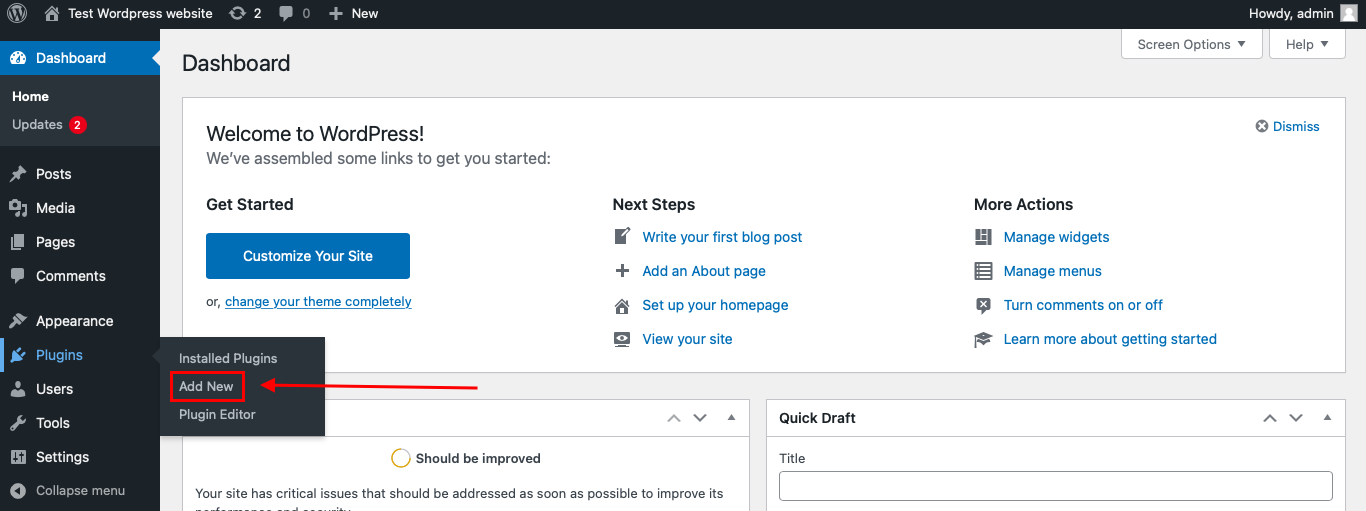
To install the Anti-Spam plugin, go to your WordPress admin panel → Plugins → Add New.
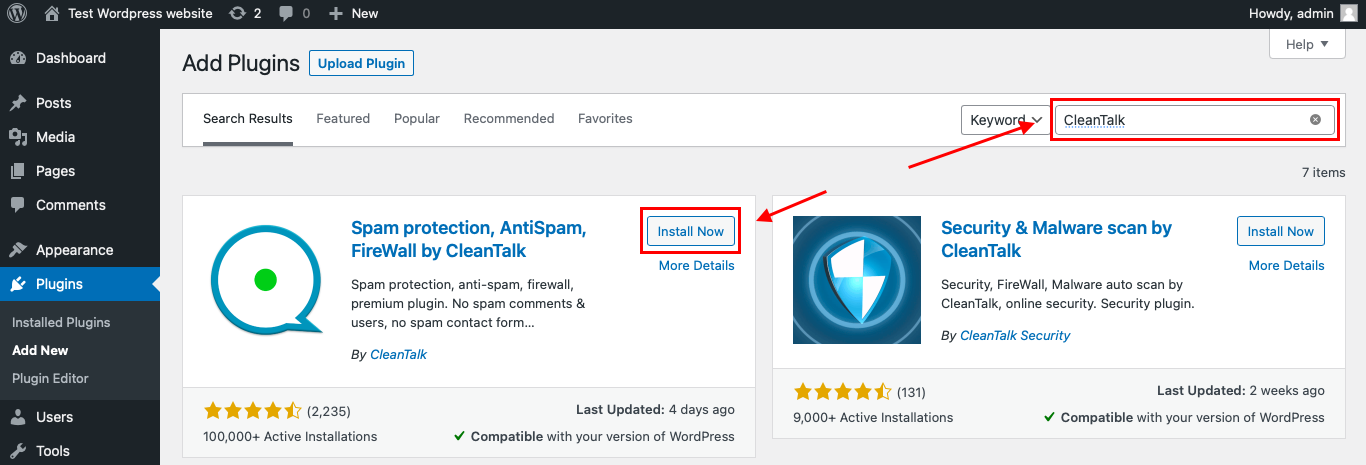
Then enter «СleanTalk» in the search box and click the Install button for «Spam protection, Anti-Spam, FireWall by CleanTalk».
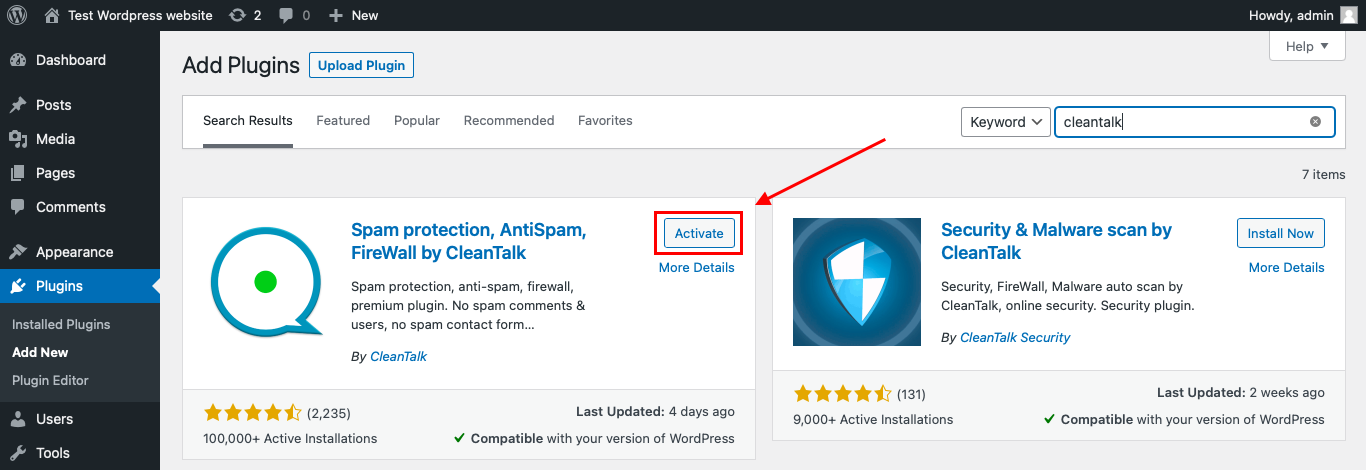
After installing the plugin, click the «Activate» button.
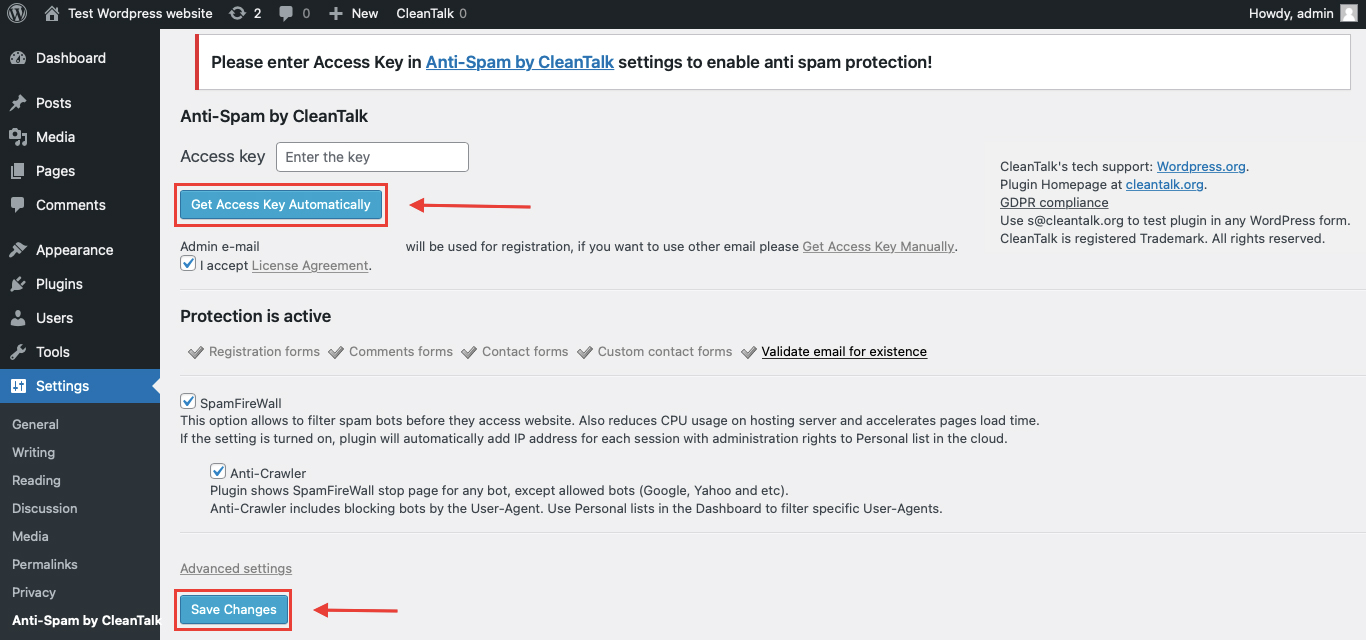
After it is done go to the plugin settings and click the «Get Access Key Automatically» button. Then just click the «Save Settings» button.
That’s it! From now you know how to completely protect your HivePress from spam.
You don’t need to rebuild your eForm forms. Keep your quizzes, surveys, feedback forms, payment estimators, reports, and submission logic as they are, and CleanTalk will check suspicious submissions in the background.
How to Check Spam Protection for eForm
You can test the work of Anti-Spam protection for your eForm forms by using a test email:
stop_email@example.com
- Open page with your form (don’t forget to add the shortcode in the page content) in Incognito browser tab.
- Fill out the Contact form using stop_email@example.com as sender’s email.
- Send the form.
- You should see a message from the Anti-Spam plugin confirming that a spam submission was blocked.
*** Forbidden. Sender blacklisted. Anti-Spam by CleanTalk. ***
The protection works only for website visitors, not for website admins. Be sure to test the form protection using Incognito mode.
This is important because eForm forms may behave differently for logged-in admins and public visitors. Testing outside the admin session helps confirm that protection works in the real user flow.
Cloud Dashboard
In addition, in the CleanTalk Cloud Dashboard, you can find extra details about submissions processed by CleanTalk, including eForm submissions and other WordPress forms.
The dashboard can help review:
- IP and email of the sender;
- sender activity history across other websites connected to the CleanTalk cloud;
- geolocation of the sender;
- date and time of the submission;
- page URL where the form was submitted;
- cloud decision: Approved or Denied;
- cloud explanation for the decision, such as blacklisted email, bad IP reputation, or spam text;
- tools to move senders to Block or Allow lists.
This is useful for eForm because spam may arrive through very different form types: quizzes, surveys, data collection forms, payment estimators, login forms, registration forms, or feedback forms.
The dashboard helps you understand which eForm form is being targeted and whether the spam pattern is based on repeated IPs, fake emails, suspicious text, unrealistic answers, or automated submissions.
eForm Features That Matter for Spam Protection
eForm is more than a basic contact form plugin. The official website describes eForm as a tool for payment, estimation, quizzes, surveys, and data collection workflows, and highlights publishing through shortcode, Gutenberg, and standalone forms.
That makes spam protection especially important in several areas.
Quizzes and Score-Based Forms
eForm can be used for quizzes and scoring workflows.
Spam quiz submissions can distort scores, leaderboards, statistics, and user-facing results. If quiz data is shown publicly or used for reporting, suspicious scores should be reviewed before publishing.
Surveys and Data Collection
eForm is often used for surveys and data collection. The official website describes it as a form builder for quizzes, surveys, data collection, payment estimation, and feedback.
Spam entries in surveys can make reports unreliable and pollute exported data.
Payment Estimation and Payment Forms
eForm can be used for payment and cost estimation workflows. The official eForm website lists payment estimation among its key use cases and also describes payment collection as part of the form workflow.
For payment-related forms, spam can create fake estimates, incomplete payment flows, failed transactions, or confusing records. A submitted form should not be treated as a completed payment until payment status is verified.
Login, Registration, and User Portal Forms
eForm can be used in account-related workflows such as login, registration, and user-facing submission flows.
Spam in these flows can affect user accounts, fake registrations, old submission tracking, or user-facing portal data.
Reports, Analytics, and Leaderboards
eForm is often selected because it can collect data and produce reports. The official website highlights collecting payments, data, and reports as part of the eForm workflow.
This means spam can affect the data shown to admins and, in some cases, visitors.
Conditional Logic and Multi-Step Workflows
Advanced form workflows often use conditional logic, multi-step pages, and progress-saving behavior.
When spam enters a conditional workflow, it may trigger irrelevant branches, incomplete submissions, or misleading partial data.
Additional Protection Options for eForm
CleanTalk should be the main anti-spam layer, but eForm websites can also benefit from form-specific controls.
Use Submission Limits Carefully
Submission limits can help protect quizzes, surveys, contests, and repeated-entry forms.
They should be configured carefully so real users are not blocked too aggressively, especially when several people may submit from the same network.
Validate Quiz and Survey Answers
If the form collects structured answers, review whether the answers make sense.
Spam may not always look like a classic spam message. Sometimes it appears as nonsense quiz answers, repeated survey choices, or unrealistic score patterns.
Review Leaderboards Before Publishing
If quiz or score results are shown publicly, review suspicious submissions before letting them affect rankings.
Fake entries can make a leaderboard unreliable.
Confirm Payment Status
For payment or estimation forms, do not treat every form submission as a completed payment.
Check payment status before fulfilling an order, granting access, sending a confirmation, or processing a request.
Protect User Registration and Login Flows
If eForm is used for registration or login forms, add extra review for suspicious accounts, repeated attempts, and low-quality user data.
Fake registrations can affect the user database and user portal workflows.
Clean Reports Before Making Decisions
If eForm reports or analytics are used for business decisions, clean suspicious entries first.
Spam can distort results, trends, statistics, exported CSV files, and summary reports.
Why eForm Spam Is Different from Regular Form Spam
A basic contact form spam message usually creates inbox noise.
eForm spam can affect the logic and output of the form system.
Depending on the form type, a fake submission may become:
- a quiz score;
- a survey response;
- a payment estimate;
- a feedback record;
- a fake registration;
- a login-related attempt;
- a leaderboard entry;
- a user portal record;
- a report data point;
- a CSV export row;
- a notification sent to an admin;
- a misleading analytics entry.
That is why eForm spam should be treated as a data-quality and workflow problem, not just a message-filtering problem.
Comparison of Anti-Spam Approaches for eForm
| Solution | Main role | Strengths | Limitations | Best use case |
|---|---|---|---|---|
| CleanTalk | Main WordPress-side anti-spam filtering | Works in the background, checks suspicious submissions, no CAPTCHA friction for real users | Should be combined with form-specific rules for complex workflows | WordPress sites using eForm |
| Submission limits | Repeated-entry control | Helps reduce duplicate quiz, survey, or contest entries | Can affect real users if too strict | Quizzes, surveys, contests, voting forms |
| Answer validation | Data quality control | Helps identify nonsense or unrealistic responses | Does not detect sender reputation | Surveys, quizzes, data collection forms |
| Payment status review | Workflow protection | Prevents fake submissions from being treated as paid actions | Applies only to payment flows | Payment estimators and paid forms |
| Leaderboard review | Public result protection | Helps prevent fake scores from appearing publicly | Requires manual review | Score-based quizzes and competitions |
| Registration review | Account quality control | Helps catch fake user accounts | Requires admin time | Login, registration, user portal forms |
| Report cleanup | Analytics quality control | Keeps exports and reports more reliable | Happens after submission | Sites using eForm reports and analytics |
In practice, eForm spam protection should combine sender filtering with workflow checks. CleanTalk helps identify suspicious submissions, while eForm-specific controls help protect reports, scores, payments, and user data.
Frequently Asked Questions — eForm Spam Protection
Why is eForm spam different from regular contact form spam?
eForm is often used for structured workflows, not only for messages.
A spam entry can become a survey response, quiz score, payment estimate, leaderboard record, report item, user submission, or exported data row. That makes cleanup more complicated than deleting one unwanted email.
Is eForm a WordPress.org plugin?
No. eForm is a premium WordPress plugin sold through CodeCanyon.
That means the article should use CodeCanyon sales, ratings, and update data instead of WordPress.org active installation numbers.
Can fake submissions affect eForm reports?
Yes. If eForm reports, statistics, or exports include spam entries, the results can become unreliable.
This is especially important for surveys, feedback forms, quizzes, polls, and data collection forms used for business decisions.
Can bots manipulate quiz scores or leaderboards?
They can try. If a quiz or scoring form is public, bots may submit fake answers, repeated entries, or unrealistic scores.
For public scoreboards or leaderboards, review suspicious submissions before displaying or relying on results.
What should I check in eForm surveys after a spam wave?
Check for repeated IPs, duplicate emails, nonsense open-text answers, sudden response spikes, repeated answer patterns, and unrealistic completion behavior.
Clean suspicious entries before exporting or presenting survey results.
Can eForm payment estimators receive spam?
Yes. Bots can submit fake cost estimates, invalid contact details, or incomplete payment-related forms.
For any payment workflow, always verify the payment status before processing the request or granting access.
Should I use submission limits in eForm?
Submission limits can be useful for quizzes, contests, polls, surveys, and repeated-entry forms.
Use them carefully, because strict limits may also affect real users who share the same network or need to submit more than once.
Can CleanTalk protect eForm submissions?
CleanTalk can work as the WordPress-side anti-spam layer for eForm submissions. It helps filter suspicious senders and bot-like activity before bad data becomes part of the form workflow.
What if spam still appears in eForm results?
Check CleanTalk logs, the affected form URL, repeated IPs or emails, form submission limits, answer patterns, and whether the spam appears in one form or across several forms.
For reports and leaderboards, review suspicious entries before using the data.
Recommended Anti-Spam Stack for eForm in 2026
eForm can support many different workflows, so the best setup depends on how the form is used.
For quizzes and score-based forms
Use:
- CleanTalk Anti-Spam;
- submission limits;
- review of suspicious scores;
- leaderboard moderation before publishing.
This helps protect quiz data and public rankings.
For surveys and feedback forms
Use:
- CleanTalk Anti-Spam;
- answer validation;
- duplicate response review;
- cleanup before reporting or exporting.
This keeps survey results and feedback data more reliable.
For payment estimators
Use:
- CleanTalk Anti-Spam;
- realistic value validation;
- payment status verification;
- review of failed or suspicious entries.
This prevents fake estimates from being treated as real payment activity.
For login and registration forms
Use:
- CleanTalk Anti-Spam;
- suspicious user review;
- restricted user roles by default;
- manual checks for high-risk registrations.
This helps reduce fake accounts and low-quality registrations.
For reports and analytics
Use:
- CleanTalk Anti-Spam;
- Cloud Dashboard monitoring;
- report cleanup after spam spikes;
- review before exporting CSV or publishing statistics.
This protects the quality of internal and public-facing data.
For multi-step or conditional forms
Use:
- CleanTalk Anti-Spam;
- required fields where needed;
- validation for important branches;
- manual review of incomplete or unusual entries.
This helps prevent bots from creating misleading partial or conditional submissions.
For high-risk public forms
Use:
- CleanTalk Anti-Spam;
- submission limits where appropriate;
- Cloud Dashboard monitoring;
- manual review of suspicious entries.
This is useful for forms placed on high-traffic pages, campaigns, contests, or public surveys.
Final Thoughts
eForm spam is not just a form-security issue. It is a data-quality issue.
The plugin is often used for workflows where submitted data continues to live after the form is sent: quiz scores, survey answers, payment estimates, reports, leaderboards, user portals, exports, and analytics. If spam enters those workflows, the problem can affect decisions, public results, internal reports, and admin time.
The right protection setup depends on the type of eForm you use. A survey needs duplicate cleanup and answer validation. A quiz needs score and leaderboard review. A payment estimator needs payment-status checks. A registration form needs user review. A report-heavy form needs cleanup before the data is exported or shared.
CleanTalk can serve as the first filtering layer by checking suspicious submissions before they become part of the workflow. After that, eForm-specific controls should protect the parts of the form that matter most: results, payments, user records, reports, and exports.
With this layered setup, you can reduce fake submissions, keep eForm data cleaner, and make the results easier to trust.
