At CleanTalk, we spend every day working with websites. We help keep them protected from spam, and over time we noticed another challenge that almost every website owner faces.
Keeping a site accurate, up-to-date, and error-free is an ongoing process. Whether you are building something new or maintaining a live site, feedback comes from everywhere: clients, team members, visitors. And collecting it in a way that is actually useful takes more effort than it should. Emails pile up. Screenshots get lost. Someone describes a problem without enough context to understand what they actually mean.
We built Spotfix to fix that.
What Is Spotfix?
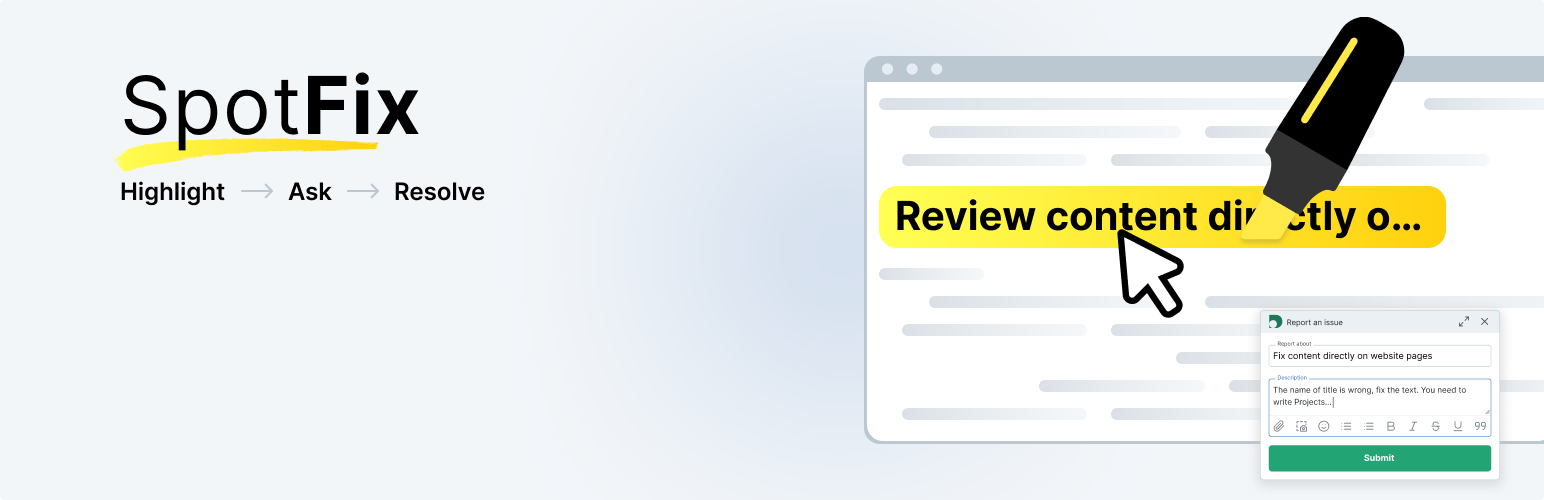
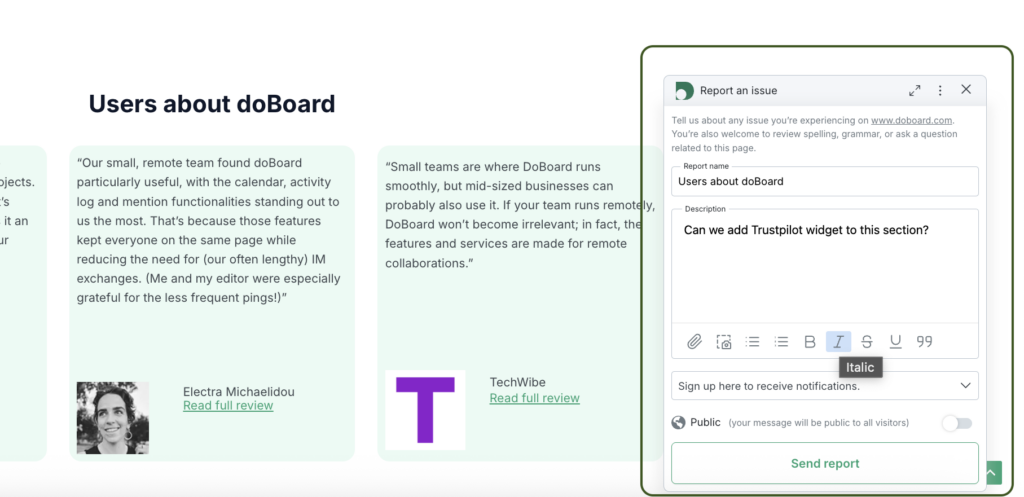
Spotfix is a lightweight on-page feedback widget that sits on your website. A visitor, client, or team member highlights any text or element on the page. A compact widget appears. They submit a Spot: a bug report, fix request, comment, or annotation tied to that exact location, with an optional file or screenshot attachment.
Spotfix website feedback widget on a live page showing a user leaving a comment with context inside a pop-up window.
Submitting feedback takes seconds and requires no extra tools or accounts. Every Spot lands in a shared workspace as a task, complete with context and ready to assign, discuss, and resolve. No back-and-forth is needed to understand what the issue is or where it is located.
A submitted Spot appears instantly as a task on a dedicated site-specific board, where it can be managed like a regular task.
Two Ways to Use It
You decide who can leave feedback.
Open the widget to all visitors and let your community help you improve your site continuously. Readers catch typos, users flag broken links, customers report outdated content, and everything lands in one structured list.
Or keep it private for your team and clients only. Share a staging or live link, invite the people you want, and collect structured feedback without making any of it visible to general visitors. Every Spot becomes a task you can assign and track.
Built for Designers, Developers, and Site Owners
For web designers, developers, and agencies, Spotfix makes client reviews much easier. Instead of revision calls and annotated PDFs, clients highlight what needs to be changed directly on the page. You get a clean task list with full context already attached.
For site owners and content teams, it means issues get reported and resolved faster, whether they come from visitors, editors, or internal contributors.
Simple Pricing, No Surprises
Spotfix starts at $5/month with unlimited users and unlimited projects. The price only changes if you need more storage. No per-seat fees, no per-site limits.
Spotfix is available as part of every doBoard account, our project management tool. You can use doBoard exclusively as a dedicated space for Spotfix feedback, or expand it into a full project tracker for broader work. All features are included at the same price either way.
Getting Started
Works on any website. Paste a JS snippet before the first script tag and the widget is live. WordPress users can install the dedicated plugin from the official directory with no code needed. Installation takes a couple of minutes and has no effect on SEO or page speed.
If you use Klaviyo web forms for email marketing, popups, or lead generation, you will eventually face spam: fake sign-ups, bot submissions, disposable emails, and low-quality leads.
This guide explains how to set up Klaviyo web forms spam protection using CleanTalk as the core filtering layer on your website, together with additional tools like Google reCAPTCHA, hCaptcha, Cloudflare Turnstile, email validation, and double opt-in.
This protection approach can be applied to Klaviyo popup forms, flyout forms, full page forms, embedded forms, and custom sign-up forms connected to Klaviyo. Klaviyo documents these form types in its sign-up forms help materials.
Klaviyo logo from https://wordpress.org/plugins/klaviyo/
Klaviyo Web Forms
First, let’s take a quick look at Klaviyo itself and the types of forms it offers.
Klaviyo is a marketing automation platform used to collect subscribers, capture leads, grow email and SMS lists, and trigger automated customer flows. Its sign-up forms can be published on a website in several formats, including popup, flyout, full page, and embedded forms, and Klaviyo also documents custom sign-up form setups for custom integrations.
Out of the box, Klaviyo web forms help businesses collect email addresses and phone numbers, promote discounts and lead magnets, grow subscriber lists, and send contacts directly into marketing flows and segmentation.
Because Klaviyo forms are public-facing and often tied to incentives such as discount codes, bonus offers, or newsletter rewards, they quickly become a target for spambots and abuse. That is why it is important to have a reliable Klaviyo spam protection setup from the beginning.
As WordPress.org shows, the Klaviyo plugin is currently used on over 100,000 websites and has a rating of 2.8 out of 5 based on 24 user ratings.
Klaviyo forms are attractive to spammers for a few practical reasons.
They are easy to find on public pages. They are often connected to high-value actions such as coupon delivery, gated content, or welcome offers. And many websites rely too heavily on frontend checks alone, which means bad submissions can still pass into Klaviyo lists if there is no stronger filtering behind the form.
In practice, the most common problems include bot sign-ups, disposable email addresses, repeated submissions for the same incentive, and low-quality contacts that hurt campaign performance.
Anti-Spam by CleanTalk
The next tool we’ll look at is CleanTalk Anti-Spam.
Here’s a short overview.
CleanTalk is a cloud-based anti-spam service that works across website forms and blocks spam automatically without forcing real users through traditional CAPTCHA puzzles. Its WordPress plugin is positioned as protection for forms, comments, registrations, subscriptions, and fake orders, and the WordPress.org plugin listing currently shows more than 200,000 active installations.
In practical terms, CleanTalk helps by filtering suspicious submissions before they become leads, checking sender reputation and email quality, detecting automated and repeated abuse patterns, and reducing junk contacts that would otherwise end up in Klaviyo.
This is especially useful for Klaviyo because the real problem is not only visible spam on the page. The bigger issue is list pollution, inaccurate reporting, wasted email volume, and lower campaign efficiency.
How CleanTalk Can Be Used with Klaviyo Forms
Klaviyo forms are usually embedded on a website, so spam protection is typically applied at the website level or at the custom form processing layer.
For example, if your site runs on WordPress and Klaviyo forms are embedded there, the site-wide anti-spam layer can help filter suspicious activity around those submissions.
If you use a custom-coded form that passes data into Klaviyo, you can add backend validation and anti-spam checks before sending the contact to Klaviyo.
If you use additional form logic, coupon delivery logic, or signup handlers, the anti-spam layer should be placed before the final subscribe action.
That is the key principle: do not rely only on what happens visually in the popup. Filter the submission before it reaches the list.
According to WordPress.org, Anti-Spam by CleanTalk for WordPress has over 200,000 active installations, with thousands of reviews and an average rating around 4.7 out of 5.
If your Klaviyo form is embedded on WordPress, the simplest setup is to use the CleanTalk WordPress plugin.
Install the CleanTalk Anti-Spam plugin
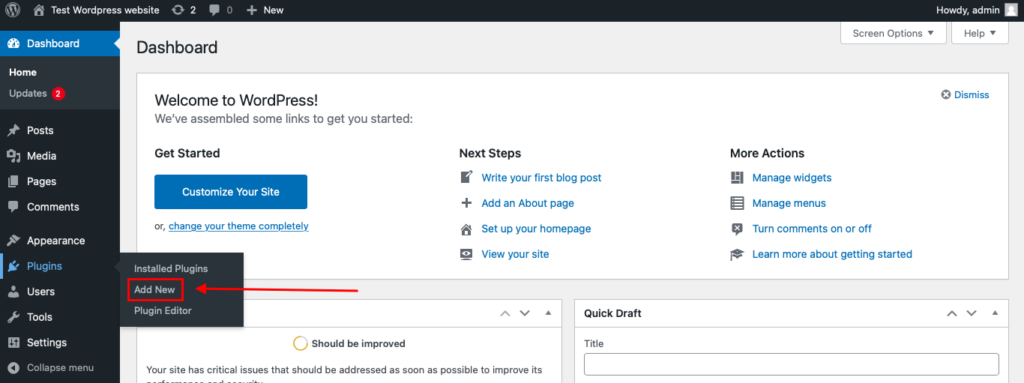
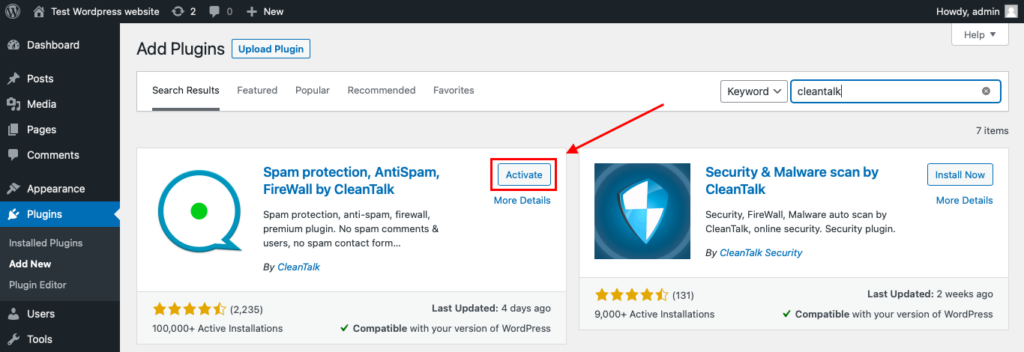
To install the Anti-Spam plugin, go to your WordPress admin panel→ Plugins→ Add New.
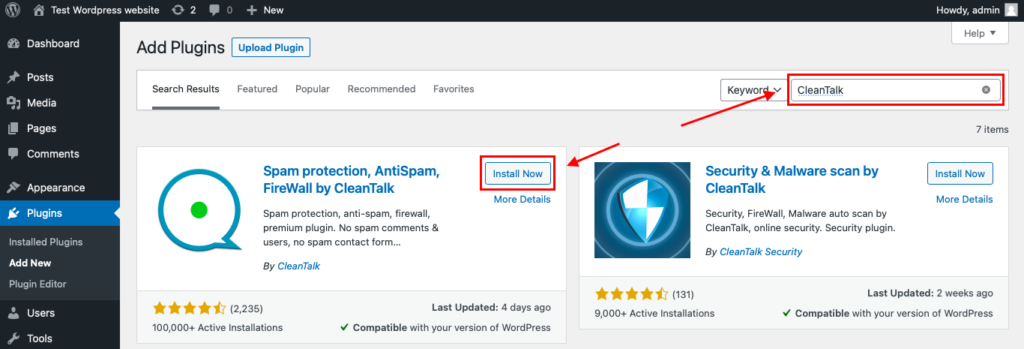
Then enter «СleanTalk» in the search box and click the Install button for «Spam protection, Anti-Spam, FireWall by CleanTalk».
After installing the plugin, click the «Activate» button.
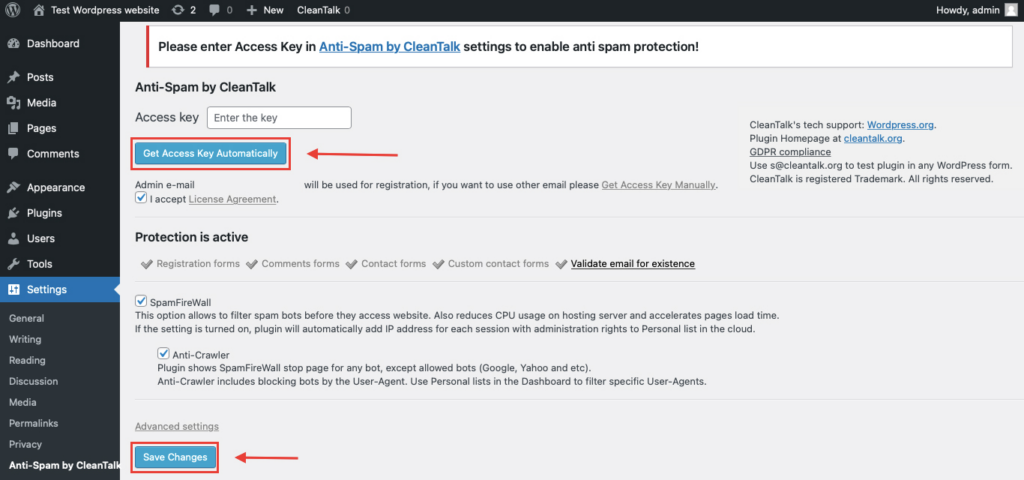
After it is done go to the plugin settings and click the «Get Access Key Automatically» button. Then just click the «Save Settings» button.
That’s all – Contact Form 7 are now protected From this moment,CleanTalk automatically protects the Contact Form 7 registration form (REST route /wp-json/Contact Form 7press/v1/users/), and the Add Listing form used to submit new listings. You don’t need to paste any shortcodes – just use Contact Form 7 as usual, and CleanTalk will filter spam in the background.
Once that is done, your website has a background anti-spam layer that can help reduce suspicio
From that point, your website will have an anti-spam layer working in the background, without adding classic CAPTCHA friction for users. The official plugin description emphasizes automatic spam blocking without visitor puzzles or extra challenges.
Check if Spam Protection Works
The easiest way to test spam filtering is to use a test address such as:
stop_email@example.com
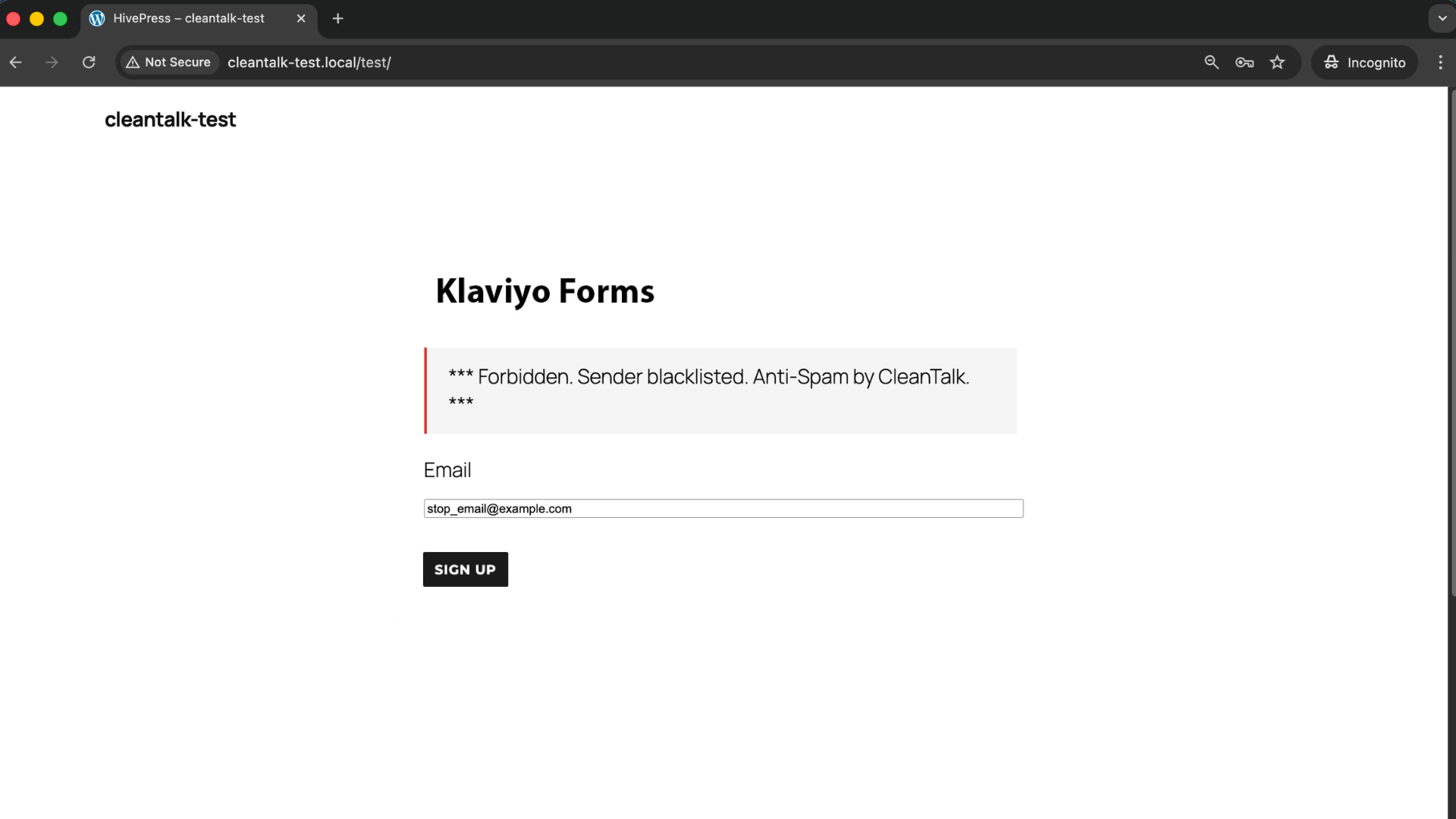
Open the page with your Klaviyo form in an Incognito or private browser tab.
Fill out the form using the test email and submit it.
If your protection setup is configured correctly, the test should be blocked or prevented from becoming a valid contact in Klaviyo.
When testing, always confirm the result in both places: on the frontend, to see whether the form allows the submission, and in your Klaviyo list or flow trigger, to make sure the spam contact did not enter your marketing system.
Cloud Dashboard and Monitoring
A strong spam protection setup should not stop at blocking alone. You also need visibility.
In the anti-spam dashboard, it is useful to review sender IP and email, submission time, source page, approval or denial status, and the likely reason why the submission was flagged.
This helps identify patterns such as specific traffic sources sending junk signups, repeated abuse during discount campaigns, or bursts of fake subscriptions from disposable domains.
That visibility is what allows you to fine-tune protection instead of guessing.
Google reCAPTCHA, hCaptcha, and Cloudflare Turnstile
Besides CleanTalk, you can also use CAPTCHA and anti-bot services together with Klaviyo forms to reduce spam.
Google reCAPTCHA
Google reCAPTCHA remains one of the best-known anti-bot solutions. Google describes it as a free service that protects websites from spam and abuse, and its documentation covers both v2 and v3 implementations. reCAPTCHA v2 uses widgets and challenges, while v3 is score-based and works without direct user interaction.
For Klaviyo-related use, reCAPTCHA can be helpful when you want an additional visible or score-based signal, you have recurring bot traffic on public lead forms, or you want a familiar system your team already understands.
At the same time, reCAPTCHA also has practical limitations. It can add friction, it may reduce form completion rates, and by itself it does not solve disposable-email abuse or repeated low-quality signups.
hCaptcha
hCaptcha is often chosen by teams that want a privacy-oriented alternative to Google-based tooling.
Typical reasons to use it include a stronger privacy position, reduced dependence on Google services, and a better fit for teams with compliance concerns.
Like reCAPTCHA, hCaptcha works best as an extra layer, not as the only defense.
Cloudflare Turnstile
Cloudflare Turnstile is one of the strongest modern alternatives for frontend verification. Cloudflare describes it as a CAPTCHA-free, privacy-preserving alternative, and its documentation includes managed, non-interactive, and fully invisible widget modes. Cloudflare also explicitly says Turnstile tokens must be verified server-side through Siteverify, otherwise the implementation is incomplete.
Main benefits of Cloudflare Turnstile compared to classic CAPTCHA solutions:
It can work invisibly in the background.
It usually creates less friction than image-based challenges.
It is a strong fit for conversion-focused signup flows.
For Klaviyo forms, Turnstile is often the most user-friendly frontend layer, especially when you want protection without making the popup feel heavy or annoying.
Email Validation, Double Opt-In, and List Quality
Not all spam looks like a bot.
Sometimes the contact is technically valid, but still harmful to your marketing system.
This includes disposable email domains, fake or mistyped email addresses, repeat signups from the same person hunting for coupons, and low-intent contacts that damage engagement rates.
That is why Klaviyo spam protection should also include email validation, double opt-in where appropriate, and basic abuse monitoring tied to signup incentives.
Double opt-in will not solve all spam, but it can reduce list pollution by requiring an extra confirmation step before a contact becomes fully usable in your marketing workflow.
Comparison of Anti-Spam Approaches for Klaviyo
Each solution blocks a different part of the problem.
Solution
Main role
Strengths
Limitations
Best use case
Google reCAPTCHA
Frontend anti-bot check
Widely known, easy to add, useful as an extra verification step
Can add friction, may reduce conversion rates, should not be the only protection layer
Websites that want a familiar anti-bot tool as an additional layer
hCaptcha
Privacy-focused frontend anti-bot check
More privacy-oriented, less reliance on Google, helpful for teams with compliance concerns
Still adds friction and does not solve list-quality issues on its own
Projects that prioritize privacy and want an alternative to Google services
Cloudflare Turnstile
Lightweight frontend verification
Supports non-interactive and invisible verification, usually creates less friction, strong fit for conversion-focused forms
Needs proper backend verification and does not replace email validation or broader anti-spam filtering
Klaviyo forms where user experience and conversion rate matter
CleanTalk
Core site-level or backend anti-spam filtering
Filters suspicious submissions before they reach Klaviyo, works without classic CAPTCHA friction, helps reduce bots, fake signups, and low-quality leads
Usually works best when combined with other layers for the strongest setup
Websites that want the main anti-spam layer to protect Klaviyo list quality
In practice, the most reliable setup is layered: backend or site-level filtering first, lightweight frontend bot verification second, and list-quality controls such as validation and double opt-in on top.
Frequently Asked Questions
Klaviyo popup form is collecting many fake emails. What should I check first?
Start with the basics.
Check whether the form is tied to a discount or incentive, review whether you are accepting disposable email domains, and verify whether you have any server-side or site-level anti-spam filtering at all.
If the only protection is a frontend popup or a visible checkbox, that is usually not enough. The problem is often not the form design itself, but the lack of filtering before the submission reaches Klaviyo.
We added CAPTCHA, but fake signups still appear in Klaviyo. Why?
Because CAPTCHA mainly handles one layer of the problem.
Modern spam attacks may bypass visible widgets, use low-quality human solving, or attack the signup flow in ways that are not stopped by a simple frontend challenge. CAPTCHA can reduce some junk traffic, but it does not automatically clean your list, validate email quality, or stop all repeat abuse.
Our discount popup is being abused by repeat signups. How do we reduce that?
This is a very common e-commerce problem.
Use a layered approach: block disposable email domains, review repeated attempts from the same IP or traffic source, connect coupon logic to stricter validation rules, and consider double opt-in for campaigns where list quality matters more than raw signup volume.
If you reward every form completion immediately, you make abuse easier.
Turnstile is installed, but spam still gets through. What may be wrong?
The most common issue is incomplete implementation.
Cloudflare states that Turnstile tokens must be verified server-side through Siteverify. If the token is not verified on the backend, the protection is incomplete. Also, Turnstile reduces automated abuse, but it does not replace email validation, duplicate-signup checks, or broader anti-spam filtering.
Klaviyo signup numbers look good, but campaign performance is getting worse. Could spam be the reason?
Yes.
One of the clearest signals of spam or low-quality lead growth is when list size increases but engagement quality declines.
Watch for sudden jumps in subscriptions, low open and click performance from new contacts, higher bounce or suppression rates, and poor conversion quality from a specific signup form.
Spam is not always obvious on the surface. Sometimes it shows up first in reporting quality.
Should we use reCAPTCHA v2, reCAPTCHA v3, or Turnstile?
It depends on your priorities.
reCAPTCHA v2 is more visible and straightforward, but adds friction. reCAPTCHA v3 is score-based and lighter for users, but needs good threshold tuning. Google documents both models officially. Turnstile is often the cleaner UX option because it supports non-interactive and invisible verification.
If your main goal is conversion-friendly protection, Turnstile is usually the better frontend option.
What is the best anti-spam stack for Klaviyo in 2026?
For most websites, the most reliable setup is a core site-level or backend anti-spam layer, Cloudflare Turnstile or another lightweight frontend verification method, email validation, and double opt-in where the business model allows it.
If your campaigns use incentives, add stronger monitoring for duplicate or abusive signups.
Recommended Anti-Spam Stack for Klaviyo (2026)
Use case
Recommended setup
Why it works
Standard lead capture website
CleanTalk as the main anti-spam filtering layer + email validation + optional double opt-in
Helps block obvious spam, reduce fake emails, and keep list growth cleaner
E-commerce site with discount popups
CleanTalk as the main anti-spam filtering layer + Cloudflare Turnstile on the signup experience + disposable email blocking + abuse monitoring for repeated coupon claims
Reduces coupon abuse, repeated signups, and low-quality contacts
High-traffic campaign landing pages
CleanTalk as the main anti-spam filtering layer + Turnstile or reCAPTCHA v3 + double opt-in if list quality is more important than raw signup volume
Balances spam protection with conversion rate and lead quality
Privacy-sensitive projects
CleanTalk as the main filtering layer + hCaptcha or Turnstile as the frontend anti-bot layer + stricter validation rules for custom forms
Adds protection while keeping a more privacy-focused setup
Protects the form before data is sent into Klaviyo and closes common bypass routes
Final Thoughts
No single anti-spam tool can stop every type of abuse in Klaviyo forms.
Some tools are better at reducing automated bot traffic. Others help validate email quality or lower the number of fake and repeated signups. The most reliable approach is to combine several layers, so each one solves a different part of the problem.
For most websites, the strongest setup is to use a site-level anti-spam layer such as CleanTalk, add a lightweight frontend verification method such as Cloudflare Turnstile, and strengthen list quality with email validation and double opt-in where needed.
This approach helps keep bad submissions out of your Klaviyo lists, protects campaign performance, and improves the overall quality of your lead generation process.
By this point, most spam issues in your Klaviyo forms should be significantly reduced.
If not, review your current setup and make sure you are not relying on only one layer of protection. In most cases, the solution is not adding more friction to the form, but applying better filtering before bad contacts enter Klaviyo.
Stop spam before it reaches your Klaviyo lists
Create your CleanTalk account and start blocking fake sign-ups, bot submissions, and disposable emails before they pollute your Klaviyo forms and flows.
If you use Flamingo to store contact form submissions in WordPress, spam will eventually become a real issue. Fake messages, bot submissions, promotional junk, and low-quality inquiries can quickly pile up in your database and make it harder to work with genuine submissions.
This guide explains how to set up Flamingo spam protection using CleanTalk as the main filtering layer on your website, along with additional tools such as Akismet, Cloudflare Turnstile, Google reCAPTCHA, Contact Form 7’s disallowed list, and other practical controls.
This approach is relevant for websites that use Contact Form 7 as the form engine and Flamingo as the storage layer for inbound messages.
Flamingo at https://wordpress.org/plugins/flamingo/
Flamingo for Contact Form 7
To begin, it helps to understand what Flamingo actually does.
Flamingo is a WordPress plugin created for Contact Form 7 that saves submitted messages in the WordPress database. Once activated, it adds an interface in the admin panel where website owners can review, search, and manage stored messages later.
This is especially useful because Contact Form 7 does not save submissions by default. Without Flamingo, an important message can be lost if email delivery fails or if the mail settings are not configured properly.
In practice, Flamingo helps website owners:
keep a database copy of inbound messages
review past inquiries in the WordPress dashboard
search through saved submissions
preserve important communication even when email delivery is unreliable
The same feature that makes Flamingo useful also creates its biggest weakness: it stores whatever gets through the form. If spam reaches the form, spam reaches Flamingo too. That is why a proper Flamingo spam protection setup matters from the start.
Flamingo works hand in hand with Contact Form 7 because it stores messages submitted through Contact Form 7 forms. If you also want a broader guide focused on protecting the form layer itself, see our article on how to protect Contact Form 7 from spam:https://blog.cleantalk.org/how-to-protect-contactform7-from-spam/
As WordPress.org shows, Flamingo is currently used on over 800,000 websites and has 118 user reviews with an average rating of 4.2.
Strictly speaking, Flamingo is not the source of the spam. It simply records what your public forms receive.
But in real-world use, that distinction does not make much difference. If Contact Form 7 is exposed on a public website, spambots and low-quality submissions will eventually find it. Once that happens, Flamingo starts storing all that noise alongside legitimate inquiries.
Typical examples include:
automated contact form submissions
irrelevant promotional messages
spam containing suspicious or malicious links
repeated junk inquiries that fill up the message list
The more visible your website becomes, the more likely it is that those submissions will start accumulating.
Anti-Spam by CleanTalk
The main tool we’re going to use here is CleanTalk Anti-Spam.
CleanTalk is a cloud-based anti-spam service for WordPress websites. In practical terms, it helps filter suspicious submissions before they are stored in Flamingo, checks sender reputation, detects automated abuse patterns, and reduces junk messages before they become part of your saved message history.
That is especially important for Flamingo because the goal is not only to stop annoying emails. The larger issue is keeping your database clean and making sure stored submissions remain useful instead of becoming clutter.
If real inquiries are buried under junk, Flamingo stops being an asset and starts becoming a maintenance problem.
How CleanTalk Fits into the Flamingo Workflow
Flamingo is usually used together with Contact Form 7, so the right place for protection is before the message is stored.
That means the real focus is not Flamingo alone, but the submission flow that feeds it.
If Contact Form 7 is running on WordPress and Flamingo is active, a site-level anti-spam layer can help block suspicious submissions before they are saved as inbound messages.
If the website uses extra Contact Form 7 logic, custom handlers, or additional workflows tied to form submissions, the anti-spam check should still be placed before the message is fully processed and written to the database.
That is the key principle: do not wait until spam appears inside Flamingo. Stop it earlier in the chain.
Because of that, Flamingo spam protection should always be considered together with Contact Form 7 spam protection. For a more detailed guide focused specifically on the form layer, you can also read: https://blog.cleantalk.org/how-to-protect-contactform7-from-spam/
According to WordPress.org, Anti-Spam by CleanTalk for WordPress has over 200,000 active installations, with thousands of reviews and an average rating around 4.7 out of 5.
If Flamingo is being used together with Contact Form 7 on WordPress, the simplest option is to install the CleanTalk WordPress plugin.
Install the CleanTalk Anti-Spam plugin
To install the Anti-Spam plugin, go to your WordPress admin panel→ Plugins→ Add New.
Then enter «СleanTalk» in the search box and click the Install button for «Spam protection, Anti-Spam, FireWall by CleanTalk».
After installing the plugin, click the «Activate» button.
After it is done go to the plugin settings and click the «Get Access Key Automatically» button. Then just click the «Save Settings» button.
That’s all – Contact Form 7 are now protected From this moment,CleanTalk automatically protects the Contact Form 7 registration form (REST route /wp-json/Contact Form 7press/v1/users/), and the Add Listing form used to submit new listings. You don’t need to paste any shortcodes – just use Contact Form 7 as usual, and CleanTalk will filter spam in the background.
Once that is done, the site has an anti-spam layer working in the background. This helps reduce suspicious form activity before unwanted messages ever reach Flamingo.
Check if spam protection works with Contact Form 7 (CF7)
The best way to text the spam protection by using a test email,
stop_email@example.com
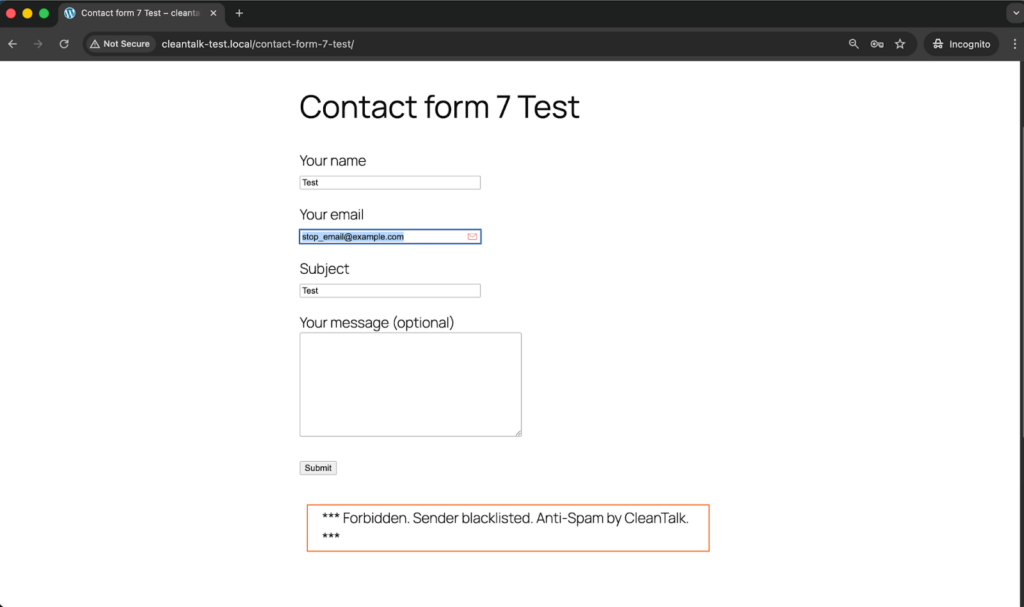
Open a page with a Contact Form 7 (for example, the registration popup or the Add Listing form) in an Incognito / private browser tab.
Fill out the Contact form using stop_email@example.com as sender’s email.
Send the form.
You should see a message from the Anti-Spam plugin confirming that a spam submission was blocked.
*** Forbidden. Sender blacklisted. Anti-Spam by CleanTalk. ***
This double check is important because visible blocking on the page and actual storage behavior in WordPress are not always the same thing.
Cloud Dashboard and Monitoring
Blocking spam is only part of the job. Good protection also gives you visibility.
In the anti-spam dashboard, it is useful to review:
sender IP and email
submission time
source page
request status: denied or approved
the likely reason a message was flagged
This makes it easier to spot recurring spam waves, identify low-quality traffic sources, and understand which forms are attracting the most junk.
That kind of visibility helps you improve the setup over time instead of relying on guesswork.
Akismet, Cloudflare Turnstile, Google reCAPTCHA, and Disallowed List
Besides CleanTalk, there are several other methods that can strengthen Flamingo and Contact Form 7 protection.
Akismet
Akismet is a familiar option for WordPress users and works well as an additional spam-filtering layer for Contact Form 7.
It is especially useful when:
you want a Contact Form 7-compatible filtering option
Akismet is already active elsewhere on the site
you want another signal alongside your main anti-spam layer
That said, Akismet works better as part of a broader setup than as the only safeguard on a website with serious spam traffic.
Cloudflare Turnstile
Turnstile is one of the best frontend protection options for modern contact forms.
Its main advantages are:
little or no visible friction for visitors
a smoother experience than traditional image-based CAPTCHA flows
a good fit for contact pages where usability matters
For Contact Form 7 forms connected to Flamingo, Turnstile is often the most user-friendly additional layer.
Google reCAPTCHA
Google reCAPTCHA is still one of the most familiar anti-bot tools.
Many WordPress users consider it first simply because it is widely recognized and easy to understand.
At the same time, in a modern Contact Form 7 and Flamingo setup, reCAPTCHA often makes more sense as an optional supporting tool than as the foundation of the whole protection strategy.
Disallowed List
The WordPress disallowed list remains useful for recurring, predictable spam patterns.
It works best when:
the same keywords appear again and again in junk messages
certain IP-based sources need to be blocked
you want a quick manual rule for repeated spam patterns
It is not enough on its own, but it can be a useful reinforcement layer when spam follows recognizable patterns.
Why Stored Spam Creates a Bigger Headache Than Expected
With Flamingo, spam does not just interrupt the moment. It stays behind.
Once junk submissions start getting stored, they can:
clutter the Inbound Messages view
make legitimate inquiries harder to find
create unnecessary database noise
slow down support or sales workflows that depend on stored submissions
That is one of the main reasons Flamingo spam protection deserves attention. Flamingo is meant to preserve valuable communication. But when filtering is weak, the same storage advantage turns into an organizational burden.
Comparison of Anti-Spam Approaches for Flamingo
Solution
Main role
Strengths
Limitations
Best use case
Akismet
Native Contact Form 7 spam filtering
Fits well into Contact Form 7 workflows, familiar to WordPress users, useful as an additional layer
Not strong enough on its own for websites with heavy spam volume
Sites that want a Contact Form 7-compatible filtering option
Cloudflare Turnstile
Lightweight frontend verification
Low friction, strong user experience, suitable for conversion-focused forms
Needs proper implementation and does not replace broader filtering
Websites that want a user-friendly frontend protection layer
Google reCAPTCHA
Familiar anti-bot verification
Widely recognized, easy to understand, adds a visible anti-bot checkpoint
Can introduce friction and is not always the best modern default
Sites that specifically prefer Google-based protection
Disallowed list
Manual rule-based spam filtering
Useful for repeated spam phrases and IP patterns, easy to update manually
Limited on its own and requires ongoing maintenance
Situations where recurring spam follows recognizable patterns
CleanTalk
Core site-level anti-spam filtering
Stops suspicious submissions before they reach Flamingo, reduces junk storage, works quietly in the background
Usually strongest when combined with other layers
Websites that want the main anti-spam layer to protect Flamingo message quality
In practice, the most reliable setup is layered: site-level filtering first, lightweight frontend verification second, and manual rules such as disallowed list on top where they add value.
Frequently Asked Questions
Flamingo is filling up with spam messages. Where should I begin?
Start by looking at the form flow, not the storage screen.
Review whether Contact Form 7 has any real anti-spam protection enabled, check if Akismet or Turnstile is active, and make sure suspicious submissions are being filtered before they are written to the database.
If junk keeps appearing in Flamingo, the weak point is usually earlier in the process.
Contact Form 7 seems to be working normally, so why does Flamingo still contain spam?
Because Flamingo simply saves what gets accepted.
If an unwanted message slips through the form layer, Flamingo may store it like any legitimate inquiry. That is why protection has to happen before the submission reaches storage, using tools such as CleanTalk, Akismet, Turnstile, or disallowed list rules.
Can spam and legitimate inquiries be separated inside Flamingo?
Yes, depending on how the filtering workflow is configured.
With the right anti-spam tools in place, suspicious entries and genuine submissions can be handled more clearly instead of ending up mixed together in one crowded stream of messages.
We installed Turnstile, but suspicious messages are still being saved. What could be wrong?
In many cases, the problem is not the idea but the implementation.
Turnstile helps reduce automated abuse, but it does not replace deeper filtering, email checks, or manual blocking rules. If junk is still getting through, review whether backend verification is configured correctly and whether another filtering layer is needed.
Contact Form 7 sometimes shows an orange border warning. What usually triggers that?
That warning typically means one of the spam protection mechanisms marked the submission as suspicious.
In other words, the system did not treat it as a regular inquiry. If this happens often, it is worth checking which layer is being triggered and whether the settings are too aggressive or working exactly as intended.
What setup tends to work best for Flamingo in 2026?
For most websites, the strongest setup is a layered one.
A site-level anti-spam filter should do the main screening, a user-friendly frontend solution such as Turnstile or a Contact Form 7-compatible layer such as Akismet can add another checkpoint, and disallowed list rules can help handle recurring spam patterns you already recognize.
Why does Flamingo spam become harder to manage over time?
Because saved junk does not clear itself.
Once spam starts accumulating, it makes the inbox harder to navigate, hides real inquiries among irrelevant messages, and creates more manual cleanup work inside WordPress. The longer it continues, the more it affects daily workflow.
What should I do if real inquiries are being blocked together with spam?
Start by reviewing your filters one by one.
Look at your keyword rules, test your frontend protection settings, and check whether the anti-spam layer is acting too aggressively. In most cases, the solution is not removing protection altogether, but adjusting the combination of rules so legitimate messages can pass more reliably.
Recommended Anti-Spam Stack for Flamingo (2026)
Use case
Recommended setup
Why it works
Standard contact website
CleanTalk as the main anti-spam filtering layer + Contact Form 7 disallowed list + optional Akismet
Helps reduce junk storage while preserving visibility into stored submissions
Final Thoughts
No single anti-spam tool can stop every type of junk submission that reaches Flamingo.
Some solutions are better at reducing bot traffic. Others are more useful for identifying suspicious message patterns or adding a lightweight verification layer without hurting usability. The most dependable approach is to combine several methods so that each one covers a different part of the problem.
For most WordPress websites using Contact Form 7 and Flamingo, the strongest setup is to use a site-level anti-spam layer such as CleanTalk, add a Contact Form 7-compatible control such as Akismet or Cloudflare Turnstile, and apply disallowed list rules where recurring manual patterns appear.
This combination helps keep bad submissions out of your saved messages, reduces unnecessary database clutter, and makes genuine inquiries easier to find and manage.
Because Flamingo stores messages submitted through Contact Form 7, it makes sense to protect both layers together. If you want a more detailed guide focused specifically on Contact Form 7, read also:https://blog.cleantalk.org/how-to-protect-contactform7-from-spam/
By this point, most spam issuesin your Flamingo inbox should be significantly reduced.
If they are not, review the current setup and make sure you are not depending on only one method. In most cases, the answer is not to store messages more carefully after the fact, but to filter more effectively before they are ever saved.
Stop spam before it reaches your Flamingo inbox
Create your CleanTalk account and start blocking spam messages sent through Contact Form 7 and stored in Flamingo — no CAPTCHA challenges and no extra friction for real visitors.
CleanTalk has added spam protection for the User Registration & Membership WordPress plugin by WPEverest through direct form integration. If you use this plugin, be sure to enable the highly effective CleanTalk Anti-Spam solution. In this post, we also review all anti-spam options available for User Registration & Membership.
User Registration & Membership – Free & Paid Memberships, Subscriptions, Content Restriction, User Profile, Custom User Registration & Login Builder
First of all let’s see what this plugin is,
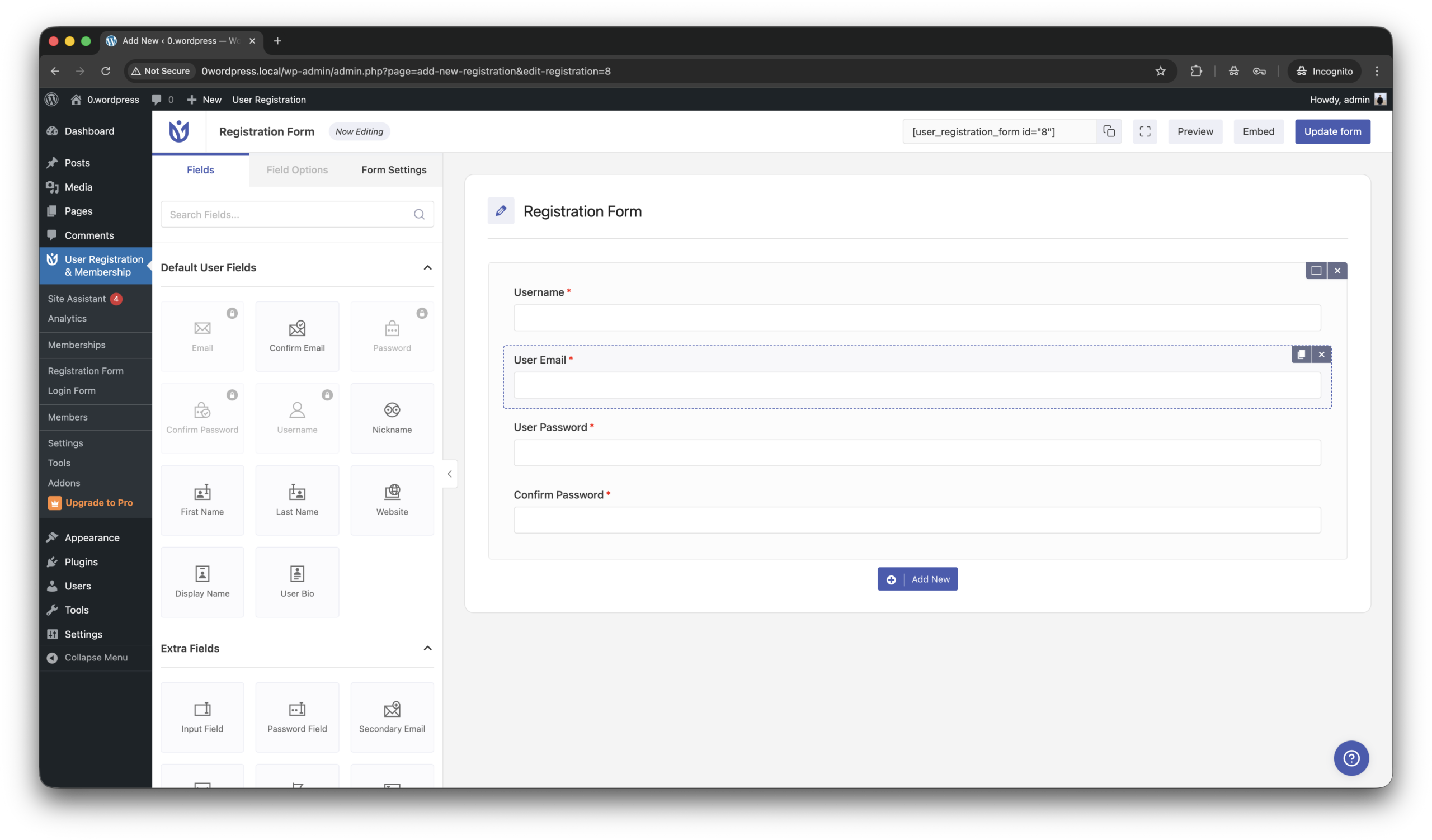
User Registration & Membership by WPEverest is a powerful WordPress plugin for creating custom user registration forms, login pages, and membership websites without coding. It features a drag-and-drop form builder, user profile management, content restriction, and payment integrations for subscription-based sites. Ideal for communities, online courses, and client portals, the plugin helps website owners manage users and memberships efficiently while improving user experience.
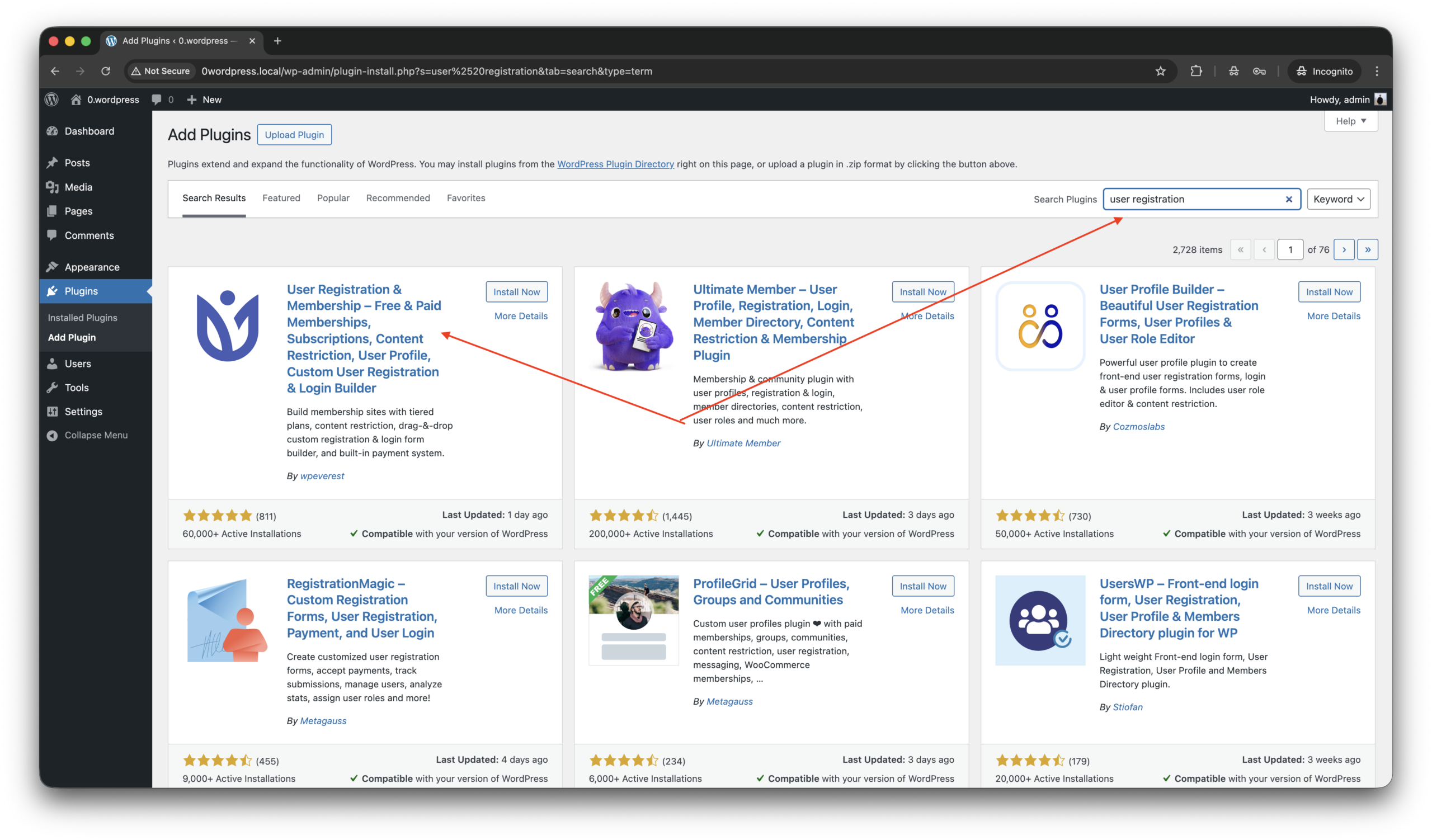
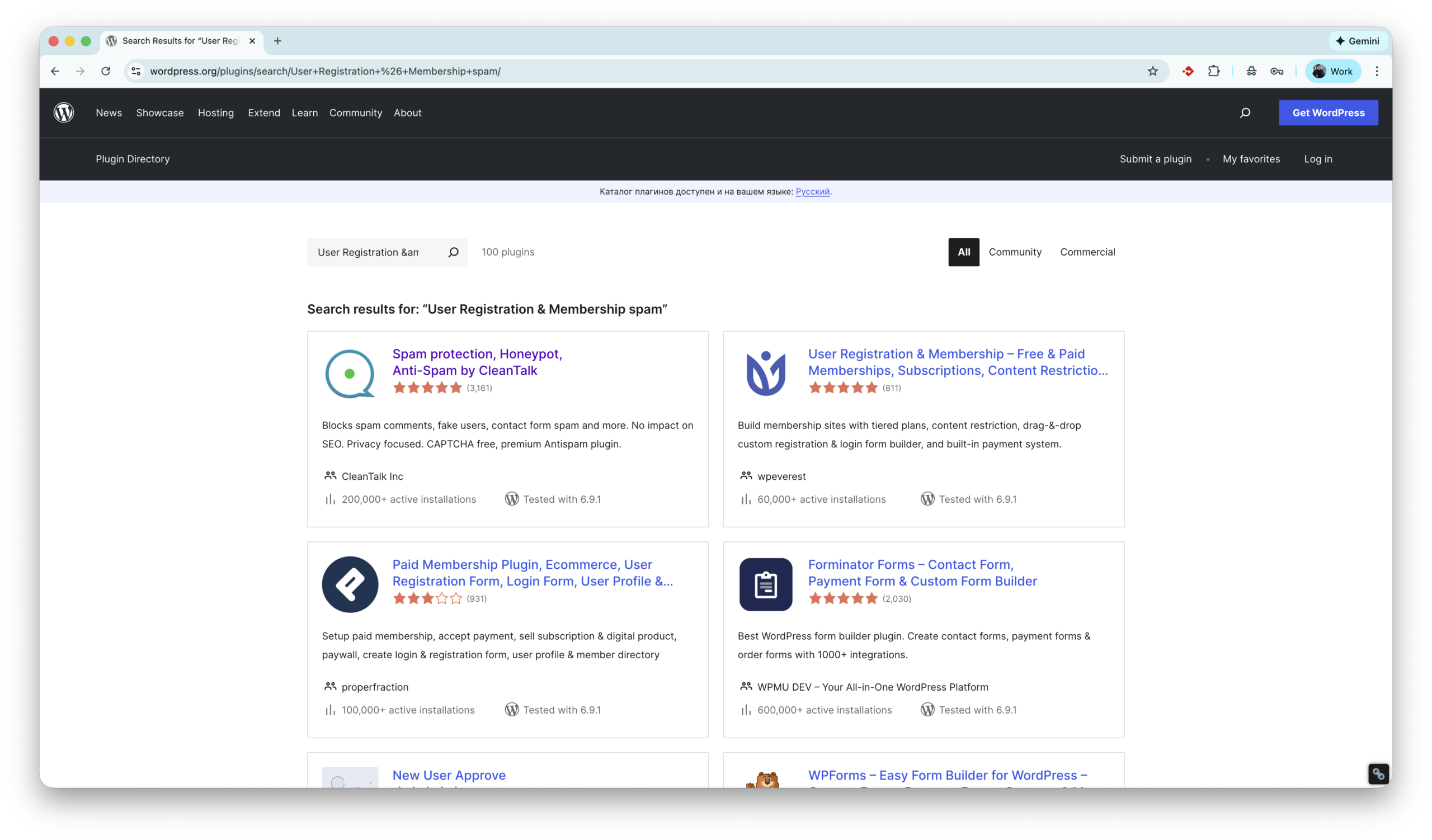
Go to WordPress console -> Plugins -> Add plugin, type ‘user’.
Install ‘User Registration & Membership’ by WPEverest and activate the plugin.
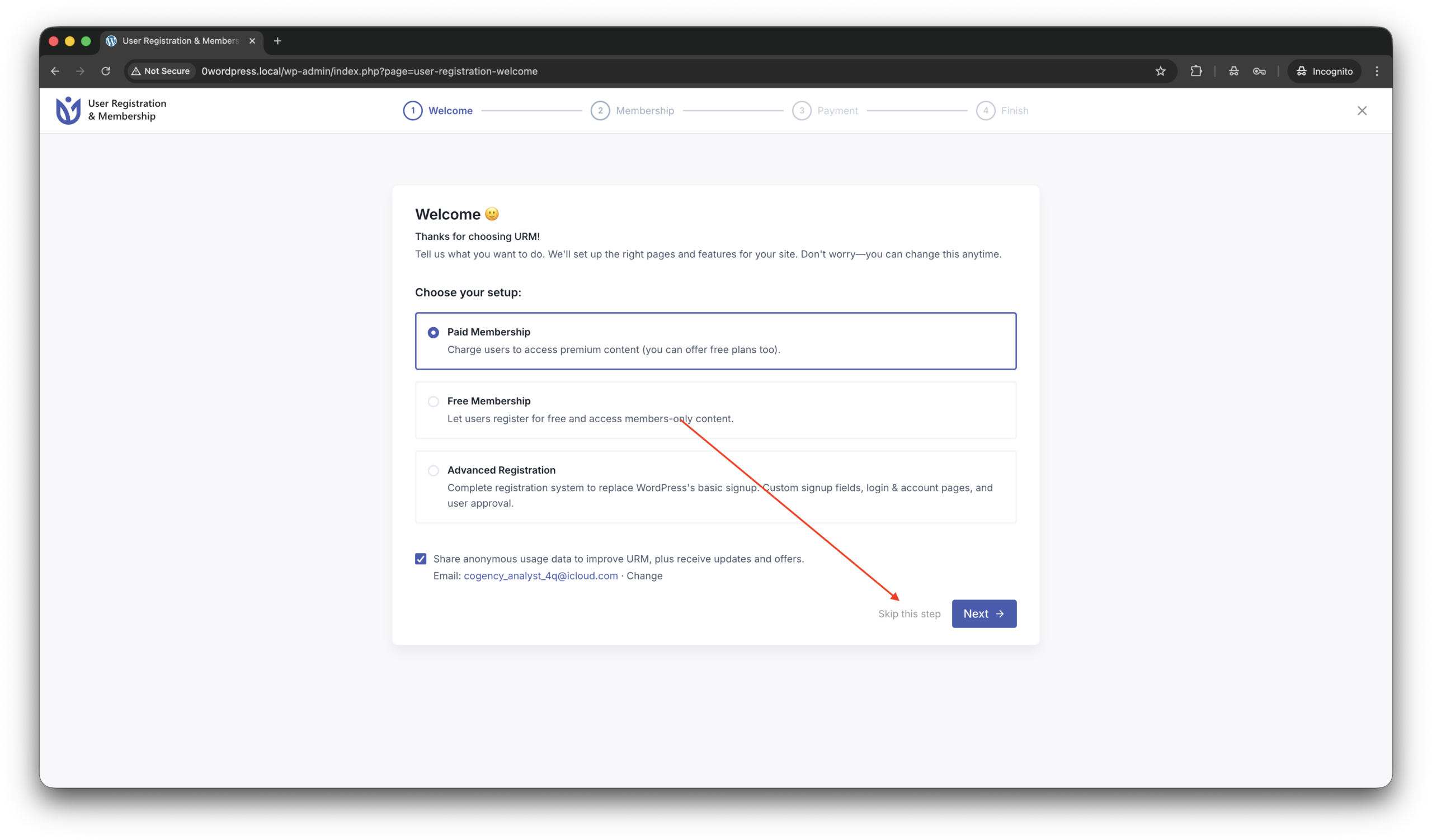
Next you see a setup screen, that can be skipped on this moment.
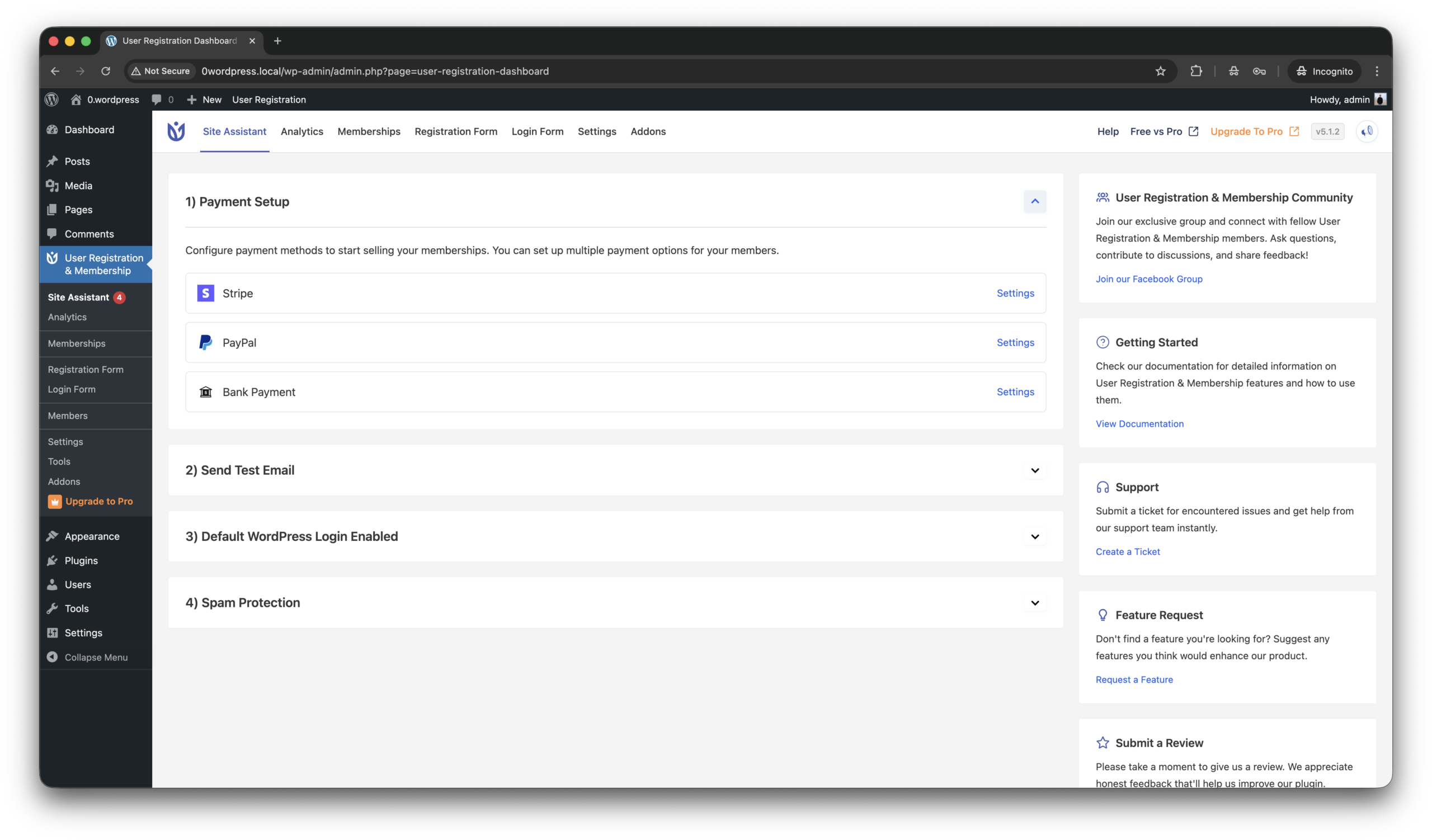
That’s all the plugin is installed!
On the next steps we work with page YOUR-SITE.COM/registration/.
By the if you want place the registration form on another page,
Follow to WordPress console -> User Registration & Membership -> Registration form.
Copy shortcode like this [user_registration_form id=”8″] from the right/top corner of screen and place on any other page you want to.
Anti-Spam plugin by CleanTalk for WordPress
In beginning a few words about the plugin that we are going to use against spam,
CleanTalk Anti-Spam plugin for WordPress automatically protects your website from spam comments, registrations, contact forms, and fake orders without using CAPTCHA. It uses cloud-based spam detection and real-time databases to block bots in the background while keeping the experience smooth for legitimate visitors.
According wordpress.org, this plugin is installed on 200,000+ web sites. To install the plugin please follow this guide.
The next step is testing the anti-spam protection.
How to check spam protection for User Registration & Membership
We are going to test protection and the most important step in this process to do it as a regular visitor, not as as authorized user/administrator in WordPress console!
Follow this,
Jump to YOUR-SITE.COM/registration/ in incognito mode in your browser.
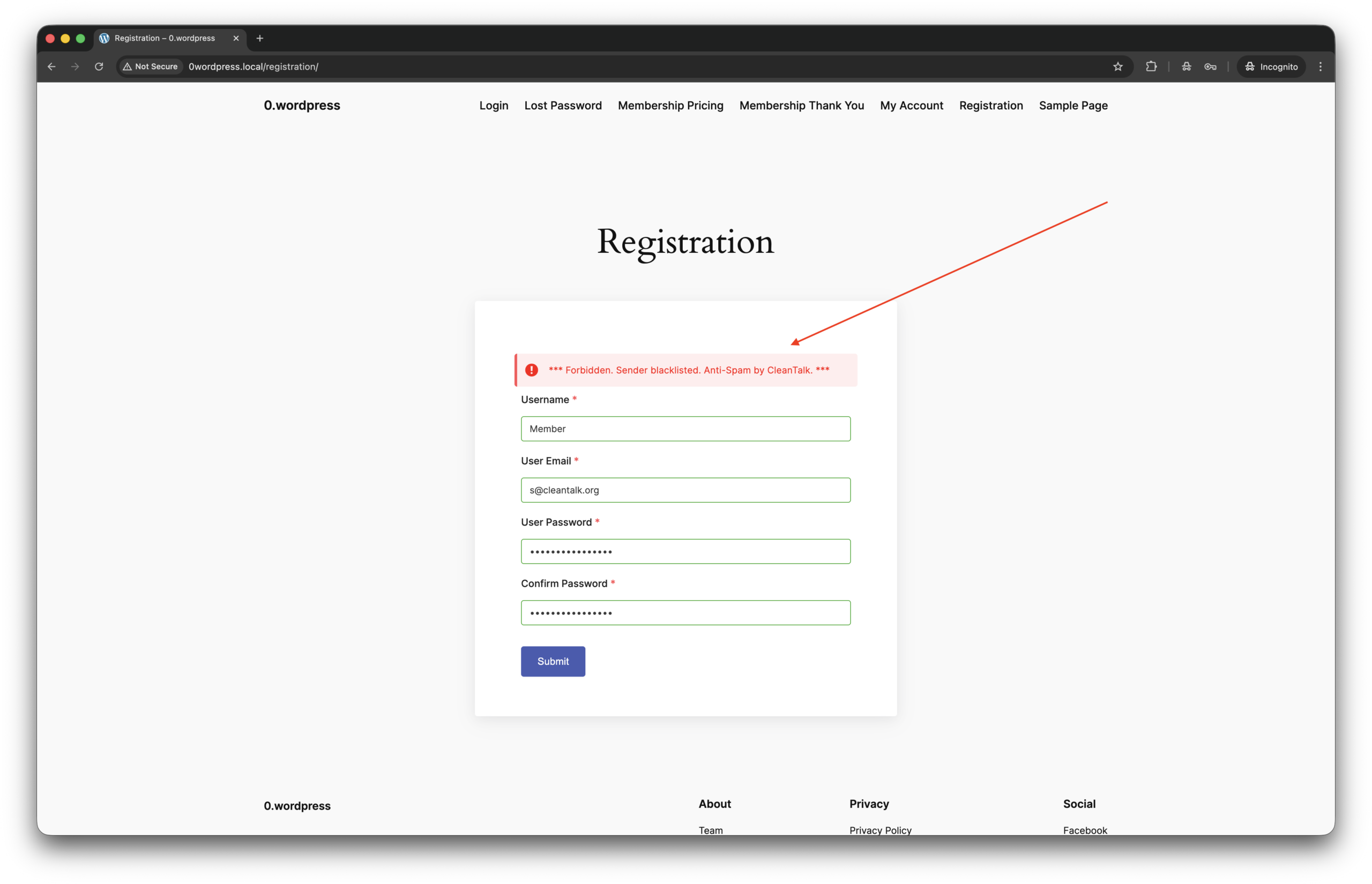
Fill up the form using test email address s@cleantalk.org. This is a service email, using which do not cause block listing your IP in CleanTalk’s cloud.
You see response from the cloud like this,
*** Forbidden. Sender blacklisted. Anti-Spam by CleanTalk. ***
That’s all! The protection is active and ready to go. If you have any questions, add a comment and we will be happy to help you. In addition, in the Cloud Dashboard you can find extra details regarding all submissions for registration form.
What additional anti-spam tools are available for User Registration & Membership?
On this day on the market there are a few more tools to protect User Registration & Membership against spam bots. As well as this plugin has some built-in tools. Let’s see what we have,
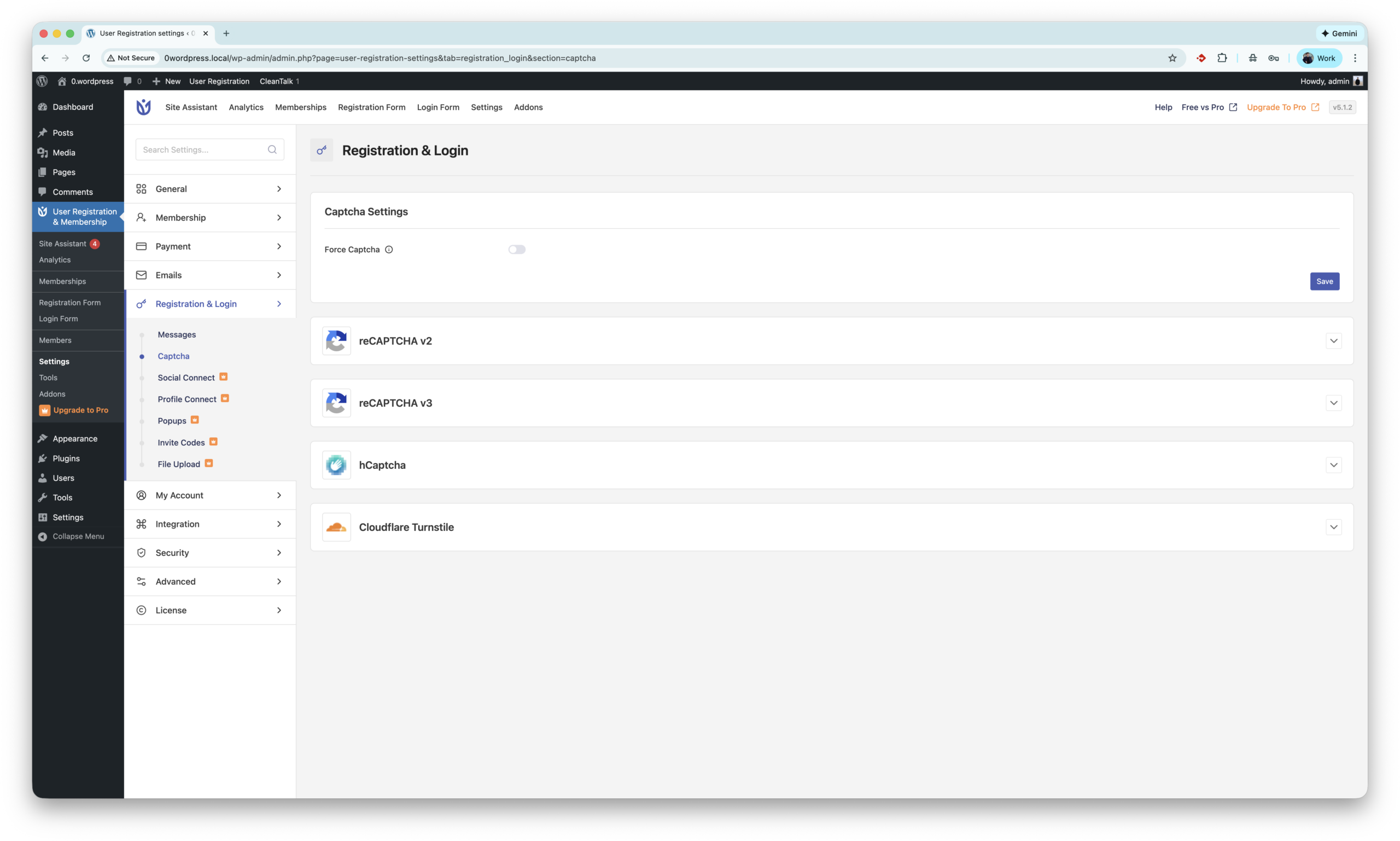
This plugin has built-in integration with Google reCaptcha version 2 and 3. reCAPTCHA by Google helps protect WordPress registration forms from spam by verifying that users are real people using behavioral analysis or interactive challenges. It blocks automated bot sign-ups and reduces fake registrations while allowing legitimate users to register securely. The settings located are here WordPress console -> User Registration & Membership -> Registration & Login -> Captcha. The Site and Secret keys are available on website.
The next tool is hCaptcha. hCaptcha is a privacy-focused CAPTCHA solution that protects WordPress registration forms from spam by requiring users to complete human verification challenges, helping block automated bot sign-ups. Unlike reCAPTCHA by Google, hCaptcha places stronger emphasis on user privacy and data control, making it a popular alternative for websites that want effective spam protection with less tracking. The settings located are here WordPress console -> User Registration & Membership -> Registration & Login -> Captcha. The Site Key and Secret key are available on website.
Next is Turnstile by Cloudflare. It protects WordPress registration forms from spam by automatically verifying visitors using browser and behavioral signals without showing CAPTCHA challenges. Unlike reCAPTCHA, Turnstile is designed to be privacy-friendly and frictionless, reducing spam registrations while keeping the signup process seamless for real users. The settings located are unde same path as tools before WordPress console -> User Registration & Membership -> Registration & Login -> Captcha. The Site Key and Secret key are available on website.
There are also bunch of universal anti-spam plugins like Simple CAPTCHA Alternative by Elliot Sowersby, WP Armour and etc. All of them can be found on wordpress.org.
As my research shows there is no plugins or direct integration with Akismet.
I have questions…
What if I don’t use User Registration & Membership plugin, but still have spam registrations (users)?
I hope this guide helped resolve all spam issues on your registration form. If not, Sign Up for an account and our CleanTalk team will be happy to help.
If you run a WordPress or WooCommerce site, WordPress fake signup protection isn’t just about convenience — fake email signups waste resources, distort analytics, and can even harm your domain reputation. According to CleanTalk’s historical stats, up to 30 % of registration spam comes from non-existent email addresses.
That means thousands of “users” who will never confirm their accounts, never receive notifications, and often trigger bounce-backs that make email servers suspicious of your site.
CleanTalk’s Email Checker verifies email existence in real time — the moment a user types or submits a form. The updated feature Non-Existent Email Notification instantly alerts users if their email is invalid, reducing failed signups and improving UX.
If the address doesn’t exist or belongs to a disposable domain, CleanTalk blocks the signup before saving it to your database — no fake profiles, no clutter.
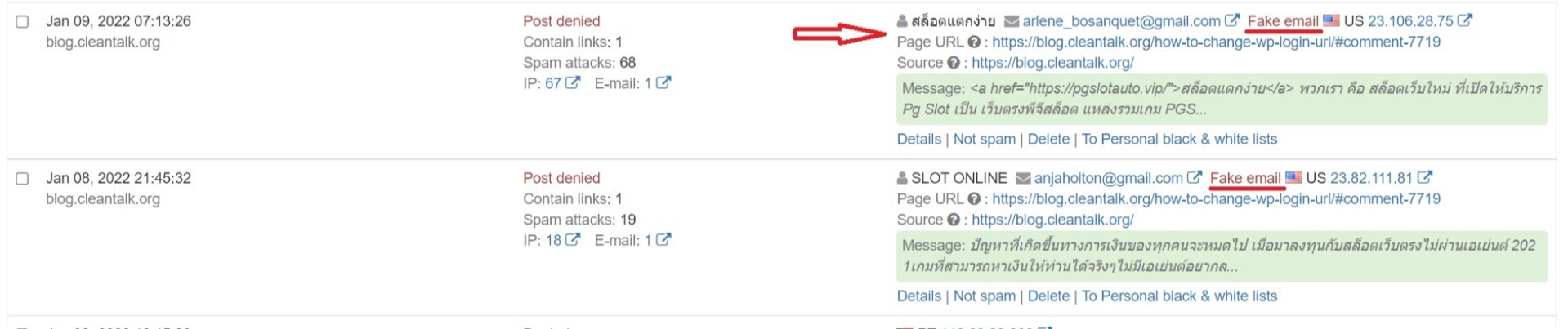
CleanTalk routes each submitted email to its cloud service, checks validity, and returns a pass or block decision in milliseconds. In your Dashboard, blocked signups appear with status “Fake email”, letting you track spam attempts and patterns.
Real Case: 100K Fake Emails Blocked
Over time, CleanTalk has filtered massive volumes of fake email signups across WordPress websites — around 100,000 per month for large site networks.
Common examples include:
noemail@fake-domain.biz
test@nonexistmail.ru
qwerty123@mail.fake
Each could have filled your database with junk or hurt your deliverability.
Example image: entries marked “Fake email” and “Post denied” in the Anti-Spam Dashboard.
For WooCommerce Store Owners
Fake accounts are even more damaging in e-Commerce. They:
Distort conversion and sales analytics
Trigger failed transactions and undelivered order emails
Lower sender reputation and email deliverability
With CleanTalk, every checkout form is validated in real time — only real customers complete orders. Result: fewer errors, cleaner data, better performance.
Why It Matters
Fake signups lead to:
Lost communication (no confirmation or password reset)
CRM clutter and wrong email lists
High bounce rates
IP or domain blacklisting
How to Enable Fake Signup Protection
Install the CleanTalk Anti-Spam plugin (https://wordpress.org/plugins/cleantalk-spam-protect/)
Register at CleanTalk.org (https://cleantalk.org/register) and add your website
In your Dashboard, enable “Email Existence Check / Notification”
Optionally turn on “Non-Existent Email Notification” for instant feedback
This feature is included in the standard Anti-Spam plan — no coding or extra modules required.
Combine with Other CleanTalk Protections
For maximum defense, combine Email Validation with:
SpamFireWall — blocks bots before they reach forms
Extra Package — 45-day logs, country blacklists, stop-words, and alerts
Continuous Updates & UX Improvements
CleanTalk’s detection engine is updated daily. Support for encrypted SMTP improves reliability, and the Non-Existent Email Notification (released Dec 2024) now gives instant feedback, reducing typos and abandoned forms. The system evolves constantly to counter new spam tactics — you don’t need to adjust anything.
Need Help or Want to Learn More?
Have questions about WordPress fake signup protection or WooCommerce integration? Leave a comment or create a support ticket (https://cleantalk.org/my/support).
Fake email signups silently damage your site’s data, performance, and reputation. CleanTalk’s real-time email checker and instant user feedback deliver clean signups and trustworthy analytics.
Get started now — register your free trial and see how many fake accounts your site can block automatically.
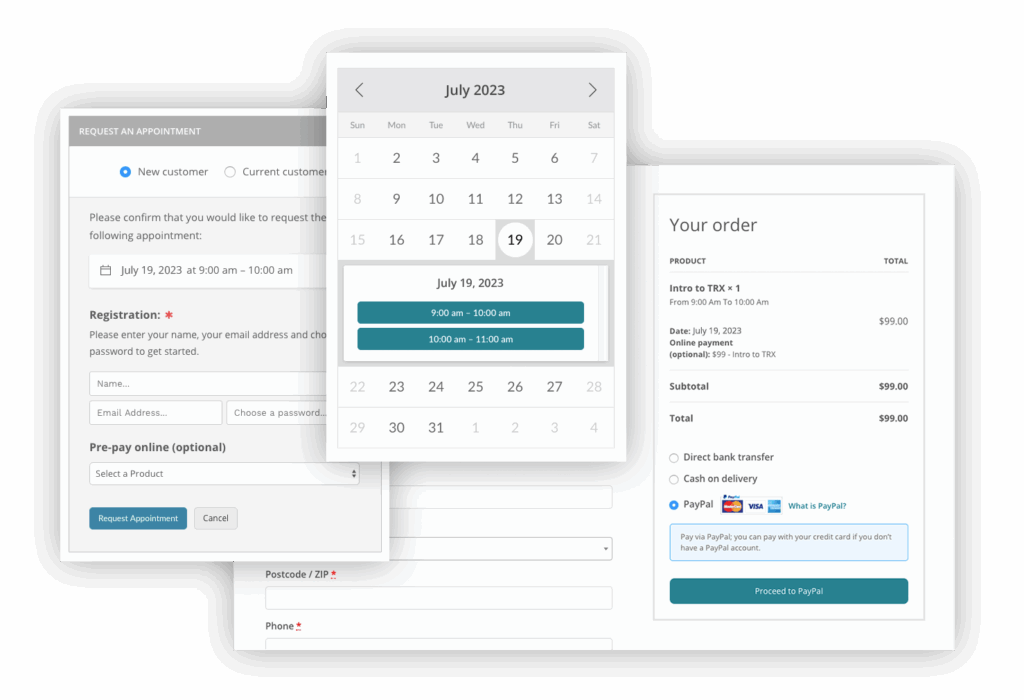
QuickCal forms is a good choice when you need to use a powerful booking calendar. Always be sure to use the most effective Anti-Spam plugin. For example CleanTalk Anti-Spam will guarantee your QuickCal booking form spam protection in about 5 minutes.
Once CleanTalk Anti-Spam plugin is installed it starts to protect all of the existing forms on your WordPress website. It may not only be QuickCal forms but many others.
How to check your QuickCal forms spam protection in about 5 minutes
You can test the work of Anti-Spam protection for your QuickCal forms by using a test email s @ cleantalk.org (without spaces). First, open the form in an Incognito browser tab. Fill in all the required form fields and send a form. After submitting the form, you will see a block message about the block on the form submission.
If you have any questions, add a comment and we will be happy to help you.
Create your Cleantalk account – Register now and enjoy your spam-free QuickCal forms.
Struggling with spam flooding your Chatway Live Chat on WordPress? You’re not alone – it’s a common headache. The source of spam are only these two widgets and there is a plugin that protects both of them, and does it without using annoying CAPTCHAs.
The Anti-Spam by CleanTalk grants cloud protection from spam, is absolutely invisible to users and runs in background. Which might be pretty useful – 300,000+ active installations and 3,000+ reviews on WordPress can’t lie. It contains many features such as logging for your control, SpamFirewall, stop words and much more.
Step 1: Install the Anti-Spam plugin
CleanTalk is a powerful plugin that blocks spam silently in the background. It also has direct integration with Chatway Live Chat and here’s how to set it up:
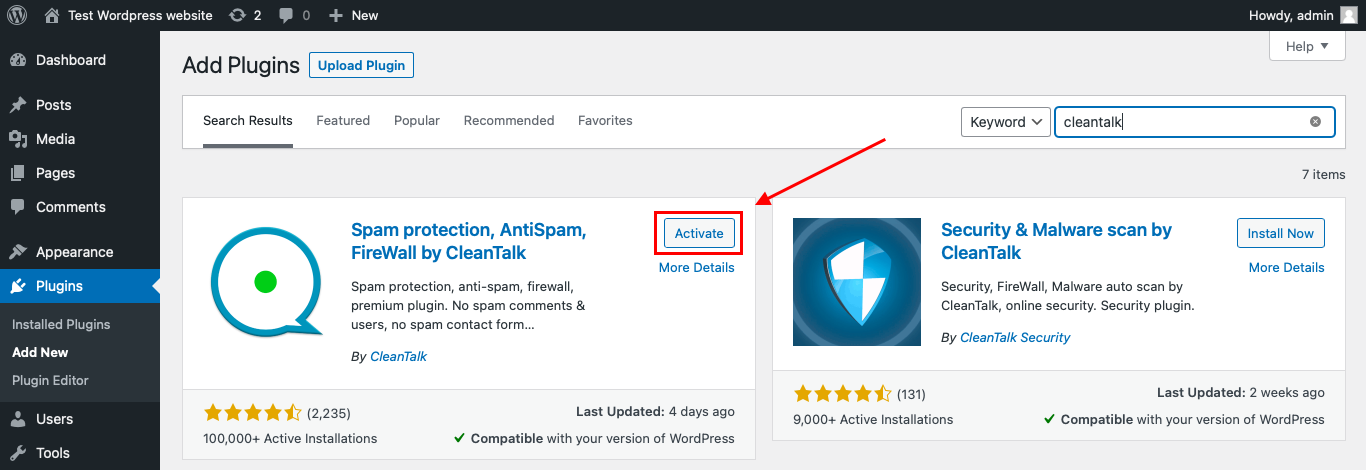
Firstly, to install the Anti-Spam plugin, go to your WordPress admin panel → Plugins → Add New. You can also download it in the WordPress catalog.
Then enter «СleanTalk» in the search box and click the Install button for «Spam protection, Anti-Spam, FireWall by CleanTalk».
After installing the plugin, click the «Activate» button.
After it is done go to the plugin settings and click the «Get Access Key Automatically» button.
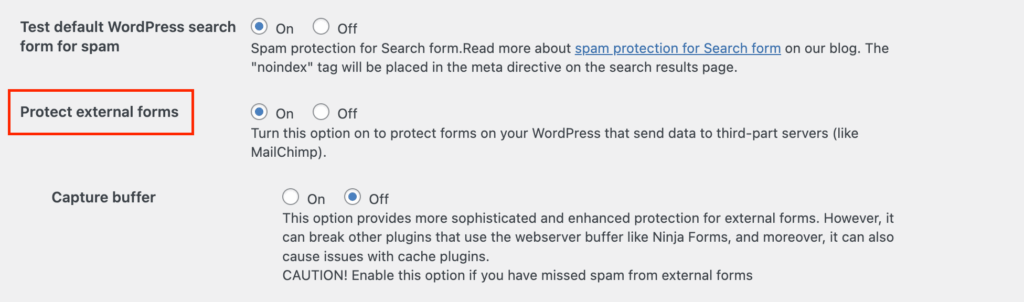
Then go to Advanced settings in the right-bottom and find the “Protect external forms” and switch it on. It is needed to protect WhatsApp widget inside Chatway Live Chat from spam. Then just click the «Save Settings» button.
From now Anti-Spam starts protecting all forms on your site including Chatway Live Chat without any extra setup.
Enjoy the result!
If you have any questions, add a comment and we will be happy to help you.
Anti-spam protection for IPS Community Suite 5 is now available with CleanTalk — a cloud-powered filter that stops spam in real time without affecting user experience.
Now there’s an easy way to stop all of that.
CleanTalk now works with IPS 5, offering fast and automatic spam filtering — easy to set up, free to try. It connects your forum to a powerful cloud-based engine that checks every signup and post in real time. No visual tests. No manual work. Just quiet, automatic blocking in the background.
The system uses an always-updated database of known spam sources and smart behavior analysis to stop suspicious activity before it reaches your forum. Whether you’re running a niche board or a large online community, CleanTalk scales with your traffic and works invisibly behind the scenes. You stay focused on your content — not fighting spam.
Setup takes just a few minutes through the IPS admin panel — quick, simple, and no extra steps required. You’ll need your CleanTalk Access Key to activate protection. Full setup guide: cleantalk.org/help/install-ipboard5
Cloud-Based Anti-Spam Protection for IPS Community Suite 5
Here’s how it works: when someone tries to register or send a message, their data is checked by CleanTalk’s cloud servers. If it looks like spam — it’s blocked. If it’s a real user — they won’t notice anything. No popups, no puzzles, no delays.
Because all the filtering happens in the cloud, your site stays fast and clean. There’s nothing heavy to install, and no need to update rules — CleanTalk handles that for you.
You can even test the protection by trying to register with this email:
stop_email@example.com.
It’ll be blocked right away if everything is working.
CleanTalk updates its spam filters every day, so your forum stays protected — even as spam tactics change. Whether your site is small or super active, this cloud system keeps things smooth.
Also available: CleanTalk now integrates directly with WPZOOM Forms — read more on the blog.
Fake accounts, junk messages, and automated bots are all forms of PrestaShop spam that can quietly damage your store.They slow down your website, clutter your customer database, and skew your analytics. More importantly, they steal time — time your team could spend on real customers instead of cleaning up fake ones.
These spam attacks aren’t just annoying — they drain server resources, degrade site performance, and can even impact your reputation if spam slips through to public-facing pages or contact forms.
Real-Time PrestaShop Spam Protection with CleanTalk
The CleanTalk Anti-Spam Module for PrestaShop is built to block spam before it ever reaches your site. It connects your store to a cloud-based filtering system that checks every registration, comment, and form submission in real time. Suspicious activity is filtered instantly and automatically — without interrupting the user experience.
There’s no need to configure complex rules or adjust spam settings manually. CleanTalk’s smart filtering handles it all behind the scenes, giving you a cleaner store without any of the hassle.
Easy Setup, No Maintenance
Installing the module takes just a few minutes, and once it’s running, it stays up to date on its own. The system is lightweight and designed to have zero impact on your site’s speed or performance.
CleanTalk also doesn’t require constant tweaking or oversight. It’s designed to be “set and forget” — offering strong, ongoing protection with no technical effort from your side.
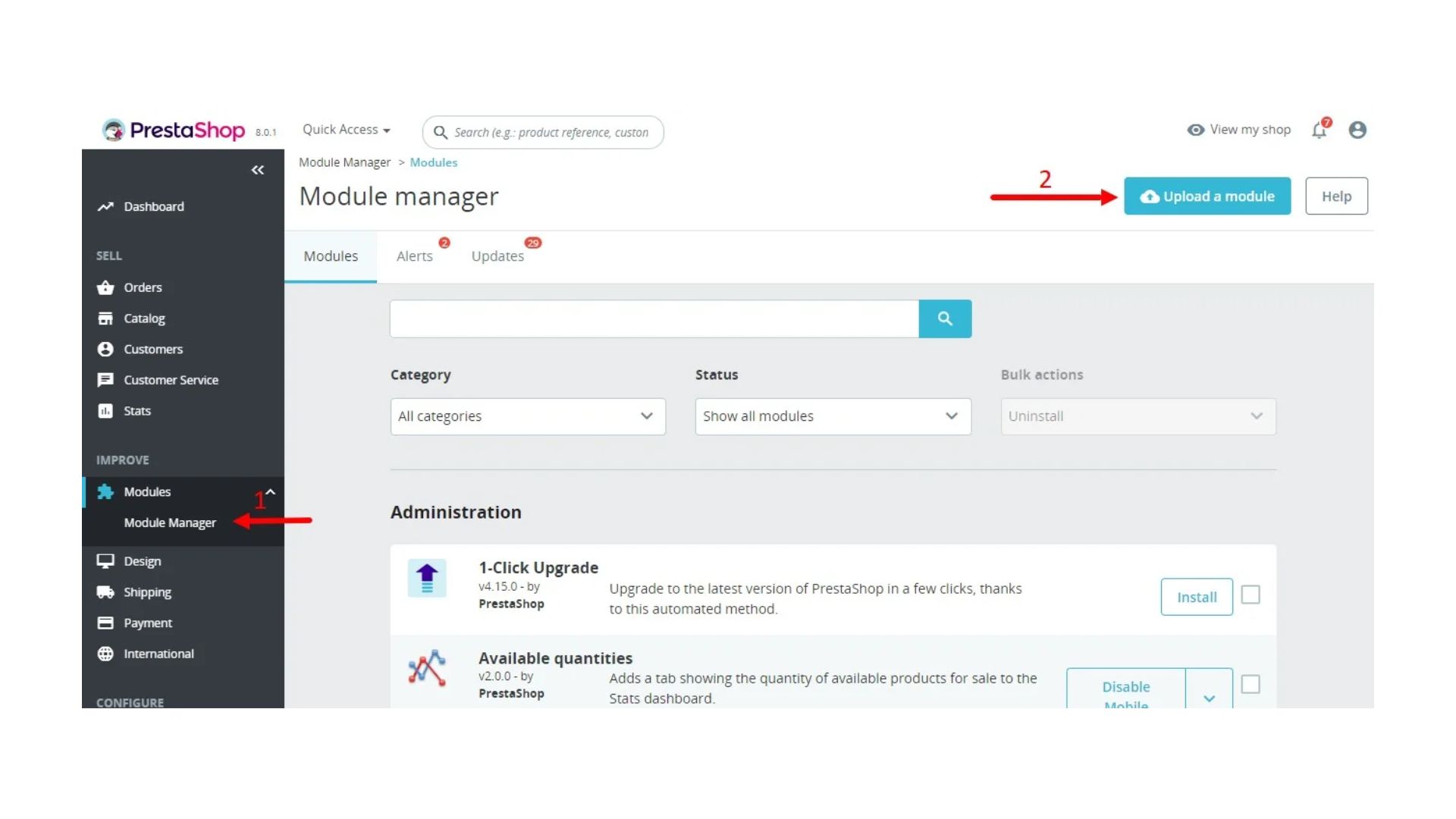
In the admin panel, go to the Modules → Module Manager section, find and press the Upload a module button.
Clean Store, Better Data, More Time
With spam gone, your store loads faster, your data becomes more reliable, and your team spends less time dealing with fake users or junk submissions. That means more energy focused on growth — not cleanup.
If you’re looking for a simple but effective way to fight PrestaShop spam, CleanTalk delivers reliable protection that just works.
Online stores are frequent targets for spam registrations, fake orders, and malicious bots. OpenMage spam attacks waste your time and server resources, skew analytics and business data, and increase security risks.
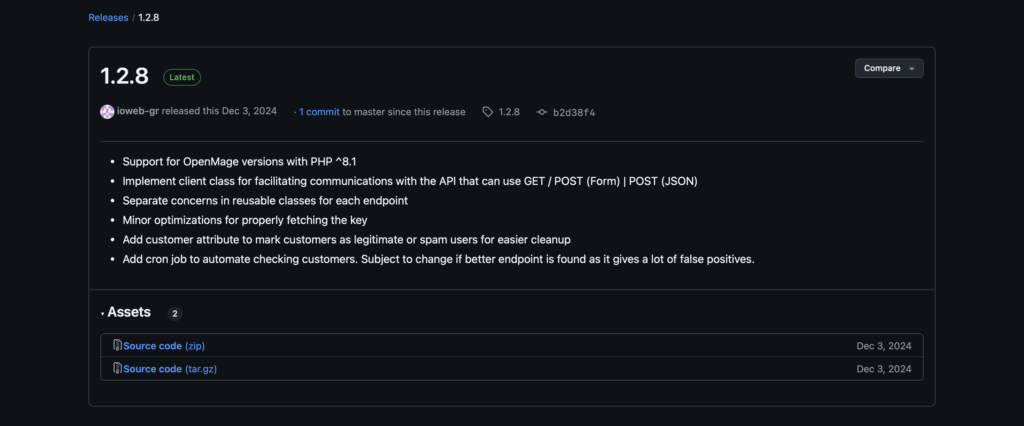
Good news for OpenMage owners! Anti-spam protection is finally available for OpenMage on Magento. Thanks to a contribution by our client ioweb-gr, you can easily integrate CleanTalk’s spam protection into your store right away.
What is CleanTalk Anti-Spam
CleanTalk Anti-Spam is a cloud-based invisible spam protection service trusted by over 1,000,000 websites. Whether you run a blog, a corporate site, or, especially, an eCommerce store,
CleanTalk Anti-Spam automatically screens all incoming submissions, registrations, and orders, blocking spam without using intrusive captchas or complicated workflows.