Stop spam without frustrating your visitors

Create your CleanTalk account and start blocking spam — no CAPTCHA challenges and no impact on visitors.

Security Block Lists

CleanTalk Account

No credit card required • Setup takes less than a minute • Your temporary password will be sent by email.

Tag: wordPress plugins

  • Quform Spam Protection in 2026: How to Stop Fake Messages, Bot Submissions, and Junk Entries

    Quform Spam Protection in 2026: How to Stop Fake Messages, Bot Submissions, and Junk Entries

    If you use Quform on a WordPress website, spam will eventually become a real problem. Fake messages, bot submissions, junk inquiries, and low-quality entries can quickly fill your inbox and make genuine submissions harder to manage.

    This guide explains how to set up Quform spam protection using CleanTalk as the main filtering layer on your website, together with additional tools already available inside Quform, such as honeypot, image CAPTCHA, reCAPTCHA, validators, and time-based spam prevention. Quform’s official features page explicitly lists honeypot, image CAPTCHA, and reCAPTCHA as built-in spam-prevention options, while its blog documents time-based spam prevention as an added passive layer.

    This protection approach can be applied to contact forms, quote requests, lead forms, booking forms, surveys, upload forms, and other public-facing forms created in Quform. Quform also supports saving form data to a custom database table, which makes clean submissions even more important over time.

    Quform banner from https://www.quform.com/
    Quform banner from https://www.quform.com/

    Quform for WordPress

    Before looking at protection methods, it helps to understand how Quform is used on WordPress sites.

    Quform is a premium WordPress form builder by ThemeCatcher. On its official site, it is positioned as a professional drag-and-drop form builder for WordPress, and its features page highlights custom autoreplies, import/export, validators, filters, database saving, and built-in anti-spam tools.

    In practice, Quform can help website owners:

    • create contact and inquiry forms
    • collect leads and quote requests
    • save submissions to the database
    • build more advanced multi-field and conditional forms

    That flexibility is exactly why spam becomes an issue. Once a form is public, it can attract bots, fake submissions, repeated junk messages, and low-quality lead traffic.

    Quform’s official homepage describes it as CodeCanyon’s favorite or best-selling form builder for WordPress. Because Envato search snippets do not consistently expose a stable per-item sales count in every view, this is the safest current way to describe its market footprint without overstating a number from an outdated snapshot.

    As Quform shows on its official website, the plugin has been on the market for over 10 years, has 30,000+ downloads, and is presented as a 5 star rated form builder for WordPress.

    Plugin Homepage at Quform | Product Page at CodeCanyon.

    Why Quform Attracts Spam

    Quform is built to make make both form building and form submission smooth. That is good for real visitors, but it also makes forms attractive to bad traffic.

    In real-world use, the most common issues usually include:

    • automated bot messages
    • repeated junk submissions
    • low-quality or fake leads
    • form abuse on highly visible public pages

    This matters even more in Quform because the plugin can save form data to a custom database table. If spam is not filtered well enough, it can affect not only inboxes, but also stored submission data and internal workflows.

    Anti-Spam by CleanTalk

    The main tool we’re going to use here is CleanTalk Anti-Spam.

    CleanTalk is a cloud-based anti-spam service for WordPress sites. Its official WordPress plugin page describes it as CAPTCHA-free spam protection for forms, comments, registrations, subscriptions, and many other submission types, and the current WordPress.org listing shows more than 200,000 active installations.

    In practical terms, CleanTalk helps by:

    • filtering suspicious submissions before they are processed
    • checking sender reputation and email quality
    • detecting automated and repeated abuse patterns
    • reducing junk entries before they reach Quform inboxes or stored submissions

    That matters because the real cost of Quform spam is not only inbox clutter. It also means wasted time, weaker lead quality, and noisier data inside form workflows.

    According to WordPress.org, Anti-Spam by CleanTalk for WordPress has over 200,000 active installations, with 3,168 reviews and an average rating of 4.7.

    Plugin Homepage at cleantalk.org | Latest release at GitHub.com | Website cleantalk.org

    Install the CleanTalk Anti-Spam plugin

    Show Instructions

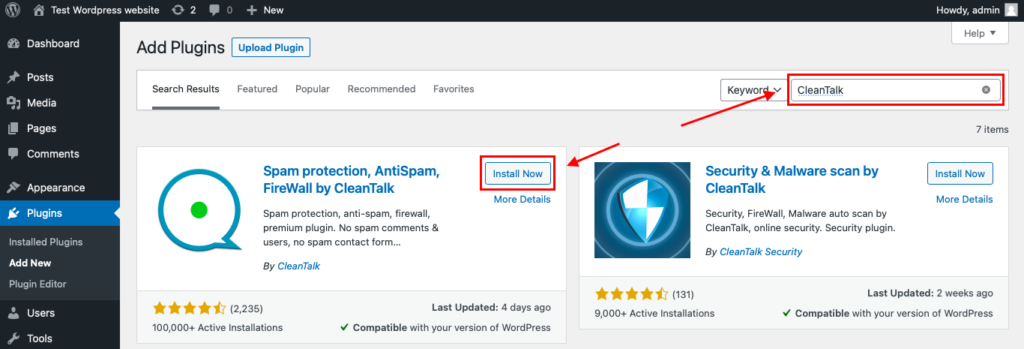
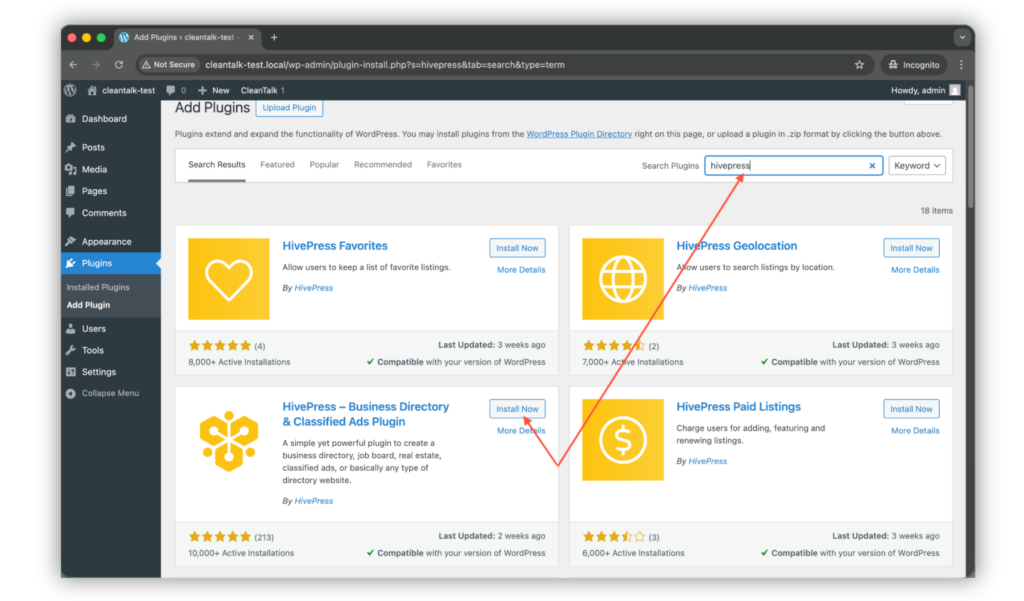
    To install the Anti-Spam plugin, go to your WordPress admin panelPluginsAdd New.

    Then enter «СleanTalk» in the search box and click the Install button for «Spam protection, Anti-Spam, FireWall by CleanTalk».

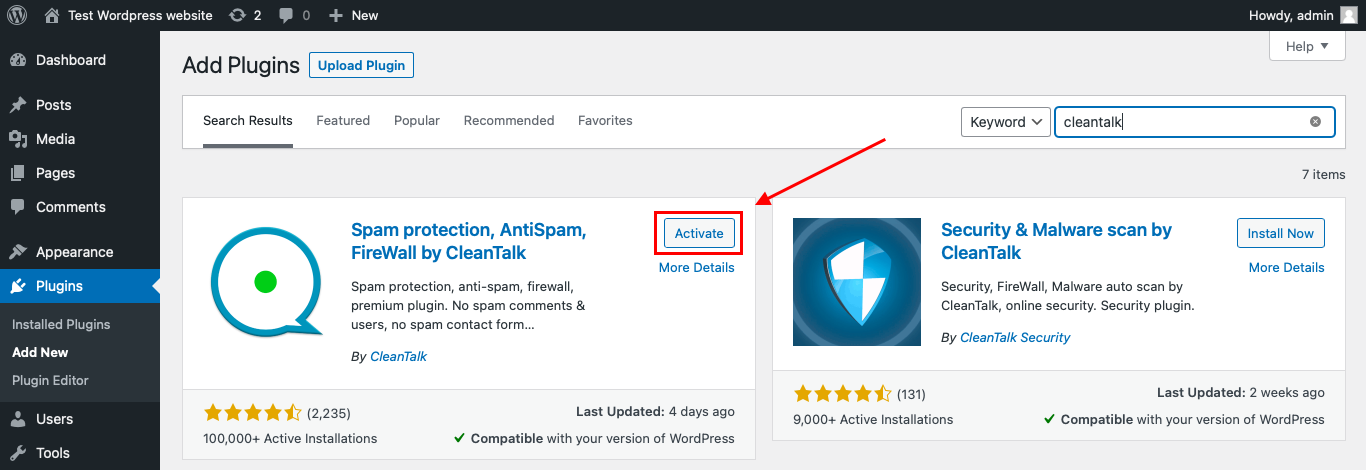
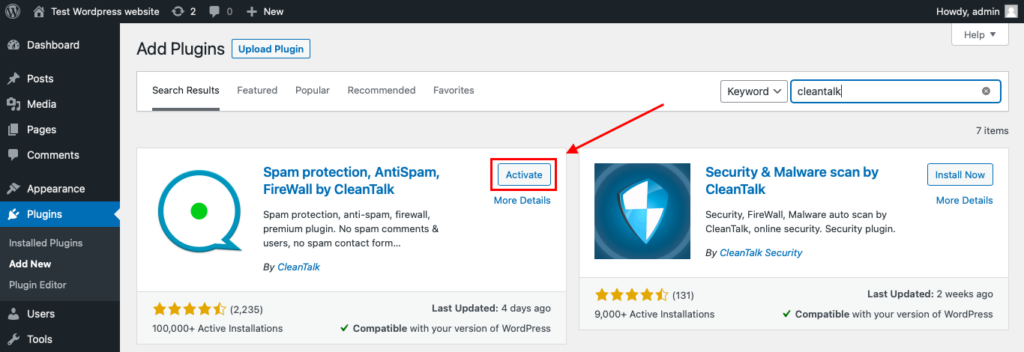
    After installing the plugin, click the «Activate»‎ button.

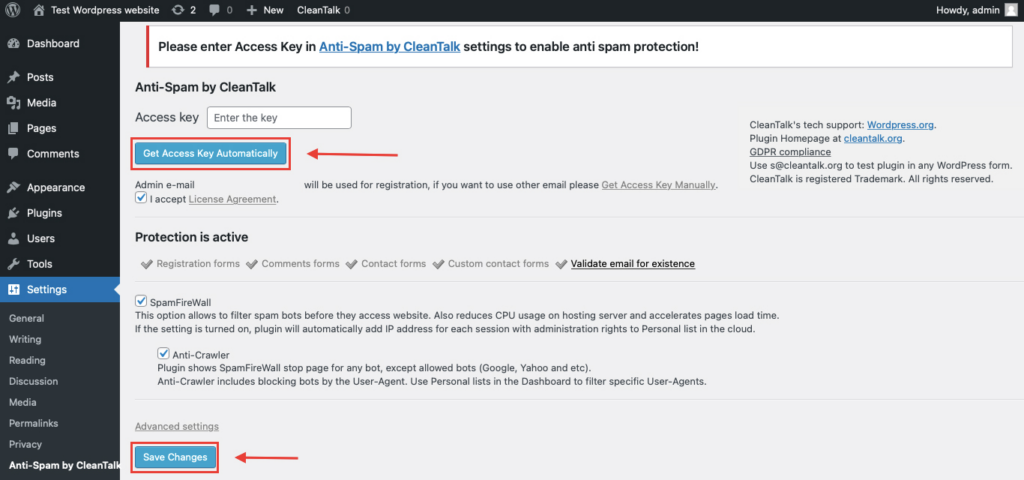
    After it is done go to the plugin settings and click the «Get Access Key Automatically» button. Then just click the «Save Settings»‎ button.

    That’s it! From now you know how to completely protect your HivePress from spam.

    Once that is done, your website has a background anti-spam layer that can help reduce suspicious Quform activity before unwanted messages reach their destination.

    How CleanTalk Fits into the Quform Workflow

    Quform runs inside WordPress, so the strongest place to apply protection is before a submission is treated as a normal message.

    That means the focus should not be only on what the form looks like on the frontend. The more important point is what happens when the submission reaches WordPress.

    If a site uses Quform for contact requests or lead capture, a site-level anti-spam layer can help stop suspicious submissions before they become normal entries.

    If the website uses custom handlers, automations, autoresponders, or database saving after submission, the filtering layer should still be placed before the message is accepted into the workflow.

    That is the key principle: do not wait until junk has already reached your inbox or stored data. Stop it earlier in the process.

    How to Check Whether Spam Protection Works

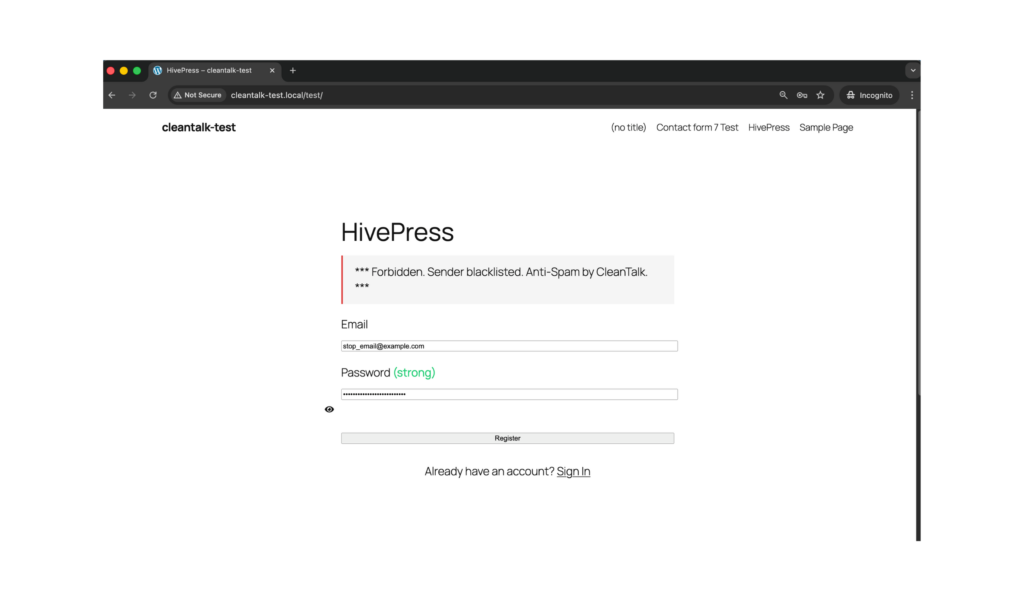
    A simple way to test the setup is to use the following test address:

    stop_email@example.com

    Open the page with your Quform form in an Incognito or private browser window.

    Submit the form using that email address.

    If everything is configured properly, the submission should be blocked or should not appear as a normal legitimate entry in your form workflow.

    When testing, check both sides of the process:

    • the frontend, to see whether the form accepts the submission
    • the form entries, database records, or email destination, to verify that the message was not processed as a normal inquiry

    This matters because a form may appear to submit on the surface while the real question is whether the message actually made it into your workflow.

    Cloud Dashboard and Monitoring

    Blocking spam is only one part of the job. Good protection also gives you visibility into what is happening.

    In the anti-spam dashboard, it is useful to review:

    • sender IP and email
    • submission time
    • source page
    • approval or denial status
    • the likely reason a message was flagged

    This makes it easier to spot recurring spam waves, identify weak pages, and understand which forms attract the most junk traffic.

    That visibility helps you fine-tune the setup over time instead of guessing.

    Honeypot, CAPTCHA, reCAPTCHA, and Additional Anti-Spam Options

    Besides CleanTalk, Quform already includes several useful anti-spam controls.

    Honeypot

    Quform’s official features page lists honeypot as one of its built-in spam-prevention options. Its blog also explains that the honeypot field was improved so that it is randomly placed through the form and made to look more like normal fields to bots, which increases its usefulness against simple automation.

    Honeypot is especially useful when:

    • you want an invisible anti-spam measure
    • you do not want to interrupt the user experience
    • you need a lightweight first barrier against simple bots

    Its limitation is that it works best against simpler automation, not every type of spam.

    Image CAPTCHA

    Quform also includes a built-in image CAPTCHA option. The official features page lists image CAPTCHA as one of Quform’s three built-in CAPTCHA methods.

    Image CAPTCHA can be useful when:

    • you want a visible challenge inside the form
    • you are dealing with repeated automated submissions
    • you need an extra checkpoint on high-risk forms

    The tradeoff is friction: visible CAPTCHA fields can reduce completion rates on some forms.

    Google reCAPTCHA

    Quform’s features page also lists reCAPTCHA as a built-in spam-prevention option, and release notes mention fixes and support work related to the reCAPTCHA field.

    reCAPTCHA can be helpful when:

    • you want a familiar anti-bot checkpoint
    • your site is seeing repeated automated submissions
    • you need an extra verification layer alongside broader filtering

    At the same time, reCAPTCHA should not be treated as the only line of defense.

    Time-Based Spam Prevention

    Quform’s blog documents a time-based spam prevention option. By default, submissions made too quickly after the form is displayed can be rejected, which helps catch automated behavior that moves faster than real users.

    This is especially useful as a passive layer because it adds protection without introducing a visible challenge.

    Why Quform Spam Becomes a Bigger Problem Over Time

    Spam in Quform is not just a temporary annoyance. It tends to become an operational problem.

    Once junk submissions start slipping through, they can:

    • clutter inboxes and notifications
    • reduce the quality of collected leads
    • waste time on manual review
    • fill saved form data with low-value entries

    This is especially important if the site uses Quform not only for simple contact forms, but also for quote requests, support flows, surveys, or other business-critical form workflows.

    Comparison of Anti-Spam Approaches for Quform

    SolutionMain roleStrengthsLimitationsBest use case
    Quform honeypotBuilt-in invisible anti-bot layerNative to Quform, invisible to users, improved by random placementLimited against more advanced spam patternsSites that want a lightweight first layer inside Quform
    Quform image CAPTCHABuilt-in visible challengeNative option, useful on higher-risk formsAdds friction and may reduce completionForms that need an extra visible anti-bot step
    Quform reCAPTCHABuilt-in anti-bot verificationFamiliar, supported inside Quform, useful as an extra checkpointShould not be the only protection methodSites that want a built-in additional anti-bot layer
    Quform time-based protectionPassive speed-based filteringHelps catch automated fast submissions without visible frictionWorks best as a supporting layerSites that want low-friction passive filtering
    CleanTalkCore site-level anti-spam filteringFilters suspicious submissions before they become normal entries, reduces junk leads, works without classic CAPTCHA frictionUsually strongest when combined with Quform’s native controlsSites that want the main filtering layer to protect Quform submissions

    In practice, the strongest starting point is to use one reliable primary anti-spam layer and then enable Quform’s built-in anti-spam options only where they add real value.

    Frequently Asked Questions

    Why is my Quform getting spam even though I already enabled CAPTCHA?

    Because one visible challenge does not solve every type of abuse. CAPTCHA can reduce some automated traffic, but it does not always stop repeated junk submissions, low-quality manual spam, or more advanced automated behavior. Sites with heavier spam pressure usually need a stronger filtering layer behind the form as well.

    Is Quform honeypot enough on its own?

    For lower-risk forms, it may reduce a lot of basic bot traffic. But on its own, it is usually better treated as a first layer rather than a complete anti-spam strategy, especially if the form is highly visible or tied to lead generation.

    What is the best anti-spam setup for Quform in 2026?

    For most websites, the best setup is to use CleanTalk as the main filtering layer, keep Quform’s built-in honeypot enabled, and add reCAPTCHA, image CAPTCHA, or time-based protection only where they improve protection without creating too much friction.

    Can Quform save spam submissions to the database?

    Yes. Quform can save submitted form data to a custom database table, so if spam is not filtered properly, junk entries can affect not only inboxes but also stored submission data.

    How can I test whether Quform spam protection is actually working?

    Open the form page in an Incognito or private browser tab and submit it with the test email stop_email@example.com. Then check both whether the form accepts the submission on the frontend and whether the message appears in Quform entries, stored data, or your email destination. If protection is working properly, the submission should be blocked or should not be processed as a normal entry.

    Why are real submissions being blocked together with spam?

    That usually means one of the protection layers is too aggressive. Review your CAPTCHA settings, honeypot behavior, time-based filtering, and site-level spam filtering one by one. In most cases, the goal is not to remove protection entirely, but to tune it more carefully.

    Recommended Anti-Spam Stack for Quform (2026)

    Use caseRecommended setupWhy it works
    Standard contact websiteCleanTalk as the main anti-spam filtering layer + Quform honeypotHelps block obvious spam while keeping the form experience smoother
    Business website with valuable inquiriesCleanTalk as the main anti-spam filtering layer + honeypot + reCAPTCHAReduces bot submissions while improving lead quality
    High-traffic public formsCleanTalk as the main anti-spam filtering layer + honeypot + time-based protection + optional reCAPTCHABalances strong filtering with practical low-friction protection
    Higher-risk lead or quote formsCleanTalk as the main filtering layer + honeypot + image CAPTCHA or reCAPTCHAAdds extra protection where form abuse has a higher business cost
    Sites focused on low frictionCleanTalk as the main anti-spam filtering layer + honeypot + time-based protectionAdds protection while keeping the form experience as smooth as possible

    Final Thoughts

    No single anti-spam tool can stop every kind of unwanted Quform submission.

    Some controls are better at catching simple bots. Others add visible or invisible verification at the form level. The most reliable approach is to combine one strong primary filtering layer with Quform’s built-in anti-spam options in a way that matches the risk level of each form.

    For most WordPress websites using Quform, the strongest setup is to use CleanTalk as the main site-level anti-spam layer, keep Quform’s built-in honeypot enabled, and add reCAPTCHA, image CAPTCHA, or time-based protection only where extra verification is needed. Quform’s own documentation confirms that these anti-spam tools are built into the product, while CleanTalk provides broader WordPress-level spam filtering.

    This combination helps keep bad submissions out of your workflow, reduces noise in your inbox and stored entries, and makes it easier to focus on real inquiries.

    Stop form spam without frustrating your visitors

    Create your CleanTalk account and start blocking fake messages, bot submissions, junk inquiries and low-quality Quform entries — no CAPTCHA challenges and no impact on real visitors.

    CleanTalk Account

    No credit card required • Setup takes less than a minute • Your temporary password will be sent by email.

  • AWeber Forms Spam Protection in 2026: How to Stop Fake Subscribers, Bot Signups, and Junk Leads

    AWeber Forms Spam Protection in 2026: How to Stop Fake Subscribers, Bot Signups, and Junk Leads

    If you use AWeber forms on a WordPress website, spam will eventually become a real problem. Fake subscribers, bot signups, junk leads, and low-quality email addresses can quickly pollute your list and make your marketing data less reliable.

    This guide explains how to set up AWeber forms spam protection using CleanTalk as the main filtering layer on your website, together with additional tools such as AWeber’s form options, double opt-in, frontend verification where appropriate, and stronger list-quality controls.

    This approach can be applied to inline forms, pop-over forms, lightbox forms, popup forms, and AWeber forms embedded on WordPress sites.

    AWeber banner at https://wordpress.org/plugins/aweber-web-form-widget/
    AWeber banner at https://wordpress.org/plugins/aweber-web-form-widget/

    AWeber Forms for WordPress

    Before looking at protection methods, it helps to understand how AWeber forms are commonly used on WordPress websites.

    AWeber offers sign-up forms for list growth and email marketing. Its WordPress plugin allows users to embed AWeber forms and landing pages on a WordPress site, while AWeber’s own documentation explains that forms can be placed through widgets, shortcodes, pages, posts, and other theme areas.

    In practice, AWeber forms can help website owners:

    • collect email subscribers
    • grow lists through embedded or popup forms
    • run split tests on forms
    • send captured contacts directly into AWeber lists

    That flexibility is exactly why spam becomes an issue. Once a form is publicly available, it can attract bots, fake signups, disposable email addresses, and repeated low-quality submissions.

    As WordPress.org shows, the official AWeber WordPress plugin is currently used on over 9000 websites and has a rating of 2.6 out of 5 based on 25 reviews.

    Plugin Homepage at WordPress.org | Documentation at AWeber Help Center

    Why AWeber Forms Attract Spam

    AWeber forms are designed to make subscribing easy. That is good for real visitors, but it also makes them attractive to bad traffic.

    In real-world use, the most common issues usually include:

    • fake subscribers
    • automated bot signups
    • disposable email addresses
    • repeated submissions tied to incentives, lead magnets, or list-growth campaigns

    This matters because spam does not only create clutter. It can lower lead quality, distort list growth metrics, reduce campaign efficiency, and make engagement data harder to trust.

    Anti-Spam by CleanTalk

    The main tool we’re going to use here is CleanTalk Anti-Spam.

    CleanTalk is a cloud-based anti-spam service for WordPress sites. In practical terms, it helps filter suspicious signups before they become normal subscribers, checks sender reputation and email quality, detects automated and repeated abuse patterns, and reduces junk leads before they reach your AWeber list.

    That matters because the real cost of AWeber spam is not only a messy list. It also means weaker segmentation, noisier reporting, and lower-quality marketing automation.

    According to WordPress.org, Anti-Spam by CleanTalk for WordPress has over 200,000 active installations, with 3,168 reviews and an average rating of 4.8.

    Plugin Homepage at cleantalk.org | Latest release at GitHub.com

    Install the CleanTalk Anti-Spam plugin

    Show Instructions

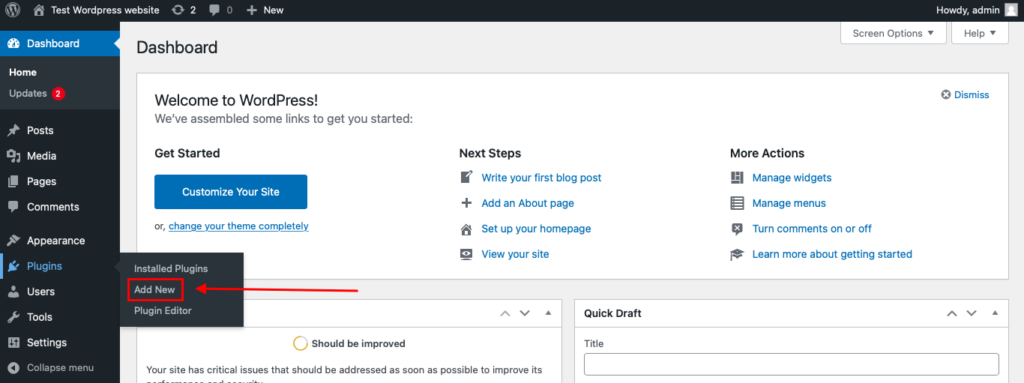
    To install the Anti-Spam plugin, go to your WordPress admin panelPluginsAdd New.

    Then enter «СleanTalk» in the search box and click the Install button for «Spam protection, Anti-Spam, FireWall by CleanTalk».

    After installing the plugin, click the «Activate»‎ button.

    After it is done go to the plugin settings and click the «Get Access Key Automatically» button. Then just click the «Save Settings»‎ button.

    That’s it! From now you know how to completely protect your HivePress from spam.

    How to Check Whether Spam Protection Works

    A simple way to test the setup is to use the following test address:

    stop_email@example.com

    Open the page with your AWeber form in an Incognito or private browser window.

    Submit the form using that email address.

    If everything is configured properly, the signup should be blocked or should not appear as a normal subscriber in your AWeber list.

    When testing, check both sides of the process:

    • the frontend, to see whether the form accepts the submission
    • the AWeber list or email destination, to verify that the contact was not processed as a normal signup

    This matters because a form may appear to submit on the surface while the real question is whether the contact actually made it into the list workflow.

    Cloud Dashboard and Monitoring

    Blocking spam is only one part of the job. Good protection also gives you visibility into what is happening.

    In the anti-spam dashboard, it is useful to review:

    • sender IP and email
    • submission time
    • source page
    • approval or denial status
    • the likely reason a signup was flagged

    This makes it easier to spot recurring spam waves, identify weak pages, and understand which forms attract the most junk traffic.

    That visibility helps you fine-tune the setup over time instead of relying on guesswork.

    How CleanTalk Fits into the AWeber Workflow

    AWeber forms can be embedded on a WordPress website through the official plugin, widgets, shortcodes, or other placement methods. That means the strongest place to apply spam protection is before the submission is treated as a normal signup.

    If your site uses the AWeber WordPress plugin, a site-level anti-spam layer can help stop suspicious signups before they are accepted as normal subscribers.

    If the website uses custom placement, widgets, or shortcode-based form display, the filtering layer should still be applied before the submission is accepted into the list-growth workflow.

    That is the key principle: do not wait until junk has already entered the list. Stop it earlier in the process.

    Form Types, Double Opt-In, and Additional Anti-Spam Options

    Besides CleanTalk, AWeber also offers several practical controls that affect spam risk and list quality.

    Form Types

    AWeber supports several sign-up form types, including inline, pop-over, lightbox, and popup forms.

    These display options can affect both conversion and spam exposure. A highly visible popup may collect more subscribers, but it can also attract more low-quality submissions if it appears too aggressively on public pages.

    Double Opt-In

    Double opt-in is one of the most useful list-quality controls when the goal is not only to collect more contacts, but to collect better ones.

    This is especially helpful when:

    • you want to reduce fake or mistyped email addresses
    • you care more about lead quality than raw signup volume
    • you want an extra confirmation step before a contact becomes fully active

    Double opt-in will not block every kind of abuse, but it can significantly improve the quality of the subscribers who actually make it into your list.

    Widgets, Shortcodes, and Placement Controls

    AWeber forms can be placed through widgets, shortcodes, pages, posts, and other theme areas. That flexibility is useful for testing form performance, but it also means you should pay attention to where your highest-risk forms appear.

    For example, aggressively displayed popups on public traffic pages may attract more junk than a quieter embedded form on a more targeted page.

    Why AWeber Form Spam Becomes a Bigger Problem Over Time

    Spam in AWeber forms is not just a temporary annoyance. It tends to become a list-quality problem.

    Once junk subscribers start slipping through, they can:

    • clutter your list with low-value contacts
    • reduce trust in your growth numbers
    • waste time on cleanup and segmentation
    • make campaign performance harder to interpret

    This is especially important for email marketing, where list quality often matters more than raw list size.

    Comparison of Anti-Spam Approaches for AWeber Forms

    SolutionMain roleStrengthsLimitationsBest use case
    CleanTalkCore site-level anti-spam filteringFilters suspicious submissions before they become normal subscribers, works without classic CAPTCHA frictionUsually strongest when combined with list-quality controlsSites that want the main anti-spam layer to protect AWeber list quality
    AWeber double opt-inSubscriber confirmation layerHelps reduce fake or mistyped email addresses and improves list qualityDoes not block every kind of spam before submissionSites that prioritize lead quality over raw signup volume
    AWeber form types and placement controlsVisibility and conversion controlLets you manage where and how forms appear, can reduce abuse through more careful placementNot a full spam filter on its ownSites testing inline, popup, lightbox, or pop-over signup flows
    Frontend verification toolsExtra anti-bot checkpointCan add an additional visible or invisible barrier against automated trafficCan introduce friction and should not be the only protection methodSites that need extra frontend verification on high-risk forms

    In practice, the strongest starting point is to use one reliable primary anti-spam layer and then add confirmation or frontend controls only where they are truly needed.

    Frequently Asked Questions

    Why am I getting fake subscribers through my AWeber form?

    This usually happens because the form is public, easy to submit, and not filtered strongly enough before the signup reaches your list. Bots, disposable emails, and low-quality manual submissions can all get through if the site relies only on basic frontend controls.

    Why do new AWeber subscribers look real, but still hurt campaign performance?

    Because not all bad signups look obviously fake. Some contacts use valid-looking addresses, but they never engage, never confirm, or only subscribed to claim a lead magnet or discount. Over time, these low-quality subscribers can distort list growth and weaken campaign results.

    Is double opt-in enough to stop spam in AWeber?

    Not by itself. Double opt-in helps improve list quality by filtering out mistyped or low-intent addresses, but it does not stop every fake signup before submission. It works best as a quality-control step, not as the only protection layer.

    Why do I still get spam signups even after adding reCAPTCHA or other frontend checks?

    Because frontend verification only handles part of the problem. It can reduce some automated traffic, but it does not always stop disposable emails, repeated submissions, or more advanced abuse. Sites with heavier spam pressure usually need a stronger site-level filtering layer as well.

    How can I tell whether spam is affecting my AWeber list?

    Common warning signs include sudden spikes in subscribers, low engagement from new contacts, poor list quality, unusual growth from one form, and subscribers who never behave like real leads. If list size is growing but campaign quality is getting worse, spam or low-quality signups may be part of the problem.

    What is the best low-friction setup for AWeber forms?

    For most websites, the best low-friction setup is to use one strong background filtering layer, then add double opt-in only where list quality matters most, and keep extra frontend verification limited to higher-risk forms. This helps protect the list without making the signup process harder than it needs to be.

    How can I test whether AWeber form protection is actually working?

    Open the form page in an Incognito or private browser tab and submit it with the test email stop_email@example.com. Then check both sides of the process: whether the form accepts the submission on the frontend and whether the contact appears in your AWeber list. If the setup is working properly, the signup should be blocked or should not enter the list as a normal subscriber.

    What should I do if real subscribers are being blocked together with spam?

    Review the protection layers one by one. Check whether your filtering is too aggressive, whether frontend verification is set too strictly, and whether double opt-in or other rules are causing confusion. In most cases, the answer is not to remove protection completely, but to tune it more carefully so real signups can pass while junk is still filtered out.

    Recommended Anti-Spam Stack for AWeber Forms (2026)

    Use caseRecommended setupWhy it works
    Standard email signup websiteCleanTalk as the main anti-spam filtering layer + optional double opt-inHelps block obvious spam and improves list quality
    Lead magnet or incentive-based signup pageCleanTalk as the main anti-spam filtering layer + double opt-in + tighter form placementReduces fake signups and repeated low-quality submissions
    High-traffic popup or lightbox formsCleanTalk as the main anti-spam filtering layer + selective frontend verificationBalances strong filtering with practical frontend protection
    Sites focused on low frictionCleanTalk as the main anti-spam filtering layer + inline or carefully placed formsAdds protection while keeping the signup experience smoother
    Split-test-driven list growth sitesCleanTalk as the main anti-spam filtering layer + AWeber split-test forms + list-quality reviewHelps compare form performance without letting junk traffic distort results

    Final Thoughts

    No single anti-spam tool can stop every kind of unwanted AWeber form submission.

    Some controls are better at improving list quality after signup. Others are better at reducing bad submissions before they ever reach the list. The most reliable approach is to combine one strong primary anti-spam layer with the signup and confirmation controls that make sense for your form strategy.

    For most WordPress websites using AWeber forms, the strongest setup is to use CleanTalk as the main site-level anti-spam layer, then use double opt-in where necessary, and apply extra frontend controls only where they improve protection without adding too much friction.

    This combination helps reduce fake subscribers, protect list quality, and keep your signup data more useful for real email marketing work.

    Stop spam without frustrating your visitors

    Create your CleanTalk account and start blocking fake subscribers, bot signups, and junk leads sent through AWeber forms — no CAPTCHA challenges and no extra friction for real visitors.

    CleanTalk Account

    No credit card required • Setup takes less than a minute • Your temporary password will be sent by email.

  • Klaviyo Web Forms Spam Protection in 2026

    Klaviyo Web Forms Spam Protection in 2026

    If you use Klaviyo web forms for email marketing, popups, or lead generation, you will eventually face spam: fake sign-ups, bot submissions, disposable emails, and low-quality leads.

    This guide explains how to set up Klaviyo web forms spam protection using CleanTalk as the core filtering layer on your website, together with additional tools like Google reCAPTCHA, hCaptcha, Cloudflare Turnstile, email validation, and double opt-in.

    This protection approach can be applied to Klaviyo popup forms, flyout forms, full page forms, embedded forms, and custom sign-up forms connected to Klaviyo. Klaviyo documents these form types in its sign-up forms help materials.

    Klaviyo Web Forms

    First, let’s take a quick look at Klaviyo itself and the types of forms it offers.

    Klaviyo is a marketing automation platform used to collect subscribers, capture leads, grow email and SMS lists, and trigger automated customer flows. Its sign-up forms can be published on a website in several formats, including popup, flyout, full page, and embedded forms, and Klaviyo also documents custom sign-up form setups for custom integrations.

    Out of the box, Klaviyo web forms help businesses collect email addresses and phone numbers, promote discounts and lead magnets, grow subscriber lists, and send contacts directly into marketing flows and segmentation.

    Because Klaviyo forms are public-facing and often tied to incentives such as discount codes, bonus offers, or newsletter rewards, they quickly become a target for spambots and abuse. That is why it is important to have a reliable Klaviyo spam protection setup from the beginning.

    As WordPress.org shows, the Klaviyo plugin is currently used on over 100,000 websites and has a rating of 2.8 out of 5 based on 24 user ratings.

    Plugin Homepage at WordPress.org | Website at Klaviyo.

    Why Klaviyo Forms Attract Spam

    Klaviyo forms are attractive to spammers for a few practical reasons.

    They are easy to find on public pages. They are often connected to high-value actions such as coupon delivery, gated content, or welcome offers. And many websites rely too heavily on frontend checks alone, which means bad submissions can still pass into Klaviyo lists if there is no stronger filtering behind the form.

    In practice, the most common problems include bot sign-ups, disposable email addresses, repeated submissions for the same incentive, and low-quality contacts that hurt campaign performance.

    Anti-Spam by CleanTalk

    The next tool we’ll look at is CleanTalk Anti-Spam.

    Here’s a short overview.

    CleanTalk is a cloud-based anti-spam service that works across website forms and blocks spam automatically without forcing real users through traditional CAPTCHA puzzles. Its WordPress plugin is positioned as protection for forms, comments, registrations, subscriptions, and fake orders, and the WordPress.org plugin listing currently shows more than 200,000 active installations.

    In practical terms, CleanTalk helps by filtering suspicious submissions before they become leads, checking sender reputation and email quality, detecting automated and repeated abuse patterns, and reducing junk contacts that would otherwise end up in Klaviyo.

    This is especially useful for Klaviyo because the real problem is not only visible spam on the page. The bigger issue is list pollution, inaccurate reporting, wasted email volume, and lower campaign efficiency.

    How CleanTalk Can Be Used with Klaviyo Forms

    Klaviyo forms are usually embedded on a website, so spam protection is typically applied at the website level or at the custom form processing layer.

    For example, if your site runs on WordPress and Klaviyo forms are embedded there, the site-wide anti-spam layer can help filter suspicious activity around those submissions.

    If you use a custom-coded form that passes data into Klaviyo, you can add backend validation and anti-spam checks before sending the contact to Klaviyo.

    If you use additional form logic, coupon delivery logic, or signup handlers, the anti-spam layer should be placed before the final subscribe action.

    That is the key principle: do not rely only on what happens visually in the popup. Filter the submission before it reaches the list.

    According to WordPress.org, Anti-Spam by CleanTalk for WordPress has over 200,000 active installations, with thousands of reviews and an average rating around 4.7 out of 5.

    Plugin Homepage at cleantalk.org | Latest release at GitHub.com

    If your Klaviyo form is embedded on WordPress, the simplest setup is to use the CleanTalk WordPress plugin.

    Install the CleanTalk Anti-Spam plugin

    To install the Anti-Spam plugin, go to your WordPress admin panelPluginsAdd New.

    Then enter «СleanTalk» in the search box and click the Install button for «Spam protection, Anti-Spam, FireWall by CleanTalk».

    After installing the plugin, click the «Activate»‎ button.

    After it is done go to the plugin settings and click the «Get Access Key Automatically» button. Then just click the «Save Settings»‎ button.

    That’s all –  Contact Form 7 are now protected From this moment,CleanTalk automatically protects the  Contact Form 7 registration form (REST route /wp-json/Contact Form 7press/v1/users/), and the Add Listing form used to submit new listings.
    You don’t need to paste any shortcodes – just use  Contact Form 7 as usual, and CleanTalk will filter spam in the background.

    Once that is done, your website has a background anti-spam layer that can help reduce suspicio

    From that point, your website will have an anti-spam layer working in the background, without adding classic CAPTCHA friction for users. The official plugin description emphasizes automatic spam blocking without visitor puzzles or extra challenges.

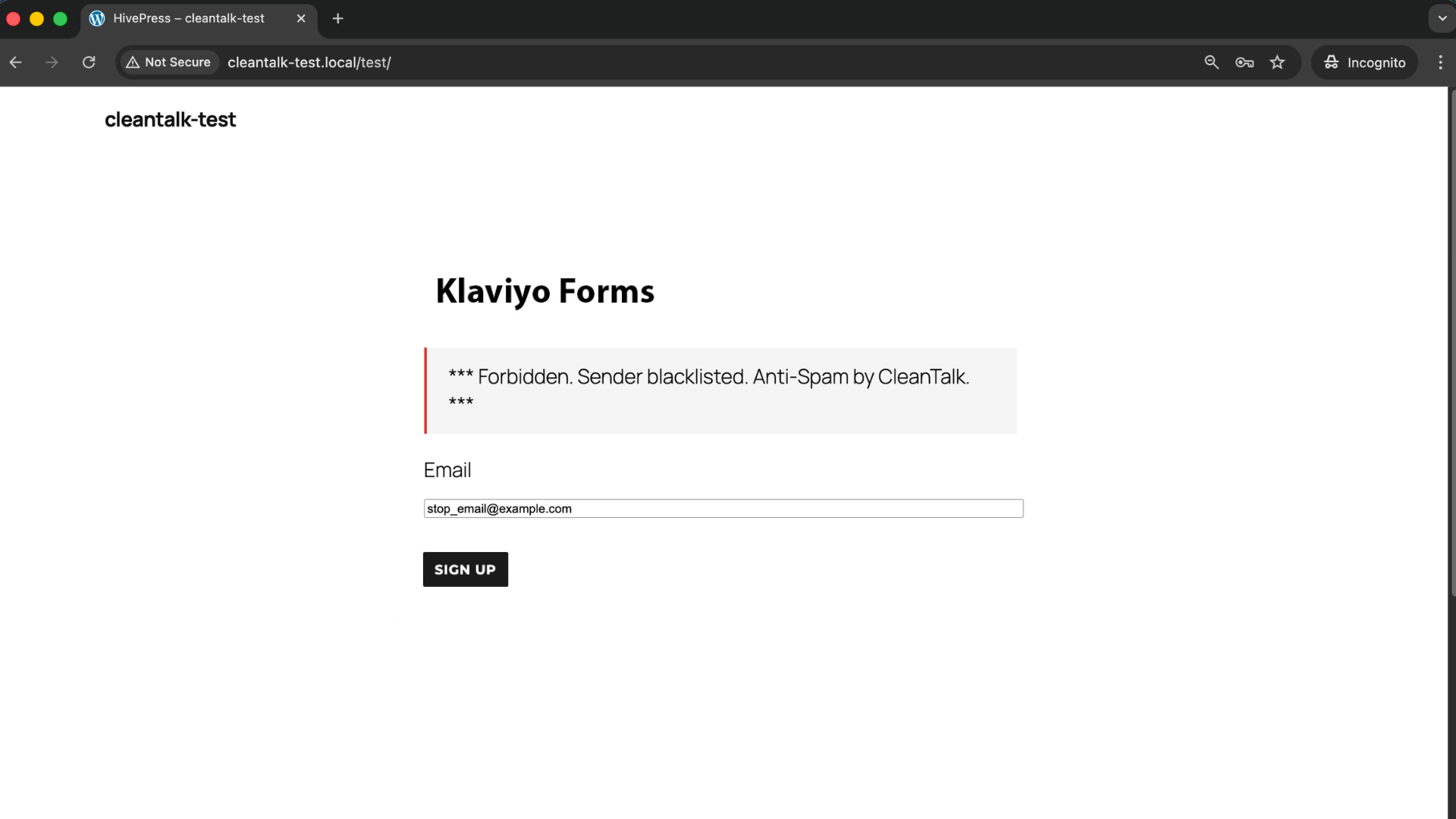
    Check if Spam Protection Works

    The easiest way to test spam filtering is to use a test address such as:

    stop_email@example.com

    Open the page with your Klaviyo form in an Incognito or private browser tab.

    Fill out the form using the test email and submit it.

    If your protection setup is configured correctly, the test should be blocked or prevented from becoming a valid contact in Klaviyo.

    When testing, always confirm the result in both places: on the frontend, to see whether the form allows the submission, and in your Klaviyo list or flow trigger, to make sure the spam contact did not enter your marketing system.

    Cloud Dashboard and Monitoring

    A strong spam protection setup should not stop at blocking alone. You also need visibility.

    In the anti-spam dashboard, it is useful to review sender IP and email, submission time, source page, approval or denial status, and the likely reason why the submission was flagged.

    This helps identify patterns such as specific traffic sources sending junk signups, repeated abuse during discount campaigns, or bursts of fake subscriptions from disposable domains.

    That visibility is what allows you to fine-tune protection instead of guessing.

    Google reCAPTCHA, hCaptcha, and Cloudflare Turnstile

    Besides CleanTalk, you can also use CAPTCHA and anti-bot services together with Klaviyo forms to reduce spam.

    Google reCAPTCHA

    Google reCAPTCHA remains one of the best-known anti-bot solutions. Google describes it as a free service that protects websites from spam and abuse, and its documentation covers both v2 and v3 implementations. reCAPTCHA v2 uses widgets and challenges, while v3 is score-based and works without direct user interaction.

    For Klaviyo-related use, reCAPTCHA can be helpful when you want an additional visible or score-based signal, you have recurring bot traffic on public lead forms, or you want a familiar system your team already understands.

    At the same time, reCAPTCHA also has practical limitations. It can add friction, it may reduce form completion rates, and by itself it does not solve disposable-email abuse or repeated low-quality signups.

    hCaptcha

    hCaptcha is often chosen by teams that want a privacy-oriented alternative to Google-based tooling.

    Typical reasons to use it include a stronger privacy position, reduced dependence on Google services, and a better fit for teams with compliance concerns.

    Like reCAPTCHA, hCaptcha works best as an extra layer, not as the only defense.

    Cloudflare Turnstile

    Cloudflare Turnstile is one of the strongest modern alternatives for frontend verification. Cloudflare describes it as a CAPTCHA-free, privacy-preserving alternative, and its documentation includes managed, non-interactive, and fully invisible widget modes. Cloudflare also explicitly says Turnstile tokens must be verified server-side through Siteverify, otherwise the implementation is incomplete.

    Main benefits of Cloudflare Turnstile compared to classic CAPTCHA solutions:

    It can work invisibly in the background.

    It usually creates less friction than image-based challenges.

    It is a strong fit for conversion-focused signup flows.

    For Klaviyo forms, Turnstile is often the most user-friendly frontend layer, especially when you want protection without making the popup feel heavy or annoying.

    Email Validation, Double Opt-In, and List Quality

    Not all spam looks like a bot.

    Sometimes the contact is technically valid, but still harmful to your marketing system.

    This includes disposable email domains, fake or mistyped email addresses, repeat signups from the same person hunting for coupons, and low-intent contacts that damage engagement rates.

    That is why Klaviyo spam protection should also include email validation, double opt-in where appropriate, and basic abuse monitoring tied to signup incentives.

    Double opt-in will not solve all spam, but it can reduce list pollution by requiring an extra confirmation step before a contact becomes fully usable in your marketing workflow.

    Comparison of Anti-Spam Approaches for Klaviyo

    Each solution blocks a different part of the problem.

    SolutionMain roleStrengthsLimitationsBest use case
    Google reCAPTCHAFrontend anti-bot checkWidely known, easy to add, useful as an extra verification stepCan add friction, may reduce conversion rates, should not be the only protection layerWebsites that want a familiar anti-bot tool as an additional layer
    hCaptchaPrivacy-focused frontend anti-bot checkMore privacy-oriented, less reliance on Google, helpful for teams with compliance concernsStill adds friction and does not solve list-quality issues on its ownProjects that prioritize privacy and want an alternative to Google services
    Cloudflare TurnstileLightweight frontend verificationSupports non-interactive and invisible verification, usually creates less friction, strong fit for conversion-focused formsNeeds proper backend verification and does not replace email validation or broader anti-spam filteringKlaviyo forms where user experience and conversion rate matter
    CleanTalkCore site-level or backend anti-spam filteringFilters suspicious submissions before they reach Klaviyo, works without classic CAPTCHA friction, helps reduce bots, fake signups, and low-quality leadsUsually works best when combined with other layers for the strongest setupWebsites that want the main anti-spam layer to protect Klaviyo list quality

    In practice, the most reliable setup is layered: backend or site-level filtering first, lightweight frontend bot verification second, and list-quality controls such as validation and double opt-in on top.

    Frequently Asked Questions

    Klaviyo popup form is collecting many fake emails. What should I check first?

    Start with the basics.

    Check whether the form is tied to a discount or incentive, review whether you are accepting disposable email domains, and verify whether you have any server-side or site-level anti-spam filtering at all.

    If the only protection is a frontend popup or a visible checkbox, that is usually not enough. The problem is often not the form design itself, but the lack of filtering before the submission reaches Klaviyo.

    We added CAPTCHA, but fake signups still appear in Klaviyo. Why?

    Because CAPTCHA mainly handles one layer of the problem.

    Modern spam attacks may bypass visible widgets, use low-quality human solving, or attack the signup flow in ways that are not stopped by a simple frontend challenge. CAPTCHA can reduce some junk traffic, but it does not automatically clean your list, validate email quality, or stop all repeat abuse.

    Our discount popup is being abused by repeat signups. How do we reduce that?

    This is a very common e-commerce problem.

    Use a layered approach: block disposable email domains, review repeated attempts from the same IP or traffic source, connect coupon logic to stricter validation rules, and consider double opt-in for campaigns where list quality matters more than raw signup volume.

    If you reward every form completion immediately, you make abuse easier.

    Turnstile is installed, but spam still gets through. What may be wrong?

    The most common issue is incomplete implementation.

    Cloudflare states that Turnstile tokens must be verified server-side through Siteverify. If the token is not verified on the backend, the protection is incomplete. Also, Turnstile reduces automated abuse, but it does not replace email validation, duplicate-signup checks, or broader anti-spam filtering.

    Klaviyo signup numbers look good, but campaign performance is getting worse. Could spam be the reason?

    Yes.

    One of the clearest signals of spam or low-quality lead growth is when list size increases but engagement quality declines.

    Watch for sudden jumps in subscriptions, low open and click performance from new contacts, higher bounce or suppression rates, and poor conversion quality from a specific signup form.

    Spam is not always obvious on the surface. Sometimes it shows up first in reporting quality.

    Should we use reCAPTCHA v2, reCAPTCHA v3, or Turnstile?

    It depends on your priorities.

    reCAPTCHA v2 is more visible and straightforward, but adds friction. reCAPTCHA v3 is score-based and lighter for users, but needs good threshold tuning. Google documents both models officially. Turnstile is often the cleaner UX option because it supports non-interactive and invisible verification.

    If your main goal is conversion-friendly protection, Turnstile is usually the better frontend option.

    What is the best anti-spam stack for Klaviyo in 2026?

    For most websites, the most reliable setup is a core site-level or backend anti-spam layer, Cloudflare Turnstile or another lightweight frontend verification method, email validation, and double opt-in where the business model allows it.

    If your campaigns use incentives, add stronger monitoring for duplicate or abusive signups.

    Recommended Anti-Spam Stack for Klaviyo (2026)

    Use caseRecommended setupWhy it works
    Standard lead capture websiteCleanTalk as the main anti-spam filtering layer + email validation + optional double opt-inHelps block obvious spam, reduce fake emails, and keep list growth cleaner
    E-commerce site with discount popupsCleanTalk as the main anti-spam filtering layer + Cloudflare Turnstile on the signup experience + disposable email blocking + abuse monitoring for repeated coupon claimsReduces coupon abuse, repeated signups, and low-quality contacts
    High-traffic campaign landing pagesCleanTalk as the main anti-spam filtering layer + Turnstile or reCAPTCHA v3 + double opt-in if list quality is more important than raw signup volumeBalances spam protection with conversion rate and lead quality
    Privacy-sensitive projectsCleanTalk as the main filtering layer + hCaptcha or Turnstile as the frontend anti-bot layer + stricter validation rules for custom formsAdds protection while keeping a more privacy-focused setup
    Custom-coded signup forms connected to KlaviyoBackend anti-spam filtering + token verification + email validationProtects the form before data is sent into Klaviyo and closes common bypass routes

    Final Thoughts

    No single anti-spam tool can stop every type of abuse in Klaviyo forms.

    Some tools are better at reducing automated bot traffic. Others help validate email quality or lower the number of fake and repeated signups. The most reliable approach is to combine several layers, so each one solves a different part of the problem.

    For most websites, the strongest setup is to use a site-level anti-spam layer such as CleanTalk, add a lightweight frontend verification method such as Cloudflare Turnstile, and strengthen list quality with email validation and double opt-in where needed.

    This approach helps keep bad submissions out of your Klaviyo lists, protects campaign performance, and improves the overall quality of your lead generation process.

    By this point, most spam issues in your Klaviyo forms should be significantly reduced.

    If not, review your current setup and make sure you are not relying on only one layer of protection. In most cases, the solution is not adding more friction to the form, but applying better filtering before bad contacts enter Klaviyo.

    Stop spam before it reaches your Klaviyo lists

    Create your CleanTalk account and start blocking fake sign-ups, bot submissions, and disposable emails before they pollute your Klaviyo forms and flows.

    CleanTalk Account

    No credit card required • Setup takes less than a minute • Your temporary password will be sent by email.

  • HappyForms Spam Protection in 2026. How to Stop Fake Messages, Bot Submissions, and Junk Entries

    HappyForms Spam Protection in 2026. How to Stop Fake Messages, Bot Submissions, and Junk Entries

    If you use HappyForms on a WordPress website, spam will eventually become a real problem. Fake messages, bot submissions, promotional junk, and low-quality entries can quickly start filling your inbox and wasting time.

    This guide explains how to set up HappyForms spam protection using CleanTalk as the main filtering layer on your website, together with additional tools like HappyForms’ built-in honeypot, Google reCAPTCHA, and other practical controls. HappyForms is a WordPress drag-and-drop form builder for contact forms and other custom forms, and its plugin pages highlight one-click HoneyPot spam prevention plus the ability to save submissions in the WordPress database or send them to your inbox.

    This protection approach can be applied to standard contact forms, lead forms, quote requests, newsletter forms, surveys, and other public-facing forms created in HappyForms. 

    HappyForms for WordPress

    First, it helps to understand what HappyForms is and why spam protection matters here.

    HappyForms is a WordPress form builder designed for creating many kinds of forms, from simple contact forms to surveys, applications, and other custom forms. Its WordPress.org listing presents it as a drag-and-drop builder, while the plugin FAQ states that submissions can be saved in the WordPress database or sent to your inbox.

    In practice, HappyForms can help website owners:

    • create contact and inquiry forms
    • collect leads and subscriber details
    • receive quote requests and support messages
    • save submissions in WordPress or send them by email

    That flexibility is exactly why spam becomes an issue. Once a form is publicly available, it can attract bots, automated scripts, and low-quality submissions.


    As WordPress.org shows, HappyForms is currently used on over 20,000 websites and has 157 user reviews with an average rating of 4.8.

    Plugin Homepage at WordPress.org | Documentation at Happyforms Help Center

    Why HappyForms Attracts Spam

    HappyForms is easy to publish and easy to use, which is good for real visitors but also appealing to bad traffic.

    In real-world use, the most common issues usually include:

    • automated bot messages
    • junk promotional submissions
    • repeated inquiries with irrelevant links
    • fake leads or low-quality contact requests

    This is not limited to one form type. The same risk applies whether you are running a basic contact form, a request form, a survey, or a lead-generation form.

    Anti-Spam by CleanTalk

    The main tool we’re going to use here is CleanTalk Anti-Spam.

    CleanTalk is a cloud-based anti-spam service for WordPress sites. Its official WordPress plugin page positions it as CAPTCHA-free spam protection for forms, comments, registrations, subscriptions, fake orders, and other submission types, and the current listing shows more than 200,000 active installations.

    In practical terms, CleanTalk helps by:

    • filtering suspicious submissions before they are processed
    • checking sender reputation and email quality
    • detecting automated and repeated abuse patterns
    • reducing junk entries that would otherwise reach HappyForms inboxes or saved submissions

    That matters because the real cost of HappyForms spam is not only inbox clutter. It also means wasted time, lower lead quality, and more manual cleanup inside your workflow.

    How CleanTalk Fits into the HappyForms Workflow

    HappyForms runs inside WordPress, so the most effective place to apply protection is before the submission is treated as a normal message.

    That means the focus should not be only on what the form looks like on the frontend. The more important point is what happens when the submission reaches WordPress.

    If a site uses HappyForms for contact requests or lead capture, a site-level anti-spam layer can help stop suspicious submissions before they become normal entries.

    If the website uses custom handling, automation, or extra logic after submission, the filtering layer should still be placed before the message is accepted into the workflow.

    That is the key principle: do not wait until junk has already reached your inbox or saved entries. Stop it earlier in the process.

    According to WordPress.org, Anti-Spam by CleanTalk for WordPress has over 200,000 active installations, with thousands of reviews and an average rating around 4.7 out of 5.

    Plugin Homepage at cleantalk.org | Latest release at GitHub.com

    If your forms are built with HappyForms on WordPress, the simplest setup is to use the CleanTalk WordPress plugin.

    Install the CleanTalk Anti-Spam plugin

    To install the Anti-Spam plugin, go to your WordPress admin panelPluginsAdd New.

    Then enter «СleanTalk» in the search box and click the Install button for «Spam protection, Anti-Spam, FireWall by CleanTalk».

    After installing the plugin, click the «Activate»‎ button.

    After it is done go to the plugin settings and click the «Get Access Key Automatically» button. Then just click the «Save Settings»‎ button.

    That’s all –  Contact Form 7 are now protected From this moment,CleanTalk automatically protects the  Contact Form 7 registration form (REST route /wp-json/Contact Form 7press/v1/users/), and the Add Listing form used to submit new listings.
    You don’t need to paste any shortcodes – just use  Contact Form 7 as usual, and CleanTalk will filter spam in the background.

    Once that is done, your website has a background anti-spam layer that can help reduce suspicious HappyForms activity before unwanted messages reach their destination.

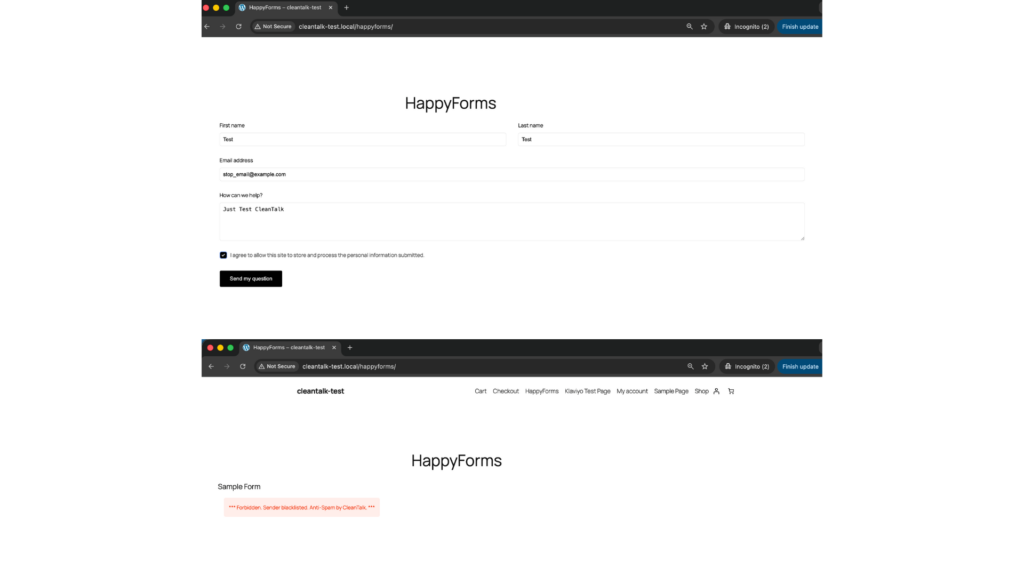
    How to Check Whether Spam Protection Works

    A simple way to test the setup is to use the following test address:

    stop_email@example.com

    Open the page with your HappyForms form in an Incognito or private browser window.

    Submit the form using that email address.

    If everything is configured properly, the submission should be blocked or should not appear as a normal legitimate entry in your form workflow.

    When testing, check both sides of the process:

    • the frontend, to see whether the form accepts the submission
    • the form entries or email destination, to verify that the message was not processed as a normal inquiry

    This matters because a form may still appear to submit on the surface while the real question is whether the message actually made it into your workflow.

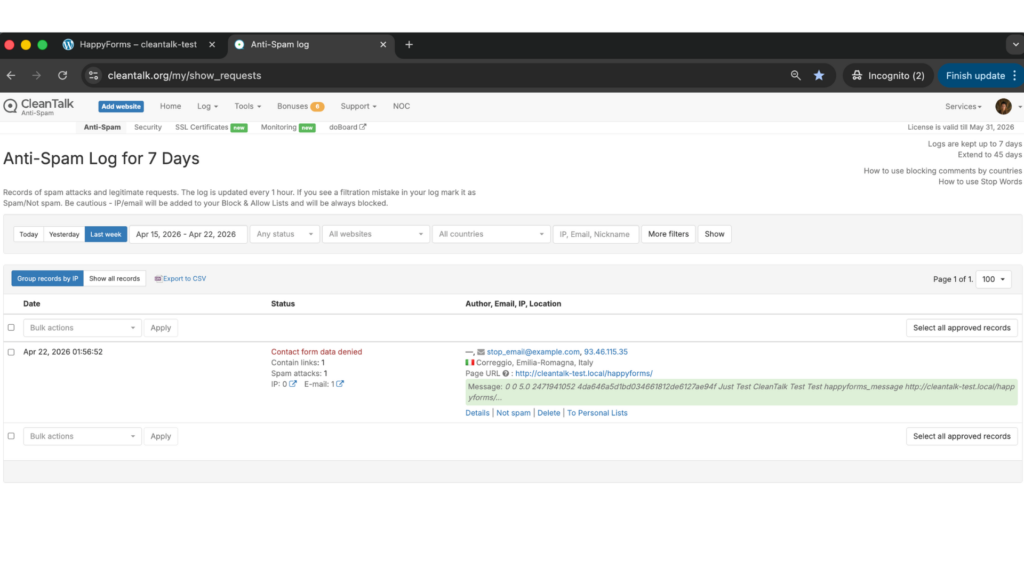
    Cloud Dashboard and Monitoring

    Blocking spam is only one part of the job. Good protection also gives you visibility into what is happening.

    In the anti-spam dashboard, it is useful to review:

    • sender IP and email
    • submission time
    • source page
    • allow or deny decisions
    • the likely reason a message was flagged
    Result: Cloud Dashboard by CleanTalk
    Result: Cloud Dashboard by CleanTalk

    This makes it easier to spot recurring spam waves, identify weak pages, and understand which forms attract the most junk traffic.

    That visibility helps you adjust the setup over time instead of guessing.

    Honeypot, Google reCAPTCHA, and Additional Anti-Spam Options

    Besides CleanTalk, HappyForms also includes or supports other useful anti-spam measures.

    Honeypot

    HappyForms highlights one-click HoneyPot spam prevention on its official plugin page. That makes honeypot the most natural built-in first layer against simple automated spam.

    Honeypot is especially useful when:

    • you want an invisible anti-spam measure
    • you do not want to interrupt the user experience
    • you need a lightweight first barrier against simple bots

    Its limitation is that it works best against simpler automation, not every type of spam.

    Google reCAPTCHA

    HappyForms provides official reCAPTCHA integration. Its help documentation shows that you can configure reCAPTCHA from Forms – Integrations, choose the version, and for reCAPTCHA v3 set a minimum accepted score.

    reCAPTCHA can be helpful when:

    • you want a familiar anti-bot checkpoint
    • your site is seeing repeated automated submissions
    • you need an additional visible or score-based verification layer

    At the same time, reCAPTCHA has tradeoffs. It can add friction and it should not be treated as the only line of defense.

    Other Supporting Controls

    Depending on the site, extra protection may also include:

    • stricter field validation
    • limiting exposed public forms
    • email quality checks
    • more careful handling of forms tied to incentives or lead capture

    These do not replace anti-spam filtering, but they can make the overall setup more resilient.

    Why HappyForms Spam Becomes a Bigger Problem Over Time

    Spam in HappyForms is not just a temporary annoyance. It tends to become an operational problem.

    Once junk submissions start slipping through, they can:

    • clutter inboxes and notifications
    • reduce the quality of collected leads
    • waste time on manual review
    • make real messages harder to notice

    This is especially important if the site uses HappyForms not only for contact forms, but also for quote requests, support flows, surveys, or other business-critical communication.

    Comparison of Anti-Spam Approaches for HappyForms

    SolutionMain roleStrengthsLimitationsBest use case
    HappyForms HoneypotBuilt-in invisible anti-bot layerEasy to enable, no visible friction, good against simple botsLimited against more advanced spam patternsSites that want a lightweight first layer inside HappyForms
    Google reCAPTCHAFamiliar anti-bot verificationOfficially documented in HappyForms integrations, widely recognized, useful as an extra checkpointCan add friction and should not be the only protection methodSites that want a built-in additional anti-bot layer
    CleanTalkCore site-level anti-spam filteringFilters suspicious submissions before they become normal entries, reduces junk leads, works without classic CAPTCHA frictionUsually strongest when combined with other layersSites that want the main filtering layer to protect HappyForms submissions
    Stricter validation and workflow controlsSupporting quality-control layerHelps reduce low-quality entries and detect tighter abuse patterns.Not a full spam filter on its ownLead forms, quote forms, or higher-value submission flows

    In practice, the most dependable starting point is to use one strong primary anti-spam layer and then add extra controls only where they are truly needed. For many WordPress sites, CleanTalk can serve as that main filtering layer, while HappyForms’ built-in honeypot, reCAPTCHA, and stricter validation can be added selectively if they improve protection without causing conflicts or unnecessary friction.

    Frequently Asked Questions

    HappyForms is receiving too much spam. Where should I begin?

    Start with the form flow itself.

    Check whether the built-in honeypot is enabled, review whether reCAPTCHA is active, and make sure there is a stronger filtering layer in place before submissions are treated as normal messages.

    If junk keeps getting through, the problem is usually not the form design. It is the lack of enough filtering before the message is accepted.

    Why do spam messages still appear even though HappyForms has built-in protection?

    Because one built-in measure is rarely enough on its own.

    Honeypot can catch simple bots, and reCAPTCHA can reduce some automated traffic, but neither one guarantees that all unwanted submissions will disappear. Sites with heavier spam volume usually need a stronger site-level filtering layer as well. HappyForms’ own materials show honeypot and reCAPTCHA as anti-spam options, not as a guaranteed all-in-one answer.

    We enabled reCAPTCHA, but fake submissions still come through. What could explain that?

    Usually, it means one layer is handling only part of the problem.

    reCAPTCHA can help reduce automated abuse, but it does not automatically solve every case of junk submissions, repeated manual spam, or low-quality lead traffic. That is why it works better as a supporting layer than as the entire strategy.

    Does honeypot still matter if I already use another anti-spam solution?

    Yes, it can still be useful.

    Honeypot is lightweight and invisible, so it can help catch simpler bot behavior before stronger filters even need to act. It is not enough by itself in every case, but it is still a worthwhile extra layer.

    What setup works best for HappyForms in 2026?

    For most websites, the strongest setup is layered.

    A site-level anti-spam filter should do the main screening, HappyForms’ built-in honeypot can provide a frictionless first barrier, and reCAPTCHA can add an extra checkpoint when needed. HappyForms officially documents both honeypot on the plugin page and reCAPTCHA in the help center.

    Why does HappyForms spam become harder to manage over time?

    Because the damage is cumulative.

    At first, junk entries may only seem annoying. Over time, they start affecting inbox quality, lead review, team workflow, and the ability to find real messages quickly. The longer they are allowed through, the more cleanup they create.

    What should I do if real submissions are being blocked together with spam?

    Review the protection layers one by one.

    Check whether reCAPTCHA is configured appropriately, confirm that your stricter validation rules are not too aggressive, and look at the site-level filtering settings. In most cases, the answer is not to remove protection, but to tune it more carefully.

    Recommended Anti-Spam Stack for HappyForms (2026)

    Use caseRecommended setupWhy it works
    Standard contact websiteCleanTalk as the main anti-spam filtering layer + HappyForms honeypot + optional reCAPTCHAHelps block obvious spam, reduce junk messages, and keep contact flows cleaner
    Business website with valuable inquiriesCleanTalk as the main anti-spam filtering layer + Google reCAPTCHA + tighter field validationReduces bot submissions while improving lead quality
    High-traffic public formsCleanTalk as the main anti-spam filtering layer + HappyForms honeypot + reCAPTCHABalances strong filtering with practical frontend protection
    Lead generation or quote request formsCleanTalk as the main anti-spam filtering layer + stricter validation + optional reCAPTCHAHelps reduce fake leads and low-quality entries before they reach the team
    Sites focused on low frictionCleanTalk as the main anti-spam filtering layer + HappyForms honeypotAdds protection while keeping the form experience as smooth as possible

    Final Thoughts

    No single anti-spam tool can stop every kind of unwanted HappyForms submission.

    Some methods are better at catching simple bots. Others help add visible or invisible verification at the form level. The most reliable approach is to combine several layers so that each one covers a different part of the problem.

    For most WordPress websites using HappyForms, the strongest setup is to use a site-level anti-spam layer such as CleanTalk, keep HappyForms’ built-in honeypot enabled, and add Google reCAPTCHA where extra verification is needed. HappyForms itself documents honeypot and reCAPTCHA as anti-spam measures, while CleanTalk provides broader site-level filtering for WordPress forms.

    This combination helps keep bad submissions out of your workflow, reduces noise in your inbox, and makes it easier to focus on real inquiries.
    If spam is still getting through, review the current setup and make sure you are not depending on only one control. In most cases, stronger protection comes not from adding more friction everywhere, but from placing the right filtering layers in the right parts of the submission flow.

    Stop spam before it reaches your HappyForms inbox

    Create your CleanTalk account and start blocking spam messages, fake leads, and junk submissions sent through HappyForms — no CAPTCHA challenges and no extra friction for real visitors.

    CleanTalk Account

    No credit card required • Setup takes less than a minute • Your temporary password will be sent by email.

  • Flamingo Spam Protection in 2026. How to Protect Contact Form 7 Messages and Stored Submissions

    Flamingo Spam Protection in 2026. How to Protect Contact Form 7 Messages and Stored Submissions

     If you use Flamingo to store contact form submissions in WordPress, spam will eventually become a real issue. Fake messages, bot submissions, promotional junk, and low-quality inquiries can quickly pile up in your database and make it harder to work with genuine submissions.

    This guide explains how to set up Flamingo spam protection using CleanTalk as the main filtering layer on your website, along with additional tools such as Akismet, Cloudflare Turnstile, Google reCAPTCHA, Contact Form 7’s disallowed list, and other practical controls.

    This approach is relevant for websites that use Contact Form 7 as the form engine and Flamingo as the storage layer for inbound messages.

    Flamingo for Contact Form 7

    To begin, it helps to understand what Flamingo actually does.

    Flamingo is a WordPress plugin created for Contact Form 7 that saves submitted messages in the WordPress database. Once activated, it adds an interface in the admin panel where website owners can review, search, and manage stored messages later.

    This is especially useful because Contact Form 7 does not save submissions by default. Without Flamingo, an important message can be lost if email delivery fails or if the mail settings are not configured properly.

    In practice, Flamingo helps website owners:

    • keep a database copy of inbound messages
    • review past inquiries in the WordPress dashboard
    • search through saved submissions
    • preserve important communication even when email delivery is unreliable

    The same feature that makes Flamingo useful also creates its biggest weakness: it stores whatever gets through the form. If spam reaches the form, spam reaches Flamingo too. That is why a proper Flamingo spam protection setup matters from the start.

    Flamingo works hand in hand with Contact Form 7 because it stores messages submitted through Contact Form 7 forms. If you also want a broader guide focused on protecting the form layer itself, see our article on how to protect Contact Form 7 from spam:https://blog.cleantalk.org/how-to-protect-contactform7-from-spam/

    As WordPress.org shows, Flamingo is currently used on over 800,000 websites and has 118 user reviews with an average rating of 4.2.

    Plugin Homepage at WordPress.org | Documentation at Contact Form 7

    Why Flamingo Becomes a Spam Magnet

    Strictly speaking, Flamingo is not the source of the spam. It simply records what your public forms receive.

    But in real-world use, that distinction does not make much difference. If Contact Form 7 is exposed on a public website, spambots and low-quality submissions will eventually find it. Once that happens, Flamingo starts storing all that noise alongside legitimate inquiries.
    Typical examples include:

    • automated contact form submissions
    • irrelevant promotional messages
    • spam containing suspicious or malicious links
    • repeated junk inquiries that fill up the message list

    The more visible your website becomes, the more likely it is that those submissions will start accumulating.

    Anti-Spam by CleanTalk

    The main tool we’re going to use here is CleanTalk Anti-Spam.

    CleanTalk is a cloud-based anti-spam service for WordPress websites. In practical terms, it helps filter suspicious submissions before they are stored in Flamingo, checks sender reputation, detects automated abuse patterns, and reduces junk messages before they become part of your saved message history.

    That is especially important for Flamingo because the goal is not only to stop annoying emails. The larger issue is keeping your database clean and making sure stored submissions remain useful instead of becoming clutter.

    If real inquiries are buried under junk, Flamingo stops being an asset and starts becoming a maintenance problem.

    How CleanTalk Fits into the Flamingo Workflow

    Flamingo is usually used together with Contact Form 7, so the right place for protection is before the message is stored.

    That means the real focus is not Flamingo alone, but the submission flow that feeds it.

    If Contact Form 7 is running on WordPress and Flamingo is active, a site-level anti-spam layer can help block suspicious submissions before they are saved as inbound messages.

    If the website uses extra Contact Form 7 logic, custom handlers, or additional workflows tied to form submissions, the anti-spam check should still be placed before the message is fully processed and written to the database.

    That is the key principle: do not wait until spam appears inside Flamingo. Stop it earlier in the chain.

    Because of that, Flamingo spam protection should always be considered together with Contact Form 7 spam protection. For a more detailed guide focused specifically on the form layer, you can also read: https://blog.cleantalk.org/how-to-protect-contactform7-from-spam/

    According to WordPress.org, Anti-Spam by CleanTalk for WordPress has over 200,000 active installations, with thousands of reviews and an average rating around 4.7 out of 5.

    Plugin Homepage at cleantalk.org | Latest release at GitHub.com

    If Flamingo is being used together with Contact Form 7 on WordPress, the simplest option is to install the CleanTalk WordPress plugin.

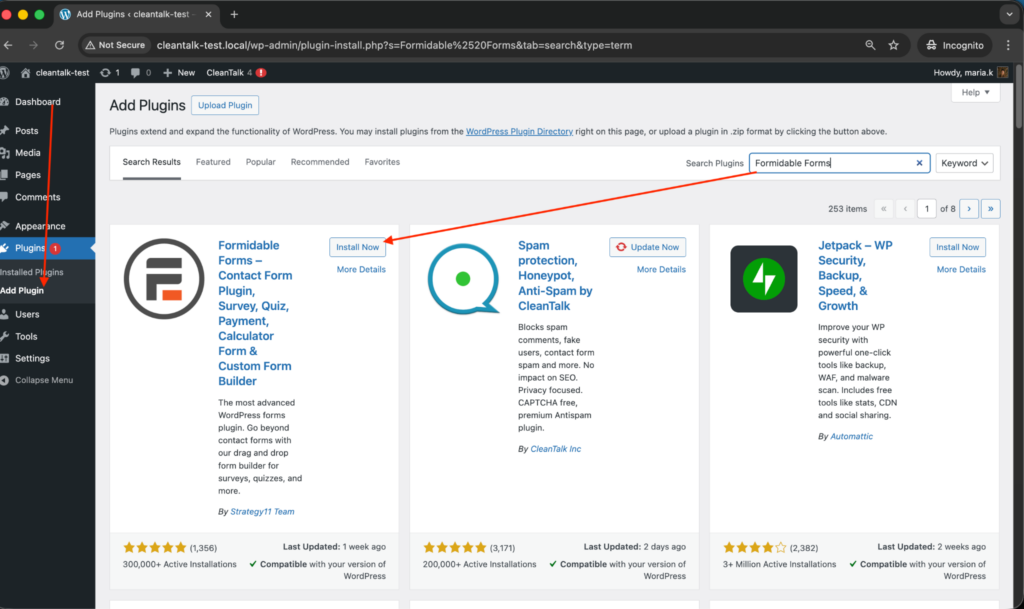
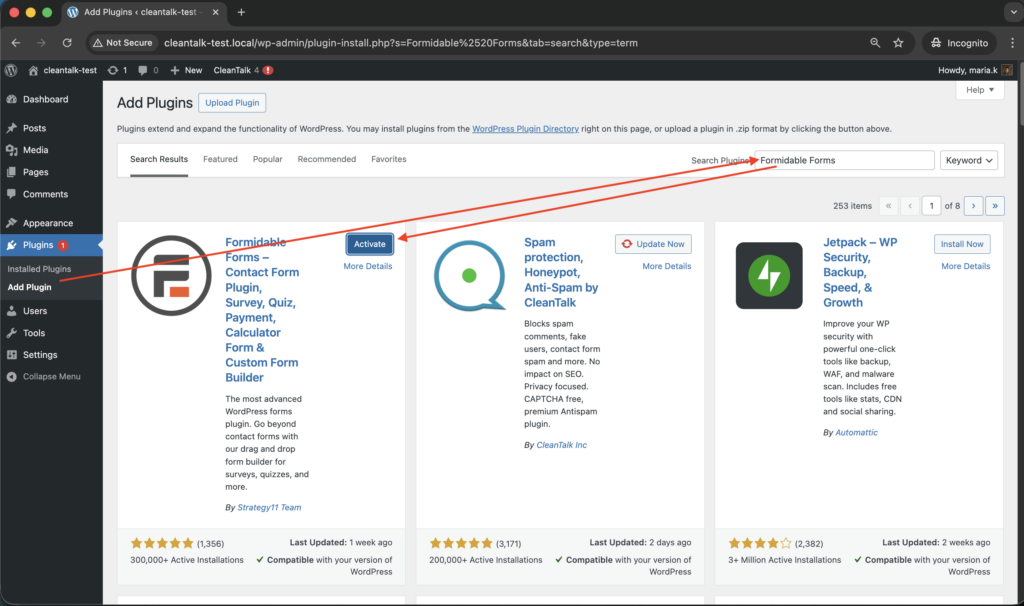
    Install the CleanTalk Anti-Spam plugin

    To install the Anti-Spam plugin, go to your WordPress admin panelPluginsAdd New.

    Then enter «СleanTalk» in the search box and click the Install button for «Spam protection, Anti-Spam, FireWall by CleanTalk».

    After installing the plugin, click the «Activate»‎ button.

    After it is done go to the plugin settings and click the «Get Access Key Automatically» button. Then just click the «Save Settings»‎ button.

    That’s all –  Contact Form 7 are now protected From this moment,CleanTalk automatically protects the  Contact Form 7 registration form (REST route /wp-json/Contact Form 7press/v1/users/), and the Add Listing form used to submit new listings.
    You don’t need to paste any shortcodes – just use  Contact Form 7 as usual, and CleanTalk will filter spam in the background.

    Once that is done, the site has an anti-spam layer working in the background. This helps reduce suspicious form activity before unwanted messages ever reach Flamingo.

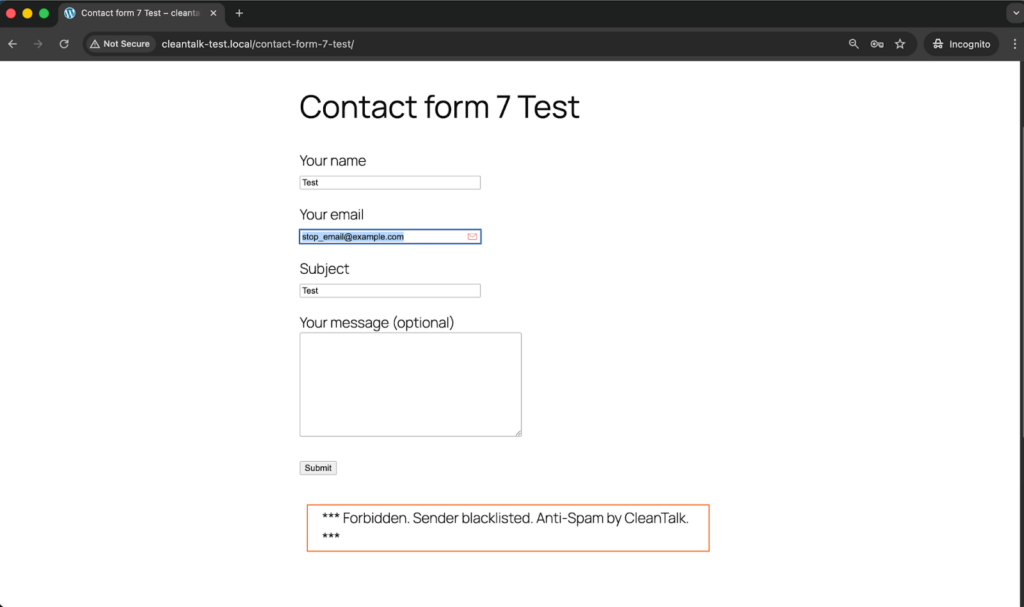
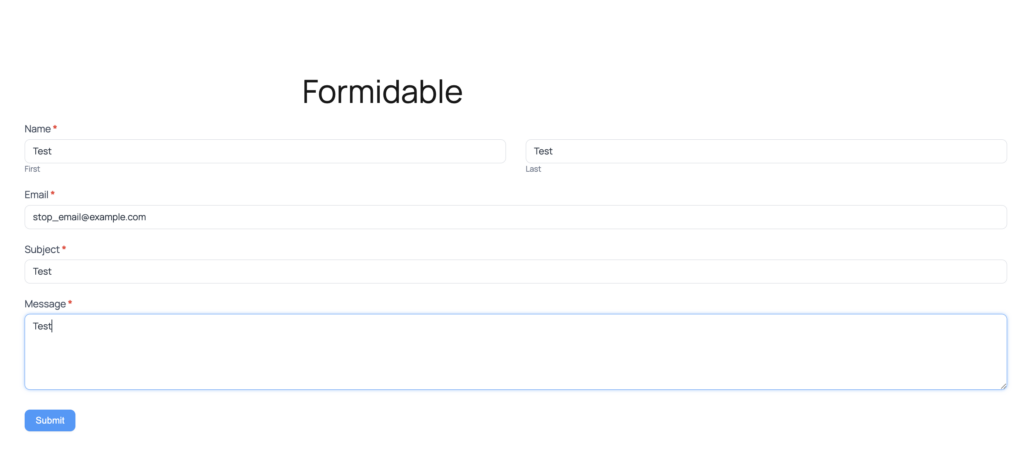
    Check if spam protection works with Contact Form 7 (CF7)

    The best way to text the spam protection by using a test email,

    stop_email@example.com

    1. Open a page with a Contact Form 7 (for example, the registration popup or the Add Listing form) in an Incognito / private browser tab.
    2. Fill out the Contact form using stop_email@example.com as sender’s email.
    3. Send the form.
    4. You should see a message from the Anti-Spam plugin confirming that a spam submission was blocked.

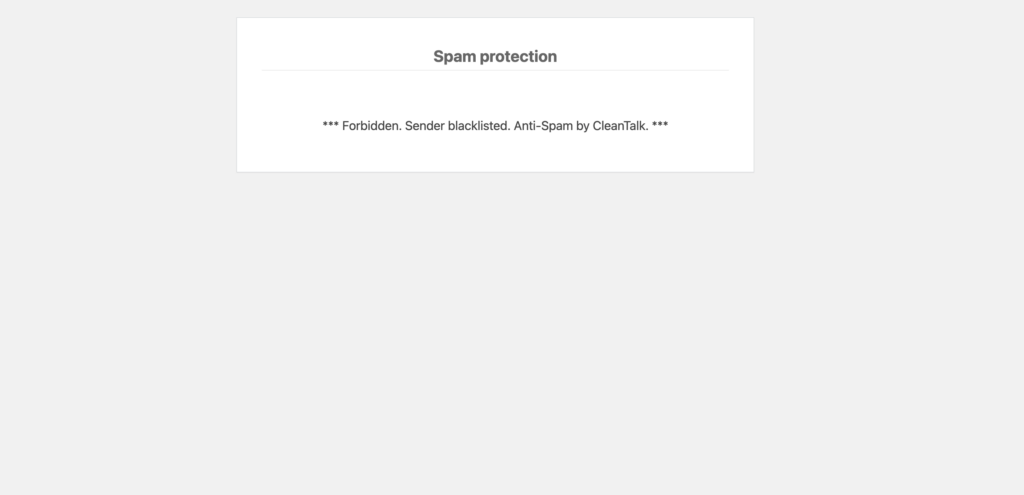
    *** Forbidden. Sender blacklisted. Anti-Spam by CleanTalk. ***

    This double check is important because visible blocking on the page and actual storage behavior in WordPress are not always the same thing.

    Cloud Dashboard and Monitoring

    Blocking spam is only part of the job. Good protection also gives you visibility.

    In the anti-spam dashboard, it is useful to review:

    • sender IP and email
    • submission time
    • source page
    • request status: denied or approved 
    • the likely reason a message was flagged

    This makes it easier to spot recurring spam waves, identify low-quality traffic sources, and understand which forms are attracting the most junk.

    That kind of visibility helps you improve the setup over time instead of relying on guesswork.

    Akismet, Cloudflare Turnstile, Google reCAPTCHA, and Disallowed List

    Besides CleanTalk, there are several other methods that can strengthen Flamingo and Contact Form 7 protection.

    Akismet

    Akismet is a familiar option for WordPress users and works well as an additional spam-filtering layer for Contact Form 7.

    It is especially useful when:

    • you want a Contact Form 7-compatible filtering option
    • Akismet is already active elsewhere on the site
    • you want another signal alongside your main anti-spam layer

    That said, Akismet works better as part of a broader setup than as the only safeguard on a website with serious spam traffic.

    Cloudflare Turnstile

    Turnstile is one of the best frontend protection options for modern contact forms.

    Its main advantages are:

    • little or no visible friction for visitors
    • a smoother experience than traditional image-based CAPTCHA flows
    • a good fit for contact pages where usability matters

    For Contact Form 7 forms connected to Flamingo, Turnstile is often the most user-friendly additional layer.

    Google reCAPTCHA

    Google reCAPTCHA is still one of the most familiar anti-bot tools.

    Many WordPress users consider it first simply because it is widely recognized and easy to understand.

    At the same time, in a modern Contact Form 7 and Flamingo setup, reCAPTCHA often makes more sense as an optional supporting tool than as the foundation of the whole protection strategy.

    Disallowed List

    The WordPress disallowed list remains useful for recurring, predictable spam patterns.

    It works best when:

    • the same keywords appear again and again in junk messages
    • certain IP-based sources need to be blocked
    • you want a quick manual rule for repeated spam patterns

    It is not enough on its own, but it can be a useful reinforcement layer when spam follows recognizable patterns.

    Why Stored Spam Creates a Bigger Headache Than Expected

    With Flamingo, spam does not just interrupt the moment. It stays behind.

    Once junk submissions start getting stored, they can:

    • clutter the Inbound Messages view
    • make legitimate inquiries harder to find
    • create unnecessary database noise
    • slow down support or sales workflows that depend on stored submissions

    That is one of the main reasons Flamingo spam protection deserves attention. Flamingo is meant to preserve valuable communication. But when filtering is weak, the same storage advantage turns into an organizational burden.

    Comparison of Anti-Spam Approaches for Flamingo

    SolutionMain roleStrengthsLimitationsBest use case
    AkismetNative Contact Form 7 spam filteringFits well into Contact Form 7 workflows, familiar to WordPress users, useful as an additional layerNot strong enough on its own for websites with heavy spam volumeSites that want a Contact Form 7-compatible filtering option
    Cloudflare TurnstileLightweight frontend verificationLow friction, strong user experience, suitable for conversion-focused formsNeeds proper implementation and does not replace broader filteringWebsites that want a user-friendly frontend protection layer
    Google reCAPTCHAFamiliar anti-bot verificationWidely recognized, easy to understand, adds a visible anti-bot checkpointCan introduce friction and is not always the best modern defaultSites that specifically prefer Google-based protection
    Disallowed listManual rule-based spam filteringUseful for repeated spam phrases and IP patterns, easy to update manuallyLimited on its own and requires ongoing maintenanceSituations where recurring spam follows recognizable patterns
    CleanTalkCore site-level anti-spam filteringStops suspicious submissions before they reach Flamingo, reduces junk storage, works quietly in the backgroundUsually strongest when combined with other layersWebsites that want the main anti-spam layer to protect Flamingo message quality

    In practice, the most reliable setup is layered: site-level filtering first, lightweight frontend verification second, and manual rules such as disallowed list on top where they add value.

    Frequently Asked Questions

    Flamingo is filling up with spam messages. Where should I begin?

    Start by looking at the form flow, not the storage screen.

    Review whether Contact Form 7 has any real anti-spam protection enabled, check if Akismet or Turnstile is active, and make sure suspicious submissions are being filtered before they are written to the database.

    If junk keeps appearing in Flamingo, the weak point is usually earlier in the process.

    Contact Form 7 seems to be working normally, so why does Flamingo still contain spam?

    Because Flamingo simply saves what gets accepted.

    If an unwanted message slips through the form layer, Flamingo may store it like any legitimate inquiry. That is why protection has to happen before the submission reaches storage, using tools such as CleanTalk, Akismet, Turnstile, or disallowed list rules.

    Can spam and legitimate inquiries be separated inside Flamingo?

    Yes, depending on how the filtering workflow is configured.

    With the right anti-spam tools in place, suspicious entries and genuine submissions can be handled more clearly instead of ending up mixed together in one crowded stream of messages.

    We installed Turnstile, but suspicious messages are still being saved. What could be wrong?

    In many cases, the problem is not the idea but the implementation.

    Turnstile helps reduce automated abuse, but it does not replace deeper filtering, email checks, or manual blocking rules. If junk is still getting through, review whether backend verification is configured correctly and whether another filtering layer is needed.

    Contact Form 7 sometimes shows an orange border warning. What usually triggers that?

    That warning typically means one of the spam protection mechanisms marked the submission as suspicious.

    In other words, the system did not treat it as a regular inquiry. If this happens often, it is worth checking which layer is being triggered and whether the settings are too aggressive or working exactly as intended.

    What setup tends to work best for Flamingo in 2026?

    For most websites, the strongest setup is a layered one.

    A site-level anti-spam filter should do the main screening, a user-friendly frontend solution such as Turnstile or a Contact Form 7-compatible layer such as Akismet can add another checkpoint, and disallowed list rules can help handle recurring spam patterns you already recognize.

    Why does Flamingo spam become harder to manage over time?

    Because saved junk does not clear itself.

    Once spam starts accumulating, it makes the inbox harder to navigate, hides real inquiries among irrelevant messages, and creates more manual cleanup work inside WordPress. The longer it continues, the more it affects daily workflow.

    What should I do if real inquiries are being blocked together with spam?

    Start by reviewing your filters one by one.

    Look at your keyword rules, test your frontend protection settings, and check whether the anti-spam layer is acting too aggressively. In most cases, the solution is not removing protection altogether, but adjusting the combination of rules so legitimate messages can pass more reliably.

    Recommended Anti-Spam Stack for Flamingo (2026)

    Use caseRecommended setupWhy it works
    Standard contact websiteCleanTalk as the main anti-spam filtering layer + Contact Form 7 disallowed list + optional AkismetHelps block obvious spam, reduce junk messages, and keep Flamingo inboxes cleaner
    Business website with important inquiriesCleanTalk as the main anti-spam filtering layer + Cloudflare Turnstile + Flamingo storageReduces bot submissions while preserving important messages in the database
    High-traffic contact pagesCleanTalk as the main anti-spam filtering layer + Turnstile or Akismet + manual disallowed list updatesBalances spam protection with usability and adds extra control over recurring spam patterns
    Privacy-sensitive projectsCleanTalk as the main filtering layer + Cloudflare Turnstile + stricter form rulesAdds protection while keeping a more privacy-friendly setup
    Contact Form 7 sites already using Flamingo heavilyCleanTalk + Akismet + Flamingo spam review workflowHelps reduce junk storage while preserving visibility into stored submissions

    Final Thoughts

    No single anti-spam tool can stop every type of junk submission that reaches Flamingo.

    Some solutions are better at reducing bot traffic. Others are more useful for identifying suspicious message patterns or adding a lightweight verification layer without hurting usability. The most dependable approach is to combine several methods so that each one covers a different part of the problem.

    For most WordPress websites using Contact Form 7 and Flamingo, the strongest setup is to use a site-level anti-spam layer such as CleanTalk, add a Contact Form 7-compatible control such as Akismet or Cloudflare Turnstile, and apply disallowed list rules where recurring manual patterns appear.

    This combination helps keep bad submissions out of your saved messages, reduces unnecessary database clutter, and makes genuine inquiries easier to find and manage.

    Because Flamingo stores messages submitted through Contact Form 7, it makes sense to protect both layers together. If you want a more detailed guide focused specifically on Contact Form 7, read also:https://blog.cleantalk.org/how-to-protect-contactform7-from-spam/

    By this point, most spam issuesin your Flamingo inbox should be significantly reduced.

    If they are not, review the current setup and make sure you are not depending on only one method. In most cases, the answer is not to store messages more carefully after the fact, but to filter more effectively before they are ever saved.

    Stop spam before it reaches your Flamingo inbox

    Create your CleanTalk account and start blocking spam messages sent through Contact Form 7 and stored in Flamingo — no CAPTCHA challenges and no extra friction for real visitors.

    CleanTalk Account

    No credit card required • Setup takes less than a minute • Your temporary password will be sent by email.

  • Formidable Forms Spam Protection in 2026

    Formidable Forms Spam Protection in 2026

    If you use Formidable Forms on a WordPress website, spam will eventually become a real issue. It usually starts with a few junk submissions in a contact form, quote request form, survey, quiz, or registration form. Then it turns into fake leads, bot traffic, meaningless messages, and wasted admin time.

    That is not a Formidable-specific flaw. It is a normal consequence of running public-facing forms on a visible website. The more accessible the form is, the more often bots and abusive senders will try to submit it. That is why Formidable Forms spam protection should be configured from the start, not only after your inbox is already full of garbage entries.
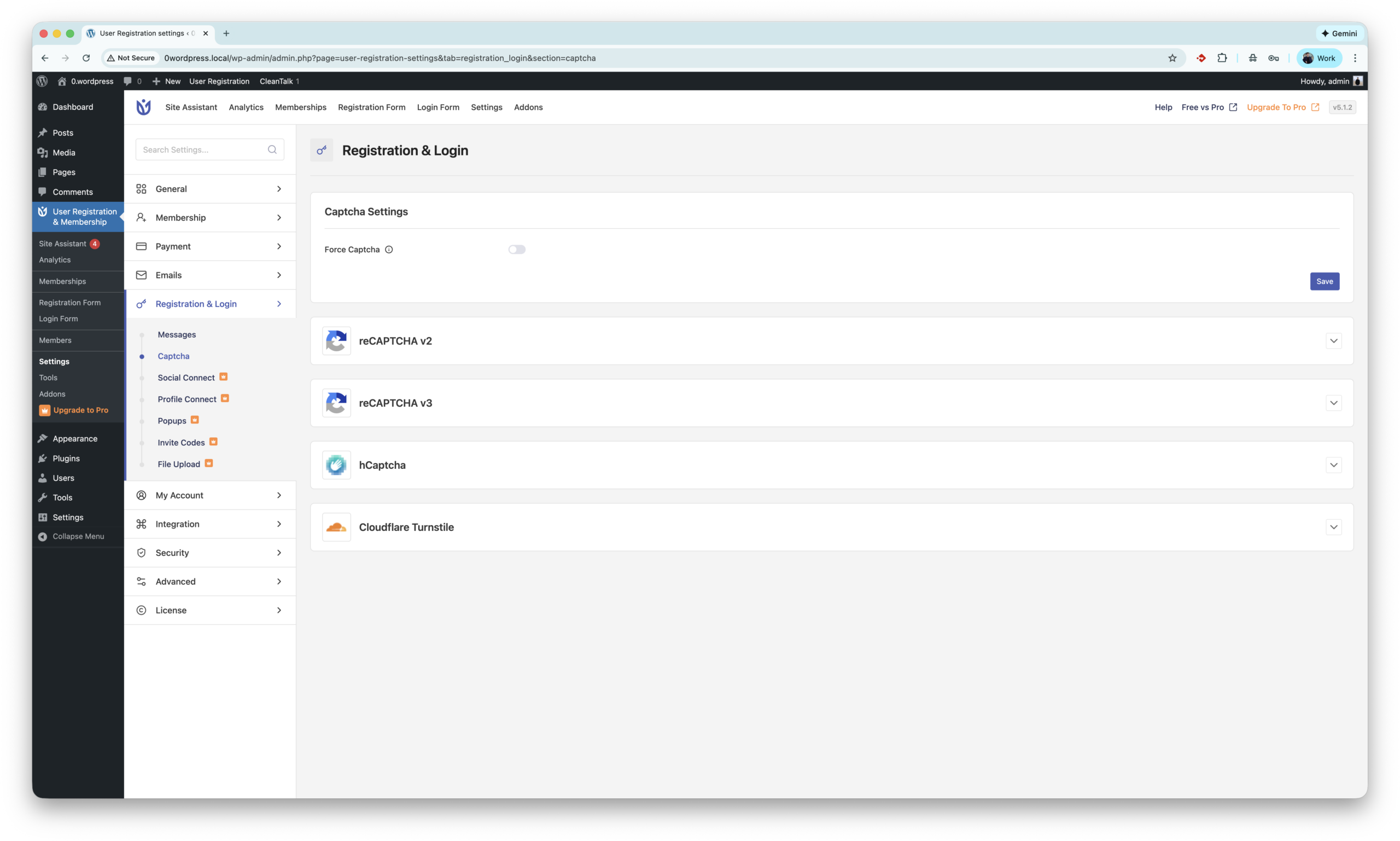
    This guide explains how to build a practical layered setup for Formidable spam protection. The main solution here is the Anti-Spam plugin by CleanTalk, and then we will also cover additional tools such as built-in anti-spam options, honeypot protection, reCAPTCHA, hCaptcha, Cloudflare Turnstile, and other WordPress anti-spam plugins.

    By the end of this article, you will know how to stop most fake submissions in Formidable Forms without making your forms harder for real visitors to use.

    formidable logo

    Formidable Forms – WordPress Form Builder Plugin

    First, let’s take a quick look at Formidable Forms itself.

    Formidable Forms is a WordPress form builder used for much more than a basic contact form. Website owners use it to create contact forms, lead forms, quote request forms, surveys, quizzes, registration flows, calculators, payment forms, and other custom workflows. That flexibility is exactly why the plugin is attractive for businesses, agencies, and content-driven sites.

    But that same flexibility also increases spam exposure. The more public forms a website has, the more entry points it gives to spambots and abusive users.

    Typical Formidable spam problems include:

    • fake contact messages,
    • junk quote requests,
    • automated survey submissions,
    • low-quality leads,
    • bot-driven registration attempts,
    • repeated testing of form fields and validation logic.

    So when users search for formidable spam, they are usually not describing one single issue. They often mean a broader set of problems: fake submissions, spammy messages, junk leads, bot traffic, and abusive attempts to use public forms.

    A strong anti-spam strategy should address all of those while keeping the experience simple for legitimate users.

    As WordPress.org shows, Formidable Forms is currently used on over 300,000 websites and has 1,357 user reviews with an average rating of 4.8.

    Plugin Homepage at wordpress.org | Website formidableforms.com

    Install Formidable Forms to create contact forms, quote request forms, surveys, quizzes, registration forms, and other custom forms in WordPress.

    You can set it up in just a few easy steps:

    1. Search for the plugin in WordPress console -> Plugins -> Add Plugin -> Search -> Type ‘Formidable Form

    Search for the plugin in WordPress console

    2. Install and Activate the plugin

    Install and Activate the plugin

    3. Create your first form in WordPress console -> Formidable -> Forms -> Add New.

    WordPress console -> Formidable -> Forms -> Add New -> choose a template or start with a blank form -> add fields and settings -> Save.

    4. That’s all! Your first form is ready and Formidable Forms is now set up on your site.

    Anti-Spam plugin by CleanTalk for WordPress

    The main solution in this guide is the Anti-Spam plugin by CleanTalk.

    CleanTalk is a cloud-based anti-spam service for WordPress and other CMS platforms. Instead of making every visitor solve a challenge, it checks submissions in the background and filters spam automatically. This matters because one of the biggest weaknesses of CAPTCHA-only protection is friction: every extra test can reduce conversion rate and annoy real users.

    Here is why CleanTalk works well for Formidable Forms websites:

    • it checks submissions automatically in the background,
    • it helps protect contact, registration, survey, quote, and feedback forms,
    • it reduces fake entries before they clutter your inbox or database,
    • it does not rely on classic CAPTCHA for every visitor,
    • it gives you a cloud dashboard for reviewing decisions and fine-tuning protection if needed.

    In practical terms, this means you can keep the form experience clean for real users while filtering suspicious behavior in the background.

    For most websites, CleanTalk should be the primary spam filter, while CAPTCHA and other tools are used only as additional layers on higher-risk forms.

    According to WordPress.org, Anti-Spam by CleanTalk for WordPress has over 200,000 active installations, with 3,168 reviews and an average rating of 4.7.

    Plugin Homepage at cleantalk.org | Latest release at GitHub.com | Website cleantalk.org

    Install the CleanTalk Anti-Spam plugin

    Show Instructions

    To install the Anti-Spam plugin, go to your WordPress admin panelPluginsAdd New.

    Then enter «СleanTalk» in the search box and click the Install button for «Spam protection, Anti-Spam, FireWall by CleanTalk».

    After installing the plugin, click the «Activate»‎ button.

    After it is done go to the plugin settings and click the «Get Access Key Automatically» button. Then just click the «Save Settings»‎ button.

    That’s it! From now you know how to completely protect your HivePress from spam.

    Check if spam protection works with Formidable Forms

    The easiest way to test the setup is to use the CleanTalk test email:

    stop_email@example.com

    Use this method:Open a page with your Formidable form in an Incognito or Private browser window.

    1. Fill out the form.
    2. Use stop_email@example.com as the sender email.
    Screenshot 2026 03 21 at 19.48.18

    4. Submit the form.

    5. You should see a blocking message from the Anti-Spam plugin instead of a successful submission.

    Screenshot 2026 03 21 at 22.21.13

    If that happens, the protection is working correctly and your Formidable form is already filtering known spam submissions.

    Cloud Dashboard

    In addition, the CleanTalk Cloud Dashboard gives you more visibility into what is happening with submissions processed through the anti-spam service.

    For Formidable Forms websites, this is useful because it helps you review not only whether a submission was blocked, but also why it was blocked.

    In the dashboard, you can usually find details such as:

    • sender IP and email,
    • geolocation of the sender,
    • date and time of the submission,
    • page URL where the form was submitted,
    • cloud decision – Approved or Denied,
    • explanation for the decision,
    • tools to move the sender to Allow or Block lists.

    This is especially helpful if the site receives repeated attacks, recurring junk leads, or suspicious activity from the same sources.

    Built-in Spam Protection in Formidable Forms

    Besides CleanTalk, Formidable Forms itself can be used with built-in anti-spam measures and additional anti-abuse checks.

    These are useful, but in most real-world cases they work best as secondary protection, not as the only defense.

    Honeypot protection

    A honeypot is one of the simplest anti-spam methods. It adds hidden fields that real visitors do not interact with, but simple bots often fill automatically. When that happens, the submission can be rejected.

    Why honeypot is useful:

    • it is invisible to legitimate users,
    • it creates no extra friction,
    • it catches primitive bots efficiently.

    Why it is not enough on its own:

    • more advanced bots can bypass it,
    • it does not handle every case of fake leads or manual spam,
    • it is better as a supporting layer than as a full anti-spam strategy.

    That is why honeypot is a good addition, but not a complete replacement for a broader spam filter.

    Native anti-spam and validation options

    Form builders often include basic anti-abuse logic, validation rules, and submission checks. These can help reduce low-quality automated submissions and obvious junk entries.
    However, built-in checks are usually narrower than a dedicated anti-spam service. They may stop some bot patterns, but they do not always provide broader reputation analysis, behavior-based filtering, or cloud-level spam intelligence.

    For that reason, a layered setup works better: use Formidable’s own checks where appropriate, but keep CleanTalk as the main filter working in the background.

    reCAPTCHA, hCaptcha, and Cloudflare Turnstile for Formidable Forms

    Another common question is whether CAPTCHA should be used together with Formidable Forms.

    The answer is: yes, sometimes – but not as the only protection layer.

    CAPTCHA-style tools are most useful for higher-risk forms, such as:

    • registration forms,
    • quote request forms,
    • lead generation landing pages,
    • public surveys,
    • pages that receive repeated bot attacks.

    Google reCAPTCHA

    Google reCAPTCHA is one of the best-known anti-bot tools. It can reduce obvious automated abuse, but it also has downsides:

    • it may interrupt the user experience,
    • it can lower form completion rates,
    • some spam still passes through,
    • it does not replace a complete anti-spam strategy.

    So reCAPTCHA can help, but it should not replace your main spam filter.

    hCaptcha

    hCaptcha is often chosen by site owners who want an alternative to Google-based services. It can be useful as an additional challenge layer for forms that receive repeated automated abuse.
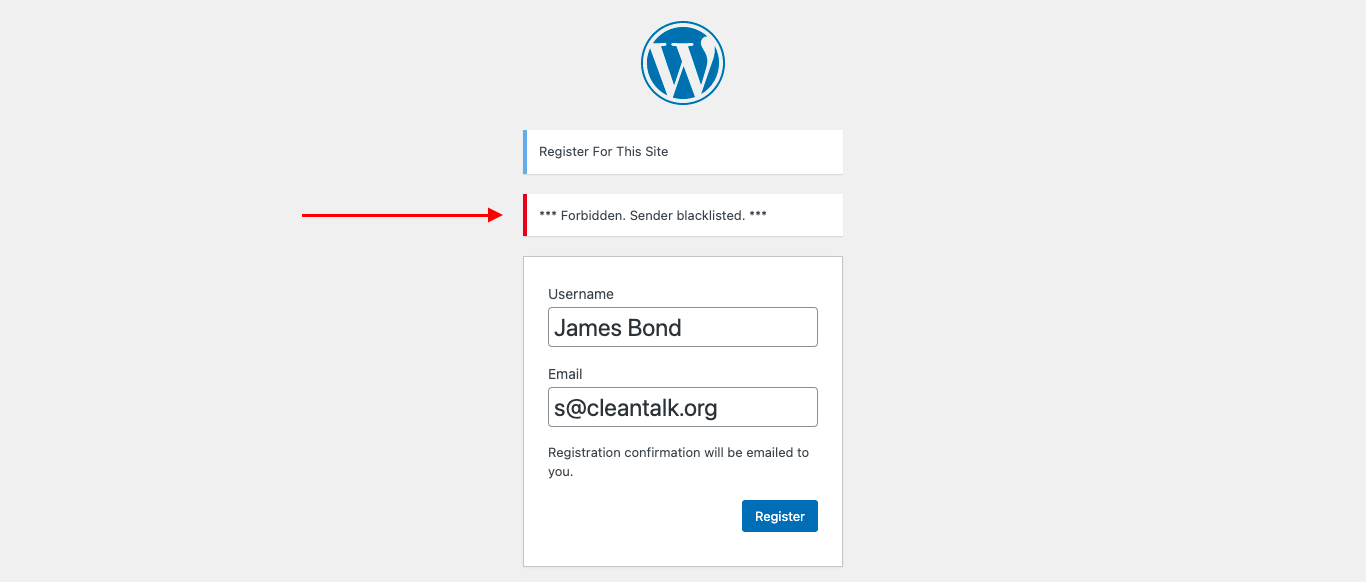
    Its role in a Formidable setup is simple: increase resistance on risky forms while CleanTalk continues filtering quietly in the background.

    Cloudflare Turnstile

    Cloudflare Turnstile is a more modern alternative that often works with less visible friction than classic CAPTCHA challenges. For websites that want extra bot protection with a lighter user experience, it can be a strong second layer.

    But the same principle still applies:

    Do not rely on Turnstile alone.
    Use it together with CleanTalk, not instead of CleanTalk.

    Akismet and other third-party anti-spam plugins

    There are also other WordPress anti-spam solutions that site owners may consider.

    Akismet

    Akismet is well known in the WordPress ecosystem and is often used for comments and basic spam filtering. On a Formidable-based website, it may help with broader site-level anti-spam needs outside the form workflow itself.

    But for a forms-heavy website, Akismet is usually better treated as a supporting layer rather than the core Formidable spam protection strategy.

    Other universal anti-spam plugins

    Some website owners also try solutions such as:

    • WP Armour,
    • OOPSpam,
    • Maspik,
    • honeypot plugins,
    • CAPTCHA-focused plugins.

    These can be useful in specific projects, especially if a website has unusual traffic patterns or several different plugins handling different submission points.

    At the same time, using too many overlapping anti-spam plugins can also create conflicts, duplicate filtering, false positives, or an unnecessarily complicated admin workflow.

    That is why the cleaner approach is usually better:

    one primary spam filter, one optional CAPTCHA layer, and extra tools only where they solve a clear problem.

    Frequently Asked Questions

    Why am I still getting fake submissions in Formidable Forms after enabling spam protection?

    Spam protection blocks most automated junk, but not every unwanted lead is a classic bot submission. Some low-quality entries may be submitted manually or by more advanced automated methods. In that situation, the best fix is layered protection: keep CleanTalk as the main background filter and add CAPTCHA or Turnstile only to the forms that receive repeated abuse.

    Can CleanTalk protect all Formidable Forms or do I need to configure each form separately?

    In most cases, CleanTalk starts checking form submissions after installation and activation, so you do not need to rebuild every Formidable form manually. That makes it convenient for websites with multiple contact forms, quote request forms, survey forms, and registration pages.

    Should I use CAPTCHA together with CleanTalk for Formidable Forms?

    For many standard contact forms, CleanTalk alone is enough. But if a site runs registration forms, quote pages, paid-traffic landing pages, or other high-risk forms, adding reCAPTCHA, hCaptcha, or Cloudflare Turnstile as a second layer is a good idea.

    What types of Formidable forms attract the most spam?

    The most common targets are contact forms, lead generation forms, quote request forms, registration forms, and surveys on public pages. These forms are easy for bots to discover and usually contain clear fields that can be abused at scale.

    How can I check whether CleanTalk is actually blocking Formidable spam?

    The simplest test is to open your Formidable form in an Incognito window and submit it using stop_email@example.com. If CleanTalk is working correctly, the form submission should be blocked and a spam warning should appear.

    Why would a legitimate Formidable form submission be blocked as spam?

    Occasional false positives can happen with any anti-spam system. This may be caused by unusual sender behavior, shared networks, VPN use, aggressive browser settings, or plugin conflicts. If needed, review the event in the CleanTalk dashboard and move trusted senders to the allow list.

    What is the best anti-spam setup for contact, quote, and registration forms built with Formidable?

    For most websites, the best setup is CleanTalk as the main spam filter, Formidable’s built-in checks or honeypot as a lightweight extra layer, and CAPTCHA only on the forms with the highest spam risk. This keeps the user experience smoother than forcing challenge-based verification everywhere.

    Why are my Formidable form notifications landing in spam folders even when submissions are blocked correctly?

    This usually points to an email delivery issue rather than a form filtering problem. If form notifications go to spam, configure SMTP for the WordPress site, avoid relying on the default PHP mail function, and make sure the sending domain has valid SPF, DKIM, and DMARC records.

    Recommended Anti-Spam Stack for Formidable Forms 

    No single anti-spam method stops every type of spam. The most reliable approach is a layered anti-spam stack, where each layer deals with a different category of abuse.

    Small business website with a contact form

    Recommended setup:

    • CleanTalk Anti-Spam as the main protection,
    • optional honeypot or built-in checks,
    • occasional dashboard review if spam appears.

    That is usually enough for a simple business website with normal traffic.

    Lead generation, quote request, survey, or registration forms

    Recommended setup:

    • CleanTalk Anti-Spam as the main protection,
    • honeypot or built-in validation as an extra layer,
    • reCAPTCHA, hCaptcha, or Turnstile on the most attacked forms.

    This setup gives better resistance against recurring bot attacks and fake leads.

    High-traffic or high-risk forms

    Recommended setup:

    • CleanTalk Anti-Spam as the main protection,
    • CAPTCHA or Turnstile on targeted forms,
    • allow/block list tuning in the dashboard,
    • checks for plugin conflicts,
    • SMTP configuration for reliable email notifications.

    This is the best option for websites that actively attract spam traffic.

    Final thoughts

    If you are trying to stop Formidable Forms spam in WordPress, the most effective approach is not to rely on one tool alone.

    A reliable setup usually looks like this:

    • CleanTalk as the main background spam filter,
    • honeypot or built-in checks as lightweight support,
    • reCAPTCHA, hCaptcha, or Turnstile only where additional verification is needed,
    • dashboard monitoring and personal lists for fine-tuning.

    That combination helps reduce fake submissions, keeps the form experience cleaner for real users, and gives you more control when spam patterns change over time.

    Stop Formidable Forms spam without frustrating your visitors

    Create your CleanTalk account and start blocking spam form submissions, fake registrations, survey spam, quiz abuse, and junk leads — no CAPTCHA challenges and no impact on real visitors.

    CleanTalk Account

    No credit card required • Setup takes less than a minute • Your temporary password will be sent by email.

  • HivePress Spam Protection in 2026

    HivePress Spam Protection in 2026

    If you use HivePress to power a directory, classifieds, or marketplace website, you will eventually face spam – fake listings, bot registrations, and junk messages.

    This guide explains how to set up HivePress spam protection using:

    • the Anti-Spam plugin by CleanTalk with direct integration for HivePress, and
    • additional tools like Google reCAPTCHA and basic moderation.

    The integration now protects both:

    • the registration form of HivePress (requests to /wp-json/hivepress/v1/users/), and
    • the Add Listing form used to submit new listings.
    hivepress logo

    HivePress – Business Directory & Classified Ads Plugin

    First, let’s take a quick look at HivePress itself and the types of sites you can build with it.

    HivePress is a free and highly flexible WordPress plugin for building any type of directory or listing website: business directory, job board, classifieds, real estate catalog, rental marketplace, and more.

    Out of the box HivePress provides:

    • listing types, categories and custom fields;
    • powerful search filters and location-based search;
    • user accounts, ratings, reviews, private messages and favorites.

    Because HivePress relies heavily on user-generated content and public forms, it quickly becomes a target for spambots. That’s why it is important to have a reliable HivePress spam protection setup from the beginning.

    As WordPress.org shows, HivePress is currently used on over 10,000 websites and has 213 user reviews with an average rating of 4.9.

    Plugin Homepage at wordpress.org | Website hivepress.io


    Install HivePress to build business directories, classifieds, marketplaces and other listing websites.

    You can set it up in just a few easy steps:

    1. Search for the plugin in WordPress console -> Plugins -> Add plugin -> Search -> Type ‘hivepress

    Untitled design

    2. Install and Activate the plugin.

    3. Add the very first listing in WordPress console -> Listings -> Add New.

    Untitled design (2)

    WordPress console -> Listings -> Add New -> add title, description, images and other fields -> Publish.

    4. That’s all! Your first listing is live and HivePress is ready to use on your site.

    Anti-Spam plugin by CleanTalk for WordPress

    The next tool we’re going to use is the Anti-Spam plugin by CleanTalk.
    Here’s a short overview:

    • CleanTalk is a cloud-based spam protection service for websites, founded in 2012.
    • It automatically blocks spam without CAPTCHAs and doesn’t interrupt the user experience.
    • Protects many types of forms: contact forms, payment forms, registrations, comments, surveys and more.
    • Stops both automated bots and human spam submissions.
    • Uses advanced filtering algorithms and a global spam detection network.
    • Detects spam based on IP address, email address and user behavior.
    • Lets you create custom filtering rules for specific cases.
    • Allows blocking or filtering by IP, email and country.
    • Works quietly in the background and is very easy to install and configure.

    According to WordPress.org, Anti-Spam by CleanTalk for WordPress has over 200,000 active installations, with 3,168 reviews and an average rating of 4.7.

    Plugin Homepage at cleantalk.org | Latest release at GitHub.com | Website cleantalk.org

    Install the CleanTalk Anti-Spam plugin

    Show Instructions

    To install the Anti-Spam plugin, go to your WordPress admin panelPluginsAdd New.

    Then enter «СleanTalk» in the search box and click the Install button for «Spam protection, Anti-Spam, FireWall by CleanTalk».

    After installing the plugin, click the «Activate»‎ button.

    After it is done go to the plugin settings and click the «Get Access Key Automatically» button. Then just click the «Save Settings»‎ button.

    That’s it! From now you know how to completely protect your HivePress from spam.

    Check if spam protection works with HivePress

    The best way to test the spam protection by using a test email,

    stop_email@example.com

    1. Open page with your form (don’t forget to add the shortcode in the page content) in Incognito browser tab.
    2. Fill out the Contact form using stop_email@example.com as sender’s email.
    3. Send the form.
    4. You should see a message from the Anti-Spam plugin confirming that a spam submission was blocked.
    Untitled design (9)
    If you see this message, it means CleanTalk successfully protects your HivePress forms (registration and Add Listing) from spam.

    Cloud Dashboard

    In addition, in the Cloud Dashboard you can find extra details regarding all submissions processed by CleanTalk, including HivePress registration and Add Listing forms:

    • IP and email of the sender, as well as the sender’s activity history across other websites connected to the CleanTalk cloud.
    • Geolocation of the sender.
    • Date and time of the submission.
      Page (URL) where the form was submitted (for example, a specific listing submission page).
    • Cloud decision – Approved or Denied.
    • Cloud explanation for the decision (e.g. blacklisted email, bad IP reputation, spam text, etc.).
    • Tools to move the sender to Block or Allow lists so you can fine-tune HivePress spam protection.

    Google reCAPTCHA, hCaptcha, and Cloudflare Turnstile

    Besides CleanTalk and the built-in HivePress tools, you can also use cloud CAPTCHA / anti-bot services together with HivePress to reduce spam and protect registration and Add Listing forms.

    Google reCAPTCHA (native HivePress integration)

    HivePress has a core integration with Google reCAPTCHA v2:

    • First, register your site in the Google reCAPTCHA admin and generate a Site Key and Secret Key.
    • Then go to WordPress console → HivePress → Settings → Integrations → reCAPTCHA and paste these keys.
    • In the same section you can select which HivePress forms to protect (for example, registration, login, listing submission).

    This helps reduce spam submissions and adds an extra security layer to HivePress forms, while CleanTalk continues to filter all submissions in the background.

    hCaptcha

    HivePress does not currently include native hCaptcha support. However, you can use hCaptcha on your site via separate WordPress plugins (for example, “hCaptcha for Forms and More”) that add hCaptcha to standard WordPress forms and some popular plugins.

    Key benefits of hCaptcha compared to reCAPTCHA:

    • Better privacy for visitors. hCaptcha collects less tracking data and is more focused on privacy and GDPR-friendly use.
    • Reduced dependence on Google services. Useful for projects that prefer not to rely on Google infrastructure for branding or compliance reasons.
    • Optional monetization. hCaptcha offers a program where site owners can earn small rewards for solved challenges, something reCAPTCHA does not provide.

    To use hCaptcha you need to:

    • obtain a Site Key and Secret Key in the hCaptcha dashboard,
    • install and configure the corresponding WordPress plugin,
    • and test that hCaptcha is correctly displayed and working on your HivePress registration and Add Listing forms (since there is no direct HivePress integration yet).

    Cloudflare Turnstile

    Cloudflare Turnstile is a modern CAPTCHA alternative that verifies users mostly in the background, without classic image puzzles.

    Turnstile can be connected to WordPress via dedicated plugins that integrate Turnstile with standard WordPress forms and some third-party plugins.

    Main benefits of Cloudflare Turnstile compared to classic reCAPTCHA:

    • Invisible verification. Turnstile usually works silently in the background, so users can submit forms without extra clicks and image challenges.
    • Higher form completion rates. With fewer interruptions, registration and listing submission forms tend to have fewer abandoned attempts.
    • Strong privacy approach. Turnstile is designed to minimize user tracking and does not rely on heavy behavioral profiling, which makes it more privacy-friendly than traditional CAPTCHA solutions.

    As with hCaptcha, you need to:

    • obtain a Site Key and Secret Key in the Cloudflare Turnstile dashboard,
    • configure the chosen WordPress plugin,
    • and verify that Turnstile is actually applied to the pages where HivePress renders registration or Add Listing forms.

    Honeypot, Akismet and third-party Anti-Spam plugins

    Additionally, let’s consider standalone plugins and anti-spam mechanics that also work for HivePress-based websites.

    Honeypot

    Honeypot is one of the simplest anti-spam mechanics against primitive spam bots. It works by adding hidden fields that are only detected and filled by bots. When a bot fills these fields, the submission is blocked automatically, while legitimate users never see any additional challenges.

    Because no CAPTCHA or interaction is required, honeypots:

    • help maintain a smooth user experience,
    • reduce friction on registration and Add Listing forms,
    • and add a lightweight extra layer of protection.

    You can enable honeypot protection via a dedicated WordPress plugin, for example WP Armour – Honeypot Anti Spam.

    Settings are available in the plugin configuration, for example:

    • WordPress console -> Plugins -> Add New -> Search -> type ‘WP Armour’
    • Install and Activate the plugin.
    • WordPress console -> Settings -> WP Armour (or the plugin’s own menu item) -> enable honeypot protection for the forms used with HivePress (registration / Add Listing pages).

    Effective on March 19th, 2026 users report that WP Armour does not protect or support HivePress. They observe spam subscriptions and accounts. Read more.

    Third-party Anti-Spam plugins

    Akismet

    Akismet Anti-Spam helps WordPress users automatically filter spam submissions by analyzing form data against its global spam detection network. It works in the background to identify suspicious content and prevent unwanted messages from reaching your inbox or database. This reduces manual moderation and helps keep comments and basic contact forms clean.

    Looking for an Akismet alternative for registrations and forms?

    For HivePress websites, Akismet can be used together with CleanTalk to:

    • filter blog comments and simple contact forms,
    • reduce low-quality submissions outside of HivePress-specific forms.

    In order to activate protection the user must:

    1. Install and activate the third-party plugin Akismet Anti-Spam.
    2. Get an API key from Akismet and enter it in the plugin settings.
    3. Enable spam checking for the content types you need (comments, contact forms, etc.).

    Typical path:

    • WordPress console -> Plugins -> Add New -> Search -> type ‘Akismet’
    • Install and Activate the plugin.
    • WordPress console -> Settings -> Akismet Anti-Spam -> enter API key and save.

    Other universal Anti-Spam plugins

    OOPSpam, Maspik, and Simple CAPTCHA Alternative are universal anti-spam plugins for WordPress that provide additional spam protection at the site level. They can help filter spam on contact forms, comments and other areas of your site that are not covered directly by HivePress integration.

    All of these solutions can be found in the search results at wordpress.org:

    WordPress console -> Plugins -> Add New -> Search -> type ‘WP Armour’ | ‘OOPSpam’ | ‘Maspik’ | ‘Simple CAPTCHA Alternative’
    Install and Activate the chosen plugin, then configure it according to its documentation.

    These third-party plugins can be used alongside CleanTalk and HivePress as optional extra layers of protection for high-risk or high-traffic projects.

    This guide explains how to protect HivePress forms using the Anti-Spam plugin by CleanTalk together with additional tools such as Google reCAPTCHA, hCaptcha, Cloudflare Turnstile, honeypot mechanisms and third-party anti-spam plugins like Akismet, OOPSpam and Maspik.

    Frequently Asked Questions (FAQ)

    Still getting spam through your HivePress forms?

    If nothing works in this guide, try a few more things:

    1. Block spammers by particular IPs, countries and email masks via Personal lists in your CleanTalk account.
    2. Enable listing moderation in HivePress, so new listings must be approved by an admin before they go live.
    3. Check for plugin conflicts – temporarily disable other anti-spam / security plugins and test HivePress registration and Add Listing forms only with CleanTalk enabled.
    4. Submit a support request to CleanTalk, attaching examples of spam submissions (IPs, emails, message text, page URLs). The support team will do their best to tune spam protection for your specific case.
    reCAPTCHA not saving in HivePs settingress or showing errors

    If reCAPTCHA keys are not saved or you see an error in HivePress → Settings → Integrations → reCAPTCHA:

    1. Make sure you are using the correct key type (usually reCAPTCHA v2 for HivePress).
    2. Double-check that the domain in the Google reCAPTCHA admin exactly matches your site.
    3. Remove any extra spaces when pasting the Site Key and Secret Key.
    4. Try temporarily disabling other CAPTCHA / security plugins and saving the settings again.
    5. If the issue persists, you can switch to an alternative solution such as hCaptcha or Cloudflare Turnstile via a separate WordPress plugin, while keeping CleanTalk as your main spam filter.
    HivePress + hCaptcha / Turnstile does not prevent spam

    If you enabled hCaptcha or Cloudflare Turnstile but spam still comes through:

    1. Do not rely on hCaptcha / Turnstile alone – always keep CleanTalk Anti-Spam enabled as the primary filter.
    2. Enable honeypot protection if it is available in your chosen security / form plugins to catch simple bots.
      Check that there are no plugin conflicts disabling CleanTalk checks or bypassing them.
    3. Use layered protection: CleanTalk + CAPTCHA (reCAPTCHA / hCaptcha / Turnstile) + HivePress moderation usually works much better than any single method.
    Emails from HivePress forms are going to spam.
    1. Check SMTP configuration and avoid sending mail via the default PHP mail() function.
    2. Install and configure an SMTP plugin, so your site sends messages through an authenticated email account (hosting mail, Gmail, or a transactional service).
    3. Verify that your domain has proper SPF / DKIM / DMARC records to improve sender reputation.
    4. After configuring SMTP, send a few test submissions from HivePress forms and confirm that notifications now arrive in the inbox, not in spam.

    Recommended Anti-Spam Stack for HivePress (2026)

    Finally, no single anti-spam tool can stop every type of spam submission. The most reliable approach for HivePress websites is a layered protection stack, where each tool blocks a different category of bots and spam behavior.

    Starting from the latest plugin update, the Anti-Spam plugin by CleanTalk includes a direct integration with HivePress. It automatically protects the HivePress registration form and the Add Listing form before a new user account or listing is created, without any extra settings inside HivePress. This integration is the core of the recommended anti-spam stack below.

    Recommended setup by site type

    Small business directory / local listings

    • CleanTalk Anti-Spam (with direct HivePress integration)
    • Optional honeypot protection in a security/form plugin
    • Basic HivePress listing moderation

    High-traffic classifieds or service marketplace

    • CleanTalk Anti-Spam (with direct HivePress integration)
    • Google reCAPTCHA or Cloudflare Turnstile on registration and Add Listing forms
    • Listing moderation for new or untrusted users

    Membership / registration-heavy HivePress sites

    • CleanTalk Anti-Spam (with direct HivePress integration)
    • Cloudflare Turnstile or hCaptcha on registration and login
    • Optional honeypot protection for additional bot filtering

    By now, most spam issues in your HivePress registration, login and Add Listing forms should be resolved. If not, sign up for a CleanTalk account or log in to your existing one and contact our support team – we will be happy to help you fine-tune spam protection for your specific case.

    Stop spam without frustrating your visitors

    Create your CleanTalk account and start blocking spam forms, surveys, polls and quiz answers — no CAPTCHA challenges and no impact on visitors.

    CleanTalk Account

    No credit card required • Setup takes less than a minute • Your temporary password will be sent by email.

  • wpForo Forum – Spam Protection

    wpForo Forum – Spam Protection

    CleanTalk added spam protection for wpForo Forum multi-layout bulletin board using direct form integration. So in case, you prefer using wpForo be sure to use the most effective Anti-Spam plugin. Read the guide below and learn 4 steps to protect your wpForo Forms from spam.

    Once the CleanTalk Anti-Spam plugin is installed it starts to protect all of the existing forms on your WordPress website. It may not only be wpForo forms but also many others.

    Download CleanTalk Anti-Spam plugin | Download wpForo Forum 

    How to install CleanTalk Anti-Spam plugin

    To install the Anti-Spam plugin, go to your WordPress admin panelPluginsAdd New.

    Then enter «СleanTalk» in the search box and click the Install button for «Spam protection, Anti-Spam, FireWall by CleanTalk».

    After installing the plugin, click the «Activate»‎ button.

    After it is done go to the plugin settings and click the «Get Access Key Automatically» button. Then just click the «Save Settings»‎ button.

    That’s it! From now you know how to completely protect your wpForo Forum plugin from spam.

    How to check spam protection for wpForo Forms

    You can test the work of Anti-Spam protection for your СonvertKit Forms by using a test email s @ cleantalk.org (without spaces). First, open the form in an Incognito browser tab. Fill in all the required form fields and send a form. After submitting the form, you will see a block message about the block on the form submission.

    If you have any questions, add a comment and we will be happy to help you.

    Create your CleanTalk account – Register now and protect your СonvertKit Forms from spam in 5 minutes

    Update

    The protection works only for website visitors, not for website admins. Be sure to test the form protection using Incognito mode.

    Additional features

    • CleanTalk protects all forms at once: comments, registrations, feedbacks, contacts, reviews.
    • Installation takes about 1-2 minutes.
    • Smart 99% protection against spambots.
    • Always online – 24/7 technical support.
    • Logs, SpamFireWall, personal lists, country filters, stop-words, and many others.

    Discover CleanTalk Anti-Spam plugin features.

  • User Registration & Membership – Spam Protection Guide in 2026

    User Registration & Membership – Spam Protection Guide in 2026

    CleanTalk has added spam protection for the User Registration & Membership WordPress plugin by WPEverest through direct form integration. If you use this plugin, be sure to enable the highly effective CleanTalk Anti-Spam solution. In this post, we also review all anti-spam options available for User Registration & Membership.

    User Registration & Membership – Free & Paid Memberships, Subscriptions, Content Restriction, User Profile, Custom User Registration & Login Builder

    First of all let’s see what this plugin is,

    User Registration & Membership by WPEverest is a powerful WordPress plugin for creating custom user registration forms, login pages, and membership websites without coding. It features a drag-and-drop form builder, user profile management, content restriction, and payment integrations for subscription-based sites. Ideal for communities, online courses, and client portals, the plugin helps website owners manage users and memberships efficiently while improving user experience.

    According wordpress.org, this plugin is installed on 60,000+ sites. All features of Anti-Spam plugin by CleanTalk for WordPress.

    Installing User Registration & Membership

    There are few steps to be this plugin installed,

    1. Go to WordPress console -> Plugins -> Add plugin, type ‘user’.
    2. Install ‘User Registration & Membership’ by WPEverest and activate the plugin.
    3. Next you see a setup screen, that can be skipped on this moment.
    4. That’s all the plugin is installed!

    On the next steps we work with page YOUR-SITE.COM/registration/.

    By the if you want place the registration form on another page,

    1. Follow to WordPress console -> User Registration & Membership -> Registration form.
    2. Copy shortcode like this [user_registration_form id=”8″] from the right/top corner of screen and place on any other page you want to.

    Anti-Spam plugin by CleanTalk for WordPress

    In beginning a few words about the plugin that we are going to use against spam,

    CleanTalk Anti-Spam plugin for WordPress automatically protects your website from spam comments, registrations, contact forms, and fake orders without using CAPTCHA. It uses cloud-based spam detection and real-time databases to block bots in the background while keeping the experience smooth for legitimate visitors.

    According wordpress.org, this plugin is installed on 200,000+ web sites. To install the plugin please follow this guide.

    The next step is testing the anti-spam protection.

    How to check spam protection for User Registration & Membership

    We are going to test protection and the most important step in this process to do it as a regular visitor, not as as authorized user/administrator in WordPress console!

    Follow this,

    1. Jump to YOUR-SITE.COM/registration/ in incognito mode in your browser.
    2. Fill up the form using test email address s@cleantalk.org. This is a service email, using which do not cause block listing your IP in CleanTalk’s cloud.
    3. You see response from the cloud like this,

    That’s all! The protection is active and ready to go. If you have any questions, add a comment and we will be happy to help you. In addition, in the Cloud Dashboard you can find extra details regarding all submissions for registration form.

    What additional anti-spam tools are available for User Registration & Membership?

    On this day on the market there are a few more tools to protect User Registration & Membership against spam bots. As well as this plugin has some built-in tools. Let’s see what we have,

    1. This plugin has built-in integration with Google reCaptcha version 2 and 3. reCAPTCHA by Google helps protect WordPress registration forms from spam by verifying that users are real people using behavioral analysis or interactive challenges. It blocks automated bot sign-ups and reduces fake registrations while allowing legitimate users to register securely.
      The settings located are here WordPress console -> User Registration & Membership -> Registration & Login -> Captcha. The Site and Secret keys are available on website.
    2. The next tool is hCaptcha. hCaptcha is a privacy-focused CAPTCHA solution that protects WordPress registration forms from spam by requiring users to complete human verification challenges, helping block automated bot sign-ups. Unlike reCAPTCHA by Google, hCaptcha places stronger emphasis on user privacy and data control, making it a popular alternative for websites that want effective spam protection with less tracking.
      The settings located are here WordPress console -> User Registration & Membership -> Registration & Login -> Captcha. The Site Key and Secret key are available on website.
    3. Next is Turnstile by Cloudflare. It protects WordPress registration forms from spam by automatically verifying visitors using browser and behavioral signals without showing CAPTCHA challenges. Unlike reCAPTCHA, Turnstile is designed to be privacy-friendly and frictionless, reducing spam registrations while keeping the signup process seamless for real users.
      The settings located are unde same path as tools before WordPress console -> User Registration & Membership -> Registration & Login -> Captcha. The Site Key and Secret key are available on website.
    4. There are also bunch of universal anti-spam plugins like Simple CAPTCHA Alternative by Elliot Sowersby, WP Armour and etc. All of them can be found on wordpress.org.

    As my research shows there is no plugins or direct integration with Akismet.

    I have questions…

    What if I don’t use User Registration & Membership plugin, but still have spam registrations (users)?

    In this case, Anti-Spam by CleanTalk is the best way to get rid of standard wordpress registration forms spam.

    Does this guide work for WPforo plugin?

    No, it does not. Read this guide instead to protect WPforo Forum against spam registrations.

    How about spam protection for s2Member plugin?

    Please use another guide in order of s2member spam protection.

    Final thoughts

    I hope this guide helped resolve all spam issues on your registration form. If not, Sign Up for an account and our CleanTalk team will be happy to help.

  • Spam Protection – S2Member Memberships

    Spam Protection – S2Member Memberships

    If you prefer to use s2Member Memberships & Subscriptions registration form be sure to use the most effective Anti-Spam plugin. Read the guide below and learn 4 steps to protect your s2Member Registration Forms from spam.

    Once the CleanTalk Anti-Spam plugin is installed it starts to protect all of the existing forms on your WordPress website. It may not only be registration forms but also contact forms and many others.

    CleanTalk Anti-Spam plugin for WordPress | Download s2Member Registration Form plugin 

    How to install CleanTalk Anti-Spam plugin

    To install the Anti-Spam plugin, go to your WordPress admin panelPluginsAdd New.

    Then enter «СleanTalk» in the search box and click the Install button for «Spam protection, Anti-Spam, FireWall by CleanTalk».

    After installing the plugin, click the «Activate»‎ button.

    After it is done go to the plugin settings and click the «Get Access Key Automatically» button. Then just click the «Save Settings»‎ button.

    That’s it! From now you How to completely protect your s2Member Registration Form from spam.

    Check the result to save your s2Member Registration Form from spam

    You can test the work of Anti-Spam protection for your s2Member Registration Form by using a test email s @ cleantalk.org (without spaces). First, open the form in an Incognito browser tab. Fill in all the required form fields and send a form. After submitting the form, you will see a block message about the block on the form submission.

    If you have any questions, add a comment and we will be happy to help you.

    Create your CleanTalk account – Register now and protect your s2Member Registration Form from spam in 5 minutes

    Update

    The protection works only for website visitors, not for website admins. Be sure to test the form protection using Incognito mode.

    Additional features

    • CleanTalk protects all forms at once: comments, registrations, feedbacks, contacts, reviews.
    • Installation takes about 1-2 minutes.
    • Smart 99% protection against spambots.
    • Always online – 24/7 technical support.
    • Logs, SpamFireWall, personal lists, country filters, stop-words, and many others.

    Discover the complete list of CleanTalk Anti-Spam plugin features here.