

Case Study: 100K Fake Emails Blocked by CleanTalk
If you run a WordPress or WooCommerce site, WordPress fake signup protection isn’t just about convenience — fake email signups waste resources, distort analytics, and can even harm your domain reputation. According to CleanTalk’s historical stats, up to 30 % of registration spam comes from non-existent email addresses.
That means thousands of “users” who will never confirm their accounts, never receive notifications, and often trigger bounce-backs that make email servers suspicious of your site.
WordPress Fake Signup Protection — Real-Time Email Validation
CleanTalk’s Email Checker verifies email existence in real time — the moment a user types or submits a form. The updated feature Non-Existent Email Notification instantly alerts users if their email is invalid, reducing failed signups and improving UX.
If the address doesn’t exist or belongs to a disposable domain, CleanTalk blocks the signup before saving it to your database — no fake profiles, no clutter.
How It Works in WordPress & WooCommerce
Once you install the CleanTalk Anti-Spam plugin , verification runs automatically during:
- User registration (WordPress + WooCommerce forms)
- Contact form submissions
- Comments and product reviews
CleanTalk routes each submitted email to its cloud service, checks validity, and returns a pass or block decision in milliseconds.
In your Dashboard, blocked signups appear with status “Fake email”, letting you track spam attempts and patterns.
Real Case: 100K Fake Emails Blocked
Over time, CleanTalk has filtered massive volumes of fake email signups across WordPress websites — around 100,000 per month for large site networks.
Common examples include:
- noemail@fake-domain.biz
- test@nonexistmail.ru
- qwerty123@mail.fake
Each could have filled your database with junk or hurt your deliverability.
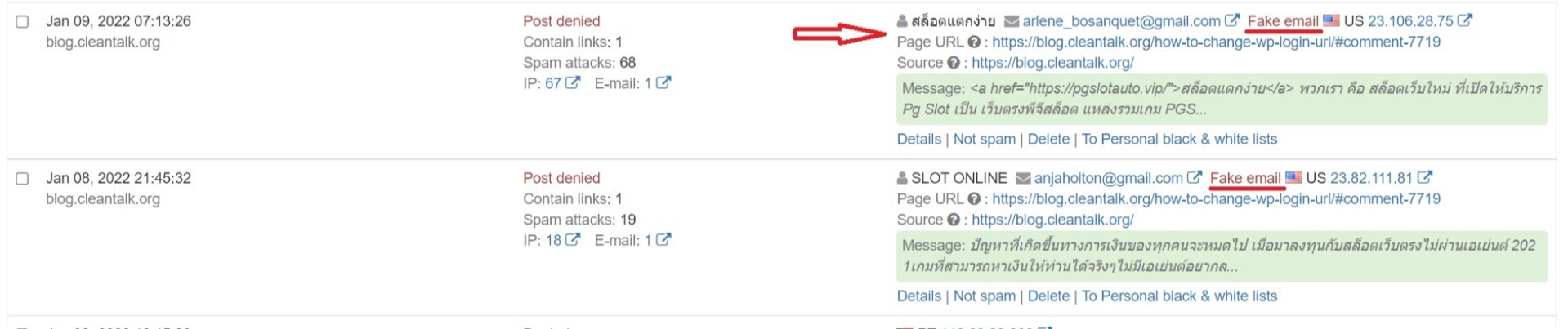 Example image: entries marked “Fake email” and “Post denied” in the Anti-Spam Dashboard.
For WooCommerce Store Owners
Fake accounts are even more damaging in e-Commerce. They:
-
Distort conversion and sales analytics
-
Trigger failed transactions and undelivered order emails
-
Lower sender reputation and email deliverability
With CleanTalk, every checkout form is validated in real time — only real customers complete orders.
Result: fewer errors, cleaner data, better performance.
Why It Matters
Fake signups lead to:
- Lost communication (no confirmation or password reset)
- CRM clutter and wrong email lists
- High bounce rates
- IP or domain blacklisting
How to Enable Fake Signup Protection
- Install the CleanTalk Anti-Spam plugin (https://wordpress.org/plugins/cleantalk-spam-protect/)
- Register at CleanTalk.org (https://cleantalk.org/register) and add your website
This function works automatically and does not require any additional settings.
Option “Show email existence alert when filling in the field” is an additional option that verifies the existence of an email address on the fly when a website visitor fills out a form. This is important because some users may make mistakes when manually entering an email address, for example, typing @gmail.com instead of @gmail.com. If a visitor makes a mistake, they will see a message in this field indicating the email address does not exist and will be able to correct the error before submitting the form.
This feature is included in the standard Anti-Spam plan — no coding or extra modules required.
Combine with Other CleanTalk Protections
For maximum defense, combine Email Validation with:
- SpamFireWall — blocks bots before they reach forms
- Security & Malware Firewall — protects from brute-force and injections
- Uptime Monitoring — alerts when your site or checkout is down
- Extra Package — 45-day logs, country blacklists, stop-words, and alerts
Continuous Updates & UX Improvements
CleanTalk’s detection engine is updated daily. Support for encrypted SMTP improves reliability, and the Non-Existent Email Notification (released Dec 2024) now gives instant feedback, reducing typos and abandoned forms.
The system evolves constantly to counter new spam tactics — you don’t need to adjust anything.
Need Help or Want to Learn More?
Have questions about WordPress fake signup protection or WooCommerce integration?
Leave a comment or create a support ticket (https://cleantalk.org/my/support).
Further reading:
Conclusion & CTA
Fake email signups silently damage your site’s data, performance, and reputation.
CleanTalk’s real-time email checker and instant user feedback deliver clean signups and trustworthy analytics.
Get started now — register your free trial and see how many fake accounts your site can block automatically.
You can leave a comment below or create a private ticket here. We will be happy to answer your questions. How to install CleanTalk Anti-Spam on your website. Create an account or log in.


Leave a Reply