

If you use RegistrationMagic forms on your WordPress website, spam registrations can quickly become a real problem. Fake users, bot-created accounts, disposable email addresses, and repeated low-quality submissions can pollute your user database and create extra moderation work.
This guide explains how to set up RegistrationMagic spam protection using CleanTalk as the main filtering layer on your WordPress website, along with additional controls such as email verification, user approval, role-based registration settings, file upload restrictions, and manual review.
This approach is relevant for websites that use RegistrationMagic for custom WordPress registration forms, frontend signup pages, login forms, event registrations, paid registrations, membership workflows, or user-management flows.

RegistrationMagic – User Registration Forms Plugin
RegistrationMagic is a WordPress user registration plugin that allows website owners to create custom registration forms, publish signup and login pages, manage user registrations, approve users, accept payments, track submissions, assign user roles, and automate registration workflows.
It can be used for:
- custom WordPress registration forms;
- frontend signup and login pages;
- membership registration;
- event registration forms;
- paid user registrations;
- WooCommerce registration flows;
- user approval workflows;
- registration forms with file uploads;
- role-based registration;
- user management and submission tracking.
As WordPress.org shows, RegistrationMagic is currently used on over 8,000 websites and has 459 user reviews with an average rating of 4.5.
Plugin Homepage at wordpress.org | Website registrationmagic.com
Why RegistrationMagic Forms Attract Spam
RegistrationMagic forms are designed to collect user data and create registration workflows. That means they are often placed on public pages where anyone can submit information.
This is exactly why spambots target them.
Typical spam cases include:
- fake user registrations;
- bot-created WordPress accounts;
- spam submissions through custom registration forms;
- disposable email addresses;
- fake event registrations;
- repeated submissions from the same IP range;
- low-quality or automated membership signups;
- spam file upload attempts;
- abuse of paid or free registration flows;
- fake users created to access restricted areas.
The problem is not only the form submission itself. If a fake user registration is accepted, it can create a real WordPress user account, pollute your user database, trigger email notifications, affect membership logic, or create extra moderation work.
That is why RegistrationMagic spam protection should work before the submission becomes a user, lead, or registration record.
Anti-Spam Plugin by CleanTalk for WordPress
The next tool we’re going to use is the Anti-Spam plugin by CleanTalk.
Here’s a short overview:
- CleanTalk is a cloud-based spam protection service for websites.
- It automatically blocks spam without CAPTCHA challenges.
- It protects many types of forms, including contact forms, registrations, comments, surveys, payment forms, and subscription forms.
- It helps stop automated bots and suspicious human spam submissions.
- It uses spam detection signals such as IP address, email address, sender behavior, and global spam activity.
- It lets website owners create custom filtering rules for specific cases.
- It allows blocking or filtering by IP, email, and country.
- It works quietly in the background and is easy to install and configure.
For RegistrationMagic, this is especially useful because registration spam can create more damage than a simple contact form message. A spam registration may become a user account, submission record, email notification, or fake member profile.
According to WordPress.org, Anti-Spam by CleanTalk for WordPress has over 200,000 active installations, with 3,168 reviews and an average rating of 4.7.
Plugin Homepage at cleantalk.org | Latest release at GitHub.com | Website cleantalk.org
Install the CleanTalk Anti-Spam plugin
Show Instructions
To install the Anti-Spam plugin, go to your WordPress admin panel → Plugins → Add New.
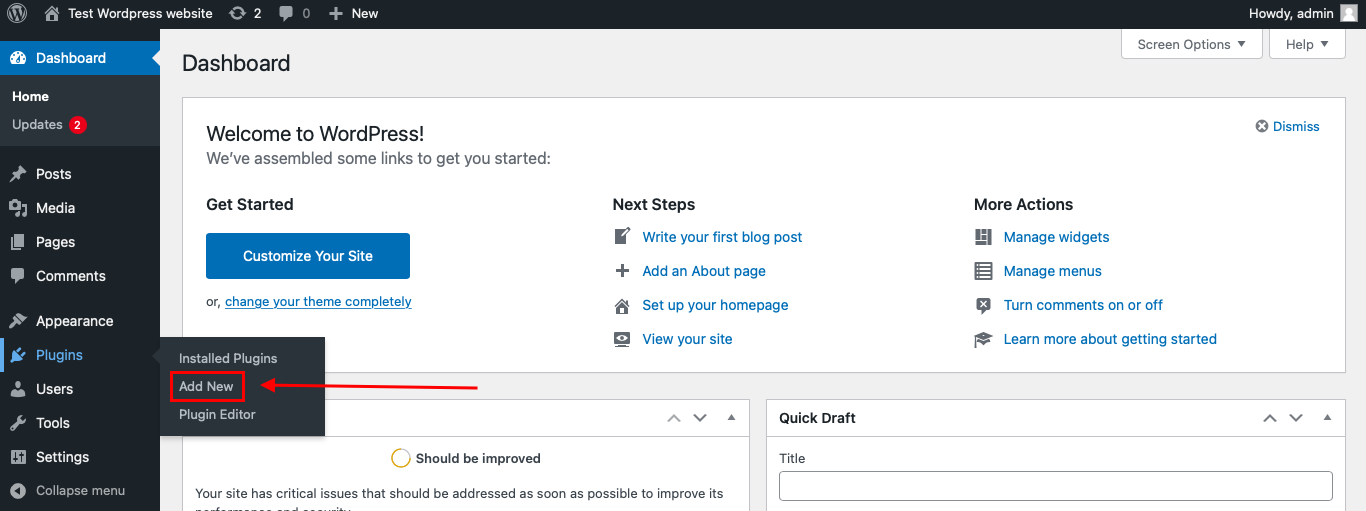
Then enter «СleanTalk» in the search box and click the Install button for «Spam protection, Anti-Spam, FireWall by CleanTalk».
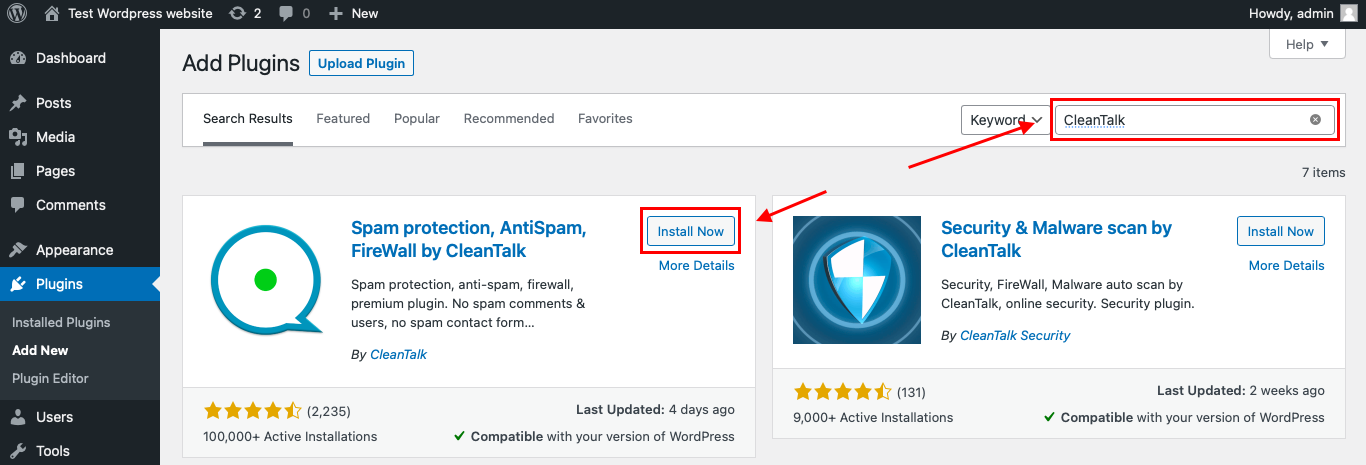
After installing the plugin, click the «Activate» button.
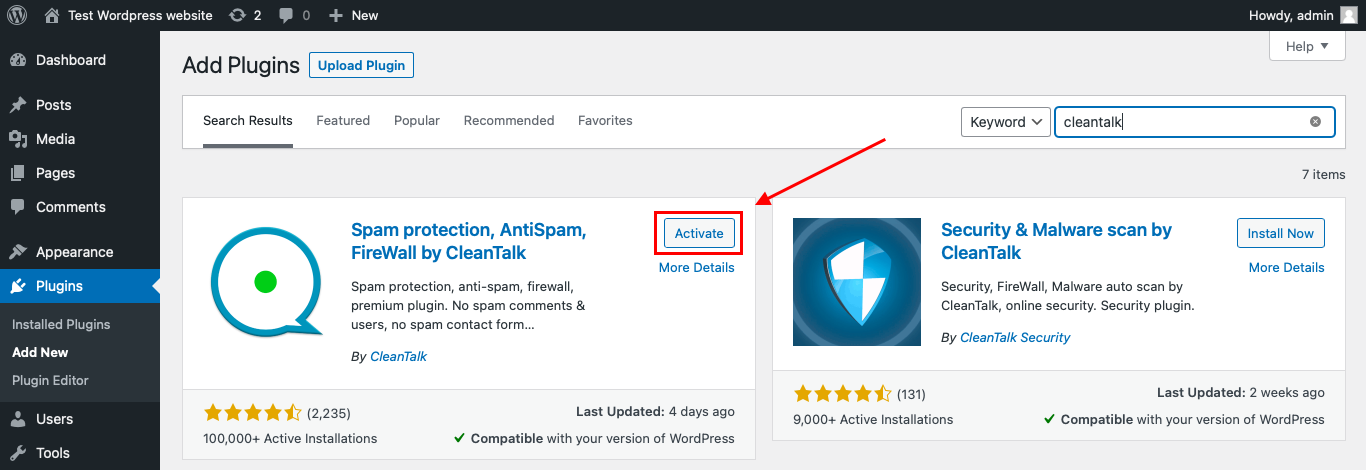
After it is done go to the plugin settings and click the «Get Access Key Automatically» button. Then just click the «Save Settings» button.
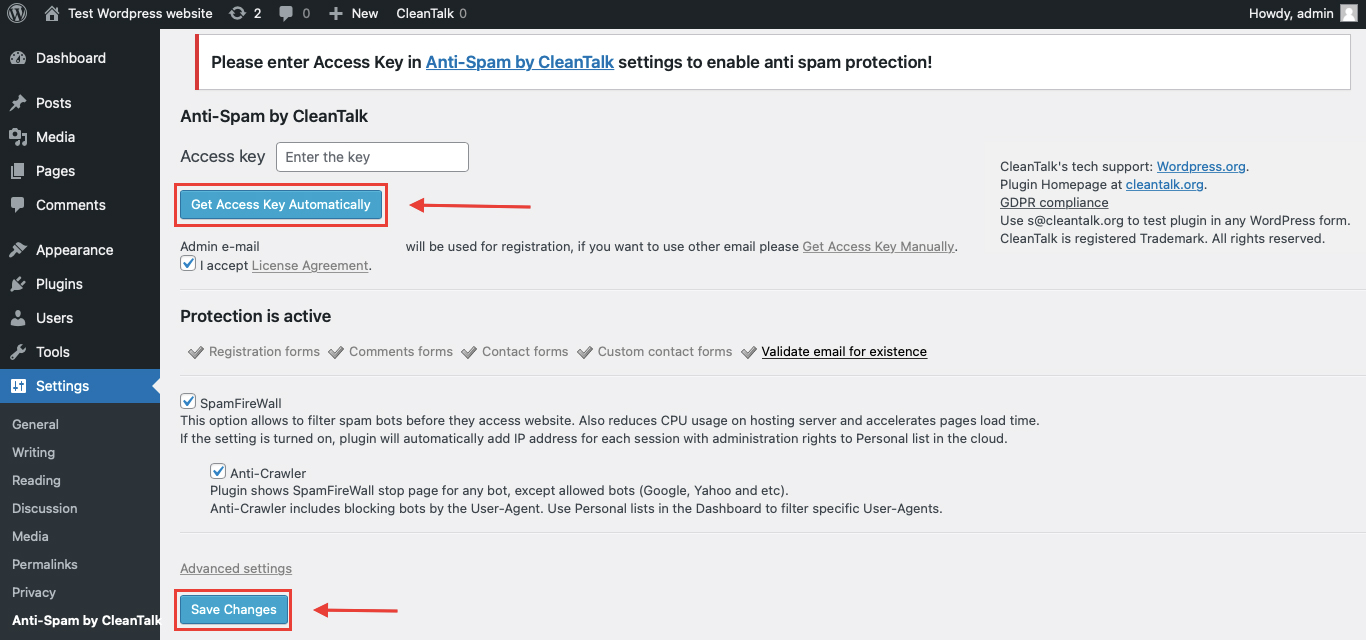
That’s it! From now you know how to completely protect your HivePress from spam.
You don’t need to rebuild your RegistrationMagic forms. Use them as usual, and CleanTalk will check suspicious submissions in the background.
How to Check Spam Protection for RegistrationMagic
You can test the work of Anti-Spam protection for your RegistrationMagic forms by using a test email:
stop_email@example.com
- Open page with your form (don’t forget to add the shortcode in the page content) in Incognito browser tab.
- Fill out the Contact form using stop_email@example.com as sender’s email.
- Send the form.
- You should see a message from the Anti-Spam plugin confirming that a spam submission was blocked.
*** Forbidden. Sender blacklisted. Anti-Spam by CleanTalk. ***
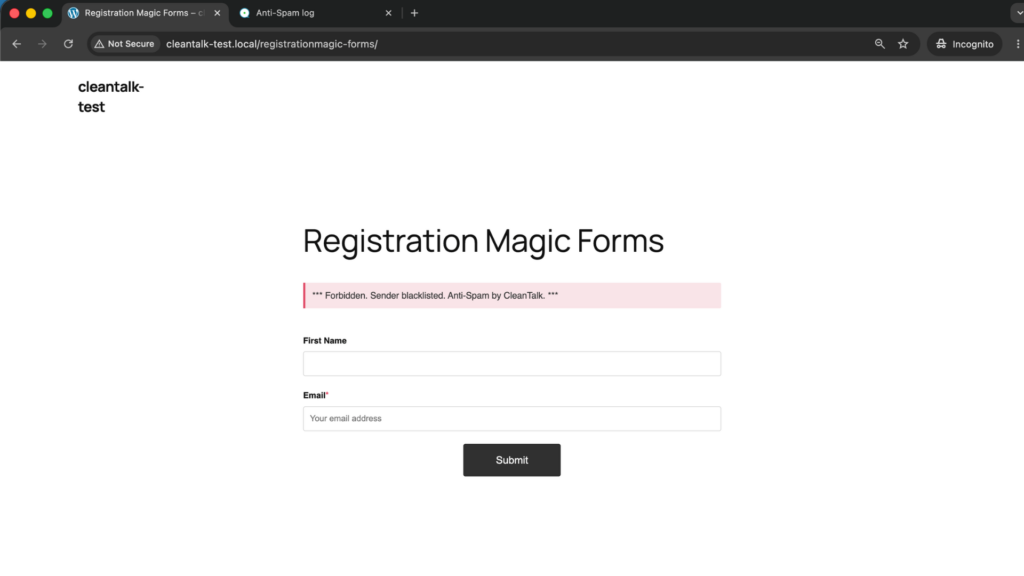
The protection works only for website visitors, not for website admins. Be sure to test the form protection using Incognito mode.
This is important because RegistrationMagic forms may behave differently for logged-in admins and normal visitors. If you test while logged into WordPress, you may not see the same result as a real visitor.
Cloud Dashboard
In addition, in the CleanTalk Cloud Dashboard, you can find extra details about submissions processed by CleanTalk, including RegistrationMagic registration forms and other WordPress forms.
The dashboard can help review:
- IP and email of the sender;
- sender activity history across other websites connected to the CleanTalk cloud;
- geolocation of the sender;
- date and time of the submission;
- page URL where the form was submitted;
- cloud decision: Approved or Denied;
- cloud explanation for the decision, such as blacklisted email, bad IP reputation, or spam text;
- tools to move senders to Block or Allow lists.
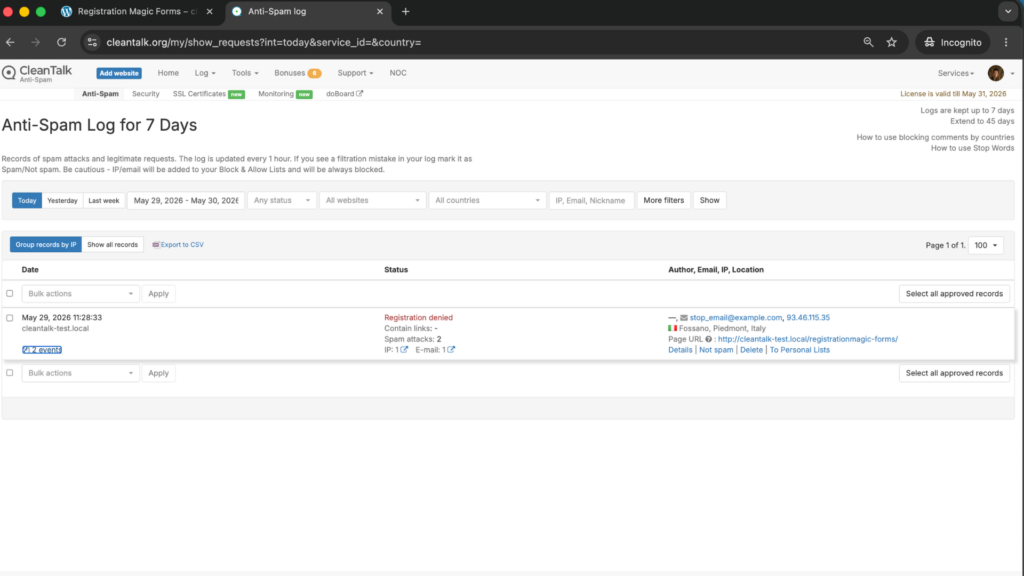
This is useful for RegistrationMagic because spam can appear not only as a visible form submission, but also as a fake user account, failed login activity, suspicious registration attempt, or repeated submission from the same source.
The dashboard helps you understand which RegistrationMagic form is being targeted and whether the problem comes from disposable emails, repeated IP addresses, suspicious text, or high-volume automated submissions.
RegistrationMagic Features That Matter for Spam Protection
RegistrationMagic is not just a basic form builder. It includes registration forms, login forms, user management, role assignment, payment forms, submission tracking, analytics, WooCommerce integrations, and approval workflows. WordPress.org describes the plugin as a tool for creating custom registration forms, publishing signup and login pages, approving users, accepting payments, tracking submissions, managing users, assigning roles, launching event registration forms, integrating WooCommerce, and automating registration processes.
That makes spam protection especially important for several areas.
User Registration Forms
If a bot submits a RegistrationMagic form, it may create a fake user account or submission record.
This can pollute your WordPress users list and make real registrations harder to manage.
Login Forms
RegistrationMagic is also connected with login-related workflows. The official RegistrationMagic website describes user login analytics, login attempts, login timelines, login success and failure data, and additional control over WordPress user registration.
This means protection should not stop at registration forms only. Login abuse, repeated attempts, and suspicious user activity should also be monitored.
Paid Registrations
RegistrationMagic can be used for payment-enabled registration forms. WordPress.org mentions accepting payments as one of the plugin’s use cases, and the official RegistrationMagic website describes payment-related premium features, including Stripe payment gateway integration and multi-payment options.
For paid registrations, spam can create fake submissions, incomplete payment records, failed transactions, and additional admin work.
File Upload Fields
RegistrationMagic supports file upload fields in premium features, including accepted file types, multiple file uploads, and a files browser for checking and downloading received files.
If file upload fields are enabled, spam protection becomes even more important. You should control accepted file types, review suspicious submissions, and avoid letting bots abuse upload fields.
Event and Course Registrations
WordPress.org says RegistrationMagic can be used to launch event registration forms and automate registration form processes.
In this case, fake submissions can block real users, distort attendance numbers, or create false demand.
Additional Protection Options for RegistrationMagic
CleanTalk should be the main anti-spam layer, but RegistrationMagic websites can also benefit from additional controls depending on the use case.
User Approval
If your website has high-value registration flows, manual or conditional user approval can help reduce the impact of fake signups.
This is especially useful for:
- membership websites;
- private communities;
- course registrations;
- event registrations;
- B2B portals;
- websites with restricted content.
Email Verification
Email verification helps reduce fake accounts created with invalid or mistyped email addresses.
It is not a full anti-spam replacement, but it improves registration quality and prevents some low-quality users from becoming active.
Role-Based Registration
RegistrationMagic allows working with user roles and registration workflows. WordPress.org specifically mentions assigning user roles and applying registration status as part of the plugin’s functionality.
This is useful, but it also means spam registrations can create users in the wrong role if the form is abused.
For sensitive user roles, review approval settings and avoid giving high-level access automatically.
Login Protection
RegistrationMagic’s official website describes login-related analytics and login activity tracking, including login attempts and login success versus failure data.
These tools can help monitor login and registration flows, especially on websites where fake accounts or repeated login attempts are a recurring issue.
File Upload Restrictions
If your RegistrationMagic form accepts files, configure accepted file extensions carefully.
Avoid allowing unnecessary file types, and review uploads from suspicious submissions before opening or processing them.
Submission Limits
For event registration, course registration, or limited-seat forms, submission limits can help control abuse.
However, limits alone do not block spam. They should be combined with anti-spam filtering so bots do not consume available slots.
Why RegistrationMagic Spam Is More Serious Than Regular Form Spam
A spam message from a contact form is annoying. But a spam registration can create a deeper problem.
With RegistrationMagic, fake submissions may affect:
- WordPress user database;
- user roles;
- registration approval queues;
- payment records;
- event or course capacity;
- membership workflows;
- email notifications;
- uploaded files;
- user analytics;
- admin moderation time.
That is why the right approach is not only to delete fake submissions later, but to stop spam before it becomes part of your registration workflow.
Comparison of Anti-Spam Approaches for RegistrationMagic
| Solution | Main role | Strengths | Limitations | Best use case |
|---|---|---|---|---|
| CleanTalk | Main site-level anti-spam filtering | Blocks suspicious submissions before they become users or records, works in the background, no CAPTCHA friction | Strongest when combined with registration controls | WordPress websites using RegistrationMagic forms |
| Email verification | Confirms user email | Reduces invalid or mistyped emails | Does not stop all bot submissions | Membership and account-based websites |
| Manual approval | Admin control | Good for private communities and high-value registrations | Requires admin time | B2B, courses, events, restricted content |
| Role-based access control | Limits user permissions | Reduces damage from fake accounts | Needs careful setup | Sites with different user roles |
| File upload restrictions | Upload safety | Reduces risk from suspicious files | Does not block form spam by itself | Registration forms with attachments |
| Submission limits | Controls capacity | Useful for events and limited seats | Bots can still consume slots without filtering | Event, class, and course registrations |
| Manual review | Cleanup and monitoring | Helps identify suspicious users after submission | Does not prevent spam | Ongoing user database hygiene |
In practice, the best setup is layered: CleanTalk first, then registration-specific controls such as approval, verification, role limits, and file restrictions.
Frequently Asked Questions – RegistrationMagic Spam Protection
Why do bots target RegistrationMagic forms?
Bots target RegistrationMagic forms because they are not just simple contact forms. They can create user accounts, send registration data, access member areas, submit event registrations, or try to enter paid and restricted workflows.
That makes RegistrationMagic forms more valuable for spam bots than a basic contact form.
Can RegistrationMagic spam create fake WordPress users?
Yes. If your RegistrationMagic form is configured to create WordPress user accounts, spam submissions can become fake users in your WordPress dashboard.
That is why spam protection should work before the registration is accepted, not only after the fake user appears.
Why is fake registration spam dangerous for membership websites?
For membership websites, fake users can pollute the member database, access restricted content if approval is automatic, consume admin time, and make user reports unreliable.
If different member roles are used, spam registrations can also create problems with access levels and permissions.
Does RegistrationMagic spam affect user roles?
It can. RegistrationMagic can be used with role-based registration workflows.
If a form automatically assigns a role after submission, a fake registration may receive that role unless the submission is blocked or manually approved first.
Should I manually approve all RegistrationMagic users?
Manual approval is useful for private communities, B2B portals, paid memberships, courses, events, and websites where every user account matters.
For simple public registration, manual approval may be too much work. In that case, CleanTalk plus email verification and proper role settings may be enough.
What should I check if fake users still appear?
First, check whether CleanTalk is active and whether the form is being tested as a visitor, not as an admin.
Then review:
- the RegistrationMagic form settings;
- whether users are created automatically;
- approval settings;
- role assignment;
- email verification;
- file upload fields;
- CleanTalk logs in the Cloud Dashboard.
This helps identify whether spam is bypassing the form, coming through another registration path, or being accepted because of the current workflow settings.
Can spam affect paid RegistrationMagic forms?
Yes. Spam can create fake payment attempts, abandoned registrations, unpaid records, or confusing submission data.
For paid registration forms, it is better to assign user roles or approve access only after successful payment confirmation.
What if my RegistrationMagic form has file upload fields?
File upload fields should be treated carefully because spam submissions may include unwanted or suspicious files.
Limit file types, set file size limits, review uploads from suspicious users, and avoid allowing file uploads on forms where they are not truly needed.
Is email verification enough for RegistrationMagic?
Email verification helps reduce fake or mistyped emails, but it is not enough as the only protection.
A bot can still submit the form, create a pending record, trigger notifications, or fill your dashboard with low-quality registrations. Use email verification together with CleanTalk and approval rules where needed.
Recommended Anti-Spam Stack for RegistrationMagic in 2026
RegistrationMagic is often used for more complex workflows than a normal form builder. That means the best anti-spam setup depends on what the form actually does after submission.
For public user registration
Use:
- CleanTalk Anti-Spam;
- email verification;
- default low-permission user role;
- regular review of new users.
This protects the basic signup flow without making registration too difficult for real users.
For membership websites
Use:
- CleanTalk Anti-Spam;
- manual user approval;
- email verification;
- restricted role assignment;
- periodic cleanup of inactive or suspicious accounts.
This is better when fake accounts could access private content or member-only features.
For event registration forms
Use:
- CleanTalk Anti-Spam;
- confirmation email;
- submission limits;
- manual review for suspicious entries.
This helps prevent bots from filling event lists or consuming available seats.
For paid registration forms
Use:
- CleanTalk Anti-Spam;
- payment confirmation before role assignment;
- manual review of failed or suspicious payments;
- restricted access until payment is completed.
This protects both the registration process and the paid access logic.
For forms with file uploads
Use:
- CleanTalk Anti-Spam;
- strict file type restrictions;
- file size limits;
- admin review before processing uploaded files.
This reduces the risk of bots using registration forms to submit unwanted attachments.
For high-risk registration pages
Use:
- CleanTalk Anti-Spam;
- email verification;
- manual approval;
- role restrictions;
- optional CAPTCHA on the most abused forms;
- monitoring through the CleanTalk Cloud Dashboard.
This setup is useful when a website is already receiving repeated registration spam.
Final Thoughts
RegistrationMagic spam should not be treated like ordinary form spam.
A fake message from a contact form is usually just an unwanted entry. A fake RegistrationMagic submission can become a WordPress user, a pending member, a false event attendee, an unpaid registration, or a record inside a user-management workflow.
That is why the main goal is not simply to reduce spam notifications. The goal is to protect the entire registration process before bad data enters the system.
For a simple signup page, CleanTalk plus email verification may be enough. For membership websites, event registrations, paid access, or forms with file uploads, it is better to add approval rules, role restrictions, payment confirmation, and careful upload settings.
The safest approach is to decide what should happen after each registration form is submitted, and then protect that exact step. If the form creates users, protect user creation. If it assigns roles, protect role assignment. If it accepts payments or files, add extra checks before access is granted.
With CleanTalk working as the first filtering layer and RegistrationMagic settings configured carefully, you can reduce fake accounts, keep the user database cleaner, and avoid turning registration forms into an entry point for spam bots.
