

TL;DR: To stop spam in MailPoet, combine its built-in captcha and double opt-in with a cloud anti-spam filter. CleanTalk Anti-Spam checks every MailPoet subscription in the background and blocks spam bots invisibly – no CAPTCHA, no puzzles, no checkboxes – while protecting registrations, comments and WooCommerce on the same site. reCAPTCHA, hCaptcha and Turnstile add a visible challenge layer for high-risk forms. For most WordPress sites, an invisible cloud filter blocks more spam with less friction than CAPTCHA alone. Plans start at $12 per site/year with a free 7-day trial.

MailPoet spam is a deliverability problem, not just an inbox problem
MailPoet is one of the few plugins that handles the whole newsletter workflow inside WordPress: subscription forms, list management, campaign editor and sending. That is exactly why it became a default choice for small businesses, and in 2026 popularity also means exposure. Every public subscription form is an open endpoint that accepts an email address, and bots find those endpoints faster than real readers do.
The damage from MailPoet spam is different from ordinary contact form spam. A spam message in your inbox is annoying. A spam subscriber is expensive: it sits in your list, receives every campaign, bounces or lands in a spam trap, and slowly destroys the sender reputation you need for the rest of your subscribers. MailPoet is direct about the consequence – if your account collects too many invalid addresses or complaints, sending through the MailPoet Sending Service is paused.
There is a second pattern that hits newsletter forms specifically. Attackers use unprotected subscription forms as a weapon: they submit thousands of other people’s addresses, and those people receive confirmation emails they never asked for. Your domain ends up looking like the source of the abuse.
As WordPress.org shows, MailPoet is currently used on over 500,000 active installations and has 1,427 reviews with an average rating of 4.4.
Plugin Homepage at wordpress.org | Website mailpoet.com
Common types of spam in MailPoet
Subscription forms attract a narrow but destructive set of abuse patterns:
- Bot signups with throwaway addresses. Scripts submit generated addresses that never open anything. They inflate your list size and your bill, and they never convert.
- Spam traps and recycled addresses. These are dead mailboxes that inbox providers monitor. Mailing one is a strong signal that you did not collect your list properly.
- List bombing / subscription bombing. A form is used to sign up thousands of real people who never asked for your newsletter. The complaints land on you.
- Invalid and misspelled addresses. Not malicious, but every hard bounce lowers your delivery rate.
- Form abuse for content injection. Where a form has a name or custom text field, bots insert links and keywords hoping they will be rendered somewhere in your admin or in a notification email.
- Competitor and prank submissions. Manual, low-volume, and impossible to catch with a rate limit.
The common thread: none of these are stopped by simply making the form harder to submit. They are stopped by knowing something about the sender before the address enters your list.
Official anti-spam options and integrations in MailPoet
MailPoet ships more built-in protection than most subscription plugins, and it is worth turning all of it on.
- Built-in CAPTCHA. MailPoet describes it as a zero-configuration CAPTCHA: no keys, no Google account. Set it in MailPoet -> Settings -> Advanced, under the section for protecting your forms against spam signups.
- Google reCAPTCHA. MailPoet supports reCAPTCHA v2 in both variants: the “I’m not a robot” checkbox and the invisible badge. It requires an API key pair from Google.
- Cloudflare Turnstile. The privacy-friendly challenge alternative, configured in the same Advanced tab with its own site and secret tokens.
- Automatic rate limiting. MailPoet enforces a delay between repeated signups from the same IP address. It runs regardless of your captcha choice and cannot be disabled.
- Double opt-in (signup confirmation). The single most valuable setting on this list. A subscriber is not added to your active list until they click a link in a confirmation email, which means bot addresses and bombed addresses never become deliverable subscribers.
Two limits are worth naming honestly. First, all of the above are challenges or delays – none of them look at who is submitting. A bot that solves a challenge is treated exactly like a reader. Second, double opt-in protects your sending reputation but does not stop the confirmation emails from being sent in the first place, which is what makes subscription bombing possible.
If your main goal is to protect MailPoet without adding CAPTCHA challenges, CleanTalk can be used as a Google reCAPTCHA alternative that filters spam submissions in the background.
CAPTCHA options in MailPoet
Because MailPoet gives you three challenge types, it is worth being deliberate about which one you use and where.
| Challenge | Setup effort | Visitor friction | Notes |
| MailPoet built-in captcha | None, no keys required | Medium – an image or phrase step | Good default for a low-traffic form |
| reCAPTCHA v2 checkbox | Google keys required | High – an explicit click | Most visible; noticeably hurts signup rate |
| reCAPTCHA v2 invisible | Google keys required | Low most of the time | Falls back to a challenge on suspicion |
| Cloudflare Turnstile | Cloudflare keys required | Low | Privacy-friendly, still a challenge, not a filter |
The practical rule for newsletter forms: friction on a subscription form is more expensive than friction on a contact form. Someone filling out a contact form has a reason to push through a puzzle. Someone casually subscribing does not, and a visible challenge is where a good share of them quietly leave. That is the argument for keeping challenges as a targeted tool rather than a default on every form.
Best ways to stop spam in MailPoet
A layered setup that costs you almost no conversion:
- Turn on double opt-in. Non-negotiable for any list that you actually send to. It keeps unconfirmed addresses out of your sending.
- Add an invisible cloud filter in front of the form. This is the layer that evaluates the sender – IP reputation, email reputation, submission behaviour – instead of asking the visitor to prove something.
- Keep MailPoet’s built-in captcha or Turnstile ready for high-risk pages. A giveaway landing page or a form that is being actively targeted can justify a visible challenge.
- Watch your list hygiene. Regularly review unconfirmed subscribers and bounced addresses, and remove them. A clean list is the cheapest deliverability improvement available.
- Protect the rest of the site too. Most sites running MailPoet also run WooCommerce registration, comments and a contact form. Spammers that find one open endpoint try the others.
Comparison table: MailPoet built-in protection vs CleanTalk
Here is how the main anti-spam options for MailPoet compare:
| Solution | Best for | Pricing | Main limitation |
| CleanTalk Anti-Spam | Invisible, site-wide protection across forms, signups and WooCommerce | From $12/site/year; free 7-day trial | Cloud service; paid after trial |
| MailPoet built-in captcha | A quick baseline on a single subscription form | Free with MailPoet | A challenge for the visitor; no sender reputation data |
| Google reCAPTCHA | High-risk forms where a challenge is acceptable | Free | Adds friction; can hurt conversion; bots bypass it |
| Cloudflare Turnstile | Lighter, privacy-friendly CAPTCHA | Free | A challenge, not a content filter |
In short: use CleanTalk as the invisible baseline filter, and add reCAPTCHA, hCaptcha or Turnstile only on your highest-risk forms.
Anti-Spam plugin by CleanTalk for WordPress
The next tool we’re going to use is the Anti-Spam plugin by CleanTalk.
CleanTalk is a cloud-based anti-spam service for WordPress and other platforms. Instead of showing visitors a puzzle, it analyzes each submission server-side against a constantly updated database of known spammers, spam patterns, and behavioral signals, then silently blocks the bad ones.
Here’s a short overview:
- CleanTalk is a cloud-based spam protection service for websites, founded in 2012.
- It automatically blocks spam without CAPTCHAs and doesn’t interrupt the user experience.
- Protects many types of forms: contact forms, payment forms, registrations, comments, surveys and more.
- Stops both automated bots and human spam submissions.
- Uses advanced filtering algorithms and a global spam detection network.
- Detects spam based on IP address, email address and user behavior.
- Lets you create custom filtering rules for specific cases.
- Allows blocking or filtering by IP, email and country.
- Works quietly in the background and is very easy to install and configure.
According to WordPress.org, Anti-Spam by CleanTalk for WordPress has over 200,000 active installations, with 3,168 reviews and an average rating of 4.7.
Plugin Homepage at cleantalk.org | Latest release at GitHub.com
MailPoet submits subscriptions over AJAX. CleanTalk has a dedicated MailPoet integration that inspects that subscribe request before MailPoet processes it, so a blocked address never becomes a subscriber and never triggers a confirmation email. Older MailPoet 2 forms are handled by a separate legacy integration. Nothing about your form has to change – no shortcode edits, no extra field.
Install the CleanTalk Anti-Spam plugin
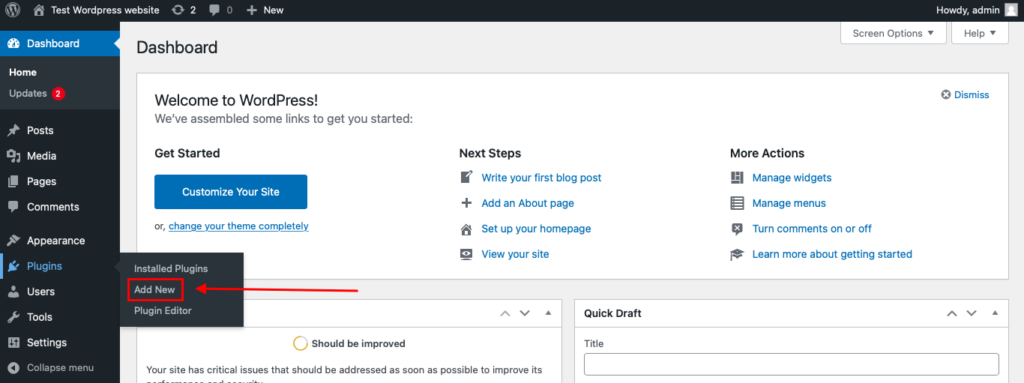
To install the Anti-Spam plugin, go to your WordPress admin panel→ Plugins→ Add New.
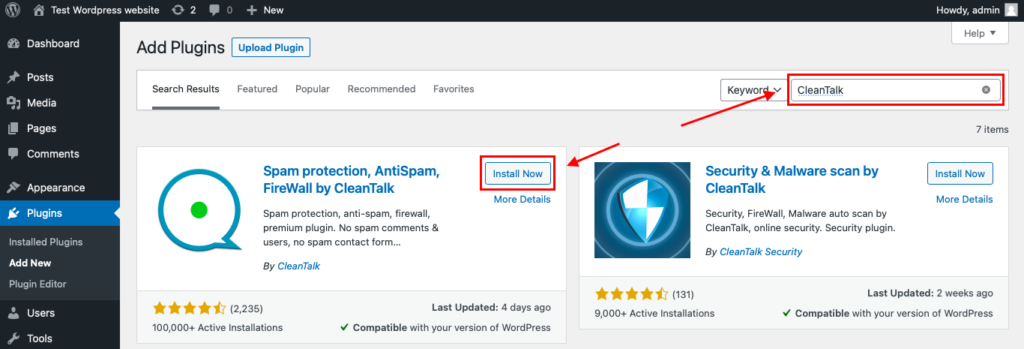
Then enter «СleanTalk» in the search box and click the Install button for «Spam protection, Anti-Spam, FireWall by CleanTalk».
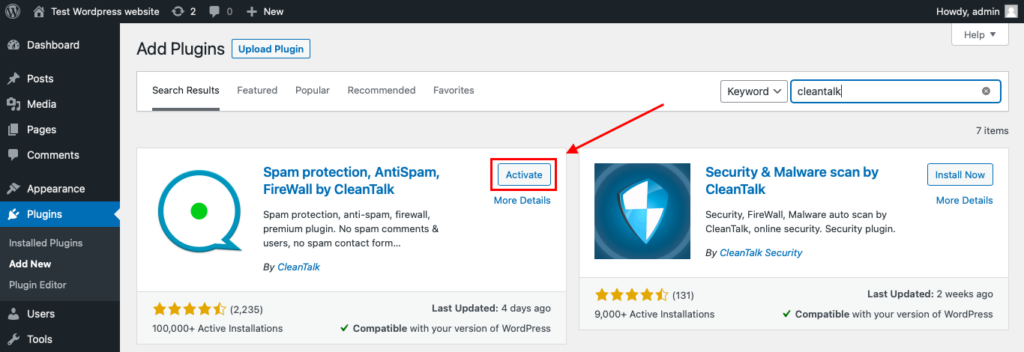
After installing the plugin, click the «Activate» button.
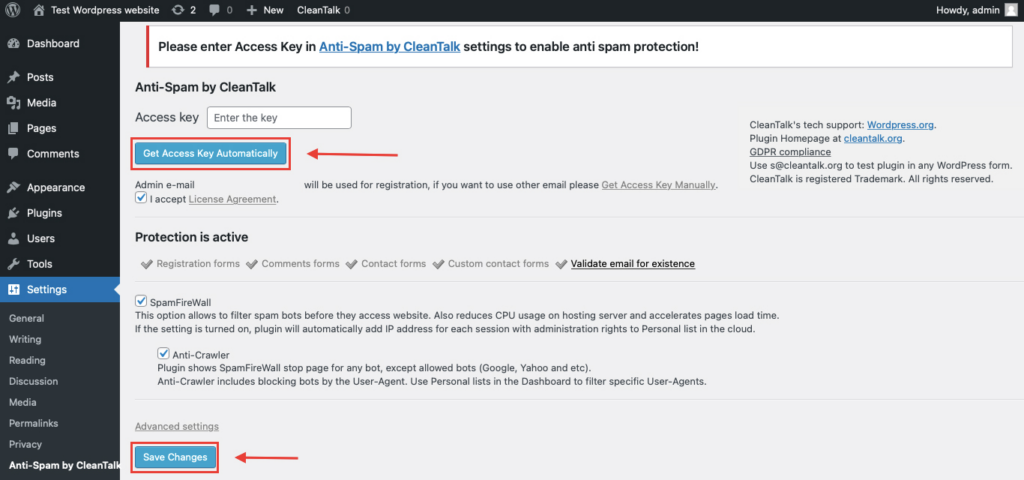
After it is done go to the plugin settings and click the «Get Access Key Automatically» button. Then just click the «Save Settings» button.
That’s all – Contact Form 7 are now protected From this moment,CleanTalk automatically protects the Contact Form 7 registration form (REST route /wp-json/Contact Form 7press/v1/users/), and the Add Listing form used to submit new listings.
You don’t need to paste any shortcodes – just use Contact Form 7 as usual, and CleanTalk will filter spam in the background.
That’s it! From now you know how to completely protect your MailPoet from spam. You don’t need to paste any shortcodes – just use MailPoet as usual, and CleanTalk will filter spam in the background.
Check if spam protection works with MailPoet
The best way to test the spam protection is by using a test email,
stop_email@example.com
- Open a page with your MailPoet form in an Incognito / private browser tab.
- Fill out the form using stop_email@example.com as the sender’s email.
- Send the form.
- You should see a message from the Anti-Spam plugin confirming that a spam submission was blocked.
*** Forbidden. Sender blacklisted. Anti-Spam by CleanTalk. **
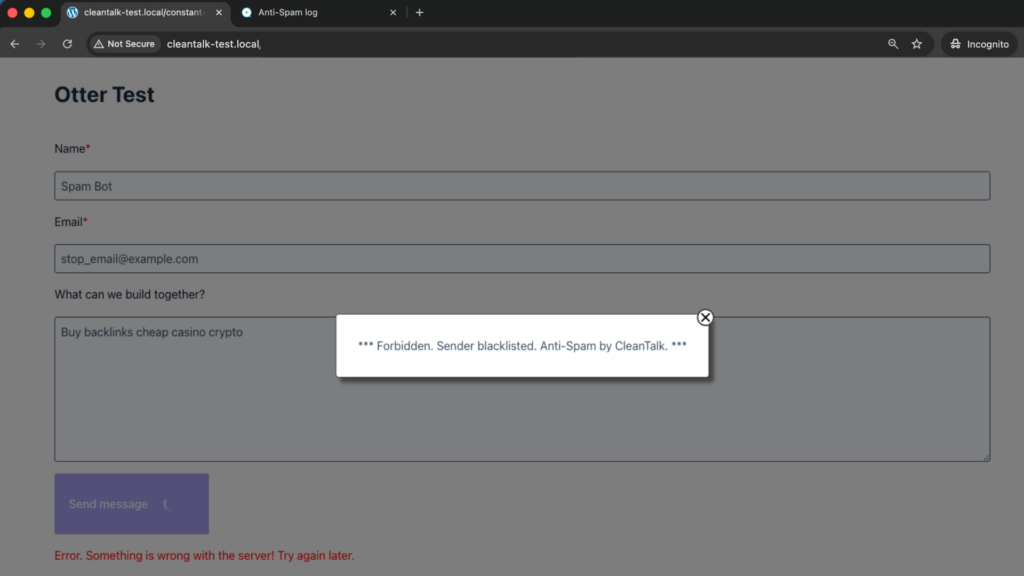
If you see this message, it means CleanTalk successfully protects your MailPoet forms from spam.
We ran this test on a clean WordPress install with MailPoet and the CleanTalk Anti-Spam plugin active. The message appears directly under the subscription form, the address is rejected with a 403 response, and no subscriber record is created – so no confirmation email goes out either.
Cloud Dashboard
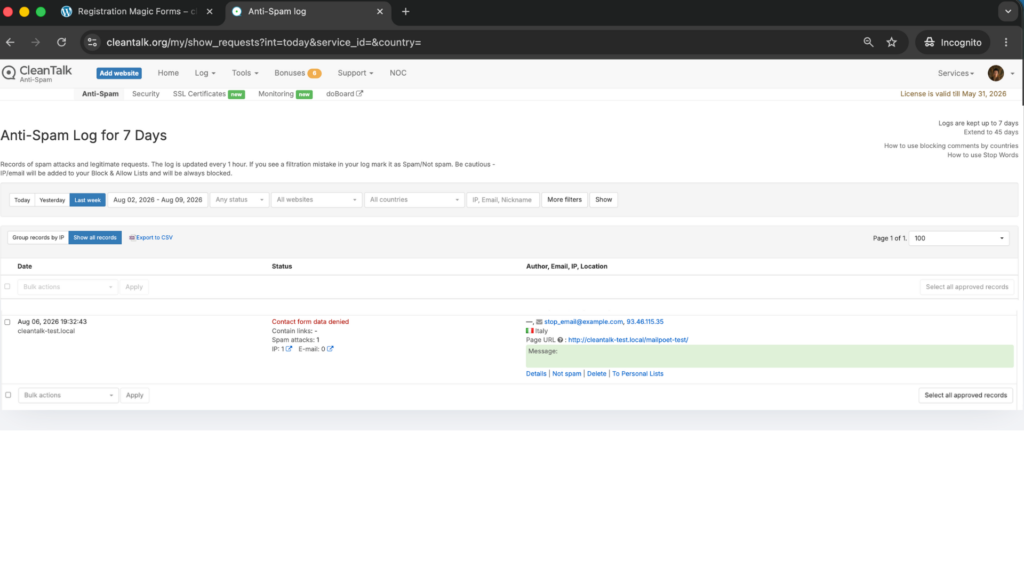
In addition, in the Cloud Dashboard you can find extra details regarding all submissions processed by CleanTalk, including MailPoet forms:
- IP and email of the sender, as well as the sender’s activity history across other websites connected to the CleanTalk cloud.
- Geolocation of the sender.
- Date and time of the submission.
- Page (URL) where the form was submitted.
- Cloud decision – Approved or Denied.
- Cloud explanation for the decision (e.g. blacklisted email, bad IP reputation, spam text, etc.).
- Tools to move the sender to Block or Allow lists so you can fine-tune MailPoet spam protection.
FAQ
Do I need to disable MailPoet’s built-in captcha after installing CleanTalk?
No, and you do not have to keep it either. They work at different layers: CleanTalk evaluates the sender, the captcha challenges the visitor. Many sites turn the visible challenge off to recover signup conversion and rely on the invisible filter, then re-enable a challenge only if a specific form comes under attack.
Will CleanTalk stop confirmation emails from being sent to bombed addresses?
Yes. The check happens before MailPoet creates the subscriber, so a blocked submission never reaches the confirmation email stage. That is the part that matters during a subscription bombing attack.
Does it work with MailPoet forms placed in a popup or a fixed bar?
Yes. Protection is tied to the subscription request itself, not to where the form is displayed, so popups, fixed bars, below-page forms and shortcode forms are all covered.
Does it work with the MailPoet block in the block editor?
Yes. The block renders the same form and sends the same subscription request.
My signup form suddenly stopped working after adding another plugin. What should I check?
Check the browser console for JavaScript errors. MailPoet forms rely on JavaScript, and a conflicting plugin that breaks scripts on the page can change how the form submits. Fixing the conflict restores both normal submissions and spam filtering.
Does CleanTalk slow the form down?
The check is a single background request to the cloud that runs while the form is submitting. Visitors do not see an extra step.
What happens to legitimate subscribers who are blocked by mistake?
Open the Cloud Dashboard, find the request, read the reason for the decision, and move the address or IP to the Allow list. Every decision is logged with an explanation, so false positives are traceable rather than invisible.
Is double opt-in still necessary?
Yes. Spam filtering and double opt-in solve different problems – one keeps bad senders out, the other proves the address belongs to a real person who wants your emails. Keep both.
Final recommendation
Treat your MailPoet list the way you would treat your sender reputation, because they are the same thing. Turn on double opt-in, keep an invisible cloud filter in front of the subscription form so bad addresses never enter the list, and reserve visible challenges for the few pages that are actually under attack. That combination keeps signup friction near zero while your bounce rate and complaint rate stay where they need to be.
For broader website protection, CleanTalk also provides anti-spam protection for websites, helping block spam in forms, comments, registrations, and orders without CAPTCHA.
