

TL;DR: To stop spam in Elfsight Form Builder, combine Elfsight’s own protection with a cloud anti-spam filter on your WordPress site. CleanTalk Anti-Spam checks every Elfsight form submission in the background and blocks spam bots invisibly – no CAPTCHA, no puzzles, no checkboxes – while protecting registrations, comments and WooCommerce on the same site. reCAPTCHA, hCaptcha and Turnstile add a visible challenge layer for high-risk forms. For most WordPress sites, an invisible cloud filter blocks more spam with less friction than CAPTCHA alone. Plans start at $12 per site/year with a free 7-day trial.

Elfsight Form Builder is the form you add when you do not want a form plugin at all: you build it in the Elfsight dashboard from one of 391 templates, copy two lines of embed code into a Custom HTML block, and the form appears on the page. Contact forms, surveys, bookings, order forms – 22 field types, notifications to up to three inboxes, integrations with Google Sheets, Zapier, Make, Stripe, Mailchimp and webhooks. The free plan gives you one widget and 200 views a month; paid plans start at $5 a month.
In 2026 popularity also means exposure. An Elfsight form is not a WordPress form: the fields are drawn by Elfsight’s script, and the submission goes straight from the visitor’s browser to Elfsight’s servers, which then email you and push the data to your integrations. WordPress never sees the request, so the usual WordPress spam filters never see it either. Bots that hit the form get a clear path: your inbox, your Google Sheet, your Mailchimp list.
Website elfsight.com | Pricing elfsight.com/pricing
Common types of spam in Elfsight Form Builder
- Contact form pitches. SEO offers, web design, guest posts – hand-typed, personalised enough to look real, sent to the same form on hundreds of sites.
- Link drops in the message field. Casino, loan and replica links, sent in bulk to build backlinks that only you will ever see.
- Fake sign-ups through Mailchimp and Sheets integrations. A junk submission is not just an email – it becomes a row in your sheet and a subscriber in your list.
- Order and booking flooding. Pre-order, booking and appointment templates get filled with fake requests that trigger your notifications and your team.
- View-limit burning. On the free and Basic plans every widget load counts against your monthly views; bot traffic to the form page spends the quota you paid for.
- Repeat offenders. The same sender comes back with a new address; blocking one email after the fact does not stop the next one.
Official anti-spam options and integrations in Elfsight Form Builder
Elfsight does ship protection, and it is worth knowing what it is.
Elfsight states that forms are “protected from spam and bots with reCAPTCHA” and that the widget “includes CAPTCHA and email blocking features”. This protection runs on Elfsight’s side – in Form Builder v1.56.0 there is no CAPTCHA switch in the editor tabs (Build Form, Email, Layout, Appearance, Settings, Integrations) and no CAPTCHA field type among the 22 available, so you cannot tune it per form. Email blocking lets you stop a sender you have already received spam from.
What that setup does not cover is the part site owners complain about most. A captcha proves that someone is a human right now; it says nothing about whether that human is a spammer who filled the same form on two hundred other sites this week. And blocking an email after the first spam message is always one message too late.
If your main goal is to protect Elfsight Form Builder without adding CAPTCHA challenges, CleanTalk can be used as a Google reCAPTCHA alternative that filters spam submissions in the background.
CAPTCHA options in Elfsight Form Builder
- Elfsight’s reCAPTCHA is applied by Elfsight, not configured by you. You cannot pick a version, a score threshold or the forms it applies to.
- A WordPress CAPTCHA plugin does not help. Plugins that add reCAPTCHA or Turnstile to WordPress forms hook forms that submit to WordPress; the Elfsight widget submits to Elfsight.
- No hCaptcha or Turnstile option exists in the Form Builder editor.
The only place where you can add your own check is the page the widget sits on – before the request leaves it.
Best ways to stop spam in Elfsight Form Builder
- Check the submission before it leaves the site. Once the request reaches Elfsight, it is in your inbox and your integrations. The check has to happen in the visitor’s browser, on your page, at the moment of Submit.
- Judge the sender. Reputation of the email and IP across many sites beats a one-off puzzle and catches hand-typed spam too.
- Protect the integrations, not just the inbox. A blocked submission never becomes a row in Google Sheets or a subscriber in Mailchimp.
- Cover every form on the site. The bot that fills your Elfsight form also fills your comments, registrations and checkout.
- Do not stack challenges. Elfsight already runs reCAPTCHA on its side; adding a visible puzzle on top hurts conversion far more than it hurts bots.
Comparison table: Elfsight Form Builder spam protection options
Here is how the main anti-spam options for Elfsight Form Builder compare:
| Solution | Best for | Pricing | Main limitation |
| CleanTalk Anti-Spam | Invisible, site-wide protection across forms, signups and WooCommerce | From $12/site/year; free 7-day trial | Cloud service; paid after trial |
| Akismet | Comment and basic form spam on small sites | Free personal; paid commercial | Comment-focused; weak on custom forms |
| Google reCAPTCHA | High-risk forms where a challenge is acceptable | Free (managed by Elfsight) | Adds friction; can hurt conversion; bots bypass it |
| Cloudflare Turnstile | Lighter, privacy-friendly CAPTCHA | Free | Not available in Elfsight Form Builder |
In short: use CleanTalk as the invisible baseline filter, and add reCAPTCHA, hCaptcha or Turnstile only on your highest-risk forms.
How the CleanTalk integration works with Elfsight Form Builder
This is a direct integration that works differently from a form hook, because there is no WordPress form to hook. CleanTalk’s script on your page recognises the Elfsight widget and watches the request the widget sends to Elfsight when the visitor clicks Submit. Before that request leaves the browser, CleanTalk takes the submitted fields – name, email, message – and the visitor’s bot-detector data, sends them to the CleanTalk cloud through your WordPress site and waits for the verdict.
If the cloud says the submission is fine, the request goes on to Elfsight as usual and the visitor sees Elfsight’s success message. If the cloud says spam, the request is cancelled: the visitor sees the block reason on the page, and nothing reaches Elfsight – no email, no row in Google Sheets, no subscriber in Mailchimp. In the live test the browser made zero requests to Elfsight’s submission endpoint for the blocked form.
The integration requires one setting: Protect external forms in the CleanTalk plugin, which is off by default. Sites that still run the older self-hosted Elfsight Contact Form plugin are covered by a separate, older integration that hooks the plugin’s mail function.
Anti-Spam plugin by CleanTalk for WordPress
The next tool we’re going to use is the Anti-Spam plugin by CleanTalk.
Here’s a short overview:
- CleanTalk is a cloud-based spam protection service for websites, founded in 2012.
- It automatically blocks spam without CAPTCHAs and doesn’t interrupt the user experience.
- Protects many types of forms: contact forms, payment forms, registrations, comments, surveys and more.
- Stops both automated bots and human spam submissions.
- Uses advanced filtering algorithms and a global spam detection network.
- Detects spam based on IP address, email address and user behavior.
- Lets you create custom filtering rules for specific cases.
- Allows blocking or filtering by IP, email and country.
- Works quietly in the background and is very easy to install and configure.
According to WordPress.org, Anti-Spam by CleanTalk for WordPress has over 200,000 active installations, with 3,214 reviews and an average rating of 4.8.
Plugin Homepage at cleantalk.org | Latest release at GitHub.com | Website cleantalk.org
Install the CleanTalk Anti-Spam plugin
Show Instructions
To install the Anti-Spam plugin, go to your WordPress admin panel → Plugins → Add New.
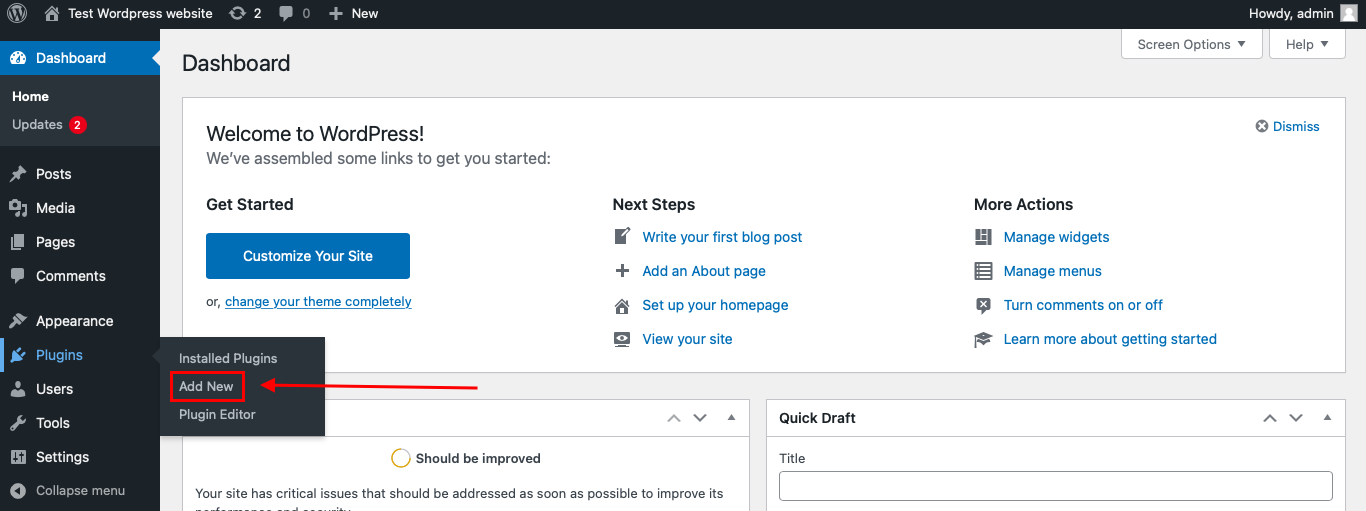
Then enter «СleanTalk» in the search box and click the Install button for «Spam protection, Anti-Spam, FireWall by CleanTalk».
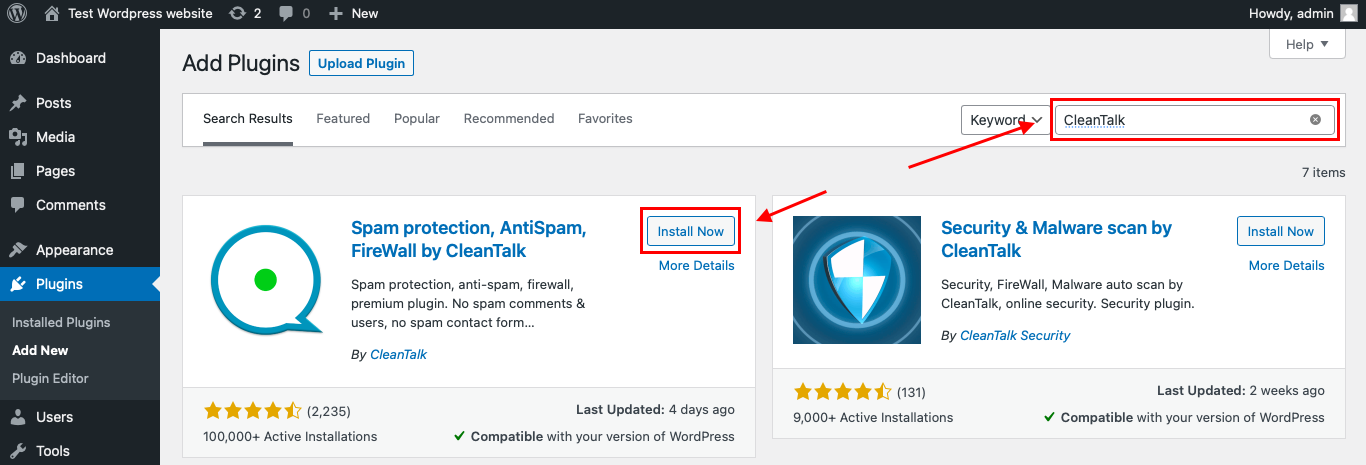
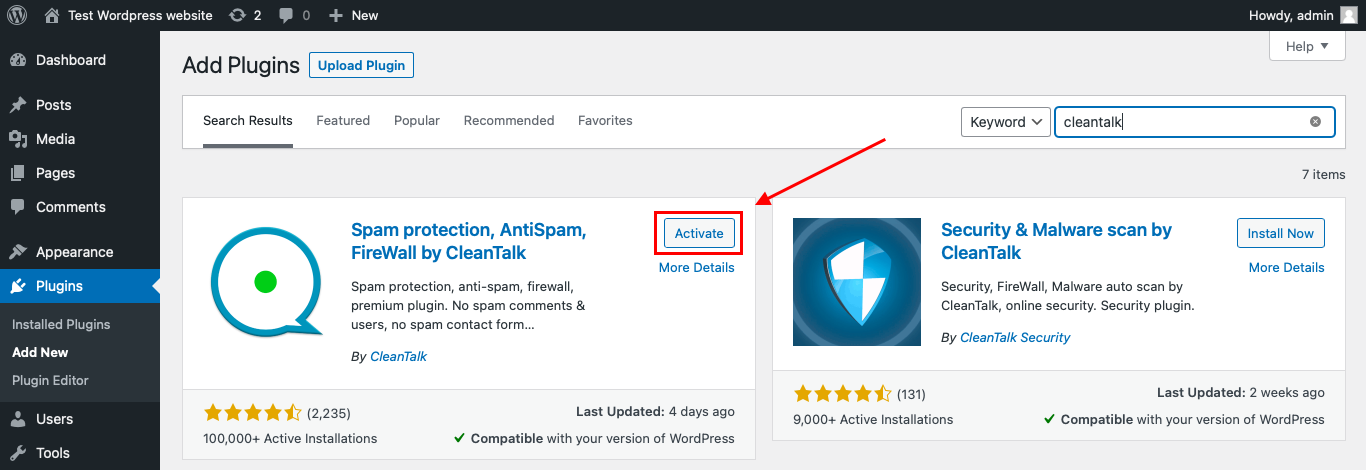
After installing the plugin, click the «Activate» button.
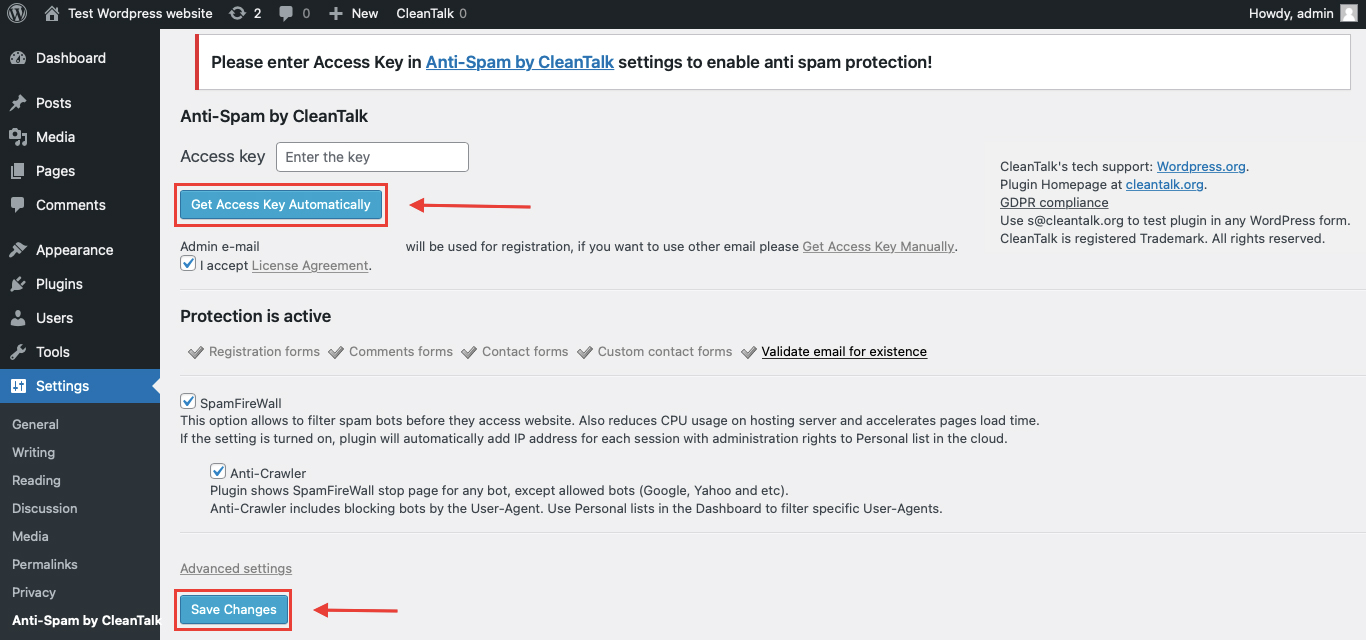
After it is done go to the plugin settings and click the «Get Access Key Automatically» button. Then just click the «Save Settings» button.
That’s it! From now you know how to completely protect your Elfsight Form Builder from spam. You don’t need to paste any shortcodes – just use Elfsight Form Builder as usual, and CleanTalk will filter spam in the background.
Check if spam protection works with Elfsight Form Builder
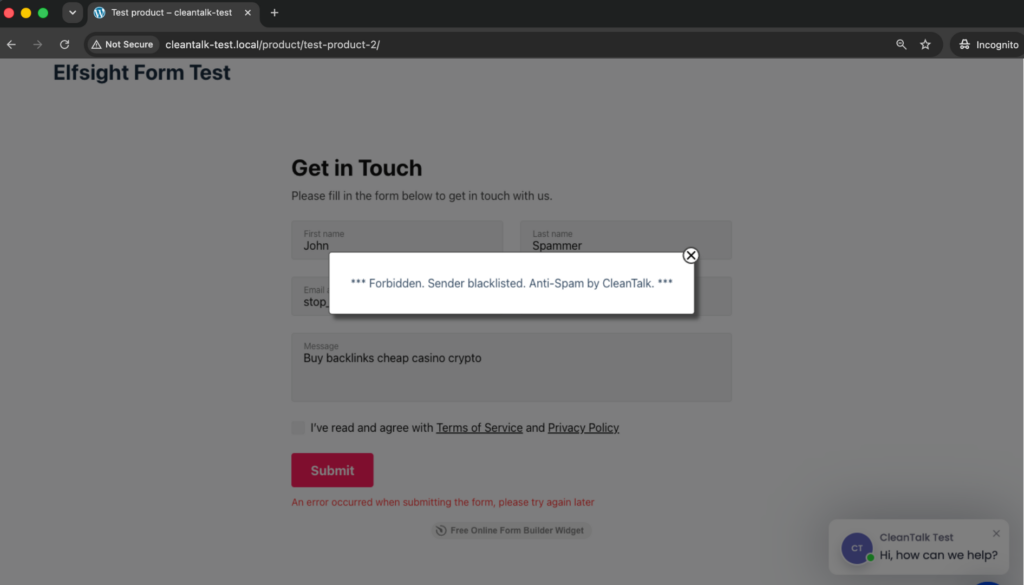
The best way to test the spam protection is by using a test email,
stop_email@example.com
- Open the page with your Elfsight form in an Incognito / private browser tab.
- Fill out the form using stop_email@example.com as the sender’s email.
- Send the form.
- You should see a message from the Anti-Spam plugin confirming that a spam submission was blocked.
*** Forbidden. Sender blacklisted. Anti-Spam by CleanTalk. ***
Under the form Elfsight shows its own note that the submission did not go through – that is expected: the request was stopped before it reached Elfsight. Then check your inbox and your Elfsight notifications: there is no email for the test submission.
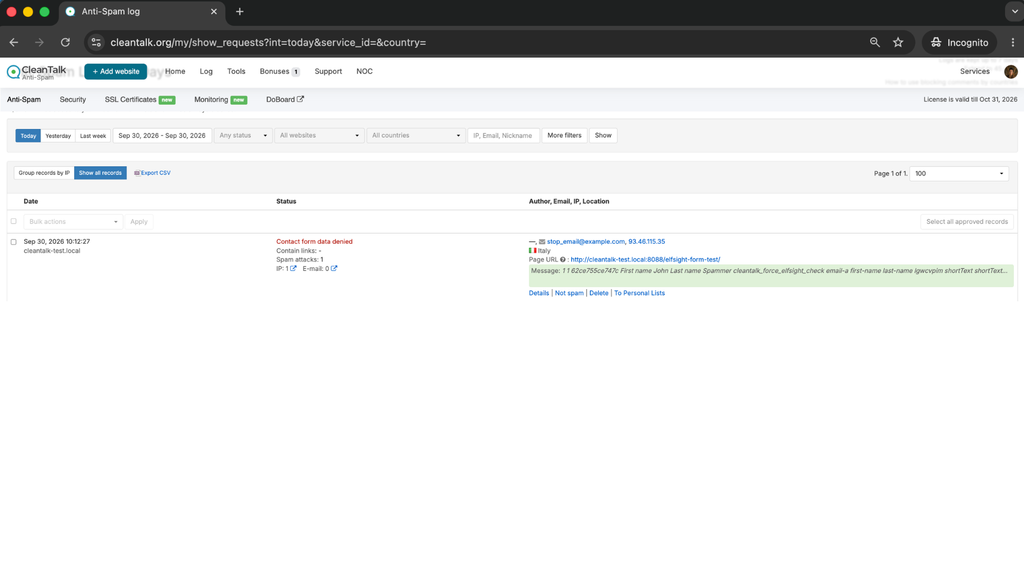
Cloud Dashboard
In addition, in the Cloud Dashboard you can find extra details regarding all submissions processed by CleanTalk, including Elfsight Form Builder forms:
- IP and email of the sender, as well as the sender’s activity history across other websites connected to the CleanTalk cloud.
- Geolocation of the sender.
- Date and time of the submission.
- Page (URL) where the form was submitted.
- Cloud decision – Approved or Denied.
- Cloud explanation for the decision (e.g. blacklisted email, bad IP reputation, spam text, etc.).
- Tools to move the sender to Block or Allow lists so you can fine-tune Elfsight Form Builder spam protection.
FAQ
Why do I need to turn on Protect external forms?
Because the Elfsight widget sends the submission to Elfsight, not to WordPress. This option enables the part of CleanTalk that checks requests to third-party services before they leave the page.
Does it work with the embed code, or do I need an Elfsight plugin?
The embed code is enough. CleanTalk recognises the widget on the page; no Elfsight plugin is required.
Will a blocked submission still reach my Google Sheet or Mailchimp list?
No. The request is cancelled in the browser before it reaches Elfsight, so none of the integrations receive it.
Does it count against my Elfsight views?
The page view is counted by Elfsight when the widget loads, as before. The blocked submission itself is never sent, so it does not create a response in Elfsight.
Do I still need Elfsight’s reCAPTCHA?
It stays on regardless – it is managed by Elfsight. CleanTalk adds the sender check that a captcha cannot do.
What if a real visitor gets blocked?
Open the Cloud Dashboard, find the submission with its reason, and move the sender to the Allow list.
Does the same protection cover other forms on the site?
Yes – comments, registrations, WooCommerce checkout and other form plugins are protected by the same installation.
Do I need to change anything in Elfsight?
No. The widget, its settings and your Elfsight account stay as they are.
Final recommendation
Elfsight Form Builder gives you a polished form without a plugin, and that convenience has a price: the submission bypasses WordPress and lands in your inbox and integrations before you can look at it. Elfsight’s own reCAPTCHA stops the simplest bots; it does not know who the sender is. A check on your page at the moment of Submit is the only place where spam can be stopped before it becomes an email, a spreadsheet row and a subscriber – and CleanTalk does that check invisibly.
For broader website protection, CleanTalk also provides anti-spam protection for websites, helping block spam in forms, comments, registrations, and orders without CAPTCHA.
