

TL;DR: To stop spam in Chatway Live Chat, combine the pre-chat form settings in Chatway with a cloud anti-spam filter. CleanTalk Anti-Spam checks every visitor who opens the Chatway widget in the background and keeps spam bots out invisibly – no CAPTCHA, no puzzles, no checkboxes – while protecting registrations, comments and WooCommerce on the same site. reCAPTCHA, hCaptcha and Turnstile add a visible challenge layer for high-risk forms. For most WordPress sites, an invisible cloud filter blocks more spam with less friction than CAPTCHA alone. Plans start at $12 per site/year with a free 7-day trial.
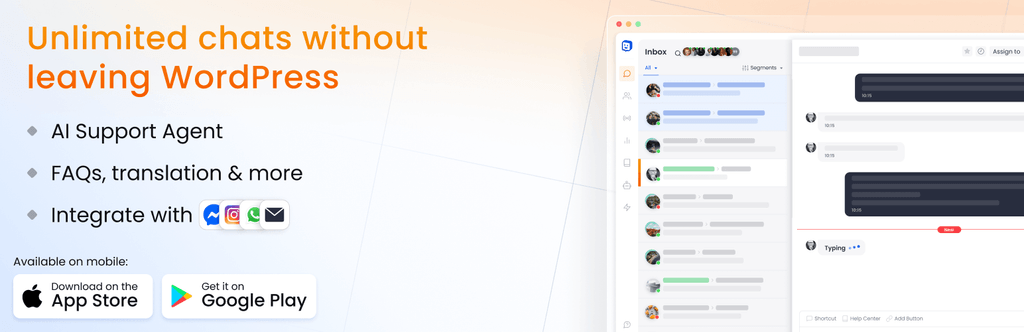
Chatway is the live chat people install when they want a chat bubble on the site by tonight: one plugin, a free account, and a widget with live chat, an AI chatbot, FAQ and click-to-chat buttons for WhatsApp, Messenger and Instagram. The widget is loaded from Chatway’s servers, the conversation lives in the Chatway app, and your team answers from the WordPress admin, the web app or the mobile app.
In 2026 popularity also means exposure. A chat bubble is a form that is open on every page of the site, needs no page to find and no submit button to press. A bot that lands anywhere on the site can open it, type a message, fill the pre-chat form with a fake name and email, and every one of those becomes a new conversation for your agents, a push notification on their phones and an email in your inbox. Because the widget is an iframe from a third-party domain, the usual WordPress form filters never see it.
As WordPress.org shows, Chatway Live Chat is currently used on over 30,000 active installations and has 761 reviews with an average rating of 5.0.
Plugin Homepage at wordpress.org | Website chatway.app
Common types of spam in Chatway Live Chat
- Bot-opened conversations. Scripts that open the widget and paste a message – SEO offers, crypto links, “your site has a problem” pitches. Each one is a new chat, a notification for every agent and an email.
- Fake pre-chat forms. If you ask for name, email or phone before the chat starts, bots fill it with junk. The contacts end up in your Chatway contact list and, if connected, in Mailchimp.
- Click-to-chat button abuse. The WhatsApp, Messenger and Instagram buttons in the widget are the same targets – a bot that reaches the widget reaches them.
- Agent flooding. Dozens of empty or one-word chats in a row keep agents busy and bury the real customer who is trying to buy.
- Link drops in chat. Casino, loan and replica links pasted into the chat window, sometimes by a person, sometimes by a script.
- Repeat offenders. The same visitor comes back from a new IP and starts again; a manual block of the previous contact inside Chatway does not know them.
Official anti-spam options and integrations in Chatway Live Chat
Chatway is built for conversations, not for filtering, so its protection is light.
The plugin ships no CAPTCHA and no spam filter – the WordPress.org description and the plugin code do not contain one. What you get is on the Chatway side: a pre-chat contact form that can require an email, name, phone or custom field before the visitor can send a message, and, in the Chatway app, the option for an agent to block a contact after the conversation has already started. That raises the effort for a lazy bot and stops nothing that runs a browser – and a manual block is always one chat too late.
The plugin itself only places the widget script on the page and, for logged-in users, passes their name and email to Chatway. Everything the visitor types goes straight to Chatway’s servers – it never passes through WordPress, so a filter that hooks WordPress forms cannot see it.
If your main goal is to protect Chatway Live Chat without adding CAPTCHA challenges, CleanTalk can be used as a Google reCAPTCHA alternative that filters spam submissions in the background.
CAPTCHA options in Chatway Live Chat
- There is no CAPTCHA option in Chatway. Neither the plugin nor the widget settings offer reCAPTCHA, hCaptcha or Turnstile.
- A site-wide CAPTCHA does not help. Plugins that add reCAPTCHA to WordPress forms work on forms that submit to WordPress; the Chatway widget is an iframe from another domain and is not one of them.
- A pre-chat form is not a CAPTCHA. It asks for data, it does not verify who is typing.
The only way to put a check in front of a third-party widget is to check the visitor before the widget is allowed to open.
Best ways to stop spam in Chatway Live Chat
- Check the visitor, not the message. By the time a message exists it is already on Chatway’s servers. The check has to happen when the visitor tries to open the widget.
- Judge by reputation and behavior. IP and email reputation across many sites plus browser behavior catch bots and known spammers that a pre-chat form cannot.
- Keep the check invisible. A real customer should see the chat open as usual; a bot should never get past the bubble.
- Cover the whole widget. Live chat, the AI chatbot and the WhatsApp and Messenger buttons are one iframe – protect it as one.
- Protect the rest of the site with the same tool. The bot that opens a chat also fills your contact form and comments.
Comparison table: Chatway Live Chat spam protection options
Here is how the main anti-spam options for Chatway Live Chat compare:
| Solution | Best for | Pricing | Main limitation |
| CleanTalk Anti-Spam | Invisible, site-wide protection across forms, signups and WooCommerce | From $12/site/year; free 7-day trial | Cloud service; paid after trial |
| Akismet | Comment and basic form spam on small sites | Free personal; paid commercial | Comment-focused; weak on custom forms |
| Google reCAPTCHA | High-risk forms where a challenge is acceptable | Free | Adds friction; can hurt conversion; bots bypass it |
| Cloudflare Turnstile | Lighter, privacy-friendly CAPTCHA | Free | A challenge, not a content filter |
In short: use CleanTalk as the invisible baseline filter, and add reCAPTCHA, hCaptcha or Turnstile only on your highest-risk forms.
How the CleanTalk integration works with Chatway Live Chat
This is a direct integration that works differently from a form hook, because there is no WordPress form to hook. CleanTalk recognises the Chatway widget iframe on the page and places a transparent cover over it. Nothing changes for the visitor until they click the widget. On the first click the cover shows a short “CleanTalk Anti-Spam checking data..” notice, the visitor’s browser data and bot-detector token go to the CleanTalk cloud, and the cloud returns a decision. A real visitor gets the cover removed and the chat opens – once per visitor, the check is not repeated. A visitor that the cloud marks as spam sees the block reason and the widget stays closed.
The check covers everything inside the widget – live chat, the AI chatbot, FAQ and the WhatsApp, Messenger and Instagram buttons – because they all live in the same iframe. The integration requires one setting: Protect external forms in the CleanTalk plugin, which is off by default.
Anti-Spam plugin by CleanTalk for WordPress
The next tool we’re going to use is the Anti-Spam plugin by CleanTalk.
Here’s a short overview:
- CleanTalk is a cloud-based spam protection service for websites, founded in 2012.
- It automatically blocks spam without CAPTCHAs and doesn’t interrupt the user experience.
- Protects many types of forms: contact forms, payment forms, registrations, comments, surveys and more.
- Stops both automated bots and human spam submissions.
- Uses advanced filtering algorithms and a global spam detection network.
- Detects spam based on IP address, email address and user behavior.
- Lets you create custom filtering rules for specific cases.
- Allows blocking or filtering by IP, email and country.
- Works quietly in the background and is very easy to install and configure.
According to WordPress.org, Anti-Spam by CleanTalk for WordPress has over 200,000 active installations, with 3,214 reviews and an average rating of 4.8.
Plugin Homepage at cleantalk.org | Latest release at GitHub.com | Website cleantalk.org
Install the CleanTalk Anti-Spam plugin
Show Instructions
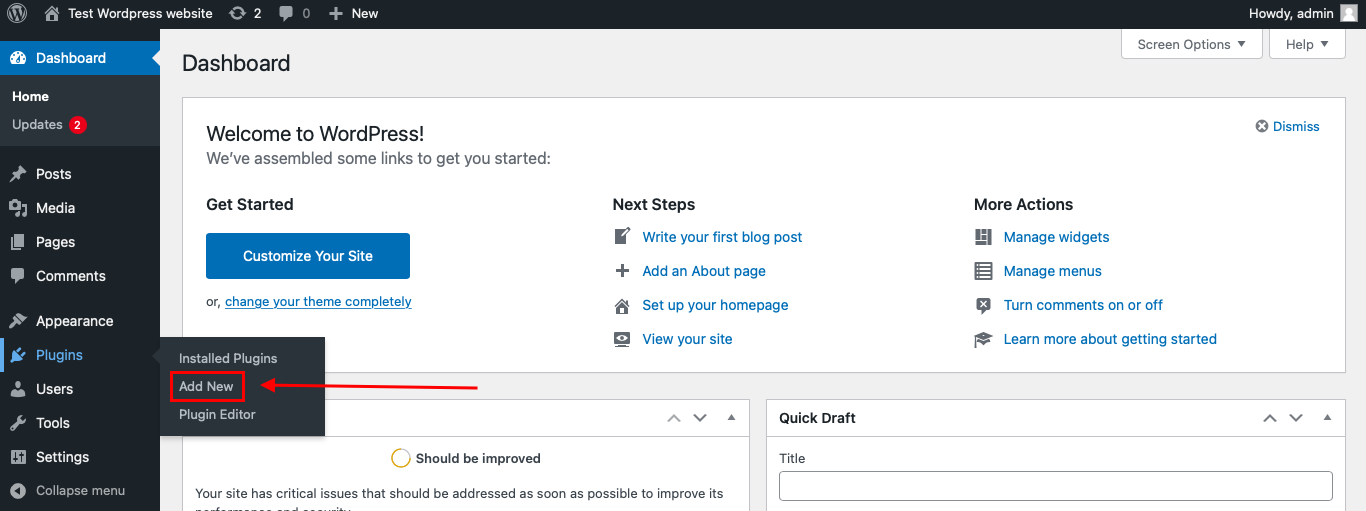
To install the Anti-Spam plugin, go to your WordPress admin panel → Plugins → Add New.
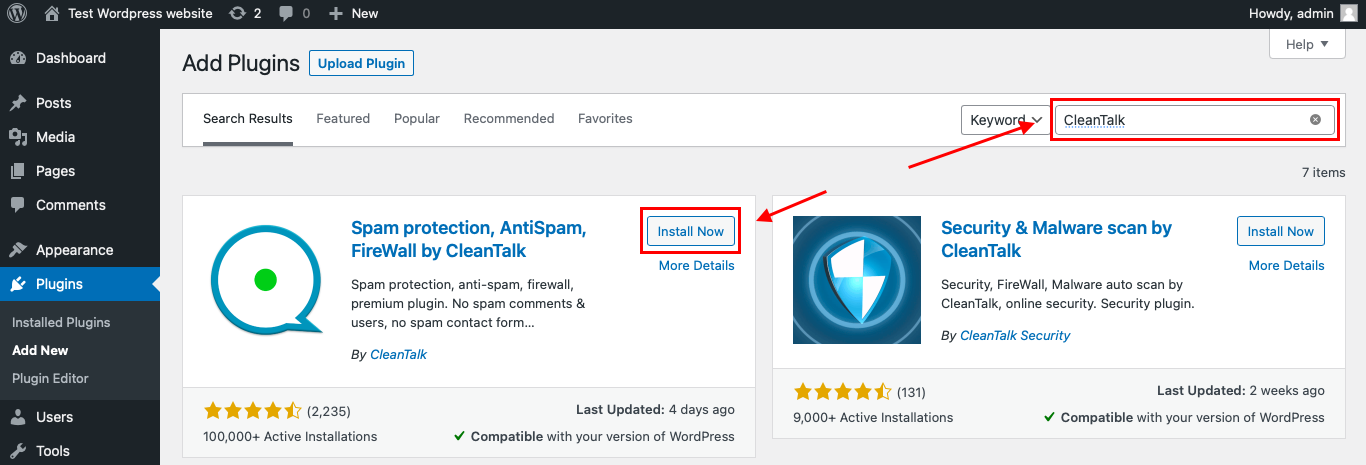
Then enter «СleanTalk» in the search box and click the Install button for «Spam protection, Anti-Spam, FireWall by CleanTalk».
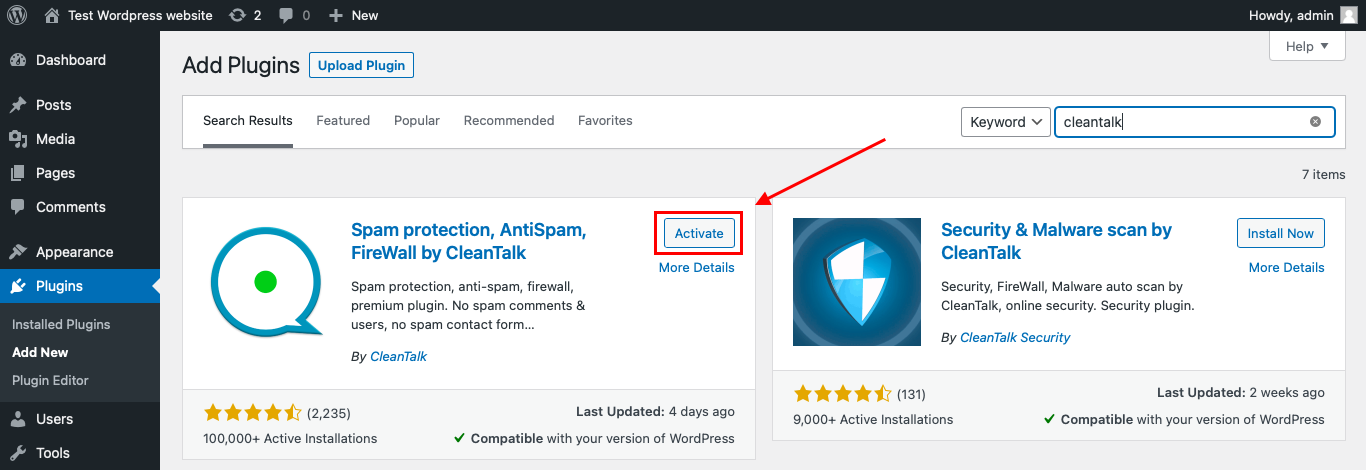
After installing the plugin, click the «Activate» button.
After it is done go to the plugin settings and click the «Get Access Key Automatically» button. Then just click the «Save Settings» button.
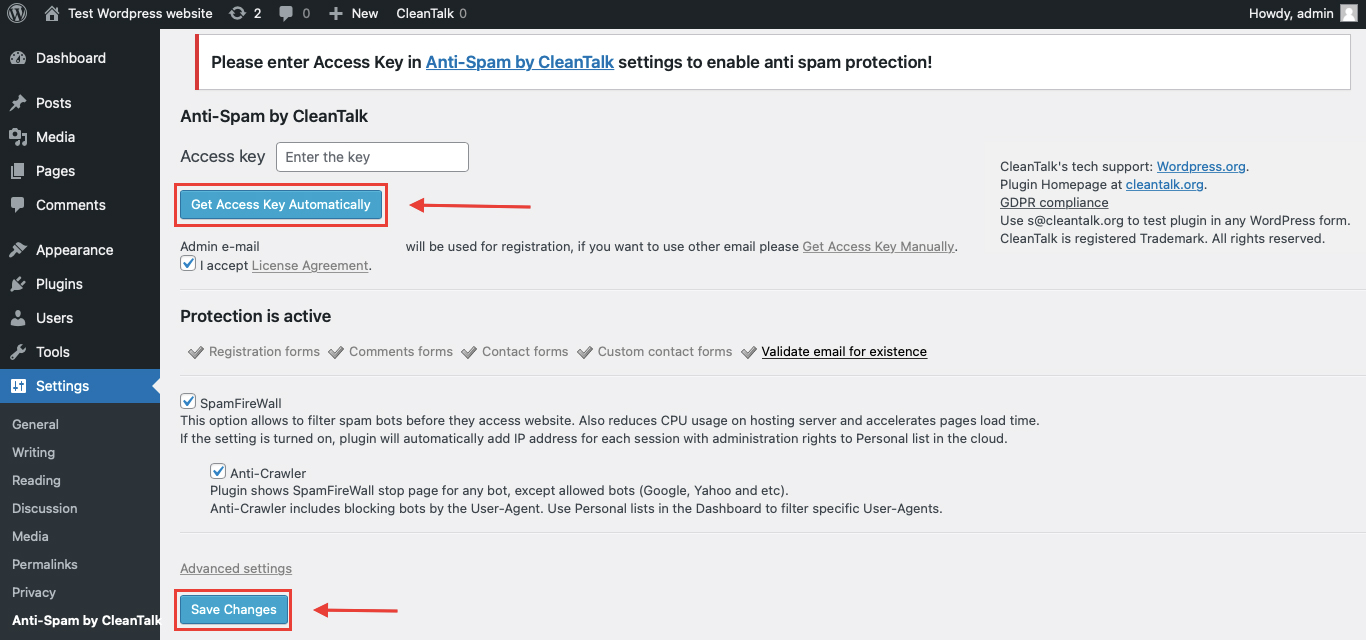
That’s it! From now you know how to completely protect your Chatway Live Chat from spam. You don’t need to paste any shortcodes – just use Chatway Live Chat as usual, and CleanTalk will filter spam in the background.
Check if spam protection works with Chatway Live Chat
Chatway does not have an email field you submit to WordPress, so the check here looks different from a contact form test.
The best way to test the spam protection is by using a test email,
stop_email@example.com
- Open your Chatway Live Chat in an Incognito / private browser tab.
- Fill it out using stop_email@example.com as the attendee’s email.
- Submit the form.
- You should see a message from the Anti-Spam plugin in the form confirming that a spam registration was blocked.
*** Forbidden. Sender blacklisted. Anti-Spam by CleanTalk. ***
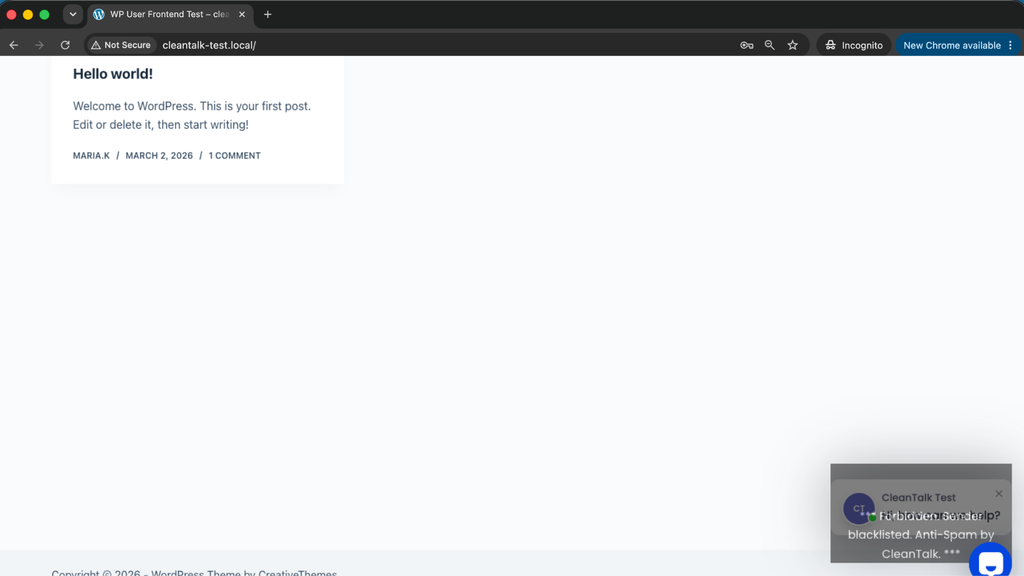
Chatway Live Chat widget that stays blocked with the CleanTalk block reason.
Then open the event in your WordPress
If you see the check notice and the chat opens, it means CleanTalk successfully protects your Chatway Live Chat widget from spam.
Cloud Dashboard
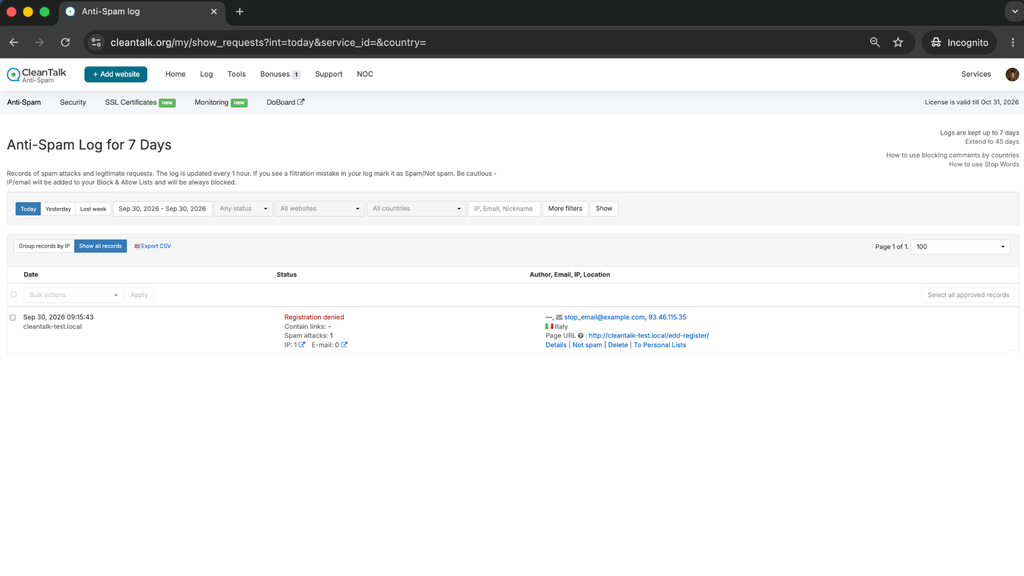
In addition, in the Cloud Dashboard you can find extra details regarding all submissions processed by CleanTalk, including Chatway Live Chat widget checks:
- IP and email of the sender, as well as the sender’s activity history across other websites connected to the CleanTalk cloud.
- Geolocation of the sender.
- Date and time of the submission.
- Page (URL) where the form was submitted.
- Cloud decision – Approved or Denied.
- Cloud explanation for the decision (e.g. blacklisted email, bad IP reputation, spam text, etc.).
- Tools to move the sender to Block or Allow lists so you can fine-tune Chatway Live Chat spam protection.
FAQ
Why do I need to turn on Protect external forms?
Because the Chatway widget is not a WordPress form – it is an iframe served from Chatway. This option enables the part of CleanTalk that covers third-party widgets and checks the visitor before the widget can be used.
Does the check slow down the chat?
No. The check runs once, on the first click, and takes a fraction of a second. After that the widget behaves exactly as without CleanTalk.
Does it cover the WhatsApp and Messenger buttons in the widget?
Yes. The buttons live inside the same Chatway iframe, and the cover applies to the whole iframe.
What about the AI chatbot?
Same answer – the chatbot is part of the widget, so a bot never reaches it.
Does it protect messages that reach Chatway some other way?
No. CleanTalk protects the widget on your WordPress site. Messages that arrive through WhatsApp, Messenger or Instagram directly go to Chatway without passing your site.
What if a real customer gets blocked?
Open the Cloud Dashboard, find the check with its reason, and move the visitor’s IP to the Allow list.
Does the same protection cover other forms on the site?
Yes – comments, contact forms, registrations, WooCommerce checkout and other form plugins are protected by the same installation.
Do I need to change anything in Chatway?
No. The integration works on the WordPress side; your Chatway account, widget and settings stay as they are.
Final recommendation
Chatway puts a door to your support team on every page, and bots knock on it exactly as often as customers do. Keep the pre-chat form if you want contacts, but do not expect it to filter anyone. A check in front of the widget is the only place where a bot can be stopped before it becomes a conversation, a notification and an email – and CleanTalk does that check invisibly, once, for the whole widget.
For broader website protection, CleanTalk also provides anti-spam protection for websites, helping block spam in forms, comments, registrations, and orders without CAPTCHA.
