

TL;DR: To stop spam in Nextend Social Login, combine its built-in moderation and email verification with a cloud anti-spam filter. CleanTalk Anti-Spam checks every Nextend Social Login submission in the background and blocks spam bots invisibly – no CAPTCHA, no puzzles, no checkboxes – while protecting registrations, comments and WooCommerce on the same site. reCAPTCHA, hCaptcha and Turnstile add a visible challenge layer for high-risk forms. For most WordPress sites, an invisible cloud filter blocks more spam with less friction than CAPTCHA alone. Plans start at $12 per site/year with a free 7-day trial.

What Is Nextend Social Login and Register?
Nextend Social Login and Register, built by Nextendweb, is one of the most popular WordPress authentication plugins. It is a professional, free login and registration plugin that lets visitors sign in or register with Google, Facebook, Apple and X in a single click. The appeal is obvious: fewer fields, no new password to remember, and a higher sign-up rate. For membership sites, communities, WooCommerce stores and learning platforms, that one-click flow can be the difference between a visitor who registers and one who leaves.
But in 2026, popularity also means exposure. Wherever there is an easy way to create accounts at scale, bots and spammers follow, and a one-click registration flow is exactly the kind of door they look for. The plugin lets the right people in quickly, but it was never built to decide who the right people are. That decision – genuine user or spam bot – is left to the open registration form underneath, and by default that form has no spam protection at all. An open sign-up flow is an open invitation, which is why Nextend sites collect spam even though the plugin itself is clean.
As WordPress.org shows, Nextend Social Login and Register is currently used on over 200,000 active installations and has 444 reviews with an average rating of 4.9.
Plugin Homepage at wordpress.org | Website nextendweb.com
Common types of spam in Nextend Social Login
Nextend itself does not create spam – it is a clean, well-maintained plugin. The problem is the registration surface it sits on top of: an open sign-up flow is attractive to anyone who wants to create accounts in bulk. In practice, Nextend sites run into four distinct kinds of abuse, and it helps to understand each one separately, because no single tool stops all four.
- Fake registrations through social login. Bots and disposable accounts use real or throwaway provider profiles to create WordPress users automatically. A spammer can spin up dozens of Google or Facebook accounts and run them through the one-click button, and from WordPress’ point of view each one looks like a normal social sign-up. The result is a member base inflated with accounts that never engage.
- Spam through the standard WordPress registration form. This is the route most site owners overlook. Nextend almost always sits next to the default WordPress registration fields – the plain email and username form. Bots frequently ignore the social buttons and submit that standard form instead, because it is older, simpler and, by default, completely unprotected. You can lock down your social providers perfectly and still be flooded through the field right below them.
- Mass bot registrations. Automated scripts hit the registration endpoint directly, often bypassing the visible page and posting straight to the WordPress sign-up handler. A single script can create thousands of junk users in a short window – which is how a site goes from a clean user list to a flood of garbage accounts overnight.
- Human-driven spam (paid accounts). Not all spam is automated. Some registrations come from real people – paid in bulk to create accounts – who slip past technical filters and CAPTCHAs precisely because they are not bots. They read the puzzle, tick the box and type a name as well as any genuine visitor, which defeats almost every challenge-based defense.
The consequences add up quickly. A database bloated with junk users is harder to manage; those accounts post spam comments and reviews and distort your analytics and member counts so you can no longer trust your own numbers. Marketing suffers too – every fake email you mail to hurts your sender reputation – and an open registration system can become a staging ground for further abuse. Nextend makes signing up easy, and that ease cuts both ways: it is just as easy for a script as for a customer.
Official anti-spam options and integrations in Nextend Social Login
Nextend gives you some genuinely useful controls, and it is worth turning them on – but it is equally important to be honest about what they are: access controls and moderation settings, not a spam filter. Here is what the plugin and WordPress put in your hands:
- Provider restriction. In Nextend Social Login -> Providers you choose which networks (Google, Facebook, Apple and others) are active. Every provider you disable is one less entry point, so enabling only the ones your audience uses is a sensible first step. It narrows the attack surface, but does not check whether the people coming through an enabled provider are real.
- Optional email verification. You can require new users to confirm an email address before the account becomes usable. This filters out the laziest bots, but does nothing against bots using real or temporary mailboxes – and disposable-email services make that trivial.
- New user moderation. Working with WordPress, you can require an administrator to approve new accounts before they go live. This is the strongest native control, but notice what it really is: a way to clean up after spam arrives, not to stop it. On a busy site, reviewing a queue full of bot registrations every day is exactly the workload you were trying to avoid.
What Nextend does not include is a built-in anti-spam filter for the registration itself. There is no behavioral analysis, no blacklist checking, no IP or email reputation lookup, and no bot detection at submission. WordPress’ own Settings -> General -> Membership options let you control whether anyone can register and what default role new users receive, and you can moderate them by hand afterwards – but again, moderation is reactive, not preventive. It assumes the spam has already been created and is waiting for you in a list.
The takeaway: Nextend is an authentication plugin, not a security plugin. It is excellent at letting the right people in with one click; it was never designed to keep the wrong ones out. Treat its controls as a useful backstop – turn on moderation, restrict providers, require email verification – but do not expect them to be your spam defense. That job needs a layer Nextend does not ship with.
If your main goal is to protect Nextend Social Login without adding CAPTCHA challenges, CleanTalk can be used as a Google reCAPTCHA alternative that filters spam submissions in the background.
CAPTCHA options in Nextend Social Login
Because Nextend has no native spam filter, the most common reflex is to bolt a CAPTCHA onto the registration form. You can add Google reCAPTCHA v2/v3 or hCaptcha through a separate CAPTCHA plugin, or use Cloudflare Turnstile as a lighter challenge. All three sit in front of the registration or login form and ask the visitor to prove they are human before the sign-up goes through.
These tools do catch a share of simple bots, and on a high-risk form they have their place. But they come with real downsides, especially on a social-login site where the whole point was a frictionless sign-up:
- Friction that fights your own design. The entire reason you installed Nextend is one-click sign-up. A CAPTCHA adds back exactly the step you removed: a visitor who would have signed in with one Google click now has to find traffic lights or read distorted text first. You keep the button but lose its advantage.
- Conversion damage. Every extra challenge costs you legitimate registrations. The harder the puzzle, the more real users abandon the form – and on mobile, where many social logins happen, fiddly challenges make someone give up even faster.
- Human spam slips straight through. A CAPTCHA proves a user is “not a robot.” It does nothing against paid human spammers, who solve the challenge and register anyway – the hardest category to detect walks past the very tool you added to stop it.
In short, CAPTCHA on a Nextend form is a tax on your real visitors that your worst spammers do not pay – and reCAPTCHA also routes visitor data through Google.
Best ways to stop spam in Nextend Social Login
No single method is enough on its own. Provider restriction does not stop a real-looking Google bot, moderation does not stop the spam being created, and a CAPTCHA does not stop human spammers or protect the standard form. The reliable setup is therefore layered, with each layer covering the gap the others leave:
- Built-in moderation (the backstop). Keep WordPress new-user moderation and Nextend’s email verification switched on, and restrict your providers. A free safety net for anything unusual that gets through.
- An invisible cloud filter – CleanTalk (the core layer). This is where the real work happens. CleanTalk checks every registration against a global spam database in the background and blocks bots and known spammers before an account is created – for both the social-login route and the standard WordPress form, with no challenge shown to genuine visitors. Because the check is server-side, it catches mass bot registrations and many human spammers that CAPTCHAs miss.
- Optional Cloudflare Turnstile (extra armor). A light, low-friction challenge you add only if your site is under sustained automated attack. For most sites this layer is unnecessary; keep it in reserve.
The order matters: protect without friction first (CleanTalk), keep the free native controls underneath, and reach for a visible challenge last – only when the data says you need it. This combination covers every angle – bots, mass registrations, human spam, and the unprotected standard form – without throwing CAPTCHAs at the visitors you worked hard to attract. For a wider view, see the Best Anti-Spam Plugins in 2026.
Anti-Spam plugin by CleanTalk for WordPress
CleanTalk is a cloud-based anti-spam service for WordPress and other platforms. Instead of showing visitors a puzzle, it analyzes each submission server-side against a constantly updated database of known spammers, spam patterns, and behavioral signals, then silently blocks the bad ones.
Here’s a short overview:
- Works quietly in the background and is very easy to install and configure.
- It automatically blocks spam without CAPTCHAs and doesn’t interrupt the user experience.
- Protects many types of forms: contact forms, payment forms, registrations, comments, surveys and more.
- Stops both automated bots and human spam submissions.
- Uses advanced filtering algorithms and a global spam detection network.
- Detects spam based on IP address, email address and user behavior.
- Lets you create custom filtering rules for specific cases.
- Allows blocking or filtering by IP, email and country.
The key advantage for a Nextend site is that the filtering is invisible. There is no CAPTCHA, no checkbox, and no “select all the traffic lights” step. Real users register exactly as before – they never see the protection working. That matters enormously here, because the whole point of social login is a frictionless sign-up, and bolting a CAPTCHA onto it would undo that benefit. CleanTalk protects the flow without touching the experience.
According to WordPress.org, Anti-Spam by CleanTalk for WordPress has over 200,000 active installations, with 3,168 reviews and an average rating of 4.7.
Plugin Homepage at cleantalk.org | Latest release at GitHub.com
Install the CleanTalk Anti-Spam plugin
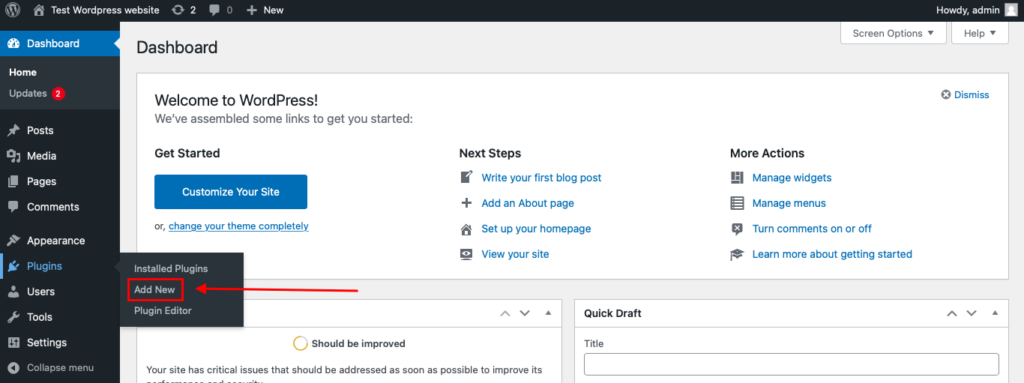
To install the Anti-Spam plugin, go to your WordPress admin panel→ Plugins→ Add New.
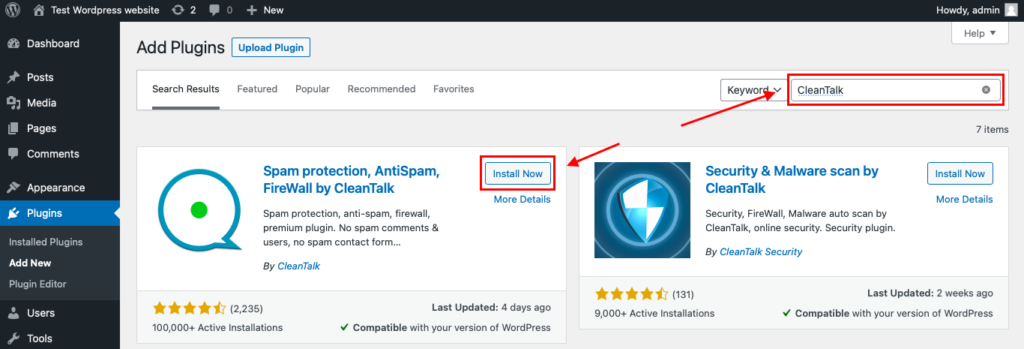
Then enter «СleanTalk» in the search box and click the Install button for «Spam protection, Anti-Spam, FireWall by CleanTalk».
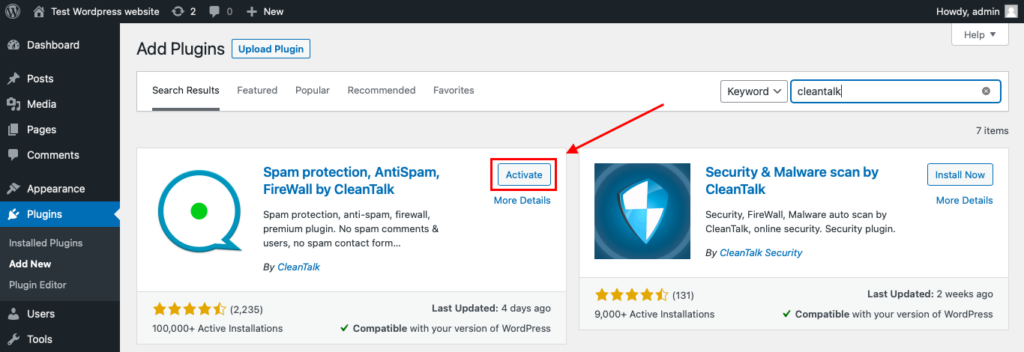
After installing the plugin, click the «Activate» button.
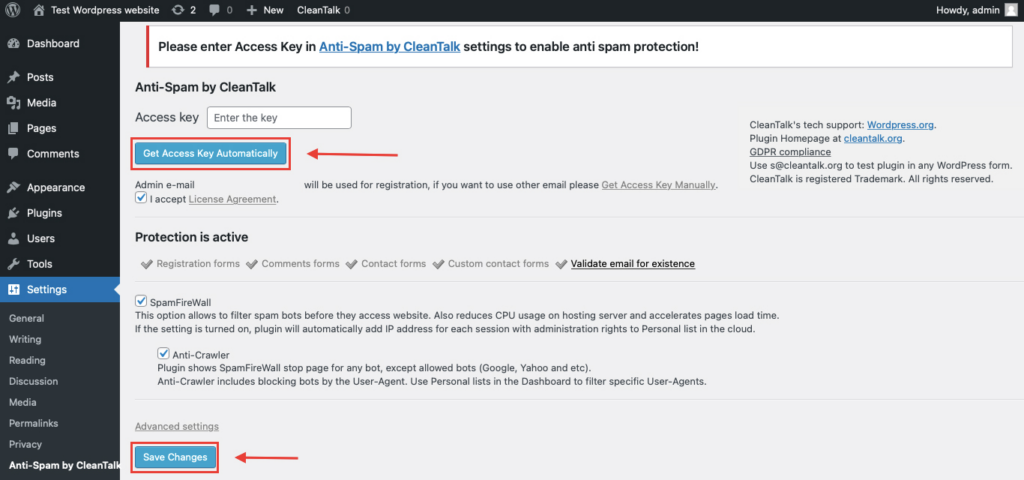
After it is done go to the plugin settings and click the «Get Access Key Automatically» button. Then just click the «Save Settings» button.
That’s all – Contact Form 7 are now protected From this moment,CleanTalk automatically protects the Contact Form 7 registration form (REST route /wp-json/Contact Form 7press/v1/users/), and the Add Listing form used to submit new listings.
You don’t need to paste any shortcodes – just use Contact Form 7 as usual, and CleanTalk will filter spam in the background.
Check if spam protection works with Nextend Social Login.
The best way to test the spam protection is by using a test email,
stop_email@example.com
- Open a page with your Nextend Social Login form in an Incognito / private browser tab.
- Fill out the form using stop_email@example.com as the sender’s email.
- Send the form.
- You should see a message from the Anti-Spam plugin confirming that a spam submission was blocked.
*** Forbidden. Sender blacklisted. Anti-Spam by CleanTalk. ***
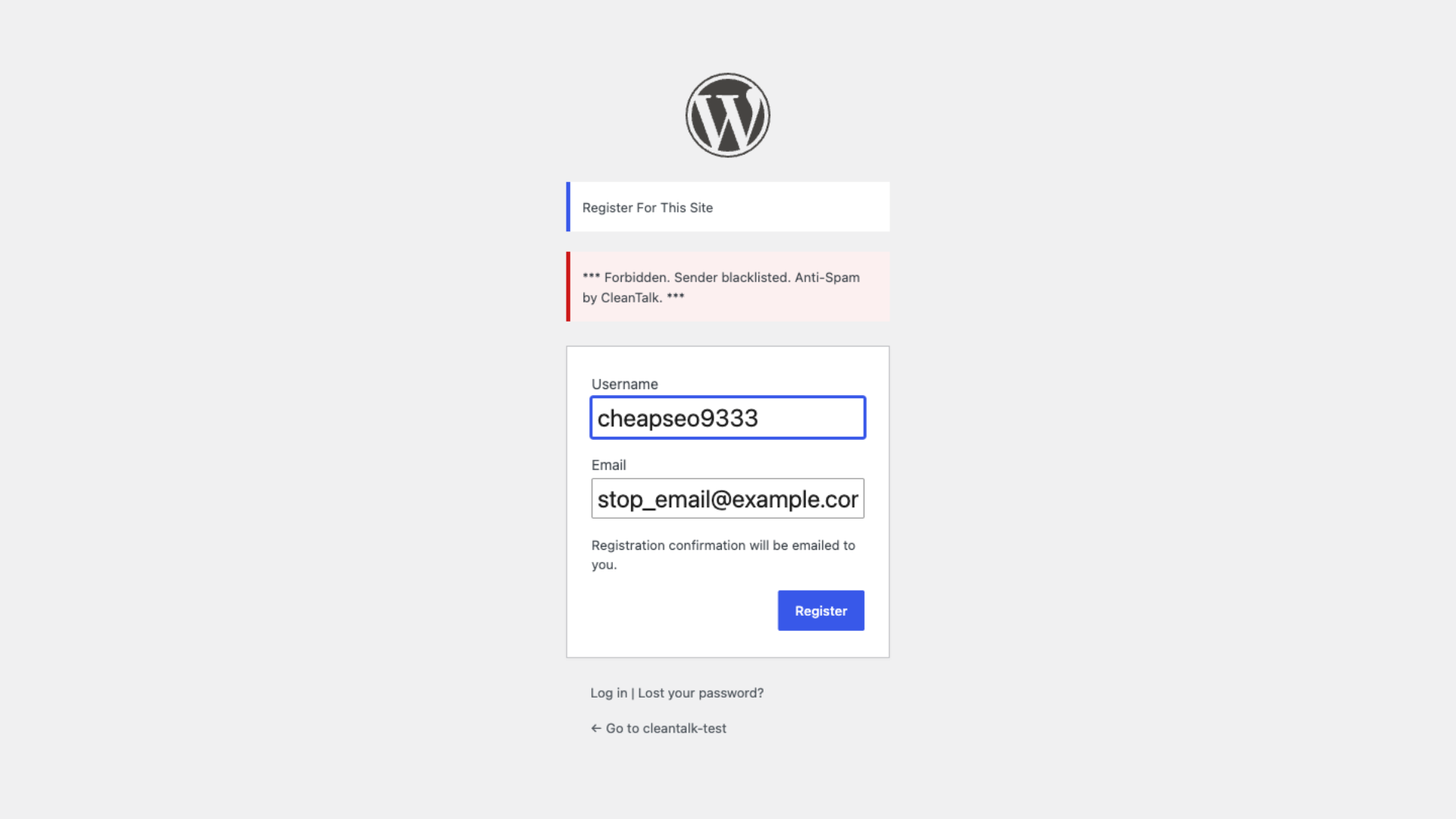
If you see this message, it means CleanTalk successfully protects your Nextend Social Login forms from spam.
Cloud Dashboard
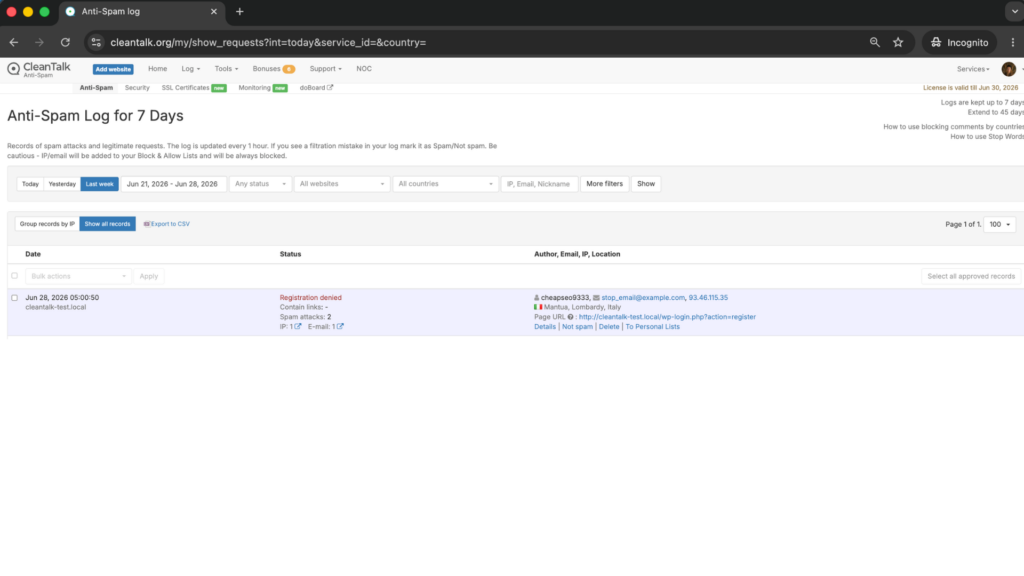
In addition, in the Cloud Dashboard you can find extra details regarding all submissions processed by CleanTalk, including Nextend Social Login forms:
Tools to move the sender to Block or Allow lists so you can fine-tune Nextend Social Login spam protection.
IP and email of the sender, as well as the sender’s activity history across other websites connected to the CleanTalk cloud.
Geolocation of the sender.
Date and time of the submission.
Page (URL) where the form was submitted.
Cloud decision – Approved or Denied.
Cloud explanation for the decision (e.g. blacklisted email, bad IP reputation, spam text, etc.).
Comparison of Spam Protection Methods
No single method is perfect, and the right choice depends on how much friction you can tolerate and what kind of spam you are facing. The table below compares the main approaches for a Nextend-based registration flow.
| Solution | Best for | Pricing | Main limitation |
| CleanTalk Anti-Spam | Invisible, hands-off filtering of bot and human spam on social, registration, and login forms | From $12/year (1 site); 7-day free trial | Cloud-based, so it relies on an external service connection |
| Google reCAPTCHA / hCaptcha | Blocking obvious automated bots on individual forms | Free (reCAPTCHA); hCaptcha free tier | Adds friction; weak against human spam; hurts the frictionless social-login UX |
| Manual moderation / email verification | Very small or low-traffic sites | Free (your time) | Does not scale; verification does not stop spam; high admin workload |
| Nextend built-in controls | Restricting providers and basic new-user handling | Free (included) | Not an anti-spam tool; ignores the standard registration form |
In short: use CleanTalk as the invisible baseline filter, and add reCAPTCHA, hCaptcha or Turnstile only on your highest-risk forms.
Alternative Methods, Briefly
Google reCAPTCHA and hCaptcha. These challenge-based tools are effective against simple bots and are free, which makes them tempting. The downside is real: they add a visible step to your sign-up, hurt accessibility, and do little against human spammers. On a site whose entire selling point is one-click social registration, dropping a CAPTCHA in front of users is a meaningful conversion tax. They work best as a secondary layer on high-risk forms, not as your primary defense.
Cloudflare Turnstile. A lighter, more privacy-friendly alternative to reCAPTCHA that is often invisible or near-invisible to users. It is a reasonable bot-mitigation layer, but like the others it is challenge-based and does not maintain a shared reputation database of known human spammers.
Manual moderation and email verification. Holding new accounts for approval or requiring email confirmation feels safe, but bots confirm emails routinely and human spammers pass moderation by looking legitimate. These methods are fine as a final sanity check, not as a filter.
Honeypot and general anti-spam plugins. Honeypot fields catch lazy bots and add zero friction, so they make a nice cheap supplement. They simply do not catch sophisticated or human spam on their own.
Recommended Anti-Spam Stack for Nextend (2026)
There is no single right setup – it depends on how exposed your registration is. Here are three sensible configurations.
Small site / low-traffic community
- CleanTalk Anti-Spam with Protect external forms enabled
- Optional honeypot field for extra bot filtering
- Basic new-user moderation in Nextend
Membership or WooCommerce site with heavy registration
- CleanTalk Anti-Spam as the base, invisible layer
- Cloudflare Turnstile or reCAPTCHA on the standard registration form only (kept off the social buttons)
- Email verification as a final check for untrusted users
High-value or heavily targeted site (promotions, gated content)
- CleanTalk Anti-Spam covering social, registration, and login forms
- Cloudflare Turnstile on registration and login for additional bot mitigation
- Honeypot protection and periodic Cloud Dashboard review for false positives
In every case CleanTalk is the foundation, because it is the only layer that handles both bot and human spam across all entry points without harming the user experience.
Frequently Asked Questions
Why am I still getting fake registrations after installing Nextend?
Because Nextend is an authentication plugin, not a spam filter. It manages how people log in – the Google, Facebook and Apple buttons – but does not check whether a registration is genuine. By default the registration form underneath has no spam protection, and bots often skip the social buttons and submit that standard form directly. To stop fak
Does Nextend Social Login have built-in spam protection?
Not really. Nextend can restrict allowed providers, optionally require email verification, and let you moderate new users, but it is an authentication plugin, not a security one. It does nothing for the standard WordPress registration form, and email verification does not stop bots that own working inboxes. For actual spam filtering you need a dedicated layer like CleanTalk.
Can bots really register through social login?
Yes. Although social login requires a real provider account, attackers use bulk-created or stolen Google and Facebook accounts to register at scale, especially when there is an incentive such as a coupon, trial, or gated content. And in most setups the standard registration form is still exposed alongside the social buttons, which is where the bulk of automated spam actually arrives.
Will CleanTalk slow down or annoy my real users?
No. CleanTalk filters submissions server-side and shows nothing to your visitors – no CAPTCHA, no checkbox, no extra step. Real users register exactly as they did before. That invisible approach is the main reason it suits social login, where any added friction defeats the purpose of the plugin.
Do I still need reCAPTCHA if I use CleanTalk?
For most sites, no. CleanTalk already blocks both automated and human spam. Some high-risk sites add a challenge like Cloudflare Turnstile on the registration form as a second layer, but it is optional and usually unnecessary. If you do add one, keep it off the one-click social buttons.
Final recommendation
For Nextend Social Login, the strongest setup is CleanTalk as the invisible baseline filter, with WordPress moderation and Nextend’s email verification kept on as a backstop, and Cloudflare Turnstile added only if you are under heavy automated attack. No single method is enough on its own in 2026 – but an invisible cloud filter does the heavy lifting without costing you the registrations social login was meant to win.
For broader website protection, CleanTalk also provides anti-spam protection for websites, helping block spam in forms, comments, registrations, and orders without CAPTCHA.
Stop Nextend Social Login spam without CAPTCHAs
Create your CleanTalk account and protect Nextend Social Login and Register from bot and human spam with server-side filtering. Keep registration easy for real visitors while extending protection across comments, registrations, and other WordPress forms.

Comments
One response to “Nextend Social Login and Register Spam Protection in 5 Minutes (2026)”
These are actually fantastic ideas in on the topic of blogging. You have touched some good factors here. Any way keep up wrinting.