

If you use Brevo forms on a WordPress website, spam signups can quickly become a real issue. Fake subscribers, bot-generated contacts, disposable email addresses, and repeated low-quality submissions can pollute your email lists and make your marketing data less reliable.
This guide explains how to set up Brevo forms spam protection using:
- the Anti-Spam plugin by CleanTalk;
- Brevo’s own form protection options;
- additional tools like Google reCAPTCHA, Cloudflare Turnstile, honeypot protection, double opt-in, rate limiting, and manual list-quality controls.
This approach is relevant for websites that use Brevo sign-up forms, embedded forms, newsletter forms, pop-up forms, Elementor popups, WooCommerce opt-in flows, or WordPress forms connected to Brevo.
Brevo is the current name of Sendinblue. The company officially rebranded from Sendinblue to Brevo in May 2023 because the product had expanded beyond email newsletters into a broader customer engagement and CRM platform.
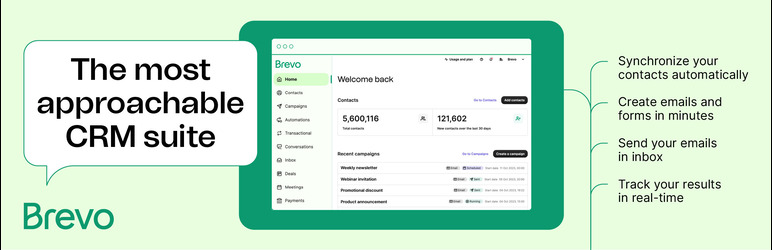
Brevo – Email, SMS, Web Push, Chat, and More
First, let’s take a quick look at Brevo itself and how it is used on WordPress websites.
Brevo is an all-in-one customer engagement platform for email marketing, SMS, web push, chat, automation, CRM, and transactional emails.
On WordPress, Brevo can be used to create subscription forms, collect newsletter subscribers, send transactional emails, manage email campaigns, sync contacts, and connect WooCommerce customer data.
In practice, Brevo helps website owners:
- collect newsletter subscribers;
- build email marketing lists;
- create and embed sign-up forms;
- send transactional emails through Brevo SMTP;
- manage double opt-in forms;
- sync WooCommerce contacts and customer data;
- connect WordPress activity with marketing automation.
The same feature that makes Brevo useful also creates its biggest spam risk: public forms are easy for bots to find and submit.
If fake contacts reach Brevo, they do not just create one bad form submission. They can stay inside your contact list, affect segmentation, trigger automations, distort campaign analytics, and reduce the quality of your email marketing data.
As WordPress.org shows, Brevo is currently used on over 100,000 websites and has 283 user reviews with an average rating of 4.1.
Plugin Homepage at wordpress.org | Website brevo.com
Why Brevo Forms Become a Spam Target
Strictly speaking, Brevo is not the source of spam. It receives and stores the contacts submitted through your public forms.
But in real-world use, that distinction does not make much difference. If a sign-up form, newsletter form, discount popup, webinar form, or lead magnet form is publicly available, bots can eventually find it.
Typical spam cases include:
- fake newsletter subscriptions;
- disposable or temporary email addresses;
- repeated signups from the same IP range;
- bot-generated names and emails;
- low-quality contacts added to marketing lists;
- fake leads submitted through popups;
- spam signups created to trigger automation flows;
- invalid emails that can increase bounce risk.
The more visible your website becomes, the more likely it is that Brevo forms will attract automated submissions.
For email marketing, this is especially important because list quality affects deliverability, segmentation, campaign reports, and automation performance.
Anti-Spam Plugin by CleanTalk for WordPress
The next tool we’re going to use is the Anti-Spam plugin by CleanTalk.
Here’s a short overview:
- CleanTalk is a cloud-based spam protection service for websites.
- It automatically blocks spam without CAPTCHA challenges.
- It protects many types of forms, including contact forms, registrations, comments, surveys, payment forms, and subscription forms.
- It helps stop automated bots and suspicious human spam submissions.
- It uses spam detection signals such as IP address, email address, sender behavior, and global spam activity.
- It lets website owners create custom filtering rules for specific cases.
- It allows blocking or filtering by IP, email, and country.
- It works quietly in the background and is easy to install and configure.
According to WordPress.org, Anti-Spam by CleanTalk for WordPress has over 200,000 active installations, with 3,168 reviews and an average rating of 4.7.
Plugin Homepage at cleantalk.org | Latest release at GitHub.com | Website cleantalk.org
Install the CleanTalk Anti-Spam plugin
Show Instructions
To install the Anti-Spam plugin, go to your WordPress admin panel → Plugins → Add New.
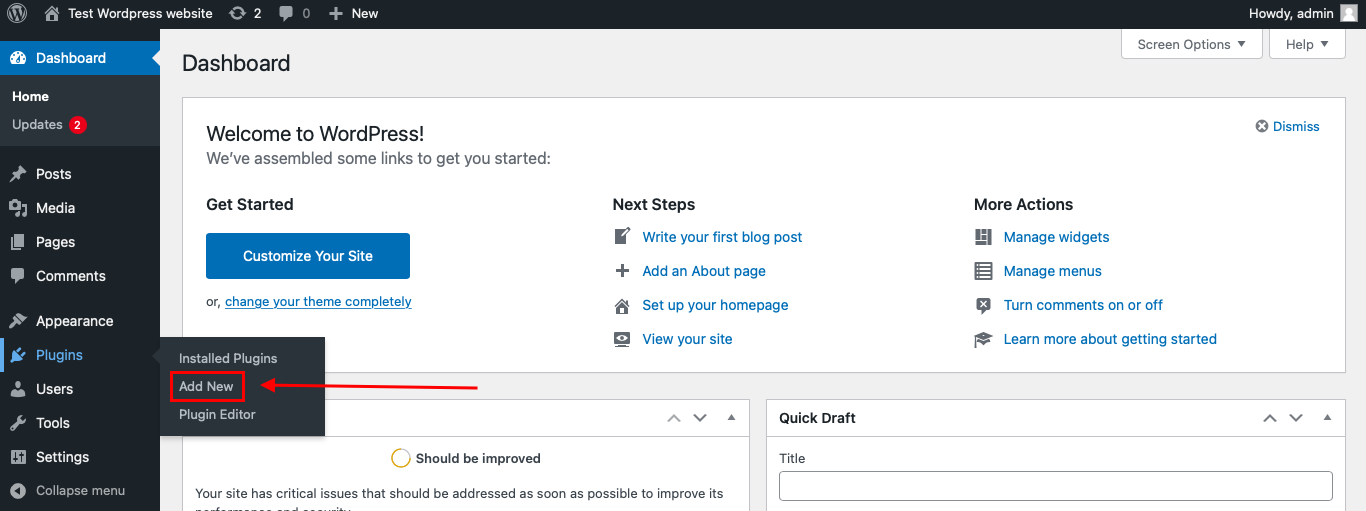
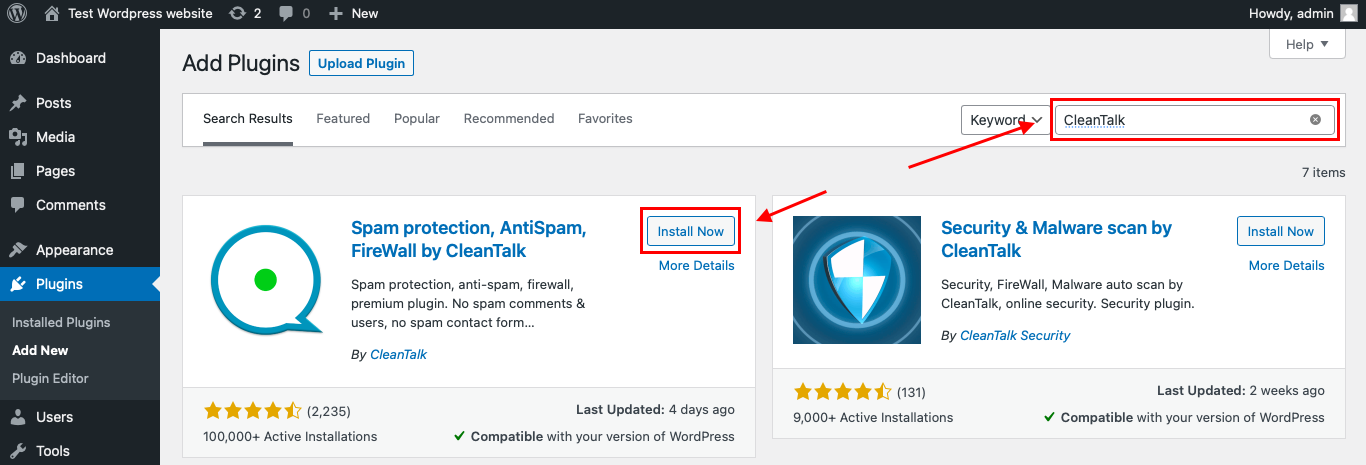
Then enter «СleanTalk» in the search box and click the Install button for «Spam protection, Anti-Spam, FireWall by CleanTalk».
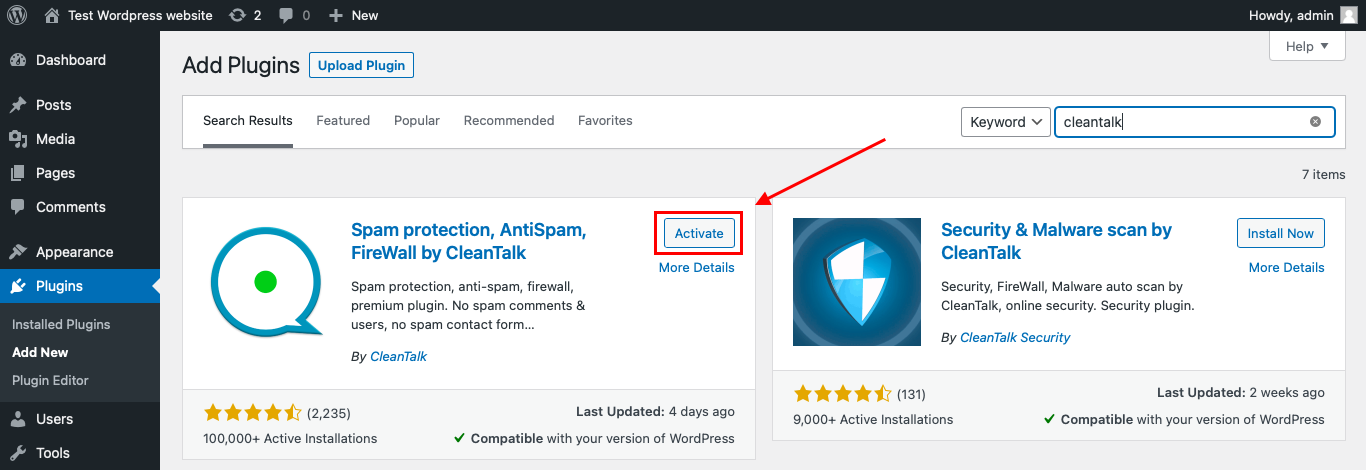
After installing the plugin, click the «Activate» button.
After it is done go to the plugin settings and click the «Get Access Key Automatically» button. Then just click the «Save Settings» button.
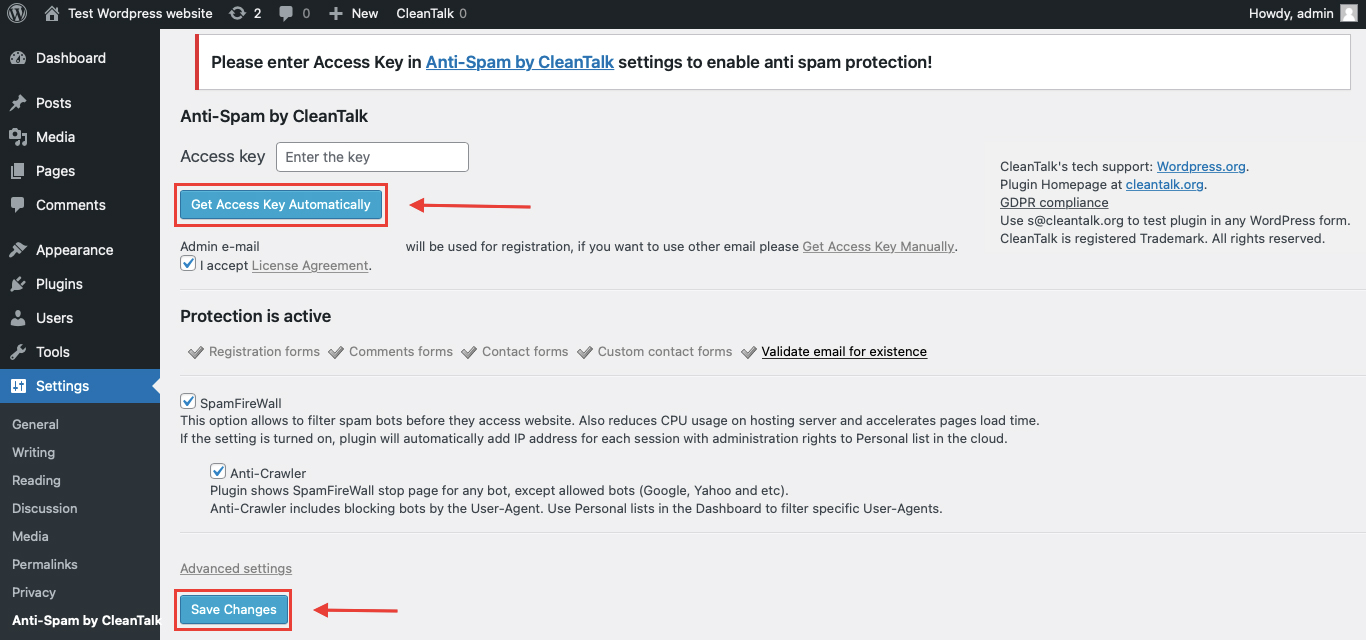
That’s it! From now you know how to completely protect your HivePress from spam.
That’s it. From now on, CleanTalk starts protecting your WordPress forms from spam.
You don’t need to change the design of your Brevo forms. Use the form as usual, and CleanTalk will filter suspicious submissions in the background.
For Brevo forms displayed in popups, Elementor popups, or dynamically loaded blocks, it is also worth checking CleanTalk advanced settings. In the comments under the older Sendinblue article, CleanTalk support recommended enabling “Protect internal forms” and “Capture buffer” when a Sendinblue/Brevo form was placed inside an Elementor popup.
Check if Spam Protection Works with Brevo Forms
The best way to test the spam protection by using a test email,
stop_email@example.com
- Open page with your form (don’t forget to add the shortcode in the page content) in Incognito browser tab.
- Fill out the Contact form using stop_email@example.com as sender’s email.
- Send the form.
- You should see a message from the Anti-Spam plugin confirming that a spam submission was blocked.
*** Forbidden. Sender blacklisted. Anti-Spam by CleanTalk. ***
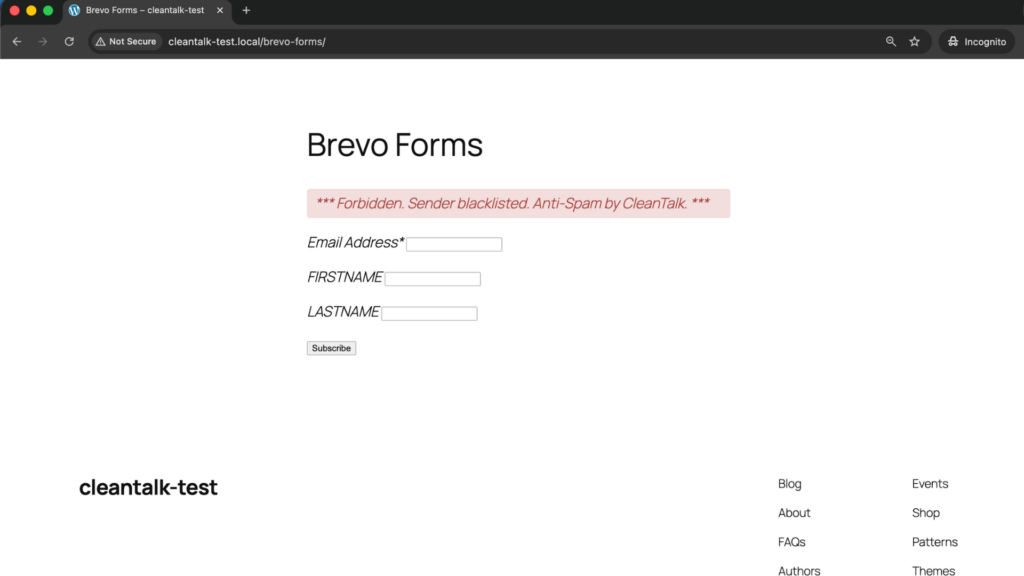
If you see this message, it means CleanTalk successfully blocks the test spam submission.
Testing in Incognito mode is important because spam protection may work differently for logged-in website admins and normal website visitors. The older Sendinblue article also notes that protection works for website visitors, not website admins, so testing should be done outside the admin session.
Cloud Dashboard
In addition, in the CleanTalk Cloud Dashboard, you can find extra details about submissions processed by CleanTalk, including Brevo sign-up forms and other WordPress forms connected to your mailing list.
The dashboard can help review:
- IP and email of the sender;
- sender activity history across other websites connected to the CleanTalk cloud;
- geolocation of the sender;
- date and time of the submission;
- page URL where the form was submitted;
- cloud decision: Approved or Denied;
- cloud explanation for the decision, such as blacklisted email, bad IP reputation, or spam text;
- tools to move senders to Block or Allow lists.
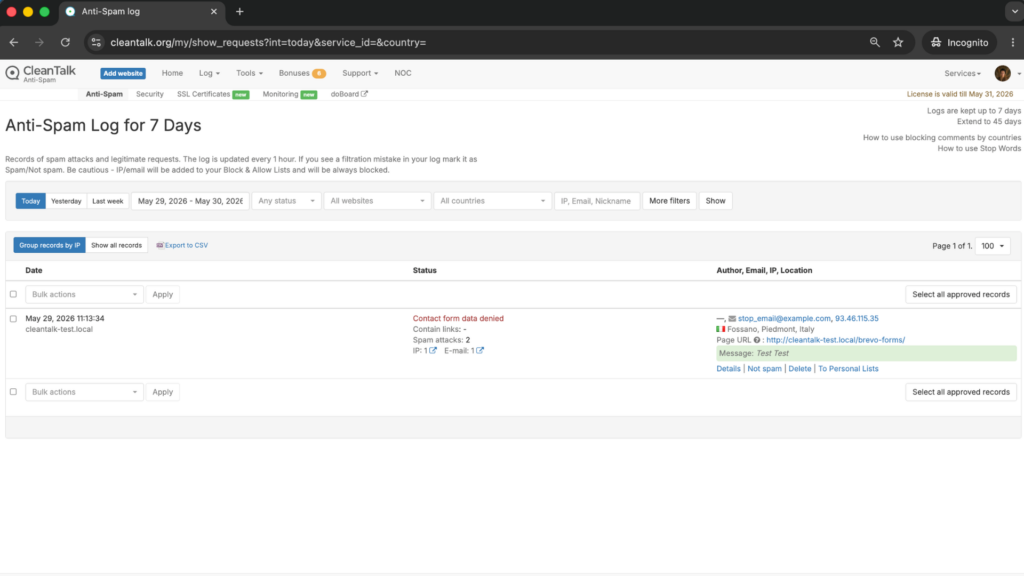
This is useful because Brevo spam is not always obvious from the form alone. Sometimes the same spam pattern appears across several forms, popups, or landing pages.
The dashboard helps you understand which form is being targeted and whether the problem comes from disposable emails, repeated IP addresses, suspicious text, or high-volume automated submissions.
Google reCAPTCHA, Cloudflare Turnstile, and Brevo CAPTCHA Options
Besides CleanTalk, Brevo also supports additional anti-bot protection for sign-up forms.
Brevo documentation recommends adding CAPTCHA to sign-up forms and says users can choose between Google reCAPTCHA and Cloudflare Turnstile CAPTCHA.
Google reCAPTCHA
Google reCAPTCHA is one of the most familiar anti-bot tools.
For Brevo sign-up forms, reCAPTCHA can be used as a visible or background verification layer, depending on the configuration.
It is useful when:
- your Brevo form receives repeated bot signups;
- you want a recognizable CAPTCHA-based protection method;
- you need an additional frontend checkpoint;
- you want to reduce automated submissions before they reach the list.
However, reCAPTCHA can sometimes add friction for real users, especially if image challenges appear.
That is why reCAPTCHA is usually better as an additional protection layer, not the only anti-spam method.
Cloudflare Turnstile
Cloudflare Turnstile is a modern CAPTCHA alternative that can verify visitors with less visible friction than traditional CAPTCHA tools.
Brevo documentation lists Cloudflare Turnstile as one of the CAPTCHA options for Brevo sign-up forms.
Main benefits of Cloudflare Turnstile:
- lower friction for real visitors;
- fewer classic image-based challenges;
- smoother experience on newsletter and lead generation forms;
- good fit for conversion-focused pages;
- useful for websites that already use Cloudflare.
For Brevo forms, Turnstile can be a good supporting layer when you want to reduce spam without making subscription forms harder to complete.
Honeypot, Double Opt-In, Rate Limiting, and Other Brevo Anti-Spam Controls
Additionally, let’s consider other anti-spam mechanics that are especially relevant for Brevo forms.
Brevo’s own documentation recommends using a combination of techniques to protect forms from bots and spam signups, including CAPTCHA, double opt-in, blocking disposable or free email addresses, honeypot fields, rate limiting, and anti-spam tools.
Honeypot
A honeypot is one of the simplest anti-spam mechanics against basic spam bots.
It works by adding a hidden field that normal users do not see. Bots may fill this hidden field automatically. When that happens, the submission can be blocked.
Because no visible CAPTCHA or extra user action is required, honeypots:
- help maintain a smooth user experience;
- reduce friction on newsletter and sign-up forms;
- catch simple automated bots;
- work well as an additional layer.
However, honeypots are not enough on their own. More advanced bots may avoid hidden fields or imitate normal user behavior.
Double Opt-In
Double opt-in is not a classic anti-spam filter, but it is very useful for Brevo list quality.
With double opt-in, a user must confirm the subscription by email before becoming an active contact.
This helps reduce:
- fake emails;
- mistyped addresses;
- low-quality contacts;
- unwanted subscriptions;
- contacts that should not enter automation workflows.
For Brevo forms, double opt-in is especially useful when the form is connected to newsletters, lead magnets, webinars, discount campaigns, or gated content.
Rate Limiting
Rate limiting restricts how many submissions can be made by one IP address or account within a specific time period.
Brevo describes rate limiting as a technique that can block bots when they quickly submit a high volume of forms.
This is useful when:
- the same IP submits many fake contacts;
- a form receives many entries in a short time;
- bots repeatedly attack one landing page;
- newsletter or lead magnet forms are abused at scale.
Rate limiting works best together with other tools, because strict limits alone can sometimes affect real users on shared networks.
Blocking Disposable or Free Email Addresses
Brevo also recommends blocking suspicious email patterns, including disposable email addresses, where relevant.
This is useful when:
- you collect B2B leads;
- your forms are abused with temporary emails;
- fake contacts are created only to access a discount or free resource;
- email quality matters more than raw signup volume.
This method should be used carefully. For some consumer websites, blocking all free email domains may be too aggressive. But blocking temporary email domains can help keep lists cleaner.
Manual List Review
Even with good protection, some suspicious contacts may still need manual review.
For Brevo, this is especially important because fake contacts can affect:
- list growth reports;
- open rates;
- click-through rates;
- bounce rate;
- segmentation;
- automations;
- sender reputation.
Manual review is not a replacement for anti-spam protection, but it is useful for cleanup and quality control.
Why Brevo Spam Signups Create a Bigger Headache Than Expected
With Brevo, spam does not only affect the moment of submission.
Once fake contacts enter your list, they can create longer-term problems:
- they make subscriber growth look better than it really is;
- they reduce the accuracy of campaign reporting;
- they may trigger automation workflows;
- they can increase bounce risk;
- they make real leads harder to identify;
- they affect segmentation quality;
- they waste email sending volume;
- they can damage sender reputation over time.
That is one of the main reasons Brevo forms spam protection deserves attention.
Brevo is meant to help manage real contacts and customer communication. But when filtering is weak, the same contact collection system can become polluted with fake data.
Comparison of Anti-Spam Approaches for Brevo Forms
| Solution | Main role | Strengths | Limitations | Best use case |
|---|---|---|---|---|
| CleanTalk | Main site-level anti-spam filtering | Blocks suspicious submissions before they reach Brevo, works in the background, does not require CAPTCHA for real users | Strongest when combined with list-quality controls | WordPress websites that want automatic spam filtering for Brevo forms |
| Google reCAPTCHA | Frontend bot verification | Familiar, supported for Brevo sign-up forms, useful against automated bots | Can add user friction | Sites that want a recognizable CAPTCHA layer |
| Cloudflare Turnstile | Low-friction CAPTCHA alternative | Smoother user experience, fewer visible challenges | Still needs proper configuration and testing | Conversion-focused Brevo forms |
| Honeypot | Hidden bot trap | Invisible to users, catches simple bots | Weak against more advanced bots | Additional protection for basic bot submissions |
| Double opt-in | Email confirmation | Improves list quality and consent confirmation | Adds one more step for subscribers | Newsletter and lead generation forms |
| Rate limiting | Submission frequency control | Reduces high-volume bot attacks | Needs careful thresholds | Forms receiving repeated submissions from the same IPs |
| Disposable email blocking | List-quality control | Helps reduce temporary or low-quality emails | Can be too strict if configured broadly | B2B lead forms, gated content, discount campaigns |
| Manual review | Cleanup and monitoring | Helps identify suspicious contacts after submission | Does not prevent spam from entering the list | Ongoing list hygiene |
In practice, the most reliable setup is layered: site-level filtering first, frontend verification second, and list-quality controls on top.
Frequently Asked Questions — Brevo Forms Spam Protection
Why am I getting fake subscribers in Brevo?
Brevo forms are public sign-up forms. If a form is visible on a website, bots can find it and submit fake contacts.
This is especially common with newsletter forms, discount popups, webinar registrations, gated content forms, and lead magnets.
Is Sendinblue the same as Brevo?
Yes. Sendinblue rebranded to Brevo in May 2023.
The old name still appears in older WordPress articles, plugin references, integrations, and search queries, but the current product name is Brevo.
Does Brevo have built-in spam protection?
Brevo provides several recommended methods for protecting forms, including CAPTCHA, double opt-in, honeypot fields, rate limiting, and blocking suspicious email patterns.
However, these methods work best as part of a layered setup. For WordPress websites, it is still useful to add a site-level anti-spam plugin that filters submissions before they become contacts.
Can I use CleanTalk with Brevo forms?
Yes. CleanTalk can protect WordPress forms that send data into Brevo, including subscription forms, embedded forms, and forms displayed through WordPress pages or popups.
For dynamically loaded forms, such as Elementor popups, it may be necessary to check advanced CleanTalk settings like “Protect internal forms” and “Capture buffer.”
Why did the old test email not work on my Brevo form?
The older article mentioned a different test email and also accidentally referred to ConvertKit in several places.
For the updated CleanTalk testing flow, use:
Also make sure you test in Incognito mode, because protection may not trigger the same way for logged-in website admins.
Brevo form is inside an Elementor popup. Will spam protection still work?
It can work, but popup forms sometimes load differently from normal embedded forms.
If the form is inside Elementor or another dynamic popup builder, check whether CleanTalk is processing the form correctly. If spam still goes through, enable advanced options such as protection for internal forms and buffer capture, then test again in Incognito mode.
Should I use CAPTCHA or CleanTalk for Brevo forms?
Use CleanTalk as the main anti-spam filtering layer and CAPTCHA or Turnstile as an additional checkpoint when needed.
CAPTCHA helps verify users on the frontend. CleanTalk helps filter suspicious submissions in the background. Together, they create stronger protection than either method alone.
Is double opt-in enough to stop Brevo spam?
Double opt-in helps keep fake or mistyped emails from becoming confirmed subscribers, but it does not fully stop spam submissions from reaching the form.
It is useful for list quality, but it should be combined with anti-spam filtering, CAPTCHA or Turnstile, and monitoring.
What should I do if real subscribers are blocked?
Start by checking the CleanTalk dashboard and Brevo form settings.
Review the sender email, IP address, block reason, and any custom rules. In most cases, the solution is not to remove protection completely, but to adjust the rules or add a trusted sender to the Allow list.
What setup works best for Brevo forms in 2026?
For most WordPress websites, the best setup is:
- CleanTalk as the main anti-spam layer;
- Brevo CAPTCHA or Cloudflare Turnstile for high-risk forms;
- double opt-in for email list quality;
- rate limiting for repeated abuse;
- manual review for suspicious contacts.
This gives protection at several points: before submission, during verification, and after contact collection.
Recommended Anti-Spam Stack for Brevo Forms in 2026
Finally, no single anti-spam tool can stop every type of spam signup. The most reliable approach for Brevo forms is a layered protection stack, where each tool blocks a different category of bot or low-quality submission.
Recommended setup by site type
Simple newsletter website
- CleanTalk Anti-Spam;
- Brevo double opt-in;
- optional Cloudflare Turnstile.
This setup helps block fake signups while keeping the form simple for real subscribers.
Lead generation website
- CleanTalk Anti-Spam;
- Cloudflare Turnstile or Google reCAPTCHA;
- disposable email blocking;
- manual review of suspicious leads.
This works well for gated content, demo requests, ebooks, and B2B landing pages.
Ecommerce website using Brevo
- CleanTalk Anti-Spam;
- Brevo WooCommerce integration;
- opt-in confirmation where relevant;
- monitoring of suspicious checkout or signup behavior.
This helps protect customer and subscriber data from fake entries.
High-traffic landing pages
- CleanTalk Anti-Spam;
- Cloudflare Turnstile;
- rate limiting;
- double opt-in;
- regular list hygiene.
This setup is useful when paid traffic, SEO traffic, or viral campaigns expose forms to larger bot volumes.
Elementor popup forms
- CleanTalk Anti-Spam;
- “Protect internal forms” and “Capture buffer” checked if needed;
- Brevo double opt-in;
- Incognito testing after setup.
This is important because popup forms may behave differently from normal embedded forms.
Privacy-sensitive websites
- CleanTalk Anti-Spam;
- Cloudflare Turnstile;
- minimal required form fields;
- double opt-in.
This setup reduces spam while keeping the user experience clean and less intrusive.
Final Thoughts
No single anti-spam tool can stop every fake signup that reaches Brevo forms.
Some solutions are better at reducing bot traffic. Others help verify users, confirm email ownership, slow down repeated submissions, or maintain list quality after the signup.
For most WordPress websites using Brevo forms, the strongest setup is to use a site-level anti-spam layer such as CleanTalk, add Brevo CAPTCHA or Cloudflare Turnstile where needed, and use list-quality controls such as double opt-in, rate limiting, and manual monitoring.
This combination helps keep bad submissions out of your Brevo lists, protects email marketing performance, and makes subscriber data easier to trust.
By this point, most spam issues in your Brevo forms should be significantly reduced.
If they are not, review the current setup and make sure you are not depending on only one method. In most cases, the answer is not to clean fake contacts after the fact, but to filter them before they ever reach your Brevo list.

Comments
2 responses to “Brevo Forms Spam Protection in 2026. How to Protect WordPress Sign-Up Forms from Spam”
s@cleantalk.org went straight through, with no spam protection.
The Sendinblue Form is in a popup in Elementor.
Hello,
Please do the following:
WordPress Admin Page —> Settings —> Anti-Spam by CleanTalk —> Advanced Settings —> enable “Protect internal forms” and “Capture buffer” —> Save Changes.
Also use incognito mode or another browser before testing.
Did it help?