

Brevo forms are usually connected directly to marketing activity: newsletter growth, popups, discount campaigns, lead magnets, WooCommerce customer communication, and automation workflows. That makes them useful for real subscribers — but also attractive to bots and fake sign-ups.
If a public Brevo form is not protected properly, spam can move beyond the form itself. Fake contacts may enter your lists, trigger confirmation emails, distort campaign reports, affect segmentation, or make your audience look larger than it really is.
This guide explains how to protect Brevo forms on WordPress using Anti-Spam by CleanTalk, together with Brevo’s own protection options such as CAPTCHA, double opt-in, disposable email blocking, and list hygiene.
Brevo and WordPress Forms
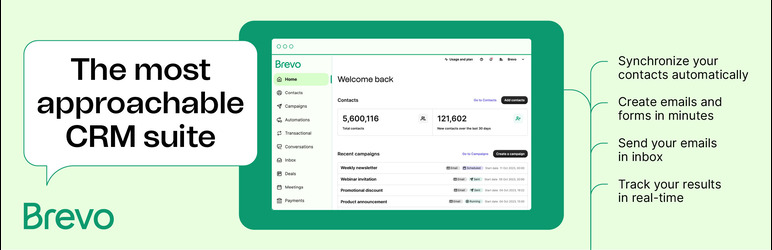
Brevo, formerly known as Sendinblue, is a marketing and communication platform for email, SMS, WhatsApp, web push, chat, CRM, automation, and transactional email.
The official WordPress plugin is called: Brevo – Email, SMS, Web Push, Chat, and more.
It helps WordPress site owners connect their website with Brevo and manage marketing tools from WordPress. According to WordPress.org, the plugin includes customizable forms and popups, subscriber sync, WooCommerce sync, segmentation, SMTP, and integration with major WordPress form plugins.
Brevo forms are often used for:
- newsletter sign-ups
- email subscription forms
- popup sign-up forms
- embedded forms
- discount and coupon forms
- lead magnet forms
- webinar registrations
- event sign-ups
- WooCommerce customer communication
- SMS or WhatsApp opt-ins
- contact list growth
The main advantage of Brevo is that a form can become part of a larger marketing workflow. A visitor submits a form, then the contact can be added to a list, segmented, confirmed by email, synced with WooCommerce, or used in future campaigns.
But this is also why spam protection is important.
If fake submissions are accepted as normal contacts, they can pollute Brevo lists and affect more than just one form.
As WordPress.org shows, Brevo – Email, SMS, Web Push, Chat, and more is currently used on over 100,000 websites and has 283 user ratings.
Plugin Homepage at WordPress.org | Documentation at Brevo
Why Brevo Forms Attract Spam
Brevo is not the reason spam happens. Spam is a common issue for public subscription forms, popups, and lead generation forms.
Bots usually search for forms that can be submitted automatically. Brevo forms can become a target because they are often connected to incentives or marketing actions.
Common Brevo form spam patterns include:
- fake newsletter subscriptions
- temporary or disposable email addresses
- bot-generated contact names
- repeated submissions from the same IPs
- fake sign-ups for discounts or coupons
- low-quality contacts entering lists
- suspicious email domains
- contacts that never confirm double opt-in
- automations triggered by fake submissions
- form entries that make list growth look inflated
This matters because Brevo is not just a form tool. It is connected to email marketing, segmentation, CRM, transactional messages, WooCommerce data, and automation.
A fake contact can create noise across the whole marketing system.
That is why Brevo forms should be protected before suspicious submissions become subscribers, contacts, or automation triggers.
Anti-Spam by CleanTalk
The next tool we are going to use is the Anti-Spam plugin by CleanTalk.
Here’s a short overview:
- CleanTalk is a cloud-based spam protection service for WordPress websites.
- It blocks spam without forcing real visitors to solve CAPTCHA challenges.
- It can protect different types of WordPress forms and submissions, including contact forms, comments, registrations, subscriptions, bookings, surveys, and WooCommerce orders.
- It checks submissions using spam detection signals such as email address, IP address, sender reputation, and sender activity.
- It helps block automated bots and suspicious form submissions.
- It works quietly in the background.
- It allows website owners to review spam checks in the CleanTalk Cloud Dashboard.
It gives website owners tools for personal Allow lists and Block lists, country filters, language filters, stop words, and SpamFireWall.
According to WordPress.org, Anti-Spam by CleanTalk for WordPress has over 200,000 active installations, with 3,168 reviews and an average rating of 4.7.
Plugin Homepage at cleantalk.org | Latest release at GitHub.com | Website cleantalk.org
Install the CleanTalk Anti-Spam plugin
Show Instructions
To install the Anti-Spam plugin, go to your WordPress admin panel → Plugins → Add New.

Then enter «СleanTalk» in the search box and click the Install button for «Spam protection, Anti-Spam, FireWall by CleanTalk».

After installing the plugin, click the «Activate» button.
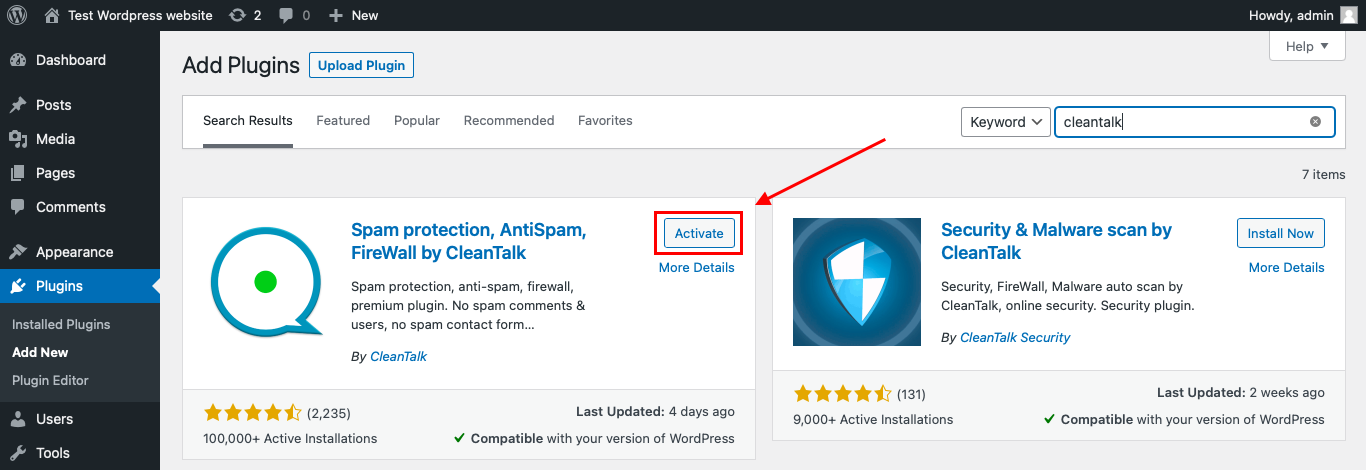
After it is done go to the plugin settings and click the «Get Access Key Automatically» button. Then just click the «Save Settings» button.

That’s it! From now you know how to completely protect your HivePress from spam.
That’s it! From now on, you know how to protect Brevo forms from spam.
How to Check Brevo Forms Spam Protection
After installing the plugin, test that spam protection is working correctly.
Use the test email:
stop_email@example.com
To test the form:
- Open a page with a Brevo sign-up form, popup, or embedded subscription form.
- Use an Incognito or private browser window.
- Fill in all required form fields.
- Use stop_email@example.com as the sender email.
- Submit the form.
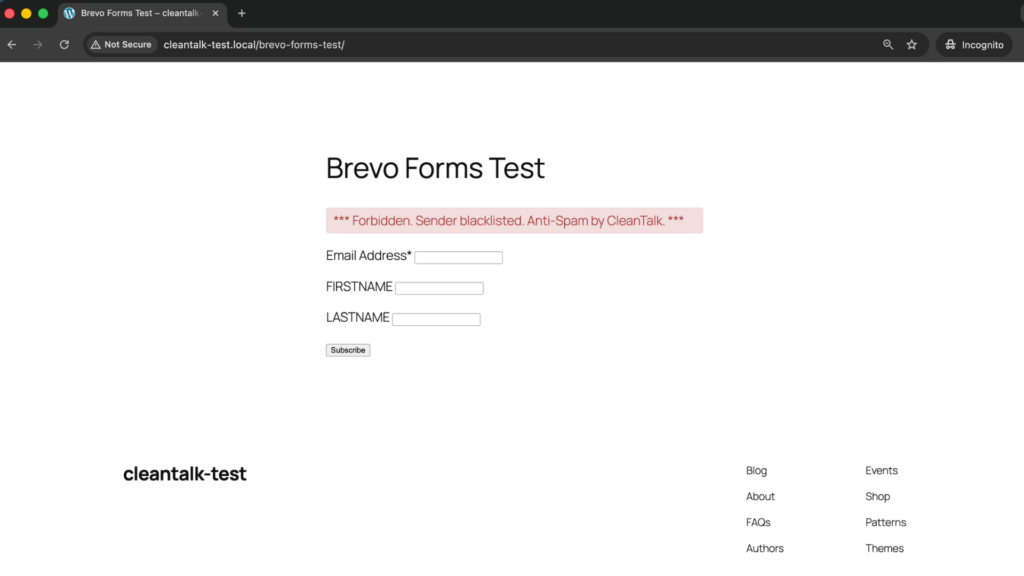
It is better to test protection in an Incognito window because WordPress admins may be treated differently from regular website visitors. Testing as a normal visitor helps confirm that protection works for public form submissions.
If the form submits successfully and nothing appears in the CleanTalk Anti-Spam Log, the form may be processed outside the standard WordPress form flow. This can happen when the form is handled through a Brevo embed, iframe, external script, API, or another integration layer.
In that case, the form path should be checked separately.
Cloud Dashboard and Monitoring
CleanTalk gives website owners access to request details in the CleanTalk Cloud Dashboard.
This is useful for Brevo forms because fake sign-ups often follow patterns. You may see repeated domains, disposable email addresses, specific countries, repeated IPs, or similar contact names.
In the Cloud Dashboard, site owners can review:
- approved and blocked submissions
- sender IP addresses
- sender email addresses
- submission date and time
- page URL where the form was submitted
- spam check result
- reason for blocking or approving a request
- personal Allow lists and Block lists
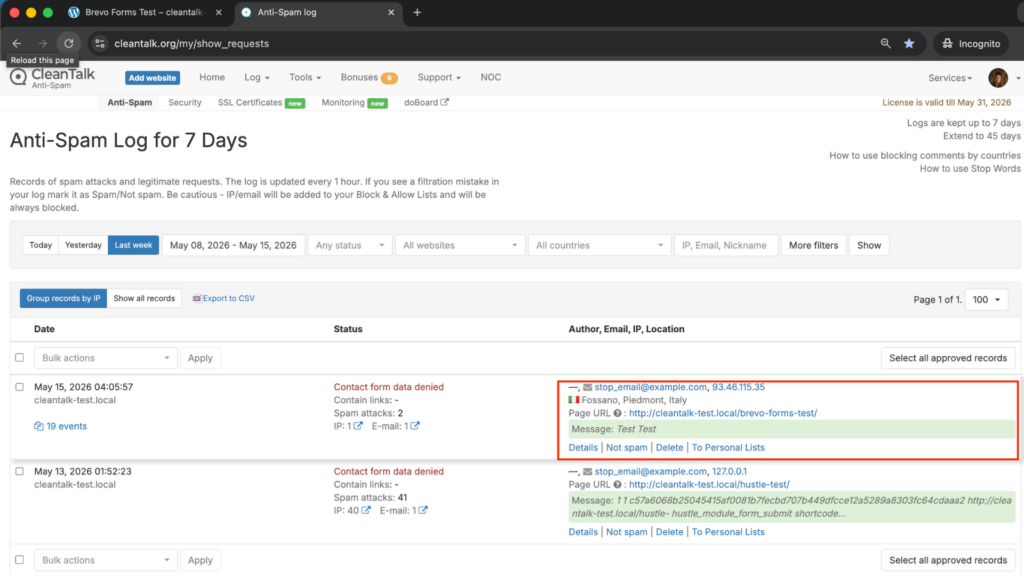
This helps website owners understand whether Brevo spam is random or coming from repeated sources.
For example, if a legitimate subscriber is blocked by mistake, the site owner can review the log and add the sender to an Allow list. If repeated fake contacts use the same email pattern, IP range, or country source, the filtering rules can be adjusted.
Brevo Workflows and Why Spam Filtering Matters
Brevo forms are usually connected to marketing workflows. A form submission may create or update a contact, add someone to a list, send a confirmation email, trigger a welcome sequence, start an automation, or sync with WooCommerce.
That means fake submissions can create downstream problems.
Spam can:
- pollute Brevo contact lists
- trigger unnecessary confirmation emails
- affect segmentation quality
- make list growth metrics unreliable
- increase low-quality contacts
- waste email or SMS campaign volume
- distort lead source reporting
- trigger automations for fake users
- create noise in WooCommerce-related communication
- make double opt-in reports harder to interpret
Brevo documentation recommends using several protection methods against bots and spam signups, including CAPTCHA, double opt-in, and blocking disposable or free email addresses.
The key point is that no single method solves every scenario. A stronger setup usually combines background spam filtering, subscriber confirmation, and list-quality controls.
Additional Spam Protection Options for Brevo Forms
CleanTalk can work as the main anti-spam layer for WordPress-side submissions, but Brevo also has its own form protection and list-quality options.
These options are especially useful for public subscription forms, lead magnets, discounts, and high-traffic landing pages.
CAPTCHA for Brevo Forms
Brevo documentation recommends adding CAPTCHA to forms to protect against bot attacks and spam signups.
For sign-up forms created in Brevo, users can choose between Google reCAPTCHA and Cloudflare Turnstile. Brevo’s CAPTCHA settings support reCAPTCHA v2, reCAPTCHA v3, and Cloudflare Turnstile, depending on the setup.
CAPTCHA can be helpful when bots are submitting forms repeatedly.
However, CAPTCHA should be configured carefully. Brevo’s troubleshooting documentation notes several common issues, such as incorrect domains, iframe-related domain settings, mismatched reCAPTCHA types, and reusing the same key across multiple forms.
Double Opt-In
Double opt-in means that a visitor submits an email address and then confirms the subscription through a confirmation email.
Brevo recommends double opt-in for higher-quality leads and GDPR-related compliance needs. For pop-up sign-up forms, Brevo explains that subscribers receive a confirmation email and must click the link before they are added to the contact database.
Double opt-in is useful because it confirms that the subscriber can access the email address.
But it is not complete spam protection.
Bots can still submit the form, trigger confirmation emails, or create temporary noise before the contact is confirmed. That is why double opt-in works best together with anti-spam filtering.
Disposable Email Blocking
Brevo sign-up forms can block sign-ups from disposable email addresses. This is especially important for lead magnets, discount campaigns, gated content, giveaways, and newsletter growth campaigns.
Disposable emails can:
- reduce list quality
- increase fake contacts
- make campaign results less reliable
- lower engagement rates
- waste email volume
- make segmentation less useful
Blocking disposable emails helps prevent low-quality contacts from entering the marketing system.
Cloudflare Turnstile
Cloudflare Turnstile is one of the CAPTCHA options available for sign-up forms created in Brevo.
It can be useful for website owners who want form verification with less visible friction than traditional CAPTCHA challenges.
Before choosing Turnstile, check how the Brevo form is created and embedded. A Brevo-created form, a WordPress plugin form, an iframe embed, and a third-party form may behave differently.
List Hygiene and Contact Quality
Even with anti-spam protection, list hygiene is still important.
Website owners should regularly review Brevo contacts for:
- unconfirmed subscribers
- bounced emails
- inactive contacts
- suspicious domains
- duplicate contacts
- unexpected source patterns
- low-engagement segments
- contacts from risky campaigns
This helps keep email marketing data cleaner after the initial form submission stage.
Comparison of Anti-Spam Methods for Brevo Forms
| Method | Main Role | Strengths | Limitations | Best Use Case |
|---|---|---|---|---|
| CleanTalk | Background anti-spam filtering | Works without visible CAPTCHA, helps block suspicious WordPress submissions before they affect workflows | Needs plugin setup and log review | WordPress sites using Brevo forms or Brevo-related lead flows |
| CAPTCHA | Bot verification | Brevo supports Google reCAPTCHA and Cloudflare Turnstile for sign-up forms | Can create setup issues or extra friction | High-risk public sign-up forms |
| Double Opt-In | Subscriber confirmation | Helps confirm consent and email access | Does not stop every spam attempt at the form stage | Newsletter and GDPR-sensitive forms |
| Disposable Email Blocking | List quality control | Helps stop temporary emails before they enter lists | Does not replace full spam filtering | Discounts, gated content, giveaways, lead magnets |
| SpamFireWall | Bot traffic filtering | Helps block active spam bots before they reach the site | Works best with form-level filtering | Websites receiving repeated bot traffic |
| List Hygiene | Post-submission cleanup | Improves long-term campaign quality | Does not block the original submission | Older Brevo lists or mixed-quality databases |
For most WordPress websites, the best approach is layered protection. CleanTalk can be used as the main background anti-spam layer, while CAPTCHA, double opt-in, disposable email blocking, and list hygiene help improve Brevo contact quality.
Frequently Asked Questions
Why am I getting bot sign-ups in Brevo forms?
Brevo forms are public sign-up forms, so bots can find them and submit fake contacts, disposable emails, or repeated entries.
This is especially common when a form offers a discount, lead magnet, gated content, newsletter subscription, or webinar registration.
Brevo recommends protecting forms from bots and spam signups with several methods, including CAPTCHA, double opt-in, and blocking disposable or free email addresses.
Does double opt-in stop all Brevo spam sign-ups?
No. Double opt-in helps confirm that a subscriber can access the email address and wants to join the list, but it does not block every spam attempt at the form submission stage.
A bot can still submit the form and trigger a confirmation email. That is why double opt-in should be used together with anti-spam filtering and list-quality controls.
Can Brevo block disposable email addresses?
Yes. Brevo sign-up forms can block sign-ups from disposable email addresses and, if needed, from free email providers.
This is important because temporary email services can create low-quality contacts, reduce list quality, increase bounces, and negatively affect email marketing performance over time.
Should I use reCAPTCHA or Cloudflare Turnstile for Brevo forms?
It depends on how the form is created.
For sign-up forms created in Brevo, Brevo supports Google reCAPTCHA and Cloudflare Turnstile. Before choosing one, check whether the form is created directly in Brevo, embedded through Brevo, or processed through a WordPress plugin or third-party form tool.
For many websites, CleanTalk can work as the background anti-spam layer, while reCAPTCHA or Turnstile can be added to high-risk forms.
Why do fake Brevo contacts matter if they never confirm subscription?
Fake contacts can still create problems before they are fully removed or ignored.
They can trigger confirmation emails, pollute temporary lists, distort form performance data, create noise in contact sources, and make list growth look stronger than it really is.
If automations or sync rules are not configured carefully, fake contacts can also enter workflows before they are properly qualified.
How do I test CleanTalk spam protection with a Brevo form?
Open the page with your Brevo form in an Incognito or private browser window and submit the form using:
If CleanTalk is working correctly, the submission should be blocked or recorded in the CleanTalk Cloud Dashboard.
If the form submits successfully and nothing appears in the Anti-Spam Log, the form may be processed outside the standard WordPress form flow, for example through an embedded Brevo script, iframe, API, or another external layer. In that case, the integration path needs to be checked separately.
Recommended Anti-Spam Setup for Brevo Forms
| Website Type | Recommended Setup | Why |
|---|---|---|
| Standard business website | CleanTalk + double opt-in | Background filtering plus stronger subscriber confirmation |
| Newsletter-focused website | CleanTalk + disposable email blocking + double opt-in | Helps keep subscriber lists cleaner |
| Lead magnet website | CleanTalk + SpamFireWall + disposable email blocking | Helps reduce fake sign-ups and temporary emails |
| Discount or coupon campaign | CleanTalk + disposable email blocking + CAPTCHA | Helps reduce offer abuse and fake contacts |
| WooCommerce website | CleanTalk + Brevo sync review + list hygiene | Helps keep customer communication workflows cleaner |
| High-spam subscription form | CleanTalk + reCAPTCHA or Turnstile + filters | Adds extra verification for risky forms |
| Website with reporting issues | CleanTalk + list hygiene + contact source review | Helps reduce fake contacts affecting campaign data |
Final Thoughts
Brevo makes it easy to connect WordPress forms with email marketing, contact lists, popups, WooCommerce sync, SMTP, segmentation, and automation. But every public sign-up form needs reliable spam protection.
Double opt-in and CAPTCHA can help, but they are not enough on their own for every scenario. Some spam comes from bots, some from temporary email addresses, some from repeated low-quality users, and some from campaigns that attract people who only want a discount or free resource.
For most WordPress websites using Brevo forms, the best solution is to install Anti-Spam by CleanTalk as the main background anti-spam layer. Then, if needed, add CAPTCHA, Cloudflare Turnstile, double opt-in, disposable email blocking, SpamFireWall, personal lists, country filters, language filters, or stop words for extra control.
This layered setup helps reduce unwanted submissions, protect Brevo list quality, keep automation data cleaner, and make sign-up forms easier for real visitors to use.
