

TL;DR: To stop spam in WP User Frontend, combine its built-in protection with a cloud anti-spam filter. CleanTalk Anti-Spam checks every WP User Frontend submission in the background and blocks spam bots invisibly – no CAPTCHA, no puzzles, no checkboxes – while protecting registrations, comments and WooCommerce on the same site. reCAPTCHA, hCaptcha and Turnstile add a visible challenge layer for high-risk forms. For most WordPress sites, an invisible cloud filter blocks more spam with less friction than CAPTCHA alone. Plans start at $12 per site/year with a free 7-day trial.
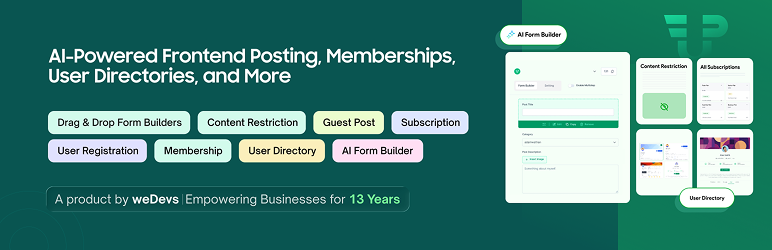
WP User Frontend (full name “User Frontend: AI Powered Frontend Posting, User Directory, Profile, Membership & User Registration”) by weDevs is one of the most popular tools for letting visitors register, build profiles, and publish posts from the front end of a WordPress site – no admin access required. It turns a plain WordPress install into a membership site, a directory, or a community where users contribute content themselves.
But in 2026, popularity also means exposure. The same forms that make WP User Frontend so useful – public registration, profile editing, and frontend post submission – are wide open to bots and spammers. Any form a real visitor can fill out, a bot can fill out too, around the clock and at scale. Because these forms create real users and real content in your database, the damage goes deeper than a junk comment.
As WordPress.org shows, WP User Frontend is currently used on over 20,000 active installations and has 532 reviews with an average rating of 4.1.
Plugin Homepage at wordpress.org | Website wedevs.com
Common types of spam in WP User Frontend
Because WP User Frontend exposes several different public forms, it attracts more than one kind of spam. The most common problems site owners see:
- Fake registrations. Bots create thousands of fake accounts through the frontend registration form. These accounts pad your user list, can be used later to post spam, and make it hard to find real members.
- Spam posts from users. The frontend post form is a magnet for bots that publish junk articles full of backlinks, ads, casino and crypto promotions, or gibberish – straight into your content.
- Spam profiles. When profiles are public, bots fill bio and custom fields with links and keywords, turning your user directory into a link farm.
- Human (manual) spam. Not all spam is automated. Paid spammers register and post by hand to bypass simple bot checks, which is why CAPTCHA alone rarely solves the problem.
- Throwaway and disposable emails. Fake signups often use temporary or invalid email addresses, leaving you with a list of accounts that can never be reached.
The end result is the same: a cluttered user base, junk posts and profiles to moderate, a bloated database, and real members buried under noise. On an active site this can mean hundreds of fake users and posts every week, so manual cleanup is not a realistic long-term plan.
Official anti-spam options and integrations in WP User Frontend
WP User Frontend does include some baseline defenses, and it is worth being honest about what they do and do not cover:
- Google reCAPTCHA support. WP User Frontend can add reCAPTCHA to its registration, login and post forms. This is the plugin’s main built-in spam defense.
- Manual post moderation. You can require that user-submitted posts stay in Pending status until an admin approves them, so spam posts never go live without review.
- Email verification. New registrations can be required to confirm their email address before the account becomes active, which filters out some invalid signups.
- Role and capability controls. You decide what role new users get and what they are allowed to do, limiting the damage a fake account can cause.
These tools help, but they have clear limits. reCAPTCHA adds friction and is regularly bypassed by modern bots and human spammers. Moderation and email verification reduce the impact of spam but do not stop it from arriving – you still have to review and delete it. None of them check the sender against a global spam reputation database, so the same known bad actors keep hitting your forms.
If your main goal is to protect WP User Frontend without adding CAPTCHA challenges, CleanTalk can be used as a Google reCAPTCHA alternative that filters spam submissions in the background.
CAPTCHA options in WP User Frontend
CAPTCHA is the most common way people try to block spam on frontend forms. WP User Frontend works with the usual options, either through its built-in reCAPTCHA support or via separate CAPTCHA plugins:
- Google reCAPTCHA v2 – the classic “I’m not a robot” checkbox or image challenge.
- Google reCAPTCHA v3 – scores visitors in the background without a visible puzzle.
- hCaptcha – a privacy-oriented alternative to reCAPTCHA with a similar challenge.
- Cloudflare Turnstile – a lightweight, privacy-friendly challenge that avoids most visible puzzles.
CAPTCHA can stop simple bots, but it has real downsides. It adds friction for genuine visitors during registration and posting – exactly the moment you do not want to lose people. Advanced bots increasingly solve or bypass CAPTCHAs, and human spam farms ignore them entirely. CAPTCHA is also a challenge, not a content filter: it never inspects the actual email, IP reputation, or text being submitted. That is why a CAPTCHA works best as an extra layer on high-risk forms, not as your only line of defense.
Best ways to stop spam in WP User Frontend
The most effective setup combines an invisible cloud filter with light moderation:
- Add an invisible cloud anti-spam filter (CleanTalk). This is the core defense. CleanTalk checks every WP User Frontend registration, profile and post submission in the background, blocking spam bots and human spammers before they create an account or publish a post – with no CAPTCHA and no friction for real users.
- Keep manual moderation as a safety net. Hold user-submitted posts in Pending status so anything that slips through still needs approval before going public. With a cloud filter in place, the moderation queue stays small and manageable.
- Require email verification for new accounts. This adds a final check that the person behind a registration controls a working inbox.
- Reserve CAPTCHA for your highest-risk forms only. If a specific form is under heavy attack, add reCAPTCHA, hCaptcha or Turnstile there – but rely on the invisible filter everywhere else.
This way, the vast majority of spam is stopped silently before it reaches your database, while real visitors barely notice any protection is in place.
Comparison table: WP User Frontend anti-spam options vs CleanTalk
Here is how the main anti-spam options for WP User Frontend compare:
| Solution | Best for | Pricing | Main limitation |
| CleanTalk Anti-Spam | Invisible, site-wide protection across forms, signups and WooCommerce | From $12/site/year; free 7-day trial | Cloud service; paid after trial |
| Akismet | Comment and basic form spam on small sites | Free personal; paid commercial | Comment-focused; weak on custom forms |
| Google reCAPTCHA | High-risk forms where a challenge is acceptable | Free | Adds friction; can hurt conversion; bots bypass it |
| Cloudflare Turnstile | Lighter, privacy-friendly CAPTCHA | Free | A challenge, not a content filter |
In short: use CleanTalk as the invisible baseline filter, and add reCAPTCHA, hCaptcha or Turnstile only on your highest-risk forms.
Anti-Spam plugin by CleanTalk for WordPress
The next tool we’re going to use is the Anti-Spam plugin by CleanTalk.
CleanTalk is a cloud-based anti-spam service for WordPress and other platforms. Instead of showing visitors a puzzle, it analyzes each submission server-side against a constantly updated database of known spammers, spam patterns, and behavioral signals, then silently blocks the bad ones.
Here’s a short overview:
- CleanTalk is a cloud-based spam protection service for websites, founded in 2012.
- It automatically blocks spam without CAPTCHAs and doesn’t interrupt the user experience.
- Protects many types of forms: contact forms, payment forms, registrations, comments, surveys and more.
- Stops both automated bots and human spam submissions.
- Uses advanced filtering algorithms and a global spam detection network.
- Detects spam based on IP address, email address and user behavior.
- Lets you create custom filtering rules for specific cases.
- Allows blocking or filtering by IP, email and country.
- Works quietly in the background and is very easy to install and configure.
According to WordPress.org, Anti-Spam by CleanTalk for WordPress has over 200,000 active installations, with 3,168 reviews and an average rating of 4.7.
Plugin Homepage at cleantalk.org | Latest release at GitHub.com
Install the CleanTalk Anti-Spam plugin
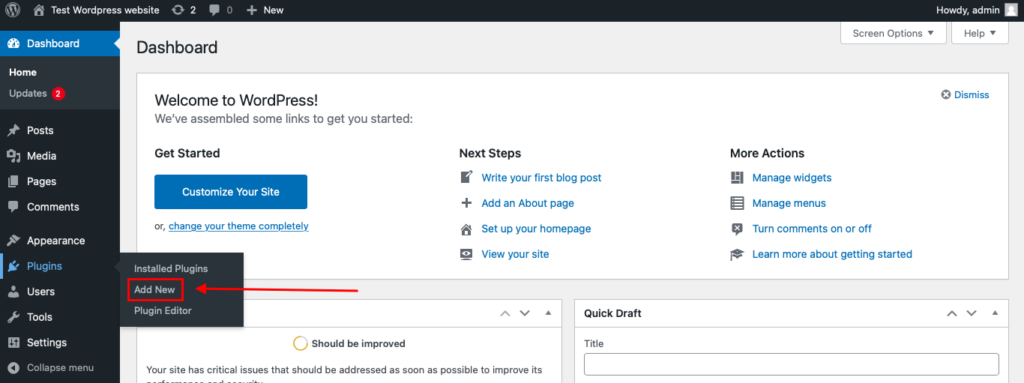
To install the Anti-Spam plugin, go to your WordPress admin panel→ Plugins→ Add New.
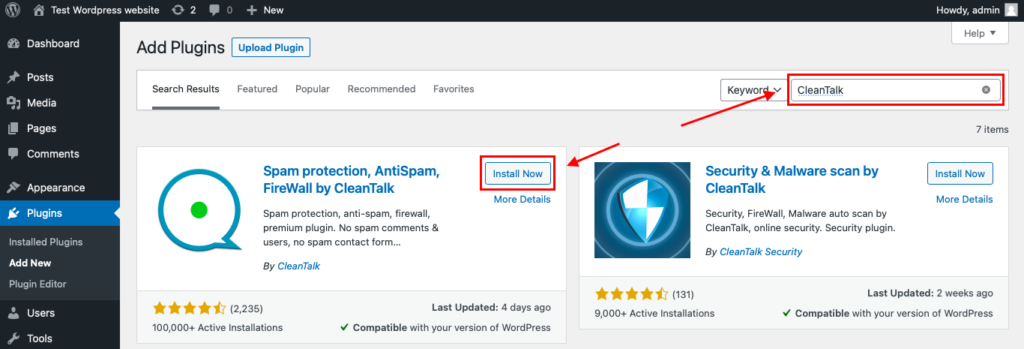
Then enter «СleanTalk» in the search box and click the Install button for «Spam protection, Anti-Spam, FireWall by CleanTalk».
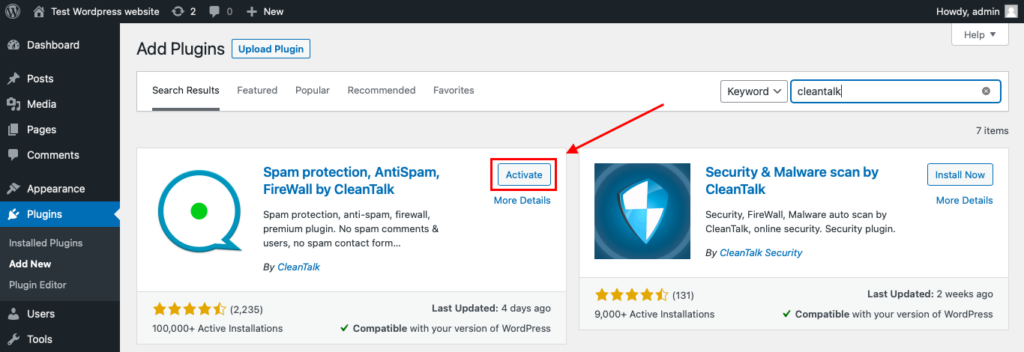
After installing the plugin, click the «Activate» button.
After it is done go to the plugin settings and click the «Get Access Key Automatically» button. Then just click the «Save Settings» button.
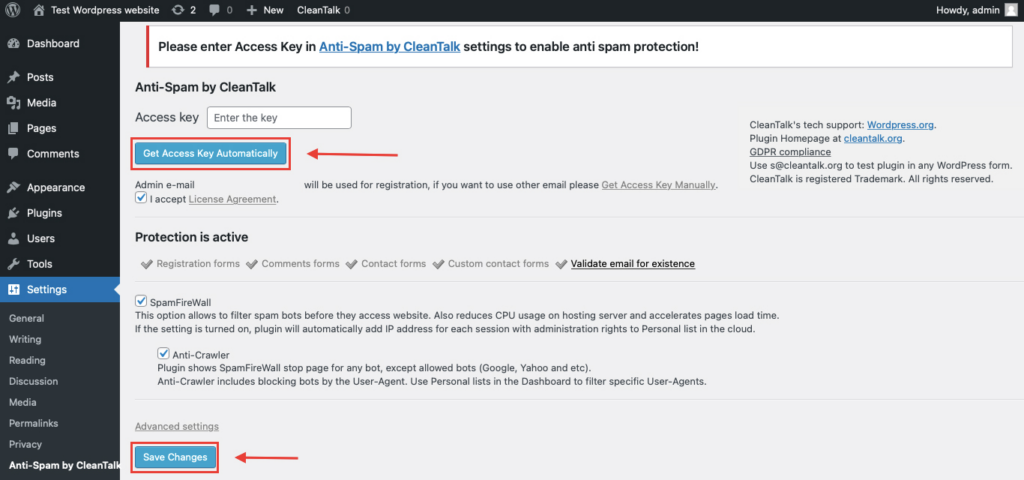
That’s all – Contact Form 7 are now protected From this moment,CleanTalk automatically protects the Contact Form 7 registration form (REST route /wp-json/Contact Form 7press/v1/users/), and the Add Listing form used to submit new listings.
You don’t need to paste any shortcodes – just use Contact Form 7 as usual, and CleanTalk will filter spam in the background.
That’s it! From now you know how to completely protect your WP User Frontend from spam. You don’t need to paste any shortcodes – just use WP User Frontend as usual, and CleanTalk will filter spam in the background.
Check if spam protection works with WP User Frontend
The best way to test the spam protection is by using a test email,
stop_email@example.com
- Open a page with your WP User Frontend form in an Incognito / private browser tab.
- Fill out the form using stop_email@example.com as the sender’s email.
- Send the form.
- You should see a message from the Anti-Spam plugin confirming that a spam submission was blocked.
*** Forbidden. Sender blacklisted. Anti-Spam by CleanTalk. ***
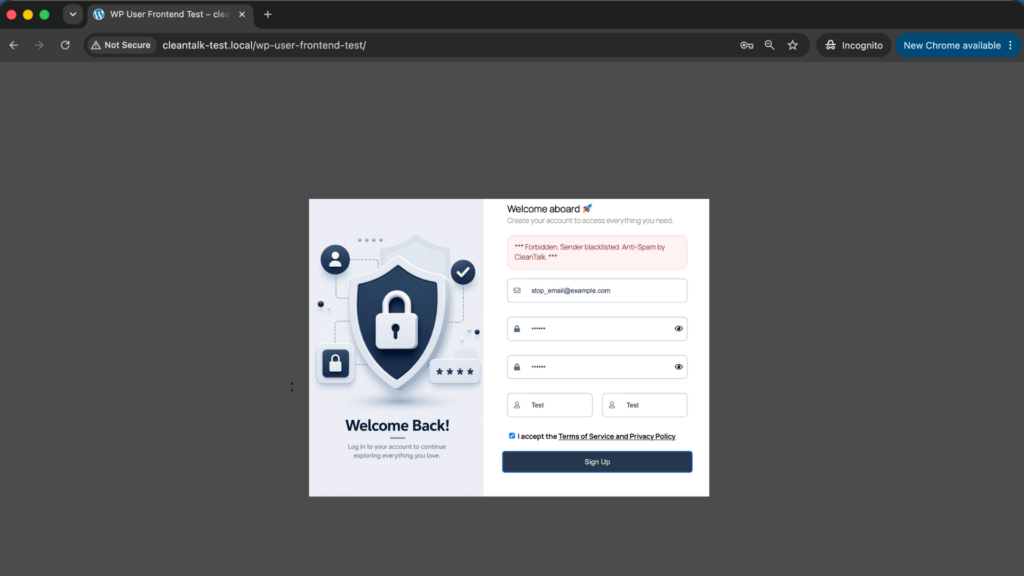
If you see this message, it means CleanTalk successfully protects your WP User Frontend forms from spam.
Cloud Dashboard
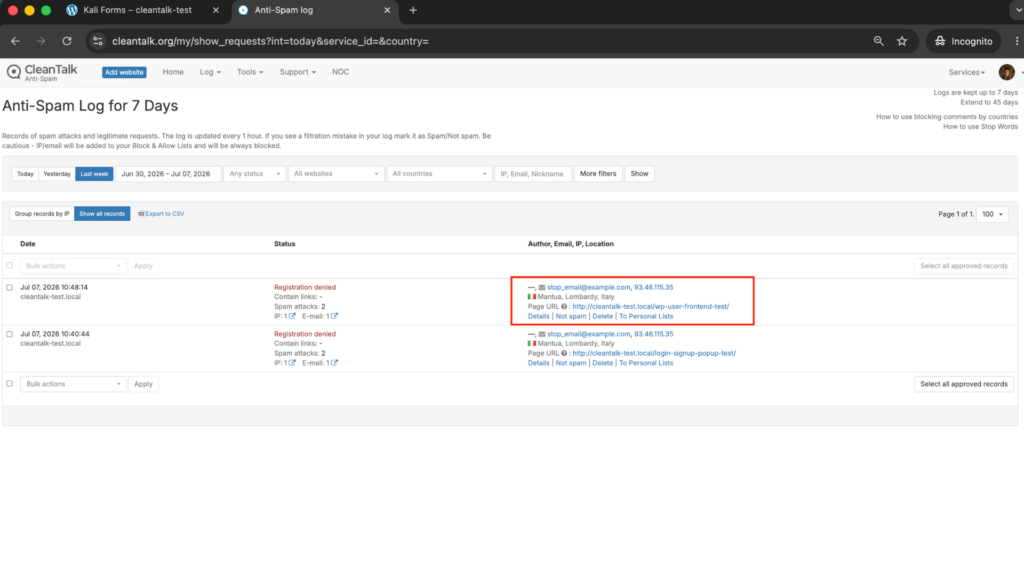
In addition, in the Cloud Dashboard you can find extra details regarding all submissions processed by CleanTalk, including WP User Frontend forms:
- IP and email of the sender, as well as the sender’s activity history across other websites connected to the CleanTalk cloud.
- Geolocation of the sender.
- Date and time of the submission.
- Page (URL) where the form was submitted.
- Cloud decision – Approved or Denied.
- Cloud explanation for the decision (e.g. blacklisted email, bad IP reputation, spam text, etc.).
- Tools to move the sender to Block or Allow lists so you can fine-tune WP User Frontend spam protection.
FAQ
Does CleanTalk stop fake registrations in WP User Frontend?
Yes. CleanTalk checks every frontend registration against its global spam database using the email, IP reputation and behavior of the visitor, and blocks fake signups before the account is created – without showing a CAPTCHA to real users.
Will CleanTalk block spam posts submitted through the WP User Frontend post form?
Yes. Frontend post submissions are checked the same way as any other form. Spam posts from bots and human spammers are blocked at submission, so they never reach your moderation queue or your content.
Do I still need reCAPTCHA if I use CleanTalk?
For most sites, no. CleanTalk is an invisible filter that inspects the actual submission, so it usually blocks more spam than reCAPTCHA with no added friction. You can still add reCAPTCHA, hCaptcha or Turnstile on a specific high-risk form if you want an extra challenge layer.
Will CleanTalk affect real users registering or posting?
No. CleanTalk works silently in the background. Genuine visitors complete WP User Frontend forms as usual and never see a puzzle or checkbox – only spam submissions are stopped.
Does CleanTalk protect other forms on my site too?
Yes. The same plugin protects WordPress registrations, comments, contact forms, WooCommerce and other forms on the same site, so you get site-wide spam protection from a single setup.
Final recommendation
For WP User Frontend, the most reliable setup is an invisible cloud filter as the baseline, backed by light moderation and email verification. CleanTalk blocks fake registrations, spam posts and spam profiles before they reach your database – stopping both bots and human spammers – while keeping registration and posting effortless for real visitors. Add CAPTCHA only on the rare form that needs an extra challenge.
For broader website protection, CleanTalk also provides anti-spam protection for websites, helping block spam in forms, comments, registrations, and orders without CAPTCHA.

Comments
4 responses to “How to Stop Spam in WP User Frontend (2026 Guide)”
I’m using Fluent Forms for all my online intake form submissions. Would this Cleantalk anti-spam plugin validate the email address on the fly when a user submits the forms?
Hello, bernadette Yu
Thanks for your question.
Yes, we do protect Fluent Forms.
If you do not have a CleanTalk account, register a new one here: https://cleantalk.org/register
Then install the plugin following this guide: https://cleantalk.org/help/install-wordpress
If you need further assistance, contact us via https://cleantalk.org/my/support/open
Best regards.
Thank you!! I subscribed to CleanTalk yesterday!
We were happy to help!
If you have questions concerning our services please contact us via email at welcome@cleantalk.org or our ticket system https://cleantalk.org/my/support/open.