

TL;DR: To stop spam in WS Form, combine its built-in honeypot and nonce protection with a cloud anti-spam filter. CleanTalk Anti-Spam checks every WS Form submission in the background and blocks spam bots invisibly – no CAPTCHA, no puzzles, no checkboxes – while protecting registrations, comments and WooCommerce on the same site. reCAPTCHA, hCaptcha and Turnstile add a visible challenge layer for high-risk forms. For most WordPress sites, an invisible cloud filter blocks more spam with less friction than CAPTCHA alone. Plans start at $12 per site/year with a free 7-day trial.
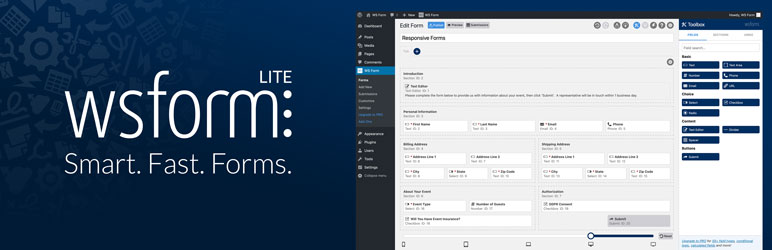
WS Form is a popular drag-and-drop form builder for WordPress, available as the free WS Form LITE and the paid WS Form PRO. On WordPress.org the free edition is listed as “WS Form LITE – Drag & Drop Contact Form Builder” and built by Mark Westguard. It is the plugin people reach for when a basic contact form is not enough – multi-step quote requests, registrations, surveys, file uploads and forms that talk to a CRM. That flexibility is why WS Form often powers the most important forms on a site, and why spam on those forms is more than a nuisance.
In 2026, popularity also means exposure. Like any form plugin, its strength is also its weakness: the more visible your forms are – contact, quote, registration, survey – the more attractive they become as a spam target. Public forms are easy for bots to discover and hammer repeatedly, and the same fields that make WS Form flexible give spammers plenty of room to drop links and junk. Once spammers find a public WS Form, they hit it again and again, which is why a dedicated anti-spam layer matters as much as the form builder itself. The rest of this guide walks through each layer and shows how to set it up and test it.
As WordPress.org shows, WS Form LITE is currently used on over 10,000 active installations and has 317 reviews with an average rating of 5.0.
Plugin Homepage at wordpress.org | Website wsform.com
Common types of spam in WS Form
Not all form spam is the same, and understanding the three main types explains why a single tool is rarely enough. Each slips past a different defense, so if you only know how one works, you protect against one threat and quietly leak the other two.
Simple bots. Basic automated scripts that crawl the web, find any form, and auto-submit it thousands of times. They do not run JavaScript – they locate the fields in the page source, fill every one, and press send. Because they are so mechanical they leave obvious fingerprints: they fill hidden fields a human would never see and submit far faster than a person could type. Honeypots and security tokens catch most of them, which is why the built-in WS Form tools handle this layer well. This is the “easy” spam.
Advanced bots. Far harder to stop. They render JavaScript like a real browser, so they can see and skip honeypot fields, reuse valid form tokens, rotate through hundreds of IP addresses, mimic human typing, and even solve CAPTCHA challenges through paid solving services. To your server they look almost human, so honeypot-only protection quietly fails. These bots are why so many owners say “I have a CAPTCHA and I still get spam” – the lazy scripts are stopped, but the determined ones walk straight through.
Human spam. The type almost no client-side tool can catch. Real people – often paid pennies per submission in spam farms – manually fill out your form to push advertising, backlinks, SEO link drops, phishing and scam messages. Because a genuine human is typing and clicking, honeypots, nonces and CAPTCHAs all pass cleanly: the person leaves the hidden field alone, the token is valid, and the CAPTCHA is solved because they really are human. The spam lands in your inbox looking exactly like a real inquiry.
The consequences add up fast: a flooded inbox buries real leads, your team wastes hours moderating junk, fake registrations clutter your user list, spam-triggered auto-replies damage your email deliverability, and malicious links can reach your staff. Stopping spam in WS Form means addressing all three layers – simple bots, advanced bots and human spam – not just the easy one.
Official anti-spam options and integrations in WS Form
To its credit, WS Form ships with a genuine set of anti-spam tools, and its official documentation on preventing form spam explains them well – this is not a plugin that leaves you defenseless out of the box. Here is what you get, and what each option realistically covers:
- Honeypot. A hidden field invisible to humans but often filled in by bots that blindly complete every field they find. If it is completed, the submission is rejected. It is free, adds no friction for real visitors, and is effective against simple bots – which is why it should always stay on. Its weakness: any bot smart enough to render the page sees the field is hidden and skips it.
- Nonce validation. WS Form adds a security token (a “nonce”) to each form to confirm the submission came from a real, freshly loaded form rather than a replayed or forged request. Important caveat: nonces expire, so do not cache your forms for longer than about 10 hours, or the token goes stale and legitimate submissions start failing. If you use aggressive page caching, this is the setting to watch.
- IP throttling. Limits how many times the same IP can submit a form in a given window, slowing high-volume flooding from a single source. Its limit: advanced bots rotate through many IPs, so throttling one address does little against a distributed attack.
- Blocklists. You can block submissions by keyword, IP address, domain or user-agent string – useful for shutting down a repeat offender or a known spam phrase. The catch is that these lists are maintained manually by you; they only catch patterns you already know, and spammers change wording and addresses constantly, so a hand-kept list is always a step behind.
- Spam scoring. WS Form can show a colored circle scoring each submission from 0 to 100% spam likelihood – green for low risk, amber for borderline, red for likely spam. That score comes from integrations such as Akismet, reCAPTCHA v3 or hCaptcha, so it is only as good as the service feeding it – and it scores rather than blocking for you.
- Integrations. WS Form connects to Akismet, Google reCAPTCHA v3, hCaptcha and Cloudflare Turnstile, so you can plug third-party checks into your forms and feed the spam scoring above. Solid building blocks, but each carries its own trade-offs around friction, privacy or coverage – covered next.
To be honest about it: this is a solid baseline against simple bots, and more than many form plugins offer. But advanced bots that render JavaScript routinely bypass the honeypot and reuse tokens, none of these tools reliably catch human spam, and the blocklists only work as well as you keep them updated by hand. The built-in layer is a good floor – just not a ceiling.
If your main goal is to protect WS Form without adding CAPTCHA challenges, CleanTalk can be used as a Google reCAPTCHA alternative that filters spam submissions in the background.
CAPTCHA options in WS Form
WS Form supports the three mainstream CAPTCHA services through its integrations: Google reCAPTCHA v3, hCaptcha and Cloudflare Turnstile. Each runs a risk check – and sometimes shows a visible challenge – before allowing a submission, and they do add friction for automated traffic and help against casual bots. They are not a complete answer, though, and the trade-offs are worth knowing before you rely on one:
- Bots can solve them. Advanced bots route challenges through human-powered or AI solving services that return the answer in seconds for a fraction of a cent. CAPTCHA stops the lazy bots, not the determined ones – which is exactly the spam most owners want gone.
- Friction for real users. Even “invisible” CAPTCHAs like reCAPTCHA v3 run risk scoring that occasionally blocks genuine visitors, and visible puzzles hurt conversion on the very forms – quotes, registrations, contact – that matter most. Every extra step is a chance for a real lead to give up.
- Data sharing and privacy. Google reCAPTCHA in particular shares visitor data with Google, which raises privacy and GDPR concerns, especially in the EU. hCaptcha and Turnstile are friendlier, but any third-party challenge still adds an external dependency to your form.
- No defense against human spam. This is the big one. A CAPTCHA only proves “a human did this” – and a paid spammer is a human, so they pass every time. It cannot tell a real customer apart from someone in a spam farm typing the same backlink into a thousand forms a day.
If CAPTCHA friction and Google data sharing are a concern, a privacy-friendly, invisible filter is a strong Google reCAPTCHA alternative that protects forms without showing puzzles. CAPTCHA is not useless – it has a place on a high-risk form – but it should not be the thing you depend on to keep WS Form clean.
Best ways to stop spam in WS Form
The most reliable approach is layered, not single-tool. No one method covers all three spam types, so the goal is to stack defenses where each covers what the others miss. Here is the setup we recommend, in order:
- Keep the WS Form honeypot and nonce enabled. They are free, lightweight, and clean out the bulk of simple automated submissions before anything else has to work. Leaving them on means your other layers only deal with the harder cases, which keeps your logs cleaner. There is no reason to turn them off, and no downside for real visitors.
- Add an invisible cloud anti-spam filter (CleanTalk). This is the layer that catches advanced bots and human spam – the two types the built-in tools and CAPTCHAs cannot reliably stop. CleanTalk checks each submission against a constantly updated global database on its own servers, invisibly, weighing the sender’s reputation, the message content and dozens of behavioral signals, then blocks spam before it reaches your inbox. For most sites this single step is the most effective change you can make.
- Optionally add one CAPTCHA on your highest-risk forms. If you run a heavily targeted form – a public registration or a high-value quote form under relentless automated traffic – a single low-friction CAPTCHA such as Cloudflare Turnstile or reCAPTCHA v3 gives an extra speed bump. The key word is one: stacking several just multiplies friction without adding much protection.
The key idea is division of labor: the free built-in tools handle simple bots, the invisible cloud filter handles the hard cases, and CAPTCHA is reserved for the few forms that truly need it – so every type of spam is covered while real visitors almost never see a challenge.
Comparison table: CleanTalk vs WS Form built-in vs reCAPTCHA v3 vs Turnstile
Here is how the main anti-spam options for WS Form compare:
| Solution | Best for | Pricing | Main limitation |
| CleanTalk Anti-Spam | Invisible, site-wide protection across forms, signups and WooCommerce | From $12/site/year; free 7-day trial | Cloud service; paid after trial |
| WS Form built-in (honeypot + nonce + blocklist) | Stopping simple bots out of the box | Free | Misses advanced bots and human spam; blocklists maintained manually |
| Google reCAPTCHA v3 | Risk scoring on submissions | Free | Bots can solve it; shares data with Google; misses human spam |
| Cloudflare Turnstile | Lighter, privacy-friendly CAPTCHA | Free | A challenge, not a content filter |
In short: use CleanTalk as the invisible baseline filter, and add reCAPTCHA, hCaptcha or Turnstile only on your highest-risk forms.
Anti-Spam plugin by CleanTalk for WordPress
The next tool we’re going to use is the Anti-Spam plugin by CleanTalk.
CleanTalk is a cloud-based anti-spam service for WordPress and other platforms. Instead of showing visitors a puzzle, it analyzes each submission server-side against a constantly updated database of known spammers, spam patterns, and behavioral signals, then silently blocks the bad ones.
Here’s a short overview:
- CleanTalk is a cloud-based spam protection service for websites, founded in 2012.
- It automatically blocks spam without CAPTCHAs and doesn’t interrupt the user experience.
- Protects many types of forms: contact forms, payment forms, registrations, comments, surveys and more.
- Stops both automated bots and human spam submissions.
- Uses advanced filtering algorithms and a global spam detection network.
- Detects spam based on IP address, email address and user behavior.
- Lets you create custom filtering rules for specific cases.
- Allows blocking or filtering by IP, email and country.
- Works quietly in the background and is very easy to install and configure.
According to WordPress.org, Anti-Spam by CleanTalk for WordPress has over 200,000 active installations, with 3,168 reviews and an average rating of 4.7.
Plugin Homepage at cleantalk.org | Latest release at GitHub.com
Install the CleanTalk Anti-Spam plugin
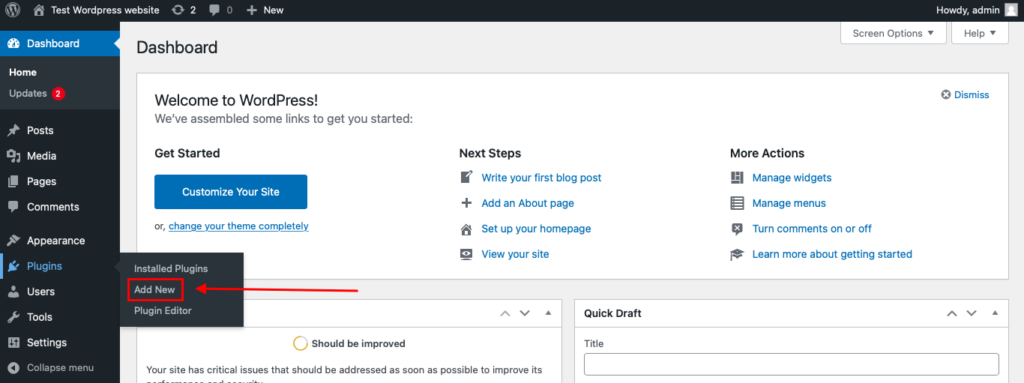
To install the Anti-Spam plugin, go to your WordPress admin panel→ Plugins→ Add New.
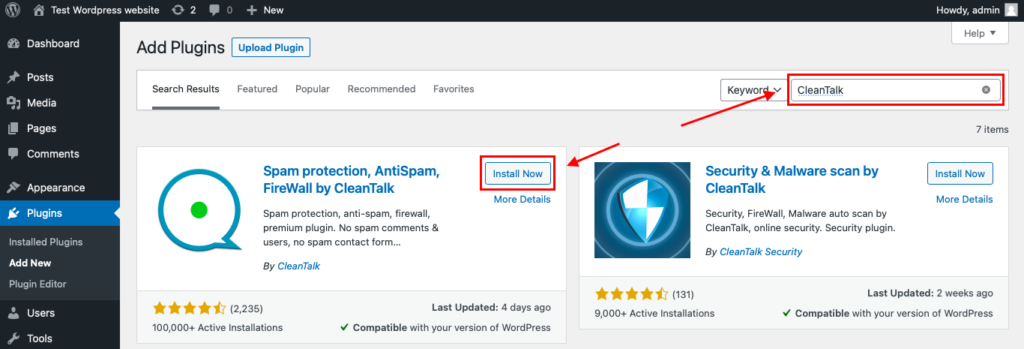
Then enter «СleanTalk» in the search box and click the Install button for «Spam protection, Anti-Spam, FireWall by CleanTalk».
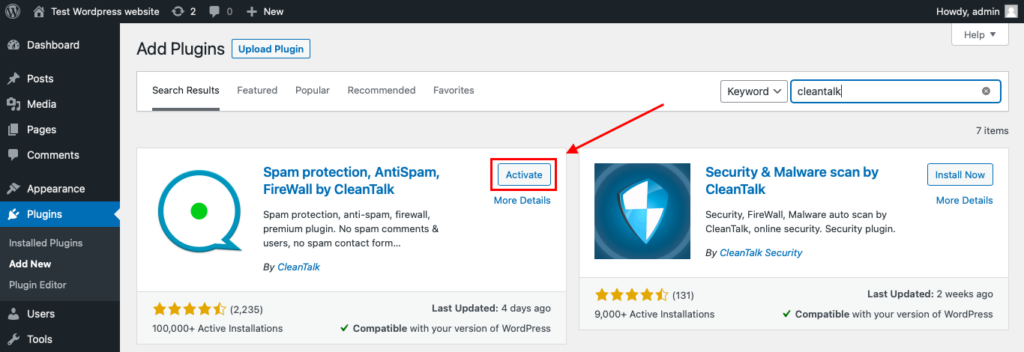
After installing the plugin, click the «Activate» button.
After it is done go to the plugin settings and click the «Get Access Key Automatically» button. Then just click the «Save Settings» button.
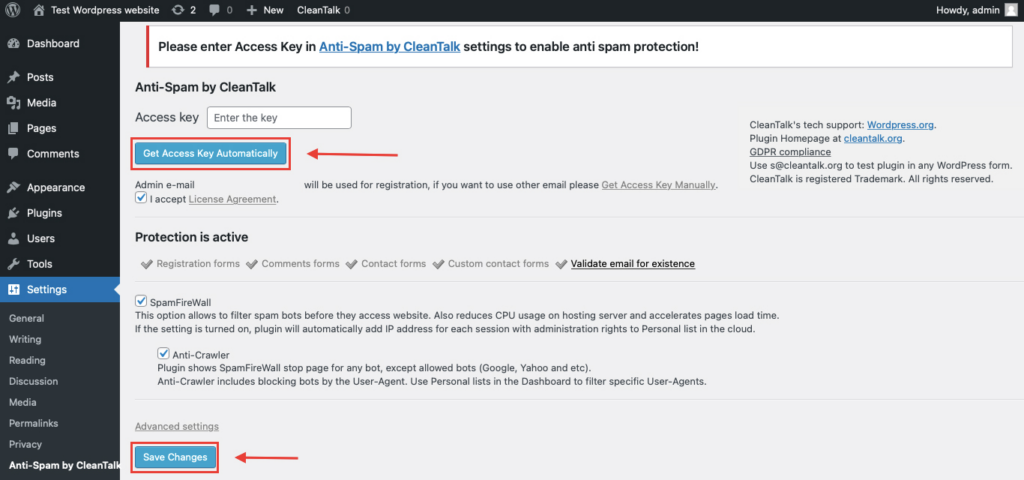
That’s all – Contact Form 7 are now protected From this moment,CleanTalk automatically protects the Contact Form 7 registration form (REST route /wp-json/Contact Form 7press/v1/users/), and the Add Listing form used to submit new listings.
You don’t need to paste any shortcodes – just use Contact Form 7 as usual, and CleanTalk will filter spam in the background.
That’s it! From now you know how to completely protect your WS Form from spam. You don’t need to paste any shortcodes – just use WS Form as usual, and CleanTalk will filter spam in the background.
Check if spam protection works with WS Form
The best way to test the spam protection is by using a test email,
stop_email@example.com
- Open a page with your WS Form form in an Incognito / private browser tab.
- Fill out the form using stop_email@example.com as the sender’s email.
- Send the form.
- You should see a message from the Anti-Spam plugin confirming that a spam submission was blocked.
*** Forbidden. Sender blacklisted. Anti-Spam by CleanTalk. ***
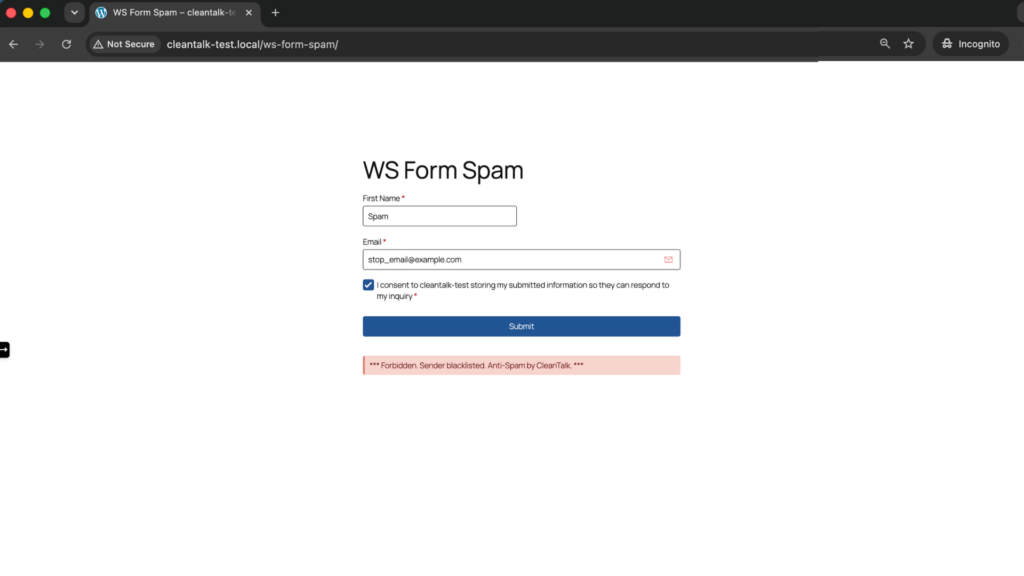
If you see this message, it means CleanTalk successfully protects your WS Form forms from spam.
Cloud Dashboard
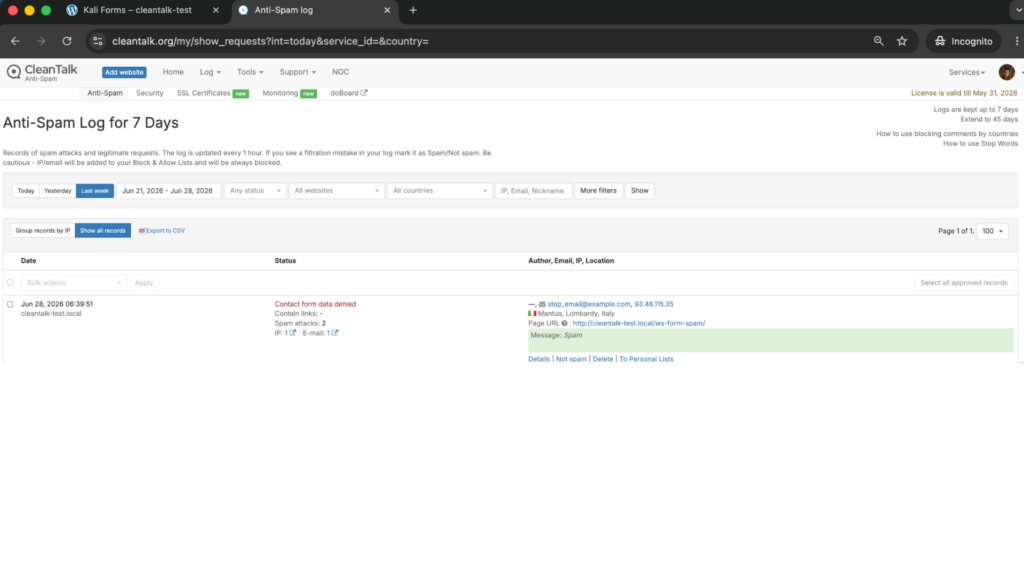
In addition, in the Cloud Dashboard you can find extra details regarding all submissions processed by CleanTalk, including WS Form forms:
- IP and email of the sender, as well as the sender’s activity history across other websites connected to the CleanTalk cloud.
- Geolocation of the sender.
- Date and time of the submission.
- Page (URL) where the form was submitted.
- Cloud decision – Approved or Denied.
- Cloud explanation for the decision (e.g. blacklisted email, bad IP reputation, spam text, etc.).
- Tools to move the sender to Block or Allow lists so you can fine-tune WS Form spam protection.
FAQ
Why do I still get spam in WS Form with honeypot and CAPTCHA?
Because both mainly stop simple bots. Advanced bots render JavaScript and skip the honeypot, reuse valid tokens, and route CAPTCHAs through solving services, while human spammers pass every honeypot and CAPTCHA by definition. To stop those, you need an invisible cloud filter like CleanTalk that checks the actual content and reputation of each submission rather than just asking “is this a human?”.
Is WS Form LITE protected, or only PRO?
CleanTalk protects both. The free WS Form LITE and the paid WS Form PRO are covered the same way, because CleanTalk filters submissions at the WordPress level rather than relying on a specific edition’s features. You do not need to upgrade to PRO to get full anti-spam coverage.
Does CleanTalk show a CAPTCHA to my visitors?
No. CleanTalk works invisibly on its own servers and shows no puzzle, checkbox or challenge to legitimate visitors – they simply fill in and submit the form as normal. A blocking message only ever appears for a submission identified as spam, so your real leads never see friction.
Will it slow down my site or break my forms?
The spam check runs server-side and is lightweight, so it adds no visible delay or CAPTCHA widget. One thing to watch on the WS Form side is caching: because forms rely on a nonce token that expires, do not cache your forms for longer than about 10 hours, or the token goes stale and legitimate submissions can start to fail. That is a WS Form nonce limit, not a CleanTalk one, but it is the most common cause of “my form stopped working”.
Do I still need the WS Form honeypot and nonce if I use CleanTalk?
Yes, keep them on. They are free and clear out the bulk of simple bots before CleanTalk even has to look, which keeps your logs cleaner and lets the cloud filter focus on the harder cases. The layers complement each other – honeypot and nonce for the easy bots, CleanTalk for the advanced bots and human spam. There is no conflict, and no reason to disable the built-in tools.
Final recommendation
For most WS Form sites, the strongest and simplest setup is: keep the built-in honeypot and nonce enabled, add CleanTalk as your invisible core filter, and add one CAPTCHA (Cloudflare Turnstile or reCAPTCHA v3) only on your highest-risk forms. That combination stops simple bots, advanced bots and human spam together, without punishing real visitors with puzzles.
For broader website protection, CleanTalk also provides anti-spam protection for websites, helping block spam in forms, comments, registrations, and orders without CAPTCHA.

Leave a Reply