

HubSpot and Leaky Paywall solve very different WordPress problems, but they have one important thing in common: both can collect data from public users.
HubSpot forms can capture leads, contacts, newsletter signups, and CRM records. Leaky Paywall can collect reader registrations, subscriber data, paid access requests, and paywall-related submissions.
That makes spam protection important for both workflows.
A fake HubSpot form submission may become a bad CRM contact. A bot-filled Leaky Paywall registration may become a fake reader account or subscriber record. In both cases, spam does not only create inbox noise — it can pollute the systems your team uses to manage leads, readers, subscriptions, and revenue.
This guide explains how to protect HubSpot embedded forms and Leaky Paywall submissions on WordPress using Anti-Spam by CleanTalk, together with practical checks for CRM data quality, reader registrations, subscriber workflows, payment records, and suspicious user activity.

HubSpot and Leaky Paywall – Two Different Workflows, One Spam Problem
HubSpot and Leaky Paywall are not the same type of plugin.
HubSpot is a CRM, marketing, forms, popups, live chat, and analytics platform. On WordPress, it can be used to capture leads, build forms, sync contacts, manage conversations, send marketing emails, and connect website activity with CRM data.
Leaky Paywall is a WordPress paywall and subscription plugin for publishers. It can be used to launch metered paywalls, registration walls, paid subscriptions, subscriber management, Stripe payments, and content restriction workflows.
Together, they cover two high-value areas:
- lead generation and CRM data;
- reader registration and subscription monetization.
That is why spam protection matters. Bots do not only target contact forms. They also target forms that create business records, user accounts, free registrations, paid subscription attempts, and database entries.
As WordPress.org shows, HubSpot All-In-One Marketing — Forms, Popups, Live Chat is currently used on over 200,000 websites and has 207 user reviews with an average rating of 4.3.
HubSpot Plugin Homepage at wordpress.org | HubSpot Website
As WordPress.org shows, Leaky Paywall is currently used on over 700 websites and has 34 user reviews with an average rating of 4.3.
Leaky Paywall Plugin Homepage at wordpress.org | Leaky Paywall Website
Why HubSpot and Leaky Paywall Attract Spam
HubSpot and Leaky Paywall both rely on public-facing user actions.
For HubSpot, spam usually appears as fake leads, fake contacts, bot-filled forms, low-quality newsletter signups, or suspicious CRM entries.
For Leaky Paywall, spam can appear as fake reader registrations, suspicious subscriber accounts, disposable email signups, fake checkout attempts, or low-quality users trying to access restricted content.
Common spam cases include:
- fake HubSpot contacts;
- bot-filled HubSpot embedded forms;
- low-quality CRM records;
- fake newsletter or lead magnet signups;
- duplicate submissions from the same IP;
- suspicious reader registrations;
- fake Leaky Paywall subscriber accounts;
- disposable email addresses;
- unpaid or failed subscription attempts;
- spam registrations created to bypass content restrictions;
- fake users created only to access free articles;
- bad data appearing in CRM, subscriber, or reader reports.
The main risk is data pollution.
A bad contact in HubSpot can affect lead scoring, segmentation, automation, sales follow-up, and campaign reporting. A fake reader in Leaky Paywall can affect subscriber lists, registration walls, paid access flows, and publisher analytics.
That is why spam protection should work before bad submissions become contacts, users, subscribers, or payment-related records.
Anti-Spam Plugin by CleanTalk for WordPress
The next tool we’re going to use is the Anti-Spam plugin by CleanTalk.
Here’s a short overview:
- CleanTalk is a cloud-based spam protection service for websites.
- It automatically blocks spam without CAPTCHA challenges.
- It protects many types of forms, including contact forms, registrations, comments, surveys, payment forms, and subscription forms.
- It helps stop automated bots and suspicious human spam submissions.
- It uses spam detection signals such as IP address, email address, sender behavior, and global spam activity.
- It lets website owners create custom filtering rules for specific cases.
- It allows blocking or filtering by IP, email, and country.
- It works quietly in the background and is easy to install and configure.
For HubSpot and Leaky Paywall, this is useful because both tools can create records that stay inside your business workflow.
A blocked spam submission is much easier to handle than a fake CRM contact, fake reader account, or fake subscription record that has already entered the system.
According to WordPress.org, Anti-Spam by CleanTalk for WordPress has over 200,000 active installations, with 3,168 reviews and an average rating of 4.7.
Plugin Homepage at cleantalk.org | Latest release at GitHub.com | Website cleantalk.org
Install the CleanTalk Anti-Spam plugin
Show Instructions
To install the Anti-Spam plugin, go to your WordPress admin panel → Plugins → Add New.

Then enter «СleanTalk» in the search box and click the Install button for «Spam protection, Anti-Spam, FireWall by CleanTalk».

After installing the plugin, click the «Activate» button.
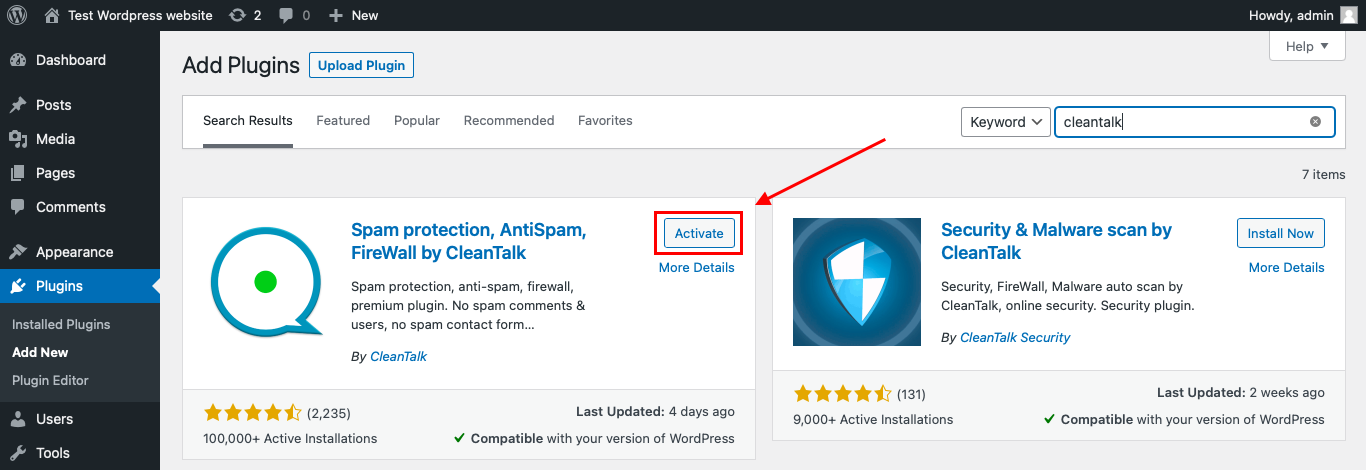
After it is done go to the plugin settings and click the «Get Access Key Automatically» button. Then just click the «Save Settings» button.

That’s it! From now you know how to completely protect your HivePress from spam.
That’s it. From now on, CleanTalk starts protecting your WordPress forms from spam.
You don’t need to rebuild HubSpot forms or Leaky Paywall workflows. Keep your embedded forms, registration walls, paywall settings, and subscription flows as they are, and CleanTalk will check suspicious submissions in the background.
How CleanTalk Works with HubSpot and Leaky Paywall
CleanTalk support for these workflows is different for each tool.
For HubSpot, protection is designed for embedded HubSpot forms on WordPress pages. No additional configuration is required in the CleanTalk Anti-Spam plugin settings.
For Leaky Paywall, protection covers submissions made through the Leaky Paywall WordPress plugin. Anti-Spam by CleanTalk for WordPress should be installed and active on the same website.
To activate protection for both services, install Anti-Spam by CleanTalk for WordPress and make sure you are using version 6.50 or newer.
How to Check Spam Protection
You can test the work of Anti-Spam protection by using a test email:
stop_email@example.com
First, open the page with your HubSpot embedded form or Leaky Paywall-related form in an Incognito browser tab. Fill in all required fields and submit the form.
After submitting the form, you should see a block message about the blocked submission:
*** Forbidden. Sender blacklisted. Anti-Spam by CleanTalk. ***
The protection works only for website visitors, not for website admins. Be sure to test the form protection using Incognito mode.
This is important because HubSpot forms, paywall flows, subscriber pages, and registration walls may behave differently for logged-in admins, logged-in users, subscribers, and public visitors.
Cloud Dashboard
In addition, in the CleanTalk Cloud Dashboard, you can find extra details about submissions processed by CleanTalk, including HubSpot embedded form submissions, Leaky Paywall submissions, and other WordPress forms.
The dashboard can help review:
- IP and email of the sender;
- sender activity history across other websites connected to the CleanTalk cloud;
- geolocation of the sender;
- date and time of the submission;
- page URL where the form was submitted;
- cloud decision: Approved or Denied;
- cloud explanation for the decision, such as blacklisted email, bad IP reputation, or spam text;
- tools to move senders to Block or Allow lists.
This is useful because HubSpot and Leaky Paywall spam may come from different types of user actions.
For HubSpot, you may see fake lead submissions, suspicious CRM contacts, or repeated form entries.
For Leaky Paywall, you may see suspicious reader registrations, subscription attempts, or users trying to access gated content.


The dashboard helps identify whether the problem comes from repeated IPs, disposable emails, suspicious domains, fake names, or automated form behavior.
HubSpot Features That Matter for Spam Protection
HubSpot’s WordPress plugin can be used for CRM, forms, popups, live chat, email marketing, automation, analytics, and contact management.
That makes spam protection especially important in several areas.
Embedded HubSpot Forms
HubSpot forms are designed to capture leads and send them into the CRM.
If bots submit fake data, those records can appear as contacts, trigger automation, enter lists, and distort lead reports.
CRM Contact Records
Spam contacts can make CRM data harder to trust.
Bad records may affect segmentation, lead scoring, email campaigns, sales follow-up, and marketing analytics.
Popups and Lead Capture Forms
HubSpot popups and lead capture forms are often placed on high-traffic pages.
That makes them useful for marketing, but also visible to bots. Pages connected to ads, SEO traffic, lead magnets, and newsletters may need closer monitoring.
Marketing Automation
If a fake contact enters HubSpot, it may trigger automated emails or workflows.
That can waste sending volume, pollute engagement data, and make automation reports less accurate.
Analytics and Reporting
HubSpot analytics can help teams understand lead generation and campaign performance.
Spam submissions can distort conversion numbers, lead quality, source attribution, and contact growth.
Leaky Paywall Features That Matter for Spam Protection
Leaky Paywall is built for publishers who want to monetize content while keeping control of their subscriber data inside WordPress.
That creates a different spam risk profile from a normal contact form.
Registration Walls
Leaky Paywall can be used to grow email lists through reader registration.
If bots register with fake or disposable emails, the publisher’s reader database becomes less useful.
Metered and Restricted Content
Paywall workflows often allow users to view a limited number of articles before registering or subscribing.
Spam accounts may be created only to access restricted content or bypass reader limits.
Paid Subscriptions
Leaky Paywall supports paid subscription workflows.
Spam can create fake users, failed payment attempts, unpaid records, or confusing subscriber data.
Subscriber Management
Subscriber records need to stay clean because they affect audience insights, access rules, email lists, and monetization workflows.
Fake subscribers make it harder to understand the real paying or registered audience.
Publisher Analytics
For publishers, spam can distort growth numbers, registration-wall performance, free-to-paid conversion tracking, and subscriber reports.
Additional Protection Options for HubSpot and Leaky Paywall
CleanTalk should be the main anti-spam layer, but both workflows benefit from additional review and cleanup.
Review HubSpot Contacts Before Automation
If a HubSpot form feeds contacts into automation, review the quality of new contacts.
Look for disposable emails, repeated domains, fake names, unrealistic messages, and contacts created from suspicious sources.
Keep CRM Lists Clean
Do not let every form submission automatically become a valuable lead.
Use list hygiene, segmentation checks, and suppression rules where needed.
Monitor Leaky Paywall Registrations
For reader registrations, check email quality, account behavior, repeated IPs, and sudden spikes in free signups.
This is especially important for publishers using registration walls to grow an email list.
Verify Paid Subscription Status
A submitted form or created user does not always mean a paid subscriber.
Check payment status before granting paid access or treating the user as an active subscriber.
Protect High-Traffic Content Pages
Paywall and lead forms on popular articles, landing pages, or campaign pages may receive more bot traffic.
Monitor these pages more closely through CleanTalk logs and platform reports.
Remove Old Spam Records
If spam has already entered HubSpot or Leaky Paywall, clean old records before using reports.
A clean CRM and subscriber database make marketing and subscription metrics more reliable.
Why HubSpot and Leaky Paywall Spam Is Different from Regular Form Spam
A regular contact form spam message is usually just an unwanted email.
HubSpot and Leaky Paywall spam can become part of business systems.
Depending on the setup, a fake submission may become:
- a HubSpot contact;
- a CRM record;
- a newsletter signup;
- a lead in a sales pipeline;
- an automation trigger;
- a fake reader registration;
- a WordPress user account;
- a Leaky Paywall subscriber record;
- an unpaid subscription attempt;
- a restricted-content access attempt;
- a row in reports or exports;
- misleading marketing or publisher analytics.
That is why protection should focus on data quality, not only message filtering.
Comparison of Anti-Spam Approaches for HubSpot and Leaky Paywall
| Solution | Main role | Strengths | Limitations | Best use case |
|---|---|---|---|---|
| CleanTalk | Main WordPress-side anti-spam filtering | Checks suspicious submissions before they become contacts, users, or subscriber records | Should be combined with CRM and subscriber review | WordPress sites using HubSpot embedded forms or Leaky Paywall |
| HubSpot contact review | CRM data quality | Helps identify fake leads before automation or sales follow-up | Happens after submission | Lead generation and CRM workflows |
| List hygiene | Marketing data cleanup | Keeps email lists and segments cleaner | Requires regular review | HubSpot newsletters, campaigns, and automations |
| Leaky Paywall registration review | Reader quality control | Helps detect fake readers and disposable emails | Requires admin attention | Registration walls and free access flows |
| Payment status verification | Subscription protection | Prevents unpaid users from being treated as paid subscribers | Applies only to paid workflows | Leaky Paywall paid subscriptions |
| Access rule review | Content protection | Helps prevent suspicious users from abusing gated content | Needs correct paywall setup | Metered and restricted content |
| Cloud Dashboard monitoring | Pattern detection | Shows repeated IPs, emails, blocked requests, and abused pages | Requires periodic review | Sites receiving repeated form or registration spam |
In practice, HubSpot and Leaky Paywall spam protection should combine sender filtering with workflow cleanup. CleanTalk helps block suspicious submissions, while CRM and subscriber review help protect the systems where the data is stored.
Frequently Asked Questions — HubSpot and Leaky Paywall Spam Protection
Why combine HubSpot and Leaky Paywall in one spam protection article?
Because both tools collect high-value user data on WordPress websites.
HubSpot collects leads and CRM contacts. Leaky Paywall collects reader registrations and subscriber data. In both cases, spam can affect more than an inbox.
Does CleanTalk protection work with HubSpot forms?
CleanTalk protection is designed for HubSpot embedded forms on WordPress pages.
That means the form should be embedded on the WordPress website where Anti-Spam by CleanTalk is installed and active.
Does CleanTalk protection work with Leaky Paywall?
Yes. Protection for Leaky Paywall covers submissions made through the Leaky Paywall WordPress plugin when Anti-Spam by CleanTalk is installed on the same WordPress site.
Which CleanTalk version is required?
Use Anti-Spam by CleanTalk version 6.50 or newer for this protection.
Keeping the plugin updated is important because form integrations and compatibility improvements are added over time.
Can fake HubSpot contacts affect marketing automation?
Yes. If a fake form submission becomes a HubSpot contact, it may enter lists, workflows, email sequences, lead scoring, or sales follow-up.
That is why fake contacts should be filtered before they enter the CRM whenever possible.
Can Leaky Paywall spam create fake reader accounts?
Yes. If registration walls or subscriber forms are public, bots may create fake reader accounts or low-quality registrations.
This can affect subscriber data, access rules, and publisher reports.
Should I use CAPTCHA on HubSpot or Leaky Paywall pages?
CAPTCHA can help on heavily abused forms, but it can also reduce conversions for real users.
For many websites, CleanTalk is better as the main background filtering layer. Add visible verification only when a specific page receives repeated abuse.
What should I check if spam still appears in HubSpot?
Check CleanTalk logs, the embedded form page URL, repeated IPs, fake emails, HubSpot contact source, automation triggers, and whether the spam comes from one form or multiple forms.
Also review whether the same contacts are entering lists or workflows automatically.
What should I check if spam appears in Leaky Paywall?
Check suspicious reader registrations, repeated IPs, disposable emails, free-access behavior, failed subscription attempts, payment status, and paywall access rules.
Also check whether the spam targets one article, one registration wall, or the whole site.
Recommended Anti-Spam Stack for HubSpot and Leaky Paywall in 2026
HubSpot and Leaky Paywall need different review steps because they store different types of user data.
For HubSpot embedded forms
Use:
- CleanTalk Anti-Spam;
- contact quality review;
- list hygiene;
- monitoring of form source pages.
This helps reduce fake CRM contacts and low-quality leads.
For HubSpot marketing automation
Use:
- CleanTalk Anti-Spam;
- automation entry checks;
- suppression of suspicious contacts;
- review of workflow triggers.
This prevents fake contacts from entering automated campaigns too easily.
For HubSpot lead generation pages
Use:
- CleanTalk Anti-Spam;
- review of high-traffic forms;
- monitoring through the CleanTalk Cloud Dashboard;
- CRM cleanup after spam spikes.
This protects landing pages, lead magnets, and campaign forms.
For Leaky Paywall registration walls
Use:
- CleanTalk Anti-Spam;
- email quality review;
- reader account monitoring;
- cleanup of fake users.
This helps protect publisher audience data.
For Leaky Paywall paid subscriptions
Use:
- CleanTalk Anti-Spam;
- payment status verification;
- subscriber record review;
- no paid access before payment confirmation.
This helps separate real subscribers from fake or failed payment attempts.
For metered or restricted content
Use:
- CleanTalk Anti-Spam;
- access rule review;
- suspicious user monitoring;
- cleanup of accounts created only to bypass limits.
This protects gated content from low-quality or automated access attempts.
For publisher websites with both CRM and paywall workflows
Use:
- CleanTalk Anti-Spam;
- HubSpot contact review;
- Leaky Paywall subscriber review;
- payment verification;
- regular cleanup of old spam records.
This is best when the same WordPress site collects both leads and reader subscriptions.
Final Thoughts
HubSpot and Leaky Paywall spam should be treated as a data-quality problem.
HubSpot spam can pollute CRM records, contact lists, automation workflows, lead reports, and sales follow-up. Leaky Paywall spam can pollute reader registrations, subscriber records, payment-related flows, access rules, and publisher analytics.
The right setup depends on which workflow is more important for your site.
If HubSpot is the main entry point, focus on embedded form protection, contact review, list hygiene, and automation checks. If Leaky Paywall is the main entry point, focus on registration quality, payment status, subscriber cleanup, and access rules.
CleanTalk can serve as the first filtering layer by blocking suspicious submissions before they become part of the workflow. After that, HubSpot and Leaky Paywall records should be reviewed in the places where they create business impact: CRM, email lists, reader accounts, subscription records, payments, and reports.
With this layered setup, you can reduce fake leads, keep subscriber data cleaner, and protect both marketing and publisher workflows on your WordPress site.
