

NEX-Forms is built for more than a basic contact form. It can be used for interactive forms, multi-step forms, popup forms, sticky forms, booking forms, payment forms, quiz forms, survey forms, newsletter forms, file upload forms, and custom business workflows.
That flexibility is useful, but it also means every public NEX-Forms form can become a possible entry point for spam.
If fake submissions are accepted, they can trigger admin notifications, autoresponders, payment-related workflows, saved entries, analytics events, or follow-up actions. For this reason, spam protection should happen before suspicious submissions are treated as real user activity.
This guide explains how to protect NEX-Forms from spam using Anti-Spam by CleanTalk for WordPress, together with the built-in anti-spam logic available in NEX-Forms and additional CleanTalk tools such as SpamFireWall, personal lists, country filters, language filters, and stop words.
NEX-Forms and WordPress Forms
NEX-Forms is a WordPress form builder for creating responsive forms with a drag-and-drop interface. According to WordPress.org, it can be used for contact forms, survey forms, booking forms, payment-integrated forms, multi-step forms, popups, sticky forms, conditional logic, file uploads, autoresponders, and admin notifications.
NEX-Forms forms are often used for:
- contact forms
- interactive forms
- multi-step forms
- popup forms
- sticky forms
- booking forms
- quote request forms
- survey forms
- poll forms
- quiz forms
- application forms
- newsletter subscription forms
- file upload forms
- PayPal payment forms
The advantage of NEX-Forms is that it allows website owners to create simple or complex form experiences inside WordPress. The official NEX-Forms website describes it as an all-in-one form building solution for simple to complex forms, including chat forms, popup forms, interactive forms, multi-step forms, application forms, payment forms, booking forms, quiz forms, RSVP forms, and newsletter subscription forms.
But the more a form does, the more damage spam can cause.
A fake contact form message is annoying. A fake payment-form attempt, fake booking inquiry, fake application, or fake autoresponder trigger can create more serious workflow noise.
As WordPress.org shows, NEX-Forms – Ultimate Forms Plugin for WordPress has 133 user reviews with an average rating of 4.1. Wordfence Intelligence lists the plugin as active and shows 7,000 active installs for the WordPress.org plugin slug.
Plugin Homepage at WordPress.org | Documentation at NEX-Forms
Why NEX-Forms Attract Spam
NEX-Forms is not the cause of spam. Public forms attract spam because they accept input from anyone on the internet.
Bots usually look for forms that can be submitted automatically. NEX-Forms can be especially attractive to bots because it supports many public form types and can be embedded in different ways, including standard pages, popups, sticky forms, and on-click displays.
Common NEX-Forms spam patterns include:
- fake contact inquiries
- fake booking requests
- repeated popup form submissions
- junk newsletter sign-ups
- suspicious URLs in message fields
- bot-generated names and phone numbers
- disposable or suspicious email addresses
- fake application form entries
- irrelevant SEO, adult, crypto, or software pitches
- spam attempts on forms with autoresponders
- fake submissions that affect analytics
- junk entries from forms using AJAX submission
This is important because NEX-Forms can send admin notifications, trigger autoresponders, store submissions, collect analytics, and support payment-related form use cases.
Spam should be stopped before it becomes a saved submission, email notification, autoresponder event, analytics signal, or business workflow.
Anti-Spam by CleanTalk
The next tool we are going to use is the Anti-Spam plugin by CleanTalk.
Here’s a short overview:
- CleanTalk is a cloud-based spam protection service for WordPress websites.
- It blocks spam without forcing real visitors to solve CAPTCHA challenges.
- It can protect different types of WordPress forms and submissions, including contact forms, comments, registrations, subscriptions, bookings, surveys, and WooCommerce orders.
- It checks submissions using spam detection signals such as email address, IP address, sender reputation, and sender activity.
- It helps block automated bots and suspicious form submissions.
- It works quietly in the background.
- It allows website owners to review spam checks in the CleanTalk Cloud Dashboard.
- It gives website owners tools for personal Allow lists and Block lists, country filters, language filters, stop words, and SpamFireWall.
According to WordPress.org, Anti-Spam by CleanTalk for WordPress has over 200,000 active installations, with 3,168 reviews and an average rating of 4.7.
Plugin Homepage at cleantalk.org | Latest release at GitHub.com | Website cleantalk.org
Install the CleanTalk Anti-Spam plugin
Show Instructions
To install the Anti-Spam plugin, go to your WordPress admin panel → Plugins → Add New.

Then enter «СleanTalk» in the search box and click the Install button for «Spam protection, Anti-Spam, FireWall by CleanTalk».

After installing the plugin, click the «Activate» button.
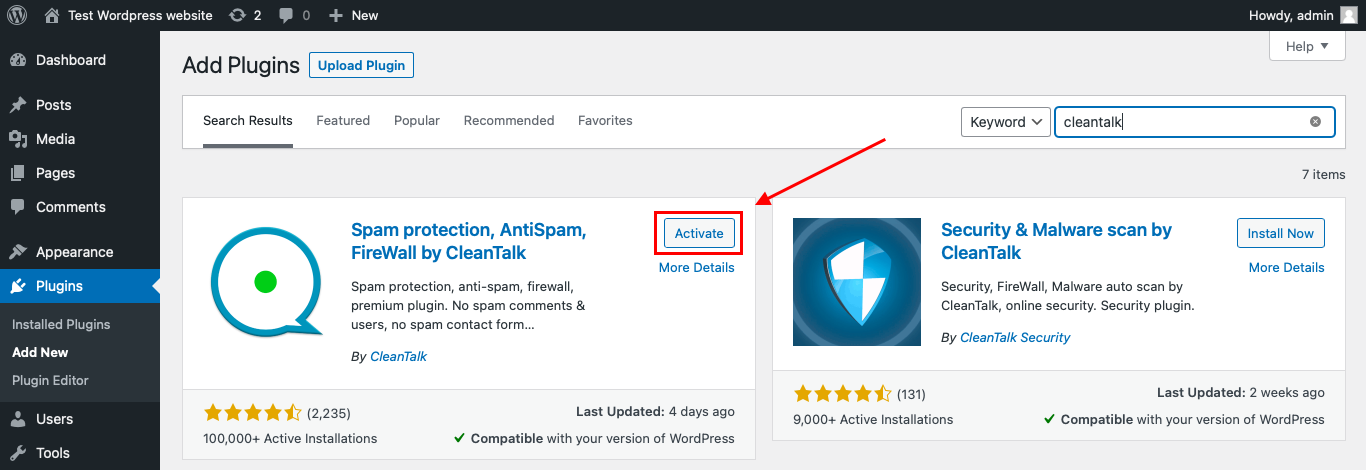
After it is done go to the plugin settings and click the «Get Access Key Automatically» button. Then just click the «Save Settings» button.

That’s it! From now you know how to completely protect your HivePress from spam.
Once that is done, the site has an anti-spam layer working in the background. This helps reduce suspicious form activity before unwanted submissions reach NEX-Forms entries, admin notifications, autoresponders, analytics, payment-related flows, or connected business workflows.
How to Check NEX-Forms Spam Protection
After installing the plugin, test that spam protection is working correctly.
Use the test email:
stop_email@example.com
To test the form:
- Open a page with a NEX-Forms form.
- Use an Incognito or private browser window.
- Fill in all required form fields.
- Use stop_email@example.com as the sender email.
- Submit the form.
If the anti-spam protection is working correctly, the submission should be blocked.
You may see a message similar to:
Forbidden. Sender blacklisted.
It is better to test protection in an Incognito window because WordPress admins may be treated differently from regular website visitors. Testing as a normal visitor helps confirm that protection works for public form submissions.
If the form submits successfully and nothing appears in the CleanTalk Anti-Spam Log, check the form path separately. NEX-Forms can use AJAX-powered submissions, popup forms, sticky forms, and custom display methods, so the request may need separate verification depending on how the form is embedded.
Cloud Dashboard and Monitoring
CleanTalk gives website owners access to request details in the CleanTalk Cloud Dashboard.
This is useful for NEX-Forms because spam may appear across several form formats. A bot may target a standard contact form, then a popup form, then a sticky form, or a newsletter form on another page.
In the Cloud Dashboard, site owners can review:
- approved and blocked submissions
- sender IP addresses
- sender email addresses
- submission date and time
- page URL where the form was submitted
- spam check result
- reason for blocking or approving a request
- personal Allow lists and Block lists
This helps website owners see whether spam is random or connected to repeated IPs, domains, page URLs, form types, or message patterns.
For example, if fake submissions are coming from the same email domain or country source, filtering can be adjusted. If a real lead is blocked by mistake, the sender can be reviewed and added to an Allow list.
NEX-Forms Workflows and Why Spam Filtering Matters
NEX-Forms can be used for many different types of workflows. Some forms simply send a message. Others may involve payments, autoresponders, booking details, multi-step logic, file uploads, or popup conversion campaigns.
Spam can create problems in several places:
- admin notifications
- autoresponder emails
- saved submissions
- form analytics
- payment-form attempts
- booking request flows
- newsletter sign-up lists
- file upload forms
- application form review
- popup conversion data
- survey and quiz results
The official NEX-Forms page highlights features such as file uploads, autoresponders, admin notifications, popups, sticky forms, PayPal payment integration, and built-in anti-spam control.
That makes spam filtering important not only for inbox quality, but also for data quality and workflow reliability.
Built-In Anti-Spam in NEX-Forms
NEX-Forms promotes built-in anti-spam protection.
The official demo page says NEX-Forms has built-in spam protection and positions it as a no-CAPTCHA experience for users. It also says the goal is to filter spammy entries while keeping forms seamless for real visitors.
This is useful because visible CAPTCHA challenges can reduce form completion, especially in popups, sticky forms, and multi-step flows.
However, no built-in anti-spam method should be treated as the only layer for every website. Spam changes over time. Bots become more advanced. Human-written spam can bypass many bot checks.
For higher-risk forms, it is safer to combine NEX-Forms built-in anti-spam logic with a broader WordPress anti-spam layer and monitoring through logs.
Additional Spam Protection Options for NEX-Forms
CleanTalk can work as the main anti-spam layer, while NEX-Forms built-in anti-spam helps reduce unwanted submissions inside the form itself.
Extra protection is useful when forms are connected to important workflows.
CleanTalk SpamFireWall
CleanTalk SpamFireWall can help block active spam bots before they access the website.
This is useful when bots are not only submitting forms but also scanning the website, opening form pages, testing popup triggers, or hitting AJAX endpoints repeatedly.
SpamFireWall can reduce bot noise before the form submission stage.
Personal Allow Lists and Block Lists
Personal Allow lists and Block lists help control known senders.
For example, if a legitimate lead is blocked, the sender can be added to an Allow list. If the same spammer keeps submitting forms from a repeated email, domain, or IP, they can be blocked more directly.
This is helpful for NEX-Forms sites with recurring spam patterns.
Country Filters, Language Filters, and Stop Words
Some spam is easy to recognize by repeated patterns.
Examples include repeated adult keywords, SEO pitches, crypto terms, suspicious links, or messages in languages unrelated to the website audience.
CleanTalk tools such as country filters, language filters, and stop words can help reduce this type of spam.
These settings should be used carefully. If filters are too broad, legitimate inquiries may be blocked.
Protecting Popup and Sticky Forms
Popup and sticky forms are more visible than standard embedded forms. That can increase conversions, but it can also increase unwanted submissions.
If a popup form receives spam, check whether the same form appears on many pages. A single spam target may affect multiple URLs if the popup is site-wide.
For site-wide NEX-Forms popups or sticky forms, it is important to review the page URLs in the CleanTalk dashboard and confirm where the submissions are coming from.
Protecting Payment and Booking Forms
NEX-Forms can be used for booking forms and payment-related forms, including PayPal payment forms. WordPress.org lists PayPal payments integration among the plugin highlights.
Spam on these forms can create confusing records, fake booking requests, or incomplete payment-related attempts.
For payment and booking forms, use stronger filtering, review logs, and make sure only verified submissions move forward in the workflow.
Comparison of Anti-Spam Methods for NEX-Forms
| Method | Main Role | Strengths | Limitations | Best Use Case |
|---|---|---|---|---|
| CleanTalk | Background anti-spam filtering | Works without visible CAPTCHA and helps block suspicious submissions before they reach workflows | Needs plugin setup and log review | Most WordPress sites using NEX-Forms |
| NEX-Forms built-in anti-spam | Form-level spam control | Built into the form builder and designed to avoid CAPTCHA friction | Should not be treated as the only layer for every spam scenario | Basic protection for standard NEX-Forms |
| SpamFireWall | Bot traffic filtering | Helps stop active spam bots before they reach the site | Works best with form-level filtering | Sites receiving repeated bot traffic |
| Personal Allow/Block lists | Sender-level control | Useful for repeated senders and false positives | Requires monitoring | Recurring spam patterns |
| Country/language filters | Source and language filtering | Useful for spam from irrelevant regions or languages | Can block real users if too strict | Local businesses or region-specific services |
| Stop words | Message pattern blocking | Good for repeated keywords, links, or spam phrases | Requires careful wording | Repeated text spam |
| Workflow review | Business process control | Helps protect payments, bookings, autoresponders, and analytics | Does not replace spam filtering | Payment forms, booking forms, multi-step forms |
For most WordPress websites, the best setup is layered. NEX-Forms built-in anti-spam can handle basic bot filtering, while CleanTalk adds broader background checks, logs, and controls for repeated spam patterns.
Frequently Asked Questions
Why do NEX-Forms popup forms get spam even if the form is not on a normal page?
Popup forms are still public forms. If the popup appears site-wide or can be triggered by a button, link, or page event, bots may still discover the form request and try to submit it.
For popup and sticky forms, check which URLs are receiving submissions and whether the same form is displayed across multiple pages.
Can spam affect NEX-Forms autoresponders and admin notifications?
Yes. If spam is accepted as a normal submission, it can trigger autoresponder emails and admin notifications.
This can waste email volume, annoy the site owner, and make it harder to separate real inquiries from junk. Spam should be filtered before email actions run.
Is NEX-Forms built-in anti-spam enough?
It can help, but it should not be the only layer on every website.
NEX-Forms promotes built-in no-CAPTCHA anti-spam protection, which is useful for reducing friction. But advanced bots, repeated spam patterns, and human-written spam may still require broader protection, logs, and filtering rules.
Why should I check CleanTalk logs for AJAX NEX-Forms submissions?
NEX-Forms can use AJAX-powered submissions. If a test submission is not blocked and no record appears in the CleanTalk Anti-Spam Log, the submission path should be checked.
AJAX handling, popup rendering, caching, or custom embedding may affect how the request reaches WordPress.
Can spam create problems in NEX-Forms payment or booking forms?
Yes. Fake payment attempts, fake booking inquiries, or incomplete payment-related submissions can create confusion in records and follow-up workflows.
For payment and booking forms, use stronger background filtering, review logs, and make sure only legitimate submissions move forward.
What is the best anti-spam setup for NEX-Forms?
For most websites, use CleanTalk as the main background anti-spam layer and keep NEX-Forms built-in anti-spam enabled.
For high-risk forms, add SpamFireWall, personal Block lists, stop words, country or language filters, and manual review for payment, booking, or application workflows.
Recommended Anti-Spam Setup for NEX-Forms
| Website Type | Recommended Setup | Why |
|---|---|---|
| Standard contact form | CleanTalk + NEX-Forms built-in anti-spam | Low-friction background protection |
| Popup or sticky form | CleanTalk + SpamFireWall + log review | Helps detect repeated bot activity across pages |
| Booking form | CleanTalk + manual review + sender filtering | Reduces fake booking inquiries |
| Payment form | CleanTalk + stronger filtering + workflow review | Helps reduce fake or incomplete payment attempts |
| Newsletter form | CleanTalk + disposable email checks | Helps reduce fake subscribers |
| Multi-step form | CleanTalk + built-in anti-spam + monitoring | Protects longer workflows without adding visible friction |
| Repeated message spam | CleanTalk + stop words + Block lists | Targets repeated keywords, URLs, and senders |
| Region-specific business | CleanTalk + country/language filters | Helps reduce irrelevant spam sources |
Final Thoughts
NEX-Forms is a flexible WordPress form builder for contact forms, popups, sticky forms, multi-step forms, booking forms, payment forms, applications, newsletters, surveys, and more.
Because these forms can trigger notifications, autoresponders, analytics, payments, and business workflows, spam protection matters before the submission is accepted.
NEX-Forms built-in anti-spam can help reduce unwanted submissions without adding CAPTCHA friction. For stronger protection, use Anti-Spam by CleanTalk as the main background anti-spam layer, then add SpamFireWall, personal lists, country filters, language filters, and stop words where needed.
This layered setup helps reduce fake submissions, protect workflow quality, keep analytics cleaner, and make NEX-Forms easier for real visitors to use.
