

TL;DR: To stop spam in Otter Blocks, combine its Captcha block with a cloud anti-spam filter. CleanTalk Anti-Spam checks every Otter form submission in the background and blocks spam bots invisibly – no CAPTCHA, no puzzles, no checkboxes – while protecting registrations, comments and WooCommerce on the same site. reCAPTCHA, hCaptcha and Turnstile add a visible challenge layer for high-risk forms. For most WordPress sites, an invisible cloud filter blocks more spam with less friction than CAPTCHA alone. Plans start at $12 per site/year with a free 7-day trial.

Why the Otter Form block collects spam
Otter Blocks turned the block editor into a page builder, and its Form block is the reason many sites never install a separate form plugin at all. You drop it on a page, add inputs, and you have a working contact form or newsletter signup inside native Gutenberg. In 2026 popularity also means exposure: a form built from core blocks is still a public POST endpoint, and bots do not care which plugin rendered it.
There is one design detail that shapes how Otter Blocks spam feels in practice. Every valid submission is written to the database first, and only then does Otter run email delivery, the autoresponder or a webhook. That is a good decision for reliability – a lead is never lost to a mail failure. It also means spam does not just arrive in your inbox and disappear. It accumulates in Otter Blocks -> Form Submissions, mixed in with real enquiries you still have to read through.
If the form is set to the subscribe action and connected to a mailing provider, the stakes change again: junk addresses go straight into your list, where they bounce and damage your sending reputation.
As WordPress.org shows, Otter Blocks is currently used on over 300,000 active installations and has 248 reviews with an average rating of 4.7.
Plugin Homepage at wordpress.org | Website themeisle.com
Common types of spam in Otter Blocks
What actually lands in the Form Submissions table:
- Link-stuffed message bodies. SEO and backlink pitches aimed at the textarea field. High volume, near-zero effort to produce.
- Generic outreach templates. “I noticed your website could rank higher” sent to thousands of sites at once by the same script.
- Fake newsletter signups. When the form uses the subscribe action, bots feed generated addresses into your connected mailing list.
- Field probing. Automated submissions that fill every input with junk to see which combinations pass validation, then reuse what worked.
- Injection attempts in the name field. HTML or script fragments hoping something renders unescaped in an admin screen or in a notification email.
- Webhook noise. If your form triggers a webhook into a CRM or Slack, every spam submission becomes a notification and a record in another system.
Official anti-spam options and integrations in Otter Blocks
Themeisle ships real protection for the Form block, and it is worth knowing exactly what it covers.
- The Captcha block. Otter includes a dedicated Captcha block that you add inside the form. It supports Google reCAPTCHA and Cloudflare Turnstile.
- Where the keys live. Provider keys can be entered in the block itself or centrally under Otter -> Settings -> Integrations, which is the saner option once you have more than one form.
- hCaptcha support. Otter integrates with the hCaptcha plugin if you already use hCaptcha across the site.
- Form nonce. Otter adds a nonce field to the form, which blocks the most primitive replay submissions.
What is not in the box: there is no honeypot field and no content or reputation filtering. Every option above is a challenge presented to the visitor. A challenge answers “can this session solve a puzzle”, not “is this sender known for spamming several thousand other websites this week”. That distinction is the whole reason challenge-only setups keep leaking.
If your main goal is to protect Otter Blocks without adding CAPTCHA challenges, CleanTalk can be used as a Google reCAPTCHA alternative that filters spam submissions in the background.
CAPTCHA options in Otter Blocks
Practical notes on the two providers Otter supports natively:
- Google reCAPTCHA. Widely recognised and free. It also adds a visible step or a badge, ties your visitors to Google, and is routinely defeated by paid solving services. It is a reasonable choice on a single high-risk form, not as a default across every page of a site.
- Cloudflare Turnstile. Lighter and more privacy-friendly, usually invisible to the visitor. It verifies the browser session rather than the content of the submission, so a real browser driven by a script can still pass.
Because the Captcha block is placed inside the form, you can be selective: put it only on the forms that are actually being hit, and leave the rest clean. That is a genuine advantage of Otter’s block-level approach, and it works best when something else is filtering the forms you left without a challenge.
Best ways to stop spam in Otter Blocks
- Put an invisible filter in front of every form first. Site-wide coverage with no visitor-facing step, so the forms without a Captcha block are not left open.
- Add the Captcha block only where it earns its place. A pricing enquiry form that is under active attack justifies friction. A newsletter bar at the bottom of a blog post does not.
- Review Form Submissions regularly. Even with good filtering, checking the table tells you whether anything is getting through and what it looks like.
- Be careful with webhooks and autoresponders. Any automation attached to the form multiplies the cost of each spam submission. Filter before automation, not after.
- Cover the rest of the site. Comments, user registration and WooCommerce are on the same domain and get probed by the same bots.
Comparison table: Otter Captcha block vs CleanTalk
Here is how the main anti-spam options for Otter Blocks compare:
| Solution | Best for | Pricing | Main limitation |
| CleanTalk Anti-Spam | Invisible, site-wide protection across forms, signups and WooCommerce | From $12/site/year; free 7-day trial | Cloud service; paid after trial |
| Otter Captcha block (reCAPTCHA) | A single high-risk form where friction is acceptable | Free | Per-form setup; adds a visible step; bots bypass it |
| Cloudflare Turnstile | Lighter, privacy-friendly CAPTCHA | Free | A challenge, not a content filter |
| hCaptcha integration | Sites already standardised on hCaptcha | Free tier available | Same challenge-only limitation |
In short: use CleanTalk as the invisible baseline filter, and add reCAPTCHA, hCaptcha or Turnstile only on your highest-risk forms.
Anti-Spam plugin by CleanTalk for WordPress
The next tool we’re going to use is the Anti-Spam plugin by CleanTalk.
CleanTalk is a cloud-based anti-spam service for WordPress and other platforms. Instead of showing visitors a puzzle, it analyzes each submission server-side against a constantly updated database of known spammers, spam patterns, and behavioral signals, then silently blocks the bad ones.
Here’s a short overview:
- CleanTalk is a cloud-based spam protection service for websites, founded in 2012.
- It automatically blocks spam without CAPTCHAs and doesn’t interrupt the user experience.
- Protects many types of forms: contact forms, payment forms, registrations, comments, surveys and more.
- Stops both automated bots and human spam submissions.
- Uses advanced filtering algorithms and a global spam detection network.
- Detects spam based on IP address, email address and user behavior.
- Lets you create custom filtering rules for specific cases.
- Allows blocking or filtering by IP, email and country.
- Works quietly in the background and is very easy to install and configure.
According to WordPress.org, Anti-Spam by CleanTalk for WordPress has over 200,000 active installations, with 3,168 reviews and an average rating of 4.7.
Plugin Homepage at cleantalk.org | Latest release at GitHub.com
CleanTalk has a dedicated Otter Blocks integration. When an Otter form is submitted, the submission is checked before it is processed, and the name, email and message values are read out of the form payload and sent to the cloud for a decision. If the sender is refused, the submission never reaches the database, the notification email is never sent, and any connected webhook or autoresponder never fires. You do not configure anything per form – the integration applies to Otter forms wherever they appear on the site.
Install the CleanTalk Anti-Spam plugin
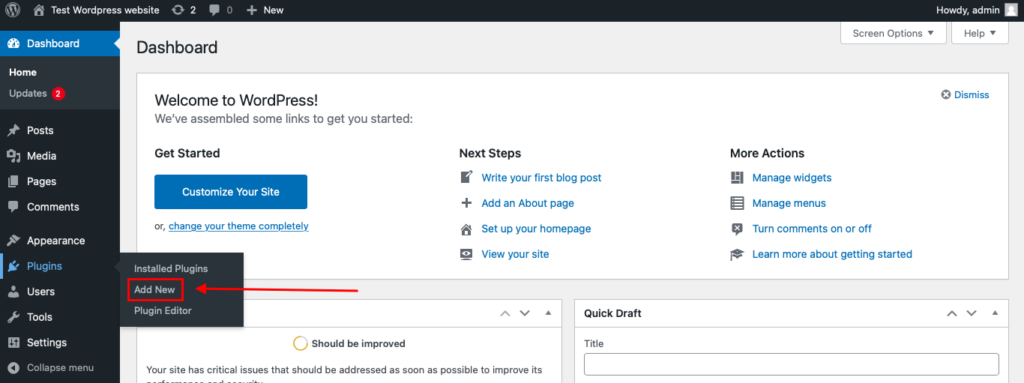
To install the Anti-Spam plugin, go to your WordPress admin panel→ Plugins→ Add New.
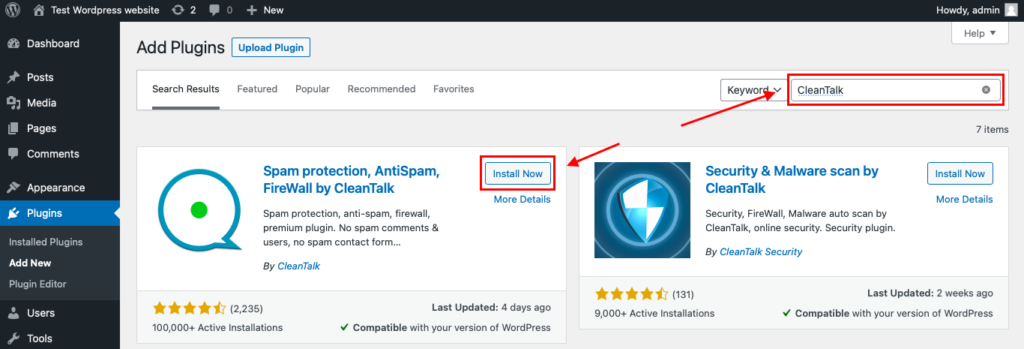
Then enter «СleanTalk» in the search box and click the Install button for «Spam protection, Anti-Spam, FireWall by CleanTalk».
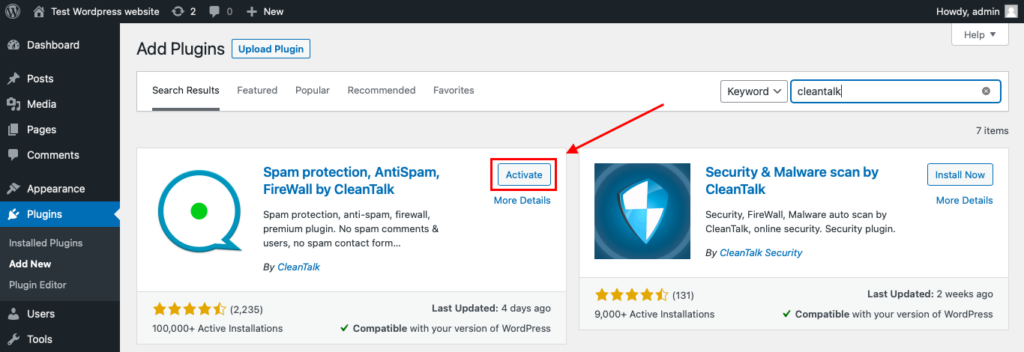
After installing the plugin, click the «Activate» button.
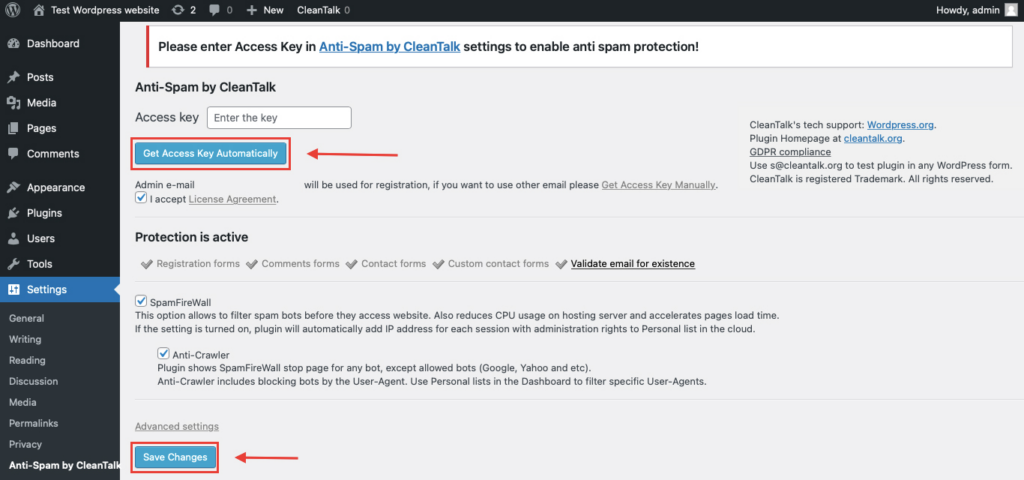
After it is done go to the plugin settings and click the «Get Access Key Automatically» button. Then just click the «Save Settings» button.
That’s all – Contact Form 7 are now protected From this moment,CleanTalk automatically protects the Contact Form 7 registration form (REST route /wp-json/Contact Form 7press/v1/users/), and the Add Listing form used to submit new listings.
You don’t need to paste any shortcodes – just use Contact Form 7 as usual, and CleanTalk will filter spam in the background.
That’s it! From now you know how to completely protect your Otter Blocks from spam. You don’t need to paste any shortcodes – just use Otter Blocks as usual, and CleanTalk will filter spam in the background.
Check if spam protection works with Otter Blocks
The best way to test the spam protection is by using a test email,
stop_email@example.com
- Open a page with your Otter Blocks form in an Incognito / private browser tab.
- Fill out the form using stop_email@example.com as the sender’s email.
- Send the form.
- You should see a message from the Anti-Spam plugin confirming that a spam submission was blocked.
*** Forbidden. Sender blacklisted. Anti-Spam by CleanTalk. **
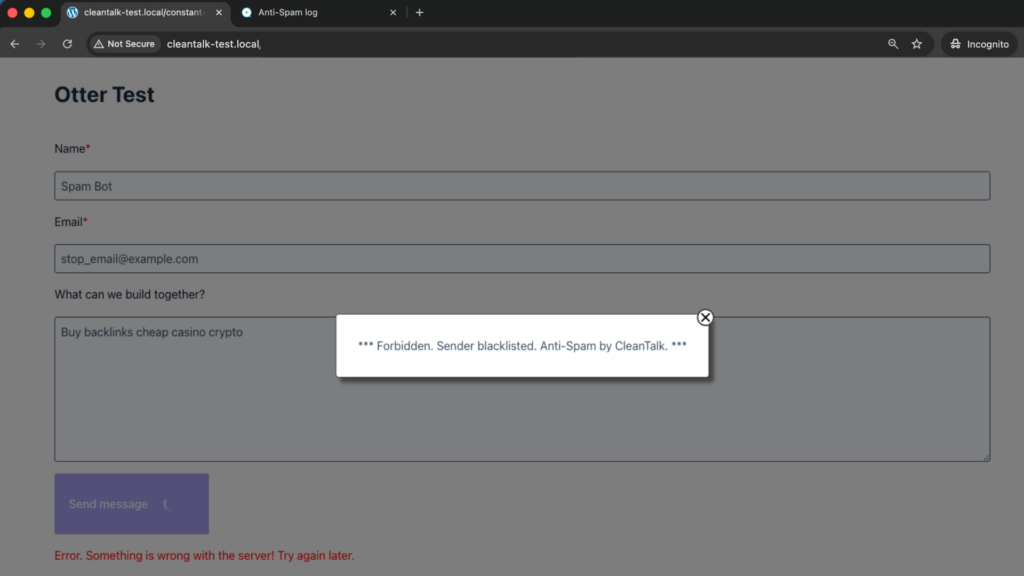
If you see this message, it means CleanTalk successfully protects your Otter Blocks forms from spam.
We ran this test on a clean WordPress install with a standard Otter Form block. The block message appears as an overlay on top of the form, the form itself reports that the submission did not go through, and nothing is written to Otter Blocks -> Form Submissions.
Cloud Dashboard
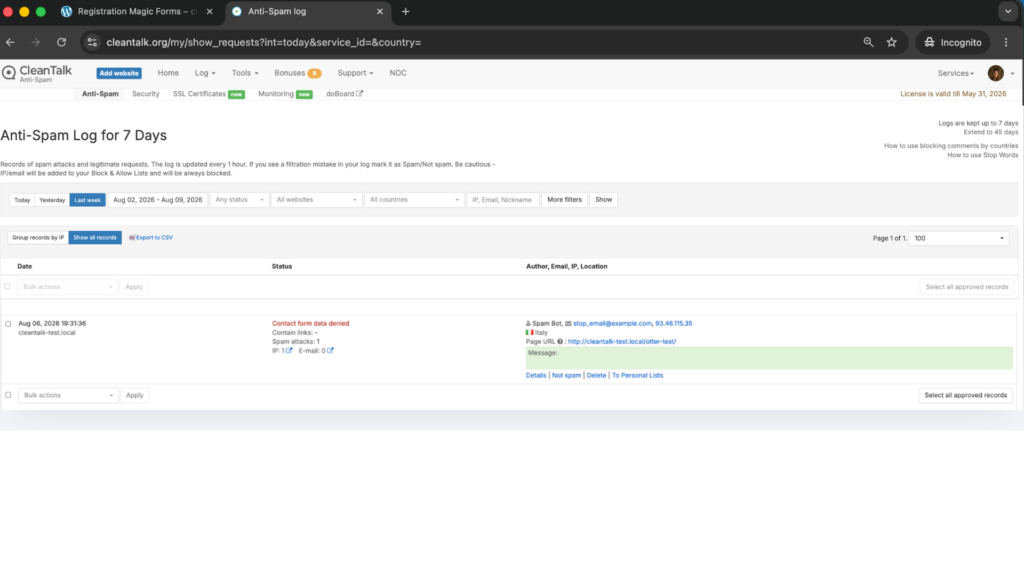
In addition, in the Cloud Dashboard you can find extra details regarding all submissions processed by CleanTalk, including Otter Blocks forms:
- IP and email of the sender, as well as the sender’s activity history across other websites connected to the CleanTalk cloud.
- Geolocation of the sender.
- Date and time of the submission.
- Page (URL) where the form was submitted.
- Cloud decision – Approved or Denied.
- Cloud explanation for the decision (e.g. blacklisted email, bad IP reputation, spam text, etc.).
- Tools to move the sender to Block or Allow lists so you can fine-tune Otter Blocks spam protection.
FAQ
Do I still need the Otter Captcha block?
Not on every form. Keep it where you have a specific, ongoing problem and the friction is worth it. On the rest of the site, the invisible filter covers you without asking readers to prove anything.
Does it protect forms that use the subscribe action with a mailing provider?
Yes. The check runs on the submission itself, before Otter passes the address to the connected provider, so junk addresses are not added to your list.
Will blocked submissions appear in Form Submissions?
No. A refused submission is stopped before Otter writes the record, which is the point – your submissions table stays a list of real enquiries.
What about webhooks and the Pro autoresponder?
They never fire for a blocked submission. Filtering happens ahead of Otter’s delivery and automation steps.
Does it work with forms inside FSE templates and patterns?
Yes. Protection follows the form submission, not the place the block is rendered, so headers, footers, template parts and patterns are all covered.
Does the file upload field change anything?
No. The submission is evaluated the same way regardless of which fields the form contains.
A real customer was blocked. How do I fix it?
Find the request in the Cloud Dashboard, check the reason given for the decision, then move that email address or IP to the Allow list. Decisions are logged with explanations, so you are not guessing.
Does this slow down the form?
The check is one background request while the form is submitting. Visitors see no additional step.
Final recommendation
Otter Blocks gives you a form that is genuinely native to the block editor, and a captcha you can place surgically where it is needed. The gap it leaves is sender reputation – nothing in the box knows that the address in front of it has been spamming other sites all week. Fill that gap with an invisible cloud filter across the whole site, keep the Captcha block for the one or two forms under real pressure, and your Form Submissions table stays worth opening.
For broader website protection, CleanTalk also provides anti-spam protection for websites, helping block spam in forms, comments, registrations, and orders without CAPTCHA.
