

TL;DR: To stop spam in Back In Stock Notifier for WooCommerce, combine its built-in protection with a cloud anti-spam filter. CleanTalk Anti-Spam checks every Back In Stock Notifier for WooCommerce submission in the background and blocks spam bots invisibly – no CAPTCHA, no puzzles, no checkboxes – while protecting registrations, comments and WooCommerce on the same site. reCAPTCHA, hCaptcha and Turnstile add a visible challenge layer for high-risk forms. For most WordPress sites, an invisible cloud filter blocks more spam with less friction than CAPTCHA alone. Plans start at $12 per site/year with a free 7-day trial.

Back In Stock Notifier for WooCommerce (also listed as Back In Stock Notifier for WooCommerce | WooCommerce Waitlist Pro) does one job very well: when a product is out of stock, it shows a “Notify me when available” form so shoppers can leave their email and get an automatic message the moment the item is back. It turns lost sales into a waitlist and gives you a clear signal of real demand.
That usefulness is exactly why the form attracts spam. By 2026, waitlist and back-in-stock plugins are widely installed on WooCommerce stores, and popularity also means exposure. The subscription form is public, simple, and sits on product pages that bots crawl constantly. It only asks for an email address, has no login wall, and submits straight into your notification list. For an automated bot, that is an open inbox: drop in any address, hit submit, repeat. So the same form that captures genuine demand also captures fake and junk signups unless you filter them.
As WordPress.org shows, Back In Stock Notifier for WooCommerce is currently used on over 20,000 active installations and has 120 reviews with an average rating of 4.7.
Plugin Homepage at wordpress.org | Website propluginslab.com
Common types of spam in Back In Stock Notifier
The damage from spam on a back-in-stock form is not just clutter – it quietly poisons your data and your email reputation. The most common patterns are:
- Bot-submitted fake and disposable emails. Automated scripts fill the subscription form with random, made-up, or one-time “burner” addresses that will never read a notification.
- Mass fake signups that distort demand. Bots can register hundreds of waitlist entries for a single product, inflating your subscriber count and making a product look far more in-demand than it really is. Any restock or inventory decision based on that data is wrong.
- Notifications sent to non-existent addresses. When the product comes back, your store emails the whole list – including the fake addresses. Those messages bounce or hit spam traps, and high bounce rates damage your sender reputation and deliverability, so even your real customers stop receiving notifications reliably.
- Human spam. Not every junk signup is a bot. Paid “manual” spammers and competitors can submit nonsense entries by hand, which CAPTCHA-style tools cannot catch.
Left unchecked, this means a bloated and useless waitlist, misleading analytics, wasted email-sending costs, and a sender reputation that drags down every email your store sends.
Official anti-spam options and integrations in Back In Stock Notifier
To be honest about it: the free version of Back In Stock Notifier for WooCommerce does not ship with a dedicated anti-spam filter on the subscription form. The Pro tier may add basic controls, but out of the box the plugin focuses on capturing and sending notifications, not on screening who signs up.
That means spam protection for the form leans on the surrounding stack – WooCommerce and WordPress account/comment settings – plus third-party tools you add yourself. In practice, most stores bolt on a CAPTCHA plugin or a cloud filter to do the actual screening.
If your main goal is to protect Back In Stock Notifier for WooCommerce without adding CAPTCHA challenges, CleanTalk can be used as a Google reCAPTCHA alternative that filters spam submissions in the background.
CAPTCHA options in Back In Stock Notifier
The usual way to add a challenge to the subscription form is through a separate CAPTCHA plugin that injects the widget onto WooCommerce forms. The common choices are:
- Google reCAPTCHA v2 (the checkbox or image challenge).
- Google reCAPTCHA v3 (an invisible score-based check).
- hCaptcha.
- Cloudflare Turnstile.
These can reduce crude bot traffic, but they come with real trade-offs on a back-in-stock form:
- They add friction exactly where you want none. The form lives on a product page where you are trying to recover a sale. A checkbox or puzzle in front of a shopper who is already hesitant (the item is out of stock) hurts conversion.
- Bots increasingly solve them. Modern bots and solver services get past reCAPTCHA and similar challenges, so spam still leaks through.
- They do not catch human spam. A challenge only proves “a human clicked.” It cannot tell a real customer from a manual spammer, so hand-submitted junk passes.
Best ways to stop spam in Back In Stock Notifier
The most reliable approach is layered, with an invisible filter doing the heavy lifting and a challenge only where it is truly needed:
- An invisible cloud filter on the subscription form (CleanTalk). It checks every signup in the background against IP reputation, email reputation and behavior, and blocks bots and known spammers before they reach your waitlist – with no challenge shown to the shopper.
- Optional Cloudflare Turnstile on your most-attacked pages. If a few specific product pages get hammered by bots, add a lightweight challenge there only, not site-wide.
- Moderation and double opt-in. Require email confirmation before a signup is added to the list. A double opt-in step means fake and disposable addresses never make it onto your notification list, which protects deliverability when you restock.
Combined, these keep the form effortless for genuine shoppers while cutting fake signups close to zero.
Comparison table: Back In Stock Notifier anti-spam options vs CleanTalk
Here is how the main anti-spam options for Back In Stock Notifier for WooCommerce compare:
| Solution | Best for | Pricing | Main limitation |
| CleanTalk Anti-Spam | Invisible, site-wide protection across forms, signups and WooCommerce | From $12/site/year; free 7-day trial | Cloud service; paid after trial |
| Akismet | Comment and basic form spam on small sites | Free personal; paid commercial | Comment-focused; weak on custom forms |
| Google reCAPTCHA | High-risk forms where a challenge is acceptable | Free | Adds friction; can hurt conversion; bots bypass it |
| Cloudflare Turnstile | Lighter, privacy-friendly CAPTCHA | Free | A challenge, not a content filter |
In short: use CleanTalk as the invisible baseline filter, and add reCAPTCHA, hCaptcha or Turnstile only on your highest-risk forms.
Anti-Spam plugin by CleanTalk for WordPress
The next tool we’re going to use is the Anti-Spam plugin by CleanTalk.
CleanTalk is a cloud-based anti-spam service for WordPress and other platforms. Instead of showing visitors a puzzle, it analyzes each submission server-side against a constantly updated database of known spammers, spam patterns, and behavioral signals, then silently blocks the bad ones.
Here’s a short overview:
- CleanTalk is a cloud-based spam protection service for websites, founded in 2012.
- It automatically blocks spam without CAPTCHAs and doesn’t interrupt the user experience.
- Protects many types of forms: contact forms, payment forms, registrations, comments, surveys and more.
- Stops both automated bots and human spam submissions.
- Uses advanced filtering algorithms and a global spam detection network.
- Detects spam based on IP address, email address and user behavior.
- Lets you create custom filtering rules for specific cases.
- Allows blocking or filtering by IP, email and country.
- Works quietly in the background and is very easy to install and configure.
According to WordPress.org, Anti-Spam by CleanTalk for WordPress has over 200,000 active installations, with 3,168 reviews and an average rating of 4.7.
Plugin Homepage at cleantalk.org | Latest release at GitHub.com
Install the CleanTalk Anti-Spam plugin
To install the Anti-Spam plugin, go to your WordPress admin panel→ Plugins→ Add New.
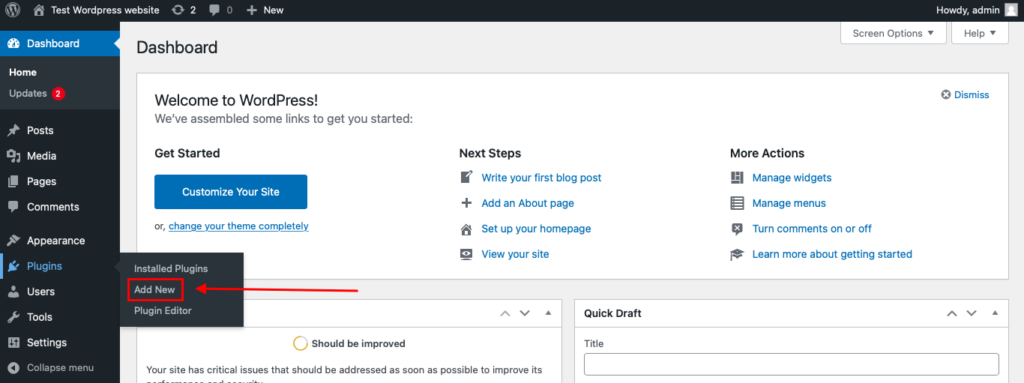
Then enter «СleanTalk» in the search box and click the Install button for «Spam protection, Anti-Spam, FireWall by CleanTalk».
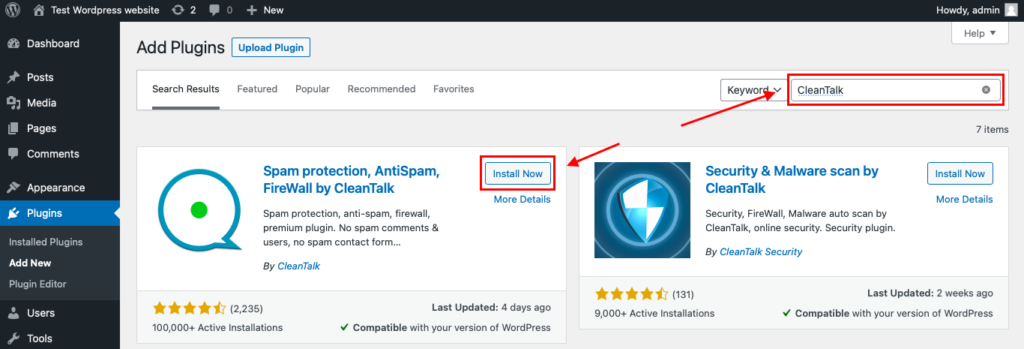
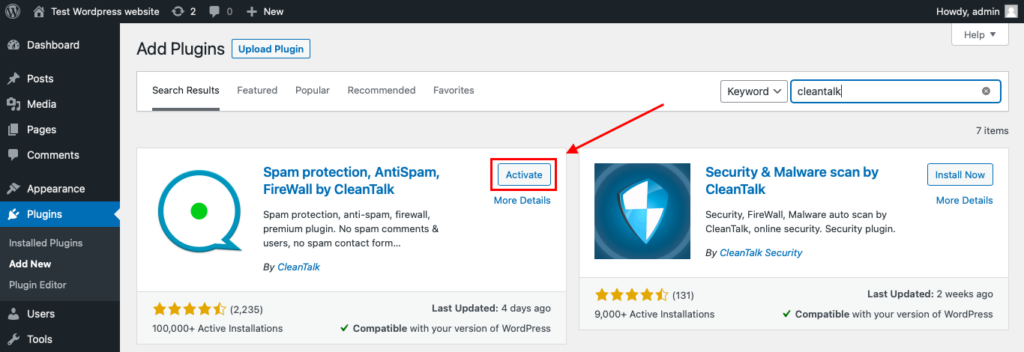
After installing the plugin, click the «Activate» button.
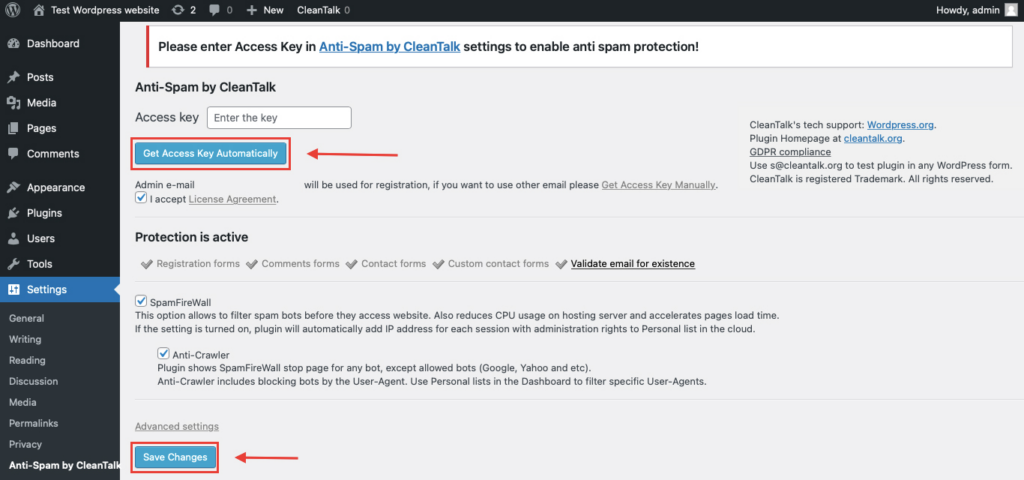
After it is done go to the plugin settings and click the «Get Access Key Automatically» button. Then just click the «Save Settings» button.
That’s all – Contact Form 7 are now protected From this moment,CleanTalk automatically protects the Contact Form 7 registration form (REST route /wp-json/Contact Form 7press/v1/users/), and the Add Listing form used to submit new listings.
You don’t need to paste any shortcodes – just use Contact Form 7 as usual, and CleanTalk will filter spam in the background.
That’s it! From now you know how to completely protect your Back In Stock Notifier for WooCommerce from spam. You don’t need to paste any shortcodes – just use Back In Stock Notifier for WooCommerce as usual, and CleanTalk will filter spam in the background.
Check if spam protection works with Back In Stock Notifier
The best way to test the spam protection is by using a test email,
stop_email@example.com
- Open a page with your Back In Stock Notifier for WooCommerce form in an Incognito / private browser tab.
- Fill out the form using stop_email@example.com as the sender’s email.
- Send the form.
- You should see a message from the Anti-Spam plugin confirming that a spam submission was blocked.
*** Forbidden. Sender blacklisted. Anti-Spam by CleanTalk. ***
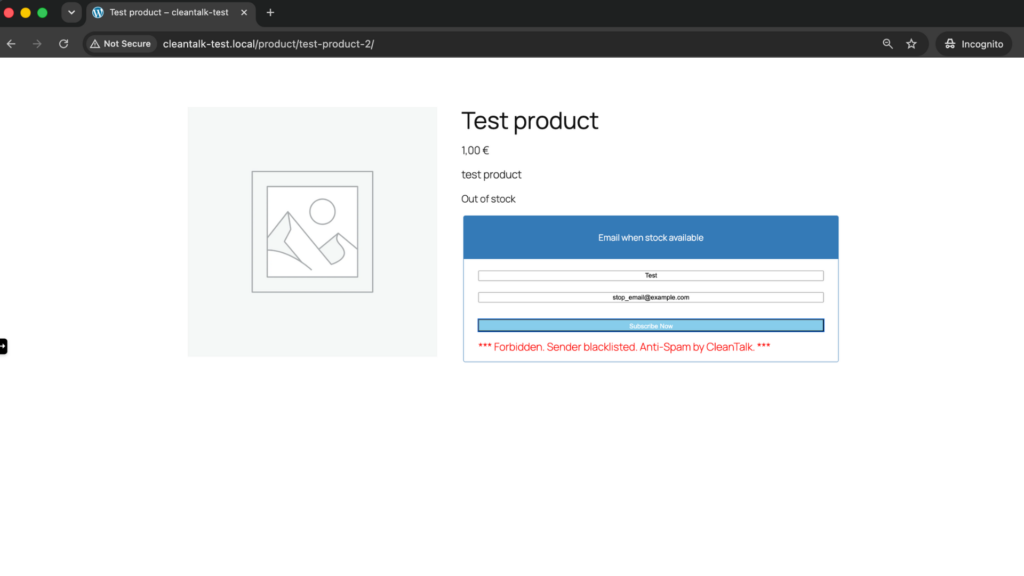
If you see this message, it means CleanTalk successfully protects your Back In Stock Notifier for WooCommerce forms from spam.
Cloud Dashboard
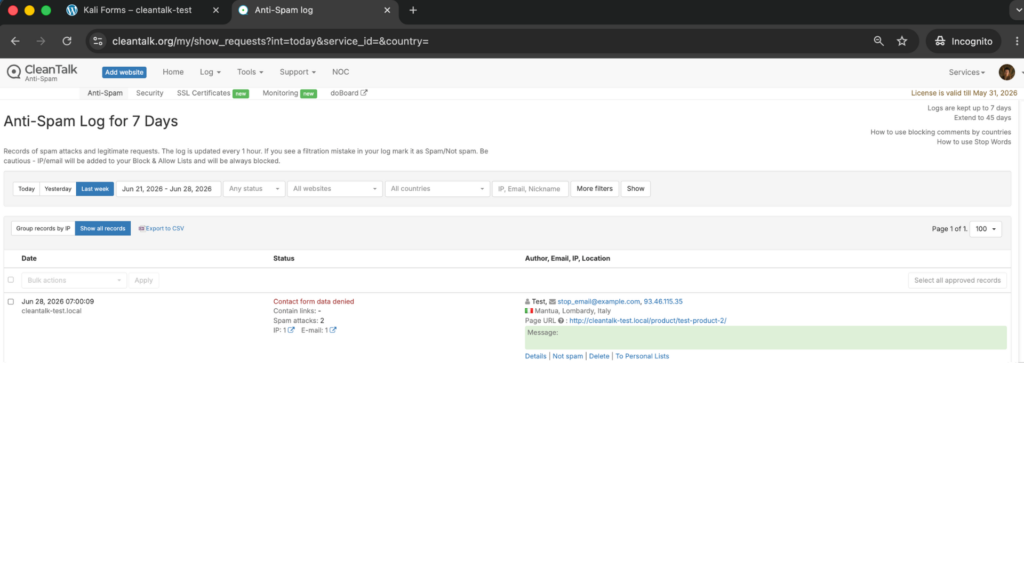
In addition, in the Cloud Dashboard you can find extra details regarding all submissions processed by CleanTalk, including Back In Stock Notifier for WooCommerce forms:
- IP and email of the sender, as well as the sender’s activity history across other websites connected to the CleanTalk cloud.
- Geolocation of the sender.
- Date and time of the submission.
- Page (URL) where the form was submitted.
- Cloud decision – Approved or Denied.
- Cloud explanation for the decision (e.g. blacklisted email, bad IP reputation, spam text, etc.).
- Tools to move the sender to Block or Allow lists so you can fine-tune Back In Stock Notifier for WooCommerce spam protection.
FAQ
Why am I getting fake back-in-stock signups?
The subscription form is public, has no login, and only needs an email – which is exactly what bots look for. Automated scripts crawl product pages and submit random or disposable addresses in bulk. An invisible cloud filter blocks them before they reach your waitlist.
How do bots even find the “Notify me when available” form?
Bots crawl your store like any visitor and detect out-of-stock product pages and their forms automatically. They do not need a link from you – if the page is reachable on the open web, the form is reachable too. That is why protection has to sit on the form itself, not on obscurity.
Do I still need reCAPTCHA if I use CleanTalk?
For most stores, no. CleanTalk filters spam invisibly in the background, so you avoid the friction a CAPTCHA adds to a product page. If a handful of pages face very heavy bot attacks, you can add Turnstile or reCAPTCHA there as an extra layer, but it is optional.
Will spam protection hurt my product-page conversion?
That is the whole point of using an invisible filter. CleanTalk shows no checkbox or puzzle to your shoppers, so a real customer signs up in one step. CAPTCHAs, by contrast, add a hurdle exactly where you are trying to recover a sale, which is why a background filter is the better fit here.
Does CleanTalk only protect the signup form, or the whole site?
Both. Once installed, CleanTalk protects the Back In Stock Notifier form and, on the same site, also covers WooCommerce checkout, registrations, comments and other WordPress forms – no extra setup per form.
Final recommendation
For Back In Stock Notifier for WooCommerce, the cleanest setup is an invisible CleanTalk filter as the baseline on the subscription form, optionally backed by a CAPTCHA like Turnstile only on your most-attacked product pages. That keeps signup effortless for real shoppers, keeps your waitlist data honest, and protects your sender reputation when you actually restock.
For broader website protection, CleanTalk also provides anti-spam protection for websites, helping block spam in forms, comments, registrations, and orders without CAPTCHA.
Stop Back In Stock Notifier spam without CAPTCHAs
Create your CleanTalk account and protect your Back In Stock Notifier waitlist from bot and human spam with server-side filtering. Keep the “notify me” form easy for real customers while extending protection across comments, registrations, and other WordPress forms.
