

TL;DR: To stop spam in Profile Builder, combine its honeypot, reCAPTCHA field and admin approval with a cloud anti-spam filter. CleanTalk Anti-Spam checks every Profile Builder registration in the background and blocks spam bots invisibly – no CAPTCHA, no puzzles, no checkboxes – while protecting comments, contact forms and WooCommerce on the same site. reCAPTCHA, hCaptcha and Turnstile add a visible challenge layer for high-risk forms. For most WordPress sites, an invisible cloud filter blocks more spam with less friction than CAPTCHA alone. Plans start at $12 per site/year with a free 7-day trial.
Registration spam costs more than form spam
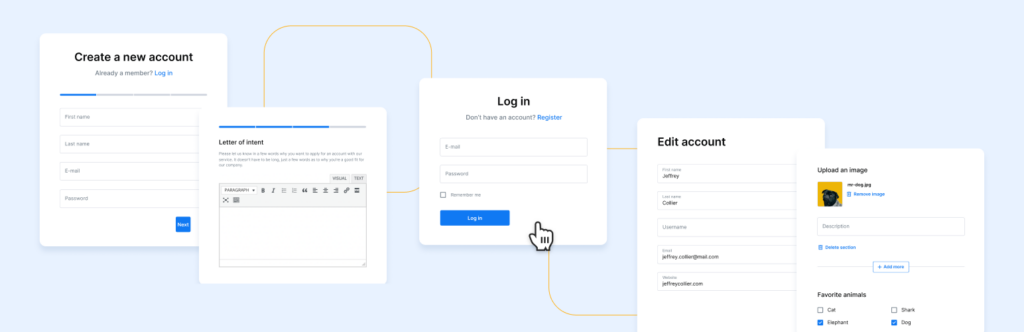
Profile Builder is what most WordPress sites reach for when the default registration screen is not enough: front-end registration, login and edit-profile forms, custom fields, user roles and approval workflows. Any site with a membership area, a customer portal or a community eventually installs something like it. In 2026 popularity also means exposure, and a front-end registration form is a more attractive target than a contact form, because a successful submission does not just send a message – it creates an account.
That is the real difference with Profile Builder spam. A blocked contact form submission costs a spammer nothing and gains them nothing. A registered account is an asset: a public profile page, a bio field, a website field, and often the ability to post. Forum and membership spammers have used this for years – register, fill the profile with links, and let search engines index it. Meanwhile you get a user list you can no longer scan at a glance, notification emails for every fake signup, and moderation work that grows every week.
As WordPress.org shows, Profile Builder is currently used on over 40,000 active installations and has 735 reviews with an average rating of 4.7.
Plugin Homepage at wordpress.org | Website cozmoslabs.com
Common types of spam in Profile Builder
- Bulk bot registrations. Scripted signups against the registration shortcode, usually in bursts, often with generated usernames and disposable addresses.
- Profile link farming. Accounts created purely to fill the website and biographical info fields with links, hoping profile pages get indexed.
- Keyword stuffing in custom fields. Any extra text field you added for legitimate reasons becomes a place to paste spam content.
- Throwaway and invalid email addresses. They pass basic format validation, never confirm, and quietly build up in your user table.
- Credential and role probing. Automated attempts to see whether registration hands out a role with more capability than intended.
- Human spam signups. Low-volume, manually created accounts. They defeat rate limits and challenge-based protection because a person really is on the other end.
Official anti-spam options and integrations in Profile Builder
Cozmoslabs gives you more registration-specific tooling than most competitors, and each piece solves a different part of the problem.
- reCAPTCHA field. Available in every version of Profile Builder, including the free one. It supports reCAPTCHA v2 checkbox, reCAPTCHA v2 invisible and reCAPTCHA v3, selected from the reCAPTCHA Type dropdown when you add the field. It works on Profile Builder’s own login, registration and password recovery forms as well as the default WordPress forms. Note that setup requires API keys from Google Cloud Console with the reCAPTCHA Enterprise API enabled and billing configured.
- Honeypot field. A hidden field that only a bot would fill in; if it is filled, the registration is rejected. It is an extra field type available in the Basic, Pro and Agency versions, so it is not part of the free plugin.
- Email confirmation. New users must confirm their address before the account becomes active. Unconfirmed accounts are collected under Users -> All Users -> Users with Unconfirmed Email Address.
- Admin approval. New registrations sit in Pending until an administrator approves them, and you can require approval only for specific roles. Available in the Basic and Pro versions, managed under Users -> All Users -> Admin Approval.
These are good defences and you should use them. The honest limitation: the honeypot stops only naive bots, the reCAPTCHA field stops only sessions that cannot solve a challenge, and email confirmation plus admin approval do not prevent the signup – they move the problem to a queue that a human has to work through. None of them ask the question that actually separates a spammer from a member: has this address and this IP been registering fake accounts across other websites?
If your main goal is to protect Profile Builder without adding CAPTCHA challenges, CleanTalk can be used as a Google reCAPTCHA alternative that filters spam submissions in the background.
CAPTCHA options in Profile Builder
Profile Builder’s reCAPTCHA field covers all three current reCAPTCHA modes, which is more flexibility than most registration plugins offer:
- v2 checkbox. The familiar “I’m not a robot” tick. The most visible and the most damaging to signup completion.
- v2 invisible. No click in the normal case; a challenge appears only when Google is suspicious. A reasonable compromise if you want a challenge at all.
- v3. Scores the session silently and leaves you to decide what to do with a low score. Less friction, but it needs tuning and gives you no explanation for a given score.
Two practical points. First, all three now depend on Google Cloud Console with the Enterprise API and billing configured, which is real setup work for a small site. Second, a challenge on a registration form is friction at the worst possible moment – the point where someone is deciding whether joining is worth the trouble. If a challenge is the only thing standing between your site and fake accounts, you are paying for it in real signups.
Best ways to stop spam in Profile Builder
- Filter the registration before the account exists. An invisible cloud check evaluates the address and IP at submission time, so fake accounts are never created and never need moderating.
- Keep email confirmation on. It is cheap, it verifies the address is real, and it costs a genuine user one click.
- Use admin approval where the role matters. If registration grants anything beyond a plain subscriber role, approval is worth the manual step. With good filtering upstream, the queue stays short enough to actually work.
- Add the honeypot field if you are on Basic or above. It costs nothing in friction and removes the laziest bots.
- Add the reCAPTCHA field only if the form is under sustained attack. Treat it as a response to a problem, not a default.
- Audit your existing user list. Sort by registration date, look for bursts, and check the website and bio fields on suspicious accounts. Clean out what got in before you tightened things up.
- Protect the rest of the site. Comments, contact forms and WooCommerce checkout are hit by the same bots that probe your registration form.
Comparison table: Profile Builder built-in protection vs CleanTalk
Here is how the main anti-spam options for Profile Builder compare:
| Solution | Best for | Pricing | Main limitation |
| CleanTalk Anti-Spam | Invisible, site-wide protection across forms, signups and WooCommerce | From $12/site/year; free 7-day trial | Cloud service; paid after trial |
| Profile Builder honeypot field | Removing unsophisticated bots at zero friction | Paid versions (Basic, Pro, Agency) | Not in the free version; easily bypassed by better bots |
| Profile Builder reCAPTCHA field | High-risk forms where a challenge is acceptable | Free field; Google keys and billing required | Adds friction; can hurt conversion; bots bypass it |
| Admin approval | Sites where every member must be vetted | Paid versions (Basic, Pro) | Manual work; the fake signup still happened |
In short: use CleanTalk as the invisible baseline filter, and add reCAPTCHA, hCaptcha or Turnstile only on your highest-risk forms.
Anti-Spam plugin by CleanTalk for WordPress
The next tool we’re going to use is the Anti-Spam plugin by CleanTalk.
CleanTalk is a cloud-based anti-spam service for WordPress and other platforms. Instead of showing visitors a puzzle, it analyzes each submission server-side against a constantly updated database of known spammers, spam patterns, and behavioral signals, then silently blocks the bad ones.
Here’s a short overview:
- CleanTalk is a cloud-based spam protection service for websites, founded in 2012.
- It automatically blocks spam without CAPTCHAs and doesn’t interrupt the user experience.
- Protects many types of forms: contact forms, payment forms, registrations, comments, surveys and more.
- Stops both automated bots and human spam submissions.
- Uses advanced filtering algorithms and a global spam detection network.
- Detects spam based on IP address, email address and user behavior.
- Lets you create custom filtering rules for specific cases.
- Allows blocking or filtering by IP, email and country.
- Works quietly in the background and is very easy to install and configure.
According to WordPress.org, Anti-Spam by CleanTalk for WordPress has over 200,000 active installations, with 3,168 reviews and an average rating of 4.7.
Plugin Homepage at cleantalk.org | Latest release at GitHub.com
CleanTalk has a dedicated Profile Builder integration that runs on the register action, before the account is created. If the cloud refuses the sender, the registration is stopped and the reason is displayed as a Profile Builder error message at the top of the form, using the plugin’s own error styling. The visitor sees a normal form error, not a broken page, and no user record, no confirmation email and no approval queue entry is created.
Install the CleanTalk Anti-Spam plugin
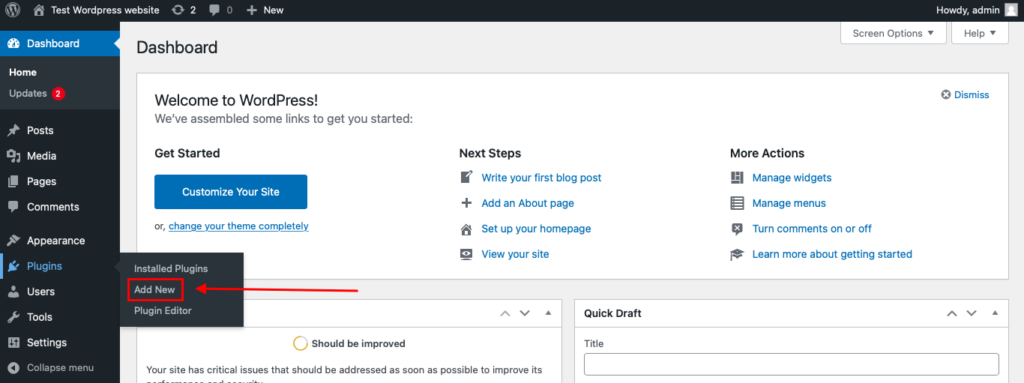
To install the Anti-Spam plugin, go to your WordPress admin panel→ Plugins→ Add New.
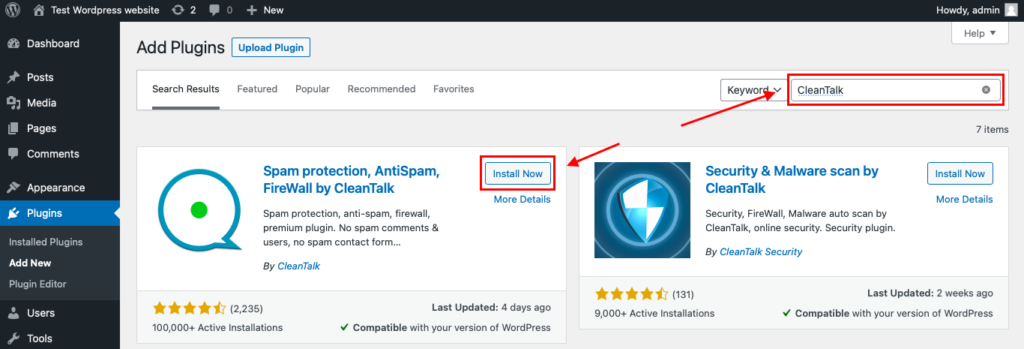
Then enter «СleanTalk» in the search box and click the Install button for «Spam protection, Anti-Spam, FireWall by CleanTalk».
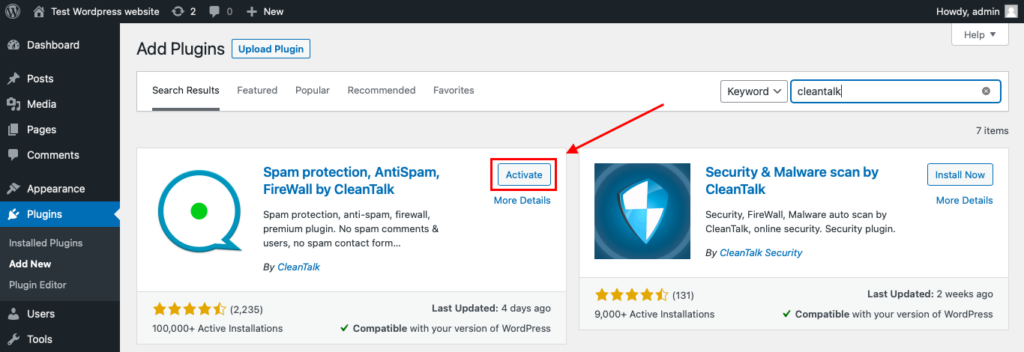
After installing the plugin, click the «Activate» button.
After it is done go to the plugin settings and click the «Get Access Key Automatically» button. Then just click the «Save Settings» button.
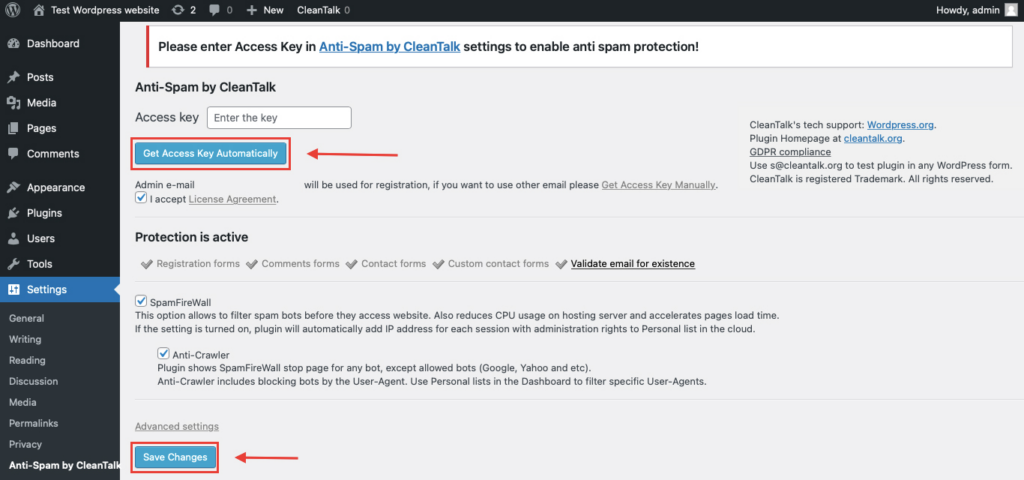
That’s all – Contact Form 7 are now protected From this moment,CleanTalk automatically protects the Contact Form 7 registration form (REST route /wp-json/Contact Form 7press/v1/users/), and the Add Listing form used to submit new listings.
You don’t need to paste any shortcodes – just use Contact Form 7 as usual, and CleanTalk will filter spam in the background.
That’s it! From now you know how to completely protect your Profile Builder from spam. You don’t need to paste any shortcodes – just use Profile Builder as usual, and CleanTalk will filter spam in the background.
Check if spam protection works with Profile Builder
The best way to test the spam protection is by using a test email,
stop_email@example.com
- Open a page with your Profile Builder form in an Incognito / private browser tab.
- Fill out the form using stop_email@example.com as the sender’s email.
- Send the form.
- You should see a message from the Anti-Spam plugin confirming that a spam submission was blocked.
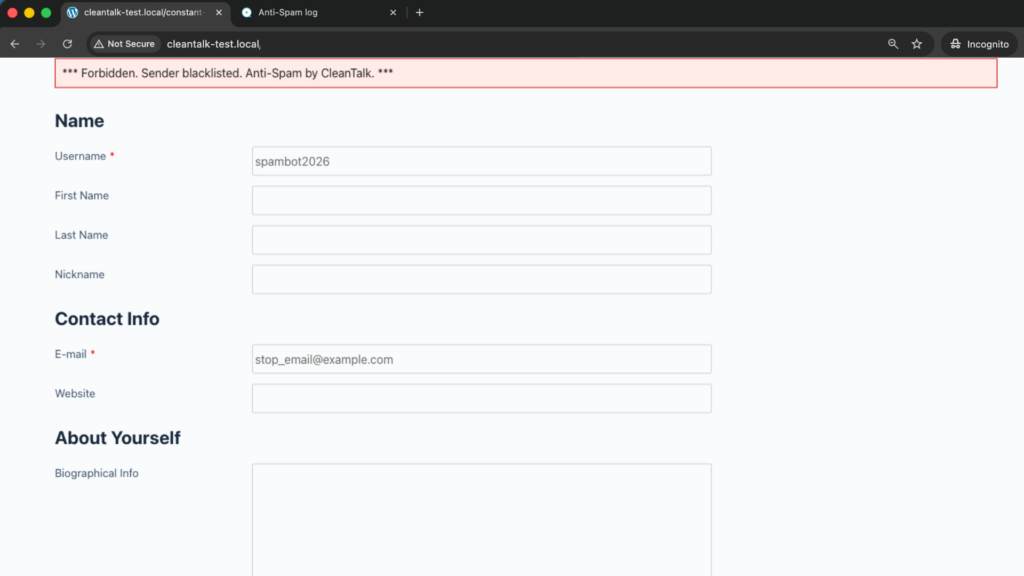
If you see this message, it means CleanTalk successfully protects your Profile Builder forms from spam.
We ran this test on a clean WordPress install using a standard [wppb-register] page. The message appears in the form’s own error box above the fields, the form stays filled in, and checking the user table afterwards confirms that no account was created.
Cloud Dashboard
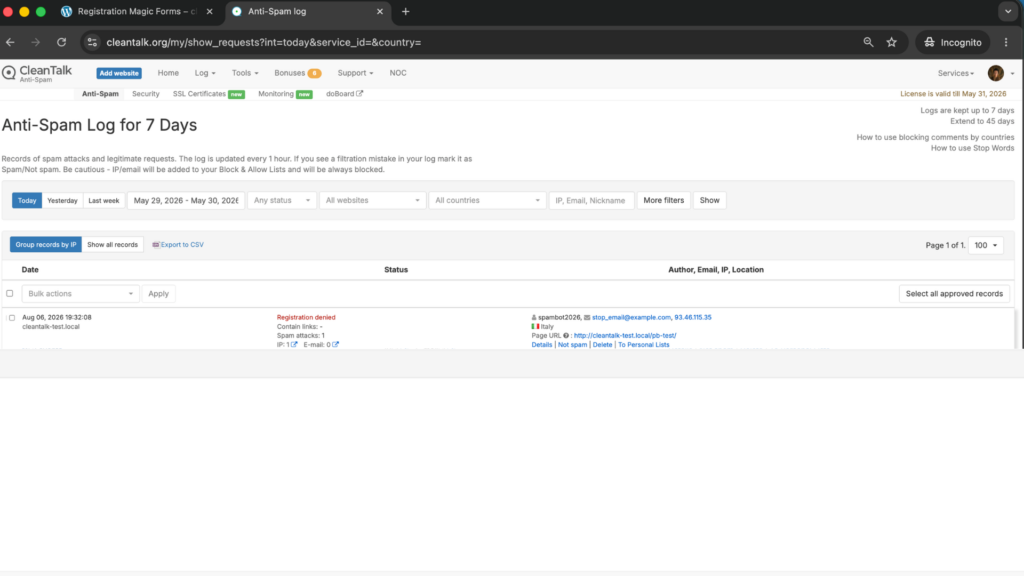
In addition, in the Cloud Dashboard you can find extra details regarding all submissions processed by CleanTalk, including Profile Builder forms:
- IP and email of the sender, as well as the sender’s activity history across other websites connected to the CleanTalk cloud.
- Geolocation of the sender.
- Date and time of the submission.
- Page (URL) where the form was submitted.
- Cloud decision – Approved or Denied.
- Cloud explanation for the decision (e.g. blacklisted email, bad IP reputation, spam text, etc.).
- Tools to move the sender to Block or Allow lists so you can fine-tune Profile Builder spam protection.
FAQ
Does this work with the free version of Profile Builder?
Yes. The integration works with the registration form regardless of which Profile Builder tier you run, which matters because the honeypot field is only in the paid versions.
Do I still need admin approval?
That depends on what an account grants. If registration only creates a subscriber, filtering at signup is usually enough. If it unlocks paid content or posting rights, keep approval as a deliberate vetting step – it will simply have far less to review.
Will blocked signups show up in the Admin Approval queue?
No. The check runs before the account is created, so nothing is queued, nothing is emailed and nothing needs deleting later.
Does it also protect the login and password recovery forms?
Registration is the form covered by the dedicated Profile Builder integration. For login protection, CleanTalk’s plugin includes a separate brute-force protection layer that applies to WordPress logins across the site.
What about custom fields I added to the registration form?
They are part of the same submission and are evaluated with it. Adding or renaming fields does not require any change on the CleanTalk side.
Can I keep the reCAPTCHA field as well?
Yes. They operate independently. Many sites remove the visible challenge once invisible filtering is in place, then bring it back only for a form under active attack.
A genuine member was blocked. What do I do?
Open the Cloud Dashboard, find the registration attempt, read the reason recorded for the decision, and move the address or IP to the Allow list.
How do I clean up fake accounts that registered before I installed this?
Sort your user list by registration date to spot bursts, check the website and biographical info fields for links, and delete what is clearly automated. New protection stops new accounts, not the ones already in the table.
Final recommendation
Registration spam is the one kind of spam that keeps working for the spammer after the submission ends, because the account stays. Profile Builder gives you the right building blocks – a honeypot in the paid tiers, a flexible reCAPTCHA field, email confirmation and admin approval – but every one of them either adds friction for real members or moves work into a queue. Put an invisible cloud filter in front of the registration so fake accounts never exist, keep email confirmation on, and use approval and challenges as deliberate choices for the cases that need them.
For broader website protection, CleanTalk also provides anti-spam protection for websites, helping block spam in forms, comments, registrations, and orders without CAPTCHA.

Leave a Reply