

If you use SureForms to build forms on your WordPress website, spam can quickly become a serious problem. Public contact forms are often targeted by bots, crawlers, automated scripts, and human-like spam submissions.
These unwanted messages may include fake inquiries, suspicious links, promotional offers, irrelevant SEO pitches, adult content, crypto spam, or repeated messages from disposable email addresses. Over time, spam can make it harder to notice real leads and important customer requests.
This guide explains how to protect SureForms forms from spam using Anti-Spam by CleanTalk for WordPress, together with additional SureForms protection options such as Google reCAPTCHA, Cloudflare Turnstile, hCaptcha, and Honeypot Security.

SureForms and WordPress Forms
SureForms is a WordPress form builder that works with the native WordPress block editor. It allows website owners to create contact forms, payment forms, feedback forms, surveys, event forms, application forms, and other custom forms without coding.
SureForms forms are often used for:
- contact forms
- lead generation forms
- support requests
- booking inquiries
- consultation requests
- payment forms
- event RSVP forms
- job application forms
- newsletter forms
- customer feedback forms
The advantage of SureForms is that users can create and publish forms directly inside WordPress without learning a completely separate interface. It also supports features such as AI-assisted form creation, multi-step forms, conversational forms, payment forms, conditional logic, calculations, integrations, and form entries.
But the same accessibility that makes SureForms convenient for real visitors can also make public forms attractive to spam bots.
Once a SureForms form is published on a public page or shared through an Instant Form URL, automated scripts can find it, submit it, and send unwanted messages through it.
As WordPress.org shows, SureForms – Contact Form, Payment Form & Other Custom Form Builder is currently used on over 500,000 websites and has 76 user reviews with an average rating of 4.9.
Plugin Homepage at WordPress.org | Documentation at SureForms
Why SureForms Attract Spam
SureForms is not the reason spam happens. Spam is a common problem for almost every public WordPress form.
Bots and spammers usually look for exposed forms that can be used to send messages, promote links, test email addresses, abuse website communication channels, or submit fake lead information.
Common SureForms spam patterns include:
- fake names and fake email addresses
- repeated promotional messages
- suspicious URLs inside the message field
- SEO, marketing, crypto, adult, or software-related spam
- irrelevant business offers
- fake support requests
- disposable email addresses
- repeated submissions from the same IPs or networks
- human-written spam that passes basic bot checks
This is especially important for business websites. If spam reaches the site owner’s inbox, CRM, database, form entries, payment workflows, or notification system, it can waste time and make real inquiries harder to manage.
That is why SureForms should have a reliable anti-spam layer working in the background.
Anti-Spam by CleanTalk
The main tool we are going to use here is the Anti-Spam plugin by CleanTalk.
Here’s a short overview:
- CleanTalk is a cloud-based spam protection service for WordPress websites.
- It blocks spam without forcing real visitors to solve CAPTCHA challenges.
- It can protect different types of WordPress forms and submissions, including contact forms, comments, registrations, subscriptions, bookings, surveys, and WooCommerce orders.
- It checks submissions using spam detection signals such as email address, IP address, sender reputation, and sender activity.
- It helps block automated bots and suspicious form submissions.
- It works quietly in the background.
It allows website owners to review spam checks in the CleanTalk Cloud Dashboard.
It gives website owners tools for personal Allow lists and Block lists, country filters, language filters, stop words, and SpamFireWall.
According to WordPress.org, Anti-Spam by CleanTalk for WordPress has over 200,000 active installations, with 3,168 reviews and an average rating of 4.7.
Plugin Homepage at cleantalk.org | Latest release at GitHub.com | Website cleantalk.org
Install the CleanTalk Anti-Spam plugin
Show Instructions
To install the Anti-Spam plugin, go to your WordPress admin panel → Plugins → Add New.
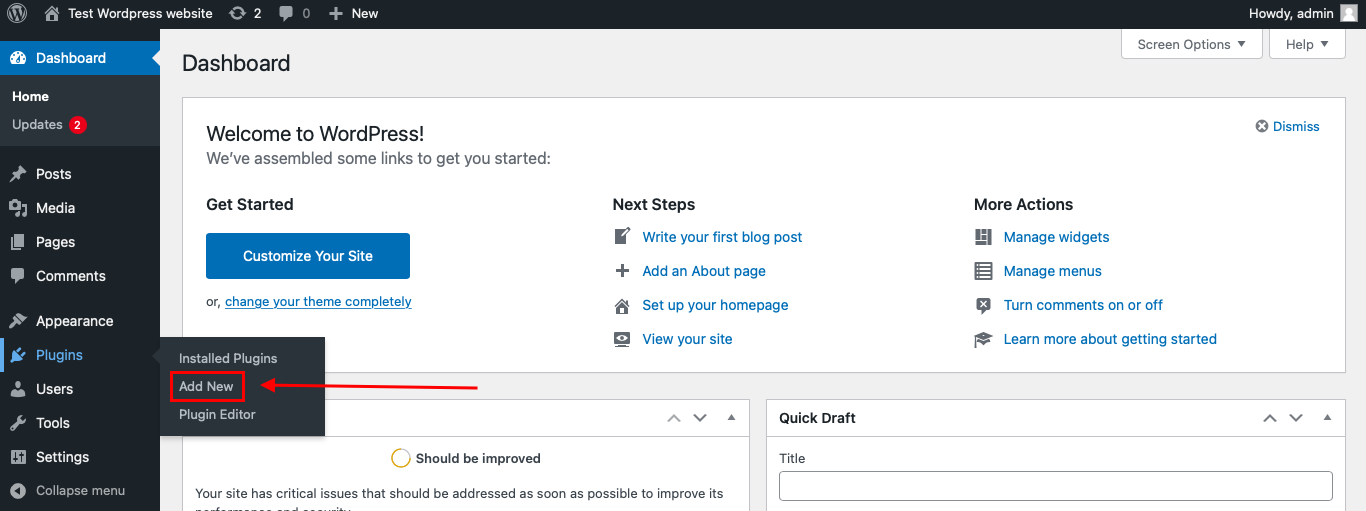
Then enter «СleanTalk» in the search box and click the Install button for «Spam protection, Anti-Spam, FireWall by CleanTalk».
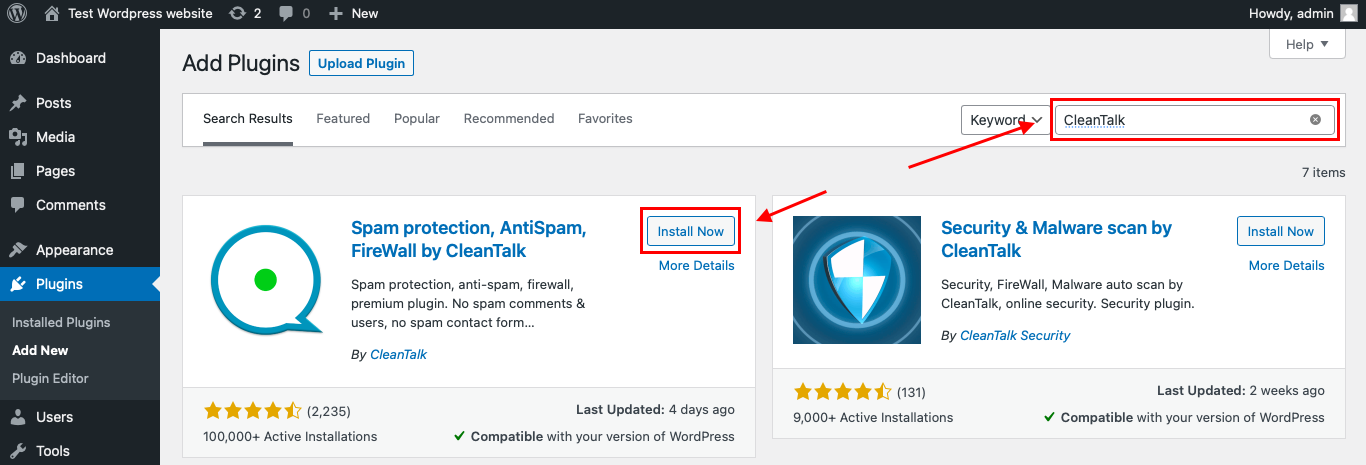
After installing the plugin, click the «Activate» button.
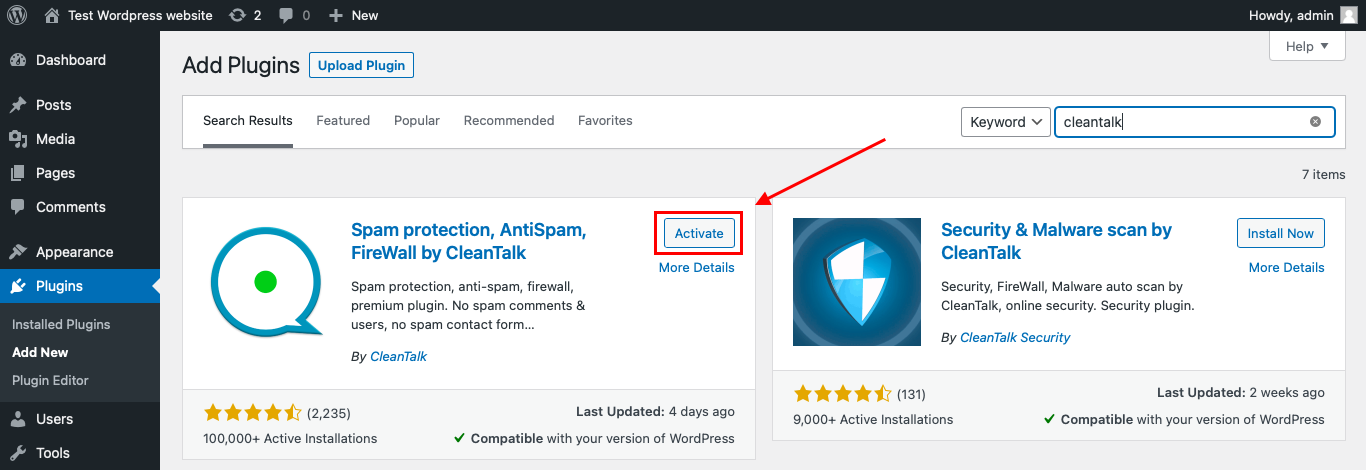
After it is done go to the plugin settings and click the «Get Access Key Automatically» button. Then just click the «Save Settings» button.
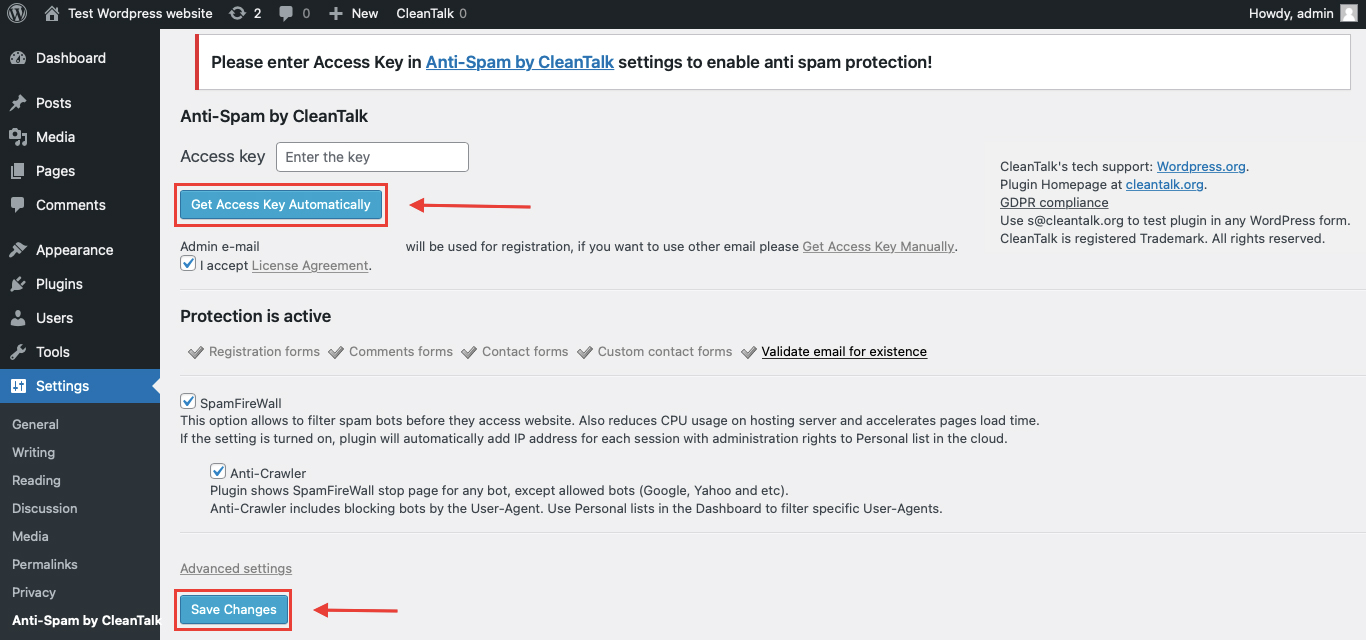
That’s it! From now you know how to completely protect your HivePress from spam.
If SureForms is being used on WordPress, the simplest option is to install the CleanTalk WordPress plugin.
How to Check SureForms Spam Protection
After installing the plugin, it is important to test that spam protection is working correctly.
Use the test email:
stop_email@example.com
To test the form:
- Open a page with a SureForms form.
- Use an Incognito or private browser window.
- Fill in the form fields.
- Use stop_email@example.com as the sender email.
- Submit the form.
If the anti-spam protection is working correctly, the submission should be blocked.
You may see a message similar to:
Forbidden. Sender blacklisted. Anti-Spam by CleanTalk.
It is better to test protection in an Incognito window because WordPress admins may be treated differently from regular website visitors. Testing as a normal visitor helps confirm that protection works for public form submissions.
Cloud Dashboard and Monitoring
CleanTalk does not only block suspicious submissions. It also gives website owners access to logs and request details in the CleanTalk Cloud Dashboard.
This is useful because spam problems are not always random. A website may receive repeated spam from the same IPs, countries, email patterns, keywords, or networks.
In the Cloud Dashboard, site owners can review:
- approved and blocked submissions
- sender IP addresses
- sender email addresses
- submission date and time
- page URL where the form was submitted
- spam check result
- reason for blocking or approving a request
- personal Allow lists and Block lists
This helps website owners understand what kind of spam is targeting their SureForms forms and adjust protection if needed.
For example, if a real user is blocked by mistake, the site owner can review the log and add the sender to an Allow list. If repeated spam comes from the same sender, country, network, or pattern, it can be handled more precisely.
Additional Spam Protection Options for SureForms
CleanTalk can work as the main anti-spam layer, but SureForms also supports several additional protection methods.
These options can be useful depending on the website’s risk level, privacy requirements, and user experience priorities.
Google reCAPTCHA
SureForms supports Google reCAPTCHA as one of its anti-spam options.
Website owners can configure reCAPTCHA keys in SureForms settings and then enable Google reCAPTCHA for the selected form under the form’s spam protection settings.
Google reCAPTCHA is a familiar option for many WordPress users. It can help reduce automated spam submissions, especially when bots are targeting public forms.
However, some website owners prefer not to use Google reCAPTCHA because of privacy, user experience, or GDPR-related concerns. For that reason, reCAPTCHA may not be the preferred option for every website.
Cloudflare Turnstile
Cloudflare Turnstile is another option for SureForms spam protection.
SureForms documentation explains that Cloudflare Turnstile helps verify whether the person filling out the form is a real user and not an automated bot. It can help reduce spam and unwanted submissions without requiring users to solve puzzles or click on checkboxes.
Turnstile can be useful when the website owner wants an additional bot protection layer without making the form experience too difficult for real visitors.
This can be a good option for lead generation forms, landing pages, payment forms, and conversion-focused websites where user experience matters.
hCaptcha
SureForms also supports hCaptcha.
hCaptcha helps protect forms by checking that real people fill them out, not bots. It can help stop spam and unwanted submissions.
This option may be useful for website owners who want CAPTCHA-style protection but prefer not to rely on Google reCAPTCHA.
As with other CAPTCHA-style tools, hCaptcha should be configured carefully so it does not create unnecessary friction for real users.
Honeypot Security
SureForms also includes Honeypot Security.
Honeypot Security works by adding a hidden field to the form. Real users do not see or fill in this field, but bots may complete it automatically. If the hidden field is filled in, SureForms can recognize it as a spam attempt.
Honeypot Security is useful because it does not require users to solve CAPTCHA challenges and does not change the visible form experience.
However, it should not be treated as a complete anti-spam solution. Modern bots can bypass basic honeypot checks, and human-written spam will not be stopped by this method.
For this reason, Honeypot Security works best as a supporting layer, not as the only protection method.
Comparison of Anti-Spam Methods for SureForms
| Method | Main Role | Strengths | Limitations | Best Use Case |
|---|---|---|---|---|
| CleanTalk | Main anti-spam layer | Works in the background, no CAPTCHA required, checks suspicious submissions before they reach workflows | Requires plugin setup and monitoring through logs | Most WordPress sites using SureForms |
| Google reCAPTCHA | CAPTCHA-style bot protection | Familiar and widely used | May add friction and raise privacy/GDPR-related concerns for some website owners | Sites already using Google services |
| Cloudflare Turnstile | CAPTCHA alternative | Less intrusive, good for user experience | Still mainly a bot verification layer | Lead generation and conversion-focused forms |
| hCaptcha | CAPTCHA alternative | Useful alternative to Google reCAPTCHA | Requires external keys and correct setup | Privacy-conscious CAPTCHA setups |
| Honeypot Security | Basic hidden-field protection | Invisible to users, simple, low friction | Not enough against advanced bots or human spam | Low-risk forms with light spam volume |
For most WordPress websites, the best approach is layered protection. CleanTalk can be used as the main anti-spam layer, while reCAPTCHA, Turnstile, hCaptcha, or Honeypot Security can be added when extra control is needed.
Frequently Asked Questions
How do I stop spam entries in SureForms?
The best way to stop spam entries is to filter suspicious submissions before they are saved as form entries.
SureForms can store submissions inside WordPress, so spam can clutter your entries list if it is not blocked early. A background anti-spam layer such as CleanTalk helps check submissions before they become part of your form workflow.
You can also add SureForms protection options such as Google reCAPTCHA, Cloudflare Turnstile, hCaptcha, or Honeypot Security for extra filtering.
Can SureForms Instant Forms receive spam?
Yes. If an Instant Form is public and accessible through a shared URL, bots and spammers may still be able to find and submit it.
Instant Forms are useful because they allow you to share a form without embedding it on a normal WordPress page. But if the URL is public, it should still be protected like any other public form.
For public Instant Forms, use an anti-spam layer and test the form after setup.
Can payment forms built with SureForms get fake submissions?
Yes. Payment forms can receive fake or incomplete submissions, especially if the form has fields that can be submitted before or around the payment step.
Spam protection is important for payment-related forms because fake submissions may clutter entries, trigger notifications, or create confusion in connected workflows.
For payment forms, use anti-spam protection together with secure payment settings and proper payment confirmation checks.
Does Honeypot Security in SureForms block all spam?
No. Honeypot Security can help with simple automated bots, but it should not be treated as complete spam protection.
A honeypot field is invisible to real users but may be filled by basic bots. However, smarter bots and human-written spam can still pass through.
Honeypot Security is best used as a quiet supporting layer together with stronger spam filtering.
Should I use Google reCAPTCHA or Cloudflare Turnstile with SureForms?
Both can help, but the best choice depends on your website.
Google reCAPTCHA is familiar and widely used, but some site owners avoid it because of privacy, GDPR-related concerns, or user experience.
Cloudflare Turnstile can be a good alternative when you want bot verification with less visible friction for real visitors.
For many websites, CleanTalk can work as the main anti-spam layer, while Turnstile, hCaptcha, or reCAPTCHA can be added only to high-risk forms.
Can hCaptcha be used instead of Google reCAPTCHA in SureForms?
Yes. SureForms supports hCaptcha as an anti-spam option.
hCaptcha can be useful for website owners who want CAPTCHA-style protection but prefer not to use Google reCAPTCHA.
Like any CAPTCHA-style method, it should be tested on the actual form to make sure it does not create unnecessary friction for real users.
Why are SureForms notifications going to spam?
That is usually an email deliverability issue, not the same thing as form spam.
Form spam means unwanted users or bots are submitting the form.
Email deliverability means real form notifications are not reaching the inbox correctly or are landing in the spam folder.
To improve notification delivery, check SMTP configuration, sender email, Reply-To settings, domain authentication, SPF, DKIM, and DMARC records.
Can spam affect SureForms integrations?
Yes. If a SureForms form is connected to email marketing tools, CRM systems, automation platforms, or webhooks, spam submissions can be passed into those systems unless they are blocked first.
This can pollute contact lists, trigger unnecessary automations, create fake leads, or send bad data to external tools.
That is why spam should be filtered before the submission reaches connected workflows.
How can I check whether CleanTalk is blocking SureForms spam?
After installing CleanTalk, submit a test entry using:
Use an Incognito or private browser window and submit the SureForms form as a regular visitor.
Then check the result on the form and review the request in the CleanTalk Cloud Dashboard. The dashboard can show whether the request was approved or blocked and why.
What should I do if a real SureForms submission is blocked?
Open the CleanTalk Cloud Dashboard and review the spam check log.
If the submission is legitimate, you can adjust settings or add the sender to an Allow list. This is safer than disabling anti-spam protection completely.
You should also check whether extra rules, CAPTCHA settings, country filters, stop words, or block lists are too strict.
Can I protect only one SureForms form and leave others unchanged?
This depends on the anti-spam method you use.
CAPTCHA-style options such as reCAPTCHA, Turnstile, hCaptcha, or Honeypot Security are usually configured per form or through SureForms form settings.
CleanTalk works as a broader WordPress anti-spam layer, so it is better for protecting website submissions globally. For different levels of protection, combine CleanTalk with form-specific SureForms settings.
What is the best anti-spam setup for SureForms?
A good setup for most websites is:
CleanTalk as the background anti-spam layer + Honeypot Security for low-friction protection + Turnstile, hCaptcha, or reCAPTCHA for high-risk forms.
For forms connected to CRM, payments, or automations, it is especially important to block spam before it reaches entries or external workflows.
Recommended Anti-Spam Setup for SureForms
| Website Type | Recommended Setup | Why |
|---|---|---|
| Standard business website | CleanTalk | Background protection without CAPTCHA |
| Lead generation website | CleanTalk + Turnstile or hCaptcha | Stronger protection while keeping user experience smooth |
| Privacy-conscious website | CleanTalk + hCaptcha or Turnstile | Reduces reliance on Google reCAPTCHA |
| High-spam contact page | CleanTalk + CAPTCHA + Honeypot Security | Adds multiple layers against bots and repeated spam patterns |
| Website with repeated keyword spam | CleanTalk + stricter filtering rules | Helps block suspicious senders and repeated spam phrases |
| Low-risk personal website | CleanTalk + Honeypot Security | Simple setup with minimal user friction |
| Website with email delivery problems | CleanTalk + SMTP/email authentication review | Separates spam filtering from email deliverability |
Final Thoughts
SureForms makes it easy to create useful WordPress forms, but every public form needs reliable spam protection.
Honeypot Security and CAPTCHA can help, but they are not always enough on their own. Some spam comes from bots, some from human-assisted submissions, and some from repeated suspicious senders that require stronger filtering.
For most WordPress websites using SureForms, the best solution is to install Anti-Spam by CleanTalk as the main background anti-spam layer. Then, if needed, add Turnstile, hCaptcha, Google reCAPTCHA, or Honeypot Security for extra control.
This layered setup helps reduce unwanted submissions, protect inbox quality, keep form entries cleaner, and keep SureForms easy for real visitors to use.
