

In case you prefer to use bbPress registration form be sure to use the most effective TL;DR: To stop spam in bbPress, combine its built-in Akismet integration and throttle time with a cloud anti-spam filter. CleanTalk Anti-Spam checks every topic, reply and registration in the background and blocks spam bots invisibly – no CAPTCHA, no puzzles, no checkboxes – while protecting comments and other forms on the same site. reCAPTCHA, hCaptcha and Turnstile add a visible challenge layer for high-risk forms. For most WordPress sites, an invisible cloud filter blocks more spam with less friction than CAPTCHA alone. Plans start at $12 per site/year with a free 7-day trial.

A forum is the one place on a WordPress site where strangers are supposed to publish. That is the point of bbPress – and it is also why forum spam is a different problem from comment spam. Spam here does not sit in a moderation queue waiting for you. It goes live, it gets indexed, and every spam topic is a page on your domain linking somewhere you did not choose.
In 2026 the attack is mostly automated registration followed by posting: a bot signs up, waits, and then drops topics into whichever forum allows new threads. By the time you notice, you have a user list full of accounts you did not vet and a forum index you have to clean by hand.
As WordPress.org shows, bbPress is currently used on over 100,000 active installations and has 342 reviews with an average rating of 3.9.
Plugin Homepage at wordpress.org | Developer The bbPress Community
Common types of spam in bbPress
- Spam topics. New threads created purely to publish links, often in the most active forum on the site.
- Spam replies. Short answers in real discussions – a sentence of filler plus a link – that look like participation.
- Fake registrations. Accounts created in bulk and used days or weeks later, so blocking by timing does not catch them.
- Signature and profile spam. Links pushed into the user profile fields, which then appear next to every post.
- Anonymous posting abuse. If guest posting is enabled, bots skip registration completely and post straight into the forum.
- Old thread necromancy. Bots reply to threads from years ago, where nobody is watching, to get the link indexed quietly.
Official anti-spam options and integrations in bbPress
bbPress does include protection, and it is on by default in two places.
Akismet integration ships with the plugin. In *Settings -> Forums* there is an option, “Allow Akismet to actively prevent forum spam”, enabled by default – it works only if the Akismet plugin is installed and has a valid key. Topics and replies flagged as spam are moved to the spam status instead of being published.
Throttle time is the second mechanism: by default a user must wait 10 seconds between posts. It limits how fast one account can flood a forum.
There is also anonymous posting, which is disabled by default. bbPress own help text is honest about the trade-off: guest posting “works best on intranets or paired with antispam measures like Akismet”.
What bbPress does not have is any CAPTCHA of its own, and no filter on the registration form at all. Registration is handled by WordPress, so an unprotected site collects bot accounts regardless of your forum settings. That is the gap most forum owners hit first.
If your goal is to protect a forum without adding CAPTCHA challenges, CleanTalk can be used as a Google reCAPTCHA alternative that filters posts and registrations in the background.
CAPTCHA options in bbPress
- reCAPTCHA v2/v3 requires a third-party plugin to add the widget to forum and registration forms.
- hCaptcha and Turnstile are the same story: an added challenge layer, not part of bbPress.
- The practical cost: a forum asks a member to solve a puzzle on every single reply. That is the one place where challenge friction is felt over and over by the people you want to keep.
Best ways to stop spam in bbPress
- Protect registration first. Most forum spam starts as an account. Filtering the signup removes the posts before they exist.
- Filter posts before they are published. In an open forum, “publish then moderate” means the link is already live and indexable.
- Judge the author, not the interval. Throttle time only slows a bot down; reputation identifies it.
- Keep Akismet if you have it. It is a second opinion, and second opinions are useful.
- Do not put a puzzle on the reply form. It taxes your regulars far more than it taxes bots.
Comparison table: bbPress spam protection options
Here is how the main anti-spam options for bbPress compare:
| Solution | Best for | Pricing | Main limitation |
| CleanTalk Anti-Spam | Invisible protection for topics, replies and registrations at once | From $12/site/year; free 7-day trial | Cloud service; paid after trial |
| Akismet | Comment and forum post spam on small sites | Free personal; paid commercial | Post-focused; does not filter registrations |
| Google reCAPTCHA | High-risk forms where a challenge is acceptable | Free | Adds friction on every reply; bots bypass it |
| Cloudflare Turnstile | Lighter, privacy-friendly CAPTCHA | Free | A challenge, not a content filter |
In short: use CleanTalk as the invisible baseline filter, and add reCAPTCHA, hCaptcha or Turnstile only on your highest-risk forms.
How the CleanTalk integration works with bbPress
CleanTalk treats forum posts as comments and checks them through the same path as WordPress comments, with its own type for forum content – so topics, replies and edited replies are all covered. The registration form is protected separately by the same plugin, which is what closes the account-creation side.
There is one useful difference from ordinary comments. A spam comment in WordPress goes quietly into the Spam folder; in bbPress the author gets a visible message in the reply form and the post is simply not created. Nothing lands in the forum, nothing gets indexed, and there is no queue for you to empty.
Anti-Spam plugin by CleanTalk for WordPress
The next tool we’re going to use is the Anti-Spam plugin by CleanTalk.
Here’s a short overview:
- CleanTalk is a cloud-based spam protection service for websites, founded in 2012.
- It automatically blocks spam without CAPTCHAs and doesn’t interrupt the user experience.
- Protects many types of forms: contact forms, payment forms, registrations, comments, surveys and more.
- Stops both automated bots and human spam submissions.
- Uses advanced filtering algorithms and a global spam detection network.
- Detects spam based on IP address, email address and user behavior.
- Lets you create custom filtering rules for specific cases.
- Allows blocking or filtering by IP, email and country.
- Works quietly in the background and is very easy to install and configure.
According to WordPress.org, Anti-Spam by CleanTalk for WordPress has over 200,000 active installations, with 3,209 reviews and an average rating of 4.8.
Plugin Homepage at cleantalk.org | Latest release at Github.com | Website cleantalk.org
Install the CleanTalk Anti-Spam plugin
Show Instructions
To install the Anti-Spam plugin, go to your WordPress admin panel → Plugins → Add New.
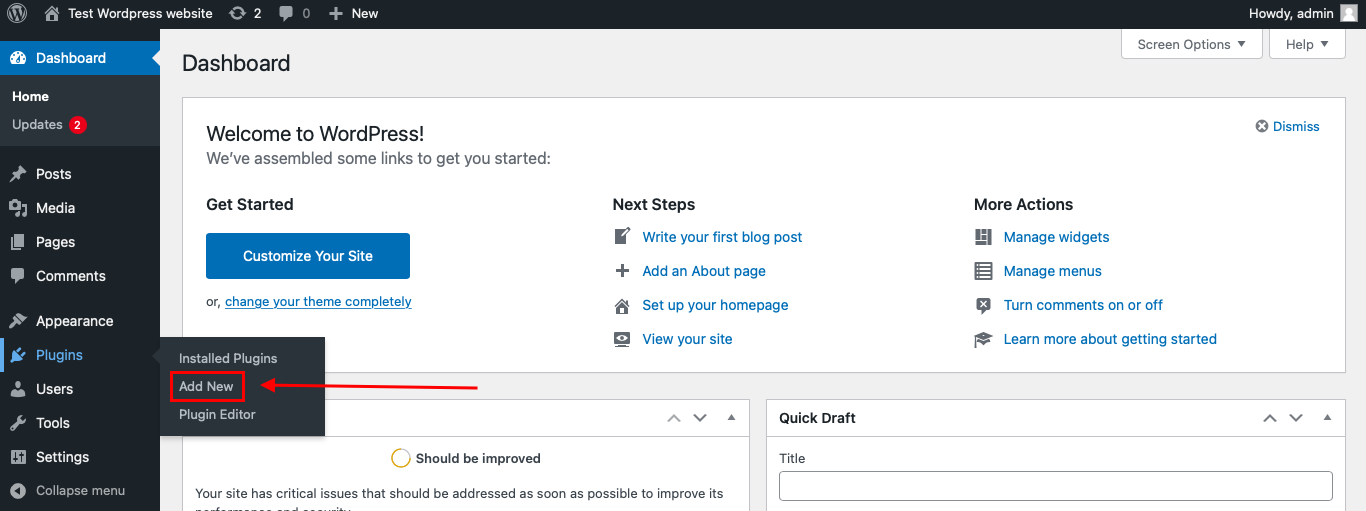
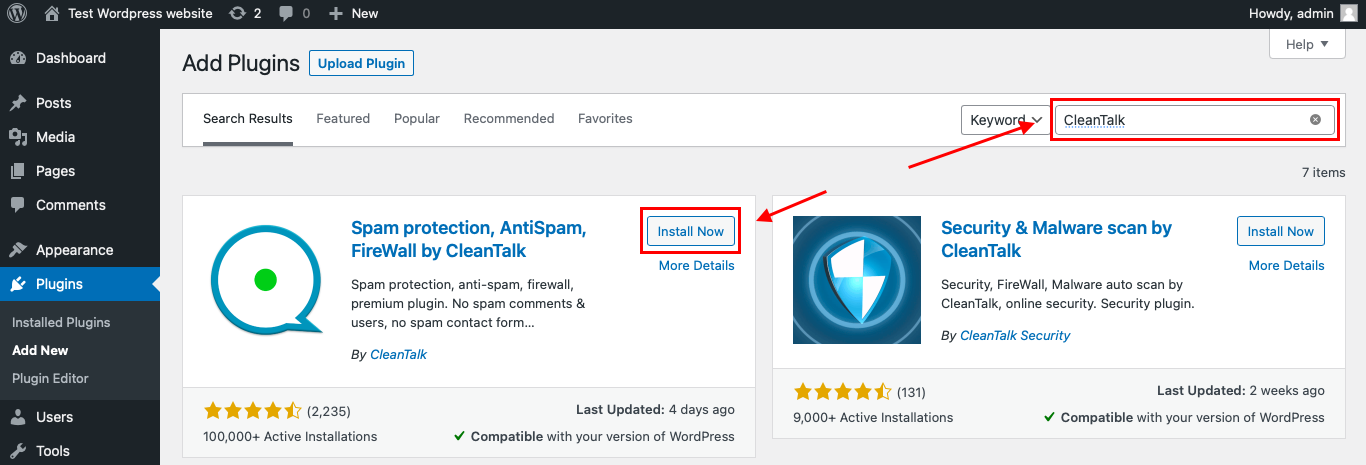
Then enter «СleanTalk» in the search box and click the Install button for «Spam protection, Anti-Spam, FireWall by CleanTalk».
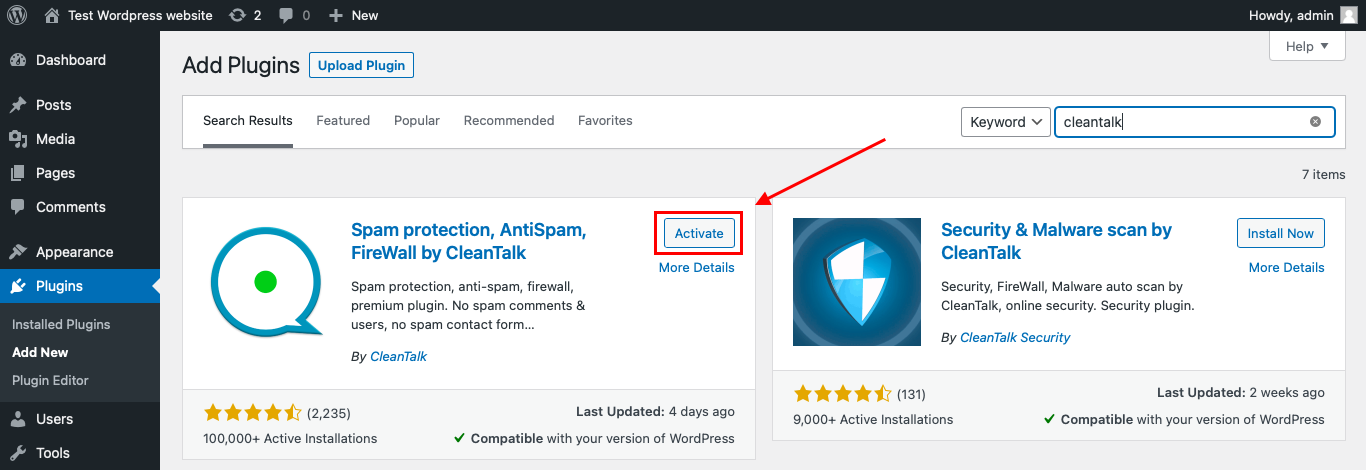
After installing the plugin, click the «Activate» button.
After it is done go to the plugin settings and click the «Get Access Key Automatically» button. Then just click the «Save Settings» button.
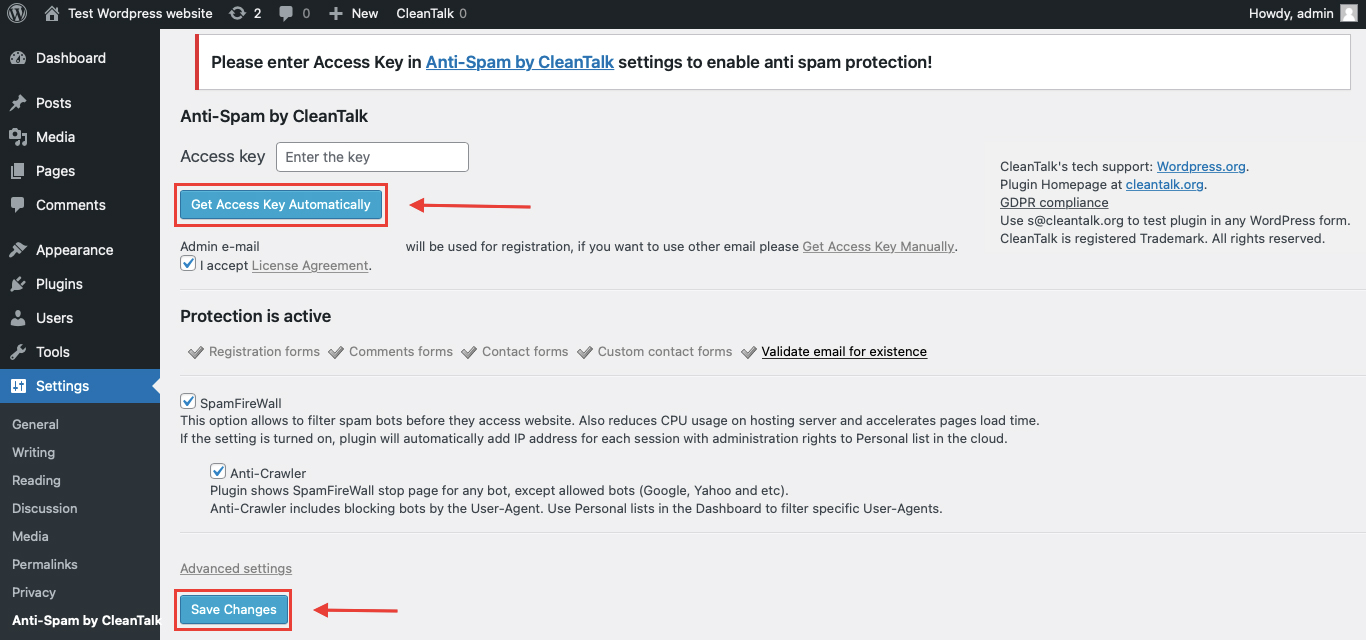
That’s it! From now you know how to completely protect your bbPress forum from spam – topics, replies and registrations at the same time.
Check if spam protection works with bbPress
The best way to test the spam protection is by using a test email,
stop_email@example.com
- Open a forum topic in an Incognito / private browser tab.
- Write a reply and use stop_email@example.com as the email (guest posting must be enabled to test as a visitor; logged-in accounts are checked by their own email).
- Submit the reply.
- You should see a message from the Anti-Spam plugin inside the reply form confirming that a spam post was blocked.
*** Forbidden. Sender blacklisted. Anti-Spam by CleanTalk. ***
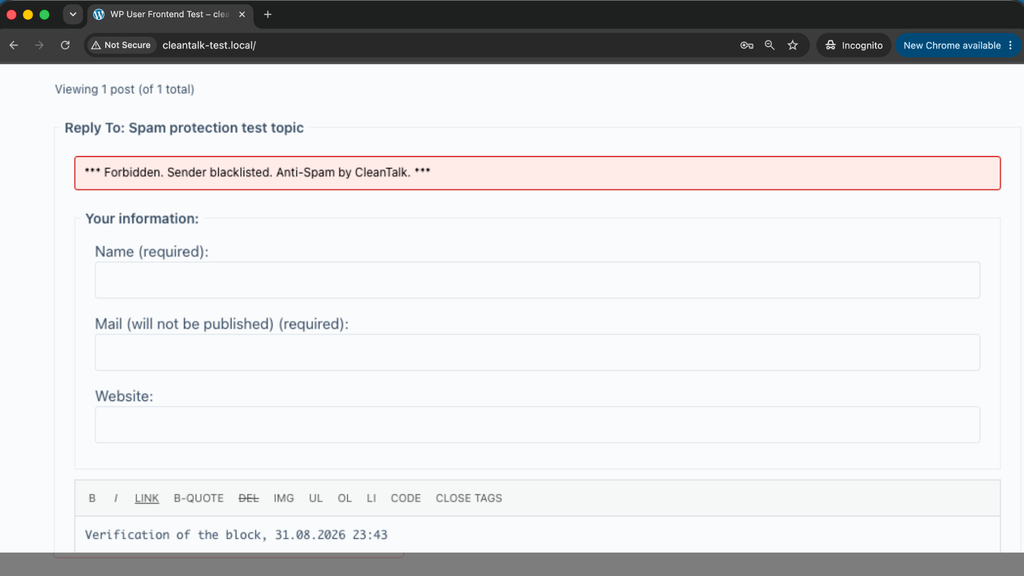
Then open the topic again: the reply was not created, and there is nothing in the spam queue to clean up.
If you see this message, it means CleanTalk successfully protects your bbPress forum from spam.
Cloud Dashboard
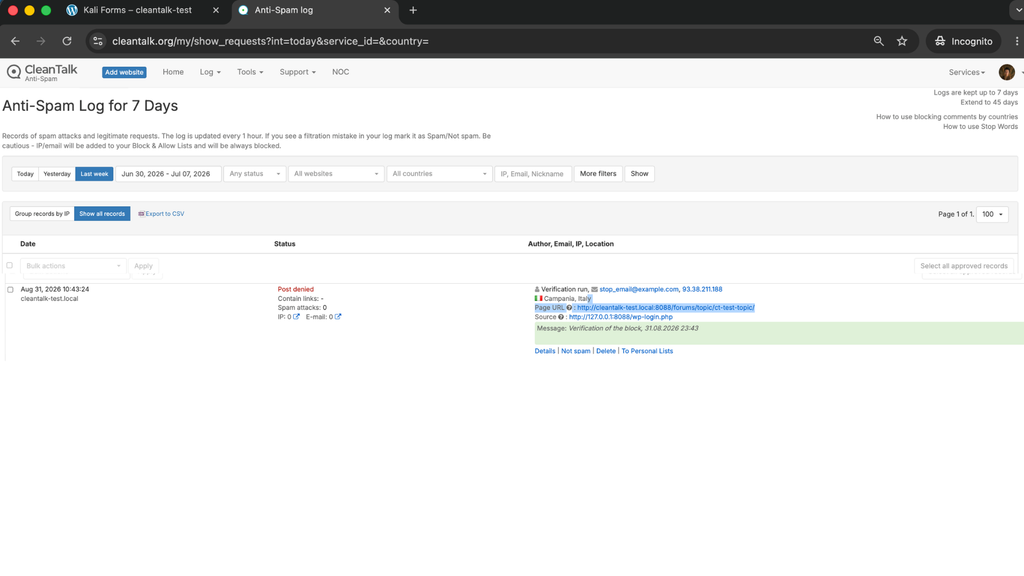
In addition, in the Cloud Dashboard you can find extra details regarding all submissions processed by CleanTalk, including bbPress topics, replies and registrations:
- IP and email of the sender, as well as the sender’s activity history across other websites connected to the CleanTalk cloud.
- Geolocation of the sender.
- Date and time of the submission.
- Page (URL) where the form was submitted.
- Cloud decision – Approved or Denied.
- Cloud explanation for the decision (e.g. blacklisted email, bad IP reputation, spam text, etc.).
- Tools to move the sender to Block or Allow lists so you can fine-tune your forum protection.
FAQ
Does it protect the registration form as well as the forum?
Yes. The same plugin filters WordPress registrations, which is where most forum spam accounts come from.
Can I keep Akismet enabled?
Yes. bbPress Akismet setting can stay on; the two work independently.
Will blocked posts appear in the spam queue?
No. The post is not created at all, so there is no queue to empty.
Does it work with anonymous (guest) posting?
Yes – that is exactly the case where a server-side filter matters most.
Do members have to solve anything to reply?
No. There is no puzzle and no extra step in the reply form.
What about existing spam accounts?
The plugin has a spam user check that scans your existing user list and shows which accounts the cloud considers spam.
What if a real member is blocked?
Open the Cloud Dashboard, find the request with its reason, and move that email or IP to the Allow list.
Final recommendation
bbPress gives you Akismet and a ten-second throttle, and leaves registration to WordPress – which means an open forum is protected on one side only. The fix is not another puzzle in the reply form; your regulars would pay for it every time they post. Filter the author server-side, at registration and at posting, and the forum stays open for people and closed for bots.
For broader website protection, CleanTalk also provides anti-spam protection for websites, helping block spam in forms, comments, registrations, and orders without CAPTCHA.
Stop bbPress forum spam without CAPTCHAs
Create your CleanTalk account and protect topics, replies and registrations with server-side filtering. Keep posting frictionless for real members while extending protection across comments and other WordPress forms. API | Plugins
*No credit card required – Setup takes less than a minute – Your temporary password will be sent by email.*

Leave a Reply