

Strong Testimonials forms are different from normal contact forms. They are not only used to send a message to the site owner. They are used to collect customer feedback, reviews, ratings, names, photos, company details, and testimonial text that may later appear publicly on a website.
That makes spam more risky.
If fake testimonials are submitted, they can clutter the moderation queue, trigger admin emails, pollute testimonial data, and create trust problems if anything suspicious is published by mistake.
This guide explains how to protect Strong Testimonials forms from spam using Anti-Spam by CleanTalk for WordPress, together with Strong Testimonials’ own spam-control options such as honeypots, JavaScript honeypots, and Google reCAPTCHA through the Captcha extension.

Strong Testimonials and WordPress Forms
Strong Testimonials is a WordPress plugin for collecting, managing, and displaying customer feedback on a website.
The plugin can be used to:
- collect testimonials through a front-end testimonial form
- add testimonials manually from the WordPress dashboard
- approve submitted testimonials before publishing
- display testimonials through Views
- show testimonials with a shortcode or widget
- create testimonial grids, lists, slideshows, and form views
- customize testimonial fields and notification emails
- use Ajax form submission for some display setups
- Strong Testimonials forms are often used for:
- customer feedback forms
- client review forms
- product testimonial forms
- service feedback forms
- case study quote collection
- star rating submissions
- photo testimonial submissions
- company or role-based testimonials
- post-purchase feedback requests
- landing page testimonial collection
The advantage of Strong Testimonials is that it helps website owners collect social proof directly from real customers and then display it on the site.
According to Strong Testimonials documentation, users can add testimonials manually, approve testimonials submitted through a testimonial form, or import reviews from third-party websites. The plugin also uses Views to control how testimonials and forms are displayed, and Views can be added with shortcodes or widgets.
But because testimonial forms are public-facing, bots can also find them.
As WordPress.org shows, Strong Testimonials is currently used on over 90,000 websites and has an average rating of 4.8 out of 5.
Plugin Homepage at WordPress.org | Documentation at Strong Testimonials
Why Strong Testimonials Forms Attract Spam
Strong Testimonials is not the reason spam happens. Spam happens because public forms are visible to bots and can be submitted automatically.
Testimonial forms can attract spam for several reasons:
- they accept public text submissions
- they may include name, email, website, image, rating, or company fields
- they can be embedded on visible review or landing pages
- they may trigger admin notifications
- they may save testimonials as pending posts
- they may use Ajax form submission depending on the setup
- they are connected to public trust signals on the website
- Common Strong Testimonials spam patterns include:
- fake customer names
- generic praise written by bots
- spam links in testimonial text
- suspicious website URLs
- irrelevant SEO or marketing pitches
- fake company names
- adult, crypto, software, or casino-related text
- repeated submissions from the same IPs
- fake ratings
- low-quality testimonials waiting for approval
This is especially important because testimonials can influence trust and conversions. Even if fake submissions are not published, they can still waste time in the moderation queue and make it harder to find real customer feedback.
That is why testimonial forms should have spam protection before suspicious submissions become pending testimonials.
Anti-Spam by CleanTalk
The next tool we are going to use is the Anti-Spam plugin by CleanTalk.
Here’s a short overview:
- CleanTalk is a cloud-based spam protection service for WordPress websites.
- It blocks spam without forcing real visitors to solve CAPTCHA challenges.
- It can protect different types of WordPress forms and submissions, including contact forms, comments, registrations, subscriptions, bookings, surveys, and WooCommerce orders.
- It checks submissions using spam detection signals such as email address, IP address, sender reputation, and sender activity.
- It helps block automated bots and suspicious form submissions.
- It works quietly in the background.
- It allows website owners to review spam checks in the CleanTalk Cloud Dashboard.
- It gives website owners tools for personal Allow lists and Block lists, country filters, language filters, stop words, and SpamFireWall.
According to WordPress.org, Anti-Spam by CleanTalk for WordPress has over 200,000 active installations, with 3,168 reviews and an average rating of 4.7.
Plugin Homepage at cleantalk.org | Latest release at GitHub.com | Website cleantalk.org
Install the CleanTalk Anti-Spam plugin
Show Instructions
To install the Anti-Spam plugin, go to your WordPress admin panel → Plugins → Add New.

Then enter «СleanTalk» in the search box and click the Install button for «Spam protection, Anti-Spam, FireWall by CleanTalk».

After installing the plugin, click the «Activate» button.
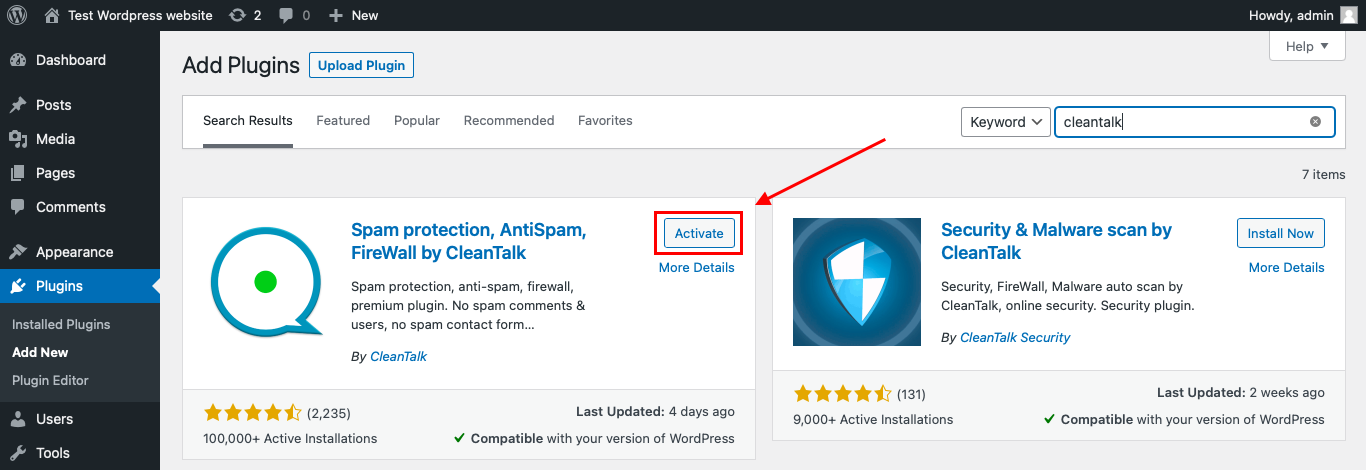
After it is done go to the plugin settings and click the «Get Access Key Automatically» button. Then just click the «Save Settings» button.

That’s it! From now you know how to completely protect your HivePress from spam.
Once that is done, the site has an anti-spam layer working in the background. This helps reduce suspicious testimonial activity before unwanted submissions reach pending testimonials, admin notifications, moderation workflows, or public review displays.
How to Check Strong Testimonials Forms Spam Protection
After installing the plugin, test that spam protection is working correctly.
Use the test email:
stop_email@example.com
To test the form:
- Open a page with a Strong Testimonials submission form.
- Use an Incognito or private browser window.
- Fill in all required testimonial fields.
- Use stop_email@example.com as the sender email.
- Submit the testimonial form.
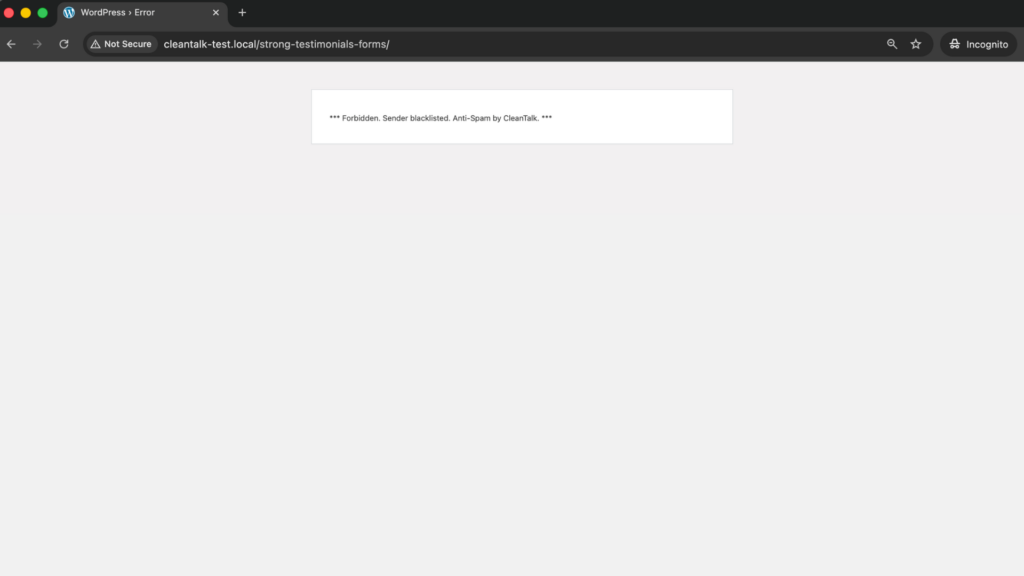
It is better to test protection in an Incognito window because WordPress admins may be treated differently from regular website visitors. Testing as a normal visitor helps confirm that protection works for public testimonial submissions.
If the form submits successfully and nothing appears in the CleanTalk Anti-Spam Log, check how the testimonial form is rendered. Ajax submission, caching, minification, popup embeds, or custom View settings may affect how the request reaches WordPress.
Cloud Dashboard and Monitoring
CleanTalk gives website owners access to request details in the CleanTalk Cloud Dashboard.
This is useful for testimonial forms because spam often follows patterns. A site may receive repeated fake testimonials with the same wording, suspicious website URLs, repeated names, repeated countries, or similar email domains.
In the Cloud Dashboard, site owners can review:
- approved and blocked submissions
- sender IP addresses
- sender email addresses
- submission date and time
- page URL where the form was submitted
- spam check result
- reason for blocking or approving a request
- personal Allow lists and Block lists
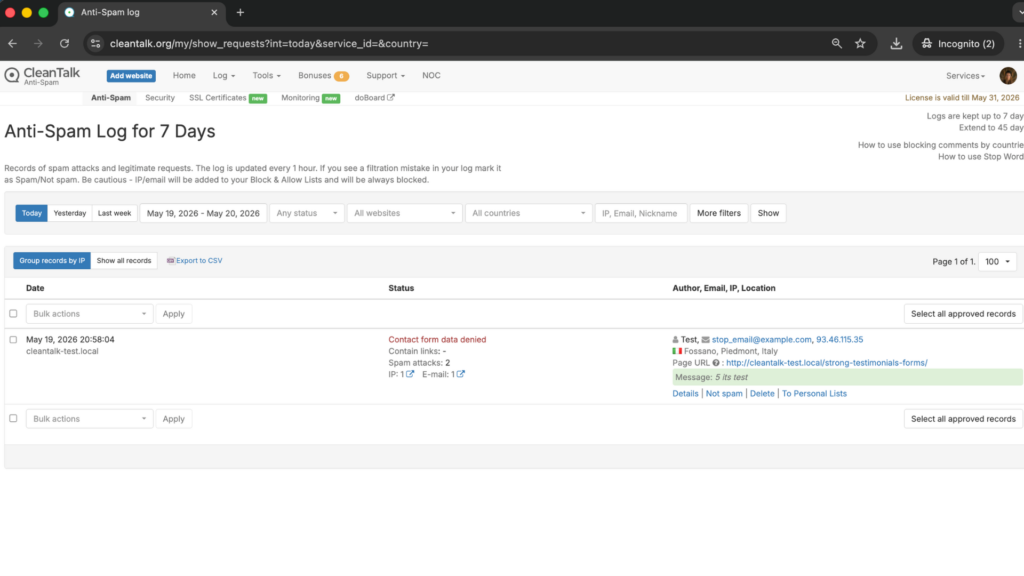
This helps site owners understand whether fake testimonials are random or connected to repeated sources.
For example, if a real customer testimonial is blocked by mistake, the sender can be reviewed and added to an Allow list. If repeated spam uses the same website URL or wording, filtering rules can be adjusted.
Strong Testimonials Moderation and Why Spam Filtering Matters
Strong Testimonials submissions can become pending testimonials that wait for approval. That is useful for quality control, but it is not the same as spam prevention.
Moderation helps stop fake testimonials from being published. Spam filtering helps stop fake testimonials before they even reach the moderation queue.
Fake testimonial submissions can:
- clutter pending testimonials
- trigger unnecessary admin notifications
- waste review time
- pollute customer feedback data
- add suspicious URLs to the database
- create fake ratings
- make real testimonials harder to find
- increase the chance of publishing something low-quality by mistake
- reduce trust if spam text appears publicly
If a website relies on testimonials as social proof, keeping the testimonial queue clean is important for credibility.
Additional Spam Protection Options for Strong Testimonials Forms
CleanTalk can work as the main anti-spam layer, while Strong Testimonials also has its own spam-control options.
Some options are available through Strong Testimonials settings or extensions.
Honeypots
Strong Testimonials documentation explains that honeypots are methods for trapping spambots and may be used simultaneously for more protection.
The documentation describes two honeypot methods:
Before: an invisible empty field is added to the form. Real users do not fill it in, but spambots often fill every field they find.
After: a new field is added when the form is submitted. Some spambots cannot run JavaScript, so the field is missing when the bot submits the form.
Strong Testimonials also notes that honeypots may not be compatible with WP-SpamShield, Ajax page loading, caching, or minification. This is important when testing testimonial forms on optimized WordPress sites.
Strong Testimonials Captcha Extension
Strong Testimonials has a Captcha extension that protects testimonial submission forms from spam and automated abuse.
The extension supports JavaScript honeypots and Google reCAPTCHA. The official Captcha extension page mentions multiple reCAPTCHA versions, including:
reCAPTCHA v2 “I’m not a robot” checkbox
Invisible reCAPTCHA badge
The checkbox version requires the user to click a checkbox. Invisible reCAPTCHA can run when the visitor clicks the Submit testimonial button and only challenge suspicious traffic depending on Google’s risk analysis.
Pending Approval
Strong Testimonials allows submitted testimonials to wait for approval before publishing. This is useful because website owners can review content before it appears on the public site.
However, approval is not the same as anti-spam protection.
Pending approval helps protect the front end of the website, but it does not stop spam from entering the admin workflow. For high-volume spam, use approval together with anti-spam filtering.
Ajax Submission Checks
WordPress.org notes that Strong Testimonials can submit the form via Ajax for use with plugins like Popup Maker.
Ajax forms can behave differently from standard form submissions, especially when caching or minification is active. If a spam test is not logged, test again with cache disabled and check whether the form is submitted through Ajax, shortcode, widget, or popup.
Website URL and Link Spam Review
Testimonial forms often include website or company fields. Spammers may use these fields to place links or brand names.
Website owners should review:
- website URL fields
- testimonial content
- company names
- job titles
- image uploads
- star ratings
- repeated phrases
- external links
Even when testimonials are pending, link spam can still clutter the admin area and database.
Comparison of Anti-Spam Methods for Strong Testimonials
| Method | Main Role | Strengths | Limitations | Best Use Case |
|---|---|---|---|---|
| CleanTalk | Background anti-spam filtering | Works without visible CAPTCHA and helps block suspicious submissions before moderation | Needs plugin setup and log review | Most WordPress sites collecting testimonials |
| Honeypot “Before” | Hidden field bot trap | Invisible to real users and useful against basic spambots | May be affected by caching, minification, Ajax, or advanced bots | Standard testimonial forms |
| Honeypot “After” | JavaScript-based bot check | Helps detect bots that cannot run JavaScript | May be affected by JavaScript optimization or Ajax setups | Forms where JavaScript runs reliably |
| Strong Testimonials Captcha | Form-level bot verification | Adds JavaScript honeypots or Google reCAPTCHA | May add friction depending on reCAPTCHA mode | High-spam testimonial forms |
| Pending Approval | Publication control | Prevents automatic publishing of fake testimonials | Does not stop spam from entering the admin queue | Any site displaying user-submitted testimonials |
| Link review | Manual content quality control | Helps catch website URL and promotional spam | Requires moderation time | Testimonial forms with URL/company fields |
| SpamFireWall | Bot traffic filtering | Helps block active spam bots before form submission | Works best with form-level filtering | Sites receiving repeated bot traffic |
For most websites, the best setup is layered: CleanTalk as the main background filter, Strong Testimonials honeypot or Captcha where needed, and pending approval before anything is published.
Frequently Asked Questions
Why am I getting fake testimonials in Strong Testimonials?
Fake testimonials usually appear because the testimonial submission form is public. Bots can find the form and submit generic praise, spam links, fake names, fake company details, or suspicious website URLs.
Even if testimonials are not published automatically, they can still clutter the pending queue.
Is pending approval enough to stop testimonial spam?
No. Pending approval protects the public website because fake testimonials are not published automatically.
But it does not prevent spam from entering the admin area. If the form receives many fake submissions, the moderation queue can become noisy. It is better to combine approval with anti-spam filtering.
Which spam controls does Strong Testimonials support?
Strong Testimonials documentation describes honeypot spam control. Its Captcha extension supports JavaScript honeypots and Google reCAPTCHA, including reCAPTCHA v2 checkbox and Invisible reCAPTCHA.
These can help reduce automated testimonial form abuse.
Why can honeypot spam control fail on testimonial forms?
Strong Testimonials documentation notes that honeypots may not be compatible with some Ajax page loading, caching, minification, or other spam-protection plugins.
If a honeypot test does not work as expected, check cache settings, JavaScript optimization, Ajax submission, and plugin conflicts.
Can fake testimonials hurt trust even if they are not published?
Yes. Fake testimonials can still create operational problems.
They can fill the pending queue, make real customer feedback harder to find, add suspicious URLs to the database, and increase the chance that a low-quality testimonial is published by mistake.
Recommended Anti-Spam Setup for Strong Testimonials Forms
| Website Type | Recommended Setup | Why |
|---|---|---|
| Standard testimonial form | CleanTalk + pending approval | Blocks suspicious submissions and prevents auto-publishing |
| High-spam testimonial page | CleanTalk + Captcha extension | Adds stronger form-level verification |
| Ajax testimonial form | CleanTalk + cache/Ajax testing | Confirms the request is logged correctly |
| Popup testimonial form | CleanTalk + log review + Captcha if needed | Helps identify where submissions come from |
| Testimonial form with website URL field | CleanTalk + manual link review | Reduces promotional link spam |
| Local business review page | CleanTalk + Allow/Block lists | Helps manage repeated senders |
| Site receiving bot traffic | CleanTalk + SpamFireWall | Blocks active spam bots before form submission |
Final Thoughts
Strong Testimonials helps WordPress websites collect and display customer feedback, but public testimonial forms need reliable spam protection.
Honeypots and reCAPTCHA can reduce automated abuse. Pending approval helps protect the public website from fake testimonials. But a cleaner setup filters suspicious submissions before they become pending testimonials.
For most WordPress websites using Strong Testimonials forms, the best solution is to install Anti-Spam by CleanTalk as the main background anti-spam layer. Then, if needed, add Strong Testimonials honeypots, Captcha extension, pending approval, SpamFireWall, personal lists, country filters, language filters, or stop words for extra control.
This layered setup helps reduce fake testimonials, protect the moderation queue, keep social proof cleaner, and make it easier to publish real customer feedback.
