

TL;DR: To stop spam in wpDiscuz, combine its built-in protection with a cloud anti-spam filter. CleanTalk Anti-Spam checks every wpDiscuz submission in the background and blocks spam bots invisibly – no CAPTCHA, no puzzles, no checkboxes – while protecting registrations, comments and WooCommerce on the same site. reCAPTCHA, hCaptcha and Turnstile add a visible challenge layer for high-risk forms. For most WordPress sites, an invisible cloud filter blocks more spam with less friction than CAPTCHA alone. Plans start at $12 per site/year with a free 7-day trial.

wpDiscuz (listed on WordPress.org as “Comments – wpDiscuz”) is one of the most popular comment plugins for WordPress, built by developer gVectors**. It replaces the default WordPress comments with a fast, AJAX-powered, real-time discussion system that readers genuinely enjoy using – inline replies, comment voting, rich editors, social login, custom rating fields and live updates without a page reload. For a blog or a community site, that interactivity is a big part of why people come back and keep the conversation going.
But in 2026, popularity also means exposure. Every widely-used comment plugin becomes a target, and wpDiscuz is no exception. Spammers write scripts and templates aimed at the most common WordPress setups, and a busy, public comment form is one of the easiest places on a site to abuse: it is open to the world, it usually accepts guest comments, and it links back from a high-traffic page. The more comments wpDiscuz invites, the more spam it attracts – and the more time you spend cleaning it up instead of writing and engaging with real readers. This guide walks through the kinds of spam wpDiscuz attracts, what the plugin and WordPress give you to fight it, where those tools fall short, and how to build a setup that stops the junk without punishing the people you actually want to hear from.
As WordPress.org shows, wpDiscuz is currently used on over 70,000 active installations and has 578 reviews with an average rating of 4.7.
Plugin Homepage at wordpress.org | Website wpdiscuz.com
Common types of spam in wpDiscuz
Comment spam is not one thing – it is several different problems that arrive through the same form, and each one needs a slightly different defense. Understanding what you are actually facing makes it much easier to see why a single CAPTCHA or keyword filter is never enough. In wpDiscuz you will typically see four overlapping categories:
- Link spam (backlinks). This is the classic, and still the most common. Bots and low-paid workers drop comments stuffed with links to gambling, pharma, payday-loan, replica-goods or shady SEO sites. The “comment” itself is meaningless – something like “Great post, thanks for sharing” – and exists only as a vehicle for the link. The goal is to borrow your domain’s authority by getting a backlink published on a real page. On a popular post these can arrive dozens of times a day, and they tend to cluster on your best-ranking articles because that is where the SEO value is.
- Advertising, self-promotion and fake reviews. Comments that openly push a product, a service, a competing site or an affiliate offer. This category also covers fake praise and manufactured testimonials – short, glowing comments designed to manipulate other readers or to make a low-quality product look popular. Because they are often written by a human (or by an AI prompted to sound human), they read more naturally than crude link spam and are harder to spot at a glance.
- AI-generated comments. This is the newer and genuinely harder problem. These comments read like real, on-topic responses – polite, grammatically perfect, sometimes even insightful and relevant to the article. They exist only to slip a link, a brand mention or a soft promotion past your filters while looking like a legitimate contribution. Traditional bot checks do not catch them because there is nothing robotic about the text, and keyword blacklists do not catch them because they avoid obvious trigger words. For a comment plugin like wpDiscuz, which is built to encourage discussion, this is the spam that blends in best.
- Bot registrations and guest comments. Automated sign-ups and anonymous guest comments created at scale. wpDiscuz allows guest commenting by default, which is great for engagement but also means a spammer never has to register to post. Bots use these open guest forms to seed spam, build fake accounts for later use, or simply probe which sites are unprotected so they can be hit harder later.
The consequences add up faster than most site owners expect. A flooded moderation queue wastes your time and, worse, makes it easy to approve a bad comment by accident when you are quickly clearing fifty pending items. Every spam comment that does go live carries outbound spam links that hurt your SEO, signaling to search engines that your pages may be low-quality, neglected or compromised – and Google has long warned that user-generated spam can drag down the reputation of an otherwise good page. There is also a trust cost: a comment section visibly full of pharma links and fake reviews tells your real readers that nobody is minding the store, which discourages the genuine discussion wpDiscuz was installed to create. On an active blog, unmanaged comment spam can quietly damage rankings and engagement you worked hard to build.
Official anti-spam options and integrations in wpDiscuz
To its credit, gVectors does not leave you defenceless – the plugin ships with anti-spam tooling, and WordPress core adds more on top. Here is what wpDiscuz and WordPress give you out of the box, and what each one is actually good for:
- Built-in invisible anti-spam. wpDiscuz includes an internal anti-spam check that works without showing anything to the reader. In simple terms, it relies on a hidden key comparison: the form embeds a value that a normal browser submits correctly but many crude scripts get wrong, so a large share of simple automated submissions are silently rejected. It is genuinely useful as a first line and it costs you nothing in user experience, because real visitors never see it. Its weakness is that it only filters out unsophisticated bots – anything that loads the page properly, or any human, sails through.
- Google reCAPTCHA v2 via the official add-on. gVectors offers an official reCAPTCHA add-on that adds a Google challenge to the comment form. Once enabled, readers see the familiar “I’m not a robot” checkbox (and sometimes the image puzzles) before their comment posts. It blocks a slice of automated traffic, but as a content-blind challenge it has real limits, which we cover in the CAPTCHA section below.
- WordPress comment moderation, blacklist words and link limits. From WordPress core (under Settings -> Discussion) you can hold comments for manual approval, maintain a list of disallowed words that automatically trash or queue matching comments, and automatically queue any comment that contains more than a set number of links – a sensible setting since link-stuffed comments are almost always spam. These are your manual safety net and they are worth configuring carefully.
- Frontend Moderation addon. A gVectors addon that lets trusted users and moderators approve, edit or delete comments directly from the front end of the site, without going into wp-admin. On a busy community this speeds up cleanup, but it is a moderation convenience, not a filter – it helps you handle spam faster, not avoid it.
These tools are useful and absolutely worth enabling – think of them as the foundation. But be honest about what they do. They reliably stop basic bots: the crude, high-volume scripts that make up the noisiest layer of spam. What they consistently miss is the spam that actually causes the most damage – link spam written to look legitimate, advertising and fake reviews posted by real people, and AI-generated comments that pass every grammar and behavior check. Keyword blacklists are trivially evaded with spacing tricks (“v i a g r a”), Unicode look-alikes and rotating synonyms, so you end up in an endless game of whack-a-mole. A hidden key check does nothing against a human or an AI that submits a perfectly normal-looking comment, because there is nothing technically wrong with the submission. The result is a comment section that is technically “protected” but still cluttered – and still leaking SEO value through every promotional comment that slips through.
If your main goal is to protect wpDiscuz without adding CAPTCHA challenges, CleanTalk can be used as a Google reCAPTCHA alternative that filters spam submissions in the background.
CAPTCHA options in wpDiscuz
The main CAPTCHA option in wpDiscuz is Google reCAPTCHA v2, available through the built-in official add-on. It shows readers the familiar “I’m not a robot” checkbox, and when Google’s risk score is uncertain it escalates to the image challenges – “select all squares with traffic lights” and similar – before a comment is allowed through.
reCAPTCHA does block some automated traffic, and for years it was the default answer to comment spam. But as your only line of defense it has three real downsides:
- It gets solved by bots. Modern bots and cheap CAPTCHA-solving services defeat reCAPTCHA at scale. There are services that solve thousands of challenges for a few dollars, using either AI or low-paid human farms, so a determined spammer is barely slowed down. The checkbox stops the laziest scripts and almost nothing else.
- It adds friction for real readers. This is the cost that hurts engagement. Genuine visitors are forced to prove they are human just to leave a comment, and on mobile the image puzzles are slow, fiddly and easy to fail. Many people simply give up and close the tab rather than solve a puzzle to say “nice article” – which means a CAPTCHA can quietly cost you the very discussion wpDiscuz exists to create.
- It never reads the content. This is the core limitation. A CAPTCHA only asks one question – “are you a human?” – and never asks the question that actually matters: “is this comment spam?” So a real person posting paid link spam, or an AI generating a polished promotional comment, passes the challenge and lands straight in your queue. The comment is human-submitted and the link is real, so reCAPTCHA has no reason to stop it.
In other words, a CAPTCHA filters the visitor but ignores the comment. For a discussion plugin like wpDiscuz – where the whole point is to let people talk, and where the worst spam is increasingly written to look human – that is the wrong thing to be checking. If you want protection that judges the content instead of just the visitor, a Google reCAPTCHA alternative that filters invisibly in the background is a far better fit, because it keeps the form frictionless for real readers while still catching human and AI spam.
Best ways to stop spam in wpDiscuz
The strongest setup is layered, and it is simpler than it sounds. The mistake most people make is treating this as a choice between user experience and protection – turn on a harsh CAPTCHA and lose readers, or turn it off and drown in spam. You do not have to make that trade. A good layered setup keeps both:
- Keep WordPress moderation as your safety net. Leave comment moderation on, keep the disallowed-words list populated, and enable the link limit so any comment with multiple links is automatically held. This layer costs you nothing in user experience and acts as a backstop for anything unusual that slips past your filter. Think of it as the net under the tightrope, not the main defense.
- Add an invisible cloud filter in front of the queue. Install a service like CleanTalk that inspects every comment before it reaches moderation – checking the sender’s reputation, the submission behavior, and the content itself against a live, global spam database. Obvious spam is rejected silently, so it never clutters your queue, never goes live, and never costs you a moderation click. This is where the heavy lifting happens.
The key idea is a reversal of the CAPTCHA approach. Instead of asking readers to prove themselves with a puzzle, you let a background filter quietly remove the junk and assume your readers are welcome. Real readers comment normally and notice nothing – no checkbox, no challenge, no delay – while spam, including AI-written and link-laden comments, gets stopped before you ever see it. The two layers reinforce each other: the cloud filter removes the 99% that is clearly spam, and WordPress moderation gives you a final manual check on the rare edge case. That combination is what keeps an active wpDiscuz comment section both clean and welcoming.
Comparison table: CleanTalk vs Akismet vs OOPSpam vs wpDiscuz built-in
There is no shortage of anti-spam options, so it helps to see how the main ones line up for a wpDiscuz site specifically. Here is how the main anti-spam options for wpDiscuz compare:
| Solution | Best for | Pricing | Main limitation |
| CleanTalk Anti-Spam | Invisible, site-wide protection across forms, signups and WooCommerce | From $12/site/year; free 7-day trial | Cloud service; paid after trial |
| Akismet | Comment and basic form spam on small sites | Free personal; paid commercial ~ | Comment-focused; weak on custom forms |
| OOPSpam | Content/IP filtering via API | Paid ~from $5/mo | API request limits; cost scales with volume |
| wpDiscuz built-in reCAPTCHA v2 | Blocking basic bots | Free | Solved by bots; misses AI and link spam; adds friction |
In short: use CleanTalk as the invisible baseline filter, and add reCAPTCHA, hCaptcha or Turnstile only on your highest-risk forms.
A few things to take from this. The built-in reCAPTCHA is free and fine as a first layer, but it is content-blind, so it cannot be your whole strategy. Akismet is a solid, well-known comment filter and the free personal tier is genuinely useful for hobby blogs, but it is comment-centric and lighter on the other forms a wpDiscuz site usually runs (registrations, contact forms, reviews). OOPSpam is a capable API-based content filter, though it works on request quotas and often needs more hands-on configuration to tune. For an active wpDiscuz comment section, CleanTalk is the best all-round baseline: it is invisible, it judges the content rather than just the visitor, and it covers every form on your site at once – not only the comment box.
Anti-Spam plugin by CleanTalk for WordPress
The next tool we’re going to use is the Anti-Spam plugin by CleanTalk.
CleanTalk is a cloud-based anti-spam service for WordPress and other platforms. Instead of showing visitors a puzzle, it analyzes each submission server-side against a constantly updated database of known spammers, spam patterns, and behavioral signals, then silently blocks the bad ones.
Here’s a short overview:
- CleanTalk is a cloud-based spam protection service for websites, founded in 2012.
- It automatically blocks spam without CAPTCHAs and doesn’t interrupt the user experience.
- Protects many types of forms: contact forms, payment forms, registrations, comments, surveys and more.
- Stops both automated bots and human spam submissions.
- Uses advanced filtering algorithms and a global spam detection network.
- Detects spam based on IP address, email address and user behavior.
- Lets you create custom filtering rules for specific cases.
- Allows blocking or filtering by IP, email and country.
- Works quietly in the background and is very easy to install and configure.
According to WordPress.org, Anti-Spam by CleanTalk for WordPress has over 200,000 active installations, with 3,168 reviews and an average rating of 4.7.
Plugin Homepage at cleantalk.org | Latest release at GitHub.com
Install the CleanTalk Anti-Spam plugin
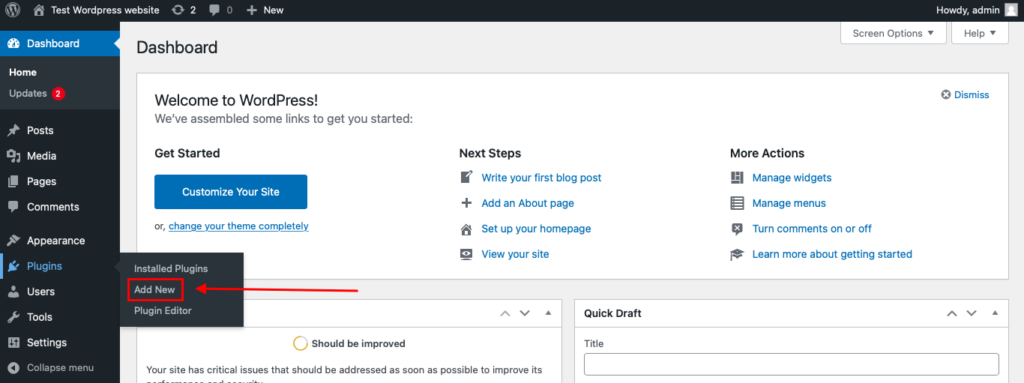
To install the Anti-Spam plugin, go to your WordPress admin panel→ Plugins→ Add New.
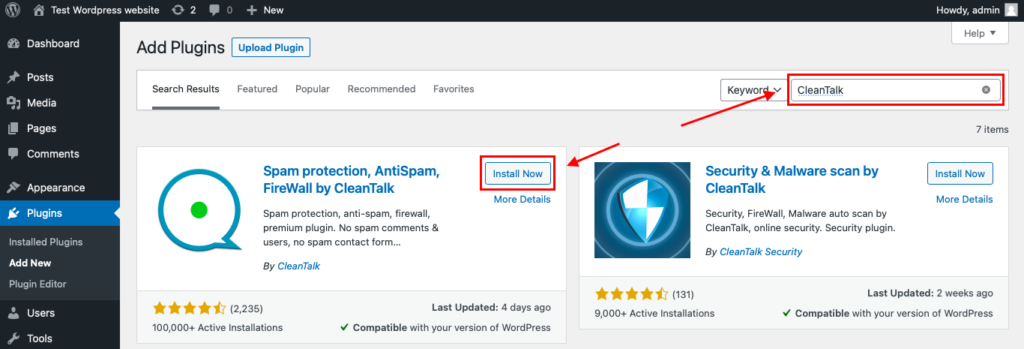
Then enter «СleanTalk» in the search box and click the Install button for «Spam protection, Anti-Spam, FireWall by CleanTalk».
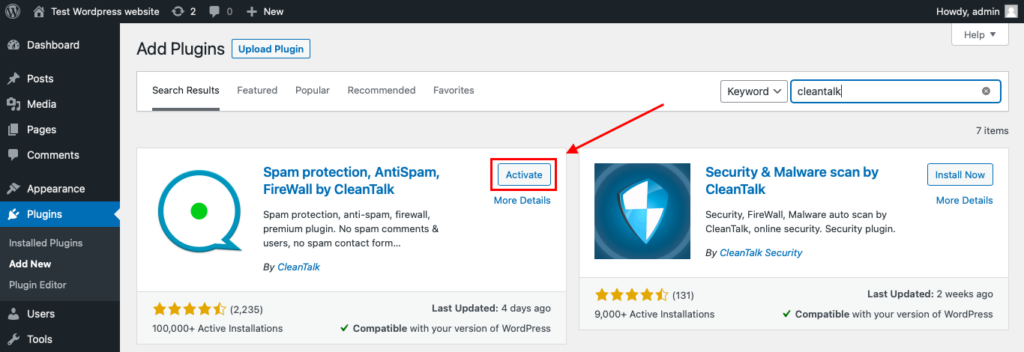
After installing the plugin, click the «Activate» button.
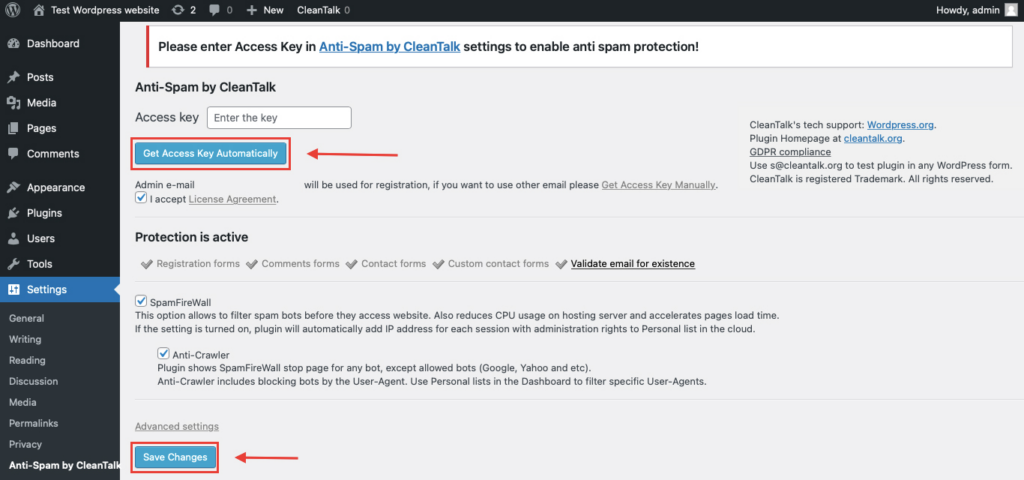
After it is done go to the plugin settings and click the «Get Access Key Automatically» button. Then just click the «Save Settings» button.
That’s all – Contact Form 7 are now protected From this moment,CleanTalk automatically protects the Contact Form 7 registration form (REST route /wp-json/Contact Form 7press/v1/users/), and the Add Listing form used to submit new listings.
You don’t need to paste any shortcodes – just use Contact Form 7 as usual, and CleanTalk will filter spam in the background.
That’s it! From now you know how to completely protect your wpDiscuz from spam. You don’t need to paste any shortcodes – just use wpDiscuz as usual, and CleanTalk will filter spam in the background.
Check if spam protection works with wpDiscuz
The best way to test the spam protection is by using a test email,
stop_email@example.com
- Open a page with your wpDiscuz form in an Incognito / private browser tab.
- Fill out the form using stop_email@example.com as the sender’s email.
- Send the form.
- You should see a message from the Anti-Spam plugin confirming that a spam submission was blocked.
*** Forbidden. Sender blacklisted. Anti-Spam by CleanTalk. ***
Screenshot: Forbidden, sender blacklisted – wpDiscuz test submission blocked by CleanTalk.
If you see this message, it means CleanTalk successfully protects your wpDiscuz forms from spam.
Cloud Dashboard
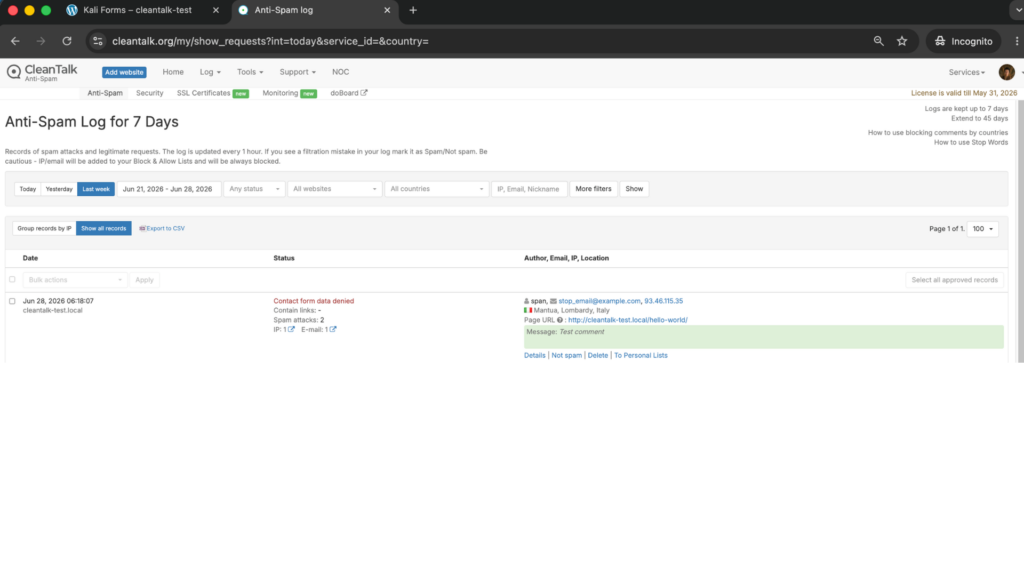
In addition, in the Cloud Dashboard you can find extra details regarding all submissions processed by CleanTalk, including wpDiscuz forms:
- IP and email of the sender, as well as the sender’s activity history across other websites connected to the CleanTalk cloud.
- Geolocation of the sender.
- Date and time of the submission.
- Page (URL) where the form was submitted.
- Cloud decision – Approved or Denied.
- Cloud explanation for the decision (e.g. blacklisted email, bad IP reputation, spam text, etc.).
- Tools to move the sender to Block or Allow lists so you can fine-tune wpDiscuz spam protection.
FAQ
How do I stop spam comments in wpDiscuz?
Keep WordPress comment moderation, the disallowed-words list and the link limit enabled, then add an invisible cloud filter like CleanTalk that checks every comment before it reaches your queue. The filter removes obvious link spam, fake reviews and AI comments automatically, and moderation acts as a manual backstop for anything unusual. That combination removes the vast majority of spam without forcing readers through a CAPTCHA.
Why does wpDiscuz still get spam even with reCAPTCHA enabled?
Because reCAPTCHA only asks whether the visitor is a robot – it never reads the comment. Bots increasingly solve the challenge with cheap automated services, and any human or AI posting link spam or fake reviews passes it easily and lands in your queue. To stop that, you need a filter that judges the content and sender, not just whether someone can tick a checkbox.
How do I stop link spam and backlink spam in comments?
Link spam is the most common type and the easiest to reduce. Set WordPress to hold any comment with more than one or two links (Settings -> Discussion), which catches the link-stuffed comments automatically, and run a content filter like CleanTalk that recognizes known spam domains and patterns. Together they stop the comments whose only purpose is to publish a backlink, before those links ever go live and start affecting your SEO.
Does CleanTalk stop AI-generated comments?
Yes. CleanTalk evaluates content, sender reputation and submission behavior against a live global database rather than relying on grammar or bot-detection alone. AI comments are written to read like real, on-topic contributions, so they pass CAPTCHAs and keyword blacklists – but they still come from senders and patterns the network recognizes, which is how CleanTalk catches them when traditional checks cannot.
Akismet vs CleanTalk – which is better for wpDiscuz?
Both filter comment spam well, and Akismet’s free personal tier is fine for a hobby blog. The difference is breadth. Akismet is comment-focused and lighter on the other forms a wpDiscuz site usually runs; CleanTalk is invisible, analyzes content, and protects every form on your site – comments, guest comments, registrations, contact forms and reviews – from a single plugin. For an active wpDiscuz site with more than just a comment box, CleanTalk usually gives broader coverage from one install.
Can I keep guest comments open without getting flooded with spam?
Yes, and you should not have to disable guest commenting to control spam. Open guest forms are a favorite target for bots, but an invisible filter checks every guest submission the same way it checks registered users, so you keep the low-friction commenting that drives engagement while the junk is removed in the background. Pair it with the link limit and moderation and your guest form stays open and clean.
Will CleanTalk get in the way of my real readers?
No. It is completely invisible – there is no CAPTCHA, checkbox or puzzle anywhere on the form. Genuine readers comment exactly as they do now and see nothing extra, while spam is filtered silently in the background. If the filter ever does catch a real comment by mistake, it is logged in your dashboard so you can recover it and whitelist that sender in seconds.
Final recommendation
For most wpDiscuz sites in 2026, the best setup is simple and layered. Use CleanTalk as your invisible baseline filter to remove link spam, fake reviews, advertising and AI-generated comments before they ever reach you, and keep WordPress comment moderation, blacklist words and link limits as your backup for the rare edge case. You get a clean comment section without forcing readers through CAPTCHAs – and without spam links quietly damaging the SEO and reputation you have built. If you are on a small hobby blog, Akismet’s free tier plus moderation may be enough; once your site is busy, runs guest comments, or has more than just a comment box to protect, an invisible site-wide filter pays for itself in saved moderation time alone.
