

LearnPress is not a regular form plugin. It is a WordPress LMS where visitors can become students, enroll in courses, complete lessons, take quizzes, make payments, and appear in course reports.
That is why spam in LearnPress can create more than one unwanted message. A fake registration may become a student account. A suspicious enrollment may appear inside a course. A bot checkout attempt may create an unpaid order. Fake quiz activity may make course progress and reports harder to trust.
This guide explains how to protect LearnPress from spam using CleanTalk as the main WordPress-side filtering layer, together with LMS-specific controls such as student account review, enrollment monitoring, payment verification, quiz data review, user role checks, and cleanup of suspicious course records.
This approach is relevant for websites that use LearnPress for online courses, student registration, course enrollment, quizzes, paid courses, checkout flows, course progress tracking, instructor workflows, certificates, reports, or other e-learning processes where user data is stored and reused.

LearnPress – WordPress LMS Plugin for Courses, Lessons, Quizzes, and Students
LearnPress is a WordPress LMS plugin by ThimPress. It helps website owners create online course websites, build course curricula, add lessons and quizzes, manage students, and sell courses from WordPress.
It can be used for:
- online courses;
- course curricula;
- lessons;
- quizzes;
- student registration;
- course enrollment;
- paid courses;
- course checkout;
- student profiles;
- course progress tracking;
- instructor and student workflows;
- course reports;
- certificates and add-ons, depending on setup;
- education websites, academies, coaching programs, and training platforms.
As WordPress.org shows, LearnPress is currently used on over 70,000 websites and has 593 user reviews with an average rating of 4.3.
Plugin Homepage at wordpress.org | Website learnpresslms.com
Why LearnPress Attracts Spam
LearnPress creates several public entry points on a WordPress website. These can include student registration pages, login forms, course enrollment buttons, checkout pages, course comments, quizzes, and other LMS-related user actions.
That gives bots more than one place to attack.
Common spam cases include:
- fake student registrations;
- bot-created WordPress user accounts;
- repeated course enrollment attempts;
- fake checkout or unpaid order records;
- suspicious student profiles;
- registrations with disposable email addresses;
- fake quiz participation;
- spam accounts created to access free courses;
- automated login attempts;
- suspicious course progress activity;
- spam registrations through payment or WooCommerce-connected flows;
- fake users appearing in LMS reports.
The main issue is that LearnPress spam can enter the learning workflow. It may not stay as a single bad form entry. It can become a student account, an enrollment record, a checkout record, a quiz attempt, a course participant, or data inside reports.
That is why LearnPress spam protection should work before suspicious submissions become part of the LMS.
Anti-Spam Plugin by CleanTalk for WordPress
The next tool we’re going to use is the Anti-Spam plugin by CleanTalk.
Here’s a short overview:
- CleanTalk is a cloud-based spam protection service for websites.
- It automatically blocks spam without CAPTCHA challenges.
- It protects many types of forms, including contact forms, registrations, comments, surveys, payment forms, and subscription forms.
- It helps stop automated bots and suspicious human spam submissions.
- It uses spam detection signals such as IP address, email address, sender behavior, and global spam activity.
- It lets website owners create custom filtering rules for specific cases.
- It allows blocking or filtering by IP, email, and country.
- It works quietly in the background and is easy to install and configure.
For LearnPress, this is useful because LMS spam usually affects more than one page. A bot may target student registration, course checkout, login, comments, contact forms, or other public inputs on the same WordPress website.
According to WordPress.org, Anti-Spam by CleanTalk for WordPress has over 200,000 active installations, with 3,168 reviews and an average rating of 4.7.
Plugin Homepage at cleantalk.org | Latest release at GitHub.com | Website cleantalk.org
Install the CleanTalk Anti-Spam plugin
Show Instructions
To install the Anti-Spam plugin, go to your WordPress admin panel → Plugins → Add New.

Then enter «СleanTalk» in the search box and click the Install button for «Spam protection, Anti-Spam, FireWall by CleanTalk».

After installing the plugin, click the «Activate» button.
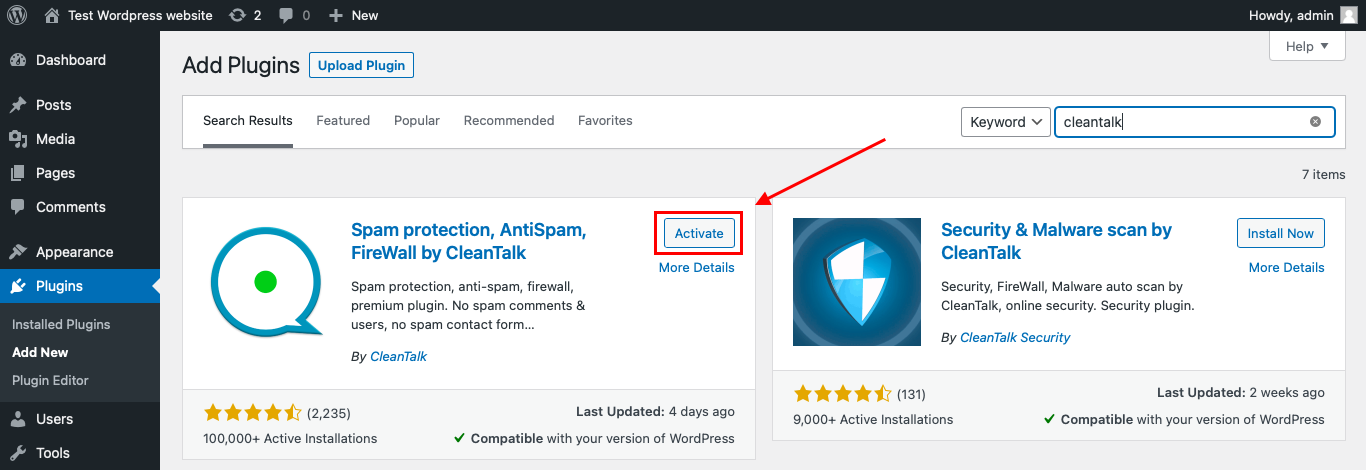
After it is done go to the plugin settings and click the «Get Access Key Automatically» button. Then just click the «Save Settings» button.

That’s it! From now you know how to completely protect your HivePress from spam.
That’s it. From now on, CleanTalk starts protecting your WordPress forms from spam.
You don’t need to rebuild your LearnPress courses. Keep your courses, lessons, quizzes, enrollments, checkout flow, and student settings as they are, and CleanTalk will check suspicious submissions in the background.
How to Check Spam Protection for LearnPress
You can test the work of Anti-Spam protection for your LearnPress forms by using a test email:
stop_email@example.com
- Open page with your form (don’t forget to add the shortcode in the page content) in Incognito browser tab.
- Fill out the Contact form using stop_email@example.com as sender’s email.
- Send the form.
- You should see a message from the Anti-Spam plugin confirming that a spam submission was blocked.
*** Forbidden. Sender blacklisted. Anti-Spam by CleanTalk. ***
The protection works only for website visitors, not for website admins. Be sure to test the form protection using Incognito mode.
This is important because LearnPress pages may behave differently for logged-in admins, logged-in students, and public visitors. Testing outside the admin session helps confirm that protection works in the real student flow.
Cloud Dashboard
In addition, in the CleanTalk Cloud Dashboard, you can find extra details about submissions processed by CleanTalk, including LearnPress-related registrations and other WordPress forms.
The dashboard can help review:
- IP and email of the sender;
- sender activity history across other websites connected to the CleanTalk cloud;
- geolocation of the sender;
- date and time of the submission;
- page URL where the form was submitted;
- cloud decision: Approved or Denied;
- cloud explanation for the decision, such as blacklisted email, bad IP reputation, or spam text;
- tools to move senders to Block or Allow lists.
This is useful for LearnPress because spam may come through different LMS entry points: student registration, course checkout, free course enrollment, login forms, course comments, or other public forms on the site.
The dashboard helps you understand which page is being targeted and whether the problem comes from repeated IPs, disposable emails, fake student data, suspicious usernames, or automated submissions.
LearnPress Features That Matter for Spam Protection
LearnPress is more than a basic course listing plugin. It includes LMS workflows such as course creation, lessons, quizzes, student management, course access, checkout, enrollment, payment gateways, progress tracking, and reports.
That makes spam protection especially important in several areas.
Student Registration
Student registration is one of the most obvious spam targets in any LMS.
If bots create student accounts, they can pollute the user database, trigger email notifications, appear in student lists, and create extra moderation work.
Course Enrollment
LearnPress websites often allow users to enroll in free or paid courses.
For free courses, bots may create fake enrollments to access content or pollute course participant lists. For paid courses, fake enrollment attempts can create confusing order or checkout data.
Course Checkout
LearnPress can be used to sell courses through supported payment methods and add-ons.
Spam in checkout-related flows can create abandoned orders, unpaid records, fake customer details, and support confusion. A course enrollment should be reviewed together with payment status when paid access is involved.
Lessons and Course Progress
LearnPress tracks learning activity and course progress.
If fake accounts enter the LMS, course progress reports and student lists become less reliable. This matters especially for schools, academies, coaching programs, and training platforms that rely on completion data.
Quizzes
LearnPress supports quizzes as part of course content.
Spam students may create fake quiz activity, repeated attempts, or low-quality data inside quiz reports. If quiz results are used for progress, certificates, or internal reports, suspicious accounts should be reviewed.
Add-ons and Integrations
LearnPress has many add-ons and can be used with themes, payment flows, WooCommerce, membership-style setups, and education websites.
The more integrations a site uses, the more important it becomes to protect every public input point: registration, login, checkout, enrollment, comments, and contact forms.
Additional Protection Options for LearnPress
CleanTalk should be the main anti-spam layer, but LearnPress websites can also benefit from LMS-specific controls.
Review New Student Accounts
For public course websites, review new user accounts regularly.
Look for disposable emails, strange usernames, repeated IPs, empty profiles, suspicious domains, and accounts that enroll but never participate meaningfully.
Protect Free Course Enrollment
Free courses are useful for marketing and onboarding, but they can also attract bot enrollments.
If a free course receives suspicious student activity, check whether registrations are coming from the same IP ranges, countries, email patterns, or referral sources.
Check Paid Course Orders
For paid courses, do not treat every form submission or order record as a confirmed student.
Check payment status before granting access, sending course-related confirmations, or treating the user as a valid learner.
Monitor Quiz and Progress Data
If course reports are important, review suspicious quiz attempts, impossible completion behavior, and accounts with unusual activity.
Spam may not always look like a message. Sometimes it appears as fake progress data.
Keep User Roles Restrictive
Avoid giving newly registered users unnecessary permissions.
Student accounts should have only the access needed to take courses. Instructor, teacher, editor, or admin permissions should never be assigned automatically without review.
Clean Old Spam Accounts
If spam accounts already exist, remove or disable them before relying on course reports.
A clean student database makes course analytics, enrollments, and progress data easier to trust.
Why LearnPress Spam Is Different from Regular Form Spam
A regular contact form spam message usually creates inbox noise.
LearnPress spam can affect the LMS itself.
Depending on the setup, a fake submission may become:
- a WordPress user;
- a student account;
- a course enrollment;
- a checkout record;
- an unpaid order;
- a quiz attempt;
- a fake course participant;
- a course progress record;
- a support notification;
- a row in student reports;
- a suspicious account inside an education platform.
That is why LearnPress spam should be treated as a student-data and course-workflow problem, not only as a form problem.
Comparison of Anti-Spam Approaches for LearnPress
| Solution | Main role | Strengths | Limitations | Best use case |
|---|---|---|---|---|
| CleanTalk | Main WordPress-side anti-spam filtering | Works in the background, checks suspicious submissions, no CAPTCHA friction for real students | Should be combined with LMS-specific review for high-risk workflows | LearnPress websites with registrations, enrollments, checkout, and forms |
| Student account review | User quality control | Helps identify fake students and suspicious users after registration | Requires admin time | Public course websites and academies |
| Payment status review | Checkout protection | Prevents fake submissions or unpaid orders from being treated as valid students | Applies only to paid courses | Paid course websites |
| Role restrictions | Access control | Reduces risk from fake or overprivileged accounts | Needs careful setup | Sites with students, instructors, editors, and admins |
| Enrollment monitoring | Course data quality | Helps detect fake course participants and suspicious free-course activity | Does not prevent spam alone | Free courses and open-access courses |
| Quiz/progress review | LMS data cleanup | Helps keep reports, progress, and quiz data more reliable | Happens after activity | Sites using quiz scores, progress tracking, or certificates |
| Cloud Dashboard monitoring | Pattern detection | Helps identify repeated IPs, emails, and abused pages | Requires review | Sites receiving repeated registration or enrollment spam |
In practice, LearnPress spam protection should combine sender filtering with LMS workflow checks. CleanTalk helps block suspicious submissions, while LearnPress-specific review helps protect student data, course access, reports, and payments.
Frequently Asked Questions – LearnPress Spam Protection
Why do bots target LearnPress websites?
Bots target LearnPress websites because they often allow public registration, course enrollment, login, checkout, and free course access.
These entry points can create real user accounts or course records, which makes them more valuable to bots than a basic contact form.
Can LearnPress spam create fake student accounts?
Yes. If public registration is enabled, bots may create fake WordPress users that appear as students.
That can pollute the user database, course participant lists, and student reports.
Is LearnPress spam only a registration problem?
No. Registration is only one possible entry point.
Spam can also affect course enrollment, checkout, login attempts, quiz activity, course progress, comments, and other forms on the same WordPress site.
Can fake users enroll in free courses?
Yes. Free courses are often easier for bots to access because there is no payment barrier.
If a free course suddenly gets many suspicious enrollments, check the IPs, email patterns, usernames, and CleanTalk logs.
Can spam affect paid LearnPress courses?
Yes. Spam can create fake checkout attempts, unpaid orders, confusing student records, or low-quality customer data.
For paid courses, always confirm payment status before treating a user as a valid enrolled student.
Should I use CAPTCHA on LearnPress pages?
CAPTCHA can help on heavily abused pages, but it may add friction for real students.
For most course websites, it is better to use CleanTalk as the background filtering layer and add visible verification only where spam is repeated.
What should I check if LearnPress spam still gets through?
Check CleanTalk logs, affected page URLs, repeated IPs, email addresses, suspicious usernames, registration settings, checkout settings, free course enrollments, and whether spam appears in one course or across the whole site.
Can quiz results be affected by spam accounts?
Yes. If fake students access quizzes, they may create unreliable attempts, scores, or progress data.
Review suspicious quiz activity before using results for certificates, reporting, or student evaluation.
How can I protect LearnPress user roles?
Keep new student accounts restricted by default.
Do not automatically assign instructor, teacher, editor, or admin-level permissions through public forms or unreviewed workflows.
Recommended Anti-Spam Stack for LearnPress in 2026
LearnPress can be used for different LMS workflows, so the best setup depends on how students interact with the site.
For public student registration
Use:
- CleanTalk Anti-Spam;
- restricted default student roles;
- review of suspicious new users;
- cleanup of fake accounts.
This helps protect the student database from bot-created users.
For free courses
Use:
- CleanTalk Anti-Spam;
- enrollment monitoring;
- review of repeated enrollments;
- suspicious email and IP checks.
This helps prevent fake students from polluting free course reports.
For paid courses
Use:
- CleanTalk Anti-Spam;
- payment status verification;
- review of failed or suspicious checkout attempts;
- no course access before payment confirmation.
This protects paid course workflows from fake order data.
For quiz-heavy courses
Use:
- CleanTalk Anti-Spam;
- suspicious student review;
- quiz attempt monitoring;
- cleanup before using reports.
This keeps quiz data and course progress more reliable.
For academies and training platforms
Use:
- CleanTalk Anti-Spam;
- student account review;
- role restrictions;
- course enrollment monitoring;
- regular database cleanup.
This is useful when student records matter for reporting, certificates, or internal training.
For LearnPress sites with WooCommerce or payment add-ons
Use:
- CleanTalk Anti-Spam;
- checkout monitoring;
- order status verification;
- suspicious customer review.
This helps separate real buyers from fake checkout attempts.
For high-risk public LMS sites
Use:
- CleanTalk Anti-Spam;
- Cloud Dashboard monitoring;
- stricter user review;
- optional CAPTCHA only on repeatedly abused pages;
- regular cleanup of spam users and enrollments.
This setup is best for open course platforms that receive repeated registration or enrollment spam.
Final Thoughts
LearnPress spam should be handled as an LMS data problem, not just a form problem.
A fake contact form message is easy to delete. A fake LearnPress user can become a student account, an enrollment, a checkout record, a quiz participant, or a course progress entry. That makes cleanup harder and can reduce trust in reports, course analytics, and student lists.
The right protection setup depends on how your LearnPress site works. A free course platform needs enrollment monitoring. A paid course website needs payment verification. A quiz-based course needs score and progress review. An academy needs clean student accounts and role control.
CleanTalk can serve as the first filtering layer by checking suspicious submissions before they enter the LMS workflow. After that, LearnPress-specific checks should protect the parts of the platform that matter most: registrations, enrollments, payments, quizzes, roles, and reports.
With this layered setup, you can reduce fake student accounts, keep course data cleaner, and protect the learning experience for real users.
