

If you use Hustle to create popups, opt-ins, slide-ins, or embedded forms on your WordPress website, spam can quickly become a serious problem. Public lead generation forms are often targeted by bots, crawlers, automated scripts, and low-quality human submissions.
If you use Hustle to create popups, opt-ins, slide-ins, widgets, or embedded forms on your WordPress website, spam can quickly become a serious problem. Public lead generation forms are often targeted by bots, crawlers, automated scripts, and low-quality human submissions.
These unwanted submissions may include fake email addresses, disposable emails, suspicious links, fake names, repeated newsletter sign-ups, or attempts to abuse discounts, lead magnets, gated content, and promotional offers.
Over time, spam can pollute your email lists, distort conversion tracking, reduce the quality of your campaign data, and make it harder to understand which leads are real.
This guide explains how to protect Hustle forms from spam using Anti-Spam by CleanTalk for WordPress, together with Hustle’s built-in Google reCAPTCHA option and additional anti-spam tools available in CleanTalk.
Hustle and WordPress Forms
Hustle is a WordPress marketing plugin for building mailing lists, opt-in forms, targeted popups, slide-ins, widgets, shortcodes, and social sharing modules.
Hustle forms are often used for:
- newsletter sign-ups
- lead generation forms
- discount offer popups
- exit-intent popups
- embedded opt-in forms
- slide-in subscription forms
- giveaway registrations
- content upgrade forms
- event or campaign sign-ups
- marketing list growth
The advantage of Hustle is that website owners can create highly visible marketing forms without building everything from scratch. Forms can appear as popups, slide-ins, embeds, widgets, or shortcodes.
But the same visibility that helps Hustle convert real visitors can also attract spam bots.
Once a Hustle opt-in form is published on a public website, automated scripts can try to submit it repeatedly. This is especially common when the form is connected to a newsletter, discount campaign, lead magnet, giveaway, or email automation.
As WordPress.org shows, Hustle – Email Marketing, Lead Generation, Optins, Popups is currently used on over 90,000 websites and has over 850 user reviews with an average rating of 4.4.
Plugin Homepage at WordPress.org | Documentation at WPMU DEV
Why Hustle Forms Attract Spam
Hustle is not the reason spam happens. Spam is a common problem for public lead generation forms, popup forms, and subscription forms.
Bots and spammers usually look for forms that can be used to submit fake contact data, test email addresses, abuse promotions, or push low-quality leads into website databases and marketing tools.
Common Hustle form spam patterns include:
- fake names and fake email addresses
- disposable or temporary email addresses
- repeated newsletter sign-ups
- fake discount or coupon requests
- suspicious URLs inside form fields
- irrelevant business offers
- SEO, crypto, adult, or software-related spam
- multiple submissions from the same IPs or networks
- human-written spam that passes basic bot checks
- low-quality contacts entering email marketing tools
This is especially important for marketing websites. If spam reaches your local submissions, email list, CRM, autoresponder, Zapier workflow, or campaign reports, it can waste time and make your performance data less accurate.
That is why Hustle forms should have a reliable anti-spam layer working in the background.
Anti-Spam by CleanTalk
The next tool we are going to use is the Anti-Spam plugin by CleanTalk.
Here’s a short overview:
- CleanTalk is a cloud-based spam protection service for WordPress websites.
- It blocks spam without forcing real visitors to solve CAPTCHA challenges.
- It can protect different types of WordPress forms and submissions, including contact forms, comments, registrations, subscriptions, bookings, surveys, and WooCommerce orders.
- It checks submissions using spam detection signals such as email address, IP address, sender reputation, and sender activity.
- It helps block automated bots and suspicious form submissions.
- It works quietly in the background.
- It allows website owners to review spam checks in the CleanTalk Cloud Dashboard.
- It gives website owners tools for personal Allow lists and Block lists, country filters, language filters, stop words, and SpamFireWall.
- It gives website owners tools for personal Allow lists and Block lists, country filters, language filters, stop words, and SpamFireWall.
According to WordPress.org, Anti-Spam by CleanTalk for WordPress has over 200,000 active installations, with 3,168 reviews and an average rating of 4.7.
Plugin Homepage at cleantalk.org | Latest release at GitHub.com | Website cleantalk.org
Install the CleanTalk Anti-Spam plugin
Show Instructions
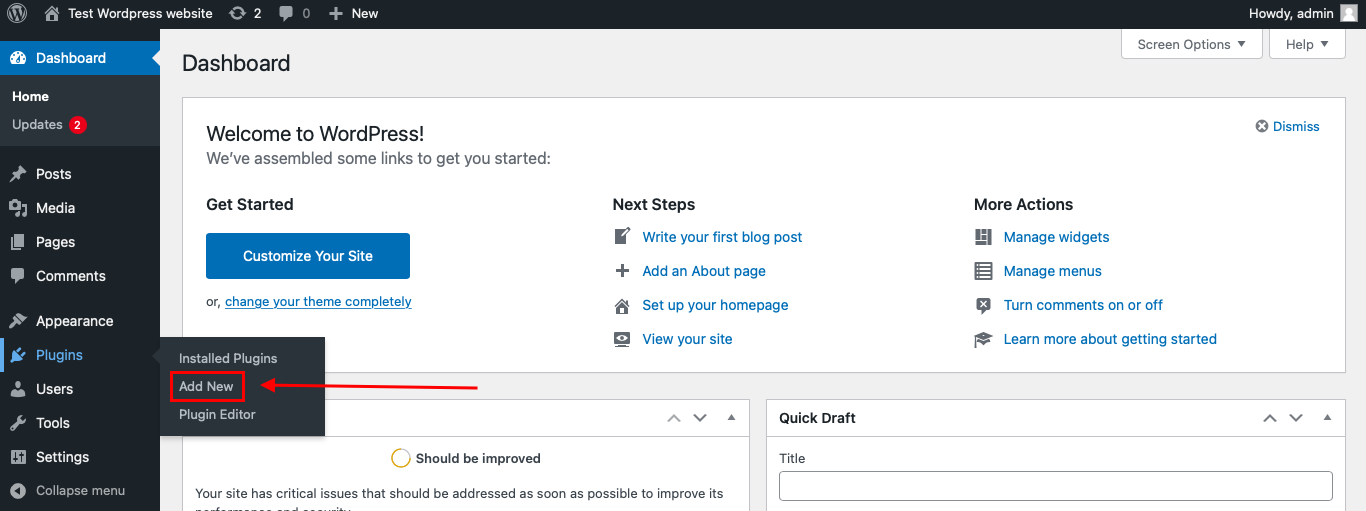
To install the Anti-Spam plugin, go to your WordPress admin panel → Plugins → Add New.
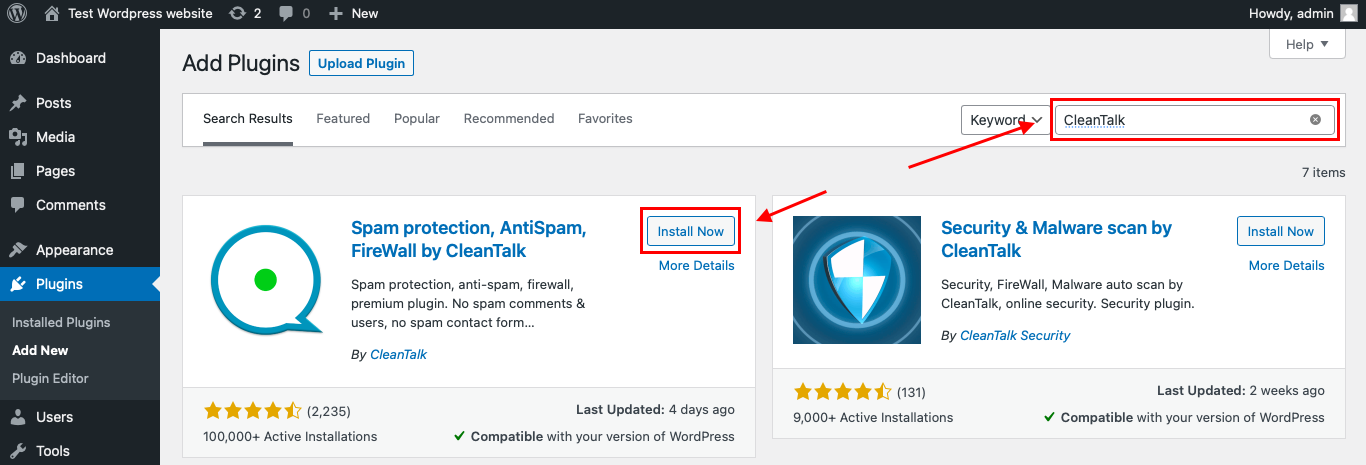
Then enter «СleanTalk» in the search box and click the Install button for «Spam protection, Anti-Spam, FireWall by CleanTalk».
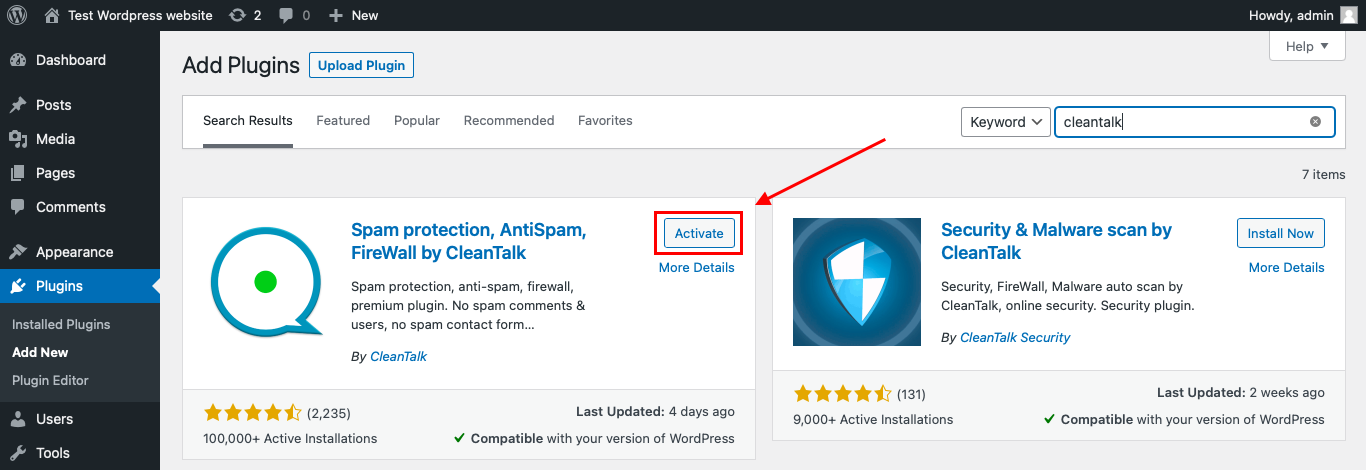
After installing the plugin, click the «Activate» button.
After it is done go to the plugin settings and click the «Get Access Key Automatically» button. Then just click the «Save Settings» button.
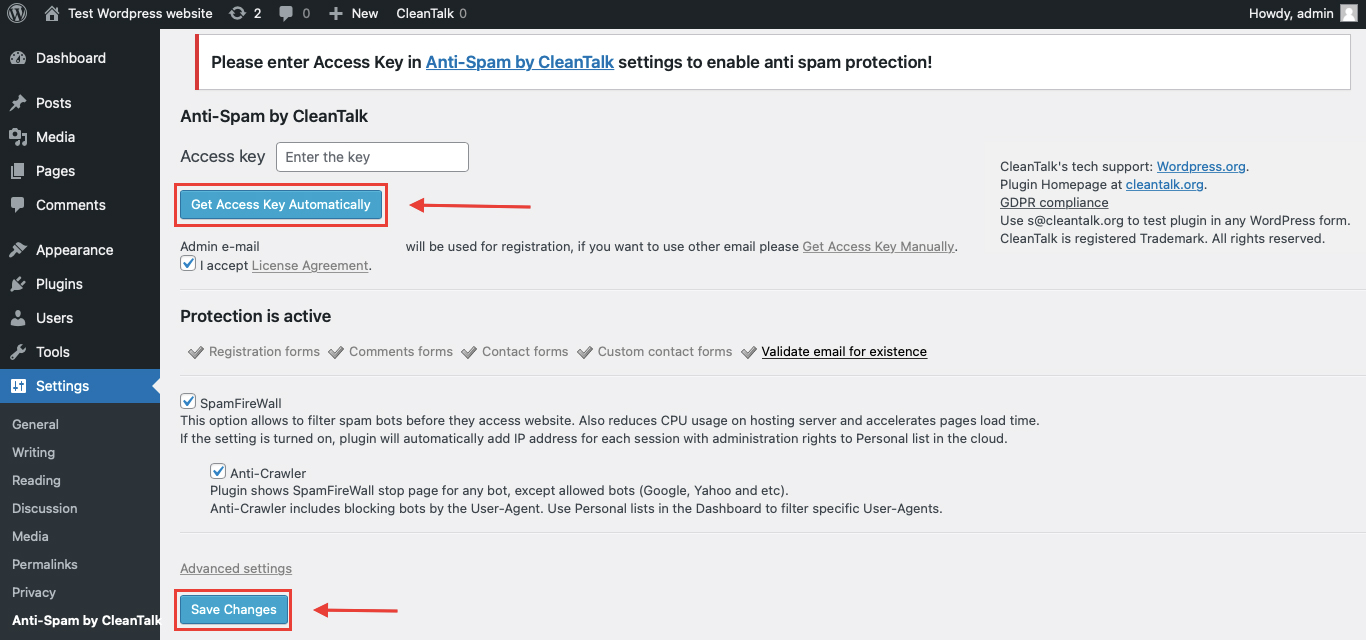
That’s it! From now you know how to completely protect your HivePress from spam.
That’s it! From now on, you know how to protect Hustle forms from spam.
How to Check Hustle Forms Spam Protection
After installing the plugin, it is important to test that spam protection is working correctly.
Use the test email:
stop_email@example.com
To test the form:
- Open a page with a Hustle popup, opt-in, slide-in, widget, or embedded form.
- Use an Incognito or private browser window.
- Fill in all required form fields.
- Use stop_email@example.com as the sender email.
- Submit the form.
If the anti-spam protection is working correctly, the submission should be blocked.
You may see a message similar to:
Forbidden. Sender blacklisted.
It is better to test protection in an Incognito window because WordPress admins may be treated differently from regular website visitors. Testing as a normal visitor helps confirm that protection works for public form submissions.
Cloud Dashboard and Monitoring
CleanTalk does not only block suspicious submissions. It also gives website owners access to logs and request details in the CleanTalk Cloud Dashboard.
This is useful because spam problems are not always random. A website may receive repeated fake sign-ups from the same IPs, countries, email patterns, keywords, or networks.
In the Cloud Dashboard, site owners can review:
- approved and blocked submissions
- sender IP addresses
- sender email addresses
- submission date and time
- page URL where the form was submitted
- spam check result
- reason for blocking or approving a request
- personal Allow lists and Block lists
This helps website owners understand what kind of spam is targeting their Hustle forms and adjust protection if needed.
For example, if a real subscriber is blocked by mistake, the site owner can review the log and add the sender to an Allow list. If repeated spam comes from the same sender, country, network, or email pattern, it can be handled more precisely.
Hustle Integrations and Why Spam Filtering Matters
Hustle can send opt-in data to connected apps and email marketing services. According to Hustle documentation and WordPress.org plugin details, Hustle supports integrations with services such as ActiveCampaign, AWeber, Campaign Monitor, Mailchimp, Constant Contact, ConvertKit, GetResponse, HubSpot, Brevo, MailPoet, MailerLite, iContact, Zapier, SendGrid, Sendy, Mautic, and others.
This is useful for real marketing workflows, but it also means spam can move beyond WordPress if it is not filtered early.
For example, spam submissions can:
- create fake subscribers in email marketing platforms
- trigger unnecessary welcome emails
- pollute CRM or automation data
- distort conversion reports
- affect segmentation quality
- waste email marketing volume
- make A/B testing results less reliable
If Hustle is connected to third-party apps, anti-spam filtering should happen before fake submissions are treated as real leads.
Additional Spam Protection Options for Hustle Forms
CleanTalk can work as the main anti-spam layer, but Hustle also includes Google reCAPTCHA support for opt-in modules.
Additional protection can be useful depending on the website’s risk level, campaign type, and user experience priorities.
Google reCAPTCHA
Hustle includes an optional Google reCAPTCHA field for opt-in modules. Before using it inside forms, website owners need to configure reCAPTCHA in Hustle settings.
Hustle supports different reCAPTCHA types:
- v2 Checkbox
- v2 Invisible
- v3
Each reCAPTCHA type requires its own API keys, so the correct key type should be created and added before enabling it in an opt-in module.
Google reCAPTCHA can help reduce automated spam submissions, especially when bots are targeting newsletter sign-ups, lead magnets, giveaways, or discount campaigns.
However, some website owners prefer not to use Google reCAPTCHA because of privacy, user experience, or GDPR-related concerns. For that reason, reCAPTCHA may not be the preferred option for every website.
CleanTalk SpamFireWall
CleanTalk SpamFireWall can help block the most active spam bots before they access the website.
This is useful for websites where spam is not limited to one form. Bots may scan pages, test forms, submit fake contacts, or send repeated requests to the website.
SpamFireWall can reduce unnecessary bot activity before the form submission stage.
Disposable Email Blocking
Hustle is often used for newsletter sign-ups, discounts, gated content, and lead magnets. These use cases can attract disposable or temporary email addresses.
Disposable emails are a problem because they may:
- pollute email lists
- reduce campaign quality
- distort conversion data
- waste email marketing volume
- make follow-up campaigns less reliable
CleanTalk can help block disposable and temporary email addresses before they enter your marketing workflow.
Personal Allow Lists and Block Lists
Personal Allow lists and Block lists are useful when the website owner wants more control over specific senders.
For example, you can allow a legitimate user who was blocked by mistake or block repeated spam from known email addresses, IP addresses, or domains.
This is especially helpful for Hustle campaigns that receive repeated spam from the same patterns.
Country Filters, Language Filters, and Stop Words
Some spam campaigns follow clear patterns. They may come from specific regions, use repeated languages, or contain the same spam phrases.
CleanTalk gives website owners tools such as country filters, language filters, and stop words. These options can help when spam submissions repeat the same keywords, links, or promotional messages.
These settings should be used carefully. If rules are too strict, real subscribers may be blocked by mistake.
Comparison of Anti-Spam Methods for Hustle Forms
| Method | Main Role | Strengths | Limitations | Best Use Case |
|---|---|---|---|---|
| CleanTalk | Main anti-spam layer | Works in the background, no CAPTCHA required, helps block suspicious submissions before they reach workflows | Requires plugin setup and log monitoring | Most WordPress sites using Hustle forms |
| Google reCAPTCHA | CAPTCHA-style bot protection | Built into Hustle opt-in modules, supports v2 Checkbox, v2 Invisible, and v3 | May add friction and raise privacy/GDPR-related concerns for some site owners | High-risk opt-in forms and public lead magnets |
| SpamFireWall | Bot traffic filtering | Helps block active spam bots before they access the site | Works best together with form-level filtering | Websites receiving repeated bot traffic |
| Disposable Email Blocking | Email quality protection | Helps reduce fake subscribers and temporary email sign-ups | Does not replace full anti-spam filtering | Newsletter forms, discounts, gated content |
| Stop Words and Filters | Manual pattern blocking | Useful for repeated spam phrases, URLs, countries, or languages | Requires careful setup to avoid false positives | Repeated spam campaigns with clear patterns |
For most WordPress websites, the best approach is layered protection. CleanTalk can be used as the main anti-spam layer, while Hustle reCAPTCHA and CleanTalk filtering tools can be added when extra control is needed.
Frequently Asked Questions
Why are my Hustle popups getting fake subscribers?
Hustle popups and slide-ins are highly visible by design. They are often connected to newsletters, discounts, lead magnets, giveaways, or exit-intent offers.
That makes them attractive not only to real visitors, but also to bots and users who submit fake or disposable email addresses to access an offer without becoming a real subscriber.
Can Hustle spam affect Mailchimp, ActiveCampaign, Zapier, or other integrations?
Yes. Hustle can send opt-in data to connected apps and email marketing services.
If spam is accepted as a normal submission, fake contacts can move into Mailchimp, ActiveCampaign, MailerLite, Zapier, HubSpot, Brevo, or another connected workflow. This can trigger welcome emails, automations, tags, CRM updates, or webhook actions based on low-quality data.
Does Hustle reCAPTCHA stop disposable email sign-ups?
Not completely.
reCAPTCHA can help reduce automated bot submissions, but it does not automatically prove that an email address is real, long-term, or valuable. A user may still pass a CAPTCHA and submit a disposable or temporary email address.
For email list quality, it is better to combine reCAPTCHA with background spam filtering and disposable email blocking.
Can spam make Hustle conversion tracking inaccurate?
Yes. Hustle is often used to measure views, conversions, and campaign performance.
If fake submissions are counted as conversions, a popup, slide-in, or embed may look more successful than it really is. This can affect decisions about offers, display rules, traffic sources, timing, and A/B testing.
How can I test CleanTalk with a Hustle opt-in form?
Open the page with your Hustle form in an Incognito or private browser window.
Submit the form using:
If CleanTalk is working correctly, the test submission should be blocked. You can also review the result in the CleanTalk Cloud Dashboard.
What is the best anti-spam setup for Hustle forms?
For most websites, the best setup is to use CleanTalk as the main background anti-spam layer.
If a specific Hustle campaign receives heavy spam, you can add Hustle reCAPTCHA to that opt-in module. For newsletter, discount, giveaway, or gated content campaigns, disposable email blocking, SpamFireWall, country filters, language filters, and stop words can also help improve lead quality.
Recommended Anti-Spam Setup for Hustle Forms
| Website Type | Recommended Setup | Why |
|---|---|---|
| Standard business website | CleanTalk | Background protection without CAPTCHA |
| Newsletter-focused website | CleanTalk + disposable email blocking | Helps keep subscriber lists cleaner |
| Lead magnet website | CleanTalk + SpamFireWall | Helps reduce fake sign-ups and bot traffic |
| High-spam popup campaign | CleanTalk + Hustle reCAPTCHA | Adds extra verification for risky forms |
| Discount or coupon campaign | CleanTalk + disposable email blocking + filters | Helps reduce offer abuse and fake subscribers |
| Conversion-focused landing page | CleanTalk without visible CAPTCHA | Reduces friction for real visitors |
| Website with repeated spam patterns | CleanTalk + stop words + country/language filters | Helps block repeated spam phrases and suspicious sources |
Final Thoughts
Hustle makes it easy to create popups, opt-ins, slide-ins, widgets, shortcodes, and embedded lead generation forms in WordPress. But every public form needs reliable spam protection.
Google reCAPTCHA can help reduce bot submissions, but it is not always enough on its own. Some spam comes from disposable emails, repeated low-quality submissions, human-written entries, or aggressive bot traffic.
For most WordPress websites using Hustle, the best solution is to install Anti-Spam by CleanTalk as the main background anti-spam layer. Then, if needed, add Hustle reCAPTCHA, SpamFireWall, disposable email blocking, personal lists, country filters, language filters, or stop words for extra control.
This layered setup helps reduce unwanted submissions, protect email list quality, keep conversion data cleaner, and make Hustle forms easier for real visitors to use.
