

Constant Contact Forms are often used to collect newsletter subscribers, customer information, visitor feedback, and email marketing leads directly from a WordPress website.
That makes them useful for list growth, but it also makes them attractive to bots.
If a public Constant Contact form is not protected properly, fake sign-ups can be added to your email lists, confirmation emails can be triggered unnecessarily, and your marketing data can become less reliable.
This guide explains how to protect Constant Contact Forms from spam using Anti-Spam by CleanTalk for WordPress, together with Constant Contact’s own protection options such as honeypot protection, CAPTCHA services, email opt-in, and Confirm Opt-in.

Constant Contact Forms and WordPress Forms
Constant Contact Forms is the official WordPress plugin by Constant Contact. It connects a WordPress website with a Constant Contact account and allows website owners to create forms that collect visitor information from the site.
The plugin can be used to create sign-up forms and contact forms inside WordPress. Captured email addresses can be automatically added to selected Constant Contact email lists.
Constant Contact Forms are often used for:
- newsletter sign-ups
- contact forms
- lead generation forms
- visitor feedback forms
- email list growth
- event interest forms
- discount or coupon sign-ups
- resource download forms
- customer inquiry forms
- campaign-specific forms
The advantage of Constant Contact Forms is that form submissions can go directly into Constant Contact lists. This reduces manual work and helps website owners grow their audience from WordPress.
But this also creates a spam risk.
If fake submissions are accepted as normal sign-ups, they can enter your Constant Contact lists and affect list quality, email permissions, reporting, and follow-up workflows.
As WordPress.org shows, Constant Contact Forms is currently used on over 20,000 websites and has 100 user reviews with an average rating of 2.7.
Plugin Homepage at WordPress.org | Documentation at Constant Contact
Why Constant Contact Forms Attract Spam
Constant Contact Forms is not the reason spam happens. Spam is a common problem for public sign-up forms and contact forms.
Bots search for forms that can be submitted automatically. Email list forms are especially attractive because they can be used to test addresses, abuse promotions, push fake contacts into mailing lists, or create noise in marketing systems.
Common Constant Contact form spam patterns include:
- fake newsletter subscriptions
- temporary or low-quality email addresses
- bot-generated contact names
- repeated submissions from the same sources
- fake coupon or discount requests
- irrelevant business messages
- suspicious URLs in message fields
- contacts added without real intent
- form submissions that never become engaged subscribers
- email list growth that looks larger than it really is
This matters because Constant Contact is connected to permission-based email marketing. Fake contacts can reduce list quality, create administrative cleanup work, and make campaign performance harder to interpret.
Constant Contact also has a help article specifically about bot-generated contacts and fake sign-ups, which shows that this is a real user problem, not just a theoretical risk.
That is why Constant Contact Forms should have a reliable anti-spam layer working before suspicious submissions become list contacts.
Anti-Spam by CleanTalk
The next tool we are going to use is the Anti-Spam plugin by CleanTalk.
Here’s a short overview:
CleanTalk is a cloud-based spam protection service for WordPress websites.
It blocks spam without forcing real visitors to solve CAPTCHA challenges.
It can protect different types of WordPress forms and submissions, including contact forms, comments, registrations, subscriptions, bookings, surveys, and WooCommerce orders.
It checks submissions using spam detection signals such as email address, IP address, sender reputation, and sender activity.
It helps block automated bots and suspicious form submissions.
It works quietly in the background.
It allows website owners to review spam checks in the CleanTalk Cloud Dashboard.
It gives website owners tools for personal Allow lists and Block lists, country filters, language filters, stop words, and SpamFireWall.
According to WordPress.org, Anti-Spam by CleanTalk for WordPress has over 200,000 active installations, with 3,168 reviews and an average rating of 4.7.
Plugin Homepage at cleantalk.org | Latest release at GitHub.com | Website cleantalk.org
Install the CleanTalk Anti-Spam plugin
Show Instructions
To install the Anti-Spam plugin, go to your WordPress admin panel → Plugins → Add New.

Then enter «СleanTalk» in the search box and click the Install button for «Spam protection, Anti-Spam, FireWall by CleanTalk».

After installing the plugin, click the «Activate» button.
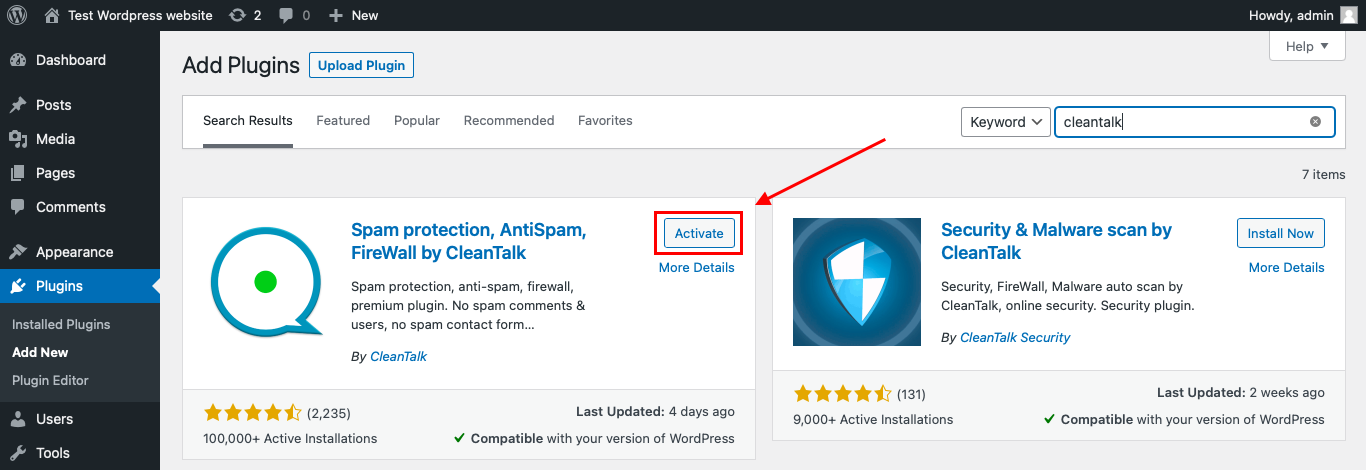
After it is done go to the plugin settings and click the «Get Access Key Automatically» button. Then just click the «Save Settings» button.

That’s it! From now you know how to completely protect your HivePress from spam.
That’s it! From now on, you know how to protect Constant Contact Forms from spam.
How to Check Constant Contact Forms Spam Protection
After installing the plugin, test that spam protection is working correctly.
Use the test email:
stop_email@example.com
To test the form:
- Open a page with a Constant Contact sign-up form or contact form.
- Use an Incognito or private browser window.
- Fill in all required form fields.
- Use stop_email@example.com as the sender email.
- Submit the form.
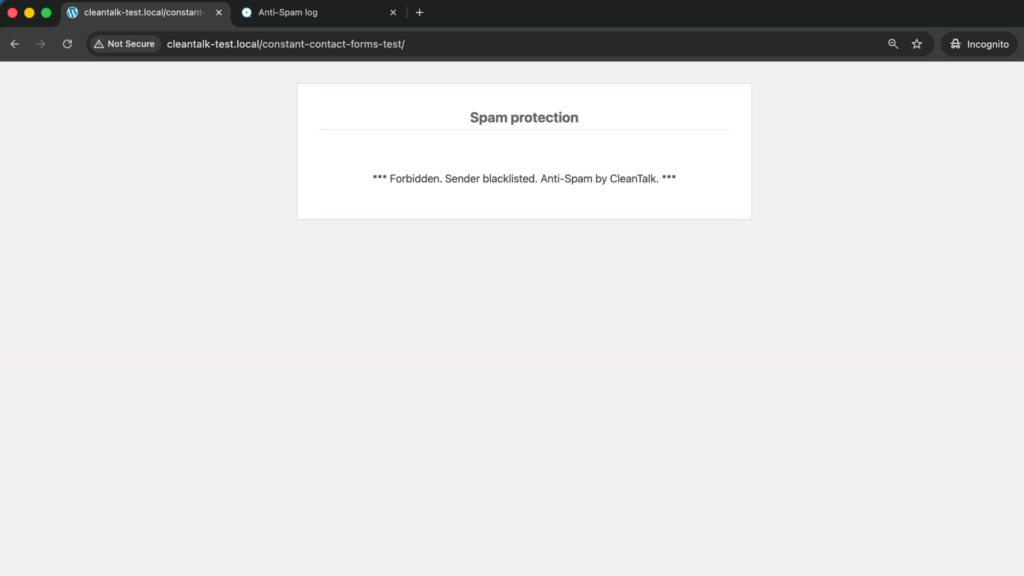
It is better to test protection in an Incognito window because WordPress admins may be treated differently from regular website visitors. Testing as a normal visitor helps confirm that protection works for public form submissions.
If the form submits successfully and nothing appears in the CleanTalk Anti-Spam Log, the request may be processed by another layer before it reaches the standard WordPress form flow. In that case, the exact form setup should be checked separately.
Cloud Dashboard and Monitoring
CleanTalk gives website owners access to request details in the CleanTalk Cloud Dashboard.
This is useful for Constant Contact Forms because fake sign-ups often follow patterns. You may see repeated email domains, repeated IP addresses, suspicious names, similar form messages, or activity from specific countries or networks.
In the Cloud Dashboard, site owners can review:
- approved and blocked submissions
- sender IP addresses
- sender email addresses
- submission date and time
- page URL where the form was submitted
- spam check result
- reason for blocking or approving a request
- personal Allow lists and Block lists
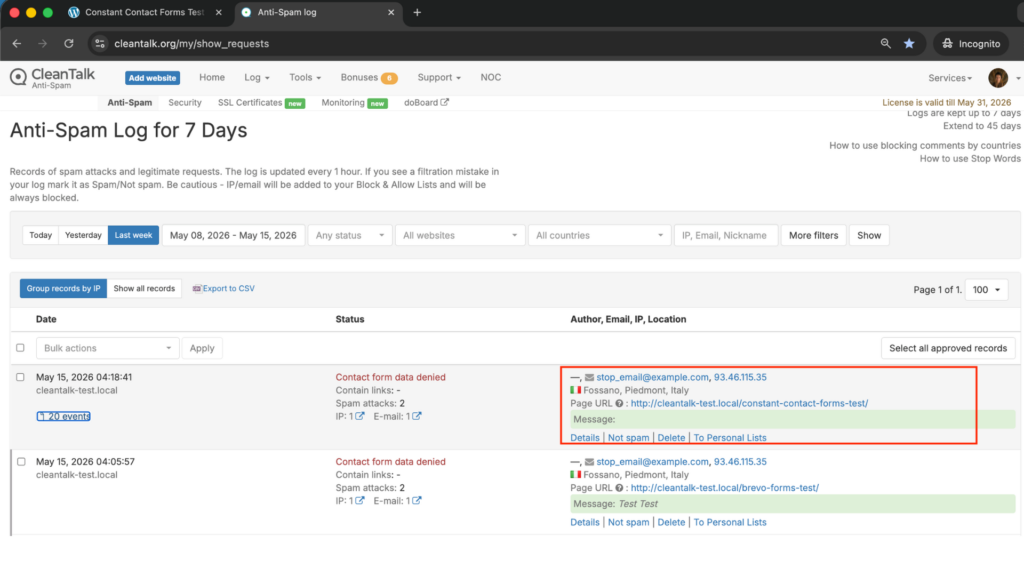
This helps website owners understand whether the spam is random or coming from repeated sources.
For example, if a real subscriber is blocked by mistake, the site owner can review the log and add the sender to an Allow list. If repeated fake contacts use the same email pattern, IP range, or country source, the filtering rules can be adjusted.
Constant Contact Workflows and Why Spam Filtering Matters
Constant Contact Forms can send submitted email addresses directly to selected Constant Contact lists. This is useful for legitimate sign-ups, but risky when spam is not filtered early.
Fake submissions can:
- pollute Constant Contact lists
- create administrative cleanup work
- trigger confirmation or welcome emails
- make list growth look stronger than it really is
- reduce engagement quality
- affect segmentation
- create noise in contact sources
- make campaign reports harder to trust
- increase the number of contacts that never engage
- make real subscribers harder to identify
Constant Contact documentation explains that the WordPress plugin syncs contact lists to WordPress and automatically captures new email addresses on the chosen list. That means spam should be stopped before fake submissions are treated as normal list growth.
Additional Spam Protection Options for Constant Contact Forms
CleanTalk can work as the main anti-spam layer for WordPress-side submissions, but Constant Contact Forms also has its own protection options.
These options are especially useful for public sign-up forms, discount forms, lead magnets, and high-traffic pages.
Built-In Honeypot Field
Constant Contact documentation explains that the Constant Contact Forms plugin includes a hidden honeypot field.
Real visitors do not see this field, but bots may fill it in. If the hidden field is filled, Constant Contact rejects the form submission.
This is useful because it does not add visible friction for real visitors.
However, Constant Contact also notes that the honeypot field is not a foolproof method. It can help with false sign-ups, but it should not be treated as the only spam protection layer.
CAPTCHA Services
Constant Contact Forms supports CAPTCHA services for WordPress sign-up forms.
According to Constant Contact documentation, the supported CAPTCHA services are:
- Google reCAPTCHA
- hCaptcha
- Cloudflare Turnstile
These services can be added through the plugin settings under the Spam Control tab.
CAPTCHA can help protect sign-up forms from malicious bots and fraudulent sign-ups. However, it may add friction depending on the service and configuration.
For conversion-focused sign-up forms, it is usually better to use CAPTCHA only where it is needed, rather than adding unnecessary friction to every form.
Spam Error Message
Constant Contact form options include a spam error message.
This message is shown when a bot fills in the hidden honeypot field and tries to submit the form.
This is useful because it allows website owners to control what visitors or blocked submissions see, instead of relying on a generic error message.
Email Opt-In and Confirm Opt-In
Constant Contact Forms can include email opt-in settings. Constant Contact also supports Confirm Opt-in, also called double opt-in.
With Confirm Opt-in enabled, new contacts receive an automatic confirmation email and must click the confirmation link before they are added to the list.
Constant Contact describes Confirm Opt-in as the strictest way to obtain permission to send emails. It can help verify that the email address is valid and active, reduce spam complaints, and improve list quality.
However, Confirm Opt-in does not stop every spam attempt at the form submission stage. A bot can still submit the form and trigger a confirmation email.
That is why Confirm Opt-in works best together with anti-spam filtering.
List Cleanup and Contact Quality
If bot-generated contacts have already entered a Constant Contact account, cleanup may be required.
Constant Contact advises users who see bot-generated contacts from sign-up landing pages to unsubscribe those contacts, either individually or by exporting and re-importing them as unsubscribed contacts when there are many.
This is important because anti-spam is not only about blocking future submissions. It is also about keeping the existing contact list clean.
Website owners should regularly review:
- new contacts from public forms
- contacts with suspicious names
- contacts that never engage
- temporary or suspicious domains
- unexpected source spikes
- contacts awaiting confirmation
- repeated entries from the same campaigns
Comparison of Anti-Spam Methods for Constant Contact Forms
| Method | Main Role | Strengths | Limitations | Best Use Case |
|---|---|---|---|---|
| CleanTalk | Background anti-spam filtering | Works without visible CAPTCHA, helps block suspicious WordPress submissions before they affect workflows | Needs plugin setup and log review | WordPress sites using Constant Contact Forms |
| Built-in Honeypot | Hidden bot trap | Included in the Constant Contact Forms plugin and invisible to real users | Not foolproof against advanced bots or human spam | Basic background protection |
| Google reCAPTCHA | CAPTCHA-style bot verification | Supported by Constant Contact Forms | May add friction or require careful setup | High-risk sign-up forms |
| hCaptcha | CAPTCHA alternative | Supported by Constant Contact Forms | Requires external keys and testing | Privacy-conscious CAPTCHA setups |
| Cloudflare Turnstile | CAPTCHA alternative | Supported by Constant Contact Forms and usually low-friction | Still mainly a bot verification layer | Conversion-focused forms needing extra verification |
| Confirm Opt-in | Subscriber confirmation | Helps verify email access and permission to send | Does not stop every spam attempt before submission | Newsletter lists and permission-sensitive campaigns |
| List Cleanup | Post-submission quality control | Helps remove bot-generated contacts already in the account | Does not stop the original spam submission | Accounts already affected by fake sign-ups |
For most WordPress websites, the best approach is layered protection. CleanTalk can be used as the main background anti-spam layer, while honeypot, CAPTCHA services, Confirm Opt-in, and list cleanup help improve contact quality.
Frequently Asked Questions
Why are fake contacts appearing in my Constant Contact lists?
Fake contacts can appear when public sign-up forms are submitted by bots or low-quality users.
Because Constant Contact Forms can automatically add captured email addresses to selected lists, spam submissions may become list contacts unless they are blocked before the form is accepted.
Does the built-in honeypot in Constant Contact Forms stop all spam?
No. The built-in honeypot helps stop some bots, but Constant Contact documentation says it is not foolproof.
It works best as a quiet first layer. For stronger protection, combine it with CleanTalk, CAPTCHA services, Confirm Opt-in, and regular list review.
Which CAPTCHA services work with Constant Contact Forms?
Constant Contact Forms supports Google reCAPTCHA, hCaptcha, and Cloudflare Turnstile.
These can be configured in WordPress under Contact Form → Settings → Spam Control after you create the required site key and secret key for the selected CAPTCHA service.
Why do bots still get through if CAPTCHA is enabled?
CAPTCHA reduces automated spam, but it does not solve every form-quality problem.
Some spam may come from low-quality human submissions, temporary emails, repeated promotion abuse, or form setups where the request is handled differently. For better protection, CAPTCHA should be combined with background spam filtering and contact list quality controls.
Should I use Confirm Opt-in for Constant Contact sign-up forms?
Confirm Opt-in is useful when list quality and permission are more important than fast list growth.
It requires new subscribers to click a confirmation link before they are added to your list. This helps verify that the email address is active and that the contact wants to receive emails.
How can I test CleanTalk with a Constant Contact form?
Open the page with your Constant Contact form in an Incognito or private browser window and submit the form using:
If CleanTalk is working correctly, the submission should be blocked or recorded in the CleanTalk Cloud Dashboard.
If the form submits successfully and nothing appears in the Anti-Spam Log, the form path should be checked because the request may be processed outside the standard WordPress form flow.
Recommended Anti-Spam Setup for Constant Contact Forms
| Website Type | Recommended Setup | Why |
|---|---|---|
| Standard business website | CleanTalk + built-in honeypot | Background filtering with low user friction |
| Newsletter-focused website | CleanTalk + Confirm Opt-in | Helps protect sign-ups and improve list quality |
| High-spam sign-up form | CleanTalk + CAPTCHA service | Adds stronger bot verification |
| Discount or coupon campaign | CleanTalk + Confirm Opt-in + list review | Helps reduce fake promotion-driven sign-ups |
| Conversion-focused landing page | CleanTalk + Cloudflare Turnstile if needed | Keeps the form smoother while adding protection |
| Account already affected by bots | CleanTalk + list cleanup + Confirm Opt-in | Helps stop new spam and clean existing contacts |
| Website with repeated spam patterns | CleanTalk + personal lists + filters | Helps block repeated senders, domains, or sources |
Final Thoughts
Constant Contact Forms makes it easy to collect sign-ups, feedback, and visitor information directly from WordPress. But because submitted email addresses can be added directly to Constant Contact lists, spam protection is especially important.
The built-in honeypot field and CAPTCHA services can help, but they are not always enough by themselves. Confirm Opt-in can improve list quality, but it does not stop every bot at the form stage.
For most WordPress websites using Constant Contact Forms, the best solution is to install Anti-Spam by CleanTalk as the main background anti-spam layer. Then, if needed, add Google reCAPTCHA, hCaptcha, Cloudflare Turnstile, Confirm Opt-in, personal lists, filters, and list cleanup for extra control.
This layered setup helps reduce fake sign-ups, protect Constant Contact list quality, keep reporting cleaner, and make forms easier for real visitors to use.
