

TL;DR: To stop spam in FluentBooking, combine the plugin’s own booking limits with a cloud anti-spam filter. CleanTalk Anti-Spam checks every FluentBooking booking in the background and blocks spam bots invisibly – no CAPTCHA, no puzzles, no checkboxes – while protecting registrations, comments and WooCommerce on the same site. reCAPTCHA, hCaptcha and Turnstile add a visible challenge layer for high-risk forms. For most WordPress sites, an invisible cloud filter blocks more spam with less friction than CAPTCHA alone. Plans start at $12 per site/year with a free 7-day trial.
FluentBooking is the appointment scheduler from WPManageNinja, the team behind Fluent Forms and FluentCRM. It puts a Calendly-style booking page inside WordPress: one-on-one, group and round-robin meetings, availability rules, Google, Apple and Outlook calendar sync, Zoom and Google Meet links, Stripe and PayPal payments, email and SMS reminders, and a direct line into FluentCRM. The free version covers the core booking flow; the Pro license starts at $63 a year for one site.
In 2026 popularity also means exposure. A booking page is a public form with a name, an email, a phone number and a free-text note, and it does something a contact form never does: it reserves a slot in your calendar, sends you a confirmation, and may create a video-call link or a calendar invite on the spot. A bot that fills it does not just send you junk – it takes time away from real customers. And FluentBooking itself does not filter who books: there is no CAPTCHA, no honeypot and no spam check in the plugin.
As WordPress.org shows, FluentBooking is currently used on over 20,000 active installations and has 46 reviews with an average rating of 4.7.
Plugin Homepage at wordpress.org | Website fluentbooking.com
Common types of spam in FluentBooking
- Fake bookings that block real slots. Bots submit appointments with throwaway or stolen email addresses. Each one reserves a slot until you notice and cancel it, and meanwhile a real client sees “no availability”.
- Notification flooding. Every booking triggers a confirmation email to you and the attendee, plus reminders. On the Pro plan with SMS reminders, each fake booking also costs you a message.
- Link drops in the “What is this meeting about?” field. SEO pitches, casino and crypto links, “your site has an issue” scams – typed into the note field and delivered straight to your inbox with a calendar invite attached.
- Calendar and video-call pollution. A spam booking synced to Google Calendar becomes an event on your phone, and with Zoom or Google Meet locations it creates a real meeting link that bots can reuse.
- Fake payments and card testing. On paid events with Stripe or PayPal, bots use booking forms to test stolen cards in small amounts; chargebacks follow.
- CRM list poisoning. With the FluentCRM integration every attendee becomes a contact. Fake attendees end up in your lists and automations.
- Repeat offenders. Cancelling a spam booking does not stop the next one from the same sender with a new address.
Official anti-spam options and integrations in FluentBooking
FluentBooking is honest about what it is: a scheduler, not a spam filter. In version 2.5.0 there is no CAPTCHA option, no honeypot and no spam-check setting in the plugin, and the documentation does not describe one. What you do get are booking rules that limit the damage:
- Required fields. Name and email are always required; you can make the phone number and custom booking questions required too. This stops the simplest scripts, not a bot that fills every field.
- Booking limits. Minimum notice before a meeting, buffer time between meetings, a daily or weekly cap on bookings, and a limit on how far ahead a slot can be booked. They cap how many slots a flood can take, but one fake booking per day still blocks one real client per day.
- Paid events (Pro). Requiring a Stripe or PayPal payment before the slot is confirmed deters most bots, at the price of friction for every real attendee, and it does not apply to free consultations.
- Fluent Forms integration (Pro). You can attach a Fluent Forms form to collect booking details. Fluent Forms itself supports reCAPTCHA, hCaptcha, Turnstile and a honeypot, so this route adds a challenge to the booking step – visible to every visitor.
- Manual cancellation. Any booking can be cancelled from the FluentBooking dashboard, and the attendee gets a cancellation email. That is cleanup, not prevention.
If your main goal is to protect FluentBooking without adding CAPTCHA challenges, CleanTalk can be used as a Google reCAPTCHA alternative that filters spam submissions in the background.
CAPTCHA options in FluentBooking
There is no CAPTCHA field in the FluentBooking booking form, free or Pro. The only way to put a challenge in front of a booking is the Fluent Forms route described above, which brings Google reCAPTCHA v2 and v3, hCaptcha and Cloudflare Turnstile with it.
Keep in mind what a CAPTCHA does on a booking page: a person who has already picked a date and a time and typed their details now has to pass one more step. Every extra step on a booking flow costs completed bookings, and a challenge does nothing against a human spammer who types the junk by hand. CAPTCHA makes sense on high-risk paid events; for a free consultation slot, an invisible check is the better default.
Best ways to stop spam in FluentBooking
- Add an invisible cloud filter. CleanTalk checks the attendee’s email, IP and note text against a reputation database the moment the booking is submitted, before FluentBooking creates the meeting. No slot is reserved, no email is sent, no calendar event appears.
- Keep the booking limits on. Minimum notice and a daily booking cap stop a flood from taking the whole week even if something slips through.
- Require a payment where it fits. For paid sessions, Stripe or PayPal confirmation on the Pro plan is a strong filter on its own.
- Use a challenge only where risk is high. If you run the Fluent Forms route, put Turnstile or reCAPTCHA on the paid or high-value event, not on every booking page.
- Review the log, not the inbox. With a cloud filter you get a log of every booking attempt and the reason it was blocked, and you can allow or block a sender in one click.
Comparison table: FluentBooking anti-spam options vs CleanTalk
Here is how the main anti-spam options for FluentBooking compare:
| Solution | Best for | Pricing | Main limitation |
| CleanTalk Anti-Spam | Invisible, site-wide protection across forms, signups and WooCommerce | From $12/site/year; free 7-day trial | Cloud service; paid after trial |
| FluentBooking booking limits (notice, buffer, daily cap) | Capping how many slots a flood can take | Included | Do not tell a bot from a client; one fake booking still blocks one slot |
| Paid events via Stripe or PayPal (Pro) | High-value sessions where payment is expected anyway | From $63/year (FluentBooking Pro) plus payment fees | Friction for every attendee; useless for free consultations |
| Fluent Forms with reCAPTCHA, hCaptcha or Turnstile (Pro) | High-risk booking forms where a challenge is acceptable | FluentBooking Pro plus free CAPTCHA | Adds a step to the booking flow; human spam passes |
In short: use CleanTalk as the invisible baseline filter, and add reCAPTCHA, hCaptcha or Turnstile only on your highest-risk forms.
Anti-Spam plugin by CleanTalk for WordPress
The next tool we’re going to use is the Anti-Spam plugin by CleanTalk.
Here’s a short overview:
- CleanTalk is a cloud-based spam protection service for websites, founded in 2012.
- It automatically blocks spam without CAPTCHAs and doesn’t interrupt the user experience.
- Protects many types of forms: contact forms, payment forms, registrations, comments, surveys and more.
- Stops both automated bots and human spam submissions.
- Uses advanced filtering algorithms and a global spam detection network.
- Detects spam based on IP address, email address and user behavior.
- Lets you create custom filtering rules for specific cases.
- Allows blocking or filtering by IP, email and country.
- Works quietly in the background and is very easy to install and configure.
According to WordPress.org, Anti-Spam by CleanTalk for WordPress has over 200,000 active installations, with 3,212 reviews and an average rating of 4.8.
Plugin Homepage at cleantalk.org | Latest release at GitHub.com | Website cleantalk.org
CleanTalk has a direct integration with FluentBooking: the plugin hooks into the booking request itself (the fluent_cal_schedule_meeting action), so the check runs on the exact data FluentBooking receives – attendee name, email, phone, the note and the visitor’s browser signals – and a blocked booking is never created. The integration has been in the plugin since version 6.28 (February 2024) and was reworked in 2025 and 2026 to load the bot detector on booking pages and attach request metadata. It is on by default as part of contact forms protection.
Install the CleanTalk Anti-Spam plugin
Show Instructions
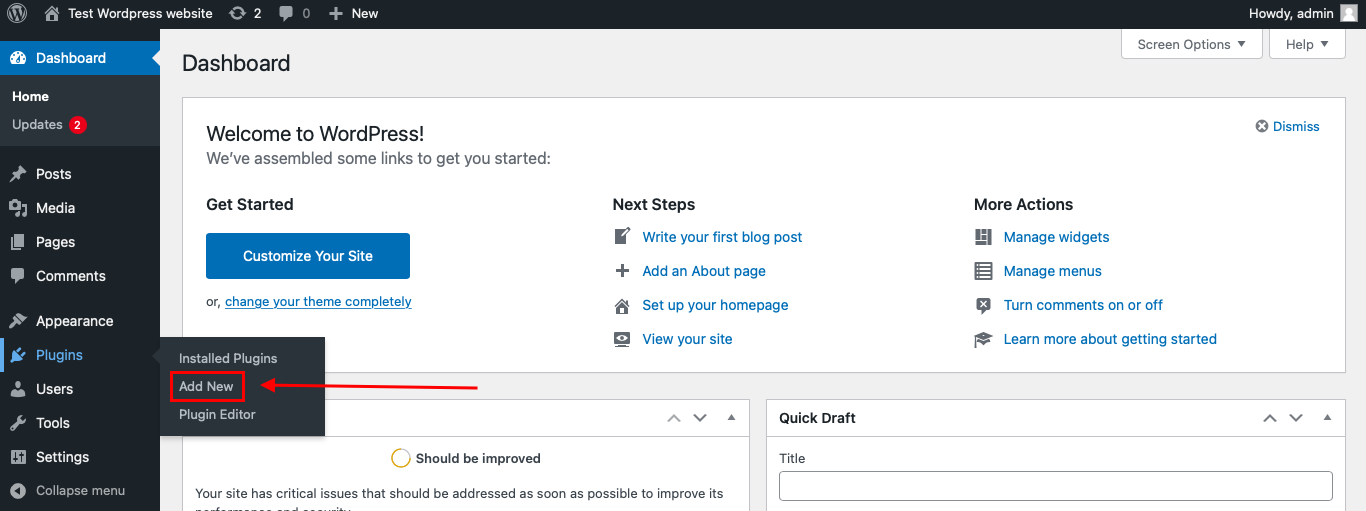
To install the Anti-Spam plugin, go to your WordPress admin panel → Plugins → Add New.
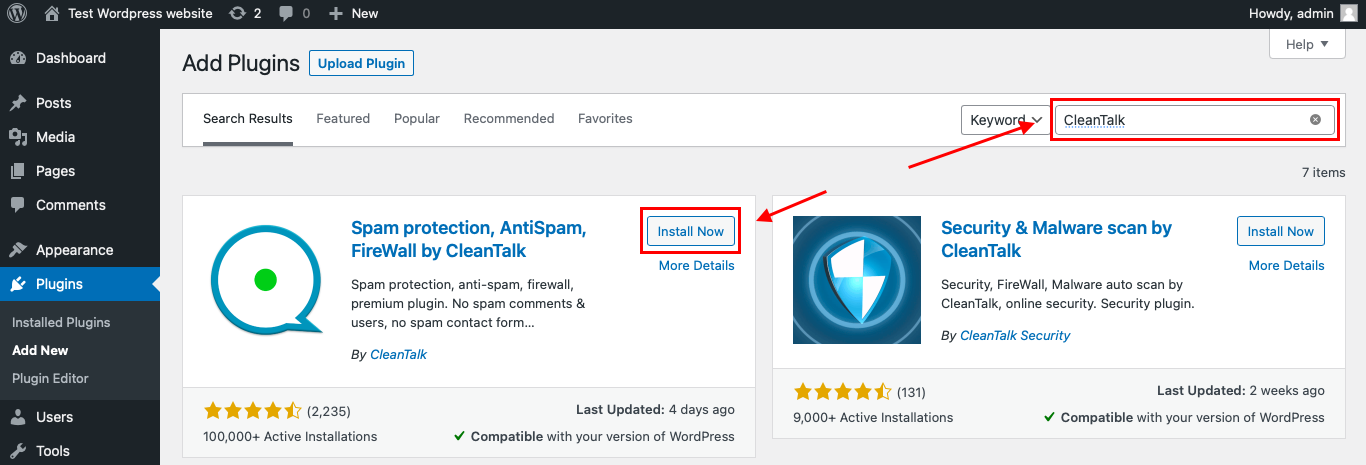
Then enter «СleanTalk» in the search box and click the Install button for «Spam protection, Anti-Spam, FireWall by CleanTalk».
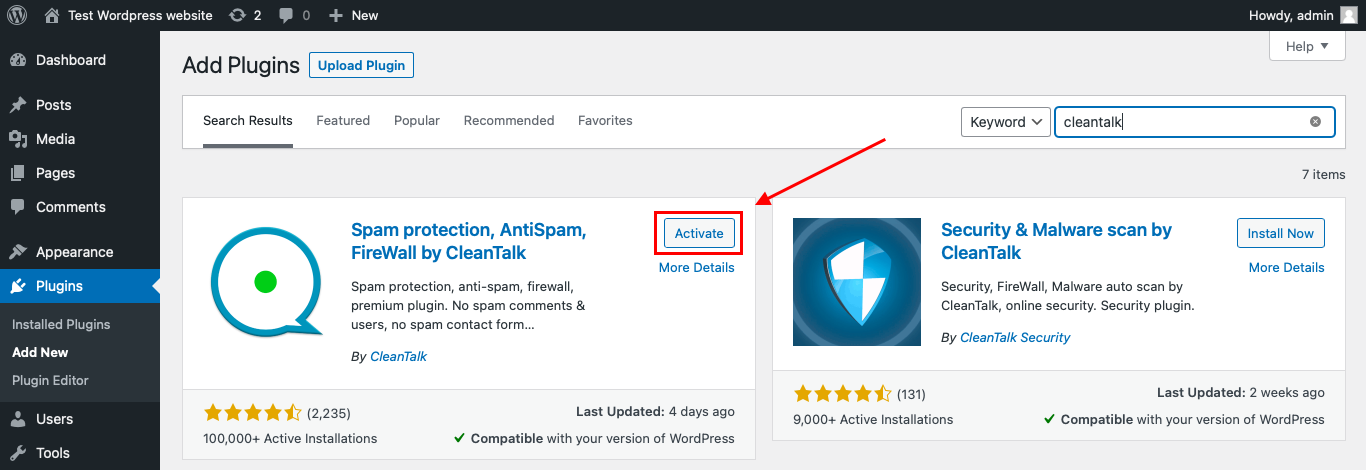
After installing the plugin, click the «Activate» button.
After it is done go to the plugin settings and click the «Get Access Key Automatically» button. Then just click the «Save Settings» button.
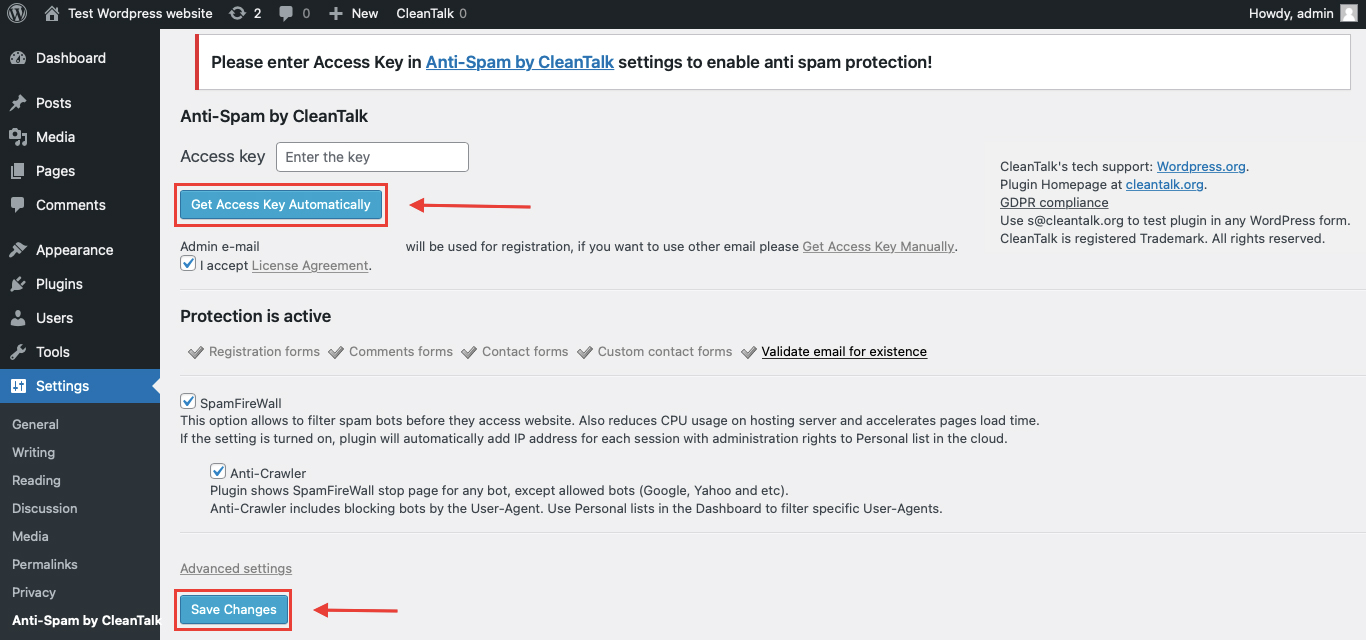
That’s it! From now you know how to completely protect your FluentBooking from spam. You don’t need to paste any shortcodes – just use FluentBooking as usual, and CleanTalk will filter spam in the background.
Check if spam protection works with FluentBooking
The best way to test the spam protection is by using a test email,
stop_email@example.com
- Open a page with your FluentBooking form in an Incognito / private browser tab.
- Pick a date and a time slot, then fill out the booking details using stop_email@example.com as the attendee’s email.
- Click Schedule Meeting.
- You should see a message from the Anti-Spam plugin confirming that a spam submission was blocked.
*** Forbidden. Sender blacklisted. Anti-Spam by CleanTalk. ***
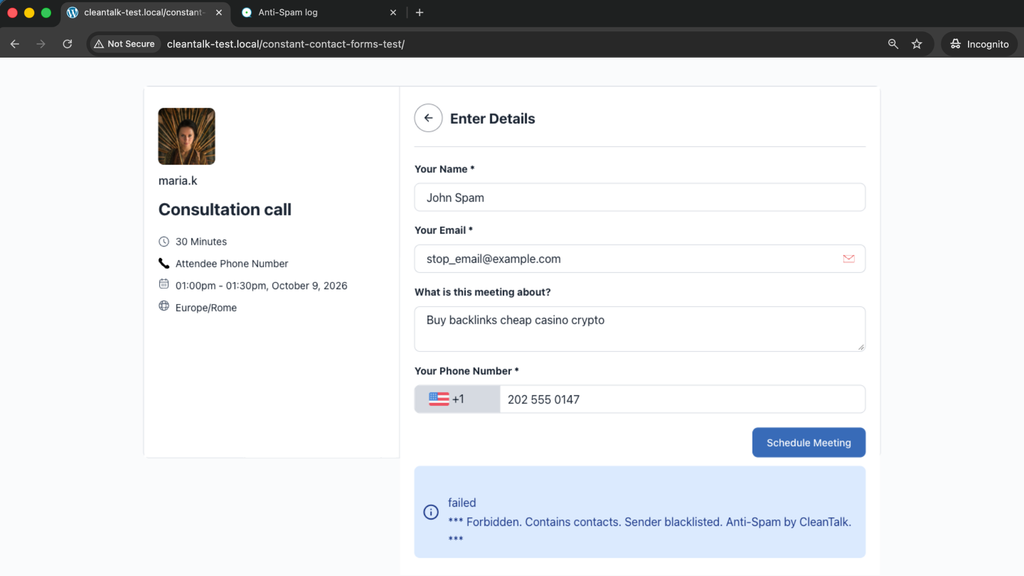
In FluentBooking the message appears inside the booking form under the Schedule Meeting button, and the exact wording includes the reason – on our test site it read “* Forbidden. Contains contacts. Sender blacklisted. Anti-Spam by CleanTalk. *”. The slot stays free, no confirmation email goes out, and nothing appears in the FluentBooking dashboard.
If you see this message, it means CleanTalk successfully protects your FluentBooking forms from spam.
To be sure real attendees are not affected, book the same event with a normal address: the booking goes through and FluentBooking shows its usual “Your meeting has been Scheduled” confirmation.
Cloud Dashboard
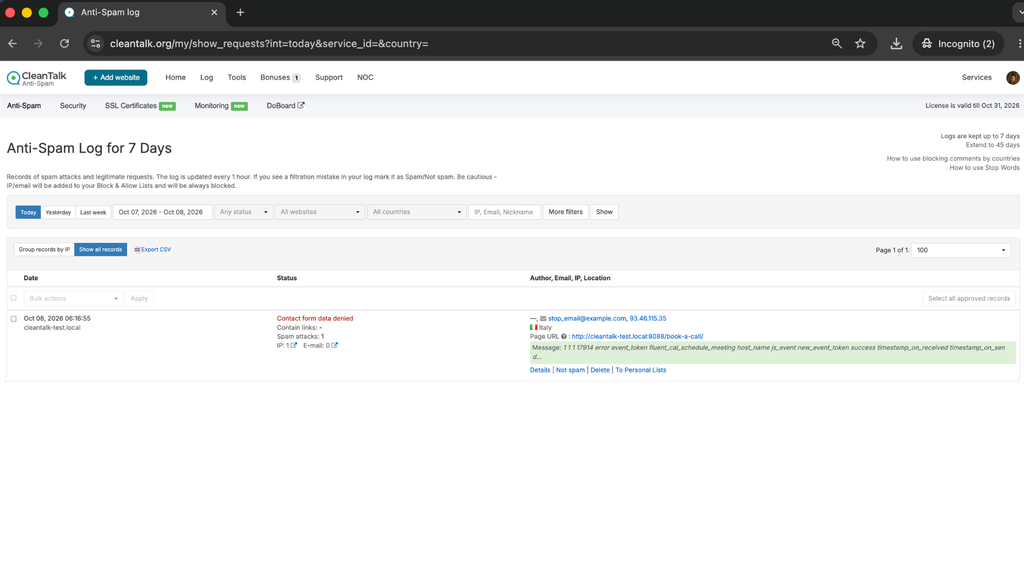
In addition, in the Cloud Dashboard you can find extra details regarding all submissions processed by CleanTalk, including FluentBooking forms:
- IP and email of the sender, as well as the sender’s activity history across other websites connected to the CleanTalk cloud.
- Geolocation of the sender.
- Date and time of the submission.
- Page (URL) where the form was submitted.
- Cloud decision – Approved or Denied.
- Cloud explanation for the decision (e.g. blacklisted email, bad IP reputation, spam text, etc.).
- Tools to move the sender to Block or Allow lists so you can fine-tune FluentBooking spam protection.
FAQ
Does FluentBooking have built-in spam protection?
No. FluentBooking 2.5.0 has no CAPTCHA, honeypot or spam filter. It offers booking limits (minimum notice, buffer time, daily caps), required fields and, on Pro, payment before confirmation. These reduce the damage but do not tell a bot from a client.
Can I add reCAPTCHA to a FluentBooking form?
Not to the native booking form. On the Pro plan you can collect booking details through a Fluent Forms form, and Fluent Forms supports reCAPTCHA, hCaptcha and Turnstile. That adds a visible step to every booking.
Does CleanTalk work with the free version of FluentBooking?
Yes. We tested it with FluentBooking 2.5.0 from WordPress.org and CleanTalk 6.88: the spam booking was blocked inside the form and a normal booking went through.
Do I need to change anything in FluentBooking settings?
No. The CleanTalk integration is part of contact forms protection, which is enabled by default. Install the plugin, get the access key, and booking requests are checked automatically.
What happens to a blocked booking?
Nothing is created: no slot is reserved, no confirmation or reminder is sent, no calendar event or video link is generated. The attempt is recorded in the CleanTalk Anti-Spam Log with the reason.
What if a real client gets blocked?
Open the Anti-Spam Log, find the request and move the sender to your Allow list; they can book again right away. Blocks on real people are rare because the decision is based on the sender’s reputation across the CleanTalk network, not on a single field.
Does CleanTalk protect my other forms too?
Yes. The same plugin covers WordPress registrations and comments, WooCommerce checkout and reviews, Fluent Forms, Contact Form 7, WPForms and most other form plugins on the site.
Final recommendation
FluentBooking does the scheduling well and leaves spam to you. Keep its booking limits on, require a payment where a payment makes sense, and add an invisible cloud filter so a bot never reaches the “Schedule Meeting” step with a fake identity. CleanTalk checks the attendee before the meeting exists, shows nothing to real visitors, and gives you a log and allow/block lists to fine-tune it.
For broader website protection, CleanTalk also provides anti-spam protection for websites, helping block spam in forms, comments, registrations, and orders without CAPTCHA.
