

TL;DR: To stop spam in Chaty, combine its CAPTCHA add-ons with a cloud anti-spam filter. CleanTalk Anti-Spam checks every Chaty submission in the background and blocks spam bots invisibly – no CAPTCHA, no puzzles, no checkboxes – while protecting registrations, comments and WooCommerce on the same site. reCAPTCHA, hCaptcha and Turnstile add a visible challenge layer for high-risk forms. For most WordPress sites, an invisible cloud filter blocks more spam with less friction than CAPTCHA alone. Plans start at $12 per site/year with a free 7-day trial.
Chaty is one of the most popular floating chat widgets for WordPress. It puts a clean set of contact icons in the corner of your site – WhatsApp, Facebook Messenger, Telegram, a call button, email, SMS and more – so visitors can reach you in one tap. On top of the messaging icons, Chaty can also display a built-in contact or lead form (a “Contact Us” form or a callback request), which turns the widget into a quick lead-capture tool.

That built-in form is exactly where the trouble starts. In 2026, popularity also means exposure: a widget that sits on hundreds of thousands of sites is a known, predictable target for spam bots. Any form that is public, loads on every page and submits leads straight into your inbox or CRM will attract automated junk. Because Chaty’s contact form is designed to be frictionless for real visitors, it is just as easy for bots to fill in and submit – so without an extra layer of protection, fake submissions pile up fast.
As WordPress.org shows, Chaty is currently used on over 400,000 active installations and has 1,236 reviews with an average rating of 5.0.
Plugin Homepage at wordpress.org | Website chaty.app
Common types of spam in Chaty
Most of the spam you see through Chaty comes in two flavors, both arriving through the widget’s built-in contact or lead form:
- Automated bot submissions. Spam bots scan the web for known forms and fire fake entries into them around the clock. They submit your Chaty contact form with random names, throwaway emails and gibberish or link-stuffed messages – sometimes hundreds per day.
- Human (manual) spam. Real people, often paid, submit advertising, backlinks, crypto and “SEO services” pitches, or outright scam messages through the form. This kind of spam is written by hand specifically to slip past simple filters.
The damage is not just an annoying inbox. Because Chaty’s form is a lead-capture tool, every fake submission becomes a fake lead:
- Your analytics get distorted – conversion and lead numbers look inflated and you can’t trust them.
- Your inbox and CRM fill up with junk, so real inquiries get buried and sales follow-up slows down.
- Time gets wasted sorting genuine leads from noise, and some real customers get lost in the pile.
In short, unfiltered Chaty submissions cost you both clean data and real opportunities.
Official anti-spam options and integrations in Chaty
Here it’s worth being honest: Chaty does not ship with a dedicated server-side anti-spam engine for its contact form. It is built first and foremost as a chat-widget and lead-capture plugin, so spam protection relies on third-party tools rather than a built-in filter that analyzes submissions on the backend.
In practice, that means you protect the Chaty form by adding an external layer – typically a CAPTCHA service connected through a separate plugin, or a cloud anti-spam filter that inspects every submission for you.
If your main goal is to protect Chaty without adding CAPTCHA challenges, CleanTalk can be used as a Google reCAPTCHA alternative that filters spam submissions in the background.
CAPTCHA options in Chaty
The common CAPTCHA route is to bolt a challenge onto the Chaty form using a separate plugin or integration. The usual options are:
- Google reCAPTCHA v2 (the “I’m not a robot” checkbox or image puzzles).
- Google reCAPTCHA v3 (an invisible score-based check).
- hCaptcha (a privacy-oriented challenge).
- Cloudflare Turnstile (a lightweight, mostly invisible challenge).
These can help, but they come with real downsides for a chat widget:
- Friction kills leads. A puzzle or checkbox inside a small floating widget adds steps to a flow that is supposed to be one tap. Every bit of friction in a lead form costs you real conversions.
- Bots increasingly solve them. Modern bots and cheap solving services get past reCAPTCHA and similar challenges, so they are no longer a reliable wall.
- They don’t stop human spam. A CAPTCHA only proves “a human is here.” It does nothing against paid human spammers who happily solve the puzzle and then submit their advertising anyway.
Best ways to stop spam in Chaty
The most reliable approach is layered, with an invisible filter doing the heavy lifting:
- CleanTalk as the invisible baseline. A cloud-based filter checks every Chaty contact/lead form submission in the background and blocks both bots and human spam – without showing your visitors a single checkbox or puzzle. This keeps the widget frictionless and your leads clean.
- Turnstile as an optional reinforcement. If you ever come under a heavy, targeted attack, you can add Cloudflare Turnstile on top for an extra (mostly invisible) challenge layer. For most sites, the cloud filter alone is enough.
This way real visitors keep their one-tap experience, while spam is filtered out before it ever reaches your inbox or CRM.
Comparison table: CAPTCHA vs CleanTalk
Here is how the main anti-spam options for Chaty compare:
| Solution | Best for | Pricing | Main limitation |
| CleanTalk Anti-Spam | Invisible, site-wide protection across forms, signups and WooCommerce | From $12/site/year; free 7-day trial | Cloud service; paid after trial |
| Akismet | Filtering comment and basic form spam | Free for personal; paid plans for business | Focused on comments; weaker on custom widget forms |
| Google reCAPTCHA | Adding a visible bot challenge to forms | Free | Adds friction; bots solve it; misses human spam |
| Cloudflare Turnstile | A lightweight, mostly invisible challenge | Free | Still a challenge layer; doesn’t stop human spam |
In short: use CleanTalk as the invisible baseline filter, and add reCAPTCHA, hCaptcha or Turnstile only on your highest-risk forms.
Anti-Spam plugin by CleanTalk for WordPress
The next tool we’re going to use is the Anti-Spam plugin by CleanTalk.
CleanTalk is a cloud-based anti-spam service for WordPress and other platforms. Instead of showing visitors a puzzle, it analyzes each submission server-side against a constantly updated database of known spammers, spam patterns, and behavioral signals, then silently blocks the bad ones.
Here’s a short overview:
- CleanTalk is a cloud-based spam protection service for websites, founded in 2012.
- It automatically blocks spam without CAPTCHAs and doesn’t interrupt the user experience.
- Protects many types of forms: contact forms, payment forms, registrations, comments, surveys and more.
- Stops both automated bots and human spam submissions.
- Uses advanced filtering algorithms and a global spam detection network.
- Detects spam based on IP address, email address and user behavior.
- Lets you create custom filtering rules for specific cases.
- Allows blocking or filtering by IP, email and country.
- Works quietly in the background and is very easy to install and configure.
According to WordPress.org, Anti-Spam by CleanTalk for WordPress has over 200,000 active installations, with 3,168 reviews and an average rating of 4.7.
Plugin Homepage at cleantalk.org | Latest release at GitHub.com
Install the CleanTalk Anti-Spam plugin
To install the Anti-Spam plugin, go to your WordPress admin panel→ Plugins→ Add New.
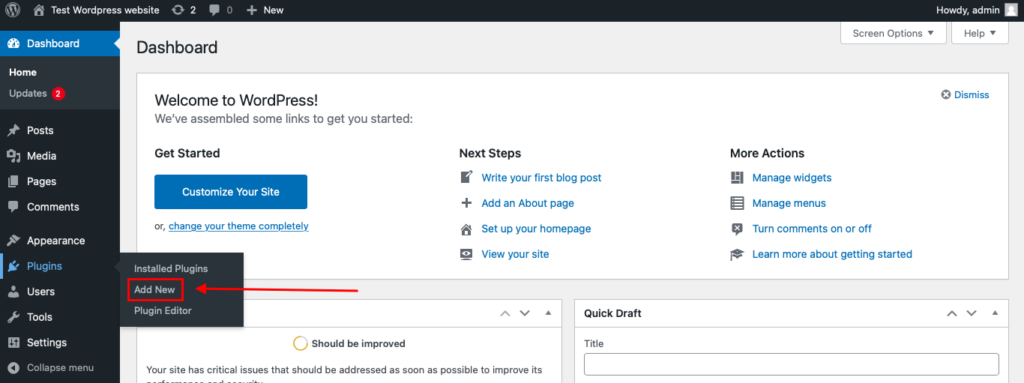
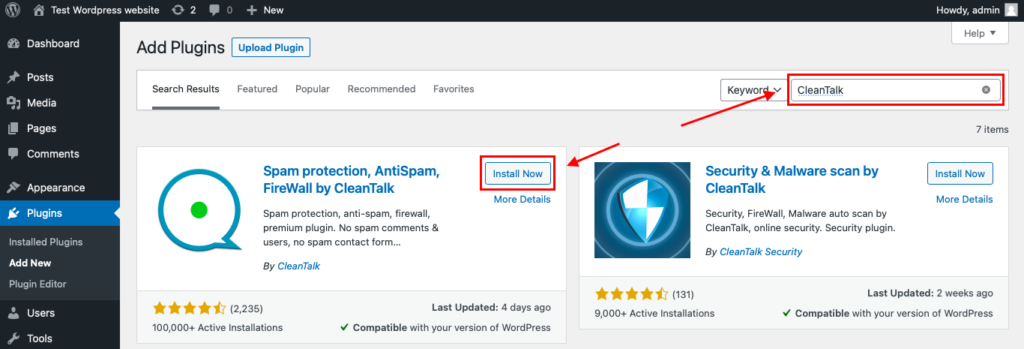
Then enter «СleanTalk» in the search box and click the Install button for «Spam protection, Anti-Spam, FireWall by CleanTalk».
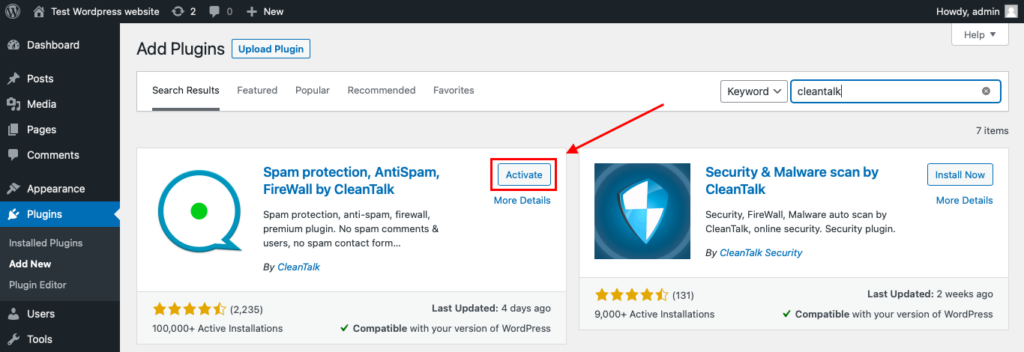
After installing the plugin, click the «Activate» button.
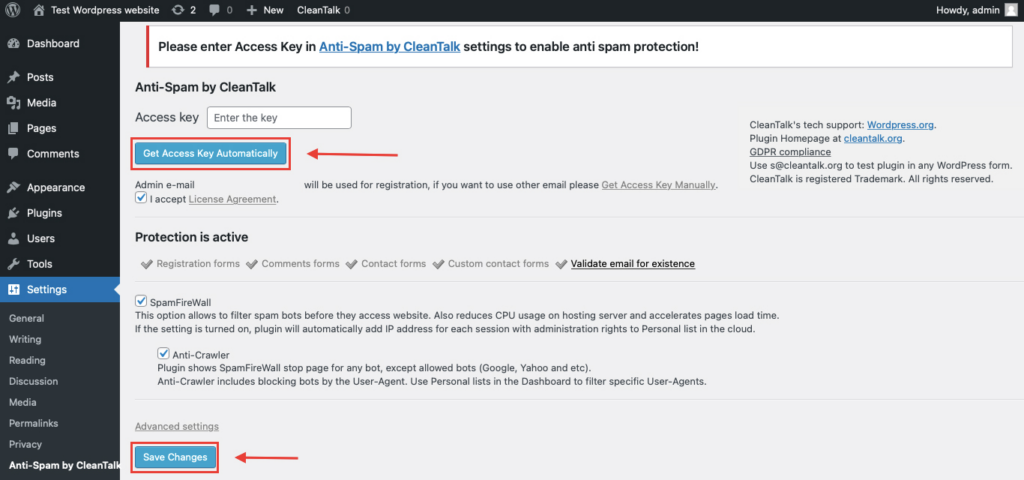
After it is done go to the plugin settings and click the «Get Access Key Automatically» button. Then just click the «Save Settings» button.
That’s all – Contact Form 7 are now protected From this moment,CleanTalk automatically protects the Contact Form 7 registration form (REST route /wp-json/Contact Form 7press/v1/users/), and the Add Listing form used to submit new listings.
You don’t need to paste any shortcodes – just use Contact Form 7 as usual, and CleanTalk will filter spam in the background.
That’s it! From now you know how to completely protect your Chaty from spam. You don’t need to paste any shortcodes – just use Chaty as usual, and CleanTalk will filter spam in the background.
Check if spam protection works with Chaty
The best way to test the spam protection is by using a test email,
stop_email@example.com
- Open a page with your Chaty form in an Incognito / private browser tab.
- Fill out the form using stop_email@example.com as the sender’s email.
- Send the form.
- You should see a message from the Anti-Spam plugin confirming that a spam submission was blocked.
*** Forbidden. Sender blacklisted. Anti-Spam by CleanTalk. ***
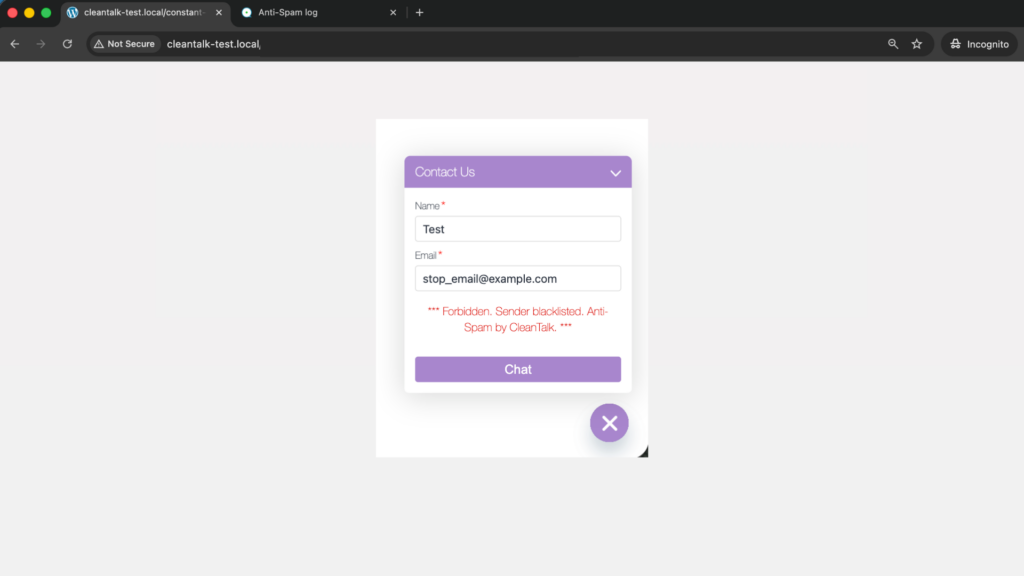
If you see this message, it means CleanTalk successfully protects your Chaty forms from spam.
Cloud Dashboard
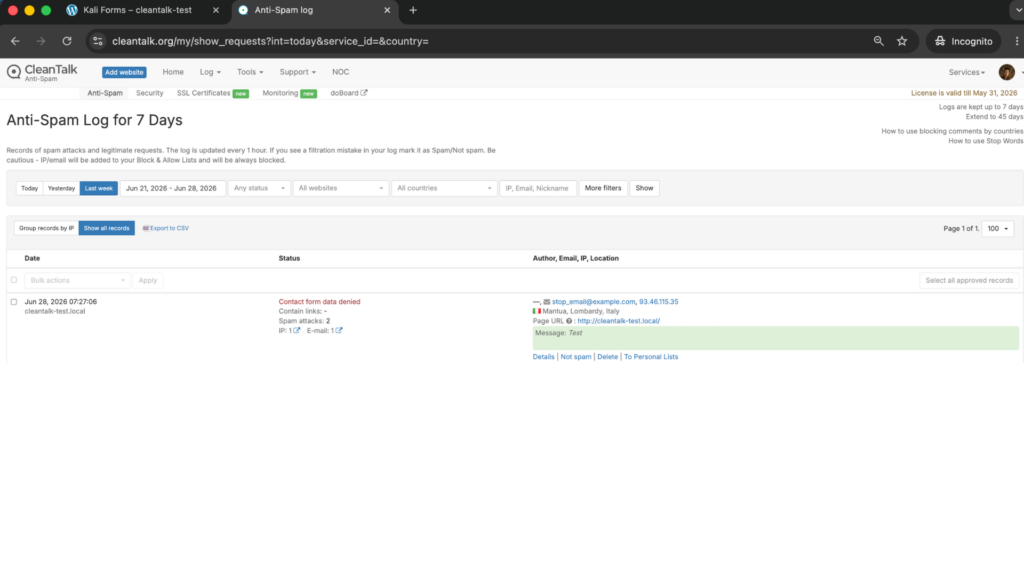
In addition, in the Cloud Dashboard you can find extra details regarding all submissions processed by CleanTalk, including Chaty forms:
- IP and email of the sender, as well as the sender’s activity history across other websites connected to the CleanTalk cloud.
- Geolocation of the sender.
- Date and time of the submission.
- Page (URL) where the form was submitted.
- Cloud decision – Approved or Denied.
- Cloud explanation for the decision (e.g. blacklisted email, bad IP reputation, spam text, etc.).
- Tools to move the sender to Block or Allow lists so you can fine-tune Chaty spam protection.
FAQ
Why am I getting fake submissions through Chaty?
Chaty’s contact and lead form is public and loads on every page, which makes it an easy, predictable target for spam bots and paid human spammers. Because the form is built to be frictionless for real visitors, it’s just as easy for bots to fill in. Without a dedicated filter, those fake entries land straight in your inbox and CRM as junk leads.
Does CleanTalk protect the Chaty form?
Yes. Once installed and activated, CleanTalk checks every Chaty contact/lead form submission in the background and blocks both bot and human spam automatically. You don’t need to add shortcodes or change your widget – just keep using Chaty as usual.
Do I still need reCAPTCHA if I use CleanTalk?
For most sites, no. CleanTalk works invisibly and stops both automated and human spam, so it usually replaces the need for a CAPTCHA. You can still add Cloudflare Turnstile or reCAPTCHA on top if you face an unusually heavy, targeted attack, but it’s optional.
Will CleanTalk scare off my real leads?
No. CleanTalk shows no puzzles, checkboxes or challenges to your visitors. Real people keep the one-tap, frictionless experience Chaty is designed for, while spam is filtered out silently in the background.
Does CleanTalk only protect the Chaty form, or the whole site?
The same CleanTalk installation protects your entire WordPress site – not just Chaty. It also filters spam in comments, user registrations, WooCommerce orders and other contact forms, all from one plugin.
Final recommendation
For a chat widget like Chaty, the goal is simple: keep the form effortless for real visitors while keeping spam out of your inbox and CRM. The most effective setup is CleanTalk as the invisible baseline filter on your Chaty contact/lead form, with an optional CAPTCHA (such as Cloudflare Turnstile) added only if you ever face a heavy, targeted attack. This blocks both bots and human spam without adding friction that costs you real leads.
For broader website protection, CleanTalk also provides anti-spam protection for websites, helping block spam in forms, comments, registrations, and orders without CAPTCHA.
