

If you use Calculated Fields Form on your WordPress website, spam can affect more than a simple inbox notification. Fake quote requests, bot-filled calculators, repeated booking forms, suspicious payment form attempts, and low-quality lead submissions can distort the numbers your forms are supposed to calculate.
This guide explains how to protect Calculated Fields Form submissions from spam using CleanTalk as the main filtering layer on your WordPress website, along with practical form-level controls such as required fields, validation logic, submission review, payment checks, and careful use of file upload or booking fields.
This approach is relevant for websites that use Calculated Fields Form for calculators, quote estimators, booking forms, order forms, payment forms, surveys, quizzes, lead forms, contact forms, or any form where user input affects calculated results.

Calculated Fields Form – Calculators, Quote Forms, Booking Forms, and More
Calculated Fields Form is a WordPress form builder designed for forms with dynamic calculations. It can be used to build calculator forms, quote estimators, booking cost calculators, order forms, payment forms, registration forms, surveys, quizzes, and lead generation forms. WordPress.org describes it as a complete form builder for contact forms, booking forms, quote forms, order forms, payment forms, surveys, quizzes, and more, with built-in dynamic calculation capabilities.
It can be used for:
- quote calculators;
- booking and reservation forms;
- cost estimators;
- order forms with dynamic pricing;
- payment forms;
- contact forms;
- survey and quiz forms;
- registration and sign-up forms;
- mortgage, loan, shipping, or fitness calculators;
- lead generation forms with calculated results.
As WordPress.org shows, Calculated Fields Form is currently used on over 40,000 websites and has over 960 verified reviews with an average rating of 4.9.
Plugin Homepage at wordpress.org | Website cff.dwbooster.com
Why Calculated Fields Form Attracts Spam
Calculated Fields Form is often used for high-intent forms. Visitors may use it to calculate a quote, request a service estimate, book an appointment, submit an order, or complete a paid form.
That makes spam more damaging than a regular contact form submission.
Typical spam cases include:
- fake quote requests;
- bot-filled calculator forms;
- repeated booking form submissions;
- fake order requests;
- suspicious payment form attempts;
- invalid contact details attached to calculated results;
- low-quality leads generated through estimator forms;
- fake survey or quiz submissions;
- repeated entries from the same IP address;
- nonsense values submitted into numeric fields;
- spam submissions that distort reports or stored entries.
The main risk is that fake data can affect calculated outputs, stored submissions, business estimates, booking records, or payment-related workflows.
If your form calculates prices, dates, quantities, scores, or quote totals, spam does not only create clutter. It can make the results harder to trust.
Anti-Spam Plugin by CleanTalk for WordPress
The next tool we’re going to use is the Anti-Spam plugin by CleanTalk.
Here’s a short overview:
- CleanTalk is a cloud-based spam protection service for websites.
- It automatically blocks spam without CAPTCHA challenges.
- It protects many types of forms, including contact forms, registrations, comments, surveys, payment forms, and subscription forms.
- It helps stop automated bots and suspicious human spam submissions.
- It uses spam detection signals such as IP address, email address, sender behavior, and global spam activity.
- It lets website owners create custom filtering rules for specific cases.
- It allows blocking or filtering by IP, email, and country.
- It works quietly in the background and is easy to install and configure.
For Calculated Fields Form, this is especially useful because many forms collect structured business data, not just a short message. Fake entries can affect quotes, cost calculations, booking requests, lead reports, and payment-related records.
According to WordPress.org, Anti-Spam by CleanTalk for WordPress has over 200,000 active installations, with 3,168 reviews and an average rating of 4.7.
Plugin Homepage at cleantalk.org | Latest release at GitHub.com | Website cleantalk.org
Install the CleanTalk Anti-Spam plugin
Show Instructions
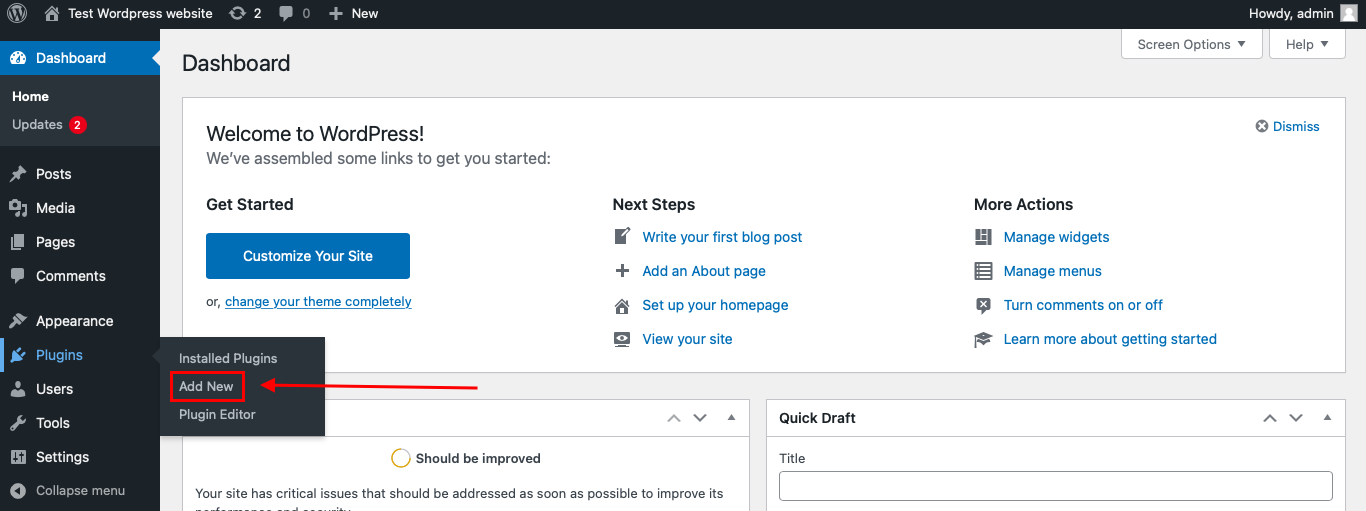
To install the Anti-Spam plugin, go to your WordPress admin panel → Plugins → Add New.
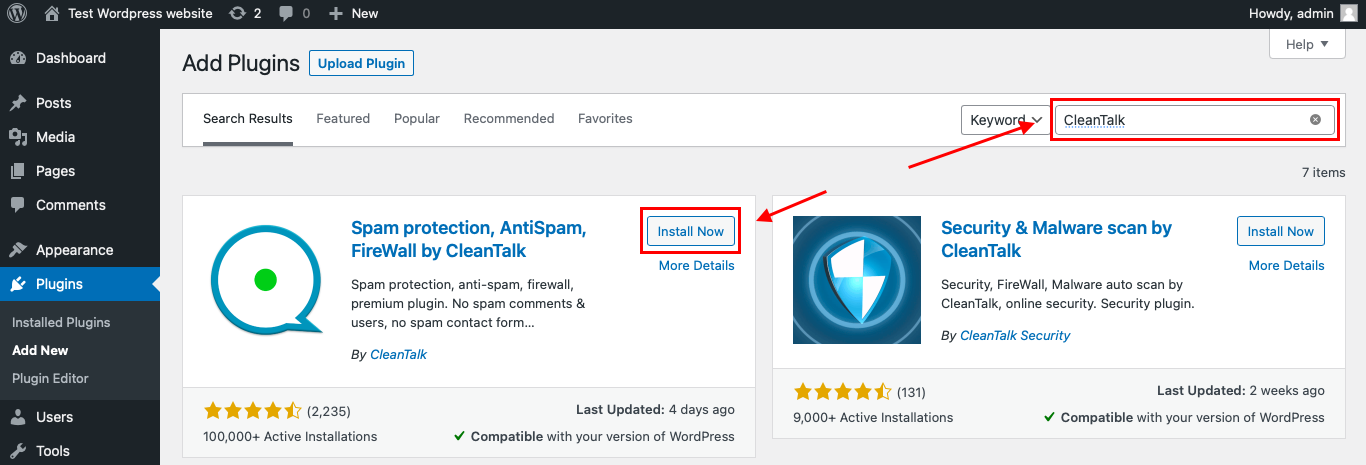
Then enter «СleanTalk» in the search box and click the Install button for «Spam protection, Anti-Spam, FireWall by CleanTalk».
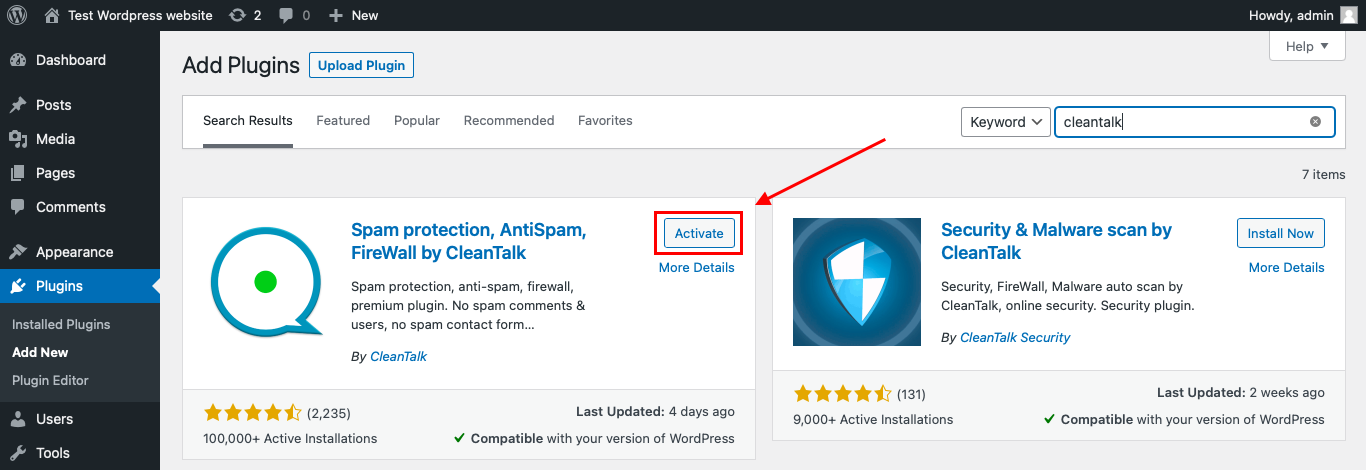
After installing the plugin, click the «Activate» button.
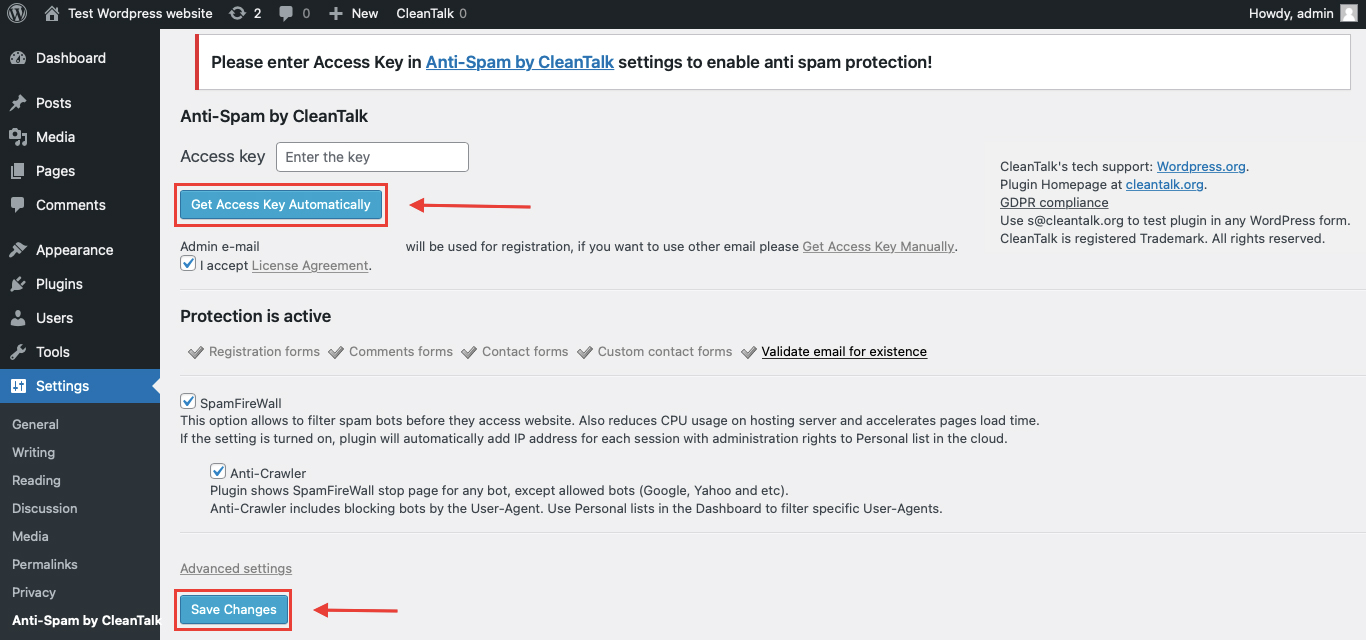
After it is done go to the plugin settings and click the «Get Access Key Automatically» button. Then just click the «Save Settings» button.
That’s it! From now you know how to completely protect your HivePress from spam.
You don’t need to rebuild your Calculated Fields Form setup. Use your calculators, quote forms, booking forms, and payment forms as usual, and CleanTalk will check suspicious submissions in the background.
How to Check Spam Protection for Calculated Fields Form
You can test the work of Anti-Spam protection for your Calculated Fields Form forms by using a test email:
The best way to test the spam protection by using a test email,
stop_email@example.com
- Open page with your form (don’t forget to add the shortcode in the page content) in Incognito browser tab.
- Fill out the Contact form using stop_email@example.com as sender’s email.
- Send the form.
- You should see a message from the Anti-Spam plugin confirming that a spam submission was blocked.
*** Forbidden. Sender blacklisted. Anti-Spam by CleanTalk. ***
The protection works only for website visitors, not for website admins. Be sure to test the form protection using Incognito mode.
This is important because calculated forms may behave differently for logged-in admins and normal visitors. Testing as a public visitor helps confirm that spam protection works in the real submission flow.
Cloud Dashboard
In addition, in the CleanTalk Cloud Dashboard, you can find extra details about submissions processed by CleanTalk, including Calculated Fields Form submissions and other WordPress forms.
The dashboard can help review:
- IP and email of the sender;
- sender activity history across other websites connected to the CleanTalk cloud;
- geolocation of the sender;
- date and time of the submission;
- page URL where the form was submitted;
- cloud decision: Approved or Denied;
- cloud explanation for the decision, such as blacklisted email, bad IP reputation, or spam text;
- tools to move senders to Block or Allow lists.
This is useful for Calculated Fields Form because spam may come through different types of forms: quote calculators, booking forms, order forms, surveys, or payment-related forms.
The dashboard helps you understand which form is being targeted and whether the spam pattern is based on repeated IPs, disposable emails, fake contact details, suspicious text, or automated submissions.
Calculated Fields Form Features That Matter for Spam Protection
Calculated Fields Form is more than a simple contact form plugin. It includes dynamic calculated fields, many field types, conditional logic, multi-page forms, payment-related workflows, and data collection features. The official documentation describes workflows for creating forms with real-time calculations, quote estimators, booking forms, financial tools, and payment handling.
That makes spam protection especially important in several areas.
Quote and Estimate Forms
Quote forms are one of the most common use cases for Calculated Fields Form.
If bots submit fake quote requests, your team may waste time reviewing bad leads or responding to fake pricing requests.
Booking and Reservation Forms
Booking forms can be affected by fake names, invalid emails, unrealistic dates, or repeated submissions.
If your form calculates availability, cost, duration, or booking totals, fake submissions can create confusion in the workflow.
Order and Payment Forms
Calculated Fields Form can be used for order forms and payment-related workflows. The official CFF feature page states that forms can be connected to a payment process using an amount taken from a calculated field or from a fixed value. It also mentions built-in PayPal Standard integration, with some distributions supporting WooCommerce payment workflows.
For payment-related forms, spam can create fake order attempts, incomplete records, failed payment flows, and additional manual review.
Survey and Quiz Forms
Calculated Fields Form can also be used for surveys, quizzes, scoring, and conditional logic. WordPress.org describes it as suitable for survey forms, quizzes, and other general-purpose form workflows.
Spam submissions can distort scores, pollute response data, and make reports unreliable.
Advanced Fields and File Uploads
Calculated Fields Form supports a wide range of form controls, and depending on the version and add-ons used, it may include advanced fields such as file upload, signature, QR code reader, voice recording, summary fields, and multi-page forms.
If advanced fields are used, spam protection should be combined with careful validation and manual review.
Additional Protection Options for Calculated Fields Form
CleanTalk should be the main anti-spam layer, but Calculated Fields Form websites can also benefit from form-specific controls.
Validate Numeric Fields
Calculated forms often depend on numbers: quantity, area, distance, weight, price, dates, or scores.
Add realistic limits where possible. For example, avoid accepting impossible values like negative quantities, extreme numbers, or invalid date ranges.
Review Calculated Results
If the form produces quotes, prices, or scores, review suspicious results before using them for business decisions.
Spam entries may not look like classic spam text. Sometimes the issue is unrealistic calculated output.
Protect Payment-Related Forms
For order or payment forms, do not treat every submitted form as a completed transaction.
Check payment status, failed attempts, and suspicious contact details before granting access, processing orders, or assigning follow-up tasks.
Add Required Fields Carefully
Required fields can help reduce low-quality submissions, but they should not make the form too difficult for real users.
For Calculated Fields Form, the most useful required fields are usually email, name, key project details, and the values needed to calculate the result.
Limit File Upload Risk
If the form includes file upload fields, restrict file types and file sizes.
Avoid allowing uploads unless they are necessary for the workflow.
Monitor High-Value Forms More Closely
Forms that calculate prices, bookings, payments, or service estimates should be reviewed more carefully than basic contact forms.
These forms often generate real business actions, so fake submissions can cost time.
Why Calculated Fields Form Spam Is Different from Regular Form Spam
A regular contact form spam message usually creates inbox noise.
Calculated Fields Form spam can affect the actual business logic of the form.
Depending on the form type, a fake submission may become:
- a false quote request;
- a wrong price estimate;
- a fake booking inquiry;
- a bad order record;
- a payment-related attempt;
- a distorted survey result;
- an invalid calculator output;
- a fake lead in the sales pipeline;
- a suspicious uploaded file;
- a misleading report entry.
That is why the protection strategy should match the purpose of the form.
A calculator, a quote form, a booking form, and a payment form do not have the same risk profile.
Comparison of Anti-Spam Approaches for Calculated Fields Form
| Solution | Main role | Strengths | Limitations | Best use case |
|---|---|---|---|---|
| CleanTalk | Main site-level anti-spam filtering | Blocks suspicious submissions in the background, no CAPTCHA friction, works across WordPress forms | Should be combined with form validation for complex calculators | WordPress sites using Calculated Fields Form |
| Numeric field validation | Data quality control | Reduces impossible or unrealistic values | Does not detect sender reputation | Quote forms, calculators, booking forms |
| Required fields | Basic submission control | Reduces empty or low-quality entries | Bots can still fill fields | Lead forms and estimate forms |
| Payment confirmation | Transaction control | Prevents fake forms from being treated as paid orders | Applies only to payment workflows | Order forms and paid calculators |
| Manual review | Business data cleanup | Helps catch suspicious quotes, bookings, or scores | Does not prevent spam at submission time | High-value form workflows |
| File upload restrictions | Upload safety | Reduces risky attachments | Does not block form spam alone | Forms with document uploads |
| Cloud Dashboard monitoring | Pattern detection | Helps identify repeated IPs, emails, and abused pages | Requires review | Sites with multiple calculator forms |
In practice, Calculated Fields Form spam protection should combine background filtering with data validation. CleanTalk helps decide whether the sender looks suspicious, while form rules help make sure submitted values make sense.
Frequently Asked Questions — Calculated Fields Form Spam Protection
Why do bots submit calculator forms?
Bots submit calculator forms because they are public forms with input fields, just like contact forms.
The difference is that calculator forms often collect more structured data, such as quantities, prices, dates, project details, or booking information. That makes spam more disruptive.
Can spam affect calculated results?
Yes. If bots submit unrealistic numbers or fake form values, the calculated result can become meaningless.
This is especially important for quote calculators, booking forms, order forms, and scoring forms.
Is Calculated Fields Form only for calculators?
No. WordPress.org describes Calculated Fields Form as a complete form builder suitable for contact forms, booking forms, registration forms, lead generation forms, order forms, survey forms, payment forms, and more.
Can CleanTalk protect Calculated Fields Form submissions?
Yes. CleanTalk can be used as the WordPress-side anti-spam layer to filter suspicious submissions before they become form entries, quote requests, or leads.
Should I add CAPTCHA to Calculated Fields Form?
Use CAPTCHA only if you need an extra visible challenge on heavily abused forms.
For many websites, CleanTalk is better as the main background filtering layer because it does not add extra steps for real users.
What should I check if calculator spam still gets through?
Check the CleanTalk logs, the form page URL, sender IPs, repeated emails, unrealistic numeric values, required fields, and whether the spam comes from one form or several forms.
For quote forms, also check whether bots are submitting strange combinations of values.
How can I protect quote estimate forms?
Use CleanTalk for spam filtering, add realistic validation limits to numeric fields, require contact details, and manually review unusual quote results before sending a final price.
How can I protect payment forms?
Use CleanTalk, confirm payment status before processing the order, review failed or suspicious payment attempts, and avoid treating a submitted form as a completed transaction until payment is verified.
Are file upload fields risky?
They can be. If a calculated form accepts uploads, limit accepted file types, set file size limits, and review suspicious submissions carefully.
Recommended Anti-Spam Stack for Calculated Fields Form in 2026
Calculated Fields Form can power very different workflows, so the best setup depends on what the form does after submission.
For quote calculators
Use:
- CleanTalk Anti-Spam;
- required contact fields;
- realistic numeric limits;
- manual review of unusual quote results.
This helps reduce fake quote requests and unrealistic calculated outputs.
For booking forms
Use:
- CleanTalk Anti-Spam;
- date and time validation;
- confirmation email;
- manual review for suspicious bookings.
This helps prevent bots from submitting fake reservations or invalid booking requests.
For order forms
Use:
- CleanTalk Anti-Spam;
- product and quantity validation;
- payment confirmation;
- review of suspicious entries.
This protects order workflows from fake or incomplete submissions.
For payment forms
Use:
- CleanTalk Anti-Spam;
- payment status verification;
- fraud-aware manual review;
- no access or fulfillment before payment confirmation.
This is important because a submitted form is not the same as a completed payment.
For surveys and quizzes
Use:
- CleanTalk Anti-Spam;
- duplicate response review;
- required fields only where needed;
- cleanup before exporting results.
This helps keep survey and quiz data more reliable.
For forms with file uploads
Use:
- CleanTalk Anti-Spam;
- strict file type restrictions;
- file size limits;
- admin review before using uploaded files.
This reduces the risk of unwanted or suspicious uploads.
For high-value calculator pages
Use:
- CleanTalk Anti-Spam;
- validation rules;
- Cloud Dashboard monitoring;
- manual review of high-value or unusual results.
This is best for pricing calculators, service estimators, loan calculators, shipping calculators, and booking cost forms.
Final Thoughts
Calculated Fields Form spam should be handled differently from ordinary contact form spam.
The reason is simple: these forms often do something with the data. They calculate prices, estimate project costs, generate booking totals, process order details, score quiz answers, or collect payment-related information.
When spam enters that workflow, the problem is not only an unwanted message. It can become a wrong quote, a fake lead, a misleading report, a suspicious order, or a form result that your team should not trust.
The safest approach is to protect both sides of the form: the sender and the submitted values. CleanTalk helps filter suspicious senders and bot behavior, while form validation helps make sure the numbers, dates, quantities, files, and calculated results are realistic.
For simple calculators, background spam filtering and basic validation may be enough. For quote forms, booking systems, payment forms, and order workflows, add stronger review steps before acting on the submitted data.
With CleanTalk working as the first filtering layer and Calculated Fields Form configured carefully, you can reduce fake submissions, keep calculated results cleaner, and protect the business workflows behind your forms.
