

If you use Wufoo forms on a WordPress website, spam entries can quickly turn a simple form into a messy data problem. Fake contact requests, repeated submissions, bot-filled surveys, low-quality leads, and suspicious payment or registration entries can make it harder to trust the information you collect.
This guide explains how to set up Wufoo forms spam protection using CleanTalk as the main filtering layer on your WordPress website, along with additional Wufoo controls such as CAPTCHA, password protection, IP-based entry limits, and careful review of suspicious submissions.
This approach is relevant for websites that embed Wufoo forms into WordPress pages, posts, landing pages, event pages, surveys, lead generation forms, order forms, or registration forms.

Wufoo – Online Forms, Surveys, Registrations, and Payments
First, let’s take a quick look at Wufoo and how it is commonly used with WordPress.
Wufoo is an online form builder that helps users create contact forms, online surveys, invitations, registrations, and payment forms without writing code. Wufoo’s WordPress integration page says the service can be embedded into WordPress pages and used to collect leads and data directly from a website.
Wufoo can be used for:
- contact forms;
- online surveys;
- event registrations;
- invitations;
- lead generation forms;
- order forms;
- payment forms;
- feedback forms;
- internal request forms;
- data collection forms.
For WordPress, Wufoo forms are commonly added through embed code or through a shortcode-based WordPress plugin. WordPress.org lists the “Wufoo Shortcode” plugin, which allows users to embed Wufoo forms with the [wufoo] shortcode. WordPress.org shows 10,000+ active installations and 5 total ratings for this plugin.
As WordPress.org shows, Wufoo Shortcode is currently used on over 10,000 websites. However, WordPress.org also notes that the plugin has not been tested with the latest 3 major releases of WordPress.
Plugin Homepage at wordpress.org | Website wufoo.com
Why Wufoo Forms Attract Spam
Wufoo forms are often used for public data collection. That is exactly what makes them useful – and also what makes them visible to spambots.
Typical spam cases include:
- fake contact form submissions;
- repeated survey entries;
- bot-filled event registrations;
- fake lead generation requests;
- suspicious order form submissions;
- low-quality payment form attempts;
- duplicate entries from the same IP address;
- nonsense answers in long forms;
- form submissions created to pollute reports;
- automated entries that make real leads harder to find.
Wufoo itself also notes that any form can receive unwanted entries from bots or unwanted respondents, and recommends several form-level controls to reduce this risk.
The key issue with Wufoo spam is that it can damage the value of the form results. A fake contact message is annoying, but a fake survey response, order request, or registration entry can also distort reporting, lead quality, event planning, and business decisions.
Anti-Spam Plugin by CleanTalk for WordPress
The next tool we’re going to use is the Anti-Spam plugin by CleanTalk.
Here’s a short overview:
- CleanTalk is a cloud-based spam protection service for websites.
- It automatically blocks spam without CAPTCHA challenges.
- It protects many types of forms, including contact forms, registrations, comments, surveys, payment forms, and subscription forms.
- It helps stop automated bots and suspicious human spam submissions.
- It uses spam detection signals such as IP address, email address, sender behavior, and global spam activity.
- It lets website owners create custom filtering rules for specific cases.
- It allows blocking or filtering by IP, email, and country.
- It works quietly in the background and is easy to install and configure.
For Wufoo, this is useful because the forms are usually embedded into public WordPress pages. The goal is to filter suspicious submissions before they become form entries, lead records, survey responses, or order requests.
According to WordPress.org, Anti-Spam by CleanTalk for WordPress has over 200,000 active installations, with 3,168 reviews and an average rating of 4.7.
Plugin Homepage at cleantalk.org | Latest release at GitHub.com | Website cleantalk.org
Install the CleanTalk Anti-Spam plugin
Show Instructions
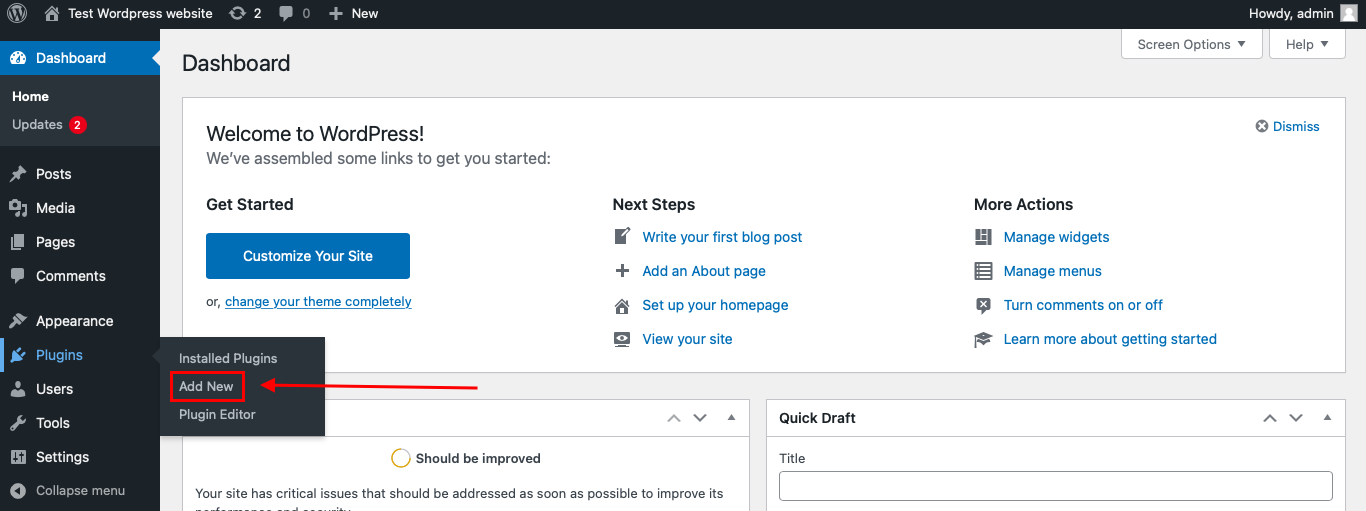
To install the Anti-Spam plugin, go to your WordPress admin panel → Plugins → Add New.
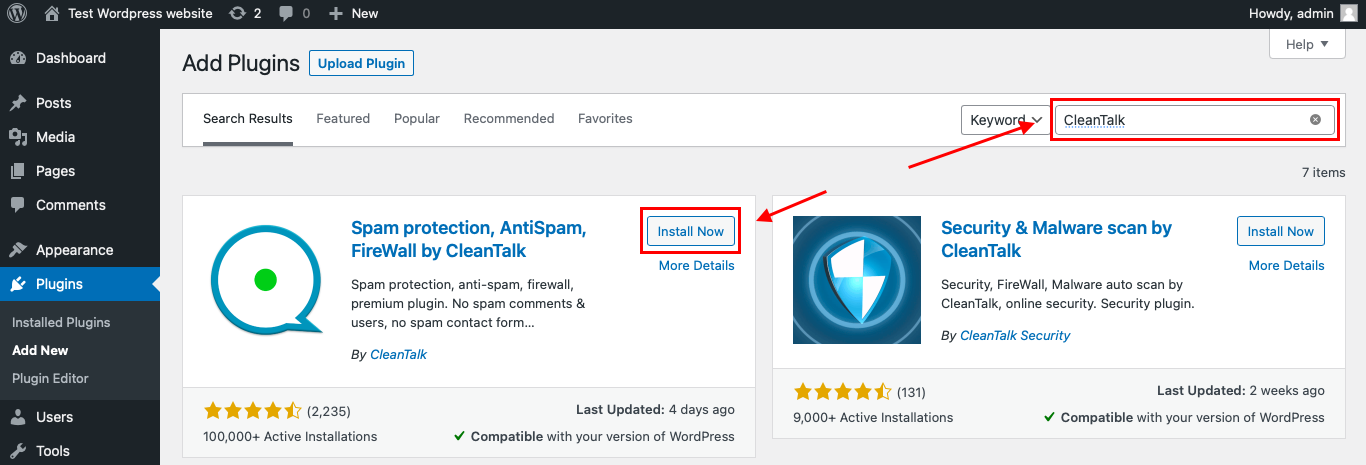
Then enter «СleanTalk» in the search box and click the Install button for «Spam protection, Anti-Spam, FireWall by CleanTalk».
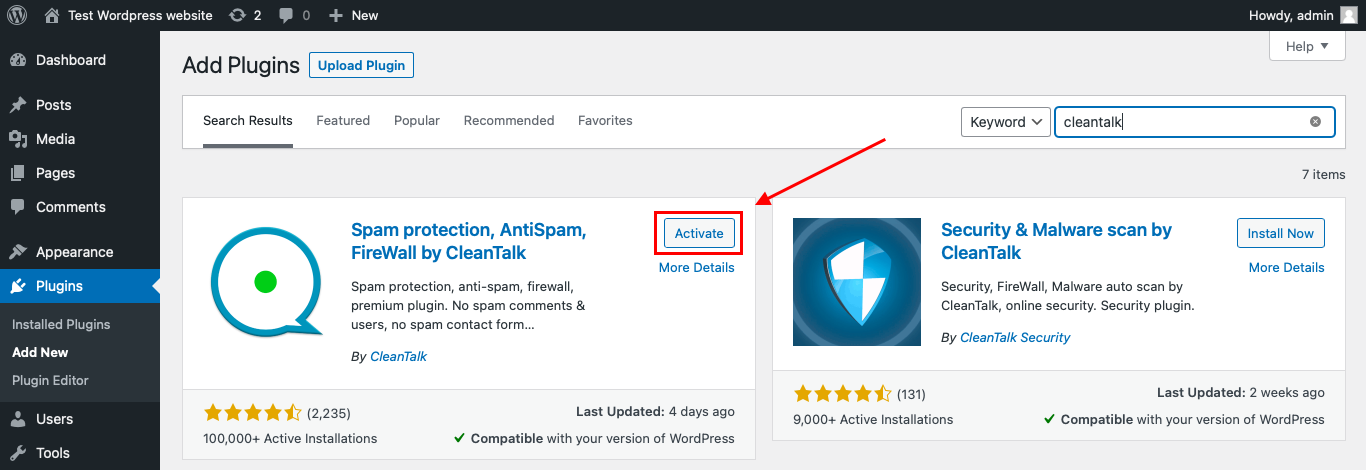
After installing the plugin, click the «Activate» button.
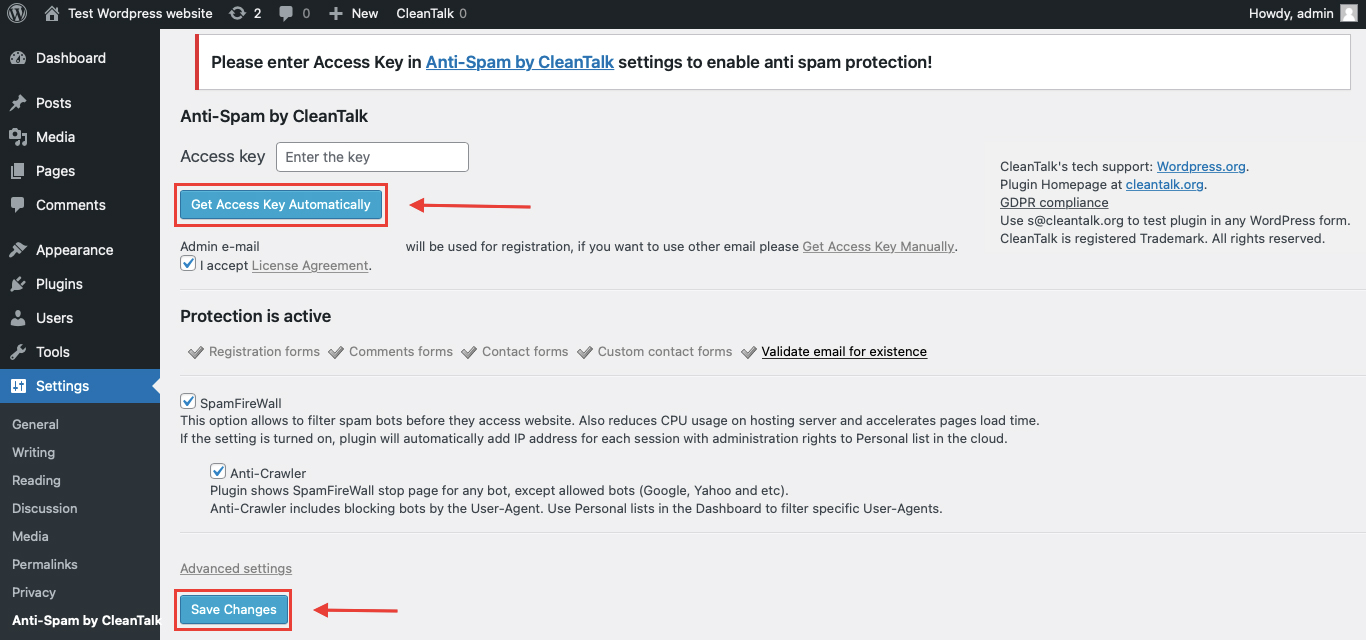
After it is done go to the plugin settings and click the «Get Access Key Automatically» button. Then just click the «Save Settings» button.
That’s it! From now you know how to completely protect your HivePress from spam.
You don’t need to rebuild your Wufoo forms. Use them as usual, and CleanTalk will check suspicious submissions in the background.
How to Check Wufoo Forms Spam Protection
You can test the work of Anti-Spam protection for your Wufoo forms by using a test email:
stop_email@example.comFirst, open the page with your Wufoo form in an Incognito browser tab. Fill in all the required form fields and send the form.
After submitting the form, you should see a block message about the blocked form submission:
*** Forbidden. Sender blacklisted. Anti-Spam by CleanTalk. ***The protection works only for website visitors, not for website admins. Be sure to test the form protection using Incognito mode.
This is important because an embedded Wufoo form may behave differently for a logged-in WordPress admin and a real visitor. The original CleanTalk Wufoo guide also notes that testing should be done as a visitor, not as a website admin.
Cloud Dashboard
In addition, in the CleanTalk Cloud Dashboard, you can find extra details about submissions processed by CleanTalk, including Wufoo forms and other WordPress forms.
The dashboard can help review:
- IP and email of the sender;
- sender activity history across other websites connected to the CleanTalk cloud;
- geolocation of the sender;
- date and time of the submission;
- page URL where the form was submitted;
- cloud decision: Approved or Denied;
- cloud explanation for the decision, such as blacklisted email, bad IP reputation, or spam text;
- tools to move senders to Block or Allow lists.
This is useful for Wufoo because spam may not always look the same. A spammer can submit a short contact request, fill out a survey with nonsense answers, repeat an event registration, or submit the same form many times from one IP address.
The dashboard helps you understand which Wufoo form is being targeted and whether the problem comes from repeated IPs, suspicious emails, duplicate submissions, or obvious bot behavior.
Wufoo Features That Matter for Spam Protection
Wufoo includes several built-in security and data-collection features that are important when thinking about spam protection.
CAPTCHA
Wufoo’s security page says its CAPTCHA integration helps verify that users are human, while additional checks help confirm that responses come from real people using a web browser.
Wufoo also recommends adding CAPTCHA at the end of a form as one way to reduce unwanted entries. The service describes both automatic CAPTCHA behavior and an “Always Show” option.
CAPTCHA can be useful for:
- public contact forms;
- heavily abused lead forms;
- event registration forms;
- survey forms with repeated bot entries;
- order forms that attract suspicious submissions.
However, CAPTCHA can add friction. That is why it works best as an additional layer, not the only protection method.
One Entry Per IP Address
Wufoo recommends limiting a form to one entry per IP address when repeated submissions from the same device or network are a problem. Wufoo also notes that this may not be ideal for shared computers or groups where several real users submit from the same network.
This option is useful for:
- surveys;
- polls;
- giveaways;
- voting forms;
- event registrations;
- forms where duplicate submissions distort results.
But it should be used carefully because shared offices, schools, families, and events may have multiple legitimate users behind one IP.
Password Protection
Wufoo recommends password-protecting forms when you want to limit who can submit them. This can be useful when a form link is shared too widely or posted in the wrong place.
Password protection is especially relevant for:
- private surveys;
- internal company forms;
- limited-access event registrations;
- partner-only forms;
- forms sent to a controlled audience.
This is not a general anti-spam solution for public lead generation, but it can work well when the form should not be open to everyone.
Secure Data Collection
Wufoo’s security page states that its forms are served over a protected 256-bit SSL connection and that encrypted data storage is available on select plans for data-sensitive fields.
This is not the same as spam filtering, but it matters for forms that collect sensitive or business-critical information.
Additional Protection Options for Wufoo Forms
CleanTalk should be the main anti-spam filtering layer on the WordPress side, but Wufoo websites can also benefit from form-level controls.
Use Different Protection by Form Type
A short contact form and a long survey should not always use the same protection settings.
For example:
- contact forms may need CleanTalk plus CAPTCHA only if spam is heavy;
- surveys may need one-entry-per-IP rules;
- private forms may need password protection;
- event forms may need submission limits and manual review;
- order forms may need extra review of suspicious payment-related entries.
Review Duplicate Entries
Duplicate entries are a common problem with Wufoo forms because repeated submissions can make reports unreliable.
For surveys, polls, and registrations, review whether the same IP, email, or name appears many times.
Protect Forms Published on Landing Pages
Landing pages often receive more bot traffic because they are linked from ads, social media, email campaigns, and search results.
If a Wufoo form is embedded on a high-traffic landing page, use stronger protection than you would use for a low-traffic internal page.
Monitor Reports After Spam Waves
Wufoo is often used for reporting and response analysis. If a form receives spam, the entries may affect reports and exported data.
After a spam wave, clean suspicious entries before using the data for business decisions.
Avoid Overexposing Private Forms
If a Wufoo form is meant for a limited audience, avoid placing it on public pages without restrictions.
For private workflows, password protection and controlled sharing can prevent many unwanted entries.
Why Wufoo Spam Is Different from Regular WordPress Form Spam
Wufoo spam is not always just a bad message in an inbox.
Depending on the form type, a fake entry may become:
- a lead in your sales pipeline;
- a survey response in your report;
- an event registration;
- an order request;
- a payment-related record;
- a support request;
- a poll or vote entry;
- a row in exported data;
- a notification sent to your team.
That is why Wufoo spam can affect more than inbox cleanliness. It can affect reporting accuracy, lead quality, event planning, conversion data, and customer workflows.
Comparison of Anti-Spam Approaches for Wufoo Forms
| Solution | Main role | Strengths | Limitations | Best use case |
|---|---|---|---|---|
| CleanTalk | WordPress-level filtering | Works in the background, helps block suspicious submissions on embedded forms, no CAPTCHA friction for real users | Should be combined with Wufoo settings for high-risk forms | WordPress pages with embedded Wufoo forms |
| Wufoo CAPTCHA | Human verification | Native Wufoo control, useful against obvious bots | Can add friction and may reduce completion rate | Public forms receiving bot entries |
| One entry per IP | Duplicate control | Helps reduce repeated entries from the same source | Can block legitimate users on shared networks | Surveys, polls, giveaways, voting forms |
| Password protection | Access control | Good for private or invite-only forms | Not suitable for open lead generation | Internal forms, private surveys, partner forms |
| Manual entry review | Data cleanup | Helps remove suspicious entries before reporting | Does not prevent spam at submission time | Surveys, reports, event lists |
| Landing page monitoring | Traffic-based control | Helps detect spikes and spam waves | Requires regular review | Campaign pages and high-traffic forms |
| Form segmentation | Risk-based setup | Lets you apply stronger controls only where needed | Requires planning | Sites with many Wufoo forms |
In practice, Wufoo spam protection should match the purpose of the form. A public lead form, a private survey, and a payment form do not have the same risk profile, so they should not rely on the same setup.
Frequently Asked Questions – Wufoo Spam Protection
Why are my Wufoo forms getting spam on WordPress?
Wufoo forms are often embedded on public WordPress pages. If a bot can access the page, it can try to submit the form.
This is especially common on contact pages, landing pages, event registration pages, surveys, and forms linked from paid or social campaigns.
Is Wufoo spam the same as WordPress comment spam?
No. WordPress comment spam usually affects comments or moderation queues.
Wufoo spam can affect form entries, survey results, registration lists, reports, exports, lead records, payment-related workflows, and team notifications. That makes cleanup more complicated.
Can CleanTalk protect embedded Wufoo forms?
Yes, CleanTalk’s older Wufoo guide says CleanTalk added spam protection for Wufoo Forms and explains how to test it on a WordPress site. The updated article should avoid overpromising and describe CleanTalk as the main WordPress-side filtering layer for embedded Wufoo forms.
Should I enable Wufoo CAPTCHA if I already use CleanTalk?
Use Wufoo CAPTCHA when the form is high-risk or already receiving many bot entries.
For normal forms, CleanTalk can work as the background filtering layer. CAPTCHA can be added only where extra verification is needed.
When should I use Wufoo’s one-entry-per-IP setting?
Use it for surveys, polls, voting forms, giveaways, or event registrations where duplicate submissions create problems.
Do not use it blindly for every form, because multiple legitimate users can share the same IP address in offices, schools, families, and event venues.
Is password protection useful for Wufoo spam?
Yes, but only for forms that should not be public.
Password protection is useful for internal forms, private surveys, partner forms, and invitation-only registrations. It is not ideal for public contact forms or lead generation forms.
Why do Wufoo survey results look wrong after a spam wave?
Spam entries can distort survey responses, totals, charts, exports, and conclusions.
Before using Wufoo survey data for decisions, remove suspicious entries and check for repeated IPs, duplicate emails, nonsense answers, or sudden traffic spikes.
Can spam affect Wufoo payment or order forms?
Yes. Spam can create suspicious order requests, abandoned payment-related entries, fake buyer details, and confusing notifications.
For order or payment forms, use stronger filtering, review suspicious submissions, and avoid relying only on raw entry counts.
What should I check if Wufoo spam still gets through?
Check the page where the form is embedded, the Wufoo form settings, CleanTalk logs, CAPTCHA status, IP limits, password protection for private forms, and whether the spam comes from one form or several forms.
This helps identify whether the issue is a public landing page, repeated IPs, weak form-level settings, or a specific abused form.
Recommended Anti-Spam Stack for Wufoo Forms in 2026
Wufoo forms can serve very different purposes, so the best anti-spam setup depends on the form type.
For public contact forms
Use:
- CleanTalk Anti-Spam;
- Wufoo CAPTCHA only if spam is heavy;
- regular review of suspicious entries.
This keeps the form easy for real users while adding protection where needed.
For surveys and polls
Use:
- CleanTalk Anti-Spam;
- one-entry-per-IP if appropriate;
- duplicate entry review;
- manual cleanup before reporting.
This protects the quality of survey results and exported data.
For event registration forms
Use:
- CleanTalk Anti-Spam;
- entry limits or manual review;
- confirmation emails;
- duplicate checks.
This helps prevent bots from inflating registration lists or consuming available seats.
For private or internal forms
Use:
- CleanTalk Anti-Spam;
- Wufoo password protection;
- controlled sharing of the form URL;
- manual review of unexpected entries.
This works best when the form should only be accessed by a known audience.
For lead generation landing pages
Use:
- CleanTalk Anti-Spam;
- CAPTCHA for high-risk campaigns;
- monitoring through the CleanTalk Cloud Dashboard;
- review of duplicate leads.
This is useful for forms exposed through ads, SEO, social media, or email campaigns.
For order or payment-related forms
Use:
- CleanTalk Anti-Spam;
- Wufoo CAPTCHA;
- manual review of suspicious entries;
- careful validation of order details.
This reduces fake order attempts and low-quality submissions.
Final Thoughts
Wufoo spam should be evaluated by the type of form being attacked, not just by the number of unwanted entries.
A spam entry in a contact form is one problem. A spam entry in a survey, event registration, order form, or payment-related workflow can create a different kind of problem: unreliable reports, fake registrations, bad lead data, or confusing operational records.
That is why Wufoo forms need layered protection. CleanTalk can work as the WordPress-side filtering layer for embedded forms, while Wufoo’s own controls can help manage form-specific risks such as duplicate entries, public access, CAPTCHA challenges, and private form sharing.
For public forms, keep the experience simple and add CAPTCHA only when needed. For surveys and polls, focus on duplicate control and data cleanup. For private forms, use password protection. For landing pages and payment-related forms, monitor submissions more actively.
The safest approach is to decide what each Wufoo form is supposed to collect, then protect that exact workflow before spam reaches the results.
