

If you use HappyForms on a WordPress website, spam will eventually become a real problem. Fake messages, bot submissions, promotional junk, and low-quality entries can quickly start filling your inbox and wasting time.
This guide explains how to set up HappyForms spam protection using CleanTalk as the main filtering layer on your website, together with additional tools like HappyForms’ built-in honeypot, Google reCAPTCHA, and other practical controls. HappyForms is a WordPress drag-and-drop form builder for contact forms and other custom forms, and its plugin pages highlight one-click HoneyPot spam prevention plus the ability to save submissions in the WordPress database or send them to your inbox.
This protection approach can be applied to standard contact forms, lead forms, quote requests, newsletter forms, surveys, and other public-facing forms created in HappyForms.
HappyForms for WordPress
First, it helps to understand what HappyForms is and why spam protection matters here.
HappyForms is a WordPress form builder designed for creating many kinds of forms, from simple contact forms to surveys, applications, and other custom forms. Its WordPress.org listing presents it as a drag-and-drop builder, while the plugin FAQ states that submissions can be saved in the WordPress database or sent to your inbox.
In practice, HappyForms can help website owners:
- create contact and inquiry forms
- collect leads and subscriber details
- receive quote requests and support messages
- save submissions in WordPress or send them by email
That flexibility is exactly why spam becomes an issue. Once a form is publicly available, it can attract bots, automated scripts, and low-quality submissions.
As WordPress.org shows, HappyForms is currently used on over 20,000 websites and has 157 user reviews with an average rating of 4.8.
Plugin Homepage at WordPress.org | Documentation at Happyforms Help Center
Why HappyForms Attracts Spam
HappyForms is easy to publish and easy to use, which is good for real visitors but also appealing to bad traffic.
In real-world use, the most common issues usually include:
- automated bot messages
- junk promotional submissions
- repeated inquiries with irrelevant links
- fake leads or low-quality contact requests
This is not limited to one form type. The same risk applies whether you are running a basic contact form, a request form, a survey, or a lead-generation form.
Anti-Spam by CleanTalk
The main tool we’re going to use here is CleanTalk Anti-Spam.
CleanTalk is a cloud-based anti-spam service for WordPress sites. Its official WordPress plugin page positions it as CAPTCHA-free spam protection for forms, comments, registrations, subscriptions, fake orders, and other submission types, and the current listing shows more than 200,000 active installations.
In practical terms, CleanTalk helps by:
- filtering suspicious submissions before they are processed
- checking sender reputation and email quality
- detecting automated and repeated abuse patterns
- reducing junk entries that would otherwise reach HappyForms inboxes or saved submissions
That matters because the real cost of HappyForms spam is not only inbox clutter. It also means wasted time, lower lead quality, and more manual cleanup inside your workflow.
How CleanTalk Fits into the HappyForms Workflow
HappyForms runs inside WordPress, so the most effective place to apply protection is before the submission is treated as a normal message.
That means the focus should not be only on what the form looks like on the frontend. The more important point is what happens when the submission reaches WordPress.
If a site uses HappyForms for contact requests or lead capture, a site-level anti-spam layer can help stop suspicious submissions before they become normal entries.
If the website uses custom handling, automation, or extra logic after submission, the filtering layer should still be placed before the message is accepted into the workflow.
That is the key principle: do not wait until junk has already reached your inbox or saved entries. Stop it earlier in the process.
According to WordPress.org, Anti-Spam by CleanTalk for WordPress has over 200,000 active installations, with thousands of reviews and an average rating around 4.7 out of 5.
Plugin Homepage at cleantalk.org | Latest release at GitHub.com
If your forms are built with HappyForms on WordPress, the simplest setup is to use the CleanTalk WordPress plugin.
Install the CleanTalk Anti-Spam plugin
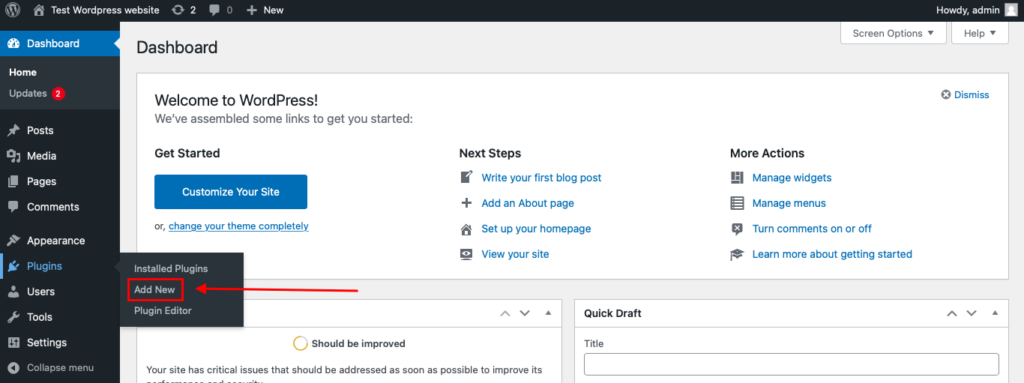
To install the Anti-Spam plugin, go to your WordPress admin panel→ Plugins→ Add New.
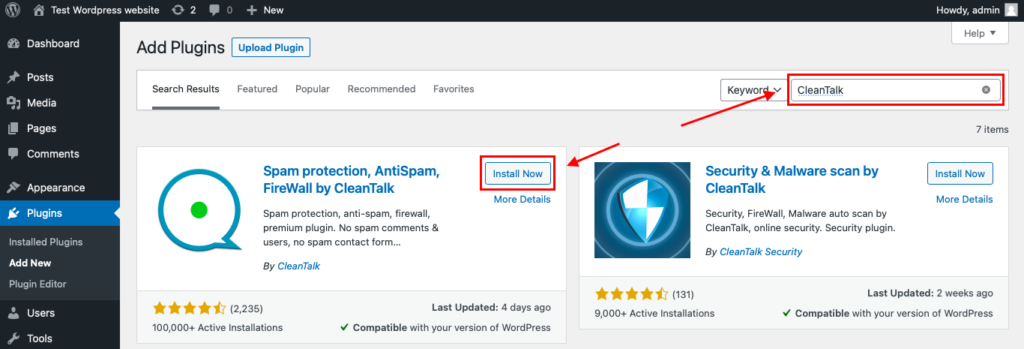
Then enter «СleanTalk» in the search box and click the Install button for «Spam protection, Anti-Spam, FireWall by CleanTalk».
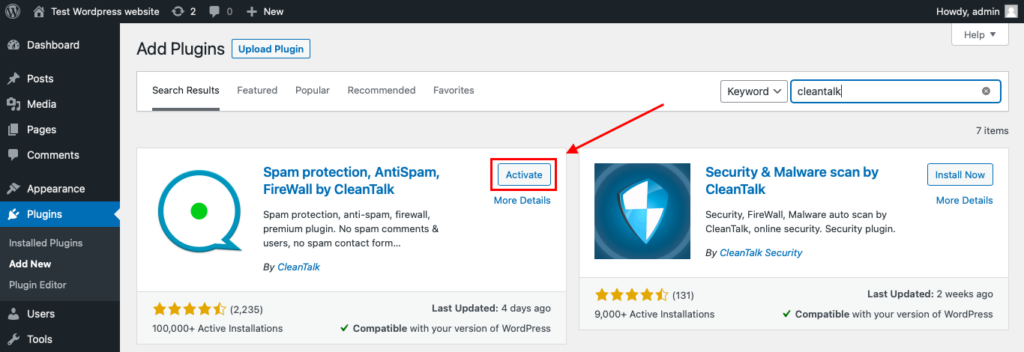
After installing the plugin, click the «Activate» button.
After it is done go to the plugin settings and click the «Get Access Key Automatically» button. Then just click the «Save Settings» button.
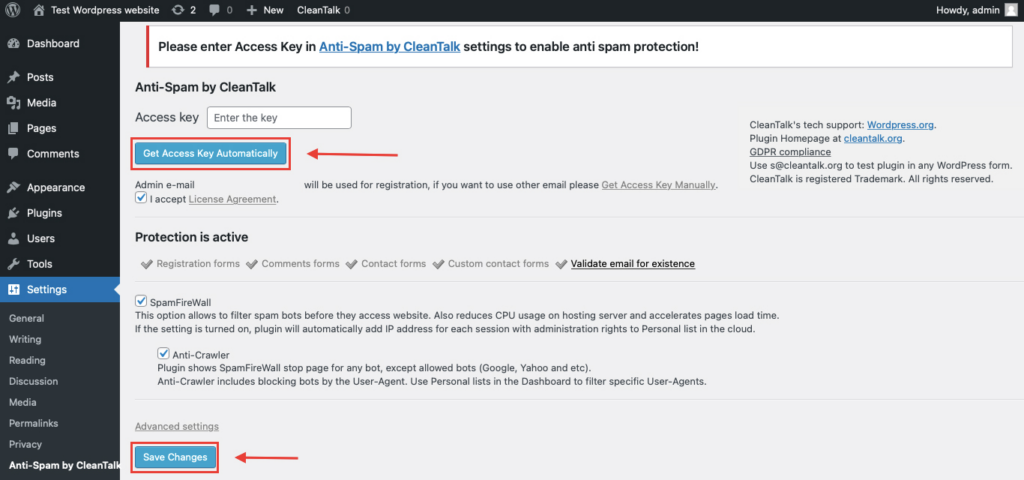
That’s all – Contact Form 7 are now protected From this moment,CleanTalk automatically protects the Contact Form 7 registration form (REST route /wp-json/Contact Form 7press/v1/users/), and the Add Listing form used to submit new listings.
You don’t need to paste any shortcodes – just use Contact Form 7 as usual, and CleanTalk will filter spam in the background.
Once that is done, your website has a background anti-spam layer that can help reduce suspicious HappyForms activity before unwanted messages reach their destination.
How to Check Whether Spam Protection Works
A simple way to test the setup is to use the following test address:
stop_email@example.com
Open the page with your HappyForms form in an Incognito or private browser window.
Submit the form using that email address.
If everything is configured properly, the submission should be blocked or should not appear as a normal legitimate entry in your form workflow.
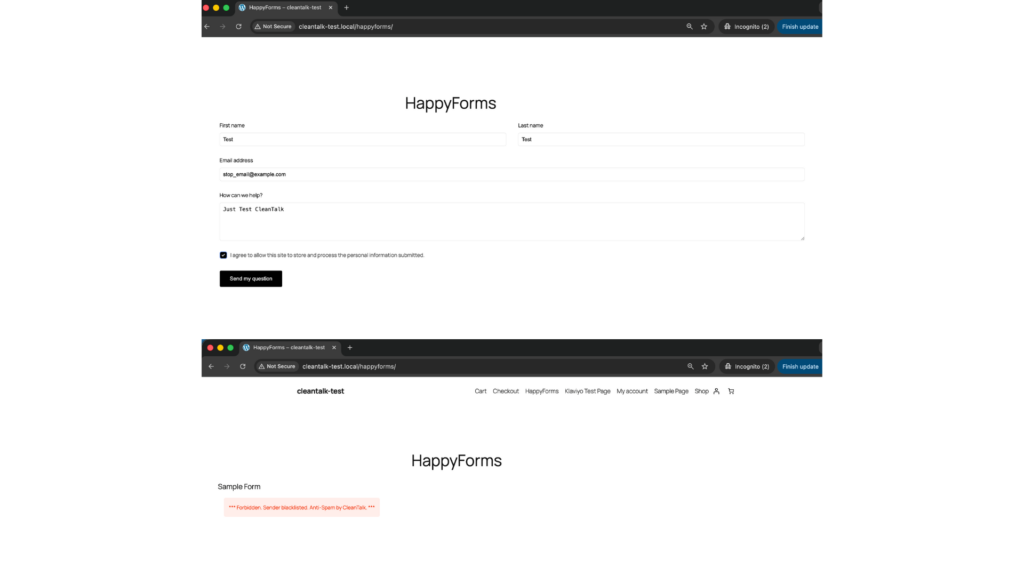
When testing, check both sides of the process:
- the frontend, to see whether the form accepts the submission
- the form entries or email destination, to verify that the message was not processed as a normal inquiry
This matters because a form may still appear to submit on the surface while the real question is whether the message actually made it into your workflow.
Cloud Dashboard and Monitoring
Blocking spam is only one part of the job. Good protection also gives you visibility into what is happening.
In the anti-spam dashboard, it is useful to review:
- sender IP and email
- submission time
- source page
- allow or deny decisions
- the likely reason a message was flagged
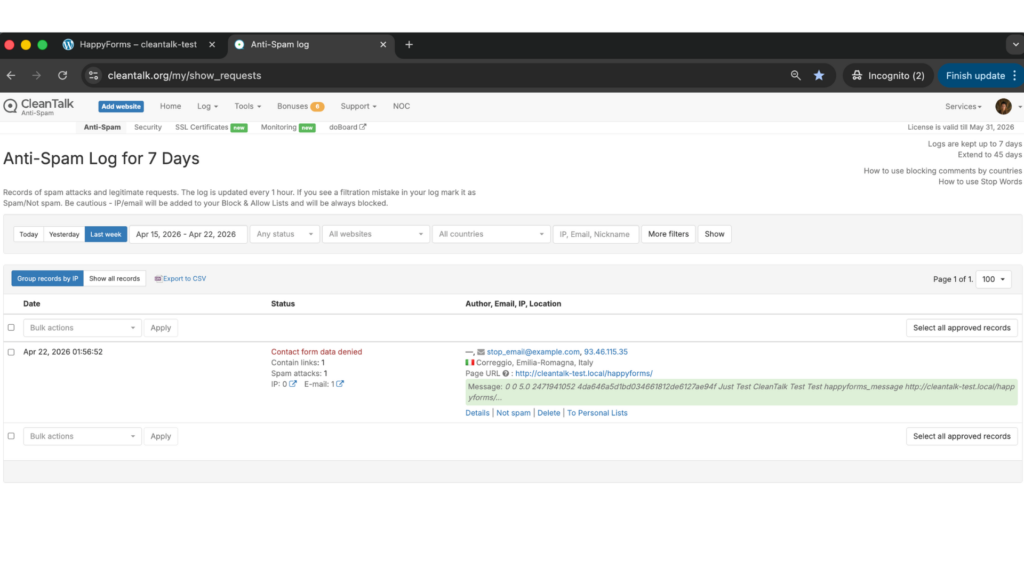
This makes it easier to spot recurring spam waves, identify weak pages, and understand which forms attract the most junk traffic.
That visibility helps you adjust the setup over time instead of guessing.
Honeypot, Google reCAPTCHA, and Additional Anti-Spam Options
Besides CleanTalk, HappyForms also includes or supports other useful anti-spam measures.
Honeypot
HappyForms highlights one-click HoneyPot spam prevention on its official plugin page. That makes honeypot the most natural built-in first layer against simple automated spam.
Honeypot is especially useful when:
- you want an invisible anti-spam measure
- you do not want to interrupt the user experience
- you need a lightweight first barrier against simple bots
Its limitation is that it works best against simpler automation, not every type of spam.
Google reCAPTCHA
HappyForms provides official reCAPTCHA integration. Its help documentation shows that you can configure reCAPTCHA from Forms – Integrations, choose the version, and for reCAPTCHA v3 set a minimum accepted score.
reCAPTCHA can be helpful when:
- you want a familiar anti-bot checkpoint
- your site is seeing repeated automated submissions
- you need an additional visible or score-based verification layer
At the same time, reCAPTCHA has tradeoffs. It can add friction and it should not be treated as the only line of defense.
Other Supporting Controls
Depending on the site, extra protection may also include:
- stricter field validation
- limiting exposed public forms
- email quality checks
- more careful handling of forms tied to incentives or lead capture
These do not replace anti-spam filtering, but they can make the overall setup more resilient.
Why HappyForms Spam Becomes a Bigger Problem Over Time
Spam in HappyForms is not just a temporary annoyance. It tends to become an operational problem.
Once junk submissions start slipping through, they can:
- clutter inboxes and notifications
- reduce the quality of collected leads
- waste time on manual review
- make real messages harder to notice
This is especially important if the site uses HappyForms not only for contact forms, but also for quote requests, support flows, surveys, or other business-critical communication.
Comparison of Anti-Spam Approaches for HappyForms
| Solution | Main role | Strengths | Limitations | Best use case |
| HappyForms Honeypot | Built-in invisible anti-bot layer | Easy to enable, no visible friction, good against simple bots | Limited against more advanced spam patterns | Sites that want a lightweight first layer inside HappyForms |
| Google reCAPTCHA | Familiar anti-bot verification | Officially documented in HappyForms integrations, widely recognized, useful as an extra checkpoint | Can add friction and should not be the only protection method | Sites that want a built-in additional anti-bot layer |
| CleanTalk | Core site-level anti-spam filtering | Filters suspicious submissions before they become normal entries, reduces junk leads, works without classic CAPTCHA friction | Usually strongest when combined with other layers | Sites that want the main filtering layer to protect HappyForms submissions |
| Stricter validation and workflow controls | Supporting quality-control layer | Helps reduce low-quality entries and detect tighter abuse patterns. | Not a full spam filter on its own | Lead forms, quote forms, or higher-value submission flows |
In practice, the most dependable starting point is to use one strong primary anti-spam layer and then add extra controls only where they are truly needed. For many WordPress sites, CleanTalk can serve as that main filtering layer, while HappyForms’ built-in honeypot, reCAPTCHA, and stricter validation can be added selectively if they improve protection without causing conflicts or unnecessary friction.
Frequently Asked Questions
HappyForms is receiving too much spam. Where should I begin?
Start with the form flow itself.
Check whether the built-in honeypot is enabled, review whether reCAPTCHA is active, and make sure there is a stronger filtering layer in place before submissions are treated as normal messages.
If junk keeps getting through, the problem is usually not the form design. It is the lack of enough filtering before the message is accepted.
Why do spam messages still appear even though HappyForms has built-in protection?
Because one built-in measure is rarely enough on its own.
Honeypot can catch simple bots, and reCAPTCHA can reduce some automated traffic, but neither one guarantees that all unwanted submissions will disappear. Sites with heavier spam volume usually need a stronger site-level filtering layer as well. HappyForms’ own materials show honeypot and reCAPTCHA as anti-spam options, not as a guaranteed all-in-one answer.
We enabled reCAPTCHA, but fake submissions still come through. What could explain that?
Usually, it means one layer is handling only part of the problem.
reCAPTCHA can help reduce automated abuse, but it does not automatically solve every case of junk submissions, repeated manual spam, or low-quality lead traffic. That is why it works better as a supporting layer than as the entire strategy.
Does honeypot still matter if I already use another anti-spam solution?
Yes, it can still be useful.
Honeypot is lightweight and invisible, so it can help catch simpler bot behavior before stronger filters even need to act. It is not enough by itself in every case, but it is still a worthwhile extra layer.
What setup works best for HappyForms in 2026?
For most websites, the strongest setup is layered.
A site-level anti-spam filter should do the main screening, HappyForms’ built-in honeypot can provide a frictionless first barrier, and reCAPTCHA can add an extra checkpoint when needed. HappyForms officially documents both honeypot on the plugin page and reCAPTCHA in the help center.
Why does HappyForms spam become harder to manage over time?
Because the damage is cumulative.
At first, junk entries may only seem annoying. Over time, they start affecting inbox quality, lead review, team workflow, and the ability to find real messages quickly. The longer they are allowed through, the more cleanup they create.
What should I do if real submissions are being blocked together with spam?
Review the protection layers one by one.
Check whether reCAPTCHA is configured appropriately, confirm that your stricter validation rules are not too aggressive, and look at the site-level filtering settings. In most cases, the answer is not to remove protection, but to tune it more carefully.
Recommended Anti-Spam Stack for HappyForms (2026)
| Use case | Recommended setup | Why it works |
| Standard contact website | CleanTalk as the main anti-spam filtering layer + HappyForms honeypot + optional reCAPTCHA | Helps block obvious spam, reduce junk messages, and keep contact flows cleaner |
| Business website with valuable inquiries | CleanTalk as the main anti-spam filtering layer + Google reCAPTCHA + tighter field validation | Reduces bot submissions while improving lead quality |
| High-traffic public forms | CleanTalk as the main anti-spam filtering layer + HappyForms honeypot + reCAPTCHA | Balances strong filtering with practical frontend protection |
| Lead generation or quote request forms | CleanTalk as the main anti-spam filtering layer + stricter validation + optional reCAPTCHA | Helps reduce fake leads and low-quality entries before they reach the team |
| Sites focused on low friction | CleanTalk as the main anti-spam filtering layer + HappyForms honeypot | Adds protection while keeping the form experience as smooth as possible |
Final Thoughts
No single anti-spam tool can stop every kind of unwanted HappyForms submission.
Some methods are better at catching simple bots. Others help add visible or invisible verification at the form level. The most reliable approach is to combine several layers so that each one covers a different part of the problem.
For most WordPress websites using HappyForms, the strongest setup is to use a site-level anti-spam layer such as CleanTalk, keep HappyForms’ built-in honeypot enabled, and add Google reCAPTCHA where extra verification is needed. HappyForms itself documents honeypot and reCAPTCHA as anti-spam measures, while CleanTalk provides broader site-level filtering for WordPress forms.
This combination helps keep bad submissions out of your workflow, reduces noise in your inbox, and makes it easier to focus on real inquiries.
If spam is still getting through, review the current setup and make sure you are not depending on only one control. In most cases, stronger protection comes not from adding more friction everywhere, but from placing the right filtering layers in the right parts of the submission flow.
