

CleanTalk protects your whole website out of the box – every form, on every page, is checked for spam. But sometimes you don’t want “everywhere.” Sometimes you want spam protection on just one page or one form – your checkout, a single landing page, one contact form – and nothing else.
Until now the URL Exclusions setting could only do the opposite: it let you turn protection off for specific URLs, while everything else stayed protected. With the new regular expression support, you can flip that around and tell CleanTalk: check only these pages, and skip the rest. This type of excludions will only work for the CleanTalk Anti-Spam plugin for WordPress.
What URL Exclusions did before
The URL Exclusions field has always been a simple “skip list.” You type a part of a URL, and CleanTalk stops checking requests coming from matching pages. This is useful if a particular form does not require protection – for example, a login or password recovery form. There was no way to say “protect only this one.”
What’s new
Under the checkbox is a field: Use Regular Expression in URL Exclusions. Turn it on, and the field stops treating your text as a plain substring and starts treating it as a regular expression.
That one change unlocks a neat trick. Because the field still means “skip what matches,” a regex that matches everything except your target page leaves you checking only that page. In other words: one clever pattern turns a “skip list” into an “only-this list.”
How to turn it on
Open the CleanTalk settings and find the URL Exclusions field.
Tick Use Regular Expression in URL Exclusions.
Paste one of the patterns below (edit the page part for your site).
Save. From now on, spam checks run only on the page(s) you specified.
Ready-to-use patterns
Every pattern follows the same shape: ^(?!.YOUR-PAGE).$. In plain words it reads as “skip every URL that does not contain YOUR-PAGE” — which leaves only the pages that do contain it being checked.
1. Check any page whose URL contains a fragment (the base template — replace the fragment):
^(?!.*<your-fragment_URL>).*$2. Check only the checkout page:
^(?!.*\/checkout(?:$|[\/?#])).*$3. Check only a page opened by a GET parameter (here p=101):
^(?!.*[?&]p=101(?:$|&)).*$4. Check only a REST endpoint (here Contact Form 7):
^(?!.*\/wp-json\/contact-form-7\/).*$5. Check only the site’s home page (root /):
^(?!\/$).+6. Check several pages with one pattern — separate them with |:
^(?!.*(?:\/checkout|\/contact|[?&]p=101(?:$|&))).*$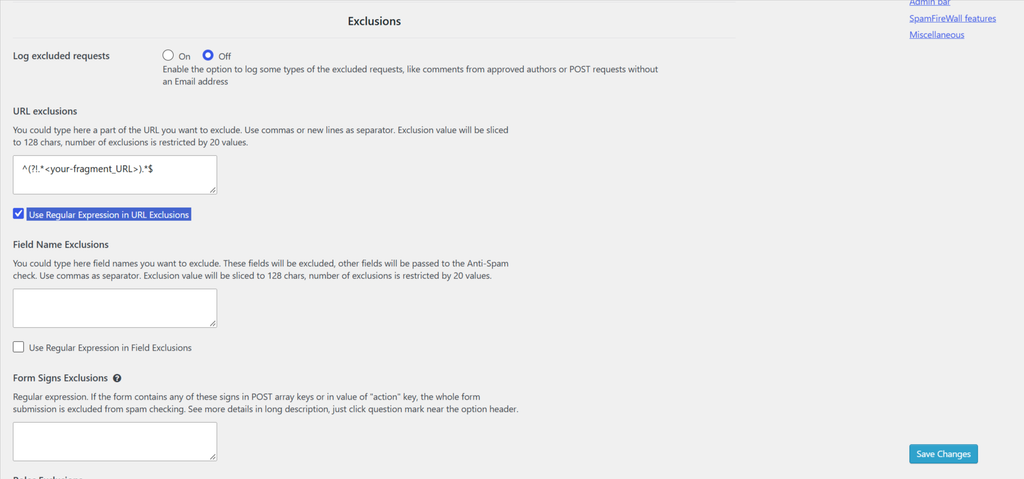
Why you’d want this
The CleanTalk code loads on every page of the site and collects certain parameters even before a form is submitted; some users do not require this, making such an exclusion the best option.
Protect only the form that actually gets spam. If 99% of your spam hits one contact form or your checkout, focus protection there and leave the rest untouched.
Fewer false positives elsewhere. Pages that never should have been checked simply aren’t.
Cleaner logs and lighter checking. Requests are only sent for the pages you care about, so your anti-spam log stays focused on what matters.
Precise targeting. You can pin protection to a specific query-string page or even a specific REST/API endpoint, not just a pretty URL.
One important limitation
These patterns match against the URL of the request being checked (REQUEST_URI). That works great for forms that submit on the same page the visitor is looking at.
It does not work for forms that send a classic POST to a separate endpoint – for example, the standard WordPress comment form (which posts to its own handler) and some custom forms. In those cases the URL CleanTalk sees is the endpoint’s address, not the page the visitor filled in, so a page-based pattern won’t catch them.
Good to know
The exclusion value is trimmed to 128 characters, and you can add up to 20 values.
The regex checkbox must be on — without it, the field treats your pattern as plain text and none of this works.
Regex-based exclusions are a small setting with a big payoff: instead of protecting everything and carving out exceptions, you can aim CleanTalk at exactly the pages and forms that need it.
Read more about excludions for Page, Form, or Field Exclusion From Anti-Spam Checking.

Leave a Reply