

If you use JetFormBuilder on your WordPress website, spam submissions can quickly become a serious problem. Public forms are often targeted by bots that submit fake names, suspicious links, disposable email addresses, repeated messages, or low-quality leads.
This can create extra work for your team, fill your inbox with unwanted notifications, distort marketing reports, and make it harder to find real enquiries among fake submissions.
This guide explains how to set up JetFormBuilder spam protection for WordPress using:
- the Anti-Spam plugin by CleanTalk with direct form integration for JetFormBuilder;
- JetFormBuilder’s built-in protection options;
- additional tools like Google reCAPTCHA, hCaptcha, Friendly Captcha, Cloudflare Turnstile, honeypot protection, Akismet, and manual review.
JetFormBuilder is a WordPress form builder for the block editor that helps users create custom forms, including contact forms, registration forms, booking forms, application forms, surveys, payment forms, post submission forms, and multi-step forms.
Because these forms are public and often collect important business data, they should be protected before spam reaches your inbox, CRM, dashboard, or email marketing workflow.
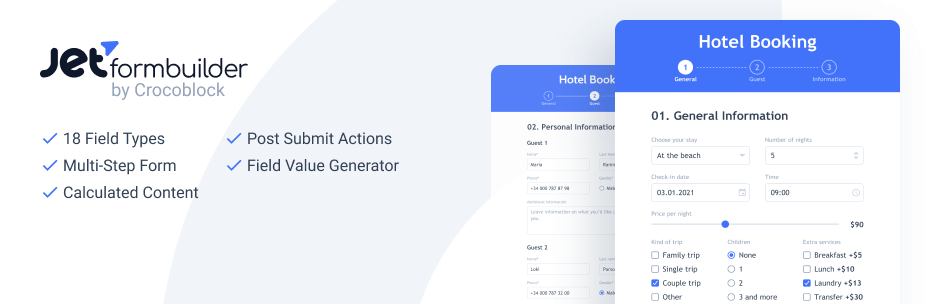
JetFormBuilder and WordPress Forms
JetFormBuilder is a dynamic form builder for WordPress that works inside the Gutenberg block editor. According to WordPress.org, it lets users create, edit, customize, and style advanced form types in the default WordPress block editor.
JetFormBuilder can be used to create many types of forms, including:
- contact forms;
- signup forms;
- user profile forms;
- subscription forms;
- online survey forms;
- appointment forms;
- application forms;
- booking forms;
- event registration forms;
- multi-page forms;
- post submission forms;
- request a quote forms;
- feedback forms;
- donation forms;
- product purchase forms;
- newsletter signup forms.
These forms are useful because they help collect messages, leads, registrations, bookings, orders, files, and feedback directly through your WordPress website. But any public form can also attract spam.
Spambots may submit fake contact details, suspicious URLs, automated messages, repeated promotional content, or irrelevant requests. If these submissions are not filtered, they can reach your inbox, dashboard, CRM, or marketing tools.
That is why reliable JetFormBuilder spam protection is important for keeping form data clean and reducing manual moderation.
As WordPress.org shows, JetFormBuilder is currently used on over 90,000 websites and has 68 user reviews with an average rating of 4.1 out of 5 stars.
Plugin Homepage at WordPress.org
Anti-Spam Plugin by CleanTalk for WordPress
The next tool we are going to use is the Anti-Spam plugin by CleanTalk.
Here’s a short overview:
- CleanTalk is a cloud-based spam protection service for websites.
- It works in the background and does not require visitors to solve CAPTCHA challenges in most cases.
- It can help protect WordPress forms, comments, registrations, reviews, orders, and other user interactions.
- It checks submissions using spam detection signals such as email address, IP address, sender behavior, and other request data.
- It helps block automated bots and suspicious form submissions.
- It allows website owners to review spam checks in the CleanTalk Cloud Dashboard.
- It provides tools such as Anti-Spam Log, Personal Lists, country filters, stop words, SpamFireWall, and honeypot options.
For JetFormBuilder specifically, the current CleanTalk article states that CleanTalk added spam protection for JetFormBuilder using direct form integration.
According to WordPress.org, Anti-Spam by CleanTalk for WordPress has over 200,000 active installations, with 3,168 reviews and an average rating of 4.7.
Plugin Homepage at cleantalk.org | Latest release at GitHub.com | Website cleantalk.org
Install the CleanTalk Anti-Spam plugin
Show Instructions
To install the Anti-Spam plugin, go to your WordPress admin panel → Plugins → Add New.

Then enter «СleanTalk» in the search box and click the Install button for «Spam protection, Anti-Spam, FireWall by CleanTalk».

After installing the plugin, click the «Activate» button.
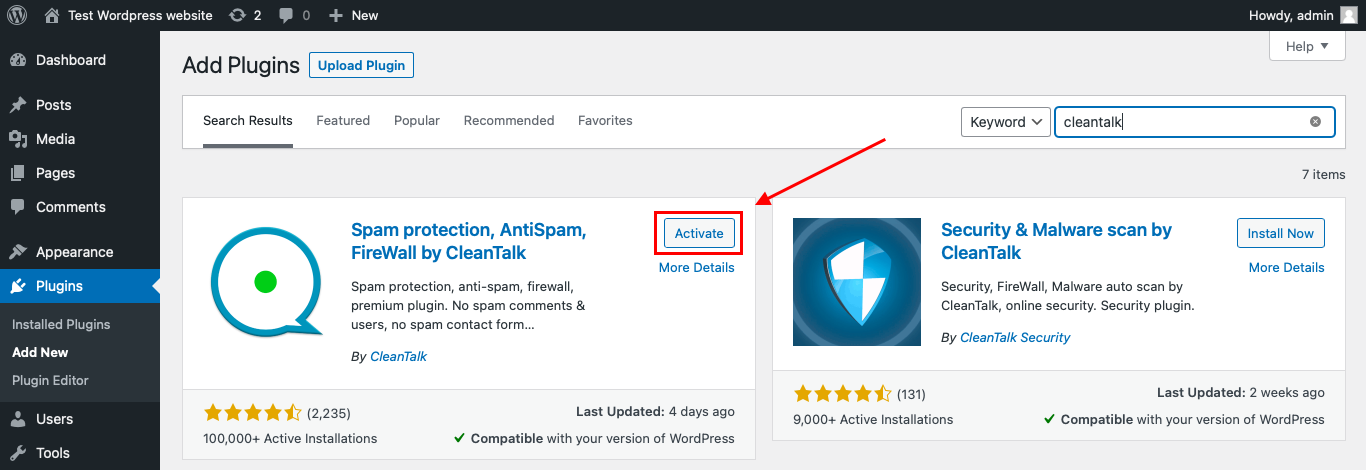
After it is done go to the plugin settings and click the «Get Access Key Automatically» button. Then just click the «Save Settings» button.

That’s it! From now you know how to completely protect your HivePress from spam.
Once that is done, your website has a background anti-spam layer that can help reduce suspicious Quform activity before unwanted messages reach their destination.
Check if Spam Protection Works with JetFormBuilder
The best way to test whether CleanTalk is checking your JetFormBuilder form is to use the CleanTalk test email:
stop_email@example.com
Follow these steps:
- Open the page with your JetFormBuilder form in an Incognito browser tab.
- Fill in all required form fields.
- Use stop_email@example.com
- as the sender email.
- Submit the form.
- Check whether the submission is blocked.
- Open the CleanTalk Cloud Dashboard and review the Anti-Spam Log.
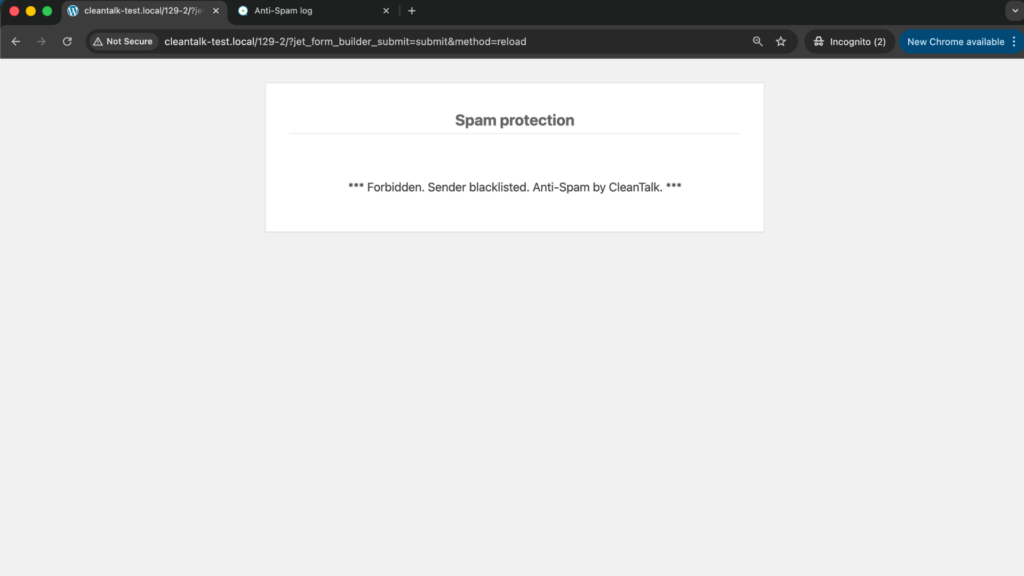
Testing in Incognito mode is important because anti-spam protection should be checked as a regular website visitor, not as a logged-in WordPress administrator.
Cloud Dashboard
In the CleanTalk Cloud Dashboard, you can review submissions processed by CleanTalk.
The dashboard can help you check:
- sender IP address;
- sender email address;
- sender activity;
- submission date and time;
- page URL where the form was submitted;
- CleanTalk decision: approved or denied;
- reason for the decision;
- approved and blocked requests;
- tools for Personal Lists and filtering.
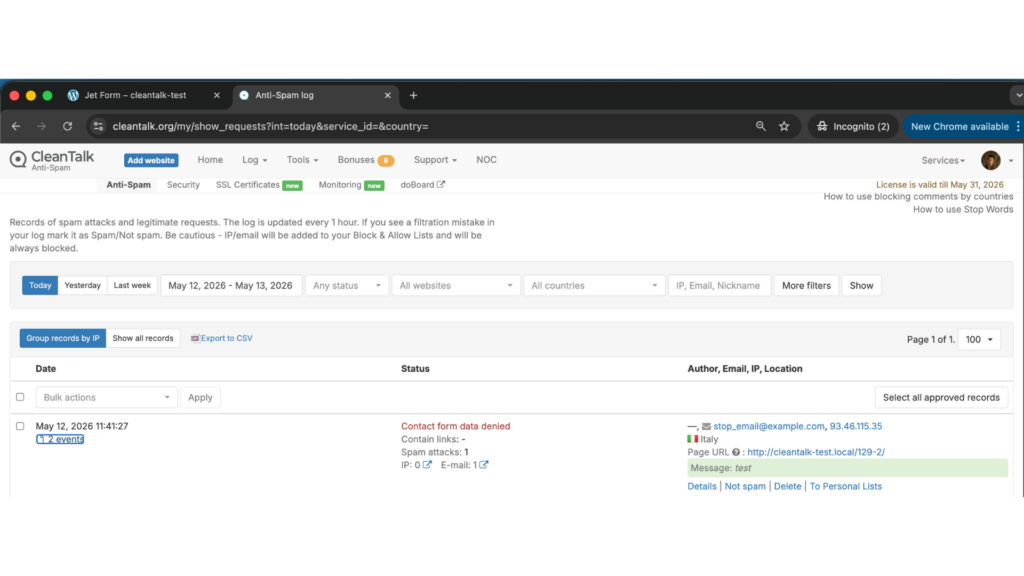
This is useful for JetFormBuilder websites because it helps you understand which submissions are real and which ones are suspicious.
If a real user is blocked by mistake, you can review the request details and adjust your settings. If repeated spam comes from the same IP addresses, countries, domains, or message patterns, you can use Personal Lists, country filters, stop words, and other CleanTalk settings to improve protection.
JetFormBuilder Built-In Spam Protection
JetFormBuilder also has its own tools for form security and spam prevention.
According to JetFormBuilder documentation, CAPTCHA settings can be configured globally from:
WordPress Dashboard → JetFormBuilder → Settings → Captcha Settings
Captcha settings can also be adjusted for each individual form. JetFormBuilder supports several CAPTCHA providers:
- Google reCAPTCHA v3;
- hCaptcha;
- Friendly Captcha;
- Cloudflare Turnstile.
Crocoblock also describes additional form protection methods for JetFormBuilder, including honeypot protection, CSRF protection, nonce validation, and input sanitization.
This means JetFormBuilder users can combine built-in form-level protection with CleanTalk’s WordPress-level spam filtering.
A practical setup can include:
- CleanTalk Anti-Spam as the main spam protection layer;
- JetFormBuilder CAPTCHA only where extra verification is needed;
- honeypot protection for simple bot filtering;
- CSRF protection and nonce validation where suitable;
- CleanTalk Cloud Dashboard logs for reviewing blocked and approved submissions.
This layered setup helps reduce spam without relying on only one method.
Google reCAPTCHA, hCaptcha, Friendly Captcha, and Cloudflare Turnstile
CleanTalk can be used as the main anti-spam layer, but some JetFormBuilder forms may need additional bot protection.
This is especially useful if your forms are placed on:
- high-traffic pages;
- paid advertising landing pages;
- public contact pages;
- registration pages;
- booking pages;
- quote request pages;
- event signup pages;
- pages that already receive repeated spam.
JetFormBuilder supports several CAPTCHA providers, including Google reCAPTCHA v3, hCaptcha, Friendly Captcha, and Cloudflare Turnstile.
These tools can help reduce automated bot submissions. However, they should not replace server-side spam filtering completely.
CAPTCHA tools can reduce automated spam, but they may not catch every suspicious submission, disposable email address, fake lead, or manual spam attempt. That is why it is better to use them together with CleanTalk, not instead of CleanTalk.
Recommended approach:
- keep CleanTalk enabled as the main anti-spam filter;
- use JetFormBuilder CAPTCHA only where extra protection is needed;
- avoid adding unnecessary friction to important conversion forms;
- test every form after adding extra protection;
- monitor submissions and CleanTalk logs.
Honeypot Protection
A honeypot is a hidden form field that real visitors do not see. Simple bots may fill it in automatically because they often try to complete every field in a form. If the hidden field is filled, the submission can be treated as spam.
JetFormBuilder supports honeypot protection as one of the methods to keep contact forms safer. Crocoblock explains that honeypot protection adds an invisible field to trap bots, and if that field is completed, the submission is blocked.
Honeypot protection is useful because it does not interrupt real visitors. There are no puzzles, image challenges, or extra clicks.
For JetFormBuilder forms, honeypot protection can help reduce simple automated spam, especially on public contact forms, newsletter forms, and request forms.
However, honeypot protection should usually be treated as an additional layer, not the only anti-spam method. More advanced bots may ignore hidden fields or behave more like real users.
Akismet
Akismet is another known anti-spam solution for WordPress. It is often used to reduce spam in comments and some basic form submissions.
For a WordPress website using JetFormBuilder, Akismet can be useful for areas outside the main form workflow, such as:
- blog comments;
- simple website submissions;
- user-generated content;
- basic spam filtering.
However, for JetFormBuilder-specific protection, it is better to use a layered setup: CleanTalk as the main anti-spam layer, JetFormBuilder’s built-in protection options, and CAPTCHA or Turnstile only when needed.
To use Akismet, you usually need to:
- Install and activate the Akismet Anti-Spam plugin.
- Get an API key.
- Enable spam checking for the content types you want to protect.
Other Universal Anti-Spam Plugins
You can also use other universal anti-spam plugins for WordPress depending on your website setup.
Examples include:
- OOPSpam;
- Maspik;
- Simple CAPTCHA Alternative;
- form-specific CAPTCHA plugins;
- security plugins with anti-bot features.
These tools may help protect comments, contact forms, registrations, or other parts of the website.
But it is better not to install too many anti-spam plugins at once without testing. Several plugins can duplicate checks, create conflicts, slow down forms, or block legitimate submissions.
A simple setup is usually better:
- one main anti-spam plugin;
- one optional CAPTCHA or bot challenge layer;
- built-in JetFormBuilder protection settings;
- clear logging;
- regular testing.
Frequently Asked Questions
Why do JetFormBuilder forms attract spam?
JetFormBuilder forms are often used for public contact forms, quote requests, bookings, registrations, surveys, and post submissions. These forms are visible on the frontend and usually accept data from any visitor, which makes them attractive targets for bots.
Spam usually appears when bots submit fake names, suspicious links, disposable emails, repeated messages, or automated requests through public form fields.
Why is spam especially risky for JetFormBuilder post-submit actions?
JetFormBuilder can trigger different post-submit actions after a form is submitted, such as sending emails, registering users, updating posts, redirecting users, or connecting with external services.
If spam is not filtered before these actions run, fake submissions can trigger unnecessary notifications, create low-quality entries, pollute workflows, or send bad data to connected tools. That is why spam protection should be active before form data moves further through your website workflow.
How can I protect JetFormBuilder forms without adding CAPTCHA to every form?
You do not have to add visible CAPTCHA to every JetFormBuilder form. A better approach is to use layered protection.
CleanTalk can work as the main background anti-spam layer. Then you can add JetFormBuilder CAPTCHA, hCaptcha, Friendly Captcha, or Cloudflare Turnstile only to high-risk forms, such as registration forms, booking forms, quote request forms, or forms that receive repeated spam.
Should I use Akismet for JetFormBuilder spam protection?
Akismet can be useful for WordPress comments and some basic spam filtering, but it should not be the main protection method for JetFormBuilder forms.
For JetFormBuilder, it is better to use CleanTalk together with JetFormBuilder’s own security options, CAPTCHA providers, honeypot protection, and form validation.
Can spam affect JetFormBuilder forms connected to webhooks or CRM tools?
Yes. If a JetFormBuilder form sends data to a CRM, webhook, automation tool, or email marketing platform, spam can move outside WordPress and pollute external systems.
That is why protection should happen before the data is passed to post-submit actions. Test the form, check CleanTalk logs, and review whether fake submissions are reaching connected tools.
What is the best anti-spam setup for a JetFormBuilder lead generation form?
For a lead generation form, use CleanTalk Anti-Spam as the main background layer, JetFormBuilder CAPTCHA or Turnstile only if the form receives repeated attacks, honeypot protection for simple bots, strong validation for email and phone fields, CleanTalk Anti-Spam Log review, and Personal Lists for repeated spam domains, IPs, or phrases.
Recommended Anti-Spam Stack for JetFormBuilder in 2026
JetFormBuilder is often used for more than simple contact forms. Many websites use it for user registration, post submissions, booking requests, quote forms, frontend profile editing, surveys, and forms connected to webhooks or CRM tools.
Because of that, spam protection should match the role of the form. A simple contact form and a form that creates a user account or sends data to an external system should not have the same level of protection.
Basic public forms
For simple contact, feedback, or newsletter forms, use:
- CleanTalk Anti-Spam as the main background filter;
- JetFormBuilder honeypot protection;
- basic email and required field validation;
- CleanTalk Anti-Spam Log review after setup.
This setup keeps the form easy for real visitors while filtering common bot submissions.
Lead generation and quote request forms
For lead forms, quote requests, and paid traffic landing pages, use:
- CleanTalk Anti-Spam;
- JetFormBuilder CAPTCHA, hCaptcha, Friendly Captcha, or Cloudflare Turnstile if spam volume is high;
- stricter validation for email, phone, and message fields;
- CleanTalk Personal Lists for repeated spam domains, IPs, or phrases;
- regular review of blocked and approved submissions.
This helps reduce fake leads without making every visitor pass unnecessary checks.
Registration, booking, and post-submit action forms
For forms that create users, accept bookings, publish or update content, trigger webhooks, or send data to CRM tools, use the strongest setup:
- CleanTalk Anti-Spam before post-submit actions run;
- JetFormBuilder CAPTCHA or Turnstile for high-risk workflows;
- honeypot protection;
- CSRF protection and nonce validation where available;
- manual moderation for post submission forms;
- monitoring in the CleanTalk Cloud Dashboard after launch.
These forms can affect more than just your inbox. They can create fake users, reserve booking slots, generate unwanted content, or send bad data to external tools, so they need stronger protection.
Final Thoughts
JetFormBuilder makes it possible to create many types of WordPress forms inside the block editor, from simple contact forms to multi-step forms, booking forms, surveys, registration forms, and post submission forms.
But because these forms are public, they can also become a target for spambots and low-quality submissions.
Spam protection is not only about blocking unwanted messages. It is also about keeping your inbox clean, protecting lead quality, reducing manual review, preserving accurate reports, and making sure real submissions are easier to find.
CleanTalk Anti-Spam can be used as the main protection layer for JetFormBuilder forms, while JetFormBuilder’s built-in CAPTCHA options, honeypot protection, CSRF protection, nonce validation, Akismet, and manual review can strengthen the setup where needed.
A layered anti-spam setup helps protect JetFormBuilder forms without making the form experience difficult for legitimate users.
