
When developing an API, checking a method’s response is only part of the job. We also need to verify what happened after the request. Was the correct record deleted? Did unrelated data remain intact? Were access permissions handled correctly?
At CleanTalk, we use AI to help write these checks. Here is our approach, using the website monitoring API as an example — from choosing scenarios to running end-to-end tests.
What We Test
Our tests send HTTP requests to a PHP API connected to test MariaDB databases. We use Playwright to make requests and verify results. No browser is needed: the tested path runs through the HTTP interface, API handler, and database.
Deleting a monitor is a useful example. A user may own a monitor or have shared access to it. For an owned monitor, the API should delete the monitor and its associated records. For a shared monitor, it should remove the user’s access while preserving the monitor itself.
Both operations can return SUCCESS. Checking the JSON response alone cannot tell us whether the correct action took place.
Give AI the Context It Needs
“Write E2E tests for this method” leaves too much room for assumptions. To get useful results, we provide AI with:
- The method’s code and relevant dependencies.
- Database table definitions and expected business behavior.
- An existing test to use as a structural example.
- Instructions for preparing data, running tests, and reading reports.
Application code should not be the only source of expected results. If the implementation contains a bug, AI may reproduce it in the test’s assertions. Business rules need to be stated separately, and discrepancies need investigation.
Define Scenarios Before Writing Tests
Before generating code, we ask AI to outline the scenarios: what data to prepare, which request to send, and what to verify afterward.
For monitor deletion, these include:
- An invalid user token.
- A missing required parameter.
- Deleting an owned monitor.
- Removing shared access.
- Attempting to delete an unauthorized or nonexistent monitor.
- Processing several monitors with different permissions in one request.
A developer reviews this list before implementation. Missing conditions and misunderstood requirements are easier to spot at this stage.
A task for AI might look like this:
Create E2E tests for
monitoring_services_deleteusing the agreed scenarios. Use the existing fixture and API request helpers. Check the complete response and the state of related tables. For rejected requests, verify that data remains unchanged. Run the method’s test suite and investigate failures without changing expected behavior just to make the tests pass.
Check the Response and Its Effects
Each test starts with known data: users, monitors, and access permissions. It then sends a request and checks the result.
For an owned monitor, the test verifies that:
- The API returns the expected success response.
- The monitor and its associated checkpoint records are deleted.
- Other monitors remain unchanged.
- The action is recorded in the log.
For a shared monitor, the expectations differ: the access record disappears, but the monitor and its checkpoint records remain.
Negative scenarios matter just as much. An invalid token should produce an error and leave the checked tables unchanged. When an error response includes both a machine-readable code and a message, we assert both. They are part of the API behavior visible to clients.
Let AI Run the Tests
Code generation becomes more useful when AI can verify its work in a reproducible environment.
We run a method’s suite with one command:
composer test:e2e -- monitoring-services-delete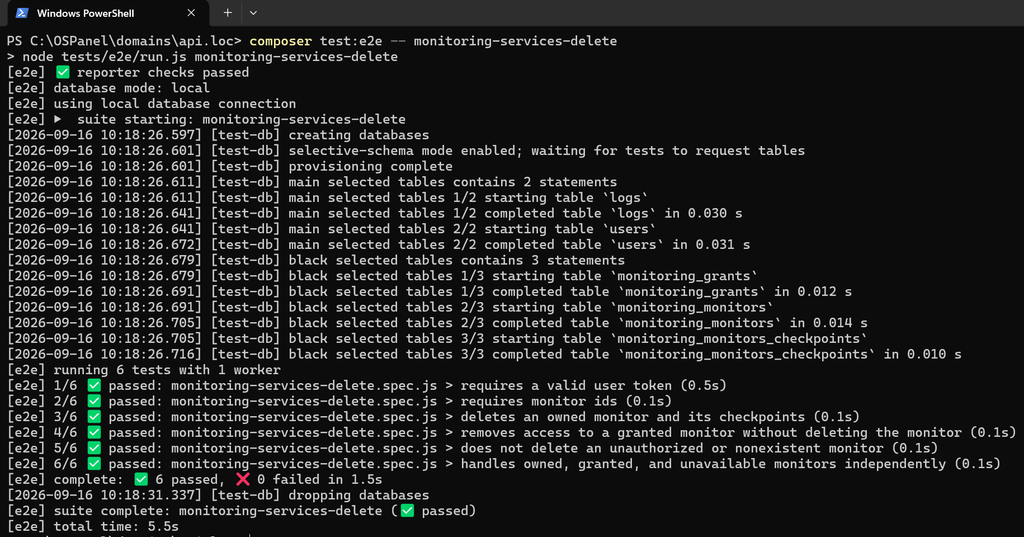
The test runner prepares isolated databases, starts a PHP server, executes the tests, and cleans up the resources it created. Each test loads its own fixture data, helping prevent scenarios from depending on earlier test results.
After execution, AI must check the process exit code, the structured report, and the number of tests executed. A successful run with missing scenarios does not establish that the work is complete.
Investigate Failures Before Making Changes
A failed test may indicate a mistake in the generated test, an environment problem, or an application defect. Each requires a different fix.
For example, AI might prepare incorrect access permissions or omit a required fixture field. But if the data is correct and the API deletes a monitor instead of removing shared access, the implementation needs attention.
Automatically replacing the expected result with the actual response is a dangerous shortcut. It can make the test pass while removing its value. First, compare the result with the requirements and determine why they differ.
One useful additional check is to deliberately break a business rule in a local copy of the application and confirm that the test fails. This demonstrates whether its assertions detect the behavior they are intended to protect.
Start with One API Method
Choose a method with clear rules, prepare an example test, and make execution reproducible. Ask AI to propose scenarios first, then implement them.
AI can help analyze code, prepare fixture data, and write repetitive assertions. Developers remain responsible for defining correct behavior and assessing whether the tests can detect violations. That review turns generated code into useful regression protection.
Check Your Website’s Availability with CleanTalk
E2E tests help catch errors during development. Monitoring helps track website availability after changes go live. CleanTalk Website Uptime Monitoring checks your site from multiple regions and notifies you when it becomes unavailable and when access is restored.
Start with the free online website availability checker: enter a URL to see availability, response times, and HTTP status codes from locations around the world. Set up ongoing monitoring to receive alerts about outages.
Want to integrate monitoring management into your own tools? Explore the CleanTalk Monitoring API documentation to take the next step from the examples in this article to your own integration.

Leave a Reply