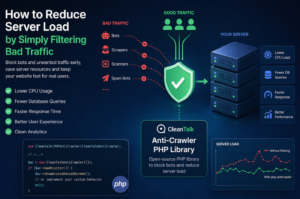
When a website starts slowing down, many teams immediately think about scaling infrastructure: adding CPU, RAM, more servers, or optimizing the database. In reality, a significant part of server load is often caused not by real users, but by automated traffic — bots, scrapers, vulnerability scanners, spam robots, and aggressive crawlers.
These requests may continuously scan pages, submit forms, probe URLs, overload search, login, registration, and API endpoints. As a result, your server wastes resources processing useless traffic: PHP workers are occupied, database connections increase, memory is consumed, and response times get worse for legitimate visitors.

Why Blocking Traffic Early Matters
Once a malicious or unwanted request reaches backend logic, some resources have already been spent. That is why one of the most effective ways to reduce load is to block suspicious traffic as early as possible, before expensive application code runs.
Even basic filtering can provide immediate benefits:
- lower CPU usage;
- fewer PHP worker bottlenecks;
- reduced MySQL load;
- faster page responses for real users;
- better stability during traffic spikes;
- cleaner analytics data.
A Practical Solution for PHP Projects — Anti-Crawler PHP Library
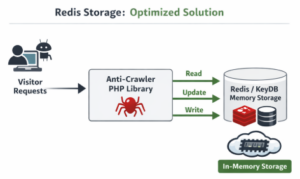
For PHP-based websites and services, a useful option is CleanTalk php-anticrawler — an open-source Anti-Crawler PHP Library designed to detect and filter unwanted bot traffic.
It can be integrated into PHP applications as an additional protection layer without requiring a major architecture rebuild.
Real Usage Example: CleanTalk.org
The library has already been successfully connected to the CleanTalk website in the Blacklists section. Over the last 60 days, the system processed a large volume of traffic and showed clear filtering results:
- BLOCKED: 1,791,250 requests
- LEGITIMATE: 460,502 requests

This means a significant amount of unwanted automated traffic was stopped before consuming backend resources. A traffic chart for this period can clearly demonstrate how early filtering helps reduce unnecessary server load.
What the Anti-Crawler PHP Library Can Help With
The library helps detect and limit suspicious requests using signals such as:
- IP address reputation;
- abnormal request frequency;
- bot-like behavior patterns;
- technical signs of automated clients;
- aggressive crawling activity.
It is especially useful for protecting:
- login pages;
- registration forms;
- contact forms;
- search pages;
- REST/API endpoints;
- resource-heavy pages.
Business Benefits
Many companies try to solve load issues by upgrading servers or paying for more infrastructure. But if a large share of requests has no business value, reducing useless traffic is often the smarter first step.
Filtering bad traffic can help:
- lower hosting and infrastructure costs;
- reduce downtime and overload incidents;
- improve website speed and uptime;
- increase conversion rates through faster UX;
- clean traffic reports and analytics.
Best Use Cases
This approach is highly effective for:
- eCommerce stores;
- SaaS platforms;
- WordPress and other PHP CMS websites;
- lead generation websites;
- public API services.
Final Thoughts
Not every performance issue requires more servers. In many cases, the first step should be identifying how much of your resources are wasted on useless automated traffic.
For PHP projects, the Anti-Crawler PHP Library by CleanTalk can be a practical way to reduce backend load, improve performance, and protect your website from unwanted traffic.