

Managing your Contact Form by Supsystic entries becomes a major headache when automated spam starts flooding your WordPress site. Fake inquiries, bot-driven messages, and junk leads from temporary email accounts not only clutter your records but also waste valuable time that should be spent on genuine customer interactions.
This tutorial focuses on strengthening your Supsystic forms by integrating CleanTalk as your frontline defense, complemented by essential features like “hidden” Honeypot fields, reCAPTCHA validation, and smart IP rate limiting.
These security strategies are vital for any site utilizing Supsystic to handle contact requests, service bookings, quote applications, or high-traffic landing pages where keeping bot activity at zero is crucial for success.
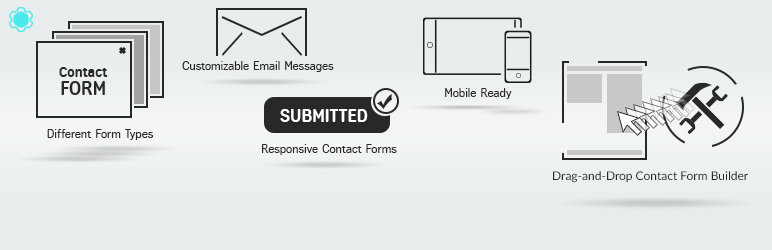
Why Choose Contact Form by Supsystic?
Contact Form by Supsystic is a versatile WordPress form builder designed to create high-converting contact sections, feedback modules, and lead generation tools. It empowers site administrators to build professional forms using a drag-and-drop editor, manage incoming inquiries, set up automated responses, and analyze submission data through integrated analytics.
It is an ideal solution for:
- Dynamic contact and feedback forms;
- Lead capture and subscription pop-ups;
- Appointment and reservation requests;
- Customer support and inquiry tickets;
- Survey and polling modules;
- Google Maps integrated forms;
- Conditional logic-based data entry;
- Marketing forms with custom styling;
- File submission and attachment forms;
- Data-driven contact workflows with tracking.
According to WordPress.org, Contact Form by Supsystic is currently active on more than 30,000 websites and maintains a strong reputation with a 4.3-star average rating from nearly 600 user reviews.
Plugin Homepage at wordpress.org | Website supsystic.com
Anti-Spam Plugin by CleanTalk for WordPress
The next tool we’re going to use is the Anti-Spam plugin by CleanTalk.
Here’s a short overview:
- CleanTalk is a cloud-based spam protection service for websites.
- It automatically blocks spam without CAPTCHA challenges.
- It protects many types of forms, including contact forms, registrations, comments, surveys, payment forms, and subscription forms.
- It helps stop automated bots and suspicious human spam submissions.
- It uses spam detection signals such as IP address, email address, sender behavior, and global spam activity.
- It lets website owners create custom filtering rules for specific cases.
- It allows blocking or filtering by IP, email, and country.
- It works quietly in the background and is easy to install and configure.
For the Contact Form by Supsystic, this is especially useful because registration spam can create more damage than a simple contact form message. A spam registration may become a user account, submission record, email notification, or fake member profile.
According to WordPress.org, Anti-Spam by CleanTalk for WordPress has over 200,000 active installations, with 3,168 reviews and an average rating of 4.7.
Plugin Homepage at cleantalk.org | Latest release at GitHub.com | Website cleantalk.org
Install the CleanTalk Anti-Spam plugin
Show Instructions
To install the Anti-Spam plugin, go to your WordPress admin panel → Plugins → Add New.

Then enter «СleanTalk» in the search box and click the Install button for «Spam protection, Anti-Spam, FireWall by CleanTalk».

After installing the plugin, click the «Activate» button.
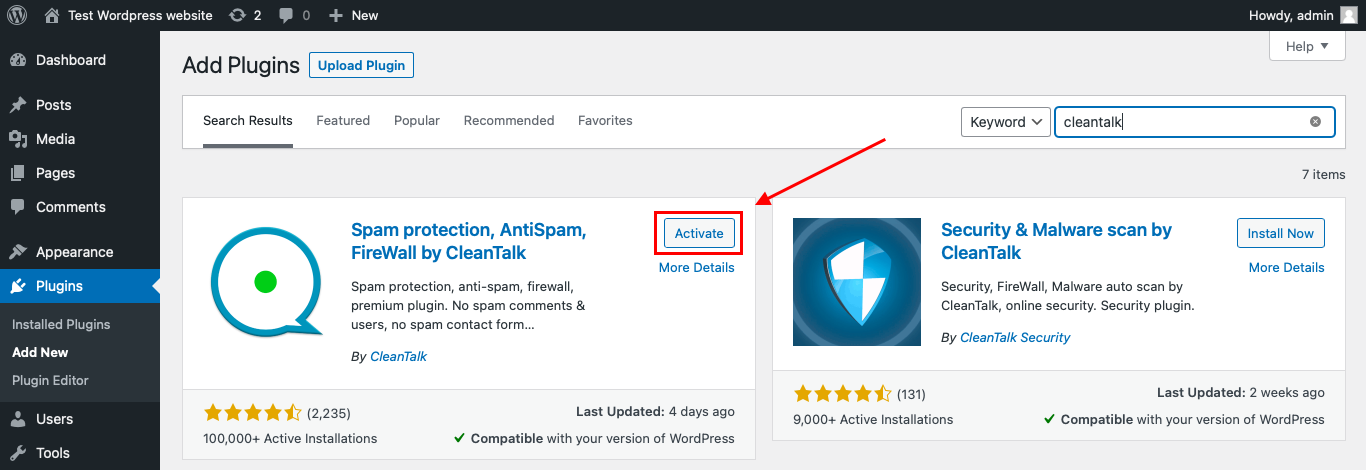
After it is done go to the plugin settings and click the «Get Access Key Automatically» button. Then just click the «Save Settings» button.

That’s it! From now you know how to completely protect your HivePress from spam.
You don’t need to rebuild your Contact Form by Supsystic. Use them as usual, and CleanTalk will check suspicious submissions in the background.
How to Check Spam Protection for Contact Form by Supsystic
You can test the work of Anti-Spam protection for your Contact Form by Supsystic by using a test email:
s@cleantalk.org
- Open page with your form (don’t forget to add the shortcode in the page content) in Incognito browser tab.
- Fill out the Contact form using s@cleantalk.org as sender’s email.
- Send the form.
- You should see a message from the Anti-Spam plugin confirming that a spam submission was blocked.
*** Forbidden. Sender blacklisted. Anti-Spam by CleanTalk. ***
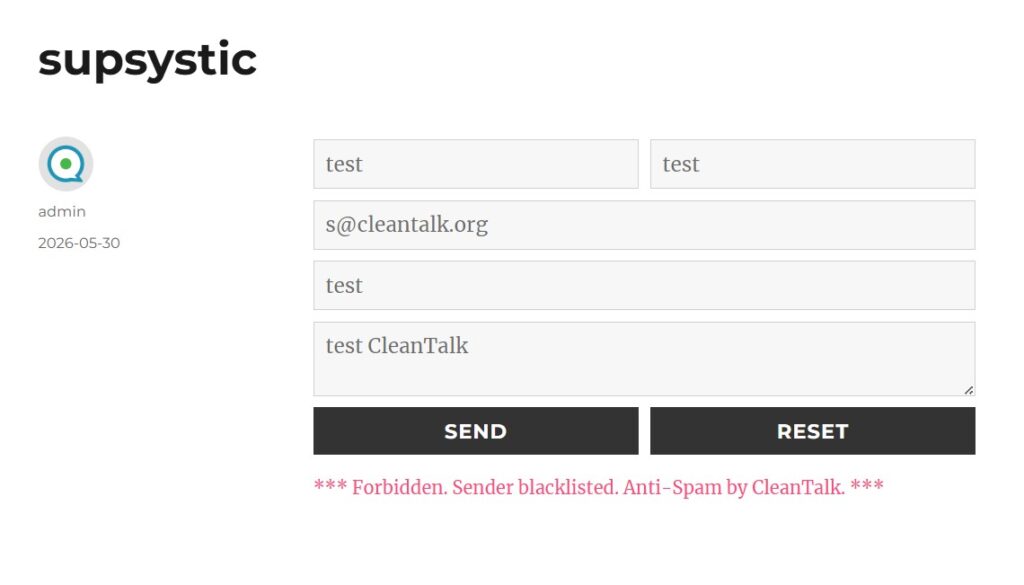
Security measures are active exclusively for your site’s guests and do not apply to administrative accounts. To verify that your defenses are working correctly, always evaluate your forms using a private or incognito browser window.
This step is vital because the Contact Form by Supsystic often bypasses certain restrictions for logged-in administrators to ensure a smooth backend experience. If you conduct tests while authenticated in your WordPress dashboard, you might not encounter the same security triggers that a typical visitor or a bot would face.
Cloud Dashboard
Furthermore, the CleanTalk Cloud Dashboard provides comprehensive insights into all inquiries handled by the service, covering Contact Form by Supsystic entries along with any other WordPress-integrated forms. This centralized logs area allows you to review granular data for every filtered submission, ensuring full visibility into how your site’s communication channels are being protected.
The dashboard can help review:
- IP and email of the sender;
- sender activity history across other websites connected to the CleanTalk cloud;
- geolocation of the sender;
- date and time of the submission;
- page URL where the form was submitted;
- cloud decision: Approved or Denied;
- cloud explanation for the decision, such as blacklisted email, bad IP reputation, or spam text;
- tools to move senders to Block or Allow lists.
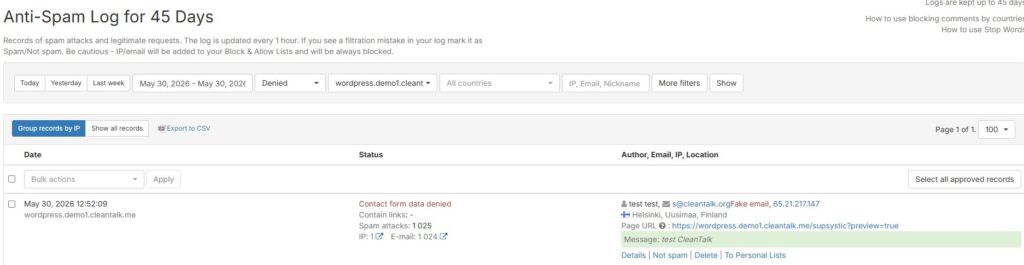
This level of transparency is highly beneficial for Contact Form by Supsystic users, as spam often extends beyond simple message clutter. It can manifest as malicious lead injections, brute-force attempts through contact fields, or a barrage of identical inquiries from a single botnet.
By utilizing the dashboard, you can pinpoint exactly which Supsystic form is under attack. It allows you to identify whether the threat stems from temporary email domains, persistent IP addresses, flagged keywords, or aggressive automated scripts trying to bypass your contact filters.
Why Securing Your Supsystic Form Modules is Vital for Site Integrity
Contact Form by Supsystic is far more than a simple data collection tool. It is a comprehensive builder that handles lead generation, customer feedback, professional inquiries, and interactive data modules. Given its versatility, securing each specific type of form is essential to maintaining your site’s integrity.
Standard Contact and Lead Forms
If an automated script targets your Supsystic forms, it can flood your database with junk inquiries and fake leads. This distorts your marketing analytics and makes it difficult for your team to identify and respond to genuine potential customers.
Subscription and Newsletter Modules
Supsystic is frequently used for subscription pop-ups and sign-up bars. Without proper filtering, bots can inject thousands of non-existent email addresses into your mailing lists. This can damage your sender reputation and lead to your domain being blacklisted by email service providers.
Forms with Google Maps Integration
Since Supsystic allows for location-based forms, spam submissions can include malicious coordinates or fake address data. Protecting these forms ensures that your location-specific service requests remain accurate and actionable.
File Upload and Attachment Fields
The plugin supports file attachments, which is a high-risk area for security. Spam protection is vital here to prevent bots from uploading malicious scripts or oversized files that could compromise your server or exhaust your storage limits.
Reservation and Booking Forms
For sites using Supsystic to handle appointments or service bookings, fake submissions are particularly damaging. They can “lock out” real clients by creating false occupancy, distorting your schedule and resulting in lost revenue.
Survey and Polling Forms
When using Supsystic for feedback or research, bot activity can completely invalidate your results. Effective anti-spam measures ensure that the data you collect reflects real user opinions rather than automated patterns.
Key Strategies to Combat Spam in Contact Form by Supsystic
To maintain a clean and professional communication channel in 2026, it is essential to move beyond basic filters. Contact Form by Supsystic offers several layers of defense that, when combined with specialized tools, provide near-impenetrable security.
1. Implementing the Invisible Honeypot
One of the most efficient features in Supsystic is the Honeypot trap. This adds a hidden field to your forms that remains invisible to human users but is tempting for automated bots.
- The Result: When a bot fills out this “ghost” field, the plugin instantly flags the submission as spam and prevents it from ever reaching your inbox.
2. Leveraging CleanTalk for Advanced Filtering
While internal tools catch basic scripts, CleanTalk acts as your primary cloud-based security layer. It checks every submission against a global database of known spam active IPs and email addresses.
- The Result: This ensures that even “low-speed” manual spam or sophisticated AI bots are blocked before they can pollute your WordPress database, all without bothering your visitors with annoying puzzles.
3. Utilizing Google reCAPTCHA v3
Supsystic allows for seamless integration with reCAPTCHA v3. Unlike older versions that require clicking images, v3 monitors user behavior to identify suspicious patterns.
- The Result: You get high-level security with zero friction for your customers, keeping conversion rates high while keeping bot submissions at zero.
4. IP-Based Submission Limits
To prevent “mail bombing” or brute-force attempts through your contact fields, Supsystic includes an option to limit submissions from a single IP address.
- The Result: By setting a time delay or a maximum number of attempts, you effectively shut down aggressive scripts that try to overwhelm your server with repeated entries.
5. Attachment and Extension Control
If you use the file upload feature in your Supsystic forms, it is crucial to restrict the types of files accepted.
- The Result: By allowing only specific formats (like .pdf or .jpg) and combining this with CleanTalk’s file scanning, you prevent the upload of potentially harmful scripts or malicious executable files.
Comparison of Anti-Spam Approaches for Supsystic forms
| Solution | Main role | Strengths | Limitations | Best use case |
|---|---|---|---|---|
| CleanTalk | Global Cloud Filtering | Blocks malicious entries before they hit your database; invisible to users; eliminates CAPTCHA frustration. | Maximum protection requires a valid cloud subscription. | WordPress websites using Contact Form by Supsystic |
| Honeypot Trap | Invisible Bot Detection | Reduces invalid or mistyped emails | Can be bypassed by highly sophisticated, custom-coded AI bots. | Any standard contact or feedback form. |
| reCAPTCHA v3 | Behavioral Analysis | High security level; scores users based on interaction quality without interruptions. | Requires integration with Google API and minor script loading. | Landing pages where conversion rates are a top priority. |
| IP Rate Limiting | Flood Protection | Prevents “mail bombing” by restricting repeated attempts from the same source. | Might affect users on shared public networks (e.g., offices or cafes). | Appointment bookings and service request forms. |
| File Restrictions | Attachment Security | Eliminates risks by strictly limiting allowed file extensions and sizes. | Does not filter text-based spam on its own. | Quote request forms requiring documentation or images. |
| Manual Moderation | Human Review | Allows for total control over which inquiries get a response. | Extremely time-consuming for high-volume websites. | Low-volume, high-value B2B inquiry forms. |
| Email Domain Blacklist | Targeted Blocking | Instantly stops known “disposable” or malicious email providers. | Requires ongoing manual updates to the blocked list. | Preventing fake sign-ups and junk newsletter entries. |
Frequently Asked Questions – Contact Form by Supsystic Anti-Spam
Why do bots target my Supsystic forms?
Bots target these forms because they are entry points for lead generation and email marketing. Since Supsystic forms often trigger auto-responders or store data in your WordPress database, bots use them to test email vulnerabilities, distribute malicious links, or flood your site with junk data to disrupt your operations.
Can spam affect the accuracy of my Supsystic analytics?
Absolutely. If you use the built-in Supsystic analytics or Google Analytics integration, bot submissions will skew your conversion rates and visitor data. This leads to inaccurate marketing reports, making it difficult to distinguish between real potential customers and automated scripts.
How does spam impact Supsystic forms with file uploads?
Forms with upload fields are high-risk targets. Without advanced filtering, bots can attempt to upload malicious scripts, malware, or excessively large files to exhaust your server storage. It is crucial to limit allowed file types in the Supsystic settings and use a secondary security layer like CleanTalk to scan submissions.
Is the “Math Captcha” in Supsystic sufficient for protection?
While a math challenge can stop very basic bots, modern AI-driven scripts can easily solve these puzzles. Additionally, any visible captcha creates “friction,” which can discourage real users from completing the form. For better results in 2026, we recommend invisible methods like CleanTalk or reCAPTCHA v3.
What should I do if spam is still bypassing my Supsystic forms?
First, verify your protection by testing the form in Incognito mode (admins are often excluded from security checks). If the issue persists, check that the Honeypot feature is enabled in your Supsystic settings and ensure your CleanTalk connection is active. Reviewing your Cloud Dashboard logs will help you identify if the spam is coming from specific IP ranges or disposable email domains that need to be blacklisted.
Recommended Anti-Spam Stack for Contact Form by Supsystic in 2026
Contact Form by Supsystic is a versatile tool used for various data collection workflows. Since it handles everything from simple feedback to complex service bookings, the ideal security configuration depends on your form’s specific purpose.
For General Contact & Inquiry Forms This setup keeps communication easy for customers while filtering out 99% of bot traffic. Use CleanTalk Anti-Spam for invisible filtering, enable the Honeypot Trap to catch basic scripts without user friction, and apply IP Rate Limiting to prevent repeated submissions from the same source.
For Lead Generation & Newsletter Signups This ensures your marketing database remains high-quality and protects your sender reputation. Combine CleanTalk Anti-Spam to verify email authenticity with reCAPTCHA v3 for background behavioral analysis. Additionally, use Domain Blacklisting to block common disposable email providers.
For Reservation & Appointment Forms This prevents bots from locking out real clients and protects your business schedule. Rely on CleanTalk Anti-Spam to stop “ghost” bookings, use Email Confirmation to ensure the requester is reachable, and set Submission Limits to restrict how many times a user can book within a specific timeframe.
For Forms with File Uploads This minimizes the risk of malware injection or server-side vulnerabilities through the upload field. Integrate CleanTalk Anti-Spam to filter text metadata, apply Strict Extension Whitelisting (e.g., .pdf, .jpg), and set File Size Caps to prevent server storage exhaustion.
For High-Risk or Targeted Landing Pages This “hardened” setup is necessary when your site is under active botnet attacks or heavy brute-force attempts. Use CleanTalk Anti-Spam as your primary defense, implement a reCAPTCHA layer for extra verification, and use Country-Based Blocking to exclude regions where you do not operate.
Final Thoughts on Securing Contact Form by Supsystic
Spam in Contact Form by Supsystic should be treated as more than just a minor annoyance. While a junk message is a nuisance, a malicious submission can distort your marketing analytics, disrupt your booking schedule, clutter your database with fake leads, or even expose your server to risks through file upload vulnerabilities.
The primary objective is not just to quiet your inbox notifications, but to safeguard your entire data collection workflow before any corrupt information enters your system. For a basic contact page, CleanTalk combined with a Honeypot trap is often sufficient. However, for reservation modules, professional inquiry forms, or forms that accept attachments, it is essential to implement extra layers like IP rate limiting and strict file type restrictions.
The most effective strategy is to secure the specific outcome of each form. If a form is designed for lead generation, protect your database from fake emails; if it handles appointments, ensure real users aren’t locked out by bots. By using CleanTalk as your frontline defense and configuring your Supsystic settings with precision, you can maintain a clean database, protect your domain reputation, and ensure your contact forms remain a secure bridge to your genuine customers.
Leave a Reply