

TL;DR: To stop spam in EventPrime, combine its built-in Google reCAPTCHA with a cloud anti-spam filter. CleanTalk Anti-Spam checks every attendee registration and event booking in the background and blocks spam bots invisibly – no CAPTCHA, no puzzles, no checkboxes – while protecting comments, registrations and WooCommerce on the same site. reCAPTCHA, hCaptcha and Turnstile add a visible challenge layer for high-risk forms. For most WordPress sites, an invisible cloud filter blocks more spam with less friction than CAPTCHA alone. Plans start at $12 per site/year with a free 7-day trial.

An event calendar is a rare kind of plugin: it collects registrations, it takes bookings, and it sends confirmation emails – all from visitors who are not logged in. That is exactly the surface bots look for.
For an organiser the damage is not abstract. Fake attendees take seats in a limited-capacity event, the attendee list becomes useless for planning, confirmation emails go to addresses that do not exist and hurt your sender reputation, and free events get filled by accounts that will never show up.
As WordPress.org shows, EventPrime is currently used on over 7,000 active installations and has 84 reviews with an average rating of 4.5.
Plugin Homepage at wordpress.org | Developer Metagauss
Common types of spam in EventPrime
- Fake attendee registrations. Bots sign up for events with disposable or non-existent addresses, and your seat count no longer means anything.
- Bot bookings at checkout. The booking form is submitted automatically, so a free event sells out on paper while the room stays empty.
- Spam in the registration fields. Links and promotional text typed into name, notes or custom fields, which then appear in your attendee list and in emails.
- Address harvesting for the confirmation email. A bot enters someone else’s address so your site sends them a message they never asked for.
- Repeat submissions. The same form hit dozens of times to flood the organiser with notifications.
- Guest booking abuse. When guest booking is enabled, there is no account to block afterwards – the filter has to work at the moment of submission.
Official anti-spam options and integrations in EventPrime
EventPrime does ship protection, and it is worth switching on.
In the plugin settings there is a global Enable Google reCAPTCHA option with fields for the site key and the secret key. Once the keys are saved, reCAPTCHA can be enabled separately for the registration form and for the checkout registration form used during booking – the per-form checkboxes stay disabled until the global keys are filled in. The developer also offers a separate Turnstile Antispam Security extension.
What this stack does not do is judge the sender. A captcha confirms that someone is a human at that moment; it says nothing about whether that human is a spammer who registered for two hundred events this week with a disposable address. It also does not check whether the email in the form actually exists – and for an event organiser, a bounced confirmation is a lost attendee either way.
If your goal is to protect registrations and bookings without adding CAPTCHA challenges, CleanTalk can be used as a Google reCAPTCHA alternative that filters spam submissions in the background.
CAPTCHA options in EventPrime
- Google reCAPTCHA is built in and free, but it requires a Google account and keys, loads Google scripts on the page, and adds a step for every attendee.
- Turnstile is available as a separate extension: lighter and privacy-friendly, still a challenge rather than a content filter.
- The practical cost: event pages are usually the last step of a marketing campaign. Anything you add between the visitor’s decision and the Register button is paid for in attendance.
Best ways to stop spam in EventPrime
- Filter at submission, not at rendering. The check must happen when the registration or booking is processed, so bots that post directly to the plugin’s AJAX endpoints are caught too.
- Judge the sender. Reputation of the email and IP across many sites catches what a puzzle cannot.
- Verify the address exists. A confirmation email that bounces is a wasted seat and a hit to your domain reputation.
- Protect the booking flow, not only the signup. Registration and checkout are two different forms and both are attacked.
- Keep the form short. For events, every extra field or challenge costs real attendees.
Comparison table: EventPrime spam protection options
Here is how the main anti-spam options for EventPrime compare:
| Solution | Best for | Pricing | Main limitation |
| CleanTalk Anti-Spam | Invisible, site-wide protection across registrations, bookings and other forms | From $12/site/year; free 7-day trial | Cloud service; paid after trial |
| Akismet | Comment and basic form spam on small sites | Free personal; paid commercial | Comment-focused; does not cover event bookings |
| Google reCAPTCHA | High-risk forms where a challenge is acceptable | Free | Adds friction; can hurt attendance; bots bypass it |
| Cloudflare Turnstile | Lighter, privacy-friendly CAPTCHA | Free | A challenge, not a content filter |
In short: use CleanTalk as the invisible baseline filter, and add reCAPTCHA, hCaptcha or Turnstile only on your highest-risk forms.
How the CleanTalk integration works with EventPrime
This is a direct integration, available since CleanTalk Anti-Spam 6.85. It covers both entry points of the plugin:
- the attendee registration form, and
- the event booking checkout, where the visitor’s email is taken from the booking fields.
CleanTalk collects the submitted data, adds the Bot Detector signals if they are present, and sends everything to the cloud for a decision. If the verdict is spam, the plugin answers the request with an error and EventPrime shows that message right in the form. The attendee is not created, the booking is not saved and no confirmation email is sent.
The visitor sees no extra step while filling the form – the check happens after the click, in the background.
Anti-Spam plugin by CleanTalk for WordPress
The next tool we’re going to use is the Anti-Spam plugin by CleanTalk.
Here’s a short overview:
- CleanTalk is a cloud-based spam protection service for websites, founded in 2012.
- It automatically blocks spam without CAPTCHAs and doesn’t interrupt the user experience.
- Protects many types of forms: contact forms, payment forms, registrations, comments, surveys and more.
- Stops both automated bots and human spam submissions.
- Uses advanced filtering algorithms and a global spam detection network.
- Detects spam based on IP address, email address and user behavior.
- Lets you create custom filtering rules for specific cases.
- Allows blocking or filtering by IP, email and country.
- Works quietly in the background and is very easy to install and configure.
According to WordPress.org, Anti-Spam by CleanTalk for WordPress has over 200,000 active installations, with 3,211 reviews and an average rating of 4.8.
Plugin Homepage at cleantalk.org | Latest release at GitHub.com | Website cleantalk.org
Install the CleanTalk Anti-Spam plugin
Show Instructions
To install the Anti-Spam plugin, go to your WordPress admin panel → Plugins → Add New.
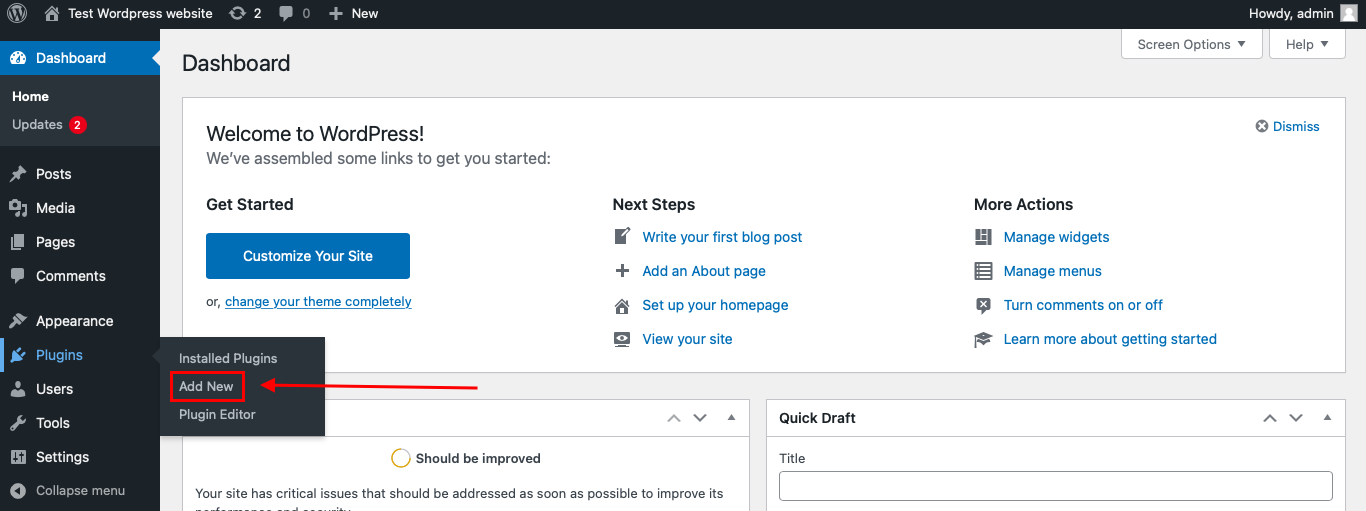
Then enter «СleanTalk» in the search box and click the Install button for «Spam protection, Anti-Spam, FireWall by CleanTalk».
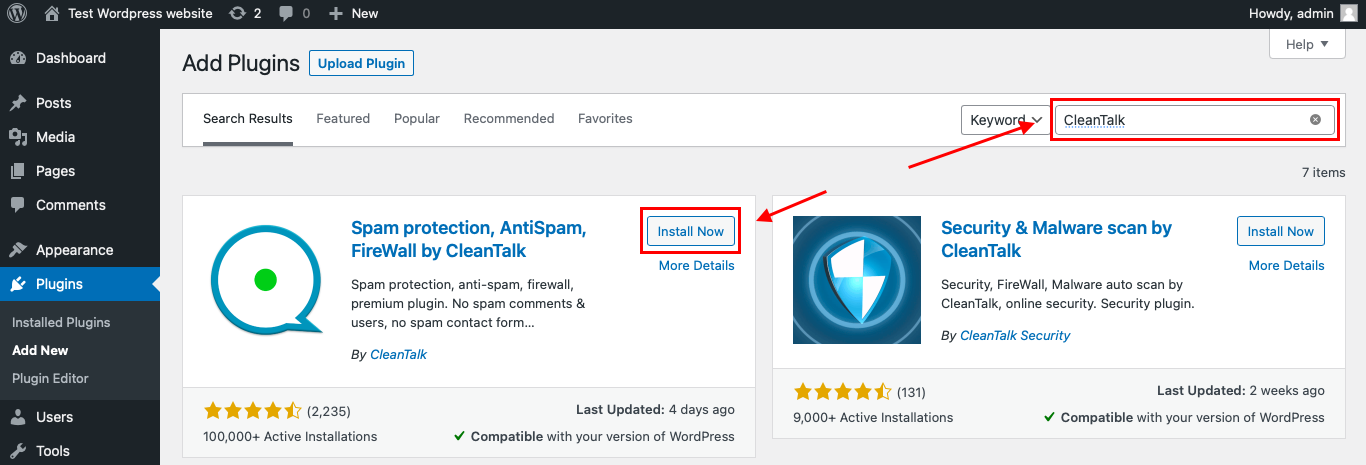
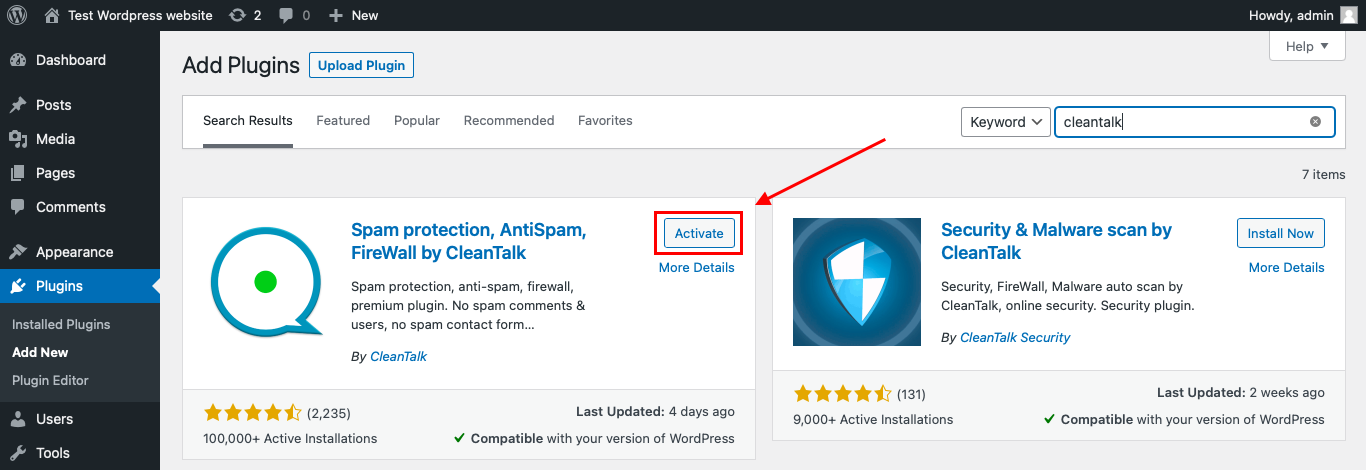
After installing the plugin, click the «Activate» button.
After it is done go to the plugin settings and click the «Get Access Key Automatically» button. Then just click the «Save Settings» button.
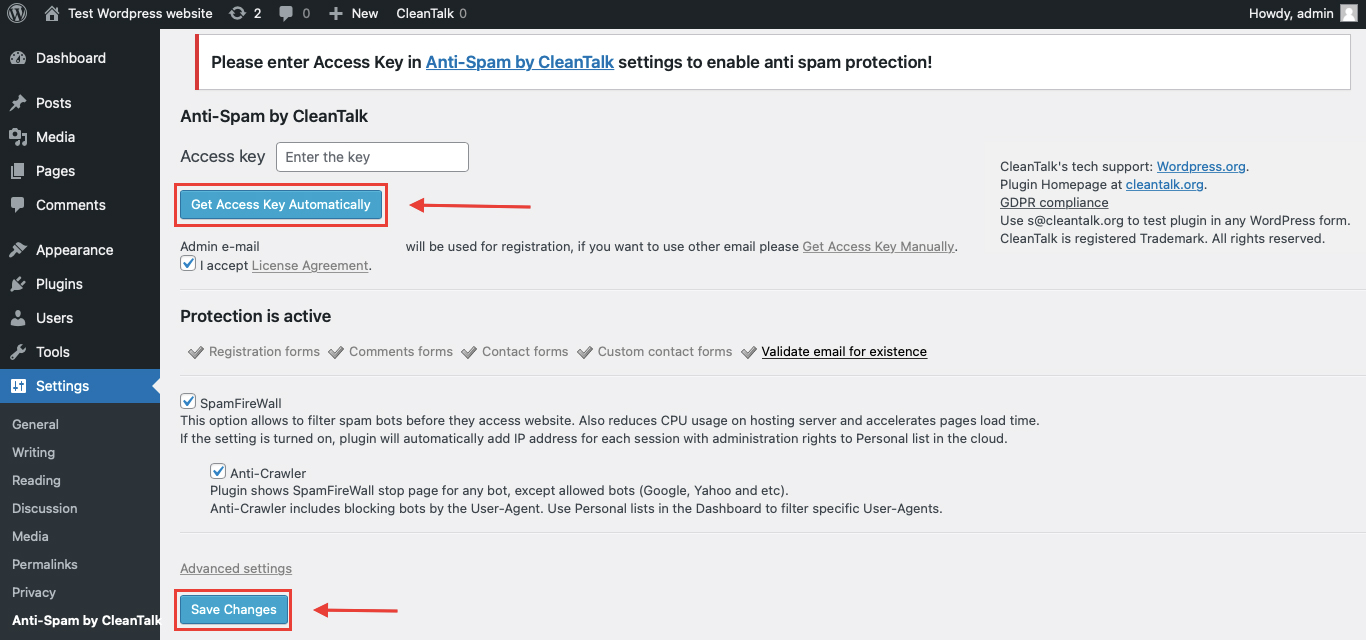
Make sure the option Registration forms is enabled in *Anti-Spam by CleanTalk -> Settings* – EventPrime registrations and bookings are checked under that setting.
That’s it! From now you know how to completely protect your EventPrime events from spam. No shortcodes and no changes to your event pages are needed.
Check if spam protection works with EventPrime
The best way to test the spam protection is by using a test email,
stop_email@example.com
- Open your EventPrime registration form in an Incognito / private browser tab.
- Fill it out using stop_email@example.com as the attendee’s email.
- Submit the form.
- You should see a message from the Anti-Spam plugin in the form confirming that a spam registration was blocked.
*** Forbidden. Sender blacklisted. Anti-Spam by CleanTalk. ***
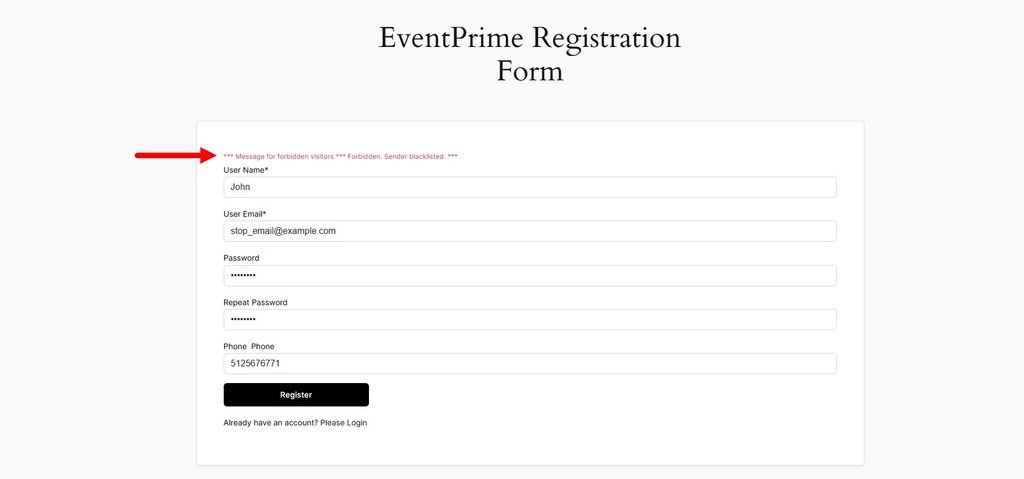
Then open the event in your WordPress admin: the attendee was not added and no confirmation email was sent.
If you see this message, it means CleanTalk successfully protects your EventPrime events from spam.
Cloud Dashboard
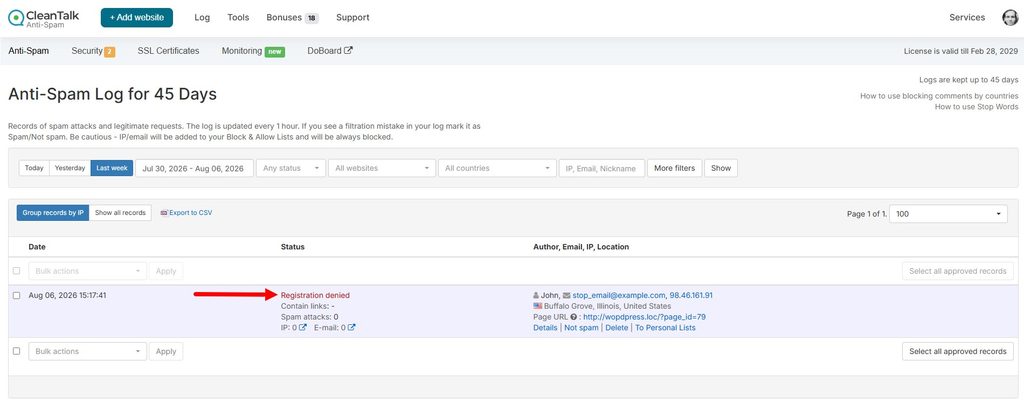
In addition, in the Cloud Dashboard you can find extra details regarding all submissions processed by CleanTalk, including EventPrime registrations and bookings:
- IP and email of the sender, as well as the sender’s activity history across other websites connected to the CleanTalk cloud.
- Geolocation of the sender.
- Date and time of the submission.
- Page (URL) where the form was submitted.
- Cloud decision – Approved or Denied.
- Cloud explanation for the decision (e.g. blacklisted email, bad IP reputation, spam text, etc.).
- Tools to move the sender to Block or Allow lists so you can fine-tune your event protection.
FAQ
Does it protect event bookings as well as registrations?
Yes. The integration covers the attendee registration form and the booking checkout, where the email is taken from the booking fields.
Do I need to remove Google reCAPTCHA from EventPrime?
Not necessarily, but most sites do. CleanTalk filters server-side, so the puzzle stops being the thing that holds the line. Keep reCAPTCHA only on a form that is under a targeted attack.
Will blocked registrations appear in the attendee list?
No. They are filtered before the attendee is created, so your seat count stays accurate and no confirmation email is sent.
Does it work with guest booking?
Yes – and that is the case where a server-side filter matters most, because there is no account to block afterwards.
Which CleanTalk setting covers EventPrime?
Registration forms. Make sure it is enabled in the plugin settings.
Which version do I need?
The direct EventPrime integration is available since Anti-Spam by CleanTalk 6.85.
What if a real attendee gets blocked?
Open the Cloud Dashboard, find the request with its reason, and move that email or IP to the Allow list.
Final recommendation
EventPrime gives you a working calendar with registrations and bookings in an afternoon, and bots find those forms just as fast. Turn on the built-in reCAPTCHA if you are under attack, but do not make it your only line: it protects the page, not the endpoint, and it says nothing about who the attendee is. A server-side filter keeps the attendee list accurate, the confirmation emails deliverable and the registration form down to the fields you actually need.
For broader website protection, CleanTalk also provides anti-spam protection for websites, helping block spam in forms, comments, registrations, and orders without CAPTCHA.
Stop EventPrime spam without CAPTCHAs
Create your CleanTalk account and protect attendee registrations and event bookings from bot and human spam with server-side filtering. Keep signing up easy for real attendees while extending protection across comments, registrations, and other WordPress forms.
