

TL;DR: To stop spam in Amelia, combine its built-in protection with a cloud anti-spam filter. CleanTalk Anti-Spam checks every Amelia submission in the background and blocks spam bots invisibly – no CAPTCHA, no puzzles, no checkboxes – while protecting registrations, comments and WooCommerce on the same site. reCAPTCHA, hCaptcha and Turnstile add a visible challenge layer for high-risk forms. For most WordPress sites, an invisible cloud filter blocks more spam with less friction than CAPTCHA alone. Plans start at $12 per site/year with a free 7-day trial.
If you run a booking site with Amelia, spam bookings will eventually show up. It usually starts quietly – one strange appointment with a nonsense name, a booking note stuffed with links, an email that bounces the moment you reply. Then it grows. Within weeks your calendar can be dotted with reservations no real customer ever made, your inbox filling with confirmations for people who will never walk through the door, and your staff chasing no-shows that were bots all along.
That is not an Amelia-specific flaw. It is the normal consequence of putting a public form with an email field on the open web. Any booking form a visitor can reach without logging in can also be reached by a script, and scripts do not sleep. Once a crawler finds your Amelia endpoint, it keeps hammering it, because submitting fake appointments is cheap and, for the spammer, occasionally profitable.
This guide explains how to build a practical, layered anti-spam stack for Amelia – one that stops the junk before it reaches your calendar, without punishing the real customers you want to book. We will look honestly at what Amelia protects on its own, where those defenses run out, and how an invisible cloud filter fills the gap.
What “Amelia spam” actually means
When people search for Amelia spam protection, they are usually not describing one single problem. They are describing a whole category of things that go wrong on a booking site. It helps to name them, because each one has a slightly different cause and a slightly different cost:
- Fake appointments. Bots pick a service and a time slot, fill in a throwaway name, and confirm. The slot now looks taken.
- Junk event registrations. For Amelia events, automated sign-ups inflate your attendee list with people who do not exist.
- Spam in booking notes and custom fields. The free-text fields on your form become a billboard for links, SEO garbage and scam pitches.
- Throwaway and disposable emails. Submissions arrive from addresses that were created seconds ago and will vanish just as fast, so your confirmations bounce.
- No-show bots. Reservations that were never genuine guarantee an empty chair, a wasted prep slot, and a hole in your day.
- Calendar flooding. In volume, all of the above turns your real schedule into noise. The genuine bookings are still there – you just cannot see them anymore.
Each of these has a real cost for a business that runs on time slots. A fake appointment does not just create a bad line in a database. It blocks a real slot that a paying customer could have taken, it triggers email notifications you have to read and dismiss, and it erodes trust in your own calendar until you stop believing what it tells you. Left unprotected, a single busy Amelia form can generate dozens of fake bookings a week.
A spam booking is not a harmless database entry. It is a slot your best customer could not book, a notification your team had to read, and a reason to stop trusting your own calendar.
As WordPress.org shows, Amelia is currently used on over 90,000 active installations and has 778 reviews with an average rating of 4.6.
Plugin Homepage at wordpress.org | Website wpamelia.com
Why Amelia booking forms attract spam in the first place
It is worth understanding why booking plugins get hit so consistently, because the reason shapes the fix. A contact form has one job: send a message. A booking form does more. It exposes services, staff, time slots and often a payment step, all through fields a visitor can submit without an account. That richness is what makes Amelia so good for real businesses – and what makes it interesting to spammers.
The people and scripts hitting your form are not all the same, and it helps to picture three broad groups.
Simple bots are basic scripts that auto-fill every field they can find and blast the same submission across thousands of sites. They are crude and easy to detect one at a time, but the volume is the problem. A crude bot that fires a hundred fake bookings overnight has still ruined your morning.
Advanced bots are smarter. They rotate IP addresses, mimic real timing, solve simple challenges, and fill fields in a human-like order. These slip past naive rules and produce a booking that looks completely legitimate – you only notice when the customer never shows.
Human spam is the category most filters miss entirely. These are real people, often paid a few cents per submission, typing promotional or malicious content into your booking notes by hand. Because a human is typing, honeypots wave them straight through.
The uncomfortable truth is that no single trick catches all three. A honeypot stops simple bots, a CAPTCHA slows advanced ones, and reputation data is what finally catches the humans. That is the whole argument for a layered stack rather than a single silver bullet.
Official anti-spam options and integrations in Amelia
Here is the honest picture. Amelia does ship with some protection, and it is worth using – but it is important to know exactly what it does and does not do.
Amelia includes an optional Google reCAPTCHA (v2 and v3) setting for its booking forms, which you enable and configure in the Amelia settings. When it is turned on, a visitor has to pass a reCAPTCHA check before a booking goes through. That genuinely raises the cost of automated abuse, and for a low-traffic site it can be enough to make the crude bots move on to an easier target.
However, reCAPTCHA is a challenge layer, not a content filter. It asks “is this visitor probably a human right now?” It does not ask “does this email have a history of spamming booking forms across the web?” or “has this IP address been flagged on thousands of other sites this week?” It looks at the moment of submission, not at reputation or behavior over time. And Amelia has no built-in cloud content filter of its own – nothing that compares each submission against a shared, constantly updated database of known spam sources.
That is the gap. And it is precisely the gap that a reputation-based cloud filter is built to close.
There is also a direct integration worth knowing about. Since CleanTalk Anti-Spam 6.81 (10 June 2026), the CleanTalk plugin hooks directly into Amelia bookings, so booking submissions are checked by the CleanTalk cloud automatically once both plugins are active. You do not have to wire anything up by hand or paste code into your form. The connection is native.
If your main goal is to protect Amelia without adding CAPTCHA challenges, CleanTalk can be used as a Google reCAPTCHA alternative that filters spam submissions in the background.
Anti-Spam plugin by CleanTalk for WordPress
The next tool we’re going to use is the Anti-Spam plugin by CleanTalk.
Here’s a short overview:
- CleanTalk is a cloud-based spam protection service for websites, founded in 2012.
- It automatically blocks spam without CAPTCHAs and doesn’t interrupt the user experience.
- Protects many types of forms: contact forms, payment forms, registrations, comments, surveys and more.
- Stops both automated bots and human spam submissions.
- Uses advanced filtering algorithms and a global spam detection network.
- Detects spam based on IP address, email address and user behavior.
- Lets you create custom filtering rules for specific cases.
- Allows blocking or filtering by IP, email and country.
- Works quietly in the background and is very easy to install and configure.
In practical terms, this is what makes CleanTalk a good fit for a booking site. Because the decision is made in the cloud against a shared network, a spammer blocked on someone else’s Amelia form yesterday is already known when it reaches yours today. The filter catches the throwaway email before it ever reserves a slot, so the fake appointment never appears on your calendar. And because it is invisible, none of this touches the real customer trying to book a haircut on their phone.
There is a second benefit that is easy to overlook. Your Amelia form is rarely the only public form on the site – you probably also have comments, an account registration, maybe a WooCommerce checkout. CleanTalk protects all of them from a single install.
According to WordPress.org, Anti-Spam by CleanTalk for WordPress has over 200,000 active installations, with 3,168 reviews and an average rating of 4.7.
Plugin Homepage at cleantalk.org | Latest release at GitHub.com | Website cleantalk.org
Install the CleanTalk Anti-Spam plugin
Show Instructions
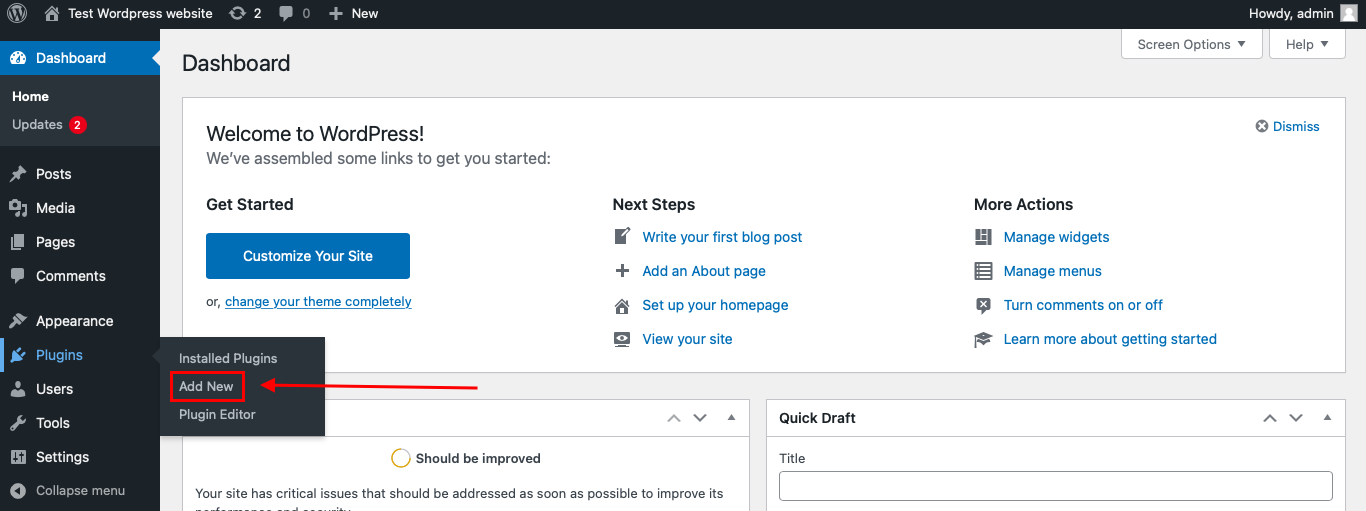
To install the Anti-Spam plugin, go to your WordPress admin panel → Plugins → Add New.
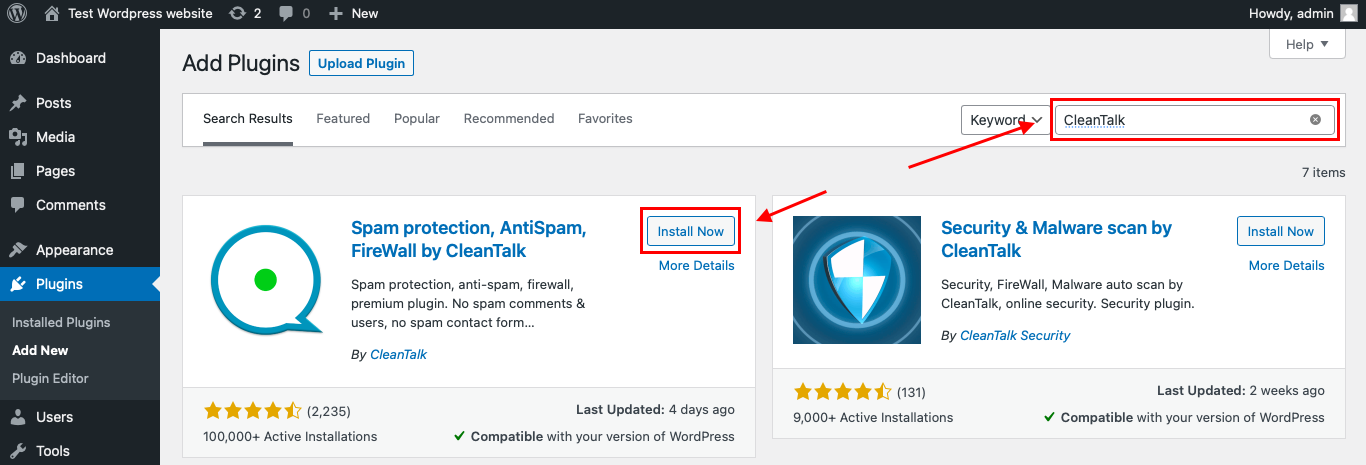
Then enter «СleanTalk» in the search box and click the Install button for «Spam protection, Anti-Spam, FireWall by CleanTalk».
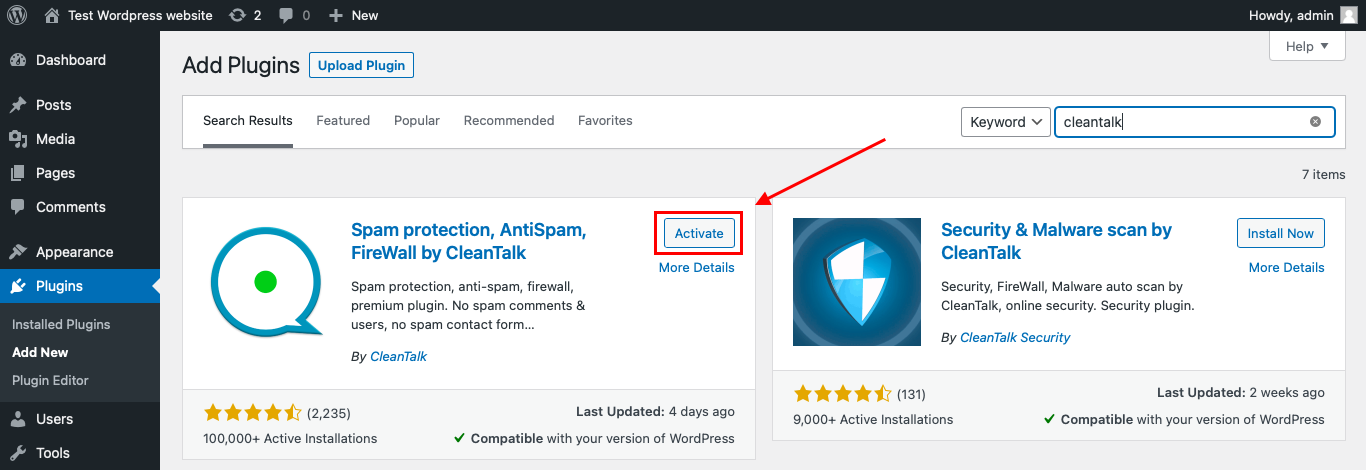
After installing the plugin, click the «Activate» button.
After it is done go to the plugin settings and click the «Get Access Key Automatically» button. Then just click the «Save Settings» button.
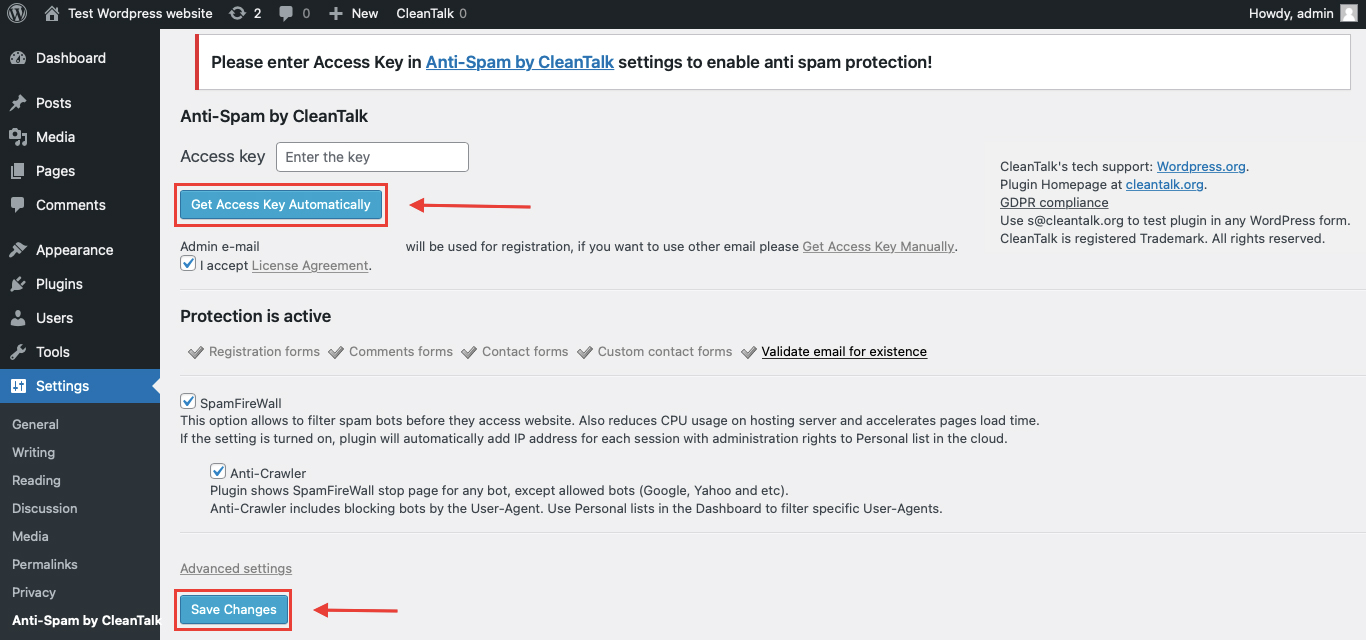
That’s it! From now you know how to completely protect your HivePress from spam.
That’s it! From now you know how to completely protect your Amelia from spam. You don’t need to paste any shortcodes – just use Amelia as usual, and CleanTalk will filter spam in the background.
Check if spam protection works with Amelia
The best way to test the spam protection is by using a test email,
stop_email@example.com
- Open a page with your Amelia form in an Incognito / private browser tab.
- Fill out the form using stop_email@example.com as the sender’s email.
- Send the form.
- You should see a message from the Anti-Spam plugin confirming that a spam submission was blocked.
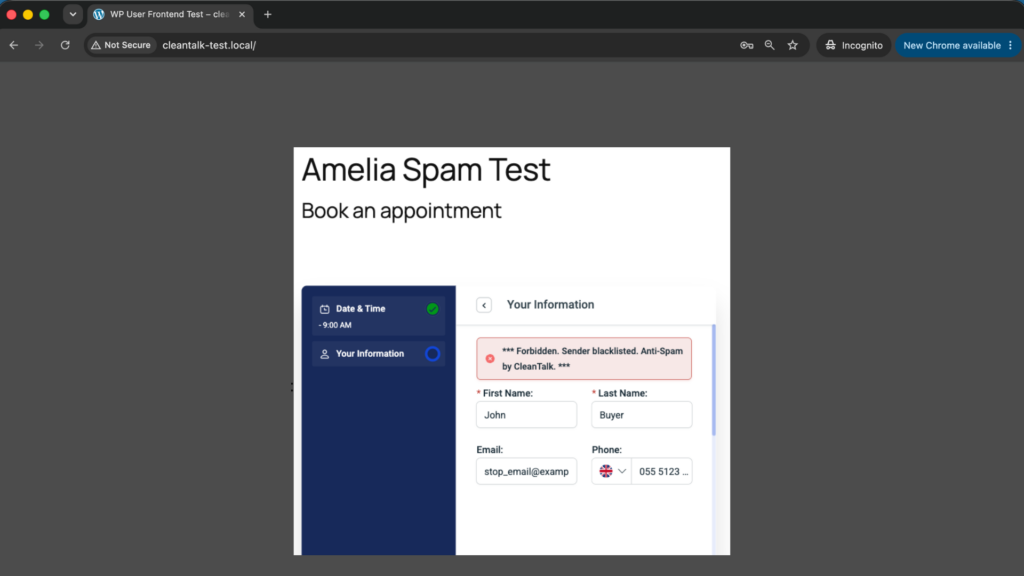
If you see this message, it means CleanTalk successfully protects your Amelia forms from spam.
Cloud Dashboard
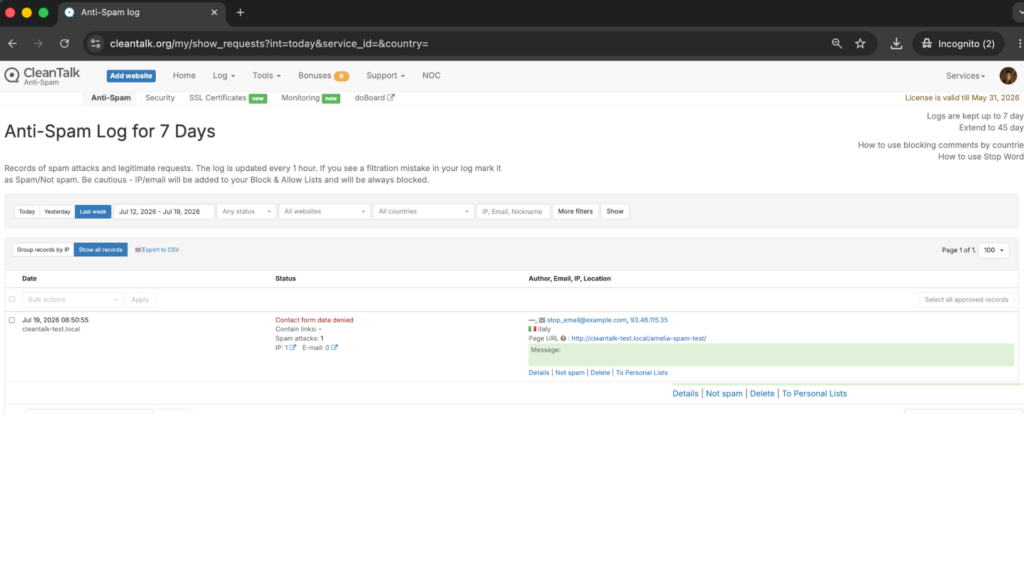
In addition, in the Cloud Dashboard you can find extra details regarding all submissions processed by CleanTalk, including Amelia forms:
- IP and email of the sender, as well as the sender’s activity history across other websites connected to the CleanTalk cloud.
- Geolocation of the sender.
- Date and time of the submission.
- Page (URL) where the form was submitted.
- Cloud decision – Approved or Denied.
- Cloud explanation for the decision (e.g. blacklisted email, bad IP reputation, spam text, etc.).
- Tools to move the sender to Block or Allow lists so you can fine-tune Amelia spam protection.
For a booking business, that dashboard is more than a log. It is where you learn which countries your fake appointments come from and which throwaway email domains to block outright, turning spam from a mystery into something you can see and manage.
Built-in spam protection in Amelia: an honest look
It would be unfair to say Amelia leaves you defenseless. Its reCAPTCHA setting is a real, useful control. But it is worth being precise about where it helps and where it stops.
Why Amelia’s reCAPTCHA is useful:
- It raises the cost of purely automated bookings, which discourages the crudest bots.
- It is built in, so there is nothing extra to install for a basic challenge layer.
- On a small, low-traffic site it can be enough to keep the obvious junk out.
Why it is not enough on its own:
- It is a challenge, not a filter – it never looks at the reputation or history behind a submission.
- Advanced bots and CAPTCHA-solving services get past it, sometimes cheaply.
- It does nothing about human spam, where a real person is doing the typing.
- It adds visible friction at the exact moment a customer is trying to book, which can cost you real reservations.
That is why Amelia’s built-in protection is a good addition to your stack, but a weak foundation for it. It works best as a supporting layer on top of an invisible cloud filter, not as the whole strategy. The same principle applies to almost every native form defense: useful, but better treated as one layer rather than the only protection layer.
CAPTCHA options for Amelia: reCAPTCHA vs hCaptcha vs Turnstile
Another common question is whether CAPTCHA should be used together with Amelia. The honest answer is: yes, sometimes – but not as the only protection layer. On a high-risk form a visible challenge is a sensible extra hurdle, but as your entire spam defense it is a poor choice, because it filters at the door while ignoring who is actually knocking.
If you do want a challenge on specific forms, you have three main options.
Google reCAPTCHA (v2 checkbox or v3 invisible scoring) is the native path, enabled directly in the Amelia settings. It is the most familiar to visitors, but it is also the most targeted by bypass services, raises privacy questions for some audiences, and the v2 image puzzles can frustrate people on mobile – right where many bookings happen.
hCaptcha is a privacy-focused alternative, usually added through an additional WordPress plugin. It behaves much like reCAPTCHA from the visitor’s side and appeals to sites that would rather not route their traffic through Google, but it is still fundamentally a challenge rather than a content filter.
Cloudflare Turnstile is the lightest of the three. For most visitors it shows no puzzle at all, just a brief background check, which makes it the friendliest option for conversions. But the same principle still applies: it verifies the moment, not the reputation, and it will not catch a human spammer typing links into your booking notes.
Do not rely on any of these alone. Use them together with CleanTalk, not instead of it. The invisible filter does the heavy lifting on reputation and behavior, and the CAPTCHA sits on top of your riskiest forms as an extra challenge where you genuinely need one.
Comparison table: Amelia anti-spam options vs CleanTalk
Here is how the main anti-spam options for Amelia compare:
| Solution | Best for | Pricing | Main limitation |
| CleanTalk Anti-Spam | Invisible, site-wide protection across forms, signups and WooCommerce | From $12/site/year; free 7-day trial | Cloud service; paid after trial |
| Akismet | Comment and basic form spam on small sites | Free personal; paid commercial | Comment-focused; weak on custom booking forms |
| Google reCAPTCHA | High-risk booking forms where a challenge is acceptable | Free | Adds friction; can hurt conversion; bots bypass it |
| Cloudflare Turnstile | Lighter, privacy-friendly CAPTCHA | Free | A challenge, not a content filter |
In short: use CleanTalk as the invisible baseline filter, and add reCAPTCHA, hCaptcha or Turnstile only on your highest-risk forms.
Recommended anti-spam stack for Amelia
There is no single setting that solves everything, which is exactly why a layered anti-spam stack works better than any one tool. The right number of layers depends on your site. Here are three realistic scenarios, from lightest to heaviest.
Scenario 1: a small services site with light booking volume. Think a solo consultant, a single-chair barber, a therapist taking a handful of appointments a week. Your risk is mostly crude, high-volume bots.
Recommended setup: CleanTalk as the invisible baseline filter, and Amelia’s reCAPTCHA left off unless you actually start seeing junk get through.
For this site, the invisible filter alone removes almost all of the fake bookings with zero friction. You keep the booking experience completely clean, and you only reach for a CAPTCHA if a specific problem appears.
Scenario 2: a busy salon-booking or clinic site. Multiple staff members, many services, steady traffic, and a calendar that genuinely hurts when it fills with junk. Here the cost of a fake appointment is higher, because every blocked slot is real lost revenue.
Recommended setup: CleanTalk as the always-on baseline filter, plus Amelia’s reCAPTCHA v3 (invisible scoring) enabled on the booking form as a quiet second layer.
This gives you reputation-based filtering on every submission and a low-friction challenge on top, without dropping visible puzzles in front of customers. The two layers cover different attack types – reputation for known spammers, scoring for suspicious sessions.
Scenario 3: paid bookings with prepayment or deposits. If you take payment through WooCommerce or a deposit at booking, your form is a more attractive target, and a fake booking can tangle up your payment and inventory logic, not just your calendar.
Recommended setup: CleanTalk as the baseline filter across the whole site including WooCommerce, plus a visible challenge – reCAPTCHA v2, hCaptcha or Turnstile – on the booking and checkout step, and country or IP rules in the CleanTalk dashboard if your spam clusters in regions you never serve.
The guiding idea across all three is the same: one primary invisible filter, one optional CAPTCHA layer, and extra rules only where they solve a clear problem. Piling on five overlapping anti-spam plugins does not make you safer – it makes conflicts and false blocks more likely. Add layers deliberately, not reflexively.
FAQ
Does Amelia have built-in spam protection?
Amelia includes an optional Google reCAPTCHA (v2 and v3) setting for its booking forms, which you enable in the Amelia settings. That is a challenge layer, not a content filter, and there is no built-in cloud filter that checks submissions against a shared reputation database. For invisible filtering on top of that, many site owners add CleanTalk.
Does CleanTalk integrate directly with Amelia?
Yes. Since CleanTalk Anti-Spam 6.81 (10 June 2026), the plugin hooks directly into Amelia bookings. Once both plugins are active, Amelia booking submissions are checked by the CleanTalk cloud automatically, with no shortcodes and no manual wiring on your side.
Why am I still getting fake bookings even with reCAPTCHA turned on?
Because reCAPTCHA only checks whether a visitor looks human at the moment they submit. It does not know that the email is a throwaway address, that the IP was flagged on thousands of other sites this week, or that a paid human is typing the booking by hand. Those are reputation and behavior signals, and they are exactly what a cloud filter like CleanTalk adds.
How do I stop fake appointments and no-shows in Amelia?
Most fake appointments and the no-shows that follow come from bots and human spammers filling the public booking form. CleanTalk checks the email reputation, the IP history and the behavior behind each submission, so it blocks the fake booking before it ever takes a real slot. Fewer junk reservations on the calendar means fewer empty chairs from no-shows that were never genuine.
Will CleanTalk add a CAPTCHA to my Amelia bookingform?
No. CleanTalk works entirely in the background and shows nothing to your visitors. Real customers book exactly as before, and the spam is filtered silently, so you protect conversions instead of taxing them.
Do I need reCAPTCHA if I already run CleanTalk?
Usually not, and that is the point of an invisible filter. For most sites CleanTalk alone removes the bulk of the spam with no friction. Keep reCAPTCHA in reserve for genuinely high-risk forms – not as your default, but as an extra layer on top when a specific form needs it.
Does CleanTalk work with Amelia events and paid bookings, including WooCommerce?
Yes. The same cloud filter protects Amelia event registrations, standard appointments and the WooCommerce checkout many sites use for paid bookings and deposits. That matters because a fake paid booking can disrupt your payment and inventory logic, not just clutter the calendar.
What about my Google Calendar sync – will spam bookings still push through to it?
If a fake booking is confirmed in Amelia, it can propagate to any calendar you have synced, including Google Calendar. The fix is to stop the junk before it is confirmed. Because CleanTalk blocks the spam submission at the point of booking, it never becomes a confirmed appointment, so it never reaches your synced calendar in the first place.
Do I have to add a shortcode or edit my booking form?
No. Once the plugin is installed and activated, protection applies automatically to your Amelia forms and the rest of your public forms. Keep using Amelia exactly as you do now.
Can I still use reCAPTCHA, hCaptcha or Turnstile alongside CleanTalk?
Yes, and that is the recommended pattern for high-risk sites. Run CleanTalk as the invisible baseline that handles reputation and behavior, and add a visible challenge on your riskiest forms only. Use them together, not instead of each other.
How can I check whether CleanTalk is actually protecting my Amelia form?
The simplest test is to open your booking page in an incognito tab and submit it using the address stop_email@example.com. If protection is working, the submission is refused with a “Forbidden. Sender blacklisted” message, and you will see the blocked attempt logged in your CleanTalk Cloud Dashboard.
Final recommendation
For most WordPress sites, the best way to stop Amelia spam is to run CleanTalk as an invisible, always-on baseline filter, and reserve CAPTCHA for the few forms that truly need a challenge. That combination keeps your calendar clean, leaves slots open for real customers, adds no friction at booking, and extends protection across comments, registrations and WooCommerce on the same site. Lead with the invisible filter, and add challenges only where a real problem calls for one.
For broader website protection, CleanTalk also provides anti-spam protection for websites, helping block spam in forms, comments, registrations, and orders without CAPTCHA.
