

We added a new option to the plugin: Disable pingbacks and trackbacks. It turns off two old WordPress features that spammers have been abusing for years. One checkbox, and the channel is closed.
Here is what it does and why you might want it on.
What pingbacks and trackbacks actually are
Both are old WordPress features. The idea was simple and, back then, useful. When another site linked to one of your posts, WordPress got a small notification about it, and that notification showed up as a special comment under the post. So you could see who was talking about your content.
That was the plan. In practice, spammers figured out years ago that these notifications are easy to fake. Nobody checks if the link is real. So you can send a fake pingback or trackback to any post and drop a comment with a link to whatever you want. A casino, a fake pharmacy, an SEO scheme, anything.
And it scales. A spammer doesn’t send one, they send thousands, to thousands of sites. The result is spam comments on your posts, links to bad sites, and load on your server for requests you never wanted in the first place.
Why regular comment protection doesn’t always catch this
Here is the part most people miss. Pingbacks and trackbacks don’t go through the normal comment form. Pingbacks come in through XML-RPC, and trackbacks use their own separate endpoint. So even when your regular comments are protected, these two can stay open on the side.
That is the gap this option closes.
What the new option does
When you turn it on, incoming pingback and trackback requests get blocked before WordPress can turn them into a comment. A pingback request gets an error back, a trackback gets a standard error response, and no spam comment is created.
It applies to all your posts, including old ones, no matter what their individual settings say. You don’t have to go through posts one by one. You don’t have to change anything in the database. One switch covers the whole site.
And when you turn the option off, it just stops blocking. Nothing was changed under the hood, so your site goes back to normal WordPress behavior, exactly as it was before.
It does not break XML-RPC or Jetpack
This is important, so we want to be clear about it.
A lot of advice online tells you to just disable XML-RPC completely to stop pingback spam. That works, but it’s a sledgehammer. XML-RPC is also used by Jetpack, by the WordPress mobile app, by remote publishing, and by other services. Kill it, and you can break those too.
We didn’t do that. The option blocks only the pingback and trackback requests. Everything else on XML-RPC keeps working. Jetpack works. Publishing works. Your normal comments work. Only the spam channel is closed.
How to turn it on
Go to the plugin settings, open the Miscellaneous section, and check Disable pingbacks and trackbacks. That’s it. It’s off by default, so if you don’t need it, nothing changes for you.
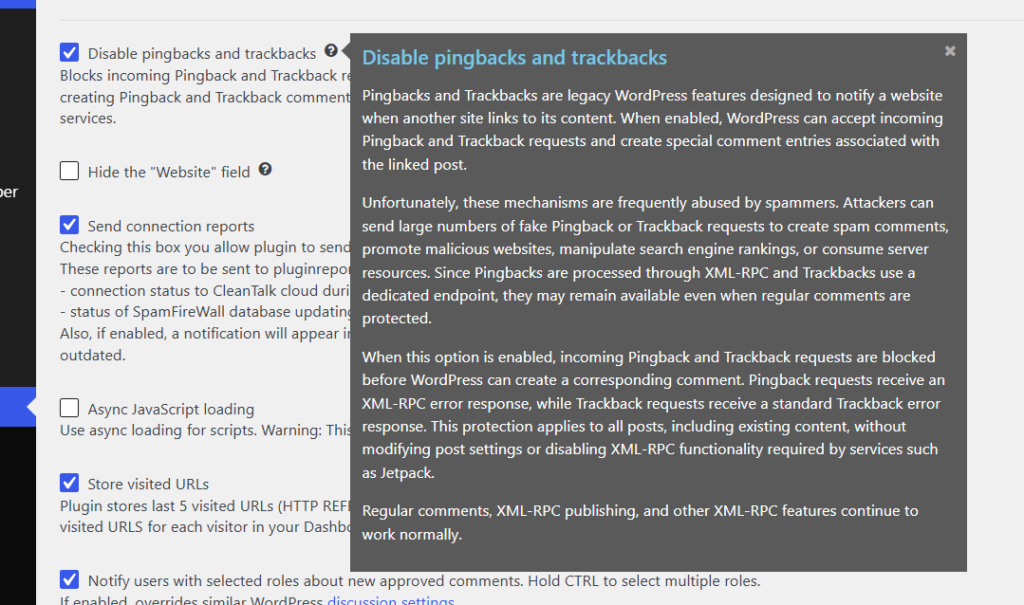
If you’ve been getting pingback or trackback spam, or you just don’t use these features and want one less thing to worry about, turn it on and forget about it.

Leave a Reply