
-
How to Reduce Server Load by Simply Filtering Bad Traffic
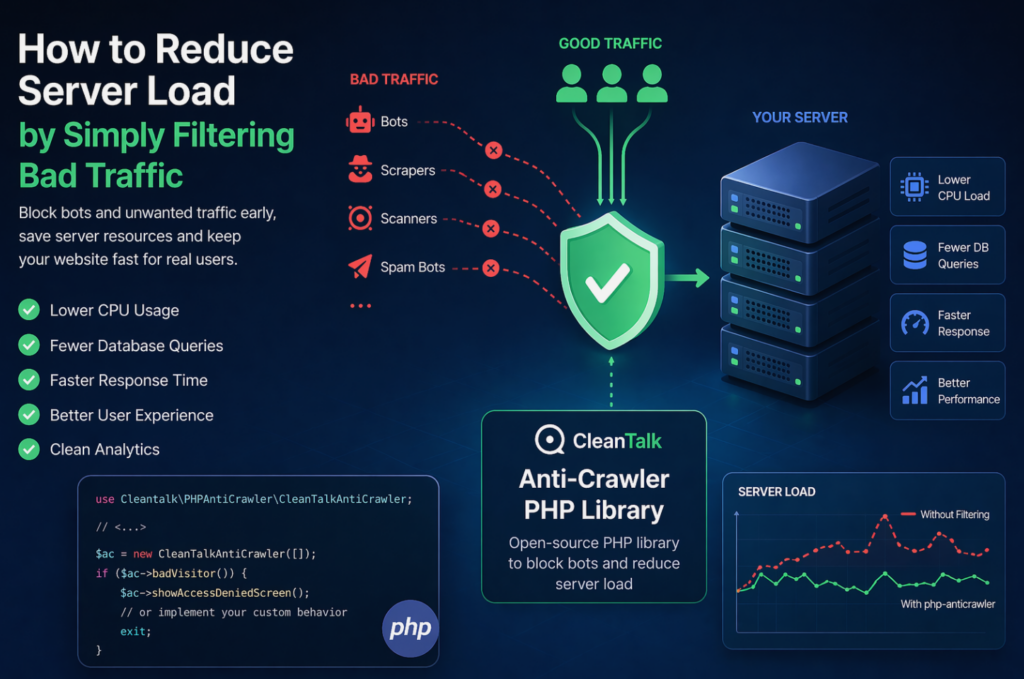
When a website starts slowing down, many teams immediately think about scaling infrastructure: adding CPU, RAM, more servers, or optimizing the database. In reality, a significant part of server load is often caused not by real users, but by automated traffic — bots, scrapers, vulnerability scanners, spam robots, and aggressive crawlers. These requests may continuously
FEEDBACK LOG


The Latest
-
CleanTalk Anti-Spam protects your WebDorado forms from spam
After you created your WebDorado Forms you may get spam through this form. CleanTalk Anti-Spam plugin protects your WebDorado contact forms from spam and save your visitors time. Once CleanTalk Anti-Spam plugin is installed it starts to protect all of the existing forms on your WordPress website. It may not only be WebDorado Forms but…
-
Hiding your WordPress username from bad bots
Do you know how to hide your WordPress usernames from bad bots? We are glad to introduce you a new Security plugin improvement: from now CleanTalk allows you to hide WordPress username from bad bots brute-force. Before this improvement became available some bots could learn WordPress usernames by their ID and use it to brute-force…

-
How to protect your Clean and Simple Forms using CleanTalk Anti-Spam plugin
After you created your Clean and Simple Contact Form you may get spam through this form. CleanTalk Anti-Spam plugin protects your Clean and Simple Contact Forms from spam and save your visitors time. Once CleanTalk Anti-Spam plugin is installed it starts to protect all of the existing forms on your WordPress website. It may not…
-
How to protect your Jetpack forms using CleanTalk Anti-Spam plugin
After you created your contact form using Jetpack Forms you may get spam through comments and contact forms. Jetpack has an integrated system of manual moderation of 100% comments, but if you want to save your own time we have a smart solution for your site. CleanTalk Anti-Spam plugin protects all of your Jetpack forms…
