
-
How to Reduce Server Load by Simply Filtering Bad Traffic
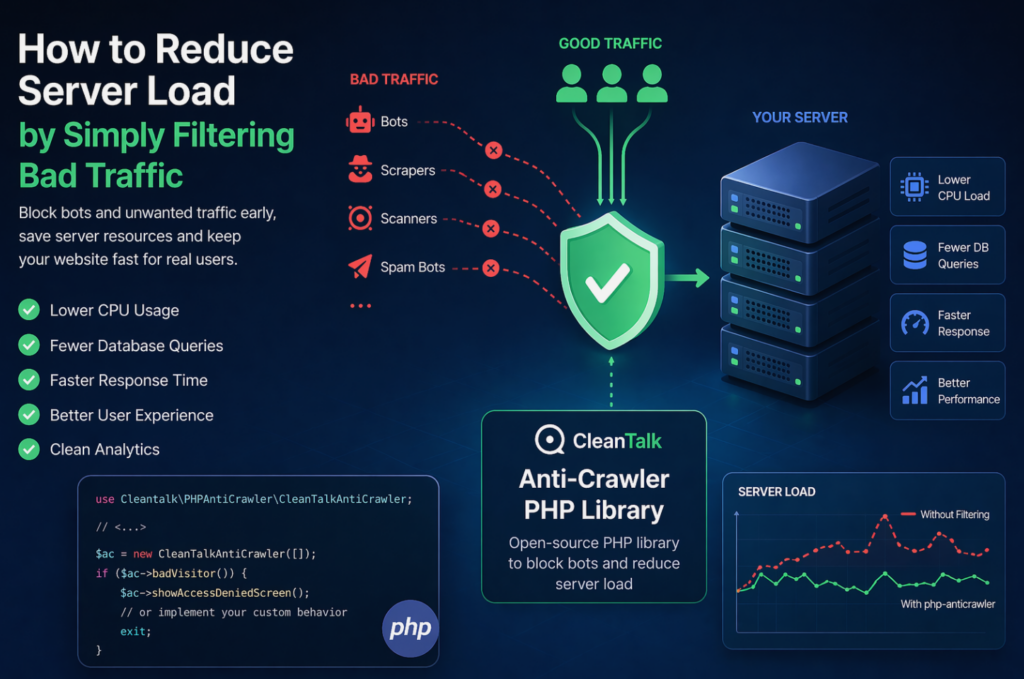
When a website starts slowing down, many teams immediately think about scaling infrastructure: adding CPU, RAM, more servers, or optimizing the database. In reality, a significant part of server load is often caused not by real users, but by automated traffic — bots, scrapers, vulnerability scanners, spam robots, and aggressive crawlers. These requests may continuously
FEEDBACK LOG


The Latest
-
AI will play an increasing role in online security
Neural Networks were introduced as far back as the 40’s of the 20th century and first works about them started in the 50’s. Nowadays this technology is being used in different fields. We believe that the CleanTalk machine teaching technologies of spam detection could be upgraded with the help of Artificial Intelligence and the CleanTalk…

-
Keeping Your Business Safe From Hackers in 2017 [INFOGRAPHIC]
Resolute cyber hackers have many tools at their disposal to cause havoc in your systems while remaining undetected for a long period of time. More than a few high-profile companies have learned this the hard way. 2017 has been the year of high-profile cyber-attacks, with a growing list of victims that include the NSA hack,…
-
It’s time to move websites to HTTPS
CleanTalk has become a Comodo SSL Partner and we started to provide SSL Certificates. It is the best way to have your web services in one place to manage they. There are a number of reasons for the accelerated adoption of HTTPS -Improving SEO -SSL Provides Trust -SSL Provides Authentication -Protects your and your visitor’s…
-
CleanTalk Security for WordPress: More informative log
We added new parameters in the Security FireWall Log. CleanTalk WordPress Security Log shows a list of all the network requests blocked in the course of loading the page. Each request is displayed in its own row. All of these requests will have next string: -Page URL to which the request was sent. Security FireWall…