We’re happy to share feedback from one of our valued clients — Christophe Thielens, founder of BRNDTIME.
At CleanTalk, we truly appreciate hearing how our anti-spam solution helps agencies and businesses keep their websites clean, fast, and user-friendly. Reviews like this motivate our team to continue improving our technology and delivering invisible, reliable protection against spam.
About BRNDTIME
BRNDTIME is a digital marketing agency based in Belgium, focused on helping SMEs and independent professionals grow their online presence. The agency specializes in building high-performance WordPress websites, SEO, online advertising, branding, content creation, and email marketing — always with a strong emphasis on usability, performance, and measurable results.
Client feedback
Christophe shared his experience with CleanTalk both on WordPress.org and on the BRNDTIME website:
“Very good plugin — works very well for my agency. No captchas, no false positives, no slowdowns. A solid and trustworthy plugin.”
BRNDTIME – Digital marketing bureau 01 29 2026 03 19 PM
Using CleanTalk Anti-Spam, BRNDTIME protects WordPress websites from spam submissions without affecting visitor experience. The absence of CAPTCHAs, combined with accurate filtering and no performance impact, allows the agency to focus on building and marketing websites — not cleaning up spam.
We’d like to thank Christophe Thielens and the BRNDTIME team for trusting CleanTalk to protect their projects and for sharing their honest feedback with the WordPress community.
From time to time, website owners report a sudden increase in spam activity and try to link it to plugin settings, hosting, or license status. However, these assumptions often overlook how dynamic spam behavior truly is. To illustrate this, I conducted a small study analyzing spam distribution over time using data from several of our WordPress sites.
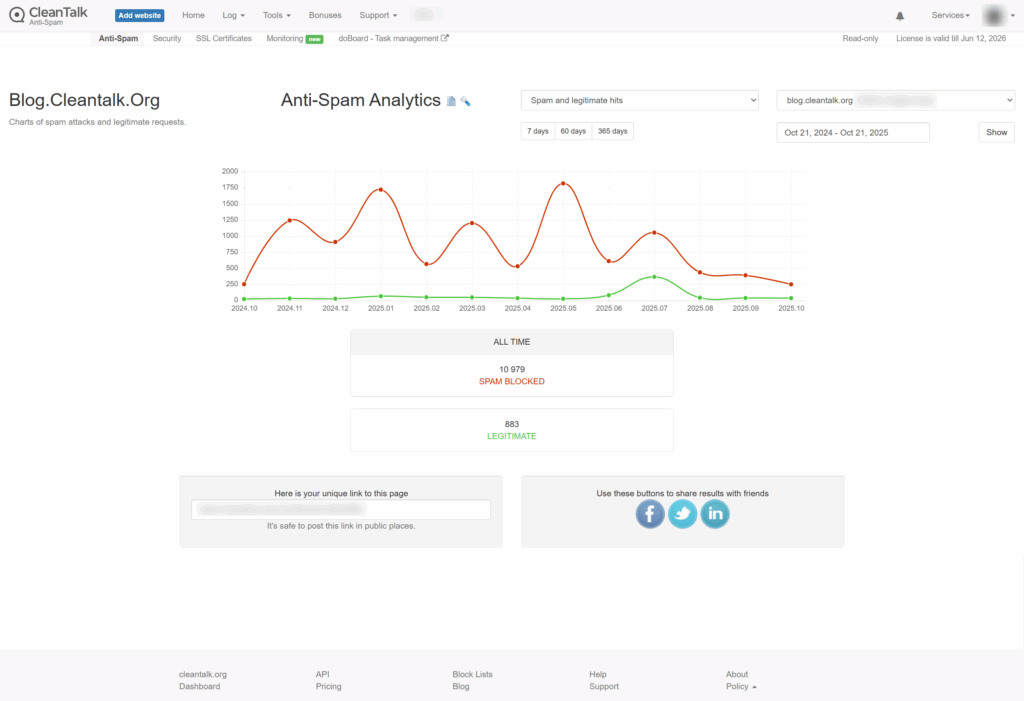
First, I’ll look at data for three of our WordPress sites, which host our themed blogs. The statistics are for the year.
The screenshot shows the statistics for the year. As you can see from the graph, the number of spam attacks isn’t linear, but fluctuates from month to month. Only since August has there been any stability, and the number of spam attacks has been more or less consistent.
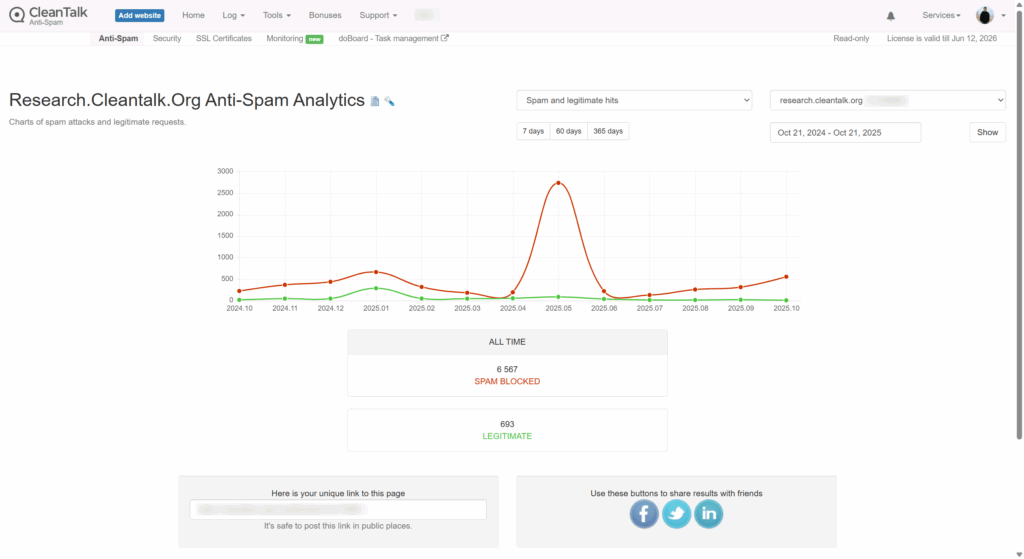
The graph shows an increase in spam attacks at the beginning of the year, followed by a decline to almost zero. However, in May, there is a peak in spam attacks, followed by a sharp decline. Subsequently, there is a slight increase in spam attacks.
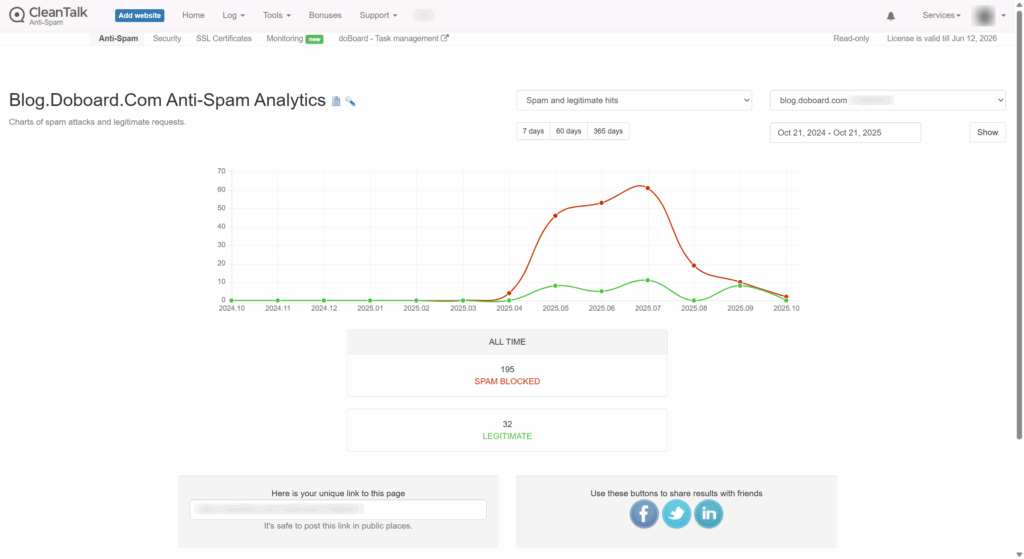
The blog was launched recently, and from the very beginning, it was clear that the number of spam attacks was high, but after some time, there was a decrease.
All time 195 spam blocked 10 21 2025 11 29 AM
4. Personal WordPress Test Site
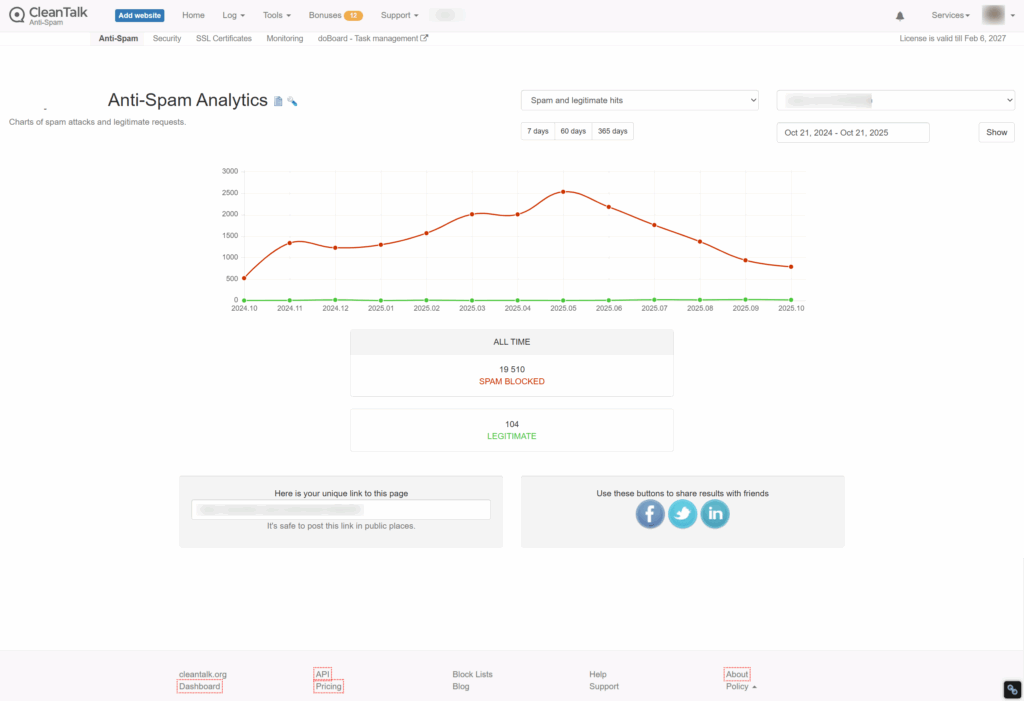
The following graph shows statistics for my personal WordPress site, which I use for testing. The graph shows a steady increase, peaking in May and then declining.
All time 19 510 spam blocked 10 21 2025 11 19 AM
What Does This Tell Us?
Based on this data, I can draw the following conclusions: the number of spam attacks does not show any trend, other than a possible seasonal factor.
The number of spam attacks may not be linear from month to month or even from day to day. At some points, there may be more, at others, fewer. A low-traffic site like my test site can receive a much higher number of spam attacks than a site with more traffic, a larger number of articles, and a higher search engine ranking.
What I did next?
Now let’s talk about how a user can evaluate the difference between the amount of spam a client sees while using an anti-spam service and when the license expires.
First, as you can see on our new site, the number of spam attacks increases as it gets added to spam lists.
Second, when a client installs the CleanTalk Anti-Spam plugin, we have the SpamFireWall option. This option blocks spammers before they reach the site.
CleanTalk Anti Spam Dashboard 10 21 2025 11 20 AM
As you can see from this table, we currently receive 12-14 spam attacks per day. These requests can be found, for example, in the spam folder on their site. On average, there were 57 spam attacks per week, and SpamFireWall (SFW) blocked another 350.
Then, I disabled SFW, and the number of spam attacks reaching the website form immediately increased to 120 on average. So, we see that when using SFW, 50% of spam attacks reach the website and forms, and the remaining spam attacks were stopped by SFW and simply didn’t reach the website.
Therefore, when assessing the amount of spam, we must also take into account the portion of SFW traffic that simply didn’t reach the website forms. You can track statistics for your sites in the Trends section of the ClanTalk Dashboard.
To summarize
The number of spam attacks is not constant and can be higher or lower. Also, when using SFW, you only see a portion of the spam reaching the forms on your website. Having or not having a CleanTalk license doesn’t affect the number of spam attacks.
We are happy to share feedback from one of our clients — Thomas, the owner of climatechangedispatch.com
Great support, even better spam killer
I was using Akismet for WordPress for years until I found Cleantalk. I got an email from Automaticc, which owns Akismet and Jetpack, stating that because I had some ads on my site, I had to pay a ridiculous amount of money. They gave me 30 days. I switched to Cleantalk as it was cheaper, and the difference was amazing. Not only did it catch spam, but the personal blacklists are a timesaver. No more hits or misses from imprecise wording in the Discussion settings. And the support is absolutely superb. The few times I’ve needed them, they were prompt and fantastic. The firewall and bot-crawler features are also a timesaver. Did you know that auto-bots crawl your site and slow it down? I’m talking spammy bots looking for email addies. This plugin stops them. And also prevents spam after spam from getting through via rate limiting. Try it out, and I swear you will rarely, if ever, have to get rid of spam manually. It’s that good!
We thank Thomas for his detailed feedback and trust in CleanTalk. It’s always a pleasure to hear that our service helps clients protect their websites and save time.
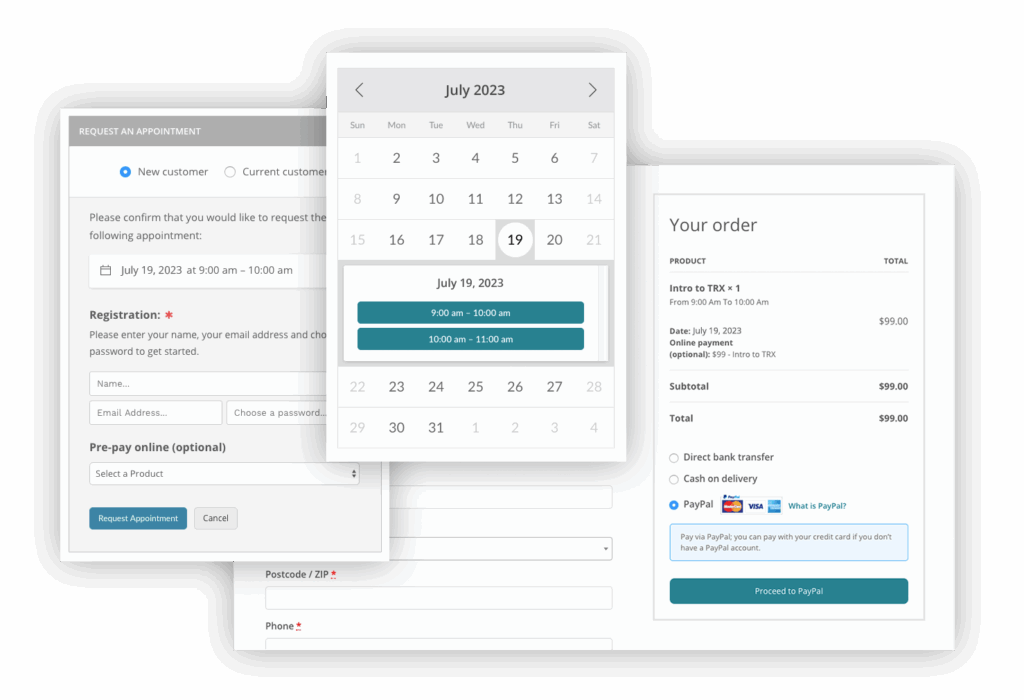
QuickCal forms is a good choice when you need to use a powerful booking calendar. Always be sure to use the most effective Anti-Spam plugin. For example CleanTalk Anti-Spam will guarantee your QuickCal booking form spam protection in about 5 minutes.
Once CleanTalk Anti-Spam plugin is installed it starts to protect all of the existing forms on your WordPress website. It may not only be QuickCal forms but many others.
How to check your QuickCal forms spam protection in about 5 minutes
You can test the work of Anti-Spam protection for your QuickCal forms by using a test email s @ cleantalk.org (without spaces). First, open the form in an Incognito browser tab. Fill in all the required form fields and send a form. After submitting the form, you will see a block message about the block on the form submission.
If you have any questions, add a comment and we will be happy to help you.
Create your Cleantalk account – Register now and enjoy your spam-free QuickCal forms.
Struggling with spam flooding your Chatway Live Chat on WordPress? You’re not alone – it’s a common headache. The source of spam are only these two widgets and there is a plugin that protects both of them, and does it without using annoying CAPTCHAs.
The Anti-Spam by CleanTalk grants cloud protection from spam, is absolutely invisible to users and runs in background. Which might be pretty useful – 300,000+ active installations and 3,000+ reviews on WordPress can’t lie. It contains many features such as logging for your control, SpamFirewall, stop words and much more.
Step 1: Install the Anti-Spam plugin
CleanTalk is a powerful plugin that blocks spam silently in the background. It also has direct integration with Chatway Live Chat and here’s how to set it up:
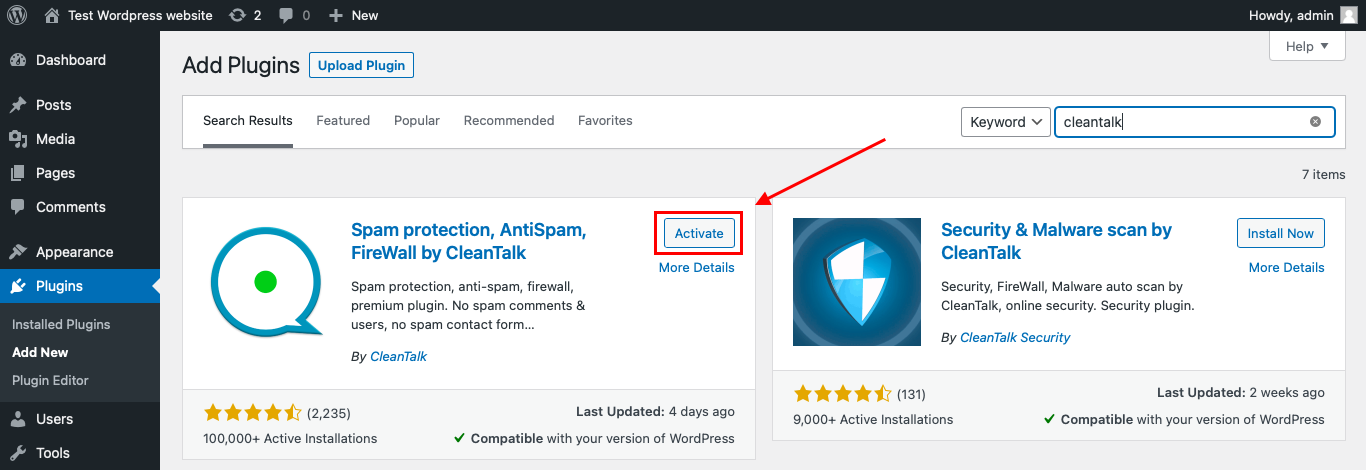
Firstly, to install the Anti-Spam plugin, go to your WordPress admin panel → Plugins → Add New. You can also download it in the WordPress catalog.
Then enter «СleanTalk» in the search box and click the Install button for «Spam protection, Anti-Spam, FireWall by CleanTalk».
After installing the plugin, click the «Activate» button.
After it is done go to the plugin settings and click the «Get Access Key Automatically» button.
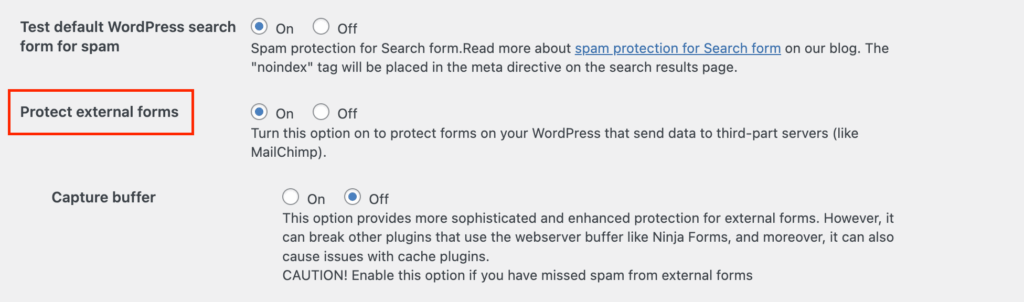
Then go to Advanced settings in the right-bottom and find the “Protect external forms” and switch it on. It is needed to protect WhatsApp widget inside Chatway Live Chat from spam. Then just click the «Save Settings» button.
From now Anti-Spam starts protecting all forms on your site including Chatway Live Chat without any extra setup.
Enjoy the result!
If you have any questions, add a comment and we will be happy to help you.
Anti-spam protection for IPS Community Suite 5 is now available with CleanTalk — a cloud-powered filter that stops spam in real time without affecting user experience.
Now there’s an easy way to stop all of that.
CleanTalk now works with IPS 5, offering fast and automatic spam filtering — easy to set up, free to try. It connects your forum to a powerful cloud-based engine that checks every signup and post in real time. No visual tests. No manual work. Just quiet, automatic blocking in the background.
The system uses an always-updated database of known spam sources and smart behavior analysis to stop suspicious activity before it reaches your forum. Whether you’re running a niche board or a large online community, CleanTalk scales with your traffic and works invisibly behind the scenes. You stay focused on your content — not fighting spam.
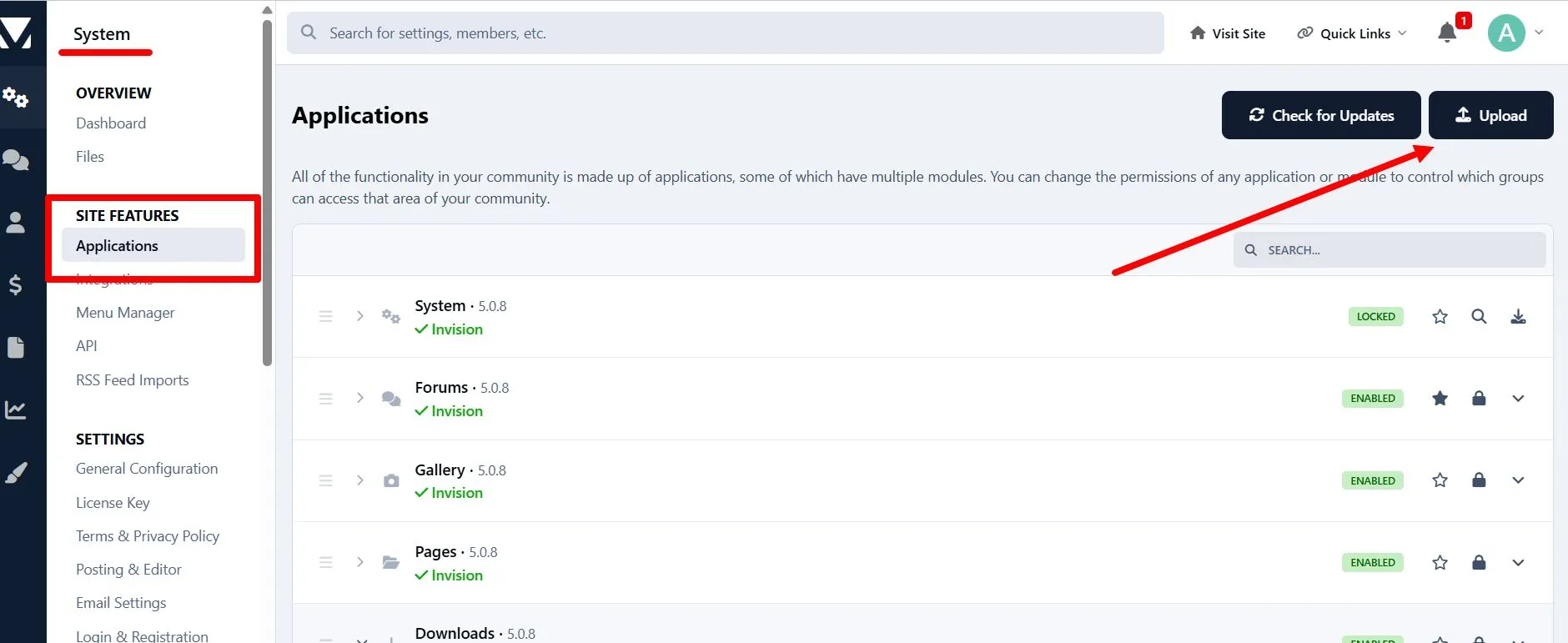
Setup takes just a few minutes through the IPS admin panel — quick, simple, and no extra steps required. You’ll need your CleanTalk Access Key to activate protection. Full setup guide: cleantalk.org/help/install-ipboard5
Cloud-Based Anti-Spam Protection for IPS Community Suite 5
Here’s how it works: when someone tries to register or send a message, their data is checked by CleanTalk’s cloud servers. If it looks like spam — it’s blocked. If it’s a real user — they won’t notice anything. No popups, no puzzles, no delays.
Because all the filtering happens in the cloud, your site stays fast and clean. There’s nothing heavy to install, and no need to update rules — CleanTalk handles that for you.
You can even test the protection by trying to register with this email:
stop_email@example.com.
It’ll be blocked right away if everything is working.
CleanTalk updates its spam filters every day, so your forum stays protected — even as spam tactics change. Whether your site is small or super active, this cloud system keeps things smooth.
Also available: CleanTalk now integrates directly with WPZOOM Forms — read more on the blog.
Fake accounts, junk messages, and automated bots are all forms of PrestaShop spam that can quietly damage your store.They slow down your website, clutter your customer database, and skew your analytics. More importantly, they steal time — time your team could spend on real customers instead of cleaning up fake ones.
These spam attacks aren’t just annoying — they drain server resources, degrade site performance, and can even impact your reputation if spam slips through to public-facing pages or contact forms.
Real-Time PrestaShop Spam Protection with CleanTalk
The CleanTalk Anti-Spam Module for PrestaShop is built to block spam before it ever reaches your site. It connects your store to a cloud-based filtering system that checks every registration, comment, and form submission in real time. Suspicious activity is filtered instantly and automatically — without interrupting the user experience.
There’s no need to configure complex rules or adjust spam settings manually. CleanTalk’s smart filtering handles it all behind the scenes, giving you a cleaner store without any of the hassle.
Easy Setup, No Maintenance
Installing the module takes just a few minutes, and once it’s running, it stays up to date on its own. The system is lightweight and designed to have zero impact on your site’s speed or performance.
CleanTalk also doesn’t require constant tweaking or oversight. It’s designed to be “set and forget” — offering strong, ongoing protection with no technical effort from your side.
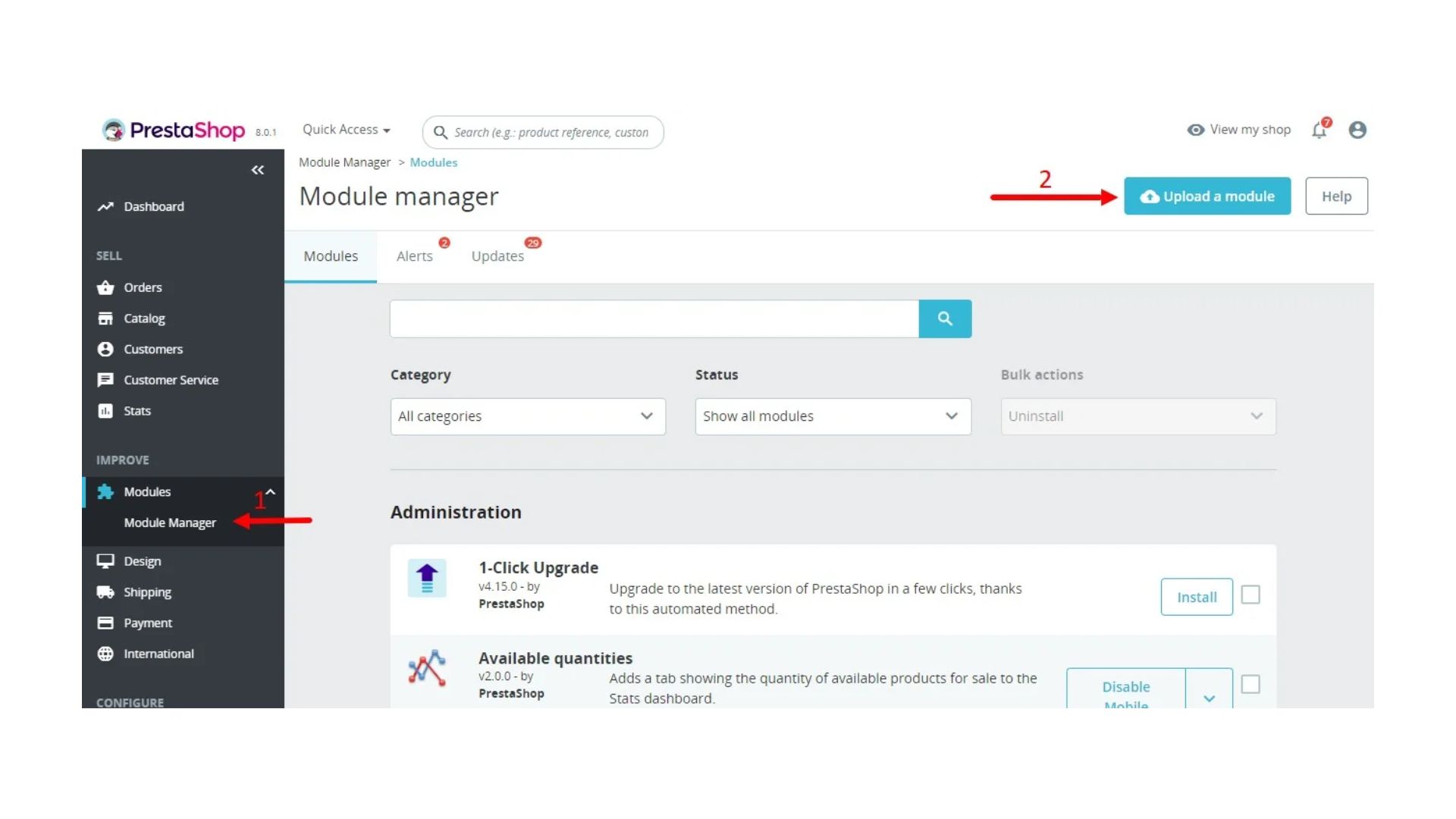
In the admin panel, go to the Modules → Module Manager section, find and press the Upload a module button.
Clean Store, Better Data, More Time
With spam gone, your store loads faster, your data becomes more reliable, and your team spends less time dealing with fake users or junk submissions. That means more energy focused on growth — not cleanup.
If you’re looking for a simple but effective way to fight PrestaShop spam, CleanTalk delivers reliable protection that just works.
We love sharing feedback from our users — and today’s story comes from Paul at DIYB.CA, originally posted on WordPress.org.
CliUnbelievably Happy!
I have lost track of how many spam blockers & techniques I’ve tried on client sites to ensure real leads make it to their inbox — but nothing has come close to CleanTalk! We use FluentForms, and when they recommended CleanTalk, it turned out to be a perfect match. Clear reports show what’s been blocked and what’s allowed. Easy to install, works flawlessly — and most importantly, my clients are happy. That makes it a winning product in my eyes.
The email address zekisuquc419@gmail.com has been reported for sending spam and launching automated malicious requests on thousands of websites.
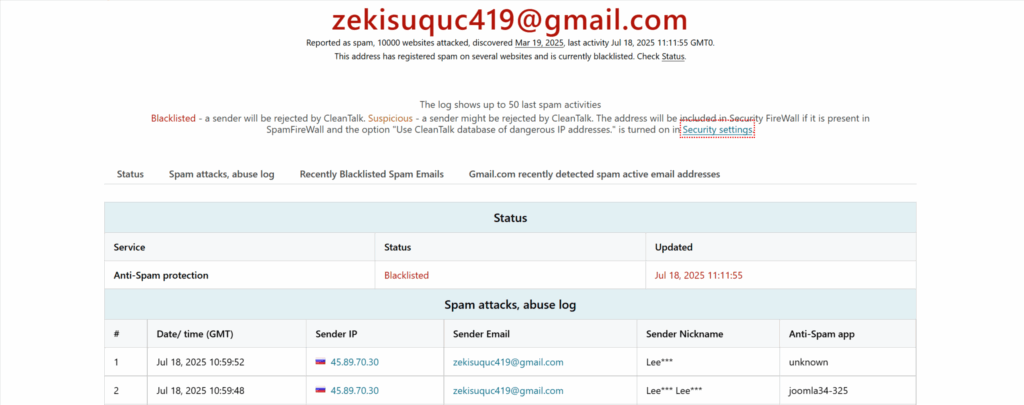
According to CleanTalk BlackLists, this address has:
Attacked over 10,000 websites
Generated approximately 2,160 spam requests in the last 24 hours
Used Russian IP addresses to send requests
First detected on March 19, 2025
Last activity recorded: July 18, 2025
Updated January 21, 2026 Attacked over 18,656 websites Generated approximately 12,144 spam requests in the last 24 hours
What Does This Spam Bot Do?
This bot attempts to register accounts, submit forms, and post comments on websites using the email zekisuquc419@gmail.com. The activity is fully automated and intended to spread spam or malicious links. This can:
Clutter your website with junk content
Expose your visitors to phishing or malware
Harm your SEO and domain reputation
This spam bot uses multiple languages to send what look like harmless price inquiries, helping it evade standard spam detection systems. At first sight, these messages seem genuine, which makes them especially dangerous for site administrators who could easily confuse them with real customer requests.
Hi, I wanted to know your price.
Прывітанне, я хацеў даведацца Ваш прайс.
Salam, qiymətinizi bilmək istədim.
Zdravo, htio sam znati vašu cijenu.
Xin chào, tôi muốn biết giá của bạn.
Aloha, makemake wau eʻike i kāu kumukūʻai.
Ողջույն, ես ուզում էի իմանալ ձեր գինը.
Kaixo, zure prezioa jakin nahi nuen.
Hola, volia saber el seu preu.
This bot uses this template to submit contact forms.
Here is a snapshot from CleanTalk’s logs:
“2160 requests in 24 hours detected from multiple Russian IP addresses. All actions associated with spam form submissions and bot-like behavior.”
zekisuquc419 gmail com Email spam report 07 21 2025 10 48 AM
How to Block Spam from zekisuquc419@gmail.com
If you’re seeing traffic or spam submissions from this email, here’s how to stop it:
1. Use CleanTalk Anti-Spam Plugin Install the CleanTalk Anti-Spam plugin for your CMS (WordPress, Joomla, Drupal, etc.). It automatically filters requests by checking emails, IPs, and behavior against the global CleanTalk Spam Database.
This email is already blacklisted and will be blocked automatically by the plugin.
2. Manually Block the Email (if needed) If you want to block it manually in addition to using CleanTalk:
Add zekisuquc419@gmail.com to your site’s block list.
Block common IPs that were used in attacks (CleanTalk logs show many from Russian ranges).
Monitor your server logs for repetitive POST requests.
zekisuquc419@gmail.com is a known spammer attacking thousands of sites daily. By installing proper anti-spam protection like CleanTalk and staying vigilant, you can block these threats before they reach your visitors.
If you’re already using CleanTalk, rest assured — this spammer is on the blacklist and will be filtered automatically.
Delegate control of your websites to other accounts at CleanTalk.org.
We’ve been testing this integration since May 12th, 2025, it’s firm and stable by now. Anyway, if you have any questions or issues, just drop a message in the comment section down below.