

Contact Form Clean and Simple is an easy-to-use WordPress contact form plugin. It can be used for straightforward contact forms, and also for feedback forms, customer inquiries, and authenticated REST API submissions in headless WordPress implementations.
That simplicity and flexibility are useful for website owners, but it also means that Contact Form Clean and Simple can become a target for spam bots.
This guide explains how to protect the Clean and Simple Contact Forms from spam using the ‘Anti-Spam by CleanTalk’ WordPress plugin, as well as the plugin’s built-in options, such as Google reCAPTCHA, email confirmation fields, AJAX client-side validation, and Fullworks Anti-Spam Pro.
Clean and Simple Contact Forms and WordPress Forms
Contact Form Clean and Simple is a WordPress contact form builder that helps website owners create forms using a straightforward shortcode. Although it is beginner-friendly, it is also flexible enough to support decoupled front ends via its REST API.
Clean and Simple Contact Forms can be used for:
- standard contact forms
- feedback forms
- customer inquiries
- support request forms
- GDPR-compliant contact forms
- headless WordPress form submissions (via REST API)
The advantage of Contact Form Clean and Simple is that it is extremely lightweight, only linking the necessary jQuery file to pages where the form is deployed. A submission triggers an immediate response for the user and handles messaging efficiently.
A fake entry may trigger unnecessary administrator notifications, broadcast duplicate copies to multiple recipient emails, or pollute connected databases via external REST requests.
As WordPress.org shows, Contact Form Clean and Simple is currently used on over 7,000 websites and has an average rating of 4.7 out of 5 stars based on user reviews.
Plugin Homepage at WordPress.org
Clean and Simple Contact Forms Attract Spam
The plugin is not the reason spam happens. Spam is a normal risk for any public WordPress form.
Bots scan websites for forms that accept visitor input. Once they find a form, they may try to submit fake names, fake emails, suspicious links, or repeated promotional messages.
Common Contact Form Clean and Simple spam patterns include:
- fake contact requests
- junk feedback submissions
- disposable or suspicious email addresses
- repeated messages from the same IPs
- spam links in message text fields
- bot-generated sender names
- fake entries that trigger administrative email notifications
This is particularly important for the Contact Form Clean and Simple plugin, as it can be configured to send notifications to multiple recipients simultaneously or allow users to email themselves a copy. That means spam should be blocked before it triggers mail delivery actions or hurts your email domain reputation.
Anti-Spam by CleanTalk
The ‘Anti-Spam by CleanTalk’ plugin is the next tool we are going to use.
Here’s a short overview:
- CleanTalk is a cloud-based spam protection service for WordPress websites.
- It blocks spam without forcing real visitors to solve CAPTCHA challenges.
- It can protect different types of WordPress forms and submissions, including contact forms, comments, registrations, subscriptions, bookings, surveys, and WooCommerce orders.
- It checks submissions using spam detection signals such as email address, IP address, sender reputation, and sender activity.
- It helps block automated bots and suspicious form submissions.
- It works quietly in the background.
- It allows website owners to review spam checks in the CleanTalk Cloud Dashboard.
- It gives website owners tools for personal Allow lists and Block lists, country filters, language filters, stop words, and SpamFireWall.
According to WordPress.org, Anti-Spam by CleanTalk for WordPress has over 200,000 active installations, with 3,168 reviews and an average rating of 4.7.
Plugin Homepage at cleantalk.org | Latest release at GitHub.com | Website cleantalk.org
Install the CleanTalk Anti-Spam plugin
Show Instructions
To install the Anti-Spam plugin, go to your WordPress admin panel → Plugins → Add New.

Then enter «СleanTalk» in the search box and click the Install button for «Spam protection, Anti-Spam, FireWall by CleanTalk».

After installing the plugin, click the «Activate» button.
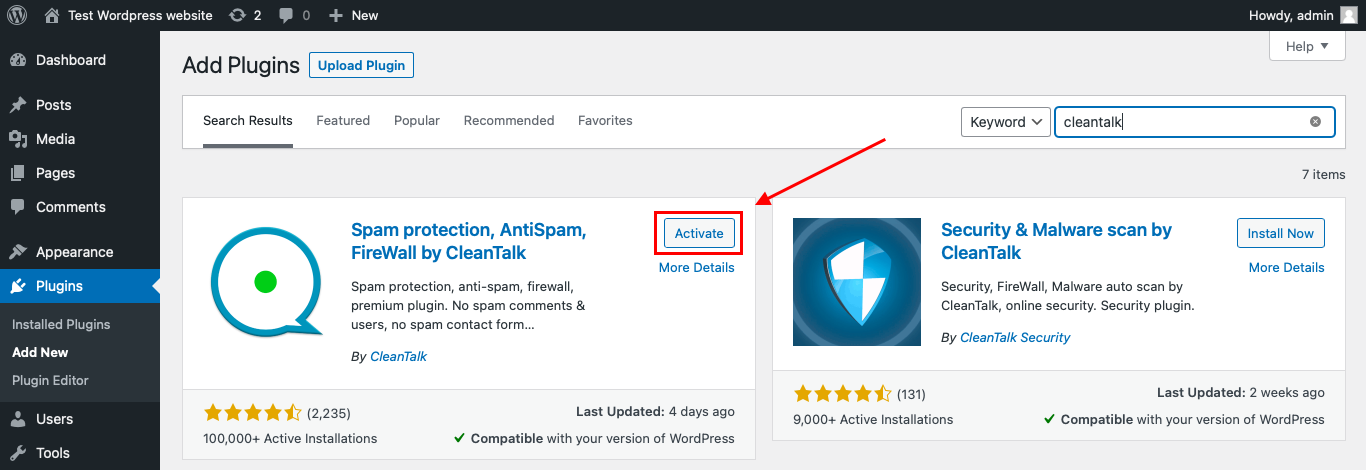
After it is done, go to the plugin settings and click the «Get Access Key Automatically» button. Then just click the «Save Settings» button.

That’s it! From now on, you know how to protect your Clean and Simple Contact Forms from spam completely.
Once that is done, the site has an anti-spam layer working in the background. This helps reduce suspicious form activity before unwanted submissions reach Clean and Simple Contact Forms email notifications, recipient lists, REST API payloads, or the site owner’s inbox.
How to Check Clean and Simple Contact Forms Spam Protection
After installing the plugin, test that spam protection is working correctly.
Use the test email:
stop_email@example.com
To test the form:
- Open a page with a ‘Clean and Simple Contact Forms’ form.
- Use an Incognito or private browser window.
- Fill in all required form fields.
- Use stop_email@example.com as the sender email.
- Submit the form.
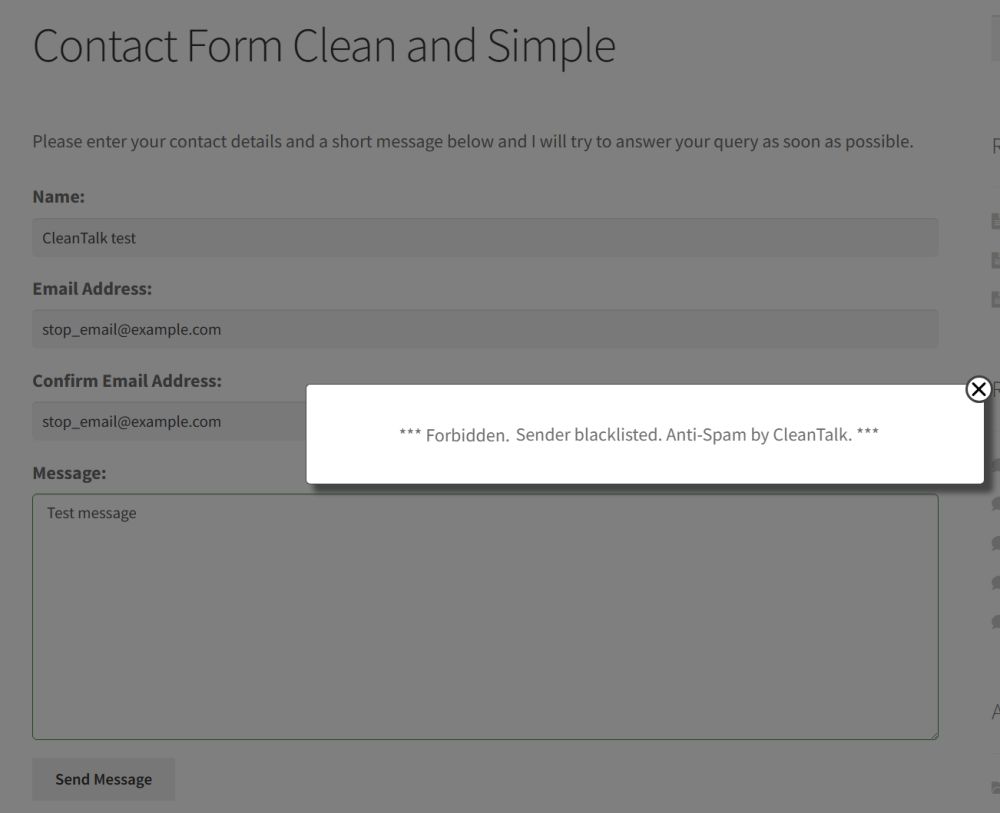
It is better to test protection in an Incognito window because WordPress admins may be treated differently from regular website visitors. Testing as a normal visitor helps confirm that protection works for public form submissions.
If the form submits successfully and nothing appears in the CleanTalk Anti-Spam Log, the request path should be checked separately. The way the submission reaches WordPress may be affected by AJAX settings, caching, custom actions, third-party integrations, or form-specific settings.
Cloud Dashboard and Monitoring
CleanTalk gives website owners access to request details in the CleanTalk Cloud Dashboard.
This is useful for Contact Form Clean and Simple because spam often follows visible patterns. You may see repeated domains, repeated IPs, similar message text, suspicious countries, disposable email addresses, or the same fake text format submitted repeatedly.
In the Cloud Dashboard, site owners can review:
- approved and blocked submissions
- sender IP addresses
- sender email addresses
- submission date and time
- page URL where the form was submitted
- spam check result
- reason for blocking or approving a request
- personal Allow lists and Block lists
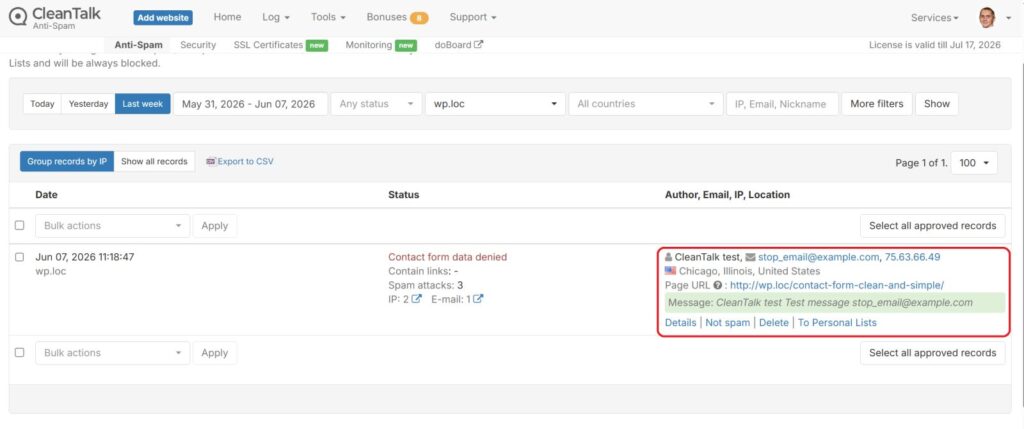
This helps website owners understand whether Contact Form Clean and Simple spam is random or connected to repeated sources.
For example, if a legitimate message is blocked by mistake, the site owner can review the log and add the sender to an Allow list. If you receive repeated spam from the same email domain, IP address range, or country, you can adjust the filtering rules.
Contact Form Clean and Simple Actions and Why Spam Filtering Matters
Contact Form Clean and Simple can do more than collect a message. It can run actions after submission.
Depending on the form setup, a submission may:
- send administrative email notifications
- route copies to multiple recipient emails
- allow the inquirer to email themselves a copy of the message
- execute REST API payloads for headless frontends
This makes spam filtering especially important.
If spam is not blocked before actions run, fake entries can:
- clutter admin and support email inboxes
- trigger autoresponder copies to invalid or fake addresses
- waste administrative time sorting genuine leads from bot requests
- create invalid post payloads in headless systems
- make form utility and metrics unreliable
- send malicious or suspicious phishing content through your server
For the Clean and Simple Contact Forms, anti-spam is about more than just stopping a bad message. It’s also about preventing bad data from triggering the next email step.
Additional Spam Protection Options for Contact Form Clean and Simple
CleanTalk can work as the main anti-spam layer, but Contact Form Clean and Simple also supports several built-in and ecosystem anti-spam options.
Google reCAPTCHA
The plugin provides native fields for Google reCAPTCHA. You can input the public and private keys obtained from Google by checking the “Use reCAPTCHA” option. This places interactive or score-based checks at the bottom of the contact block to verify that the form filler is a real person.
Confirm Email Address Field
Website owners can toggle the “Confirm Email Address” rule within settings. This forces the user to retype their email address. It not only helps prevent typos but also works as a basic shield against poorly constructed bot scripts that don’t map duplicate field arrays.
Fullworks Anti Spam Pro Integration
The plugin explicitly states that it is compatible with Fullworks Anti-Spam Pro. When activated, all form data is thoroughly scanned, and submissions are automatically logged and categorized as spam or clean within the dashboard.
Client-Side Validation (AJAX)
The “Use client-side validation (Ajax)” option enables instantaneous frontend field check-ups. This provides prompt feedback to visitors without page reloads and effectively deters primitive form-posting spam scripts.
Input Stripping & GDPR Compliance
The plugin features automatic code-stripping filters to clean all user inputs, mitigating cross-site scripting (XSS) vulnerabilities. It also features a “Contact consent” setting to append a GDPR-compliant tracking checkbox to the form.
Comparison of Anti-Spam Methods for Contact Form Clean and Simple
| Method | Main Role | Strengths | Limitations | Best Use Case |
|---|---|---|---|---|
| CleanTalk | Background anti-spam filtering | Works without a visible CAPTCHA, helps stop suspicious submissions before they reach workflows | Needs plugin setup and log review | Most WordPress sites that use Contact Form Clean and Simple |
| Google reCAPTCHA | Interactive verification | Familiar and supported natively inside the plugin settings | Can add visitor friction and requires Google key generation | High-spam forms where visible verification is acceptable |
| Confirm Email | Input quality check | Prevents communication loss from typos, stops basic bot fields | Insufficient against advanced bots or human spam | Sales inquiry and quote-driven contact forms |
| Fullworks Anti Spam Pro | Local spam filtering layer | Native ecosystem integration, logs spam results locally | Requires an additional premium plugin | Sites utilizing the full Fullworks product suite |
| AJAX Validation | Real-time field validation | Instant error reporting for users without page reloads | Limited protection against advanced automated bots | Standard enhancement for basic form usability |
For most WordPress websites, the best setup is layered. CleanTalk can act as the primary anti-spam layer in the background, while Contact Form Clean and Simple’s specific verification settings can be used where needed.
Frequently Asked Questions
Can spam trigger Contact Form Clean and Simple emails or REST API actions?
Yes, if spam is accepted as a normal submission, the plugin’s actions are triggered. That means fake entries can send notification emails, forward messages to multiple recipient mailboxes, or dispatch payload data into a decoupled frontend framework via the REST API endpoint (/wp-json/cscf/v1/submit). Spam should be blocked before post-submit actions run.
What is the best anti-spam setup for Contact Form Clean and Simple?
For most websites, use CleanTalk as the main background anti-spam layer and keep client-side AJAX validation active. For high-risk forms or environments under heavy bot attacks, complement the setup by activating the native Google reCAPTCHA or using the “Confirm Email Address” parameters.
Recommended Anti-Spam Setup for Contact Form Clean and Simple
| Website Type | Recommended Setup | Why |
|---|---|---|
| Standard contact page | CleanTalk + AJAX Validation | Low-friction background protection that seamlessly matches the theme. |
| High-spam contact form | CleanTalk + Google reCAPTCHA | Adds an explicit dual-layer defensive wall against aggressive bot scripts. |
| Headless WordPress form | CleanTalk + REST API Authentication | Intercepts spam hits at the endpoint layer before they reach cloud decoupled systems. |
| GDPR-sensitive contact form | CleanTalk + Contact Consent Toggle | Pairs transparent background security with required regulatory consent boxes. |
Final Thoughts
Contact Form Clean and Simple is a highly efficient WordPress contact form tool that emphasizes speed, semantic code, and minimal configuration. But because every entry automatically sends mail or interacts with server scripts, proper spam protection remains vital.
Options like reCAPTCHA, email confirmation fields, and AJAX validation all help, but they work best as part of a layered setup.
For most WordPress websites using Contact Form Clean and Simple, the best solution is to install the ‘Anti-Spam by CleanTalk’ as the main background anti-spam layer. Then, depending on your target traffic and risk parameters, add native plugin verification rules for extra control.
This helps eliminate fake submissions, protects your notification emails, preserves your domain’s email sender reputation, and prevents automated scripts from wasting your team’s administrative time.
Comments
4 responses to “Clean and Simple Contact Forms Spam Protection: A Guide to Preventing False Entries on Your WordPress”
Does Cleantalk support with Divi contact form?
Hello, Robi.
Yes, the CleanTalk plugin is fully compatible with the Divi Contact Forms.
If you want you can read our plugin description in the official WordPress catalog here:
https://wordpress.org/plugins/cleantalk-spam-protect/
Your CleanTalk Control Panel: [ https://cleantalk.org/my/ ].
Best regards.
I use Freesould on my websites should i only enable cleantalk on pages/post with comments option?
Hello.
As I see, the Freesoul plugin is dedicated to managing other plugins and whether they should be enabled on some pages or not.
CleanTalk plugin check forms types listed in the plugin settings. You do have not to manage the plugin with other solutions.
If you need any further support, contact us via https://cleantalk.org/my/support/open.
Be well.