

TL;DR: To stop spam in the Divi Email Optin module, put a cloud anti-spam filter in front of it. CleanTalk Anti-Spam checks every Divi opt-in submission in the background and blocks spam bots invisibly – no CAPTCHA, no puzzles, no checkboxes – while protecting registrations, comments and WooCommerce on the same site. Divi’s own built-in reCAPTCHA and other CAPTCHA tools add a visible challenge layer for high-risk forms. For most WordPress sites, an invisible cloud filter blocks more spam with less friction than CAPTCHA alone. Plans start at $12 per site/year with a free 7-day trial.

If you collect subscribers with the Divi Email Optin module, bots will eventually find your signup form. It is not a question of whether, only when. The moment your opt-in module is placed on a public page and indexed, automated scripts start probing it, and a steady trickle of junk addresses begins to reach your mailing service. That is not a Divi flaw. It is what happens to every public form on the open web.
Divi by Elegant Themes is one of the most popular premium WordPress themes ever made, built around the visual Divi Builder. Among its many modules is the Email Optin module – a ready-made subscription form you can drop onto any page or post and connect straight to your mailing service, such as Mailchimp or ConvertKit. It looks great, it matches the rest of your design, and it takes seconds to add. And that convenience is exactly the problem.
In 2026, popular also means exposed. The Email Optin module is a public subscription form. It sits in the open, and it accepts an email address from anyone or anything that can fill in a field and press submit. To a spam bot, that is an invitation. The module feeds your mailing service directly, so every fake signup does not just clutter a list – it quietly poisons the channel you rely on to reach real people. Divi users have even asked for stronger spam protection for this form in the WordPress support forums.
Divi by Elegant Themes is one of the most widely used premium WordPress themes in the world. According to Elegant Themes, Divi powers over 2 million websites, and BuiltWith consistently ranks it among the most popular WordPress themes overall.
Theme Homepage at elegantthemes.com | Email Optin module docs at elegantthemes.com
Common types of spam in the Divi Email Optin module
Subscription spam is not one thing. It is a category, and the different varieties cause different kinds of damage. Understanding the taxonomy helps you see why a single defensive trick is rarely enough. Here is what actually shows up in an unprotected opt-in form:
- Bot signups with fake or throwaway emails. Automated scripts submit the module with misspelled, disposable or entirely invented addresses that will never open a single message.
- Spam-trap addresses. Some of the emails bots feed into your form are known spam traps – addresses that mailbox providers use specifically to catch senders with poor list hygiene. Mail one, and your reputation takes a hit.
- List-bombing and subscription-bomb attacks. Bots hammer the module with thousands of addresses at once. Sometimes the goal is to bury a real victim’s inbox under confirmation emails, using your site as the weapon.
- Invalid addresses that bounce. Even without malice, junk signups pile up dead addresses. Every send to them is a bounce, and bounces are a signal that hurts you.
- Competitors or bad actors flooding the form. Occasionally the traffic is not random. Someone wants to inflate your costs, wreck your metrics or get your sending domain flagged.
The consequences are practical, not theoretical. A bloated list makes your audience look bigger than it is and your reporting less trustworthy. Sending to invalid and spam-trap addresses raises bounce and complaint rates, which drags down your sender reputation and can push legitimate newsletters into the spam folder. And someone still has to clean it all up.
Left unchecked, junk signups quietly erode the deliverability that your real subscribers depend on. The list keeps growing, but the results keep shrinking.
That is the trap of subscription spam. It rarely announces itself with a dramatic failure. It just slowly makes email marketing work worse, until one day a campaign that used to land in the inbox starts landing in spam and nobody is quite sure why.
Why the Email Optin module is such a tempting target
A contact form sends a message to a human who reads it. A subscription module does something more automatic and more valuable to an attacker: it writes directly to a system that will later send email. When a bot submits your opt-in module, it is not trying to talk to you. It is trying to get an address into a pipeline – either its own throwaway address, to test whether your form can be abused, or someone else’s address, to drown that person in mail. In practical terms, the Email Optin module is a machine for sending email, and bots want to borrow it.
However, the same principle applies here that applies everywhere in spam defense. The attacker looks for the path of least resistance. If your form is trivially easy to submit at scale, it will be. Your job is not to build an impenetrable wall – it is to stop being the easiest form on the block.
Official anti-spam options and integrations in Divi
Unlike some themes, Divi does ship with a spam-protection option for its forms, and it is worth using. In the Email Optin module settings, under Spam Protection, you can toggle «Use A Spam Protection Service» and connect Google reCAPTCHA (v3) by adding your account name, site key and secret key. Enabling it adds a challenge-and-score layer that stops a share of the simplest bot traffic.
That is a genuinely useful first step, and if you already have it configured you should keep it on. But be clear about what a reCAPTCHA toggle does and does not do:
- It requires setup – a Google reCAPTCHA account and API keys wired into the module.
- It is a challenge and score, not a content filter. It asks “does this look automated right now?”, not “is this a known spam sender?”.
- It shares visitor data with Google, which matters for privacy-minded and GDPR-focused sites.
- Modern bots and cheap human-solver services bypass reCAPTCHA routinely, so a score-based gate alone still lets junk through.
What Divi does not include is a reputation check that compares an incoming signup against a global spam database of known-bad emails and IPs. That is the layer this article is really about, and it is the layer you add on top.
Good news for Divi users: you do not have to wire anything up by hand for that layer. The Email Optin module submits over AJAX, and CleanTalk inspects that request before the address ever reaches your mailing service. Once the CleanTalk Anti-Spam plugin is active, it automatically covers the Email Optin module along with your other WordPress forms. We tested this on a live Divi site: every spam submission through the Email Optin module was caught and filtered in the cloud before an address reached the list, with no shortcode and no manual setup – even with Divi’s own protection toggled off.
If your main goal is to protect the Divi opt-in form without adding CAPTCHA challenges, CleanTalk can be used as a Google reCAPTCHA alternative that filters spam submissions in the background.
CAPTCHA options for the Divi opt-in form
Sometimes you do want a visible challenge on the opt-in form, especially if a particular page is under sustained attack. Divi makes this easy for one option and leaves the others to plugins:
- Google reCAPTCHA (v3 score-based) is built into the Email Optin module through the Use A Spam Protection Service setting. It is the most widely used challenge and is free to use. It is familiar, which is both its strength and, for privacy-minded audiences, its weakness.
- hCaptcha is a privacy-oriented alternative to reCAPTCHA. It is not native to the Optin module, so you add it with a separate plugin.
- Cloudflare Turnstile is a lighter, privacy-friendly challenge that often runs invisibly. Like hCaptcha, you layer it on with a third-party plugin.
CAPTCHA can knock out the simplest, laziest bot traffic. But it comes with real costs. It adds friction to a form whose entire purpose is to make subscribing effortless. It frustrates some real visitors, and a share of them will simply not bother, which quietly costs you signups. And modern bots, along with cheap human-solver services, bypass CAPTCHAs routinely. That is why a challenge works best as an extra layer on your highest-risk forms, not as the only protection layer. Reach for it when you have a specific problem it solves, and leave it off where it just taxes honest subscribers.
Building a layered anti-spam stack
The mental model that keeps all of this straight is a layered anti-spam stack. No single tool catches everything, and no single tool needs to. Instead you stack complementary layers, each covering the gaps the others leave.
At the base sits an invisible cloud filter that checks the reputation and behavior behind every signup. On top of that sits your list hygiene – double opt-in where your provider offers it, periodic pruning, watching for spikes. And above that, only where a form genuinely needs it, sits an optional CAPTCHA challenge such as Divi’s built-in reCAPTCHA. The base layer does the heavy lifting silently. The upper layers handle edge cases and the loudest attacks. People tend to reach for a CAPTCHA first and wonder why fake signups keep arriving. A CAPTCHA is a fine layer. It is a poor foundation.
Here is the best-practice setup, from foundation upward:
- Use an invisible cloud anti-spam filter as your baseline. A service like CleanTalk checks every Divi opt-in submission in the background – based on email reputation, IP address and behavior – and blocks spam before a fake address is ever passed to your mailing service. No CAPTCHA, no puzzles for real visitors.
- Keep double opt-in on where your provider supports it. Confirmation emails add a second gate that helps keep any unconfirmed junk out of your active sending list.
- Watch your list health. Review new subscribers periodically, watch for unusual signup spikes, prune bounced addresses, and use block and allow lists to fine-tune protection for your specific audience.
- Add CAPTCHA only where it earns its place. If a particular page still draws heavy attacks, turn on Divi’s reCAPTCHA for that page on top of the invisible filter, and not as the only protection layer.
This way real visitors keep a smooth, one-step subscribe experience, while bots and fake emails are filtered out automatically, and your deliverability stays healthy.
Comparison table: Divi opt-in anti-spam options vs CleanTalk
Here is how the main anti-spam options for the Divi Email Optin module compare:
| Solution | Best for | Pricing | Main limitation |
| CleanTalk Anti-Spam | Invisible, site-wide protection across forms, signups and WooCommerce | From $12/site/year; free 7-day trial | Cloud service; paid after trial |
| Divi built-in reCAPTCHA | Adding a challenge to the Optin module without extra plugins | Free (with a Google account) | A challenge, not a reputation filter; needs key setup; shares data with Google |
| Akismet | Comment and basic form spam on small sites | Free personal; paid commercial | Comment-focused; weak on custom forms |
| Cloudflare Turnstile | Lighter, privacy-friendly CAPTCHA | Free | A challenge, not a content filter; needs a plugin for Divi |
In short: use CleanTalk as the invisible baseline filter, and add Divi’s reCAPTCHA, hCaptcha or Turnstile only on your highest-risk forms.
Anti-Spam plugin by CleanTalk for WordPress
The next tool we’re going to use is the Anti-Spam plugin by CleanTalk.
CleanTalk is a cloud-based anti-spam service for WordPress and other platforms. Instead of showing visitors a puzzle, it analyzes each submission server-side against a constantly updated database of known spammers, spam patterns, and behavioral signals, then silently blocks the bad ones.
Here’s a short overview:
- CleanTalk is a cloud-based spam protection service for websites, founded in 2012.
- It automatically blocks spam without CAPTCHAs and doesn’t interrupt the user experience.
- Protects many types of forms: contact forms, payment forms, registrations, comments, surveys and more.
- Stops both automated bots and human spam submissions.
- Uses advanced filtering algorithms and a global spam detection network.
- Detects spam based on IP address, email address and user behavior.
- Lets you create custom filtering rules for specific cases.
- Allows blocking or filtering by IP, email and country.
- Works quietly in the background and is very easy to install and configure.
According to WordPress.org, Anti-Spam by CleanTalk for WordPress has over 200,000 active installations, with 3,168 reviews and an average rating of 4.7.
Plugin Homepage at cleantalk.org | Latest release at GitHub.com
Install the CleanTalk Anti-Spam plugin
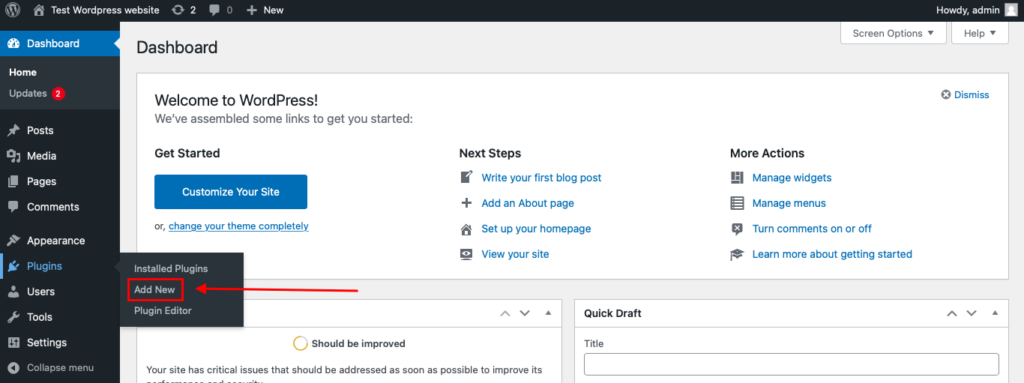
To install the Anti-Spam plugin, go to your WordPress admin panel→ Plugins→ Add New.
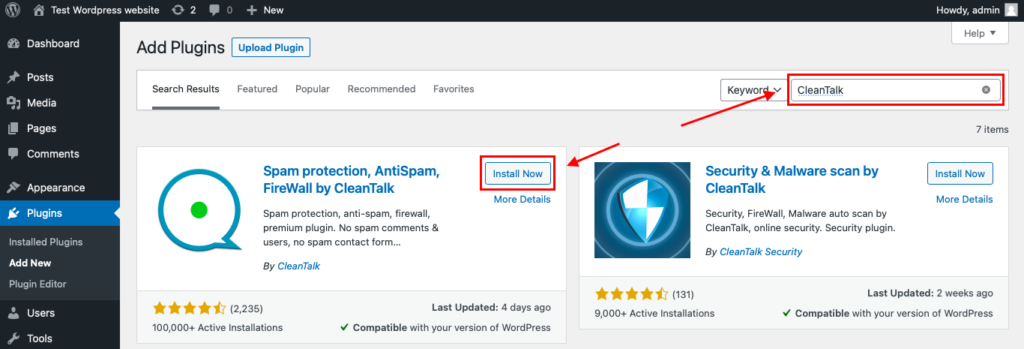
Then enter «СleanTalk» in the search box and click the Install button for «Spam protection, Anti-Spam, FireWall by CleanTalk».
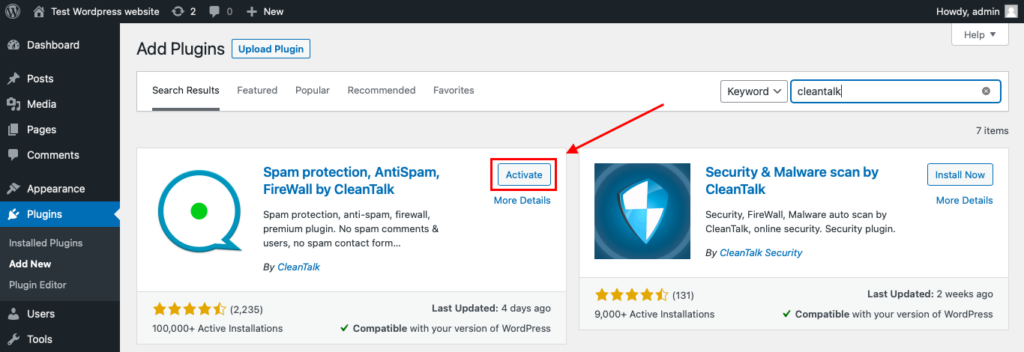
After installing the plugin, click the «Activate» button.
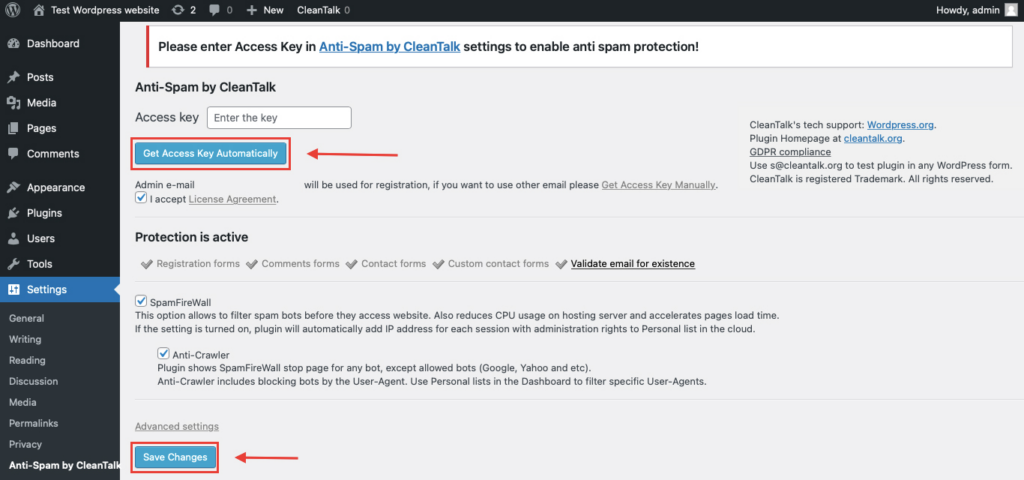
After it is done go to the plugin settings and click the «Get Access Key Automatically» button. Then just click the «Save Settings» button.
That’s all – Contact Form 7 are now protected From this moment,CleanTalk automatically protects the Contact Form 7 registration form (REST route /wp-json/Contact Form 7press/v1/users/), and the Add Listing form used to submit new listings.
You don’t need to paste any shortcodes – just use Contact Form 7 as usual, and CleanTalk will filter spam in the background.
That’s it! From now you know how to completely protect your Divi Email Optin module from spam. You don’t need to paste any shortcodes – just use the module as usual, and CleanTalk will filter spam in the background.
Check if spam protection works with the Divi opt-in form
The best way to test the spam protection is by using a test email,
stop_email@example.com
- Open a page with your Form Maker by 10Web form in an Incognito / private browser tab.
- Fill out the form using stop_email@example.com as the sender’s email.
- Send the form.
- You should see a message from the Anti-Spam plugin confirming that a spam submission was blocked.
*** Forbidden. Sender blacklisted. Anti-Spam by CleanTalk. ***
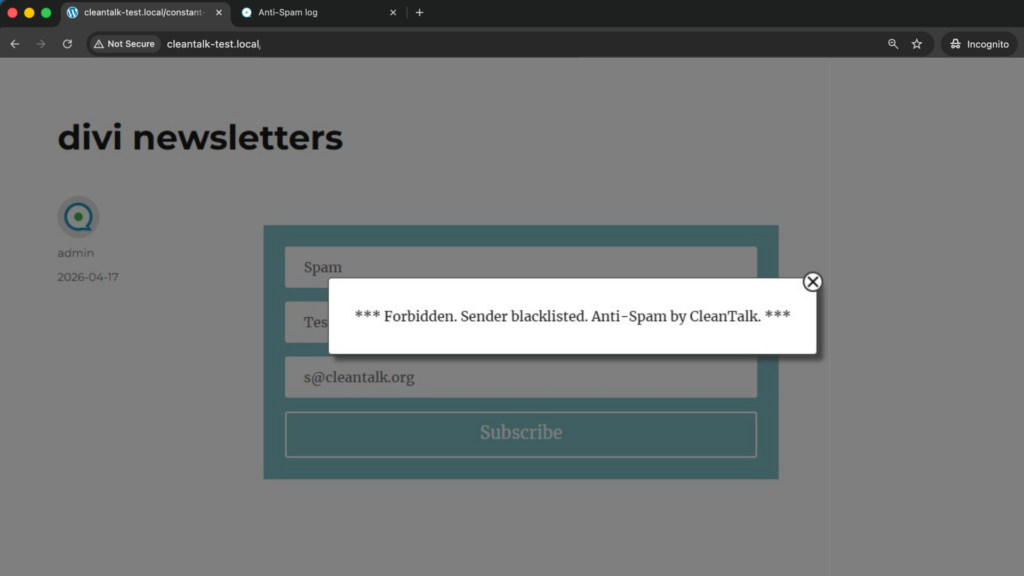
If you see this message, it means CleanTalk successfully protects your Divi opt-in forms from spam.
Cloud Dashboard
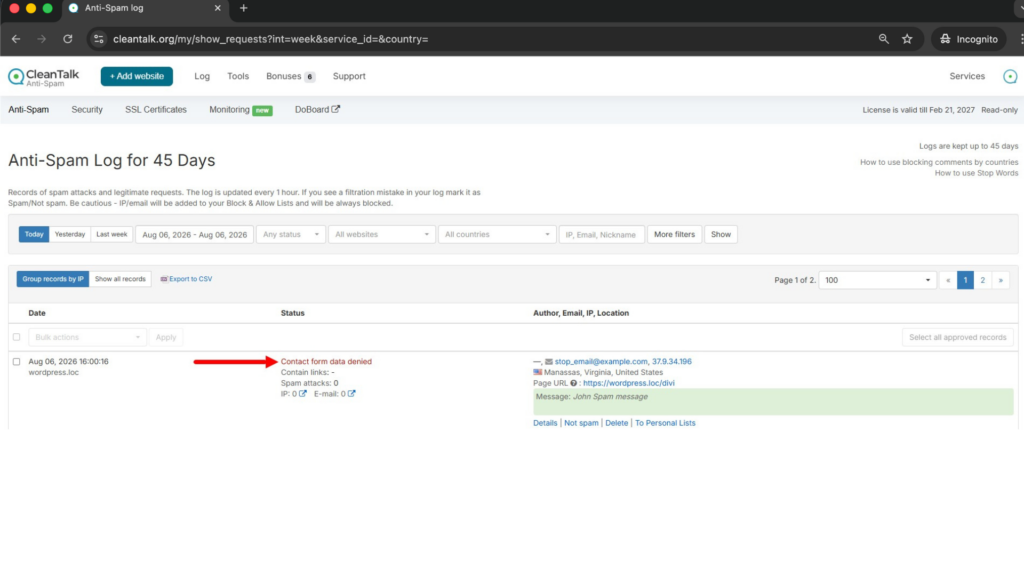
In addition, in the Cloud Dashboard you can find extra details regarding all submissions processed by CleanTalk, including Divi Email Optin forms:
- IP and email of the sender, as well as the sender’s activity history across other websites connected to the CleanTalk cloud.
- Geolocation of the sender.
- Date and time of the submission.
- Page (URL) where the form was submitted.
- Cloud decision – Approved or Denied.
- Cloud explanation for the decision (e.g. blacklisted email, bad IP reputation, spam text, etc.).
- Tools to move the sender to Block or Allow lists so you can fine-tune Divi opt-in spam protection.
FAQ
If I run CleanTalk and Divi’s reCAPTCHA at the same time, will they clash?
No, they operate at different points and do not interfere. Divi’s reCAPTCHA challenges the visitor in the browser before the form is allowed to send; CleanTalk evaluates the submission on the server after it leaves the browser. Running both simply means a signup has to get past a challenge and then survive a reputation check. Nothing breaks, and there is no double prompt for the person subscribing.
My Optin shows an inline “success” message or redirects after signup. Does a block ruin that for real visitors?
It only changes what a spammer sees. A legitimate subscriber still gets your success message or redirect exactly as you set it up in the module. When a blacklisted address is caught, that particular request is stopped and the spammer gets the block notice instead – your configured success flow is untouched for everyone else.
I use Divi Leads to A/B test two versions of the opt-in. Are both variants protected?
Yes. Because filtering happens on the submission itself rather than on a specific layout, it does not matter which Divi Leads variant a visitor was shown. Every version of the form that posts to your site is checked the same way, so your split test stays clean without any per-variant setup.
Can I see which addresses were rejected, or does the junk just vanish silently?
Blocked signups are not lost – each one is recorded with the email, the IP it came from and why it was refused. That log is useful in two directions: it reassures you the filter is doing something, and if a real person is ever caught by mistake you can find that entry and let them through. So instead of a mystery, you get an auditable trail of what hit your opt-in.
My provider (Mailchimp, ConvertKit) already has double opt-in. Isn’t that enough?
Double opt-in is worth keeping, but it works after the fact – it stops unconfirmed junk from becoming active subscribers, yet the bot still triggered a submission and your provider still fired a confirmation email to that address. When the attack is subscription-bombing, those confirmation emails are the whole point. Filtering the request before it reaches your provider means the confirmation is never sent in the first place.
Does the extra check slow down the moment someone hits Subscribe?
Not noticeably. The reputation lookup is a lightweight server call that resolves in a fraction of a second, so a real subscriber sees their normal success response without a perceptible wait. The trade is a tiny, invisible check in exchange for keeping fake addresses off your list.
I run several Divi sites. Do they share one setup?
Each site is protected with its own access key, but you manage them all from a single CleanTalk account, so adding a new Divi site is just activating the plugin and dropping in a key – the reporting and settings stay in one place. Pricing scales per site, and there is a free 7-day trial to try it on any one of them first.
How is CleanTalk’s data handling different from reCAPTCHA’s for a privacy-conscious site?
Both look at signals like the visitor’s IP to judge a submission, but the purpose differs. CleanTalk uses that data solely to decide whether a signup is spam; it is not building an advertising profile of your visitor the way a large ad-funded challenge service can. For teams that pick tools partly on data practices, that narrower, single-purpose use is often easier to explain in a privacy policy.
Final recommendation
For the Divi Email Optin module, the most effective setup is a layered anti-spam stack: an invisible cloud filter as your foundation, double opt-in and light list hygiene on top, and an optional CAPTCHA – such as Divi’s own reCAPTCHA – only on your highest-risk pages, not as the only protection layer. That combination blocks bot signups and fake emails while keeping the subscribe experience fast and friendly for real visitors, and it protects the deliverability, sender reputation and reporting that your mailing list depends on.
For broader website protection, CleanTalk also provides anti-spam protection for websites, helping block spam in forms, comments, registrations, and orders without CAPTCHA.
