

Fake registrations are more than a minor admin inconvenience. They fill your database with junk accounts, waste moderation time, reduce signup quality, and make it harder to understand what real user activity looks like.
For WordPres sites, this problem is especially common. Registration forms are public by design, which makes them an easy target for bots, automated scripts, and low-quality signups. Membership websites, WooCommerce stores, directories, LMS platforms, communities, and lead generation projects are all exposed.
There is also a broader operational side to this issue. Fake registrations are often just one visible part of a larger spam and bot traffic problem. CleanTalk’s own network data shows that suspicious requests are processed at very high volumes across protected websites, with cloud filtering handling a massive share of that traffic before it turns into a bigger site-level problem
The good news is that fake registrations can be reduced significantly with the right setup.
Below are seven practical ways to prevent fake signups on WordPress while keeping the registration flow simple for real users.
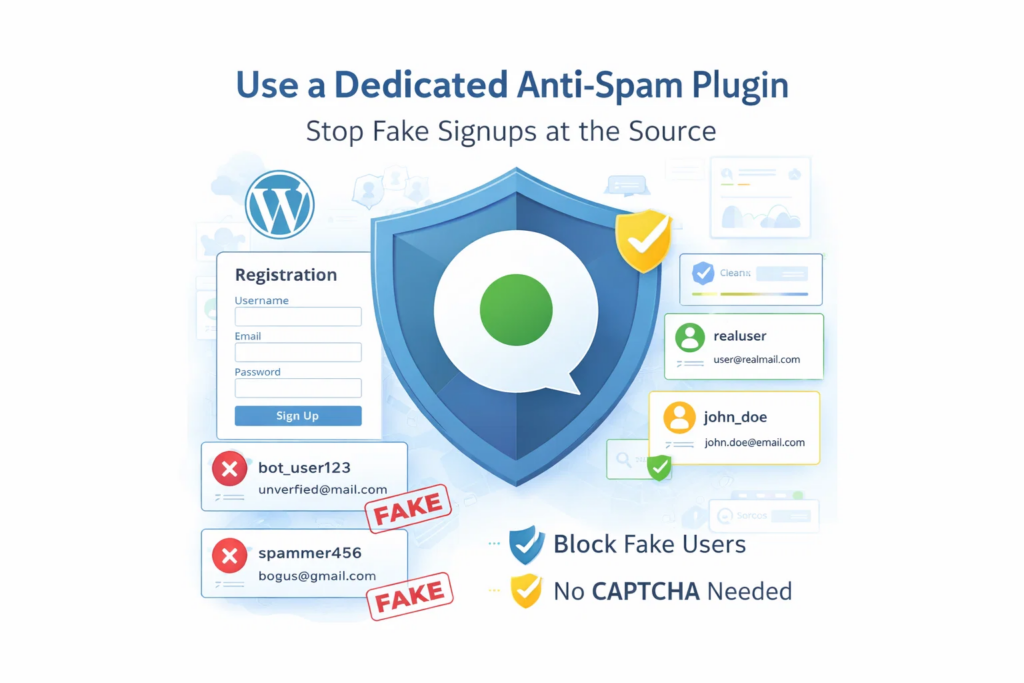
1. Use dedicated anti-spam protection on registration forms
The default WordPress registration flow is not a complete anti-spam system. If registration is open and there is no dedicated protection in place, fake accounts can enter your database far too easily.
The first step is simple: protect the registration form itself.
A dedicated anti-spam solution helps filter suspicious signups before they become user accounts. This reduces manual cleanup, keeps your user list cleaner, and improves the quality of data collected through the signup process.
CleanTalk is a practical fit here because it is designed to block fake users, spam submissions, and other forms of automated abuse without adding unnecessary friction to the registration experience.
According to WordPress.org, Anti-Spam by CleanTalk for WordPress has over 200,000 active installations, with 3,168 reviews and an average rating of 4.7.
Plugin Homepage at cleantalk.org | Latest release at GitHub.com | Website cleantalk.org
Install the CleanTalk Anti-Spam plugin
Show Instructions
To install the Anti-Spam plugin, go to your WordPress admin panel → Plugins → Add New.

Then enter «СleanTalk» in the search box and click the Install button for «Spam protection, Anti-Spam, FireWall by CleanTalk».

After installing the plugin, click the «Activate» button.
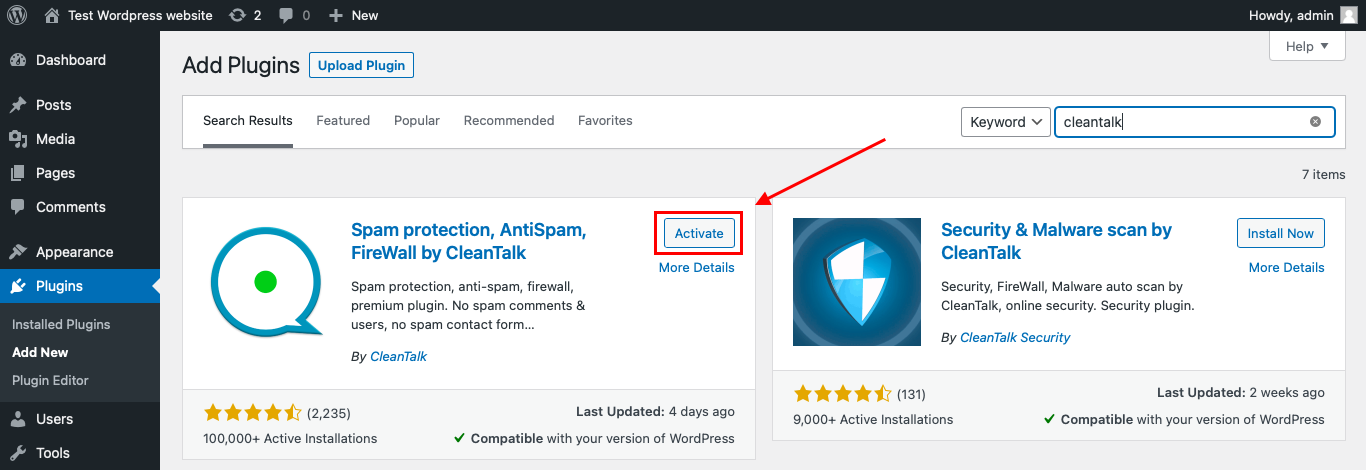
After it is done go to the plugin settings and click the «Get Access Key Automatically» button. Then just click the «Save Settings» button.

That’s it! From now you know how to completely protect your HivePress from spam.
2. Add email confirmation or validation steps
A valid email format does not always mean a real signup. Many fake registrations use temporary, low-quality, or non-engaged email addresses simply to get through the form.
That is why email confirmation and validation rules matter.
Even a basic confirmation step can make fake signups harder to activate and easier to filter out. On higher-risk sites, additional checks may also help improve account quality and reduce junk users before they become part of your system.
This is especially useful for:
- membership websites
- gated content hubs
- communities and forums
- B2B lead capture flows
- downloadable resource pages
If signup quality matters, email validation should be part of the process.
3. Do not rely only on CAPTCHA
CAPTCHA can help reduce some automated submissions, but it should not be the only line of defense.
The problem is simple: CAPTCHA adds friction for legitimate users and does not always stop more advanced spam activity. A registration flow that depends only on visible challenges can still be bypassed, while real visitors are left with a worse experience.
For websites dealing with spam signups and fake accounts, this reCAPTCHA alternative for registrations may be a better fit.
A better approach is to use background anti-spam checks first and visible challenges only when they are really needed.
If you need a broader anti-spam approach for signups, see our for WordPress registrations.
This is one reason CleanTalk works well for registration protection. It focuses on filtering spam in the background, which helps site owners reduce fake signups without forcing every legitimate user to solve a puzzle before they can create an account.
4. Add approval steps where the business risk is higher
Not every WordPress site needs the same registration policy.
A simple blog may be able to keep things lightweight. A membership site, store, directory, forum, or gated platform may need stronger controls. The more access, content, or operational value a new account creates, the more carefully that account should be validated.
Useful options include:
- email activation
- admin approval
- restricted access until verification
- role-based registration rules
- manual review for suspicious profiles
The goal is not to create friction everywhere. The goal is to apply more control where fake accounts create more risk.
5. Look at behavior patterns, not just individual signups
Fake registrations are rarely isolated. In many cases, they are part of a larger pattern of repeated bot activity, abusive traffic, or automated spam campaigns.
That is why it helps to think beyond one form submission at a time.
CleanTalk’s broader protection model supports this layered approach. In addition to form-level anti-spam, CleanTalk SpamFireWall is designed to block many suspicious requests before they reach the website. According to CleanTalk’s own reporting, the cloud layer processes a much larger volume of suspicious requests than the visible spam events site owners usually notice inside forms and registrations
That matters because fake signups are often just one symptom of a wider abuse pattern.
6. Monitor signup and spam activity in a dashboard
Many teams only notice fake registrations after the database is already filled with junk accounts. By then, the problem is harder to measure and slower to fix.
Visibility changes that.
When signup and spam activity can be monitored in one dashboard, teams can see blocked events, track spikes, understand where suspicious activity is coming from, and evaluate whether protection settings are working over time.
This is one of the strongest advantages of the CleanTalk Cloud Dashboard. It turns spam from a cleanup problem into something measurable and manageable.
That helps answer practical questions like:
- Are fake signups increasing?
- Did a recent settings change improve results?
- Are suspicious requests coming in waves?
- Is spam pressure affecting only one form or the whole site?
A dashboard does not just help you react. It helps you make better decisions earlier.
7. Use one system that combines protection and visibility
Many site owners try to solve fake registrations with a patchwork stack: one CAPTCHA, one verification step, one moderation rule, one separate way to review activity.
That can work, but it is rarely simple or scalable.
A more practical setup is to use one system that combines:
- registration protection
- broader anti-spam coverage
- reduced visible friction
- cloud-level filtering
- centralized monitoring
That is where CleanTalk stands out. Instead of treating fake signups as a narrow registration-form issue, it helps site owners approach the problem as part of a wider spam prevention strategy.
For WordPress websites, that means cleaner user lists, less manual moderation, and better visibility into what is happening around the signup flow.
Why CleanTalk is a strong fit for fake registration prevention
CleanTalk is a strong fit for this use case because it addresses both sides of the problem.
At the application level, it helps block fake users and spam submissions on registration forms and other public-facing forms. At the cloud level, SpamFireWall helps filter many suspicious requests before they ever reach the site. And through the Cloud Dashboard, teams can review logs, monitor blocked activity, and better understand spam patterns over time.
That gives site owners a simple and practical framework: protect the form, reduce fake users, and make spam activity visible.
FAQ
What are fake registrations in WordPress?
Fake registrations are user accounts created by bots, spammers, or low-quality users who have no real intention of engaging with your website. These accounts often use suspicious usernames, temporary email addresses, or automated signup patterns.
Why are fake registrations a problem?
Fake registrations do more than clutter your user database. They waste admin time, reduce data quality, distort reporting, and can create extra moderation and security work for your team.
Why does WordPress get so many fake signups?
WordPress registration forms are public and easy for bots to find. If registration is enabled without proper protection, automated scripts can create fake accounts at scale.
How do I stop fake registrations on WordPress?
The most effective approach is layered protection. This usually includes dedicated anti-spam protection, email confirmation or validation, approval rules for higher-risk registrations, and monitoring suspicious activity over time.
Is CAPTCHA enough to stop fake registrations?
Not always. CAPTCHA can reduce some spam registrations, but many site owners use additional anti-spam protection because CAPTCHA alone may not stop all fake signups and can add friction for legitimate users.
Can CleanTalk block fake users on WordPress?
Yes. CleanTalk is designed to help block fake users, spam submissions, and other types of abuse on WordPress forms.
How is CleanTalk different from basic signup protection?
CleanTalk combines form-level anti-spam protection with cloud-based filtering and dashboard visibility. This helps site owners not only reduce fake registrations, but also monitor suspicious activity more effectively.
Does CleanTalk only protect registration forms?
No. CleanTalk can also help protect comments, contact forms, and other public-facing submission points on a WordPress site.
What kinds of websites need fake registration protection most?
This is especially important for membership sites, WooCommerce stores, directories, forums, LMS platforms, and lead generation websites.
Will anti-spam protection hurt the user experience?
Not necessarily. Many site owners prefer solutions that work in the background and reduce spam without forcing legitimate users through extra visible challenges.
Final takeaway
Fake registrations on WordPress are best handled with layered protection. Kinsta’s guidance supports using a combination of CAPTCHA, admin approval, email activation, and dedicated anti-spam plugins. CleanTalk’s official product materials support using its plugin to block fake users and its SpamFireWall to stop many spam bots before they ever reach the site.
If your site is dealing with fake signups, the practical goal is not to add random friction everywhere. It is to make registrations easier for real users and harder for bad actors.
Stop fake registrations on WordPress without CAPTCHAs
Create your CleanTalk account and protect WordPress registration forms from fake users, spam signups, and automated bot activity. Keep signups easy for real visitors while extending protection across comments, contact forms, and other WordPress forms.
