Tag: wordPress plugins

  • 4 steps for a complete HappyForms spam protection

    4 steps for a complete HappyForms spam protection

    After you created your HappyForms Contact Form you may get spam through this form. CleanTalk protects your HappyForms Contact Form from spam and saves your visitors time.

    Once CleanTalk Anti-Spam plugin is installed it starts to protect all of the existing forms on your WordPress website. It may not only be HappyForms but many others.

    Download CleanTalk Anti-Spam plugin | Download HappyForms Contact Form 

    How to install CleanTalk Anti-Spam plugin

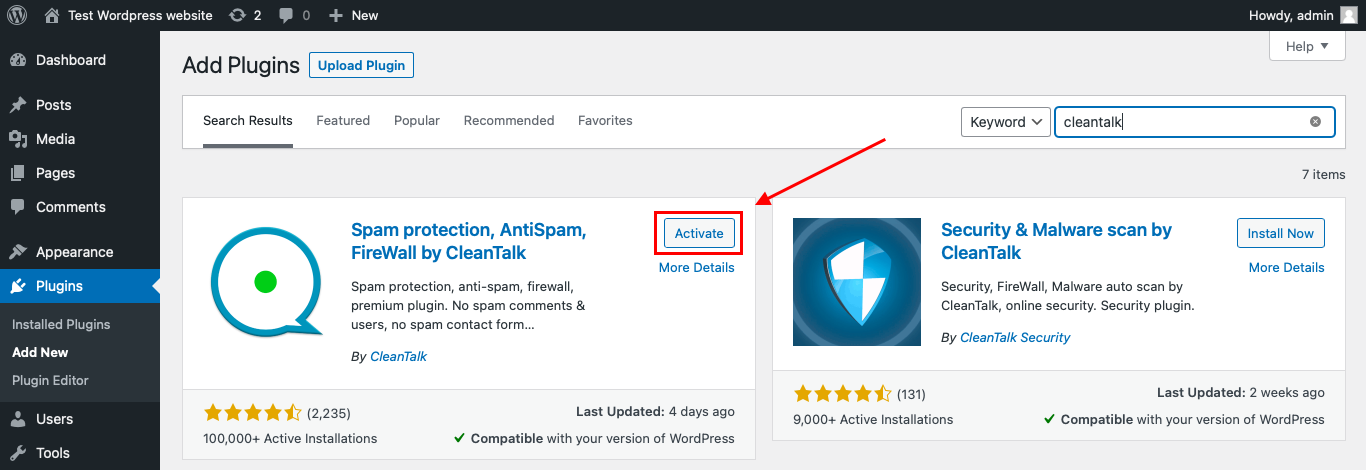
    To install the Anti-Spam plugin, go to your WordPress admin panelPluginsAdd New.

    Then enter «СleanTalk» in the search box and click the Install button for «Spam protection, Anti-Spam, FireWall by CleanTalk».

    After installing the plugin, click the «Activate»‎ button.

    After it is done go to the plugin settings and click the «Get Access Key Automatically» button. Then just click the «Save Settings»‎ button.

    That’s it! From now your WordPress website and HappyForms Contact Forms are protected from spam.

    You can always use our detailed installation instructions.

    How to check that CleanTalk already protects your HappyForms Contact Forms from spam

    You can test the work of Anti-Spam protection for your HappyForms Contact Forms by using a test email s @ cleantalk.org (without spaces). First, open the form in an Incognito browser tab. Fill in all the required form fields and send a form. After submitting the form, you will see a block message about the block on the form submission.

    If you have any questions, add a comment and we will be happy to help you.

    Create your Cleantalk account – Register now and enjoy while CleanTalk protects your HappyForms Contact Form from spam.

    Update

    The protection works only for website visitors, not for website admins. Be sure to test the form protection using Incognito mode.

    You may view a complete list of CleanTalk Anti-Spam plugin features here. https://cleantalk.org/help/introduction 

    WordPress spam protection

  • CleanTalk Anti-Spam protects your WebDorado forms from spam

    CleanTalk Anti-Spam protects your WebDorado forms from spam

    After you created your WebDorado Forms you may get spam through this form. CleanTalk Anti-Spam plugin protects your WebDorado contact forms from spam and save your visitors time.

    Once CleanTalk Anti-Spam plugin is installed it starts to protect all of the existing forms on your WordPress website. It may not only be WebDorado Forms but many others.

    Download CleanTalk Anti-Spam plugin | Download WebDorado Contact Form 

    How to install CleanTalk Anti-Spam plugin

    To install the Anti-Spam plugin, go to your WordPress admin panelPluginsAdd New.

    Then enter «СleanTalk» in the search box and click the Install button for «Spam protection, Anti-Spam, FireWall by CleanTalk».

    After installing the plugin, click the «Activate»‎ button.

    After it is done go to the plugin settings and click the «Get Access Key Automatically» button. Then just click the «Save Settings»‎ button.

    That’s it! From now your WordPress website and WebDorado contact forms are protected from spam.

    You can always use our detailed installation instructions.

    Download CleanTalk Anti-Spam plugin | Download WebDorado Contact Form 

    How to check that CleanTalk already protects your WebDorado Contact Forms from spam

    You can test the work of Anti-Spam protection for your WebDorado contact forms by using a test email s @ cleantalk.org (without spaces). First, open the form in an Incognito browser tab. Fill in all the required form fields and send a form. After submitting the form, you will see a block message about the block on the form submission.

    If you have any questions, add a comment and we will be happy to help you.

    Create your Cleantalk account – Register now and enjoy while CleanTalk Anti-Spam plugin protects your WebDorado contact forms from spam.

    Update

    The protection works only for website visitors, not for website admins. Be sure to test the form protection using Incognito mode.

    You may view a complete list of CleanTalk Anti-Spam plugin features here.

    WordPress spam protection

  • How to protect your Clean and Simple Forms using CleanTalk Anti-Spam plugin

    How to protect your Clean and Simple Forms using CleanTalk Anti-Spam plugin

    After you created your Clean and Simple Contact Form you may get spam through this form. CleanTalk Anti-Spam plugin protects your Clean and Simple Contact Forms from spam and save your visitors time.

    Once CleanTalk Anti-Spam plugin is installed it starts to protect all of the existing forms on your WordPress website. It may not only be Clean and Simple Contact Forms but many others.

    How to install CleanTalk Anti-Spam plugin

    To install the Anti-Spam plugin, go to your WordPress admin panel → Plugins → Add New.

    Then enter «СleanTalk» in the search box and click the Install button for «Spam protection, Anti-Spam, FireWall by CleanTalk».

    After installing the plugin, click the «Activate»‎ button.

    After it is done go to the plugin settings, click the «Get Access Key Automatically» button. Then click the «Save Settings»‎ button.

    That’s it! From now your WordPress website and Clean and Simple Contact Forms are protected from spam.

    You can always use our detailed installation instructions.

    Download CleanTalk Anti-Spam plugin | Download Contact Form by Clean and Simple Contact Forms 

    How to check that CleanTalk already protects your Clean and Simple Contact Forms from spam

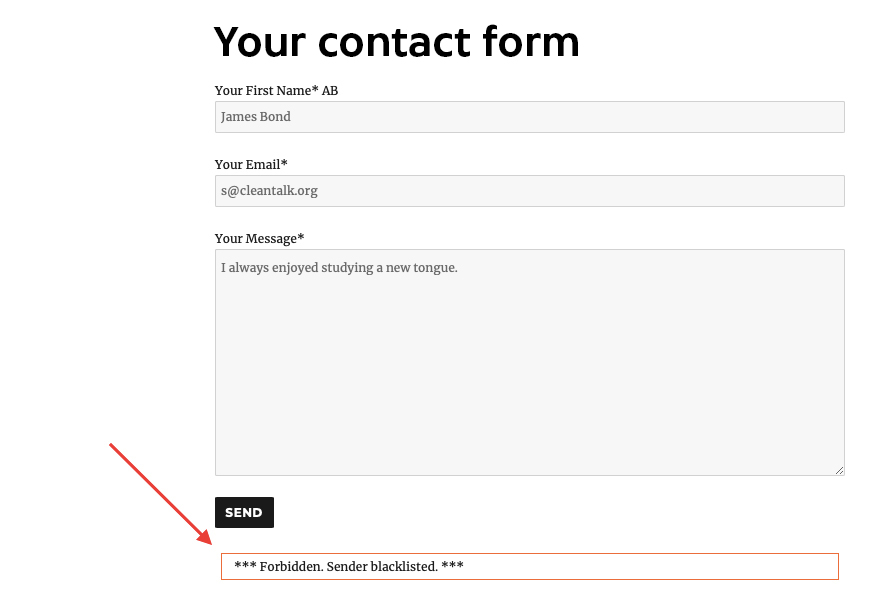
    You can test the work of Anti-Spam protection for your Clean and Simple Contact Forms by using a test email s @ cleantalk.org (without spaces). First, open the form in an Incognito browser tab. Fill in all the required form fields and send a form. After submitting the form, you will see a block message about the block on the form submission.
    If you have any questions, add a comment and we will be happy to help you.

    Create your Cleantalk account – Register now and enjoy while CleanTalk Anti-Spam plugin protects your Clean and Simple Contact Forms from spam.

    Update

    The protection works only for website visitors, not for website admins. Be sure to test the form protection using Incognito mode.

    Additional features

    • CleanTalk protects all forms at once: comments, registrations, feedbacks, contacts, reviews.
    • Installation takes about 1-2 minutes.
    • Smart 100% protection against spambots.
    • Always online – 24/7 technical support.
    • Logs, personal lists, country filters, stop-words and many another.

    A complete list of CleanTalk Anti-Spam plugin features can be viewed here. https://cleantalk.org/help/introduction 

    WordPress spam protection

  • How to protect your Gravity forms using CleanTalk Anti-Spam plugin

    How to protect your Gravity forms using CleanTalk Anti-Spam plugin

    After you created your contact form using Gravity Forms you actually may get spam. CleanTalk Anti-Spam plugin protects your Gravity contact forms from spam.

    Once CleanTalk Anti-Spam plugin is installed it starts to protect all of the existing forms on your WordPress website. It may not only be Gravity contact forms but many others.

    How to install CleanTalk Anti-Spam plugin

    To install the Anti-Spam plugin, go to your WordPress admin panel → Plugins → Add New.

    Then enter «СleanTalk» in the search box and click the Install button for «Spam protection, Anti-Spam, FireWall by CleanTalk».

    After installing the plugin, click the «Activate»‎ button.

    After it is done go to the plugin settings, click the «Get Access Key Automatically» button. Then click the «Save Settings»‎ button.

    That’s it! From now your WordPress website and Gravity forms are protected from spam.

    You can always use our detailed installation instructions.

    Download CleanTalk Anti-Spam plugin | Download Contact Form by Gravity Forms 

    How to check that CleanTalk already protects your Gravity contact forms from spam

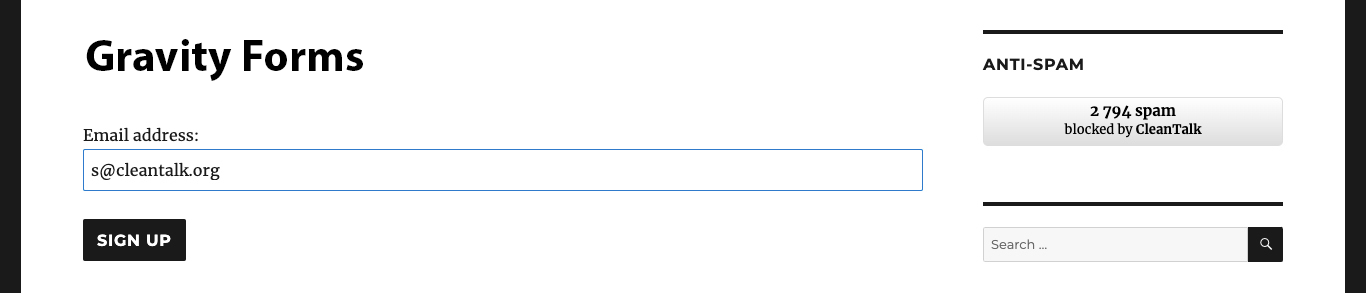
    You can test the work of Anti-Spam protection for your Gravity contact form by using a test email s @ cleantalk.org (without spaces). First, open the form in an Incognito browser tab. Fill in all the required form fields and send a form. After submitting the form, you will see a block message about the block on the form submission.

    If you have any questions, add a comment and we will be happy to help you.

    Create your Cleantalk account – Register now and enjoy while CleanTalk Anti-Spam plugin protects your Gravity contact forms from spam.

    Update

    The protection works only for website visitors, not for website admins. Be sure to test the form protection using Incognito mode.

    Additional features

    • CleanTalk protects all forms at once: comments, registrations, feedbacks, contacts, reviews.
    • Installation takes about 1-2 minutes.
    • Smart 100% protection against spambots.
    • Always online – 24/7 technical support.
    • Logs, personal lists, country filters, stop-words and many another.

    A complete list of CleanTalk Anti-Spam plugin features can be viewed here. https://cleantalk.org/help/introduction 

    WordPress spam protection