-
How to Reduce Server Load by Simply Filtering Bad Traffic
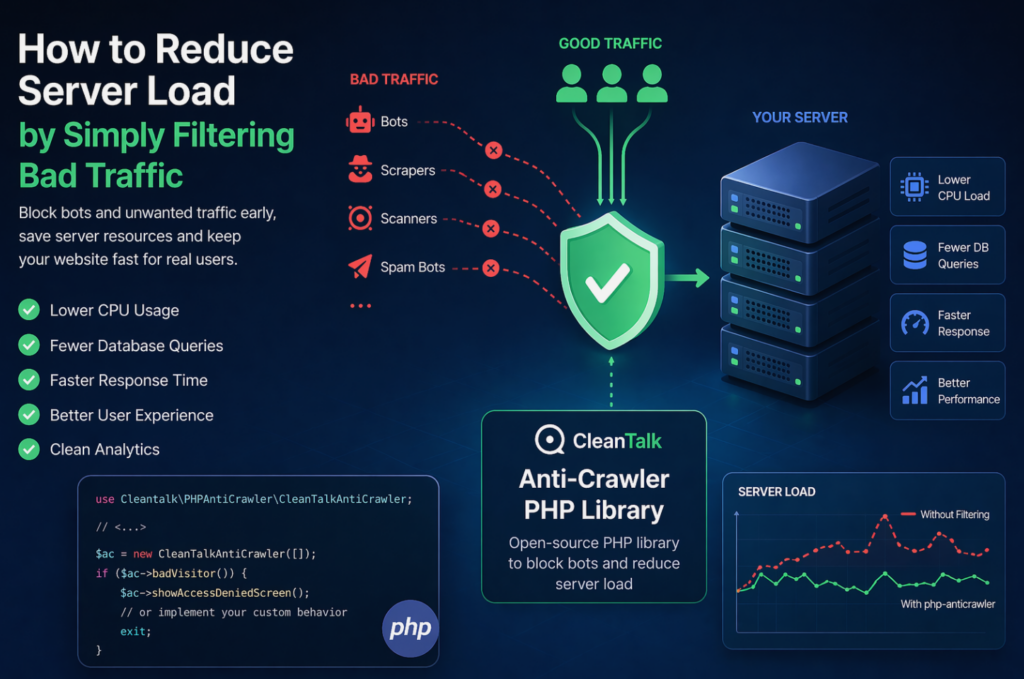
When a website starts slowing down, many teams immediately think about scaling infrastructure: adding CPU, RAM, more servers, or optimizing the database. In reality, a significant part of server load is often caused not by real users, but by automated traffic — bots, scrapers, vulnerability scanners, spam robots, and aggressive crawlers. These requests may continuously
FEEDBACK LOG


The Latest
-
CVE-2023-3720 – Upload Media By URL < 1.0.8 - Stored XSS via CSRF
During a thorough security assessment of the Upload Media By URL plugin for WordPress, a concerning medium-level vulnerability has been uncovered in versions prior to 1.0.8. This vulnerability poses a significant risk to your website’s security and calls for immediate action! If exploited, this vulnerability allows attackers to potentially upload files containing malicious code directly…
-
CleanTalk Security Plugin Tools for WordPress
In this article we have tried to tell you about the main and most useful options of the CleanTalk Security Plugin for WordPress. You can install the plugin from the official WordPress directory here: https://wordpress.org/plugins/security-malware-firewall

-
CVE-2023-3601 – Simple Author Box < 2.52 - Contributor+ Arbitrary User Information Disclosure via IDOR (Thief of Creds)
We have discovered a severe security vulnerability in the Simple Author Box plugin (CVE-2023-3601), which puts your WordPress accounts at high risk of being compromised. This vulnerability allows attackers with Contributor-level access or higher to steal sensitive user information, including hashed passwords. Main info: CVE CVE-2023-3601 Plugin Simple Author Box Critical Very High Publicly Published…
-
Our client’s review: MYABIDING.COM
We continue sharing our clients’ reviews and today’s one is kindly brought to you by @leahladams from myabiding.com. EXCELLENT PRODUCT! Clean Talk has protected me before. When i started my new website, there was no question as to who i wanted to help with the Spam Attacks! Clean Talk will always be my Spam killer!…