

With this update, we polished CleanTalk Anti-Spam to do what it’s supposed to do the best. And here’s what was improved in the plugin in more detail.
What Did We Do
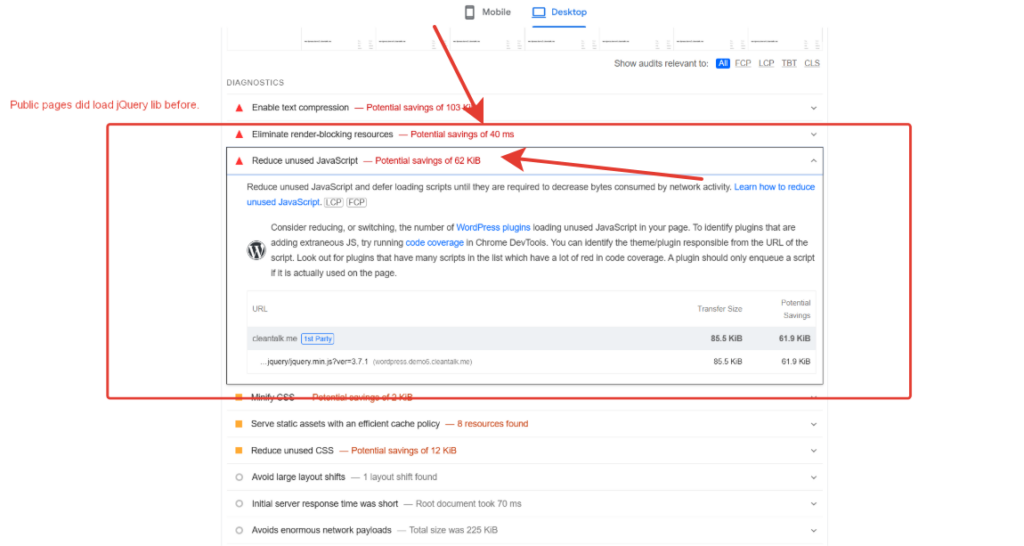
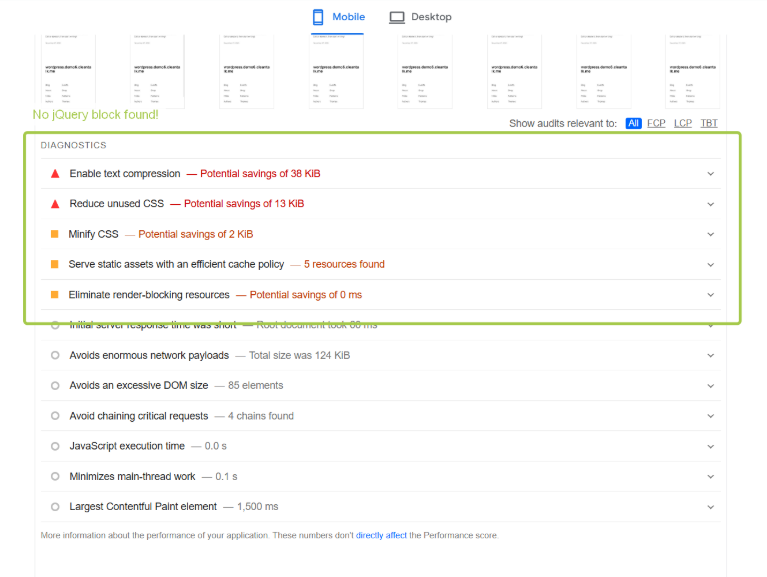
- Reducing jQuery Dependency
- Why jQuery? jQuery was often included to handle some JavaScript tasks but sometimes added extra weight to your website.
- New Approach: We replaced jQuery with native JavaScript where possible. This will reduce the amount of code needed to load and parse, hence offering faster page load times.
- Simplify Handling of AJAX
- AJAX and Anti-Spam: AJAX helps perform real-time anti-spam checks. However, incorrect AJAX requests may make your website slow.
- Improved AJAX: We further improved our AJAX handling by reducing the number of requests and enhancing the data transfer process. This will keep the anti-spam checks lean without interfering with the user experience at all.
- The debug_ajax Option
- The debug_ajax option was only given for development purposes and seldom, if ever, used in production environments. To make the plugin core even slimmer, we removed this option.
- comments__manage_comments_on_public_page Option
- That is when comments need to be enabled on a public page. Comment visibility and comment moderation make the option work seamlessly without compromising security.
Results
With these optimizations, you will be guaranteed that your website-essentially pages with an active comment section see a significant improvement in speed and performance that will positively reflect in the visitor experience with better SEO rankings and hence a better overall user experience.
Front-end optimizations are only one part of the performance story, though. A surprising share of CPU, RAM and bandwidth on many sites is still wasted on spam bots instead of real visitors. If you want to see how much server capacity bad bots can consume — and how CleanTalk’s cloud filtering helps to reduce this load — read our article How Much Server Resources Spam Bots Waste (and How CleanTalk Saves Them).
Let’s see what PageSpeed Insights has to say:
Before
After
Update Today
We recommend that you update to the latest release of CleanTalk Anti-Spam to take advantage of these performance enhancements.
Automatic Update:
- Check for Updates:
- Go to your WordPress admin dashboard.
- Navigate to Plugins > Installed Plugins.
- Locate the “Anti-Spam by CleanTalk” plugin.
- You’ll see a “Update Now” button next to the plugin name.
- Update the Plugin:
- Click the “Update Now” button.
- WordPress will automatically download and install the latest version of the plugin.

Leave a Reply