

If you run a WooCommerce store, spam is rarely limited to a few junk messages.
More often, it appears in ways that directly affect store operations: fake orders, suspicious signups, spam reviews, and unwanted submissions through store-related forms. Left unchecked, this kind of activity creates extra admin work, weakens customer data quality, and makes it harder to separate genuine sales activity from noise.
In this article, you will learn what WooCommerce spam usually looks like, why it becomes a problem for store owners, and how to install the CleanTalk plugin to protect your WooCommerce store from spam. We will look at the most common warning signs, explain where spam usually comes from, and show how to reduce it across orders, registrations, reviews, and related forms without adding CAPTCHA friction for real customers.
That is why WooCommerce spam should be treated as a store-level problem, not just a single-form nuisance.

What WooCommerce Spam Actually Includes
WooCommerce spam is a broad category. In practice, it usually includes:
- fake or junk orders
- spam customer registrations
- spam product reviews
- suspicious checkout activity
- abuse of enquiry, contact, or other store-related forms
These issues may appear separately, but they often overlap. A store dealing with fake orders may also have low-quality registrations. A site receiving spam reviews may also be getting junk messages through product or contact forms. When several public-facing actions exist in the same store, spam rarely stays in only one place.
Fake Orders
Fake orders are one of the most visible and frustrating forms of WooCommerce spam.
They create immediate operational noise and can make the store feel unstable, even when no real sales are being lost directly. Instead of processing genuine customer activity, the admin team ends up sorting through junk entries, failed attempts, and suspicious patterns that should never have reached the store in the first place.
Typical signs of fake orders include:
- many pending or failed orders
- repeated patterns in customer details
- suspicious bursts of low-value orders
- usernames or email addresses that look random or disposable
- checkout activity that does not match normal store behavior
- repeated requests from unusual locations or similar device patterns
The main problem with fake orders is not only clutter. They consume time, distort reporting, and make it harder to understand what is actually happening in the business. If suspicious activity keeps building up in the background, genuine operational signals become harder to spot.
Spam Signups
Spam registrations are another common part of the WooCommerce spam problem.
At first glance, fake signups may seem less urgent than fake orders. But over time they create their own kind of damage. Customer data becomes weaker, email lists become noisier, and the admin area fills up with accounts that have no real commercial value.
Typical signs of spam signups include:
- fake-looking email addresses
- disposable or temporary email domains
- many registrations with no meaningful activity
- bursts of signups from irrelevant geographies
- junk profiles that never behave like real customers
Spam accounts are not just a cosmetic issue. They reduce data quality, add cleanup work, and can later be used for other low-value actions such as spam reviews or repeated form submissions.
Spam Reviews
Review spam is easy to underestimate, especially when fake orders feel more urgent. But it creates a different kind of problem: it damages trust.
A store that depends on user-generated content needs product reviews to look authentic and useful. When product pages start filling with generic praise, link-heavy comments, or repeated low-quality posts, the entire shopping experience begins to feel less reliable.
Typical signs of spam reviews include:
- generic praise with no product detail
- repeated text across multiple products
- irrelevant promotional content
- link-heavy submissions
- comments that do not match the product itself
- low-quality text clearly written for exposure rather than actual feedback
Spam reviews increase moderation work, weaken credibility, and make product pages look neglected.
Store Form Abuse
WooCommerce spam often goes beyond orders, signups, and reviews.
Many stores also use enquiry forms, quote forms, waitlist forms, product-related contact flows, and plugin-based forms connected to the shopping experience. Each additional form creates another public-facing entry point, and each entry point can become a target for abuse if left unprotected.
Common targets include:
- product enquiry forms
- quote request forms
- contact forms
- waitlist or notification forms
- pre-sale communication forms
- custom WooCommerce-related forms
This matters because many stores focus on protecting checkout while leaving the rest of the site exposed. In practice, that often means the problem simply moves from one part of the store to another.
Why WooCommerce Stores Attract Spam
WooCommerce stores combine several public interactions in one place:
- registration
- login and account-related actions
- checkout
- reviews
- contact and enquiry forms
- plugin-based product interactions
That makes them attractive to bots and abusive submitters. A single weak point can create junk data, but many stores have multiple open entry points at the same time. As a result, what looks like a small problem at first can grow into a broader operational issue across the store.
Store owners rarely experience WooCommerce spam as one isolated technical bug. More often, it feels like a growing mess: noisy order queues, low-quality customer accounts, spam reviews, and more time spent cleaning up actions that should never have made it into the system.
Common Signs You Have a WooCommerce Spam Problem
You likely have a WooCommerce spam issue if you see:
- sudden spikes in failed, pending, or suspicious orders
- fake-looking customer accounts
- spam reviews appearing on products
- junk submissions through contact or enquiry forms
- repeated names, emails, or behavior patterns
- strange activity from locations that do not match your normal market
- more admin cleanup without matching growth in sales
Another clue is repetition. If the same kinds of names, email patterns, order values, IP behavior, or submission patterns keep appearing, the issue is less likely to be random noise and more likely to be organized spam or bot activity.
Real Customer Activity vs Spam Activity
Not every unusual order is spam, but spam usually leaves patterns that real customers do not.
Real customer activity usually looks like this:
- normal order timing and volume
- realistic names and email addresses
- browsing and checkout behavior that fits the store’s traffic patterns
- reviews connected to actual purchase intent
- registrations followed by meaningful activity
Spam activity often looks like this:
- bursts of failed or suspicious orders
- repeated or random-looking customer details
- fake accounts with no meaningful activity
- generic reviews or irrelevant promotional messages
- repeated patterns across orders, accounts, or form submissions
This kind of comparison helps move the problem from a vague feeling that something is wrong to practical signals that can actually be monitored.
Why This Problem Hurts More Than It Seems
WooCommerce spam is not just annoying. It creates real business costs.
It often leads to:
- more time reviewing fake orders
- less reliable customer data
- polluted reporting
- more moderation work on reviews and forms
- less clarity about real store activity
- more manual cleanup in the admin area
- more risk of missing genuine issues inside noisy data
And because the problem can affect several parts of the store at once, teams often end up treating symptoms one by one instead of fixing the broader cause.
How to Stop WooCommerce Spam
The strongest approach is layered protection.
That does not mean adding as much friction as possible. In e-commerce, too much friction can hurt real customers. The goal is to protect the store broadly while keeping the buying experience smooth.
A strong WooCommerce anti-spam strategy should cover:
- checkout-related flows
- registrations
- product reviews
- contact and enquiry forms
- WooCommerce-related add-ons and custom forms
- one consistent anti-spam layer across the store
If you only secure one area, bots may continue using another. A store that protects checkout but ignores registration, reviews, or form-based plugins may still end up dealing with the same problem through a different entry point.
One-Form Protection vs Store-Wide Protection
Some store owners try to solve WooCommerce spam by protecting only one entry point, usually checkout. That may help temporarily, but it often leaves the rest of the store exposed.
One-form protection usually focuses on:
- checkout only
- one visible symptom, such as fake orders
- manual cleanup after spam appears
- isolated fixes that do not protect the rest of the store
Store-wide protection focuses on:
- orders
- registrations
- product reviews
- contact and enquiry forms
- multiple store-related plugins and form types
- consistent anti-spam filtering across the store
If one form becomes harder to abuse, bots often move to another. That is why WooCommerce spam should be treated as a store-wide issue rather than a single checkout issue.
WooCommerce Spam Protection Without CAPTCHA
One of the biggest challenges in e-commerce is protecting the store without creating friction for real customers.
WooCommerce depends on smooth interactions at key moments:
- account creation
- cart flow
- checkout
- post-purchase reviews
- contact and enquiry forms
For many store owners, the goal is not simply to block spam. The real goal is to block spam without making legitimate customers work harder.
How CleanTalk Helps Protect WooCommerce Stores
CleanTalk is designed to help protect WooCommerce stores in the background, without adding CAPTCHA friction to the customer journey.
Instead of focusing on only one step of the funnel, the idea is to reduce spam more broadly across the store. That includes the places where bots usually create the most visible problems: orders, registrations, reviews, and other store-related forms.
This matters because WooCommerce spam rarely stays limited to one action. A store dealing with fake orders may also be collecting junk registrations or low-quality reviews. In the same way, a site that protects checkout but ignores other public-facing forms may still leave important entry points open to abuse.
In practical terms, CleanTalk fits stores that want to:
- reduce fake orders and suspicious submissions
- protect registrations and review forms
- cover multiple WooCommerce-related forms at once
- keep checkout and signup smoother for legitimate users
For stores where conversion matters, that low-friction approach is especially important.
CAPTCHA vs Background Protection
CAPTCHA-based protection can:
- add friction to checkout or signup
- interrupt the buying flow
- create extra steps for legitimate users
- reduce completion rates if users abandon the process
Background anti-spam protection aims to:
- block unwanted submissions automatically
- keep checkout and signup smoother
- reduce spam without visible friction for real customers
- protect multiple store forms at the same time
This is why low-friction protection matters so much for WooCommerce. On an e-commerce site, every extra obstacle can affect conversion.
How to Install CleanTalk for WooCommerce Spam Protection
Once you understand where WooCommerce spam is coming from, the next step is to set up protection across the store.
A typical WooCommerce anti-spam setup should cover the main public-facing actions that bots target most often:
- customer registrations
- checkout-related activity
- product reviews
- contact and enquiry forms
- other WooCommerce-related forms and add-ons
With CleanTalk, the goal is to reduce spam in the background rather than add more visible friction for shoppers.
CleanTalk Anti-Spam for WordPress is used on over 200,000 websites and is designed to protect forms, registrations, reviews, and other submissions without adding friction for real users.
How to install CleanTalk Anti-Spam plugin
Show Instructions
To install the Anti-Spam plugin, go to your WordPress admin panel → Plugins → Add New.

Then enter «СleanTalk» in the search box and click the Install button for «Spam protection, Anti-Spam, FireWall by CleanTalk».

After installing the plugin, click the «Activate» button.
After it is done go to the plugin settings and click the «Get Access Key Automatically» button. Then just click the «Save Settings» button.

That’s it! Your WooCommerce store is now protected. Next, let’s see how to test the protection.
How to check spam protection for WooCommerce
You can test the Anti-Spam protection for WooCommerce by using a test email.
stop_email@example.com
- Open your WooCommerce store in an Incognito browser tab. Add any product to the cart and proceed to checkout.
- Fill in the checkout form using test customer details and the email address stop_email@example.com.
- Submit the form. You should see a blocking message similar to the one shown below.
*** Forbidden. Fraud prevention. Sender blacklisted. Anti-Spam by CleanTalk. ***
You can use the same approach to test other WooCommerce-related forms, such as:
- customer registration forms
- product review forms
- enquiry or contact forms connected to the store
In addition, in the Cloud Dashboard , you can review additional details about blocked WooCommerce submissions, including:
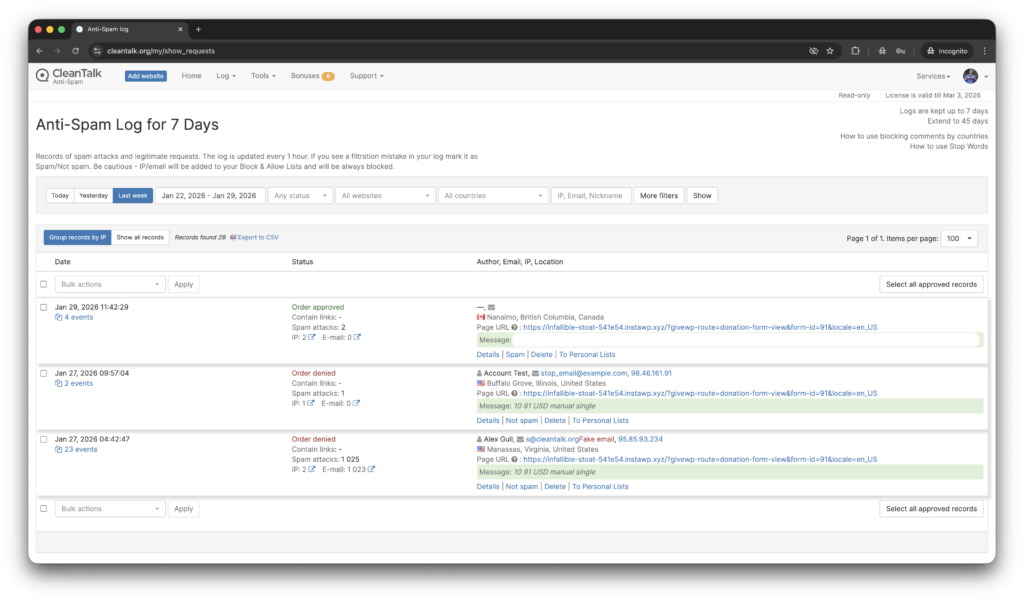
- IP address and email of the sender
- sender activity history across websites connected to the CleanTalk cloud
- sender geolocation
- date and time of the submission
- page URL where the submission was made
- cloud decision, such as Approved or Denied
- explanation for the cloud decision
- tools to move the sender to the Block or Allow lists
This kind of setup helps store owners move from manual cleanup to ongoing prevention. Instead of removing fake orders, spam accounts, and junk reviews after they appear, you reduce the chance of that spam reaching the store in the first place.
If your store uses additional WooCommerce-related plugins, such as review, enquiry, or registration extensions, it is also worth checking that those forms are included in your anti-spam coverage.
Final Thoughts
WooCommerce spam is rarely one isolated issue sitting in one corner of the store.
Fake orders are often only the most visible symptom. Spam signups weaken data quality. Spam reviews damage trust. Unprotected forms create additional entry points for abuse. If you treat each of these as separate annoyances, you will keep cleaning up symptoms. If you treat them as part of a broader store-level problem, you can protect the customer journey more consistently and keep the experience smoother for real users.
The practical takeaway is simple: the most effective response is not to patch one symptom and move on. It is to look at the store as a whole, identify where public-facing interactions are exposed, and protect the full customer flow — from registration to checkout to post-purchase engagement.
For store owners who want a low-friction way to reduce WooCommerce spam across orders, signups, reviews, and related forms, CleanTalk is the natural next step.
FAQ
What is WooCommerce spam?
WooCommerce spam is a broad term for unwanted or automated submissions affecting a WooCommerce store. It can include fake orders, spam registrations, spam reviews, suspicious checkout activity, and abuse of related store forms.
Does WooCommerce spam include fake orders?
Yes. Fake orders are one of the clearest and most visible forms of WooCommerce spam, especially when stores start seeing repeated failed orders, suspicious customer details, or unusual checkout patterns.
Can WooCommerce spam affect registrations and reviews?
Yes. WooCommerce spam can affect registrations, product reviews, enquiry forms, contact flows, and other public-facing interactions, not just checkout.
What are the signs of a WooCommerce spam problem?
Common signs include spikes in failed or pending orders, suspicious user details, fake-looking registrations, spam reviews, repeated patterns in submissions, and junk activity across store-related forms.
What is the best way to approach WooCommerce spam?
The strongest approach is to treat it as a store-wide issue and protect orders, registrations, reviews, and related forms together instead of focusing on only one symptom.
Stop WooCommerce spam without frustrating your customers
Create your CleanTalk account and start blocking fake orders, spam signups, and spam reviews — no CAPTCHA challenges and no friction for real shoppers.