Stop spam without frustrating your visitors

Create your CleanTalk account and start blocking spam — no CAPTCHA challenges and no impact on visitors.

Security Block Lists

CleanTalk Account

No credit card required • Setup takes less than a minute • Your temporary password will be sent by email.

Events Manager Spam Protection in 2026

·

If you use Events Manager to run event listings, bookings, registrations, and attendee management on WordPress, you will eventually face spam: fake bookings, bot registrations, junk attendee submissions, and abusive messages sent through public event-related forms.

This guide explains how to set up Events Manager spam protection using:

  • the Anti-Spam plugin by CleanTalk,
  • Google reCAPTCHA where applicable,
  • and additional tools like hCaptcha, Cloudflare Turnstile, honeypots, and moderation.

For Events Manager websites, spam is not just an inbox problem. It can pollute attendee data, trigger fake booking notifications, waste admin time, and reduce trust in your event workflows.

Events Manger logo

Events Manager – Calendar, Bookings, Tickets, and more!

First, let’s take a quick look at Events Manager itself and the types of sites that usually need anti-spam protection.

Events Manager is a WordPress plugin for publishing events, calendars, locations, bookings, tickets, scheduling, and registrations. It is used for everything from simple local meetups and workshops to conferences, classes, recurring events, and larger event-driven websites. The plugin’s official site highlights bookings management, guest bookings, approvals, cancellations, multiple tickets, and booking-related email workflows, which is exactly why spam becomes a practical issue on public-facing event pages.

Because Events Manager relies on public booking and registration flows, it can attract several types of spam:

  • fake bookings created by bots,
  • disposable or non-existent attendee emails,
  • junk text submitted through custom booking fields,
  • low-quality manual submissions,
  • repeated fake booking attempts that trigger admin emails and clutter records.

Events Manager documentation also shows that bookings can be enabled directly for events, and that the booking flow may involve custom booking forms where email is required. That makes fake or throwaway email addresses one of the most realistic spam problems for this plugin.

As WordPress.org shows, Events Manager is currently used on over 70,000 websites.
Plugin Homepage at wordpress.org | Documentation at wp-events-plugin.com

Install Events Manager to build event listings, booking pages, registration flows, and attendee management on WordPress.

You can set it up in a few easy steps:

Open your WordPress admin panel.

Go to Plugins → Add New.

Search for Events Manager.

Screenshot 2026 03 25 at 20.42.48 1

Click Install and then Activate.

Screenshot 2026 03 25 at 20.45.02

Go to Events → Settings and configure your basic event and booking options.

Open an event and enable bookings by checking Enable registration for this event.

Publish the event and verify that the booking form appears on the event page if your format/settings are configured to display it.

Events Manager’s documentation confirms that bookings are enabled at the event level and can be displayed on event pages through the booking form placeholder/setup.

Anti-Spam plugin by CleanTalk for WordPress

The next tool we’re going to use is the Anti-Spam plugin by CleanTalk.

Here’s a short overview:

  • CleanTalk is a cloud-based spam protection service for websites.
  • It blocks spam without forcing every visitor to solve CAPTCHA challenges.
  • It protects registrations, contact forms, comments, booking-related submissions, and many other types of WordPress forms.
  • It helps stop both automated bots and manual spam submissions.
  • It uses signals such as IP address, email reputation, and behavior patterns.
  • It works quietly in the background and is easy to install.

For Events Manager websites, this is useful because the main problem is usually not just “spam comments.” It is fake bookings, junk attendee details, and noisy event-related submissions that should never have reached the admin panel in the first place.

According to WordPress.org, Anti-Spam by CleanTalk for WordPress has over 200,000 active installations, with 3,168 reviews and an average rating of 4.7.

Plugin Homepage at cleantalk.org | Latest release at GitHub.com | Website cleantalk.org

Install the CleanTalk Anti-Spam plugin

Show Instructions

To install the Anti-Spam plugin, go to your WordPress admin panelPluginsAdd New.

Then enter «СleanTalk» in the search box and click the Install button for «Spam protection, Anti-Spam, FireWall by CleanTalk».

After installing the plugin, click the «Activate»‎ button.

After it is done go to the plugin settings and click the «Get Access Key Automatically» button. Then just click the «Save Settings»‎ button.

That’s it! From now you know how to completely protect your HivePress from spam.

Check if spam protection works with HivePress

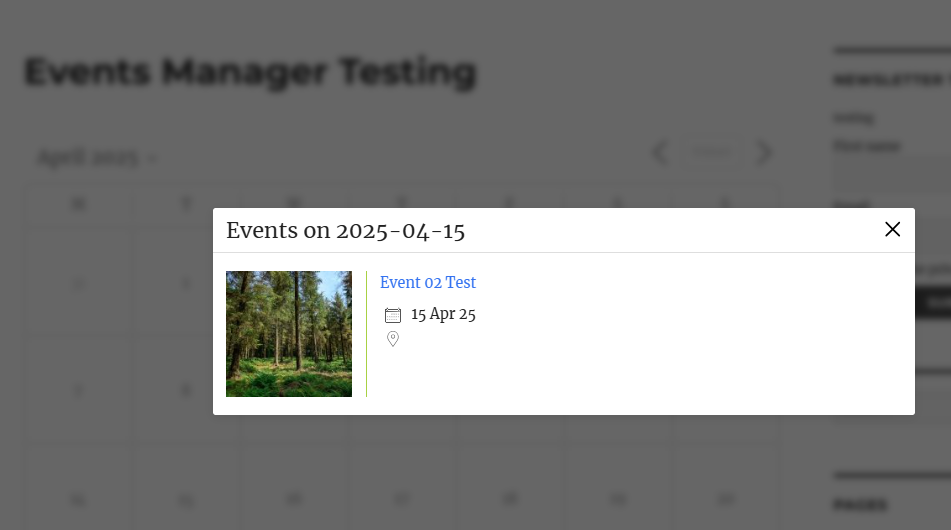
The best way to test the spam protection by using a test email,

stop_email@example.com

  1. Open page with your form (don’t forget to add the shortcode in the page content) in Incognito browser tab.
  2. Fill out the Contact form using stop_email@example.com as sender’s email.
  3. Send the form.
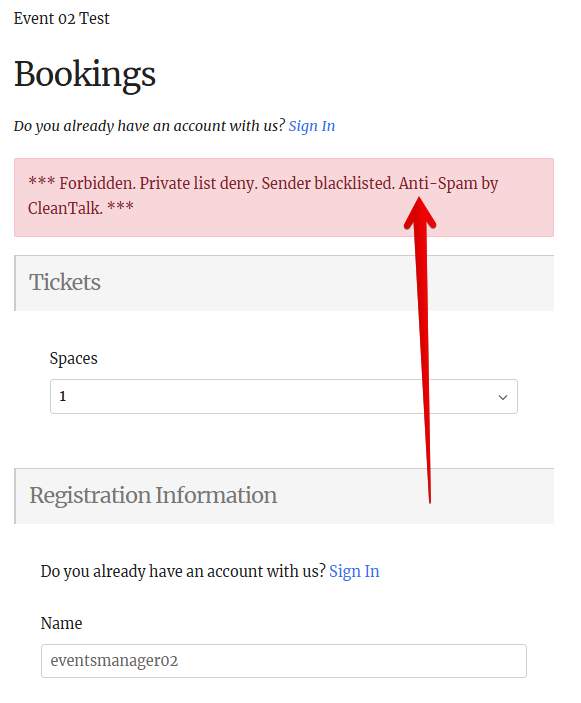
  4. You should see a message from the Anti-Spam plugin confirming that a spam submission was blocked.
events manager test 02 1
If you see this message, it means CleanTalk successfully protects your Events Manger forms (registration and booking) from spam.

Cloud Dashboard

In addition, in the Cloud Dashboard you can find extra details regarding submissions processed by CleanTalk, including event-related form submissions on your website.

This is especially useful for Events Manager because it helps you investigate fake attendees, repeated junk bookings, and suspicious submission patterns.

In the dashboard you can review:

  • sender IP and email,
  • geolocation,
  • date and time of the submission,
  • the page URL where the form was submitted,
  • cloud decision: Approved or Denied,
  • the likely reason for the decision,
  • tools to move senders into Allow or Block lists.

For event websites, this helps identify patterns such as repeated fake bookings from the same IP range, disposable email domains used by bots, or spam attempts targeting one specific event page.

Google reCAPTCHA, hCaptcha, and Cloudflare Turnstile

Besides CleanTalk, you can also use CAPTCHA and anti-bot services together with Events Manager to reduce spam and protect booking-related flows.

Google reCAPTCHA

Events Manager documentation for custom booking forms explicitly mentions a captcha field based on Google’s reCAPTCHA service. The docs describe it as a field that helps prevent spammers from successfully filling the form and note that it requires Google API keys.

To use reCAPTCHA with Events Manager:

  1. Register your domain in the Google reCAPTCHA admin.
  2. Generate the required keys.
  3. Configure the keys where your Events Manager booking form setup supports them.
  4. Test that the CAPTCHA is displayed and working correctly on the booking page.

This adds an extra visible challenge to the form, while CleanTalk can continue filtering submissions in the background.

hCaptcha

Events Manager does not present hCaptcha in the same native way as its custom-form reCAPTCHA field, so hCaptcha is usually added through a separate WordPress plugin.

Key benefits of hCaptcha:

  • better privacy positioning for some projects,
  • less dependence on Google services,
  • useful for sites that want a visible anti-bot layer.

To use hCaptcha:

  1. Create an hCaptcha account.
  2. Get a Site Key and Secret Key.
  3. Install a WordPress plugin that adds hCaptcha to supported forms.
  4. Test that hCaptcha appears correctly on your booking or registration pages.

Cloudflare Turnstile

Cloudflare Turnstile is a modern CAPTCHA alternative that often works more quietly in the background than classic image-based challenges.

Main benefits of Turnstile:

  • less friction for visitors,
  • better form completion rates,
  • more privacy-friendly approach than traditional CAPTCHA systems.

To use Turnstile:

  1. Generate Turnstile keys in Cloudflare.
  2. Install a WordPress plugin that supports Turnstile.
  3. Connect the keys in the plugin settings.
  4. Verify that Turnstile is actually applied on the pages where Events Manager renders booking forms.

For many event sites, Turnstile is attractive because public event booking pages usually convert better when users do not have to solve image puzzles.

Honeypot, Akismet and third-party Anti-Spam plugins

Additionally, let’s consider standalone plugins and anti-spam mechanics that also work with Events Manager-based websites.

Honeypot

Honeypot is one of the simplest anti-spam mechanics against primitive bots. It works by adding hidden fields that humans never interact with, but bots often fill automatically.

Because no challenge is shown to the user, honeypots:

  • keep the booking process smooth,
  • reduce friction on mobile,
  • add a lightweight extra layer of bot filtering.

A honeypot is a useful addition for Events Manager booking pages, but it is usually not enough by itself against manual spam or more advanced bot traffic.

Akismet

Akismet can be useful on the broader WordPress site level.

For Events Manager websites, Akismet may help with:

  • blog comments,
  • basic contact forms,
  • general low-quality submissions outside the main booking workflow.

However, it is better to position Akismet as a secondary layer rather than the main answer to booking spam.

Other universal Anti-Spam plugins

Other plugins such as WP Armour, OOPSpam, Maspik, and similar universal anti-spam tools can also be used at the site level.

They may help protect:

  • contact forms,
  • comment areas,
  • miscellaneous site forms not directly tied to the core event booking flow.

These tools can be combined with CleanTalk on high-risk or high-traffic projects, especially if you want a layered anti-spam setup.

Frequently Asked Questions (FAQ)

Bookings look normal at first, but later you notice obvious fake attendees. Why?

This usually happens when spam is not aggressive enough to be blocked by a basic visible challenge alone. Instead of sending nonsense, bots or low-quality submitters use realistic names and email formats to blend into normal bookings.

What to check:

  1. Review whether too many bookings are coming from the same IP range or location.
  2. Look for patterns in attendee emails, such as random strings or disposable domains.
  3. Check whether the same event receives repeated signups within very short time intervals.
  4. Add moderation for events that attract open public traffic.
  5. Use CleanTalk as the background filter instead of relying only on a visible CAPTCHA.
A booking form is protected, but spam moves to another event page. Why does this happen?

This is common on event websites with multiple public pages. Once one booking form becomes harder to abuse, spam often shifts to the next publicly accessible event or registration page.

To reduce that risk:

  1. Make sure protection is active across the whole site, not just on one event.
  2. Check old event pages, recurring events, and cloned event templates.
  3. Review whether guest bookings are enabled everywhere by default.
  4. Test more than one event page, not just your newest listing.
  5. Use one anti-spam layer that covers the full WordPress form flow sitewide.
Real visitors complain that CAPTCHA is annoying, but you still need spam protection. What is the best balance?

This is one of the most common problems for Events Manager websites. Public event pages need to convert well, especially on mobile, but they also attract bots.

A practical balance is:

  1. Use CleanTalk as the main low-friction filtering layer.
  2. Add Turnstile or reCAPTCHA only on the highest-risk booking forms.
  3. Keep shorter booking forms where possible.
  4. Avoid stacking multiple visible challenges on the same page.
  5. Monitor whether spam drops without hurting real registrations.
Spam is not breaking the form, but it is ruining reporting and attendee lists. How do you handle that?

This is an important point. On event websites, spam does not always look dramatic. Sometimes the form works perfectly, but your attendee list becomes unreliable.

That creates operational problems:

  1. inflated registration numbers,
  2. misleading conversion reporting,
  3. wasted follow-up emails,
  4. poor visibility into real event demand,
  5. extra manual cleanup before the event.

The best response is to treat spam as a data quality problem, not just a form problem. Use layered protection, review suspicious bookings in the dashboard, and add moderation for events where list accuracy matters.

You are getting spam mostly on free events, not paid ones. Is that normal?

Yes. Free event pages are often easier targets because there is less friction in the booking flow. Paid or more controlled events naturally filter out a portion of spam just by adding checkout or payment-related steps.

If your free events are being targeted:

  1. apply stronger filtering to free registration pages,
  2. consider moderation for first-time or suspicious bookings,
  3. review whether unnecessary form fields are exposed,
  4. watch for repeated email-domain patterns,
  5. add an extra challenge only where abuse is concentrated.
Events Manager emails are working, but too many junk confirmations are being sent. What should you fix first?

When spam reaches the booking stage, email noise is often the first visible symptom. Admins start getting useless notifications, and fake attendees may also receive confirmation emails.

Fix the source first:

  1. stop the fake booking before it is created,
  2. reduce exposure on public booking forms,
  3. check for repeated sender patterns in the Cloud Dashboard,
  4. use moderation for vulnerable events,
  5. only then fine-tune email delivery settings if needed.

In other words, do not treat this only as a mail problem if the real cause is spam entering the workflow upstream.

hCaptcha or Turnstile is enabled, but suspicious registrations still get through. Why?

Because challenge-based tools are not the same as full spam filtering. They help reduce some automated abuse, but they do not automatically catch every low-quality or semi-manual submission.

That is why suspicious registrations may still appear when:

  1. the spam is submitted manually,
  2. the attacker uses more realistic input,
  3. the challenge is only active on part of the workflow,
  4. another page or form variant remains unprotected,
  5. there is no secondary filtering layer behind the form.

For Events Manager, challenge tools work best as part of a layered setup, not as the only defense.

Recommended Anti-Spam Stack for Events Manager (2026)

No single anti-spam plugin solves every Events Manager problem, because the risks are different: one site struggles with fake attendees, another with disposable emails, another with noisy free-event bookings, and another with recurring spam across cloned event pages.

That is why the best setup is not “one perfect plugin,” but a stack built around how your event site actually gets abused.

1. For simple event websites with moderate traffic

Best for local events, workshops, community meetups, and small business event pages.

Recommended stack:

  • CleanTalk Anti-Spam as the primary filtering layer
  • optional honeypot for lightweight bot filtering
  • manual review only for suspicious cases

Why this works:
It keeps the booking flow simple for real users while still filtering the most common bot and junk submissions in the background.

2. For public booking-heavy event sites

Best for websites where bookings are open to everyone and event pages get regular public traffic.

Recommended stack:

  • CleanTalk Anti-Spam
  • Cloudflare Turnstile or Google reCAPTCHA on the main booking form
  • dashboard review for repeated spam patterns
  • moderation for events that attract abuse spikes

Why this works:
This setup balances conversion and protection. CleanTalk handles silent filtering, while Turnstile or reCAPTCHA adds pressure on higher-risk forms.

3. For free events that attract fake registrations

Best for webinars, free classes, community sessions, lead-generation events, and open sign-up pages.

Recommended stack:

  • CleanTalk Anti-Spam
  • stronger checks on registration-heavy event pages
  • review of suspicious email domains and repeat booking patterns
  • moderation for first-wave suspicious signups

Why this works:
Free events are often targeted because they are easy to abuse. In this case, protecting list quality matters as much as blocking classic spam.

4. For complex Events Manager setups with guest bookings and custom fields

Best for sites using custom booking forms, guest booking flows, and more flexible attendee data collection.

Recommended stack:

  • CleanTalk Anti-Spam
  • reCAPTCHA where the custom booking form supports it
  • careful review of open text fields
  • moderation on high-risk events
  • block lists for repeat abuse patterns

Why this works:
The more flexible the booking flow is, the more ways spam can imitate normal behavior. These sites benefit from stronger filtering plus closer review of custom inputs.

5. For high-value events where attendee accuracy matters most

Best for paid events, limited-capacity events, invite-based events, and registrations tied to operations or sales follow-up.

Recommended stack:

  • CleanTalk Anti-Spam
  • visible challenge on the booking form
  • manual moderation for suspicious submissions
  • dashboard-based review of suspicious IP, email, and geo patterns
  • stricter approval logic where needed

Why this works:
Here the goal is not only blocking spam, but protecting the quality of attendee data, reporting, and operational planning.

Final recommendation

For most Events Manager websites, the strongest practical setup is this:

  • CleanTalk as the core anti-spam layer
  • Turnstile or reCAPTCHA on the most exposed booking pages
  • moderation where data quality matters more than booking speed
  • dashboard review for recurring spam patterns

That combination is usually much more effective than relying on one visible CAPTCHA or one lightweight plugin alone.

Stop fake bookings and registration spam in Events Manager

Create your CleanTalk account and protect your Events Manager booking and registration forms from fake attendees, disposable emails, and bot submissions — without CAPTCHA friction for real visitors.

CleanTalk Account

No credit card required • Setup takes less than a minute • Your temporary password will be sent by email.