Avada Form Builder is a great choice when you need to create contact forms, surveys, quizzes, and more. In this post, we will review available anti-spam services such as Google reCAPTCHA and Cloudflare Turnstile, tools like honeypots, and anti-spam plugins including CleanTalk, Akismet, hCaptcha, and OOPSpam available to Avada users as of March 2026.

Avada Form Builder, Avada Website Builder, Avada WordPress Theme and Plugins
First, let’s take a closer look at what Avada is and how it works.
Avada Form Builder is a flexible drag-and-drop form solution built directly into the Avada WordPress theme, allowing users to create contact forms, registration forms, surveys, polls, quizzes, feedback forms, and other interactive form types without installing additional plugins. It offers an intuitive visual interface that makes form creation fast and accessible for both beginners and experienced website owners. To help protect websites from unwanted submissions, Avada Form Builder supports built-in spam protection features and integration with popular anti-spam services such as Google reCAPTCHA, Cloudflare Turnstile. With proper spam protection enabled, website owners can reduce bot submissions, fake registrations, and malicious form activity while maintaining a smooth experience for real visitors. This improves data quality, saves administrative time, and keeps communication channels reliable.
In my personal opinion, Avada is a very flexible theme that offers many features out of the box. However, one downside is that it may require some time to build and launch the first version of a website using this theme. I spent more than hour to launch a demo site (including purchasing the theme), it’s much more my average installation process for a theme, which usually takes 10-15 minutes.
The theme is premium and costs $69, with 6 months of support included. Its official website is avada.com, and it can be purchased and downloaded from Envato Market. Envato Market shows 1,054,005 sales, 26.5k reviews with average score 4.78.
Anti-Spam plugin by CleanTalk
As the anti-spam solution, I’m going to use the Anti-Spam by CleanTalk plugin for WordPress. Let’s see what this plugin is.
Anti-Spam by CleanTalk is a cloud-based spam protection plugin that automatically blocks spam submissions on WordPress websites without using CAPTCHAs. It protects contact forms, registration forms, comments, surveys, polls, and other interactive elements from both automated bots and manual spam. Avada users can also protect Avada Form Builder forms, including contact forms, feedback forms, surveys, and registration forms, without adding extra CAPTCHA challenges for visitors. The service analyzes submissions using advanced filtering algorithms and a global spam database that tracks suspicious activity by IP addresses, email addresses, and other parameters. CleanTalk works in the background, allowing real visitors to submit Avada forms normally while blocking spam attempts automatically. Website owners can also review detailed logs of blocked submissions and manage personal allow and deny lists for IP addresses, email addresses, and countries.
According to WordPress.org, Anti-Spam by CleanTalk for WordPress has over 200,000 active installations, with 3,168 reviews and an average rating of 4.8.
Plugin Homepage at cleantalk.org | Latest release at Github.com | Website cleantalk.org
How to install CleanTalk Anti-Spam plugin
Click to see the Installation guide.
To install the Anti-Spam plugin, go to your WordPress admin panel → Plugins → Add New.

Then enter «СleanTalk» in the search box and click the Install button for «Spam protection, Anti-Spam, FireWall by CleanTalk».

After installing the plugin, click the «Activate» button.
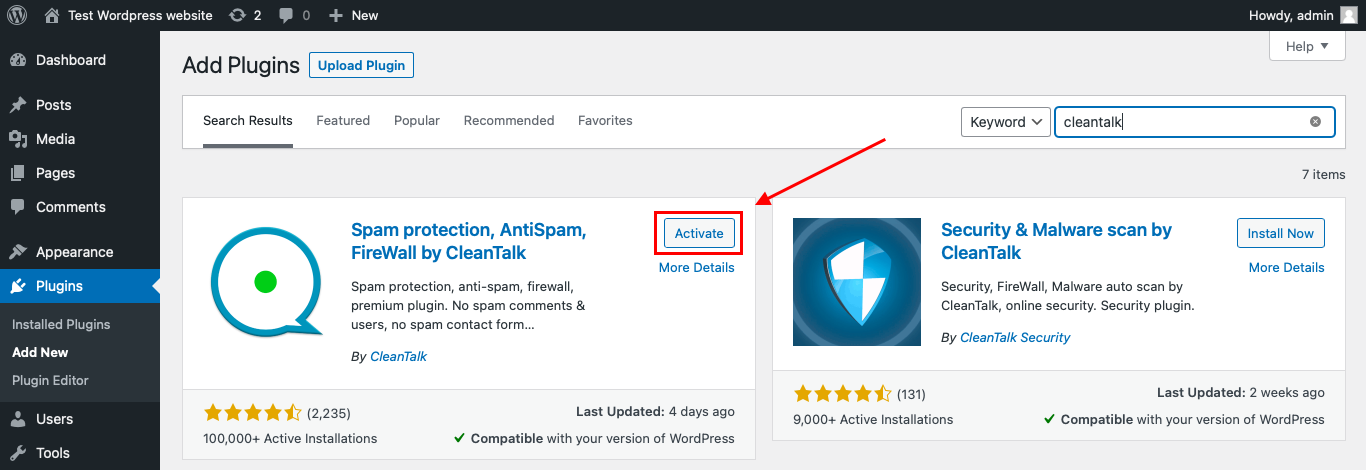
After it is done go to the plugin settings and click the «Get Access Key Automatically» button. Then just click the «Save Settings» button.

That’s it! From now your WordPress website and Avada forms are protected from spam.
How to check spam protection
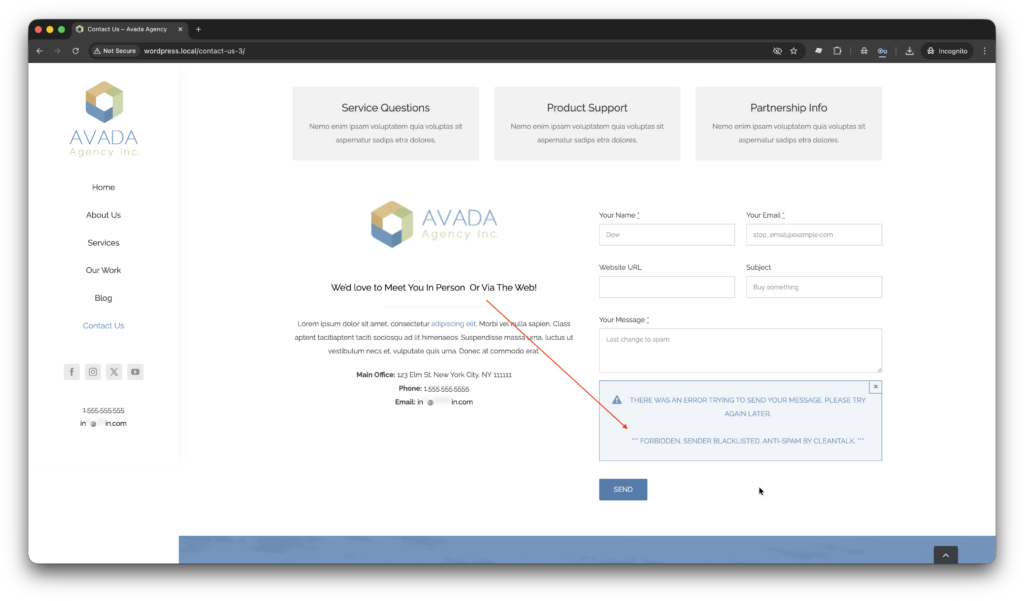
You can test the work of anti-spam protection for your Avada forms by applying a test email,
stop_email@example.com
Test sequence is,
- Open a page with your form in Incognito Window.
- Fill out the form with any valid data plus stop_email@example.com in the Email field.
- Submit the form.
- You should get a message like this,
*** Forbidden. Sender blacklisted. Anti-Spam by CleanTalk. ***
Cloud Dashboard
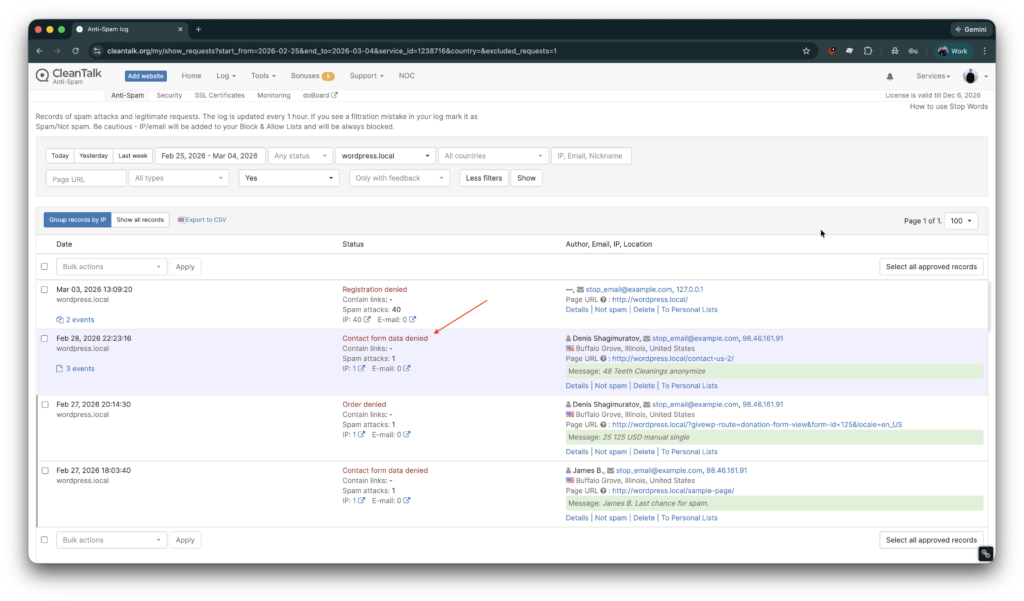
In the Cloud Dashboard you can find extra details regarding all submissions made via form,
- IP, Email of the sender. As well as history of activity a sender among other sites connected to CleanTalk’s cloud. Geolocation of the sender. Date and time of submission.
- Tools to move the sender to Block or Allow lists.
If you have any questions, add a comment and we will be happy to help you.
Create your Cleantalk account – Register now and enjoy your spam-free Avada forms.
You may view a complete list of CleanTalk Anti-Spam plugin features here. https://cleantalk.org/help/introduction
Google reCAPTCHA, and Cloudflare Turnstile
There are two anti-spam services integrated into the Avada forms core,
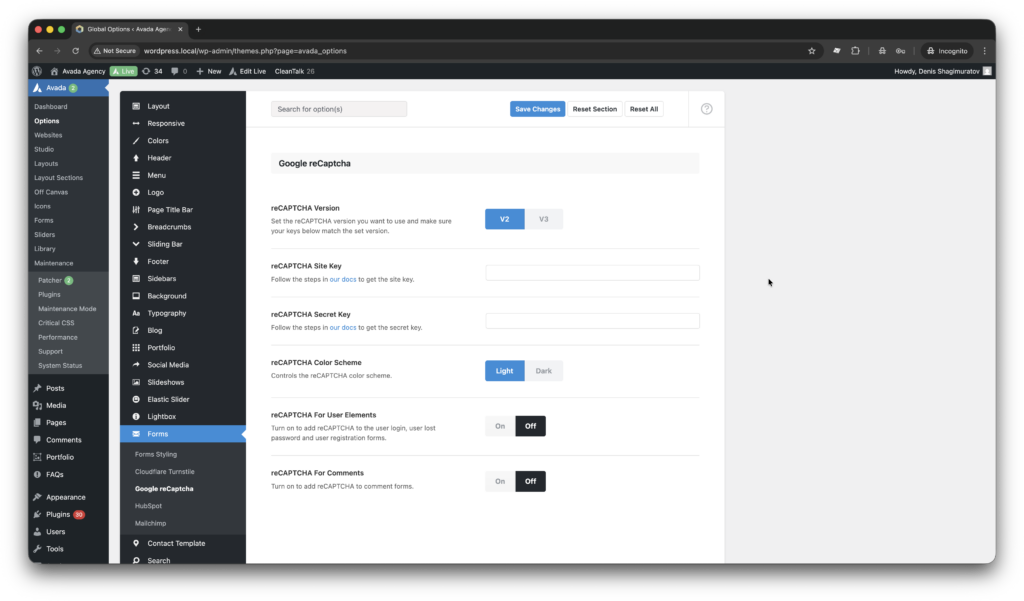
- Google reCAPTCHA is the first services, that we have in the core. By analyzing user behavior and verifying whether a visitor is human, reCAPTCHA adds an extra layer of security to contact forms, registration forms, surveys, and other form types created with Avada. It is widely used and easy to integrate, making it a convenient option for many website owners. reCAPTCHA can help reduce the number of fake submissions and automated attacks targeting Avada forms. However, depending on the version used, it may also add additional steps for visitors, such as solving challenges or running background behavioral analysis.
- Service is available under settings Settings are under path WordPress console -> Avada > Maintenance -> Forms -> Google reCaptcha.
- To activate this service obtain Site key and Secret key on the site.
- Cloudflare Turnstile provides an easy way for Avada Form Builder users to protect their forms from automated spam and bot submissions. Unlike traditional CAPTCHAs, Turnstile verifies visitors quietly in the background, helping reduce friction for real users filling out contact forms, registrations, surveys, or polls created with Avada. It integrates easily into websites and focuses on privacy by avoiding invasive tracking methods. For Avada users, this means stronger bot protection while maintaining a smoother and more user-friendly form experience.
- Main benefits of Cloudflare Turnstile over Google reCAPTCHA.
- One of the main benefits is a better user experience, as Turnstile verifies visitors automatically in the background without showing image puzzles or interactive challenges.
- It also focuses more on privacy, because it does not rely on extensive user tracking or Google cookies.
- Turnstile is designed to be lightweight and fast, which can help maintain page performance on Avada-based websites.
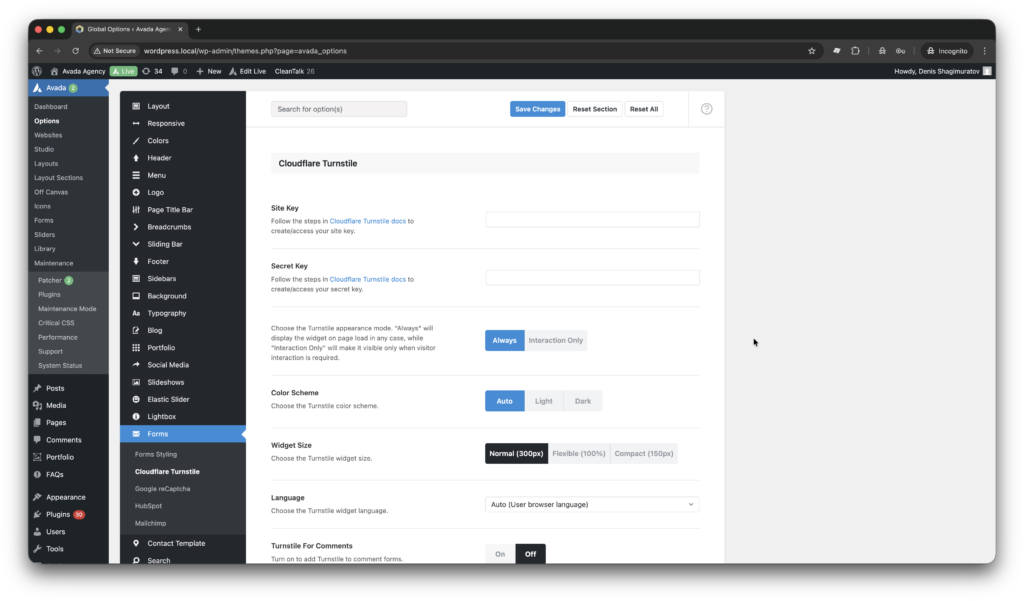
- Service is available under settings Settings are under path WordPress console -> Avada > Maintenance -> Forms -> CloudFlare Turnstile.
- Site Key and Secret key can be obtained on site.
- Main benefits of Cloudflare Turnstile over Google reCAPTCHA.
Honeypot, Akismet, and Anti-Spam plugins
Here we have few additional anti-spam mechanics available for Avada users.
- Akismet is one of the most popular anti-spam services for websites, with background spam checking as its key feature. Unfortunately,Akismet is not available for Avada users, either as an element or as an integration within the , and I have found no evidence that such .
- Honeypot is a simple anti-spam technique that works silently in the background. It adds an invisible field to your Avada forms that real visitors never see, but spam bots often fill out automatically. When the hidden field is completed, the submission is identified as spam and blocked before it reaches your website. The main benefit for Avada users is that honeypot protection does not require CAPTCHA or extra steps from visitors, helping keep the form experience fast and user-friendly while reducing automated spam.
- This technique works through a form element. This is the best guide to activate a honeypot for your form
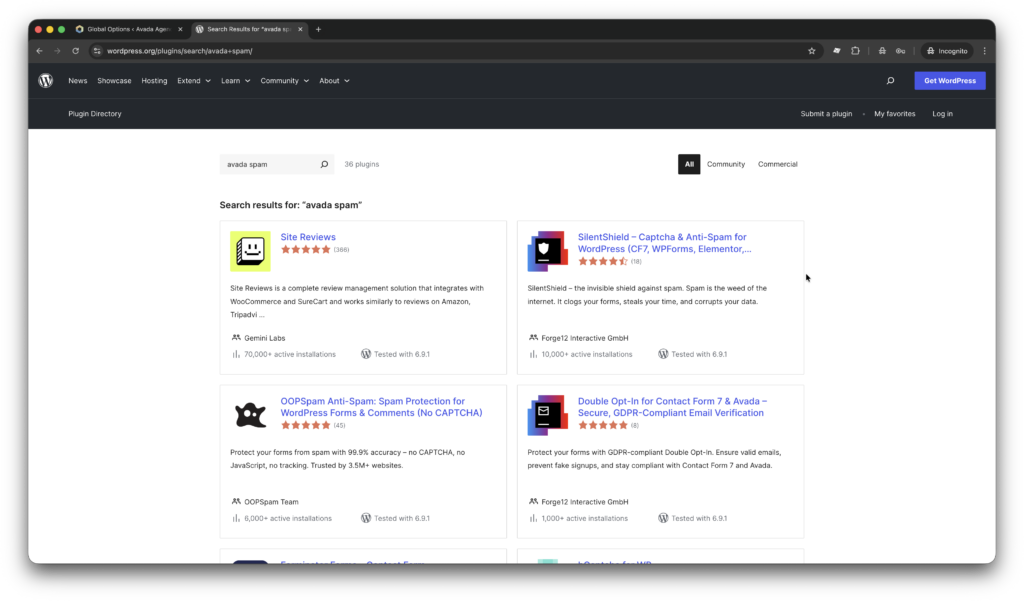
- Also in the market we have universal, anti-spam plugins SilentShield, OOPSpam, hCaptcha and a few more that protects Avada users against spam. These plugins are listed in wordpress.org.
Frequently Asked Questions (FAQ)
Is WP Armour compatible with Avada?
There is no evidence that WP Armour support Avada users.
I have problems with the reCaptcha, I have registered and put the key ods, but it’s not working.
You have to all the form elements enabled from the builder options. Here is the guide.
Does this come with captcha? or can google captcha work and be added to contact form?
Yes, you can definitely add Google reCaptcha to your contact form or login element with Avada.
Recommended Anti-Spam Stack for Avada Form Builder (2026)
Finally, here in March 2026 I can recommend the following anti-spam stack for Avada users.
- Small Websites and Personal Blogs: CleanTalk Anti-Spam + Avada Honeypot field.
- For small websites, portfolios, and personal blogs using Avada Form Builder, CleanTalk alone is often enough to stop most automated spam and manual submissions.
- High-Traffic Websites, Agencies: CleanTalk Anti-Spam + Cloudflare Turnstile + CleanTalk personal allow/deny lists.
- High-traffic Avada websites and agency projects often experience both automated and manual spam attacks. In this setup, CleanTalk performs the main filtering, SpamFireWall blocks bot traffic early, and Turnstile provides an additional verification step for sensitive forms such as registrations or payments. Website administrators can further refine protection using CleanTalk’s logs and personal filters by IP address, email, or country.
By this point, spam issues should be resolved on your site. If not, Sign Up for an account and our support team will be happy to help you.